Email deliverability is one of the biggest factors behind the success or failure of your email campaigns.
You can have the perfect offer, a great email sequence, and a highly targeted prospect list. But if your emails never make it to the inbox, none of that matters.
That's why understanding email deliverability is so important.
Whether you're sending cold emails, running outbound campaigns, or managing email marketing at scale, knowing how mailbox providers evaluate your emails can help you avoid spam folders, protect your sender reputation, and consistently land in the inbox.
In this guide, I'll walk you through everything you need to know about email deliverability.
I will cover what it actually means, the factors that affect it, common mistakes that hurt inbox placement, and the best practices you can follow to improve your results and reach the inbox consistently.
Email deliverability is the ability of your emails to reach the recipient's primary inbox.
That definition sounds simple. In practice, it's anything but.
When you hit send, the receiving mail server runs your email through a series of checks. It looks at your domain's authentication, your sending reputation, your content, and your historical sending behavior.
If those checks pass, your email reaches the inbox. If they don't, it gets filtered or rejected before your prospect ever sees it.
Think of it as a trust score. Every email you send either builds or erodes that trust with inbox providers like Google and Microsoft.
Here's the part most people miss. Email deliverability isn't a single metric you can pull from a dashboard. It's the outcome of multiple factors working together behind the scenes.
According to Validity's 2025 Benchmark Report, the global average inbox placement rate sits at 83.5%. That means roughly 1 in 6 legitimate emails never reaches the inbox. For cold email, where engagement rates are naturally lower, that number is likely worse.
💡A quick note on scope
Deliverability matters for both marketing emails and cold outreach. The principles are the same. But the challenges are different. Marketing teams send to opted-in subscribers who expect their emails. Cold email teams send to people who didn't ask to hear from them.
That structural disadvantage means cold email senders need tighter infrastructure, cleaner lists, and more disciplined warmup. This guide focuses on cold email deliverability specifically.
Worth clarifying before I go further. These two terms sound identical but mean very different things.
Here's an example. You send 100 cold emails and 97 get accepted by Gmail. Your delivery rate is 97%.
But if 40 of those 97 emails land in spam, your actual deliverability is low.
Your delivery looks fine on paper while your campaign silently fails. Research from Unspam across millions of test emails found that only about 60% of sent emails reach a visible mailbox location. The gap between "delivered" and "actually seen" is where most teams lose performance.
If you're searching for "email deliverability guide 2026," you probably want to know what's different now. A lot has changed.
Starting in February 2026, Google and Yahoo rolled out strict new requirements for bulk senders.
These weren't suggestions. They came with enforcement.
SPF and DKIM are now mandatory for anyone sending 5,000+ emails per day to Gmail or Yahoo. DMARC is required at minimum with a p=none policy. Before 2024, you could get away with partial authentication. Now, missing any of these gets you filtered or rejected outright.
Google enforces a 0.3% maximum spam complaint rate. Go above that and your emails start getting filtered. The recommended target is 0.1% or lower. For cold email, where recipients didn't opt in, staying under 0.1% takes real discipline.
Bulk senders must include a working one-click unsubscribe mechanism. This matters less for cold email (where unsubscribe links can actually hurt deliverability), but it signals how seriously providers now treat recipient experience.
Outlook also rolled out similar requirements through 2025. Authentication, spam complaint thresholds, and sender reputation checks are now enforced across all three major providers.
The bottom line for cold email teams? The bar has risen. Authentication that was "nice to have" three years ago is now table stakes.
Volume and reputation management that used to be best practices are now enforced rules with real consequences.
Mailbox providers got much smarter about deciding what belongs in the inbox.
Instead of relying mainly on technical settings and sending volume, providers like Gmail now use AI-powered filtering systems that analyze how recipients interact with your emails.
Engagement signals such as opens, replies, clicks, and historical sender behavior now play a much bigger role in inbox placement. If people consistently ignore your emails, mailbox providers take that as a sign that future emails may not be wanted.
For cold email teams, this means perfect SPF, DKIM, and DMARC records are no longer enough.
You can have your technical setup dialed in and still struggle with deliverability if your campaigns generate poor engagement. Over time, those negative signals can hurt your sender reputation and make it harder for future campaigns to reach the inbox.
In 2026, email deliverability is no longer just a technical problem. It's also a relevance problem.
Email deliverability isn't controlled by a single switch. It's the result of six factors working together. Weakness in any one of them can drag down inbox placement across the board.
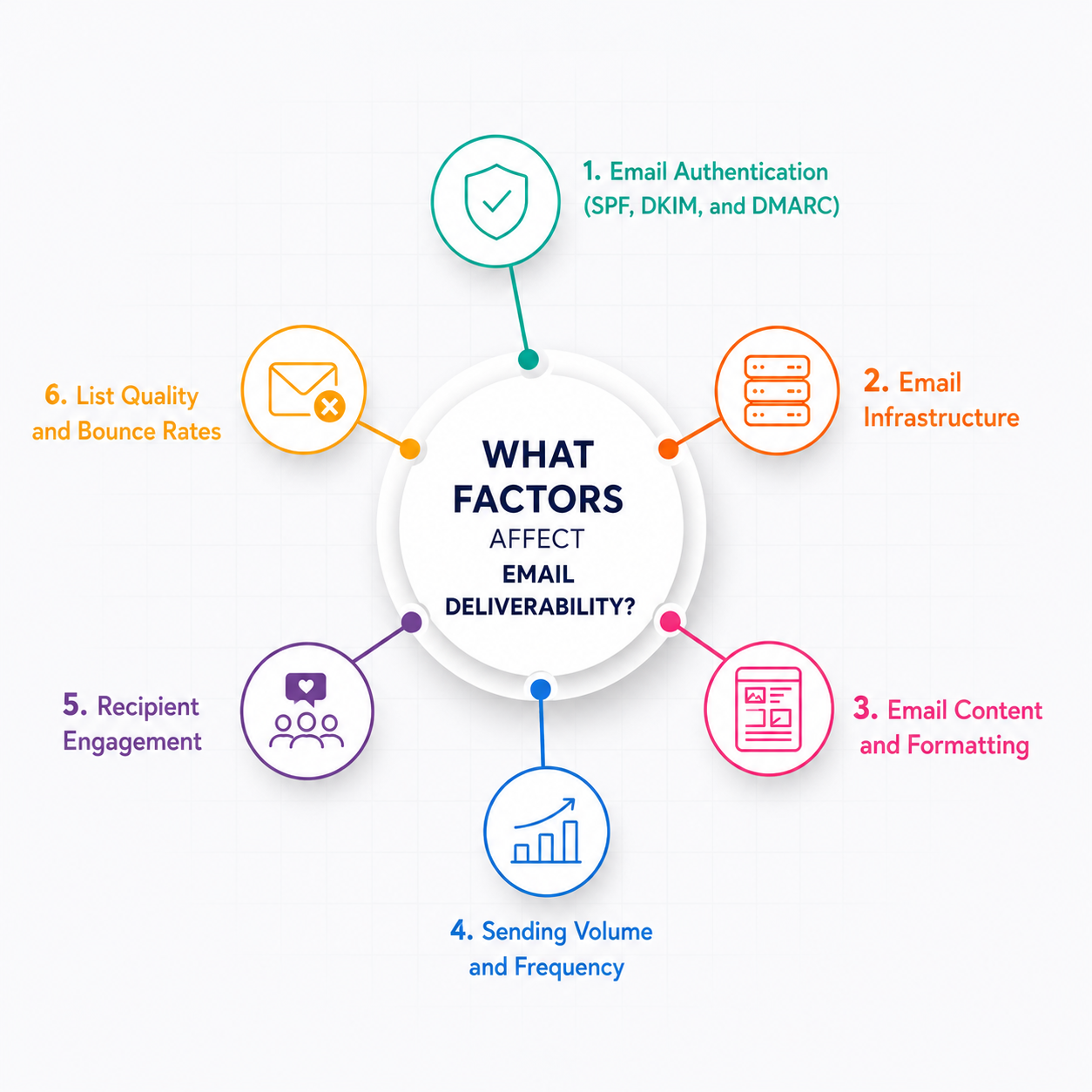
Before inbox providers read your content, they verify your identity. That's what email authentication does.
Three DNS records handle this:
If any of these are missing or misconfigured, inbox providers treat your emails as suspicious. Getting authentication right is the bare minimum for deliverability, not an advanced tactic.
Even small errors can silently break the chain. I've seen teams configure SPF but exceed the 10 DNS lookup limit, which causes silent authentication failures. I covered the most common SPF, DKIM, and DMARC misconfigurations in a separate post.
I also covered how MX records affect email deliverability separately. DNS issues are one of the most overlooked causes of inbox placement failures.
If you're using Warmforge, the deliverability center runs automated SPF, DKIM, and DMARC health checks across all your mailboxes. That way, you catch misconfigurations before they cost you weeks of wasted warmup.
The infrastructure behind your sending setup affects deliverability more than most teams realize. Your choice of IPs and mailbox providers shapes how inbox providers evaluate your emails from day one.
If you specifically need legitimate Google Workspace or Microsoft 365 mailboxes for cold outreach, Primeforge sets those up with US IP addresses and automated authentication.
What you write matters for deliverability, not just engagement.
Spam filters scan your content for patterns that look like spam, phishing, or bulk marketing. For cold email specifically, plain text outperforms HTML-heavy designs.
Avoid links in first emails, skip images and attachments, and keep formatting simple. Certain words and phrases trigger spam filters more than others.
I covered practical ways to avoid spam filters in cold email in a separate guide.
Inbox providers watch your sending patterns closely. A sudden spike from 10 emails a day to 500 is one of the fastest ways to tank deliverability.
Volume increases need to be gradual.
If you're launching new mailboxes, start small and ramp up over time. Inbox providers need to build a baseline of normal behavior for your domain.
Consistency matters just as much as volume. Sending 200 emails every weekday looks natural. Sending 1,000 on Monday and nothing for the rest of the week looks suspicious.
How recipients interact with your emails feeds directly back into your deliverability.
Opens, replies, and clicks send positive signals. Spam complaints and ignores send negative ones.
This is where cold outreach teams face a structural disadvantage. You're emailing people who didn't ask to hear from you. Engagement rates are naturally lower than marketing emails.
That makes every other factor in this list even more important. If engagement is going to be lower by default, your authentication, reputation, and infrastructure need to be airtight.
Recommended Read: Engagement Metrics That Improve Email Deliverablity
High bounce rates tell inbox providers you're sending to invalid addresses. That signals poor list management and damages your sender reputation fast.
Hard bounces mean the address doesn't exist. Remove them immediately.
Soft bounces are temporary issues like a full inbox. These usually resolve on their own.
Verifying your lead lists before sending is non-negotiable. Even a small percentage of invalid addresses can push your bounce rate past 2%, which is where inbox providers start filtering you.
Email deliverability can't be measured directly.
There's no single metric that says "your deliverability is 83%."
It's not like open rate or bounce rate where you get a clean number.
Deliverability is the result of all the factors above working together. You measure it indirectly by tracking the signals those factors produce.
The closest direct metric is inbox placement rate.
That's the percentage of your emails that actually land in the primary inbox versus spam, promotions, or getting blocked.
So how do you actually check this?
Run a placement test. You send test emails across major providers, and the tool shows you exactly where they land. Warmforge gives you one free placement test per month per account. That's enough to spot problems before they compound.
Beyond placement tests, here are the key email health metrics worth tracking:
Tracking these together gives you a reliable picture of where your deliverability stands.
If you want a deeper breakdown, I wrote a separate guide on how to check email deliverability with step-by-step instructions.
Starting with a fresh domain and new mailboxes is actually an advantage. You have no negative history. That means you get to build reputation the right way from the start.
The mistake most teams make is rushing straight into campaigns. A new domain with no sending history that suddenly fires off hundreds of cold emails looks exactly like spam.
Here's the process I follow every time I set up new infrastructure for outbound.
Set up SPF, DKIM, and DMARC records before you send a single email. This is your foundation. If authentication is broken, nothing else matters.
If you're setting up mailboxes through Mailforge, Infraforge, or Primeforge, DNS authentication is configured automatically. But it's still worth running a health check in Warmforge's deliverability center to confirm everything is passing.
A 14-day warmup period before any campaign goes live is the minimum. Warmup builds your sender reputation gradually by simulating natural email activity. Opens, replies, and conversations that inbox providers recognize as legitimate.
I wrote a separate breakdown on whether email warmup actually works in 2026 and where it stops making a difference.
Don't jump from warmup straight to full sending volume. Increase daily sends gradually. Inbox providers need to adjust their baseline for your domain.
Don't rely on a single mailbox provider. Mix Google Workspace and Microsoft 365 accounts across your sending domains. Primeforge handles both. Mailforge and Infraforge cover shared and dedicated IP infrastructure. If one provider tightens filtering, your entire pipeline doesn't go down with it.
Run an inbox placement test after warmup and before your first campaign. There's no point sending to a real list if your emails are already landing in spam. Warmforge's free monthly placement test is built for exactly this.
The whole process takes about two to three weeks. Teams that skip it spend months trying to recover reputation that could have been built correctly from day one.
Damaged deliverability on accounts you're already using is a different problem from setting up new ones. Something was working, and now it's not.
The first step is figuring out what broke. In my experience, it usually traces back to one thing.
When you run cold email campaigns, engagement metrics naturally decline over time. Recipients who don't know you are less likely to engage. They're more likely to ignore or report your emails.
ESPs like Google and especially Microsoft pick up on these signals quickly. Low engagement tells them your emails aren't wanted. They start filtering you to spam or blocking you entirely.
This creates a cycle that's hard to break. Lower engagement leads to lower placement, which leads to even lower engagement.
The recovery process starts with pausing campaigns on the affected mailboxes. You need to stop the bleeding before you can fix anything.
From there, re-warm the affected mailboxes to rebuild trust gradually. Warmforge is designed for exactly this. Set the mailboxes back to warmup-only, monitor the heat score, and don't resume campaigns until placement tests confirm you're back in the primary inbox.
Recovery isn't instant. Depending on the severity, it can take one to four weeks before inbox providers start trusting your domain again.
The teams that recover fastest are the ones who catch the drop early.
That's why ongoing deliverability monitoring matters more than any one-time fix.
Keeping deliverability healthy while running campaigns takes ongoing work. Cold outreach puts constant downward pressure on your sender reputation. Every campaign chips away at the trust you built during warmup.
Here's what I've found works to keep things stable over time.
Don't pause warmup once campaigns go live. Keep it running alongside active sends. This keeps positive engagement signals flowing to inbox providers, even as your cold emails generate lower engagement.
Don't wait until reply rates drop to test where your emails are landing. I run at least one placement test per mailbox per month. If placement shifts from primary to promotions or spam, I catch it before it compounds.
A single mailbox shouldn't carry your entire sending volume indefinitely. Rotate mailboxes in and out of active campaigns. Each one gets time to recover reputation between sends.
Consistency matters. Irregular volume spikes or gaps in sending patterns look suspicious to inbox providers. Sending 200 emails every weekday looks natural. Going silent for a week and then blasting 1,000 does not.
You should review your deliverability health check. Review DNS records, check blacklist status, verify authentication is still passing. Infrastructure changes on the provider side can break things without warning.
Setting up is the easy part. Staying consistent at scale is where the real work lives.
Warmforge exists specifically for this problem. Automated warmup, heat score tracking, placement testing, and health checks in one dashboard. No more manually juggling signals across dozens of mailboxes.
Sign up and get 1 free warming slot and 1 free placement test to see where your deliverability stands today.
Run an inbox placement test to send test emails across major providers and see where they land. Warmforge's free placement test grades your setup and shows which factors need attention. For ongoing monitoring, track bounce rates, spam complaints, and sender reputation scores together.
Email delivery means the receiving server accepted your email without bouncing it back. Email deliverability means the server trusted your email enough to place it in the primary inbox.
You can have a 97% delivery rate and still have poor deliverability if most of those emails land in spam.
SPF, DKIM, and DMARC records let inbox providers verify that you're a legitimate sender. Without them, your emails look the same as phishing attempts. As of 2024, Gmail, Yahoo, and Microsoft require these for bulk senders. Authentication is the baseline. Everything else is built on top of it.
It depends on the severity. Minor reputation drops from a bad campaign can recover in one to two weeks with paused sending and active warmup. Serious damage from blacklisting or sustained spam complaints can take three to four weeks or longer.
Yes. Spam filters scan your content for patterns associated with spam, phishing, and bulk marketing. For cold email, plain text performs better than HTML-heavy formatting. Avoiding links, images, and attachments in your first email reduces the chance of triggering filters.
Email warmup builds sender reputation on new or inactive mailboxes by simulating natural email activity before campaigns start. It generates positive engagement signals like opens and replies. Inbox providers use these to evaluate your trustworthiness. Running warmup continuously alongside campaigns helps maintain deliverability over time.
Shared IPs spread sending across multiple users on the same IP address. Your deliverability is partly affected by what other senders are doing. Mailforge uses shared IPs, which keeps costs low and warmup fast. Dedicated IPs give you full control over your own reputation but need proper warmup and consistent volume. Infraforge provides dedicated IPs for high-volume senders who need that control.
Starting February 2024, Gmail and Yahoo require bulk senders (5,000+ daily emails) to authenticate with SPF, DKIM, and DMARC. Spam complaint rates must stay below 0.3%, with 0.1% recommended. One-click unsubscribe is mandatory. Microsoft Outlook enforces similar rules. These aren't optional. Failing to comply gets your emails filtered or rejected.

