If too many people mark your emails as spam, email providers like Gmail, Yahoo, and Outlook may block or filter your messages. This is tied to your spam complaint threshold - the percentage of recipients who report your emails as spam. Staying below 0.1% (1 complaint per 1,000 emails) is ideal, while exceeding 0.3% can lead to serious consequences like account suspension or blacklisting.
To avoid issues, focus on engaging your audience, monitor your metrics using tools like Google Postmaster Tools, and implement authentication protocols (SPF, DKIM, DMARC). A proactive approach ensures your emails reach inboxes, protecting your reputation and results.
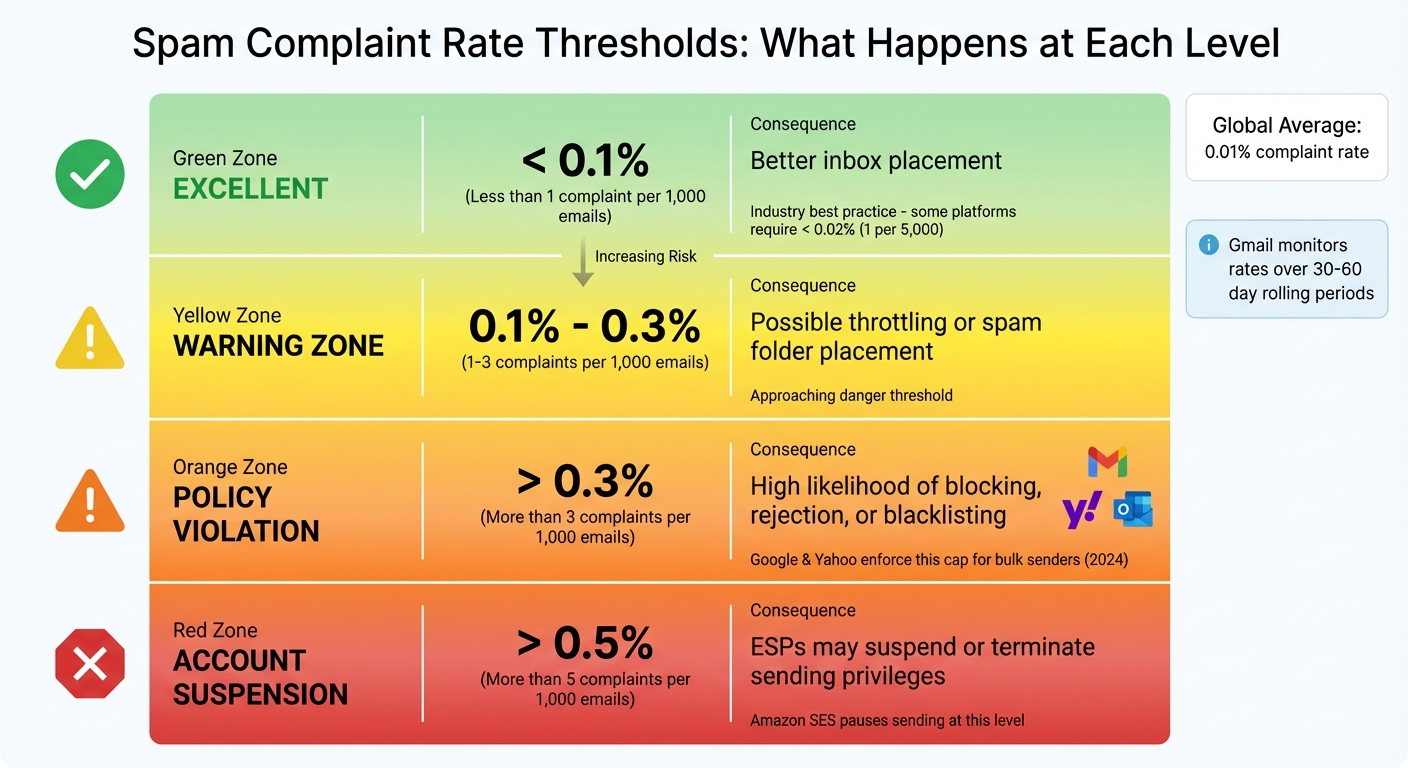
Email Spam Complaint Rate Thresholds and Consequences
Spam complaint thresholds represent the maximum percentage of recipients who can mark your email as spam before your sending reputation takes a hit. To determine this rate, divide the number of spam complaints by the total number of delivered emails. For instance, if 10 recipients out of 10,000 click "Report Spam", your complaint rate is 0.1%. This metric is key to understanding how complaint rates influence your email deliverability.
Email providers use these thresholds to gauge your reliability as a sender. Higher complaint rates signal to mailbox providers that your emails might be unwanted, which can lead to throttling, spam folder placement, or outright blocking of your messages. Many providers rely on Feedback Loops (FBLs) to monitor these complaints.
"It helps to think of a spam complaint as a malformed unsubscribe request; the recipient wanted the mail to stop, and the 'spam' button was the easiest or most trustworthy way to ensure the desired outcome."
- Lydia Vazquez, Senior Email Deliverability Consultant, Braze
Spam complaint benchmarks are well-defined across the email industry. A complaint rate under 0.1% (1 complaint per 1,000 emails) is considered excellent and typically leads to better inbox placement rate. Some platforms, like Campaign Monitor, set an even stricter standard of less than 0.02% (1 complaint per 5,000 emails).
On the other hand, a 0.3% complaint rate is the upper limit for acceptable performance. As of 2024, both Google and Yahoo enforce this cap for bulk email senders. Microsoft Outlook (including Hotmail and Live.com) adopted similar standards on May 5, 2025, requiring domains that send 5,000 or more emails daily to meet these thresholds. Exceeding these limits can result in emails being blocked or rejected. Some email service providers (ESPs) even issue warnings at rates around 0.2% and may suspend accounts if rates climb above 0.5%. Gmail adds an extra layer of scrutiny by monitoring complaint rates over a rolling 30–60 day period, so a single problematic campaign can hurt your reputation for weeks.
| Spam Rate | Implication | Provider Action |
|---|---|---|
| < 0.1% | Excellent | Better inbox placement |
| 0.1%-0.3% | Warning Zone | Possible throttling or spam folder placement |
| > 0.3% | Policy Violation | High likelihood of blocking, rejection, or blacklisting |
| > 0.5% | Account Suspension | ESPs may suspend or terminate sending privileges |
"Legitimate senders should be thrilled with Google and Yahoo's sender requirements. The majority of spammers won't be able to meet the requirements and your customers' inboxes will be less cluttered as a result."
- Denis O'Sullivan, Principal Deliverability Consultant, Twilio
Next, let’s break down what triggers these spam complaints and the common mistakes that can lead recipients to flag your emails.
Spam complaints happen when recipients label an email as unwanted. This can occur by clicking "Report Spam" or "Junk", dragging the email to the spam folder, or marking it as spam while attempting to unsubscribe.
One common trigger is a poorly designed unsubscribe process. If the unsubscribe link is hard to find or doesn’t seem trustworthy, recipients are more likely to hit the spam button. To address this, Google and Yahoo now require bulk senders to implement a one-click unsubscribe option using the List-Unsubscribe header (per RFC 8058). Making it easy for users to opt out can protect your sender reputation.
Other factors that increase spam complaints include sending emails to purchased or scraped lists, failing to use double opt-in to confirm subscriber intent, and continuing to email inactive users. For European providers like Orange, only about 10% of recipients share complaint data, meaning your actual complaint rate could be five to ten times higher than what’s reflected in your statistics.
Interestingly, a 0% complaint rate isn’t always a good sign. It might mean your emails are already being filtered into spam folders, preventing recipients from even seeing them to mark as unwanted. Tools like Google Postmaster Tools can provide a clearer picture of your email deliverability and help you identify areas for improvement.
When spam complaint thresholds are exceeded, the consequences are immediate and severe. Email providers act quickly to shield their users from unwanted messages.
Once you cross acceptable complaint thresholds, the penalties from Email Service Providers (ESPs) come fast. For starters, ESPs may throttle your email delivery - platforms like Gmail and Yahoo will slow down the process, delaying critical emails such as invoices or alerts. If the issues persist, providers may start deferring your emails, temporarily rejecting them.
In many cases, your emails will bypass the inbox entirely and land straight in spam folders. If the problem worsens, providers can escalate to outright blocking, preventing your emails from even reaching the recipient's server.
ESPs also take internal actions when thresholds are breached. For instance, Amazon SES will pause your ability to send emails if your complaint rate hits 0.5%. Moreover, high complaint rates can lead to your domain or IP being added to blocklists, which can disrupt your email campaigns on a much larger scale.
Google has its own critical threshold: a spam complaint rate of 0.3%. Once you hit this level, you lose access to mitigation tools like manual reviews or appeals for delivery issues. This can create a major hurdle in resolving any deliverability problems.
The immediate penalties are just the beginning. High complaint rates also tarnish your sender reputation - a trust score that email providers use to evaluate your domain and IP. Once damaged, recovering your reputation is no quick fix; it can take 30–60 days of consistent, positive sending behavior.
"A high spam complaint rate results in long-term deliverability issues that can take months to correct."
This decline in reputation creates a snowball effect. As more of your emails are flagged as spam, engagement rates drop. Providers interpret this as a sign that your emails are unwanted, prompting stricter filtering. Your inbox placement rate, which should ideally hover near 100%, can plummet below 70%. At this point, immediate action is required to salvage your email campaigns.
The consequences of a single misstep can linger. Providers like Gmail monitor complaint rates over a rolling 30–60 day period. This means that even one problematic campaign can negatively impact your reputation for weeks or even months. In extreme cases, being blacklisted might force you to overhaul your email infrastructure entirely - a costly and time-intensive process that could have been avoided by staying within acceptable thresholds.
Keeping spam complaint rates well below these limits is critical to maintaining both your delivery performance and your long-term reputation.
Avoiding harmful spam thresholds starts with fine-tuning your subscriber list and ensuring every part of your email program is optimized for engagement and deliverability.
To minimize spam complaints, focus on creating a permission-based email list built from recent, verified opt-ins. Using double opt-in verification helps confirm subscribers, block bot traffic, and boost engagement. While this may slightly reduce the size of your list, it ensures higher-quality subscribers who are less likely to mark your emails as spam.
Regularly clean your list by removing hard bounces, invalid addresses, and disengaged users (those inactive for 6 to 12 months). On average, email lists decay by about 28% annually as of 2024, so implementing automated suppression for users inactive over the last 90 days can keep your campaigns focused on active recipients.
"Your sender reputation is built on the quality of your list, not its size." - Bruce Pinchbeck, Head of Marketing, Letterhead
Segmentation is another key strategy. By grouping subscribers based on behavior, demographics, or purchase history, you can deliver tailored content that feels relevant. Segmented campaigns have been shown to generate up to 760% higher revenue compared to non-segmented ones. When people receive emails that align with their interests, they're far less likely to flag them as spam.
Consistency is also important. Stick to a predictable weekly or bi-weekly send schedule to avoid raising red flags with spam filters. If subscribers go inactive, try re-engagement campaigns. If they remain unresponsive, it’s best to suppress or remove them from your list.
Start your emails with a quick reminder of how subscribers joined your list. This reduces confusion and lowers the chances of spam reports. Ensure your "From" name and branding match what users saw when signing up - this makes your emails immediately recognizable.
Keep emails under 85 KB to ensure critical elements, like the unsubscribe link, display properly. Strike a balance between images and text, as image-only emails can trigger spam filters. Always include descriptive alt text for images. Avoid spammy formatting like all caps, excessive punctuation (e.g., "BUY NOW!!!"), or subject lines that mislead recipients.
For example, Taxfix, in 2025, used Braze to personalize messages and unify customer data. By incorporating Liquid personalization and Content Blocks, they boosted their deliverability rate to 99.8% (up from 60–70%) and saw a 15% increase in tax return submissions. Similarly, the dating app Happn reduced bounce rates by 42% by adding targeted in-app messages during onboarding and using a structured welcome flow.
Authentication protocols such as SPF, DKIM, and DMARC are essential to maintaining a strong sender reputation. As of 2024 and 2025, major email providers like Google, Yahoo, and Microsoft Outlook require these protocols for bulk senders. These measures protect against spoofing and phishing, reducing the likelihood of spam complaints.
"Legitimate senders should be thrilled with Google and Yahoo's sender requirements. The majority of spammers won't be able to meet the requirements and your customers' inboxes will be less cluttered as a result." - Denis O'Sullivan, Principal Deliverability Consultant, Twilio
Without these protocols, even well-crafted emails risk being flagged as suspicious.
An easy, one-click opt-out option not only reduces spam complaints but also signals trust to mailbox providers. Unlike spam complaints, unsubscribes don’t harm your sender reputation.
For bulk senders (those sending over 5,000 messages daily), RFC 8058 mandates a one-click unsubscribe feature that must be honored within two days. Make the unsubscribe link prominent - consider placing one at the top of your email in addition to the footer - and ensure the process is quick and hassle-free. Offering a preference center where users can choose fewer emails or specific content instead of fully unsubscribing can also help maintain engagement.
During the COVID-19 pandemic, Canva scaled its email volume from 30 million to 50 million per week. By focusing on strategic IP warm-ups and running high-performing, relevant campaigns with clear opt-out options, they maintained a 99% deliverability rate and saw a 33% increase in open rates.
These strategies, combined with regular monitoring, help sustain strong deliverability and keep spam complaints low.
Keeping an eye on spam complaints is crucial for protecting your sender reputation. Catching issues early can stop small problems from turning into bigger headaches. Here’s a breakdown of some tools and strategies to help you stay on top of things.
Google Postmaster Tools (GPT) is a must-have if you’re emailing Gmail or Google Workspace users. It’s free and provides key insights like your spam rate, IP and domain reputation, authentication success (SPF, DKIM, DMARC), and delivery errors. To access this data, you’ll need to send at least 300 emails daily and verify your domain ownership by adding a TXT record to your DNS provider.
GPT organizes sender reputation into four categories:
Keep in mind, GPT updates its data every 24 hours, and certain changes might take up to seven days to show up. For detailed tracking, you can add a Feedback-ID header to your emails. This lets you group complaint data by specific campaigns or business units.
For Outlook, Hotmail, and MSN addresses, Microsoft SNDS (Smart Network Data Services) provides similar insights. It tracks complaint rates and filter results based on your IP, and like GPT, it’s free to use. Yahoo’s Complaint Feedback Loop (CFL) is another handy tool, but it only works with DKIM-signed emails. Once set up, it sends you copies of spam complaints directly.
If you’re looking for more advanced options, third-party platforms like SendForensics and Campaign Refinery integrate with GPT and other feedback loops. They offer features like real-time alerts, spam trigger content analysis, and DMARC monitoring. These tools consolidate data from multiple sources into one easy-to-navigate dashboard.

Warmforge simplifies spam complaint management by combining automated warm-up, deliverability tracking, and inbox placement testing into one platform. Its warm-up process gradually increases your email volume over 10–14 days, helping new domains establish trust with inbox providers before you launch larger campaigns.
The platform also keeps tabs on your IP and domain health, ensures authentication protocols (SPF, DKIM, DMARC) are functioning properly, and uses AI to test where your emails end up - whether that’s the primary inbox, promotions tab, or spam folder. Plus, Warmforge offers a free warm-up slot for a Google or Microsoft mailbox and one free placement test per month. This gives you a chance to see how it works without any upfront cost.
Managing spam complaint thresholds goes beyond being a technical requirement - it's a cornerstone for maintaining strong inbox deliverability. Spam complaints act as a key negative indicator for mailbox providers, directly impacting how they perceive your trustworthiness as a sender.
"A spam complaint is a malformed unsubscribe request; the recipient wanted the mail to stop, and the 'spam' button was the easiest or most trustworthy way to ensure the desired outcome."
- Lydia Vazquez, Senior Email Deliverability Consultant, Braze
The stakes are no small matter. Major providers strictly enforce the 0.3% complaint threshold for bulk senders. Go over that limit, and you risk immediate consequences - your emails may be slowed, diverted to spam folders, or blocked entirely. Fixing the damage isn’t quick either; it can take 30–60 days of consistent, clean sending practices to rebuild your reputation.
Staying within these thresholds is entirely possible with the right strategy. Start with permission-based marketing, ideally using a double opt-in process. Keep your email list healthy by removing inactive subscribers and making it easy for recipients to unsubscribe. Remember, an unsubscribe won’t harm your reputation, but a spam complaint will. As covered earlier, maintaining a clean list and implementing strong authentication measures are critical. Use protocols like SPF, DKIM, and DMARC, and monitor your metrics using tools such as Google Postmaster Tools and Microsoft SNDS.
If you're looking for a streamlined solution, Warmforge can help. It automates warm-ups, monitors deliverability, and verifies email health. Plus, it offers a free warm-up slot for a Google or Microsoft mailbox and one free placement test each month - making it easier to safeguard your sender reputation and ensure your emails land in the inbox.
Don’t wait to act. Protect your sender reputation now, and make sure your emails consistently reach the primary inbox.
Maintaining a spam complaint rate below 0.1% (1 complaint per 1,000 emails) is essential to safeguard your sender reputation and ensure your emails reach inboxes instead of spam folders. The key to achieving this lies in sending emails to people who have explicitly opted in and ensuring your content is relevant, expected, and offers an easy way to unsubscribe.
Here’s how you can keep your complaint rate low:
Tools like Warmforge can make this process much easier. With features like AI-powered email warm-up, real-time deliverability tracking, and placement tests, it helps you build a strong sender reputation. Plus, it can alert you to potential problems before they become serious, keeping your complaint rate well below the 0.1% mark.
Spam complaint thresholds are the benchmarks mailbox providers use to gauge whether a sender's emails are seen as unwanted or potentially abusive. Generally, the accepted standard is 0.1% or less - that’s a maximum of one complaint for every 1,000 emails sent. Crossing this line can lead to serious issues, including your emails landing in spam folders, delays in delivery, or even being permanently blacklisted.
Keeping your sender reputation intact means staying on top of complaint rates and maintaining clean email lists. Tools like Warmforge can make this easier by automatically tracking complaint rates, flagging problematic addresses, and conducting placement tests. With consistent monitoring and actionable insights, Warmforge helps ensure your emails meet the threshold and land in your audience's primary inbox.
Email authentication protocols - SPF, DKIM, and DMARC - play a key role in keeping spam complaints at bay. These tools help mailbox providers confirm that emails sent from your domain are legitimate. Here's how they work: SPF verifies that the sending server has permission to send emails on your behalf, DKIM checks that the email's content remains untouched during transit, and DMARC sets rules for handling unauthorized messages. Together, they build trust and reduce the risk of your emails being flagged as spam.
Top email providers like Gmail and Microsoft take these protocols seriously. Emails without proper authentication are often blocked or sent straight to the spam folder, which can hurt your sender reputation. That’s why correctly setting up these protocols is non-negotiable if you want your emails to land in inboxes. Tools like Warmforge make this process easier by automating the management of authentication records, tracking deliverability, and using AI-driven warm-up strategies to keep your emails complaint-free and inbox-ready.