
Is Allegrow the right deliverability tool for your sending volume?
Allegrow verifies email contacts and monitors mailbox reputation. Its Starter plan includes automated positive email interactions and hourly SPF, DKIM, and DMARC monitoring.
However, it covers only one mailbox, with each additional mailbox or user costing $40.
If you need more features, its Scale Plus plan includes native HubSpot, Outreach, and Salesloft integrations. It costs $1,340 per month with annual billing.
Before choosing an alternative, compare:
I've compared seven Allegrow alternatives based on these features, along with their pricing and limitations.
Looking for a quick overview of alternatives to Allegrow? Here are seven tools worth considering
I evaluated these seven platforms based on five criteria that matter when you want to keep cold emails out of spam.
Let’s have a detailed discussion of each allegrow alternative tool.
Best for: GTM teams and agencies that need email warmup, inbox placement tests, Heat Scores, and mailbox health checks at a fixed price per mailbox slot.
If I manage dozens of sending mailboxes, the cost of separate warmup and deliverability tools can add up.
Warmforge brings these features under one subscription, with a flat price per mailbox slot. Each slot includes warmup, inbox placement testing, and mailbox health checks.
Warmforge uses one pool of aged accounts for warmup. Most are real Google Workspace and Microsoft 365 mailboxes. I don't have to choose between different warmup tiers or pools for my mailboxes.
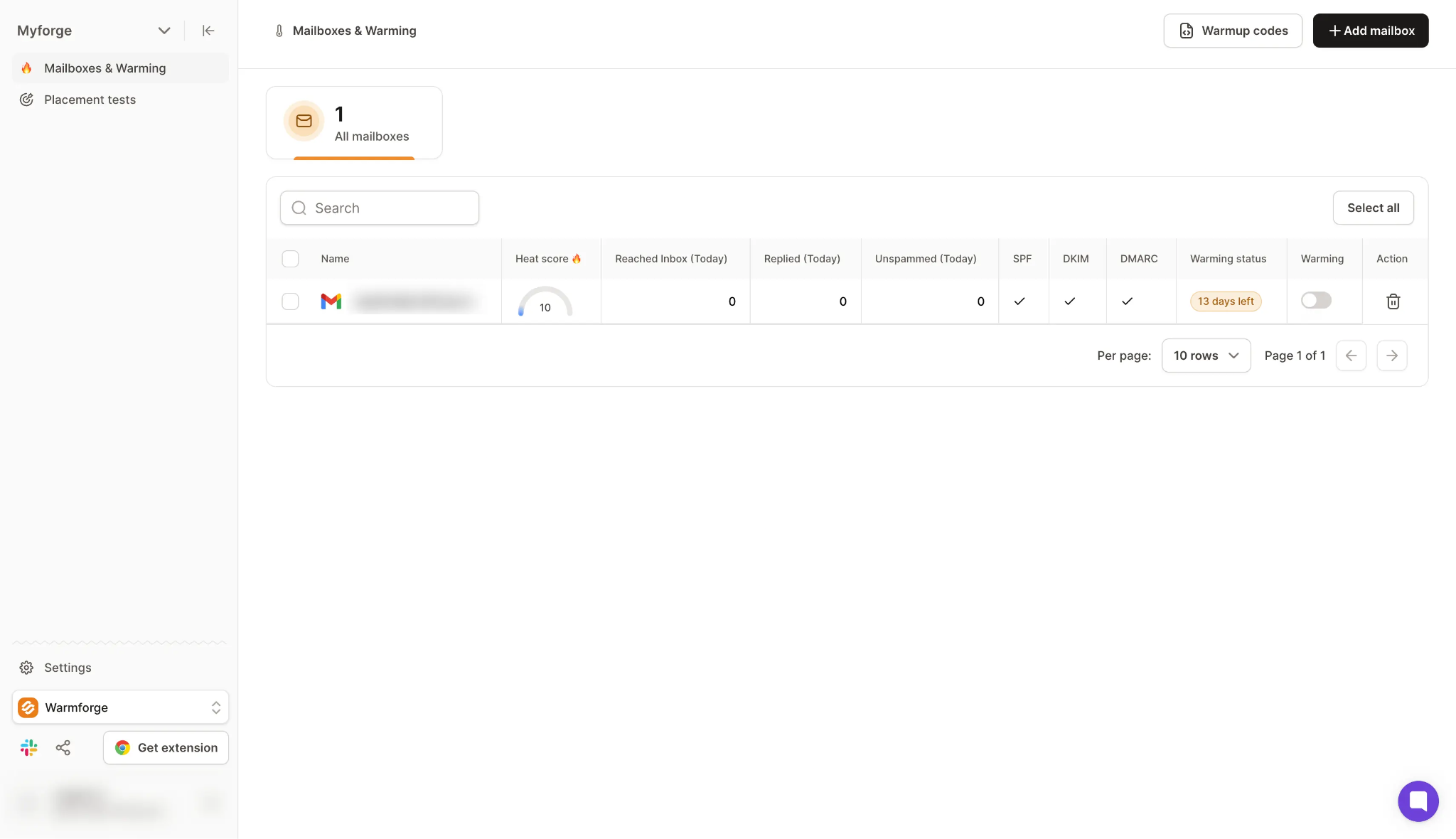
I can check each mailbox's Heat Score to see how ready it is for sending campaigns. The score has a target of up to 100.
Warmforge also monitors DNS and MX records and checks blacklist status. Its alerts help me spot potential issues before they affect my campaigns.
Each warmup plan includes one free inbox placement test per month. If I need more tests, the Pro and Growth placement test plans offer unlimited testing, with up to 250 mailboxes per test.
For endpoints and setup examples, refer to the Warmforge API guide.
Warmforge charges per mailbox slot, with placement tests sold as separate plans. Here's what you can expect to pay:
Free trial: Warmforge does not offer a free trial for warmup. You can sign up for free and explore the app before you buy mailbox slots.
Annual billing gives you two months free on mailbox slots. You can also use the Warmforge pricing calculator to estimate your costs based on the number of mailboxes you need.
Best for: Teams that want self-serve warmup and spam tests priced per mailbox, with health checks for each domain.
I can start with MailReach by choosing how many mailboxes I want to warm up. Its pricing is based on the number of connected mailboxes, and each warmup plan includes at least 20 spam test credits.
MailReach supports Google Workspace, Outlook, and other providers that support SMTP, including Zoho, SendGrid, and Amazon SES. It sends up to 100 warmup emails per mailbox per day through its network of high-reputation accounts.
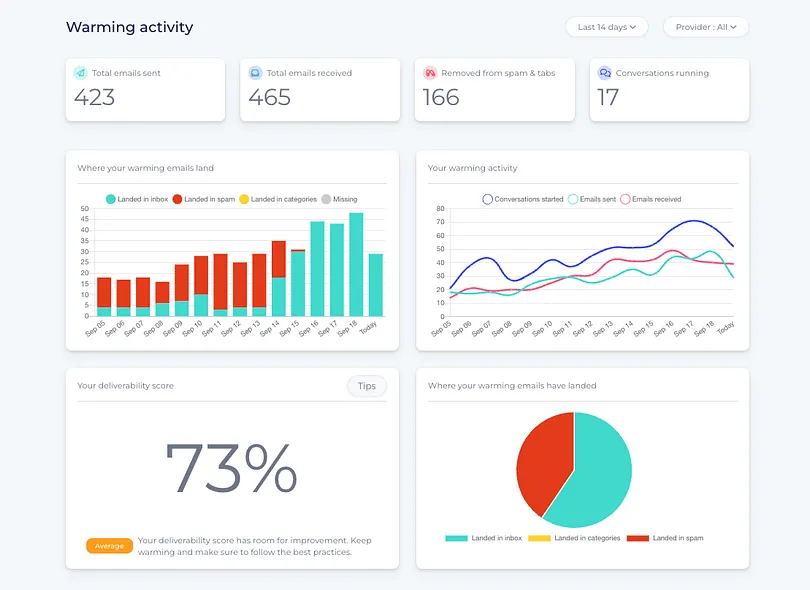
I can run spam tests to check where my emails land across Gmail and Outlook inboxes. The reports also show authentication results for SPF, DKIM, and DMARC, along with blacklist hits and content issues. I can run tests manually or schedule them to monitor inbox placement over time.
MailReach also checks domain and inbox health, including blacklist status and email authentication records. I can receive alerts through Slack or webhooks when it detects account or deliverability issues.
MailReach recommends an initial warmup period of at least 14 days before starting campaigns. It also recommends continuing warmup while campaigns are running.
For a closer look at its warmup results, read this MailReach review.
MailReach charges per mailbox, with spam test credits sold separately. Here's what you can expect to pay:
Free trial: MailReach's pricing page does not mention a free trial. You can run a free spam test before you buy.
MailReach offers 20% off the first 30 days of warming up your first mailbox.
Best for: Teams that want warmup, seed-list placement tests, DMARC monitoring, and email verification in one deliverability platform.
Warmy combines email warmup and inbox placement testing with a network of 1M+ mailboxes. It also provides access to a seed list of 500K+ US mailboxes, which engage with emails and rotate automatically every month.
Warmy offers separate plans for B2B and B2C senders. Its pricing is based on warmup email volume, so I pay according to the number of warmup emails I need. Both sender plans start at $49 per month.
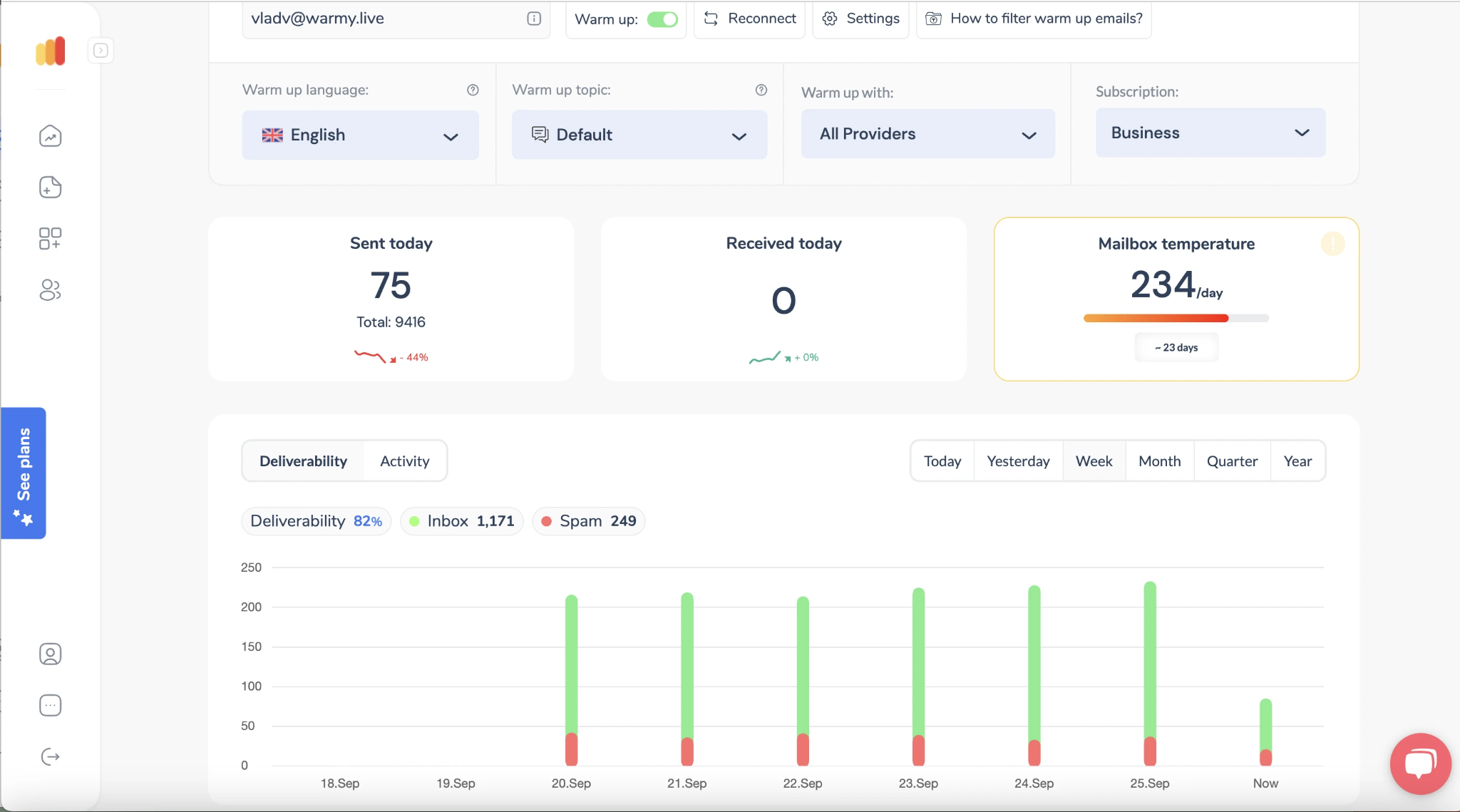
I also get DMARC monitoring, email verification, Google Postmaster data, and a reputation tracker that monitors domain and IP reputation. Warmy includes Adeline, which reviews deliverability reports and suggests what I should check or fix.
Placement test credits are shared across connected mailboxes. Warmy does not publish the exact monthly allowance, so I need to confirm it with the team before choosing a plan.
To see how it holds up in practice, read this Warmy review.
Warmy prices its plans by warmup volume. Here's what you can expect to pay:
Free trial: Warmy offers a 7-day free trial with no credit card required.
Warmy also offers free tools, including a deliverability test, blacklist checker, and DNS record checkers.
Best for: lemlist users and solo senders who want automated warmup at a low price per email address.
Lemwarm uses a network of 20,000+ healthy domains to warm up my mailboxes. It sends warmup emails, checks my technical setup, and tracks deliverability through reports.
With the Smart plan, I can warm up my actual email templates before using them in campaigns. It also matches my mailbox with a warmup network based on my industry. The plan includes custom deliverability alerts and tips.
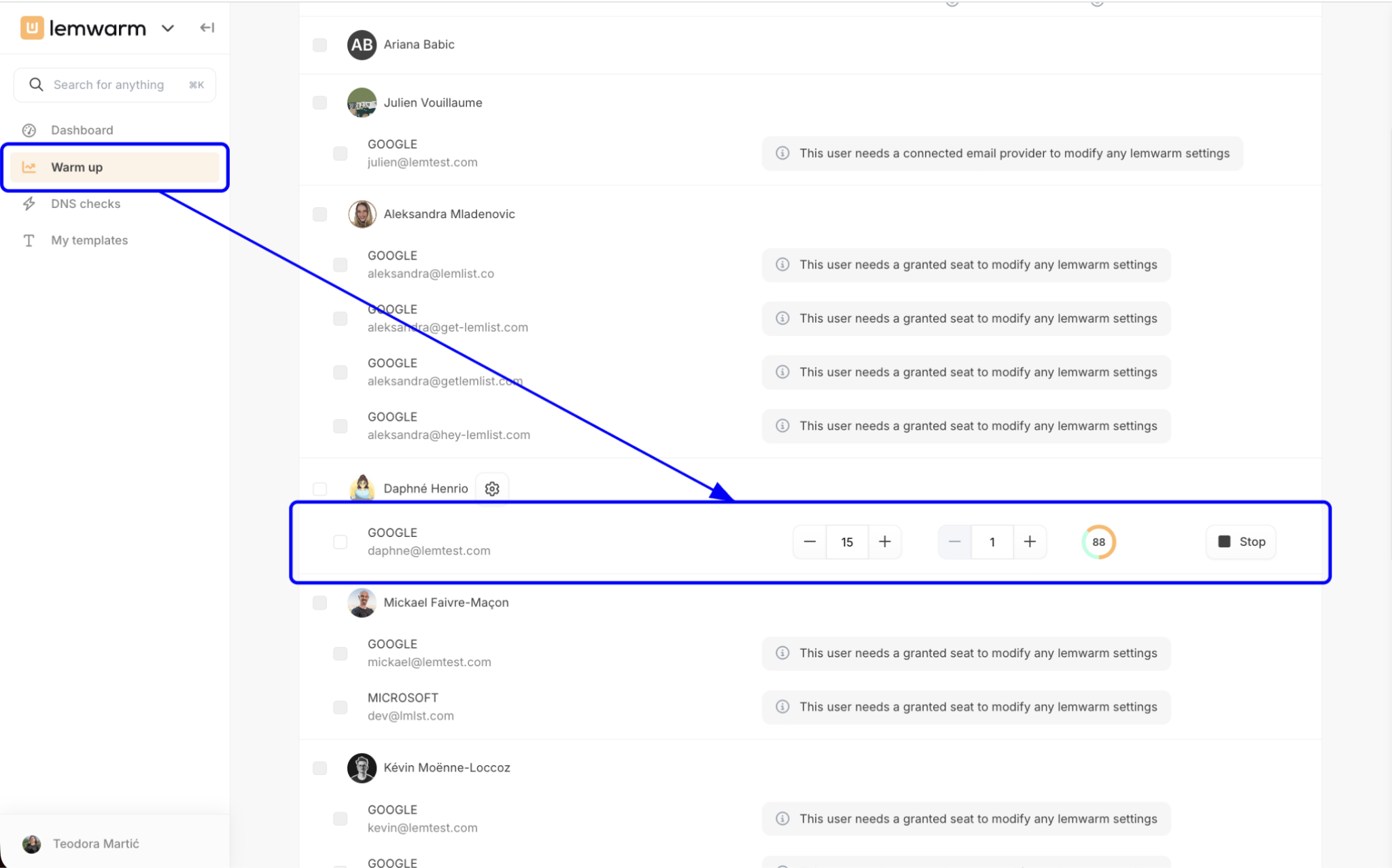
Lemwarm tracks blacklist status as part of its Warmup Score. However, it does not list dedicated inbox placement tests on its pricing page. I may need a separate tool to check where my emails land across providers.
On top of that, Lemwarm is included with every lemlist plan at no extra cost. I can also purchase it separately, with pricing based on the number of email addresses I connect.
For more detail on its warmup network, read this Lemwarm review.
Lemwarm charges per email address. Here's what you can expect to pay:
Free trial: Lemwarm's pricing page does not mention a free trial.
Quarterly billing takes 10% off the monthly price.
Best for: B2B outbound teams that want help finding and fixing the causes of spam placement, with ongoing placement monitoring.
Folderly is an email deliverability platform that helps me identify why emails land in spam. It checks technical settings, email content, and sender reputation, then provides recommendations to fix issues.
I can use Inbox Insights to test inbox placement and review sending IP and DNS information. Pulse monitors inbox placement over time and alerts me when it detects problems.
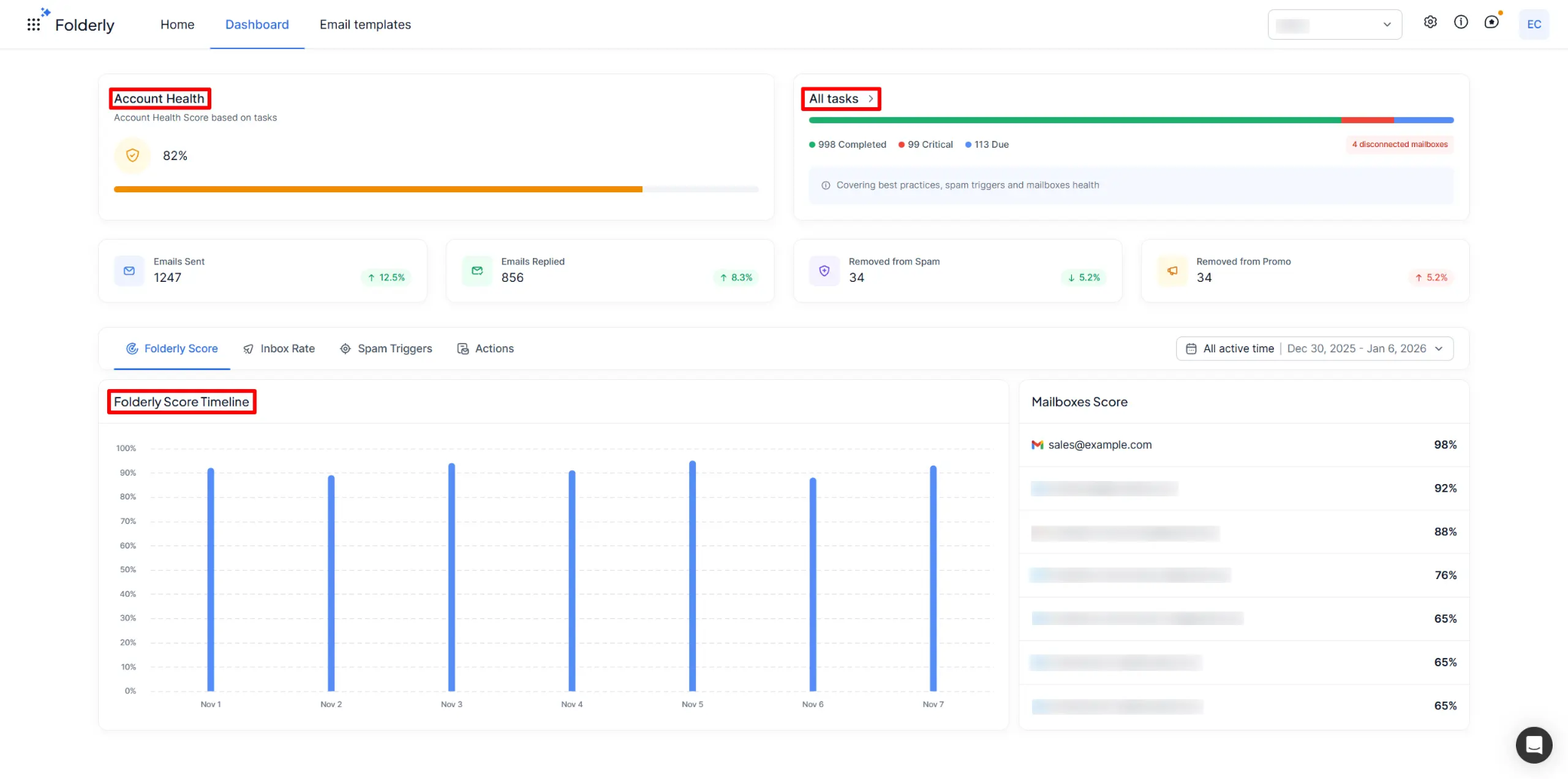
Folderly Lens checks DNS, email authentication, reverse DNS, and blocklists to identify issues with my domains and sending IPs. Folderly also offers deliverability consulting for teams that need expert help with their campaigns.
Folderly does not list a dedicated email warmup feature on its website. I may need a separate tool if I want to warm up my mailboxes.
For user feedback on its results, read these Folderly reviews.
Folderly charges per mailbox for its core product and sells placement tests separately. Here's what you can expect to pay:
Free trial: Folderly does not mention a free trial. Inbox Insights and Pulse have free tiers.
Pricing for Folderly AI, Lens, and the other tools in its suite is listed on each product's own page.
Best for: Teams that need inbox placement tests, DMARC analytics, and blacklist monitoring without warmup.
GlockApps is an email deliverability platform that helps me test where my emails land before sending campaigns. Its Inbox Insight tool checks placement across providers such as Gmail, Outlook, and Yahoo.
It also analyzes spam filters, email content, and authentication records to identify issues that could affect delivery.
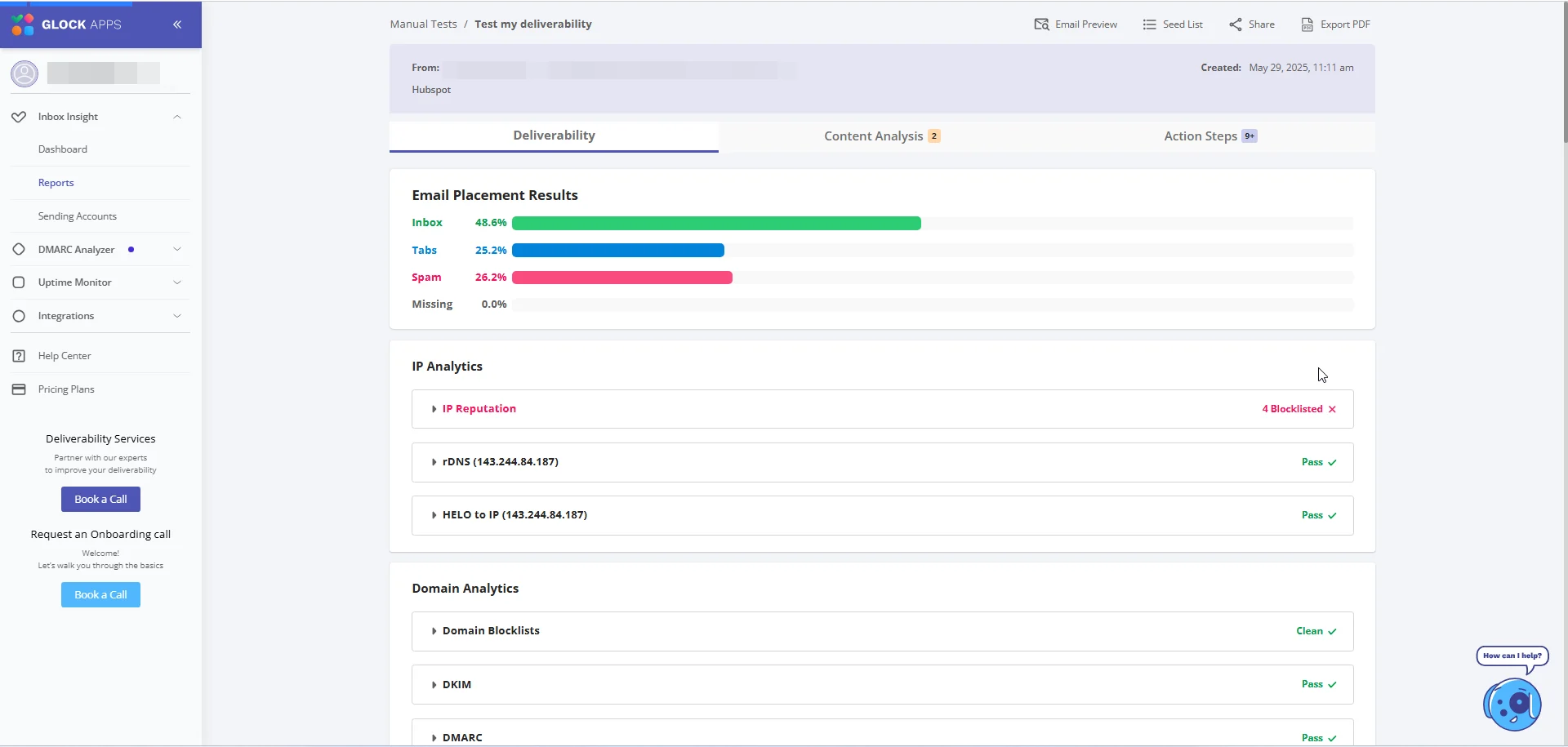
I can use DMARC Analytics to review email traffic, check SPF, DKIM, and DMARC results, and identify unauthorized sending sources. It supports unlimited domains, although the number of messages covered depends on my plan.
GlockApps also offers IP Reputation Monitor and Uptime Monitor. I can track sending IPs against blocklists and monitor email authentication records, mail servers, and website availability. The number of monitors varies by plan.
GlockApps does not offer a dedicated email warmup service. I need a separate tool to warm up my mailboxes. GlockApps helps me test inbox placement and monitor deliverability instead.
For a deeper look at its testing, read this GlockApps review.
GlockApps prices its plans by test credits and monitoring limits. Here's what you can expect to pay:
Free trial: GlockApps offers a Free plan instead of a free trial.
The prices above are annual rates, which GlockApps says save 30%. Monthly billing costs more.
Best for: Senders who want seed engagement to move emails out of spam or Promotions and into the primary inbox.
InboxAlly uses a network of seed mailboxes to engage with my emails. These accounts open, click, reply to, and move messages to the inbox. The goal is to improve sender reputation and inbox placement.
InboxAlly recommends five seed engagements for every 100 emails sent. At this ratio, 100 seeds can support around 2,000 daily sends.
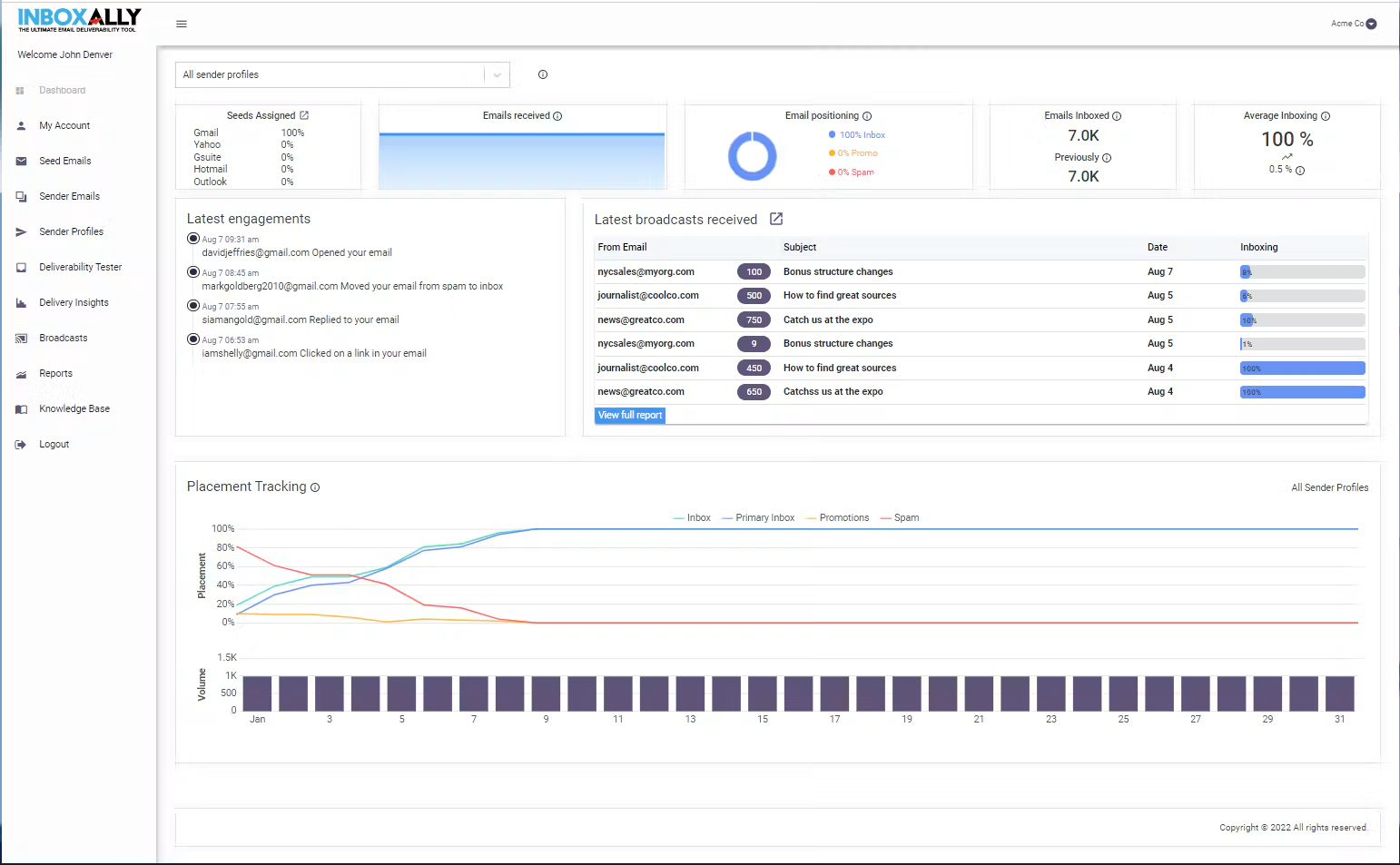
I can add its seed addresses to my sending lists and use them for domains that need reputation repair.
Every plan includes Adaptive Autowarmup, inbox placement testing, live blacklist monitoring, and DMARC reporting. I also get a dedicated customer success manager.
InboxAlly reports measurable improvements within 2–4 weeks. Full reputation building can take 4–8 weeks, depending on the domain's condition.
For a closer look at its seed approach, read this InboxAlly review.
InboxAlly prices its plans by seed emails per day. Here's what you can expect to pay:
Free trial: InboxAlly offers a 10-day free trial with no credit card required.
The trial is shorter than a full reputation repair cycle, so you may not see complete results within it.
The right Allegrow alternative depends on what you need from an email deliverability tool.
If email verification is your main priority, Allegrow may be enough. But if you need to warm up multiple mailboxes and monitor their health, Warmforge offers these features in one place.
For $10 per mailbox slot, Warmforge includes email warmup, Heat Scores, inbox placement tests, and mailbox health checks. Its warmup network consists mostly of real Google Workspace and Microsoft 365 mailboxes. Salesforge customers also get unlimited Warmforge slots at no extra cost.
If you're unsure how to prepare your mailboxes before sending, read our email warmup process guide. You can also use an inbox placement test to check where your emails land.
Get started with Warmforge to warm up your mailboxes and monitor their deliverability.
Cost per mailbox is the main reason. Allegrow's Starter plan includes one connected mailbox, and each extra mailbox or user costs $40. Native HubSpot, Outreach, and Salesloft integrations are only on Scale Plus. That plan costs $1,340 per month with annual billing.
Allegrow offers a free 14-day trial with up to 1,000 verifications. Starter costs $99 per month for 5,000 contacts and one connected mailbox. Extra contacts cost $8 per 1,000. Scale Plus costs $1,340 per month with annual billing, and the API plan has custom pricing.
Warmforge is the best fit for teams that warm up many mailboxes, since it charges $10 per mailbox slot with no extra cost per user. Its pool is mostly real Google Workspace and Microsoft 365 mailboxes. Salesforge customers get unlimited Warmforge slots included.
No. Warmforge focuses on warming and monitoring your mailboxes, and it does not verify contacts. Allegrow checks catch-all addresses and detects spam traps and disposable mailboxes. If you use Salesforge, you can validate contacts there instead.
A placement test shows where your emails land, but it does not build sender reputation. GlockApps tests placement and monitors blacklists without warming your mailboxes. Warmforge, MailReach, Warmy, and InboxAlly combine warmup with placement testing. That lets you build reputation and check it in one tool.
It depends on the tool and the state of your domain. MailReach recommends warming a mailbox for at least 14 days before you start campaigns. InboxAlly says a full reputation repair often takes 4 to 8 weeks for a domain that already has deliverability problems.