
Personalized Outbound Strategy
Get The Right Outbound Strategy In Minutes
Enter your email to get a custom plan & stack recommendation for your business
It's being carefully crafted by AI
Please check your mailbox in 5 minutes

When your emails start landing in spam, everything else in your campaign becomes harder. You may still be sending to the right people. Your copy may be fine. Your offer may be strong. But if your emails are not reaching the inbox, open rates drop, replies slow down, and your pipeline suffers.
The bigger problem is that deliverability issues are not always easy to fix. Warming up inboxes, cleaning lists, lowering sending volume, and checking authentication can help, but they do not always repair a damaged sender reputation quickly.
That is the problem InboxAlly is trying to solve. The InboxAlly reviews are mostly positive, with users reporting better inbox placement, healthier domains, and improved email performance. But there are also concerns around price, setup, and cases where the improvement was not strong enough for a specific use case.
So the real question is not whether InboxAlly has good reviews. It is whether it can actually help fix your deliverability problem.
In this InboxAlly review, I will look at how it works, what real users are saying, how much it costs, and whether it is worth using in 2026.
My take: InboxAlly looks strongest when you already know sender reputation or engagement history is hurting your inbox placement. The customer feedback shows it can work, but at $149+ per month, it makes more sense for teams where poor deliverability is already costing them replies, leads, or revenue.
InboxAlly is more than a basic email warm-up tool. It uses engagement actions like opens, replies, clicks, moving emails out of spam, and moving emails from Promotions to Primary to help improve sender reputation and inbox placement. It also tracks where your emails are landing and supports multiple sender profiles for different domains or IPs.
Warmforge solves a similar problem, but the setup is more focused on mailbox warm-up and ongoing deliverability monitoring. Along with warm-up, it includes health checks for DNS, MX records and blacklists, plus inbox placement tests for Google and Outlook.
InboxAlly gives you more control over the engagement signals used to improve reputation. You can choose engagement profiles, control sending schedules, track inbox placement, and use your own email content. It also works with different sending platforms without requiring you to migrate your setup.
Warmforge takes a more straightforward approach. You connect your mailboxes, turn on warm-up, and monitor their health over time. It also checks DNS and MX records, scans for blacklist issues, and gives you placement tests so you can see whether emails are landing in the inbox, promotions, or spam.
The biggest difference is cost and use case. InboxAlly starts at $149 per month and makes more sense when you are actively trying to repair sender reputation or need deeper control over engagement.
Warmforge starts much lower per mailbox and is a better fit if you mainly want to warm up mailboxes, monitor deliverability, and catch problems before they hurt your campaigns.
So if your domain already has a serious reputation problem, InboxAlly gives you more tools for recovery. If you want ongoing warm-up and monitoring across your outreach mailboxes without spending $149+ per month, Warmforge is the more practical option.
The InboxAlly reviews are positive overall, but they also show a few clear limits around pricing, setup, reporting, and integrations.
InboxAlly has a 4.8/5 rating from 63 Trustpilot reviews. The strongest theme is deliverability improvement. One reviewer said two mailboxes that were heavily landing in spam became healthy again after about two months.
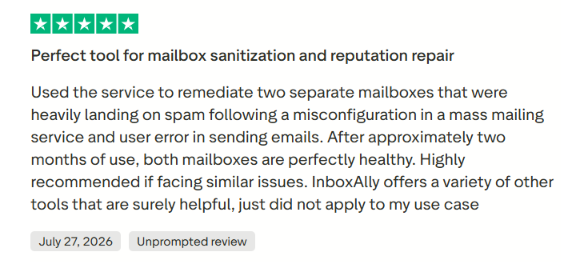
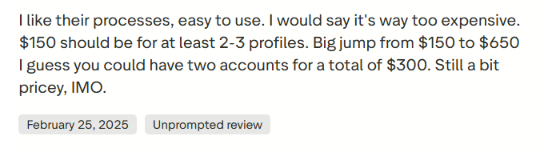
Another said InboxAlly helped bring Mailchimp open rates back to their previous levels. A separate 2026 reviewer said the service helped improve domain authority and email deliverability. The main concern is price. One Trustpilot reviewer liked the process but said the jump from the $149 Starter plan to the $645 Plus plan felt too expensive.
InboxAlly has a 4.6/5 rating from 47 G2 reviews. G2's review summary highlights ease of use, customer support, effectiveness, and email warm-up as common positives. The main negatives include price, learning curve, integrations, and complexity.
One reviewer said InboxAlly helped repair their domain trust after deliverability problems. Another reported a 40% improvement in deliverability for their campaigns. But the reviews are not all positive.
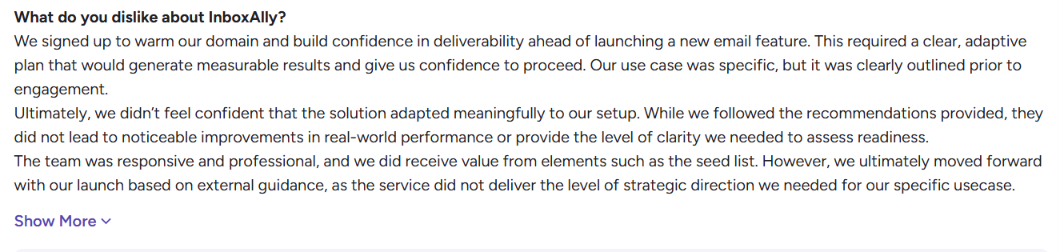
One 3/5 reviewer said the team was responsive, but the recommendations did not lead to noticeable improvements in real-world performance for their specific setup.
Some users setup can feel technical, especially around DNS, SMTP, and warm-up settings. Others mention limited integrations, basic reporting, or the cost being high for smaller teams.
Most users like InboxAlly for improving inbox placement, repairing sender reputation, and getting hands-on support. It can be expensive for smaller senders, setup may take some learning, and not every user sees the same level of improvement.
So the reviews support the idea that InboxAlly can help with deliverability, but they do not support treating it as a guaranteed fix for every sender.
InboxAlly works by creating positive engagement with your emails to help build or repair your sender reputation. You keep using your existing email sending platform, so you do not need to move your campaigns to InboxAlly. Here is how the process works:
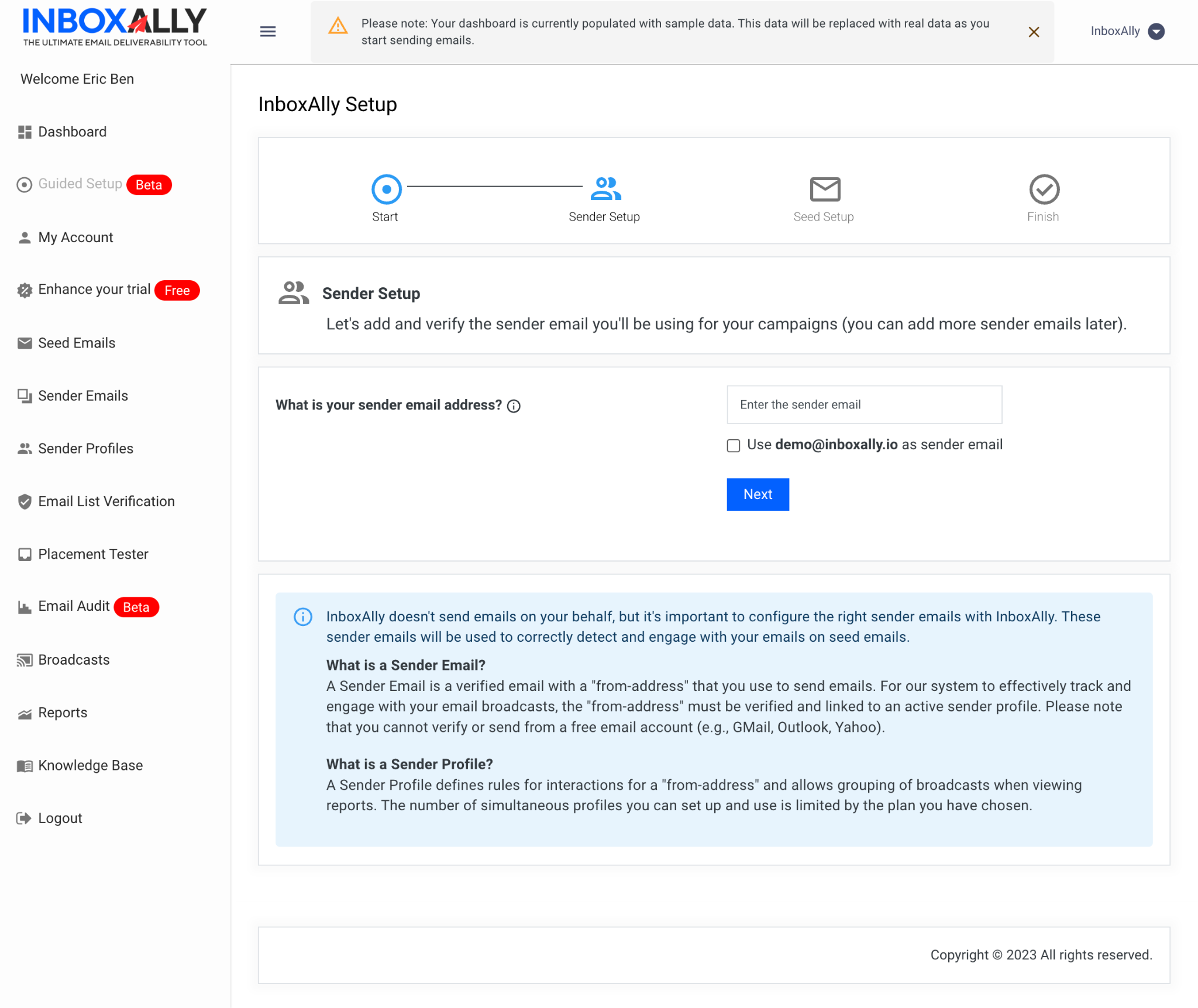
The important point is that InboxAlly does not replace your email sending tool. It works alongside your existing setup and focuses on the engagement and reputation signals that affect where your emails land.
InboxAlly can help fix some deliverability problems, but it is not a fix for every reason your emails land in spam. Its main job is to improve sender reputation and engagement history.
InboxAlly generates positive engagement signals such as opens, replies, moving emails out of spam, and marking messages as important. These signals can help rebuild the reputation of a new or damaged sending domain.
InboxAlly also shares customer results showing that its approach can improve inbox placement. For example, one customer reportedly went from below 50% to above 90% inbox placement within 10 days, while another reduced spam placement from over 20% to below 2% over eight months.
These are reported case-study results, so you should not expect the same outcome for every account.
The bigger limitation is that warm-up only addresses part of deliverability. InboxAlly itself says warm-up cannot fix failed SPF, DKIM, or DMARC authentication, poor list quality, or bad sending infrastructure. If one of those is causing your problem, generating more engagement alone may not improve your inbox placement.
So, InboxAlly makes the most sense when poor engagement history or sender reputation is the problem. If your emails are going to spam because of authentication, bad lead lists, high bounce rates, complaints, or infrastructure issues, you need to fix those problems separately.
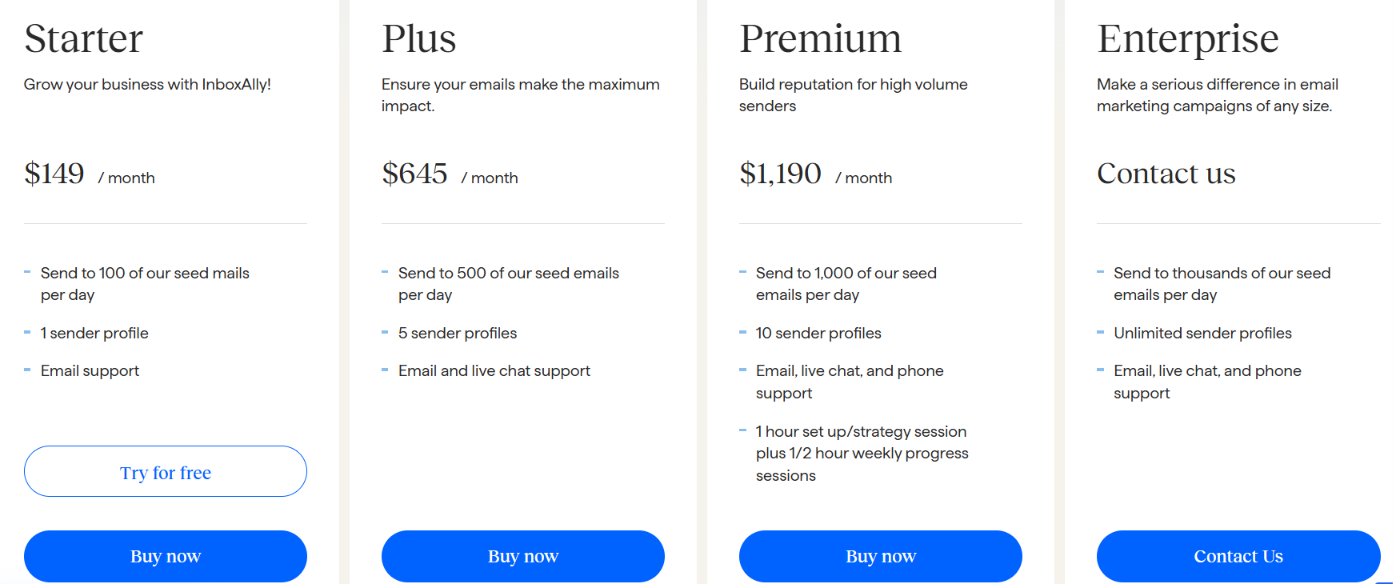
InboxAlly is on the expensive side compared with basic email warm-up tools. Pricing starts at $149 per month, and there are four plans depending mainly on how many seed emails and sender profiles you need.
The Starter plan gives you 100 seed emails per day and one sender profile. Plus increases that to 500 seed emails and five profiles, while Premium supports 1,000 seed emails and 10 profiles. Premium also includes a one-hour setup and strategy session, followed by 30-minute weekly progress sessions. Enterprise pricing is custom and is designed for much higher volumes.
InboxAlly also offers a 10-day free trial with no credit card required. The main thing to consider is cost. At $149/month for just one sender profile, InboxAlly may be difficult to justify if you only need basic mailbox warm-up. Its higher plans make more sense for teams managing several domains or dealing with larger deliverability problems.
InboxAlly makes the most sense when email deliverability is already affecting your campaigns or you need to build sender reputation before increasing volume. It works with different sending platforms and can handle multiple domains and sender profiles.
The biggest factor is how serious your deliverability problem is. InboxAlly offers more than basic warm-up, but with plans starting at $149/month, it may be more than you need if you simply want to warm a few mailboxes.
If you mainly need email warm-up, inbox placement testing, and ongoing deliverability monitoring, Warmforge is a more affordable alternative to InboxAlly.
Warmforge automatically warms your mailboxes using AI-generated email conversations and gives you tools to check whether your sending setup is healthy. You can:
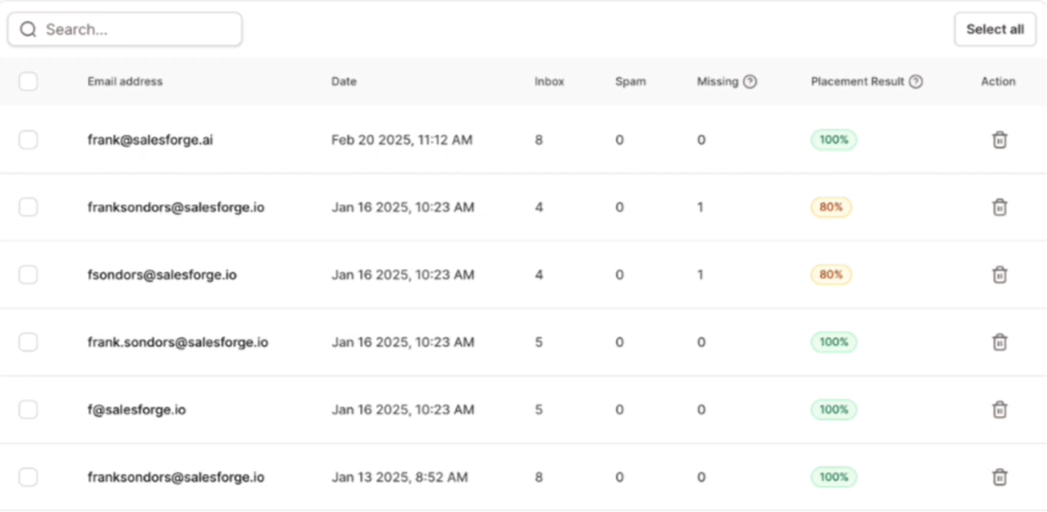
The biggest difference is price. InboxAlly starts at $149/month, while Warmforge's warm-up pricing starts at $12 per mailbox monthly, dropping to $10 with quarterly billing and $9 with annual billing. Each subscription also includes one placement test per month.
If you already use Salesforge, the value is stronger because Warmforge warm-up is included with unlimited mailbox slots.
Enter your email to get a custom plan & stack recommendation for your business
Please check your mailbox in 5 minutes

InboxAlly is worth considering if you already have a serious deliverability problem and want more control over sender reputation, engagement signals, and inbox placement. The reviews are strong overall, and several users report better inbox placement, healthier domains, and stronger email performance.
But InboxAlly is not a guaranteed fix. If your real problem is broken authentication, poor lead data, high bounce rates, or weak sending infrastructure, warm-up alone will not solve it.
The biggest drawback is cost. InboxAlly starts at $149 per month, which can be hard to justify if you mainly need to warm mailboxes and monitor where your emails are landing.
That is where Warmforge can be a better choice. It gives you automated warm-up, placement tests, mailbox health checks, and blacklist monitoring at a much lower starting cost. If you want a simpler way to keep your mailboxes warm and catch deliverability problems early, try Warmforge.