
Personalized Outbound Strategy
Get The Right Outbound Strategy In Minutes
Enter your email to get a custom plan & stack recommendation for your business
It's being carefully crafted by AI
Please check your mailbox in 5 minutes

Have you ever opened your warm-up dashboards in the morning and realized half your day was about to disappear just checking inboxes?
That’s exactly what started happening to me once I scaled past a few dozen domains.
At first, the warm-up felt simple. You connect a few inboxes, slowly increase sending volume, monitor placement, and move on.
But once I started managing 100+ domains, the manual work became overwhelming very quickly.
Every day looked the same:
And the worst part was that this work kept growing with the infrastructure.
I reached a point where managing warm-up was taking more time than running outbound campaigns.
That was the moment I realized I did not need another warm-up tool. I needed a better system to manage the operational side of warm-up at scale.
So I started using Claude Code as an operational layer on top of my outbound setup.
Instead of manually reviewing hundreds of inboxes every day, I used it to monitor inbox health, organize warm-up activity, flag weak domains early, and reduce a huge amount of repetitive operational work.
The biggest difference was not “fully automating warm-up.”
It was finally getting visibility and control without constantly living inside dashboards.
In this guide, I’ll show you:
You can use the same workflow to make large-scale warm-up operations far easier to manage.
Claude Code does not warm inboxes by itself. It connects to tools like Warmforge through MCP, reviews warm-up data, checks inbox health, detects placement drops, and helps operators manage large inbox pools faster.
Step 1: Set up domains, inboxes, SPF, DKIM, and DMARC using Infraforge or Primeforge.
Step 2: Connect inboxes to Warmforge and start a gradual inbox warm-up and placement monitoring.
Step 3: Connect Claude Code to the outbound stack through the Salesforge MCP Server using the MCP API setup.
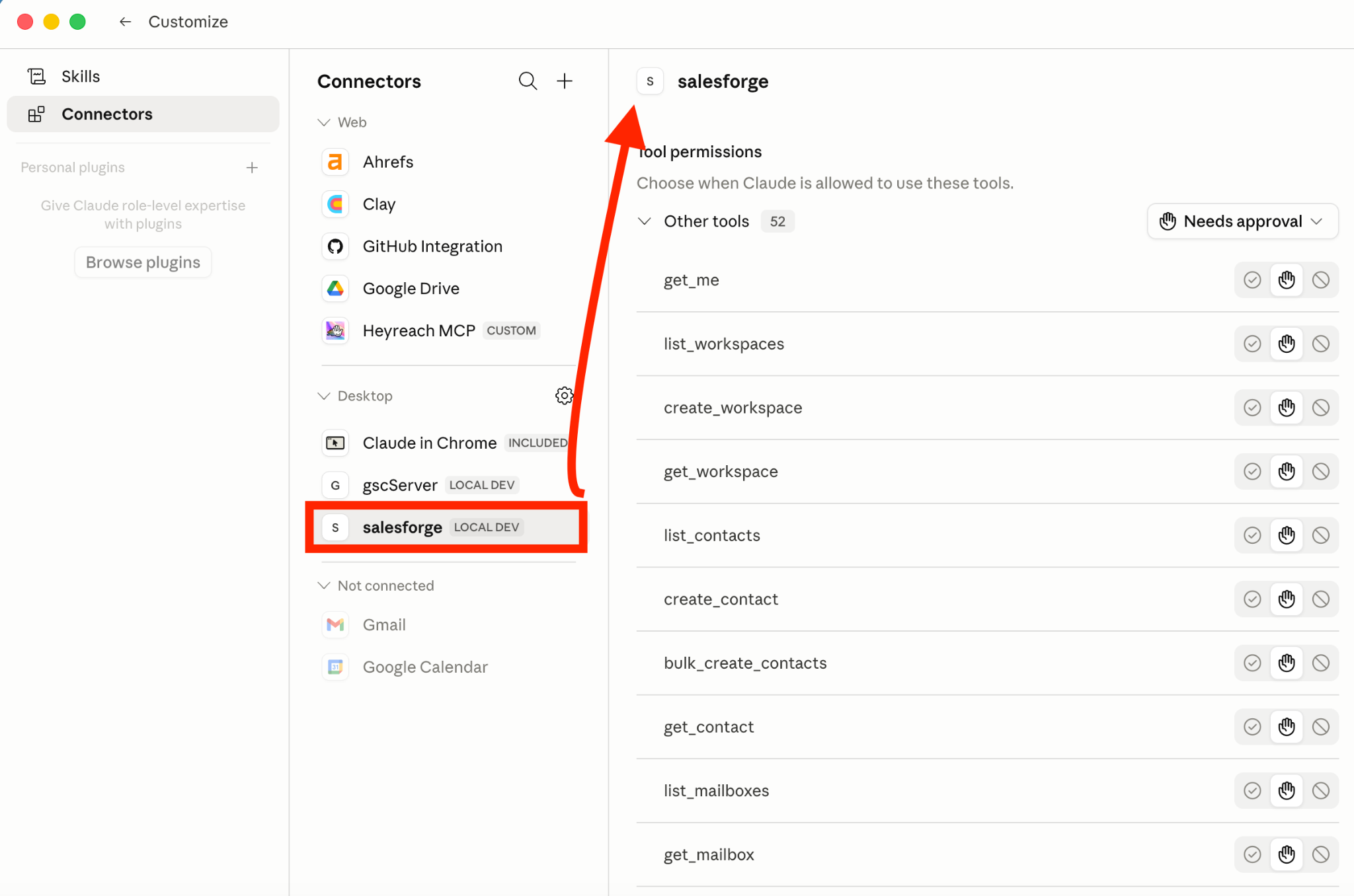
Step 4: Use Claude Code daily to review inbox health, placement changes, unstable inboxes, and warm-up activity.
Example Claude Code output:
Step 5: Gradually scale healthy inboxes into campaigns and replace unstable inboxes when needed.
The main goal of this workflow is not to replace warm-up tools, but to make large-scale warm-up operations easier to monitor and manage.
The biggest problem with managing warm-up across 100+ domains is that deliverability issues usually happen slowly, not instantly.
A few inboxes may start losing placement quietly for several days before anyone notices.
During that time:
The same thing happens during scaling.
Increasing sending volume too early may look completely fine in the beginning. But later, inbox reputation weakens, and domains become harder to recover.
At a smaller scale, these issues are manageable.
But with 100+ domains, continuously tracking:
across hundreds of mailboxes becomes extremely difficult.
And because most deliverability problems appear gradually, small mistakes often stay unnoticed until campaign performance is already affected.
That is what makes managing warm-up at scale difficult.
The workload eventually becomes reactive. Teams spend more time fixing deliverability problems after they happen instead of catching them early.
You may think auto warm-up tools are already enough for handling inbox warm-up very well, and many of them work properly even for large inbox volumes.
But they still mainly focus on the warm-up activity itself. They do not fully handle the operational layer around large-scale setups.
Things like reviewing infrastructure health across domains, organizing operational monitoring, and managing large inbox pools still require a lot of operational oversight.
Claude Code can be used more on that side of the workflow.
Claude Code did not do the warm-up itself.
It helped manage warm-up operations across hundreds of inboxes.
For example, it helped with:
This made it easier to manage large inbox pools without constantly checking dashboards manually.
But Claude Code still needed a proper outbound system underneath it.
It could not:
Warm-up still depended on:
Claude Code simply helped manage those operations more efficiently at scale.
To make this workflow actually work well, you still need a strong outbound system underneath it.
So the next thing I’ll break down is the outbound stack I used to manage inbox infrastructure, warm-up activity, and deliverability monitoring at scale.
I used the Forge stack because it already had different tools for every part of the outbound workflow instead of managing everything across separate platforms.
Warmforge handled inbox warm-up, inbox health tracking, and placement monitoring across domains.
The Salesforge MCP Server connected Claude Code to the outbound workflow, so it could review warm-up data, monitor inbox activity, and help manage operations across large inbox pools.
Infraforge handled dedicated IP inbox infrastructure, mailbox provisioning, and inbox management for scaling outbound sending more reliably.
The Forge stack also includes:
This made the overall workflow much easier to manage because the infrastructure, warm-up, monitoring, and operational layer were already connected inside the same system.
Now I’ll walk you through the actual setup and workflow I used to manage warm-up operations across 100+ domains.
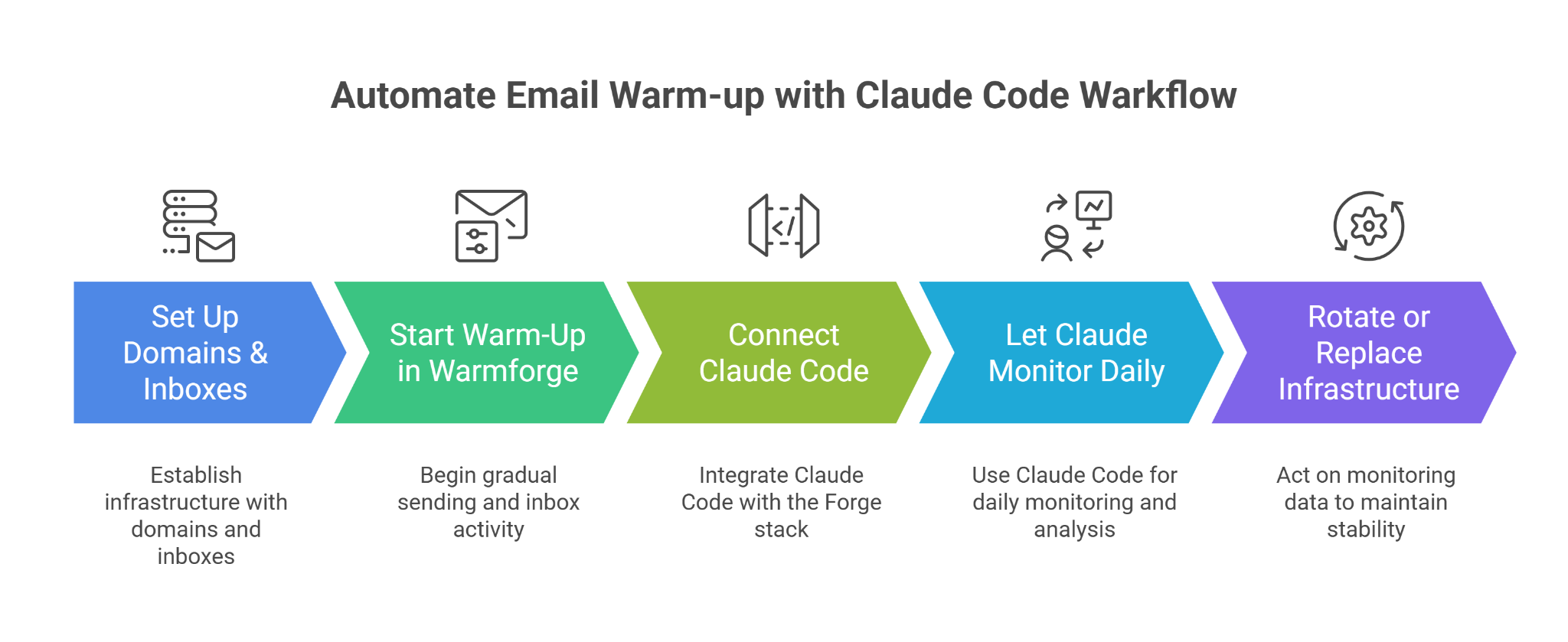
Before starting warm-up, the first step was setting up the infrastructure properly.
The goal here was to start with stable infrastructure before any sending activity began.
Once the inboxes were ready, they were connected to Warmforge.
At this stage, inbox stability mattered more than sending volume.
After warm-up started, Claude Code was connected to the Forge stack through the Salesforge MCP Server.
Once connected, Claude Code could directly access operational data from the outbound stack.
Instead of opening multiple dashboards manually, the entire setup could now be queried directly inside Claude Code.
Once the MCP connection was active, Claude Code became the daily monitoring layer for the setup.
This made it easier to catch email deliverability issues before they affected campaigns.
The final step was acting on the monitoring data.
New inboxes and domains could then be provisioned again through the infrastructure layer to keep the outbound setup stable while scaling.
Once the MCP setup was connected, Claude Code became the fastest way for me to monitor the entire warm-up setup without constantly opening multiple dashboards.
These were the prompts I used the most during daily operations.
Check all active inboxes and show the ones with declining inbox placement in the last 7 days.
Find inboxes that recently moved from primary inbox placement to promotions or spam.
I mainly used these to catch placement problems before reply rates started dropping.
List inboxes still showing unstable warm-up activity.
Find domains where inbox reputation is not stable enough for outbound scaling.
These prompts helped me avoid scaling inboxes too aggressively early on.
Find inboxes with declining warm-up health scores.
Show inboxes with inconsistent placement performance across the same domain.
I used these mostly to identify weak inboxes before they started affecting larger campaign performance.
Summarize inbox health across all active domains.
List domains with the highest number of unstable inboxes.
Show domains that may require inbox replacement soon.
These prompts saved a lot of time because I could review large inbox pools conversationally instead of manually checking dashboards one by one.
After running this workflow for a while, I started noticing clear operational improvements across the entire warm-up setup.
A lot of repetitive work disappeared because inbox monitoring no longer required manually checking multiple dashboards throughout the day.
It became much easier to:
Instead of noticing problems after campaign performance dropped, placement changes and unstable inbox behavior became easier to detect early.
The biggest improvement was visibility.
Managing 100+ domains stopped feeling scattered because warm-up monitoring, inbox health checks, and infrastructure reviews became much more centralized through Claude Code.
Healthy inboxes could be moved into campaigns more confidently because inbox health and placement data were easier to review continuously.
Here are some rules I make sure to follow before scaling inboxes:
Enter your email to get a custom plan & stack recommendation for your business
Please check your mailbox in 5 minutes

Managing warm-up across large inbox pools becomes difficult mainly because of the operational workload that comes with it.
Things like:
become much harder as the number of domains grows.
Using Claude Code together with the Forge ecosystem helped me manage those operations in a much more organized way.
Warmforge handled warm-up and placement monitoring, Infraforge handled infrastructure, and the Salesforge MCP Server connected the operational data directly into Claude Code.
If you are already struggling with managing warm-up across multiple domains, this same workflow can help make the operational side much easier to handle at scale.