Your sender reputation is the invisible score deciding whether your emails reach inboxes or get flagged as spam. Providers like Gmail and Outlook assess your domain and IP, assigning a score (0–100) based on factors like bounce rates, spam complaints, and engagement metrics. A poor reputation can block or bury your emails, while a strong one ensures higher deliverability.
Here’s why it matters:
Failing to monitor or maintain your reputation can lead to blocked emails, revenue loss, and months of recovery. Tools like Warmforge help automate monitoring, warm-ups, and issue detection to keep your campaigns on track. Focus on building trust with email providers to ensure your outreach efforts succeed.
Sender reputation is essentially a trust score - assigned by email service providers like Gmail and Outlook - that determines whether your emails land in the recipient's inbox or get banished to the spam folder. This score typically ranges from 0 to 100 and is influenced by several factors, including:
Email providers use a mix of technical checks, sending behavior, and recipient reactions to calculate sender reputation. At the technical level, three key authentication protocols help verify the legitimacy of your emails:
| Protocol | Purpose |
|---|---|
| SPF | Identifies the IPs authorized to send emails on behalf of your domain |
| DKIM | Adds a digital signature to confirm the email hasn’t been altered |
| DMARC | Provides instructions for handling emails that fail SPF or DKIM checks |
These protocols, combined with metrics like bounce rates and spam complaints, play a major role in shaping your reputation.
Bounce rates, for example, should stay below 2% - anything higher suggests poor list management. Spam complaints are even more critical; a rate as low as 0.1% (just one complaint per 1,000 emails) can harm your reputation. Providers like Gmail and Yahoo enforce strict limits, with Gmail capping acceptable spam rates at 0.3%. As Marcel Becker, Senior Director of Product at Yahoo, explains:
"A spam rate of 0.3% is really high... If you're a good sender your spam rates will be well below 0.3%."
Sender reputation isn’t static - it updates constantly based on your recent activity. Modern spam filters also go beyond simple keyword triggers, using advanced algorithms to evaluate your intent and content quality. And beware of spam traps - these fake email addresses are designed to catch senders with poorly maintained lists and can severely damage your score.
Understanding how sender reputation works is key to ensuring your emails actually reach their intended audience.
Sender reputation is the backbone of any successful cold email campaign. If your reputation is poor, your emails are far more likely to end up in spam - or not get delivered at all. Consider these stats:
Reputation scores have clear thresholds that affect delivery outcomes. Scores below 50 often result in blocks or blacklisting, scores between 50 and 69 lead to spam folder placement, and scores above 70 generally ensure inbox delivery.
The financial impact of a damaged reputation can be severe. For instance, in 2024, TechStart Solutions boosted their cold email deliverability from 67% to 91% in just eight weeks by implementing proper SPF/DKIM authentication, monitoring their reputation, and gradually increasing their email volume. This led to a 156% jump in lead generation without sending more emails. On the flip side, a cybersecurity company’s SDR team saw their delivery rate plummet from 85% to 23% in just one week after receiving 15 spam complaints from 500 emails. It took them six weeks to recover their deliverability.
To succeed in cold email outreach, aim for a delivery rate of 95% or higher, an inbox placement rate above 85%, and a spam rate below 15%. Without a solid sender reputation, even the best-crafted emails are unlikely to ever be seen.
Your sender reputation depends heavily on two things: your sending habits and the quality of your email list. These factors play a huge role in determining whether your cold emails land in someone’s inbox - or their spam folder. Let’s break it down.
Email service providers (ESPs) keep a close eye on how many emails you send daily. If your sending patterns suddenly spike, it raises red flags. As Ricky Pearl, Founder of POINTER, puts it:
"Gmail and other email services know exactly how many emails a typical user sends per day. So it's incredibly simple for Gmail to see who is standing out from the crowd... you should keep your daily sending limit below 50 emails per inbox."
For example, jumping from sending 20 emails a day to 500 overnight can make ESPs suspicious. To avoid this, keep your growth gradual - no more than doubling your daily email count at a time. A safe range is 30–50 emails per day per account. If you need to scale up, use multiple authenticated accounts to spread out your campaigns. This approach mimics natural human behavior and helps you avoid spam filters.
But sending habits aren’t the only thing that matters. The quality of your email list is just as important.
Using a poor-quality email list can cause hard bounces and even trigger spam traps. A bounce rate above 2% can harm your sender reputation. Ideally, your bounce rate should stay below 1%. If it creeps above 5%, you’re entering a danger zone.
Spam traps - old or unused email addresses set up to catch senders using outdated lists - are another risk. Hitting one of these traps can severely damage your reputation. Since email databases naturally decay by 22% to 30% annually as people change jobs or abandon accounts, regular list cleaning is a must. This ensures your emails reach real prospects and protects your reputation.
How recipients interact with your emails also plays a big role in shaping your sender score.
Even a single spam complaint out of 1,000 emails can hurt your reputation. Nick Schafer, Senior Manager of Deliverability & Compliance at Sinch, highlights the importance of engagement:
"Engagement is your lifeline to reputation as a sender. It is extremely important."
Providers track how recipients interact with your emails - whether they open them, click links, reply, or forward them. If people consistently delete your emails without reading them or mark them as spam, it signals to ESPs that your content isn’t hitting the mark. Carin Slater, Manager of Lifecycle Email Marketing at Litmus, explains:
"If an ISP sees that nobody's interacting with your emails, they're going to say, 'Nobody wants this. Must be spam.'"
Encouraging replies is one of the best ways to boost your reputation. While link clicks are helpful, a reply sends the strongest positive signal. On average, open rates across industries sit at about 21.33%, with 20%–30% considered solid for cold outreach.
Here’s a quick look at benchmarks for key metrics:
| Metric | Excellent | Warning Zone | Critical/Action Needed |
|---|---|---|---|
| Bounce Rate | < 1% | 2% - 5% | > 5% |
| Spam Complaint Rate | < 0.02% | 0.1% | > 0.3% |
| Open Rate | > 27% | 15% - 20% | < 15% |
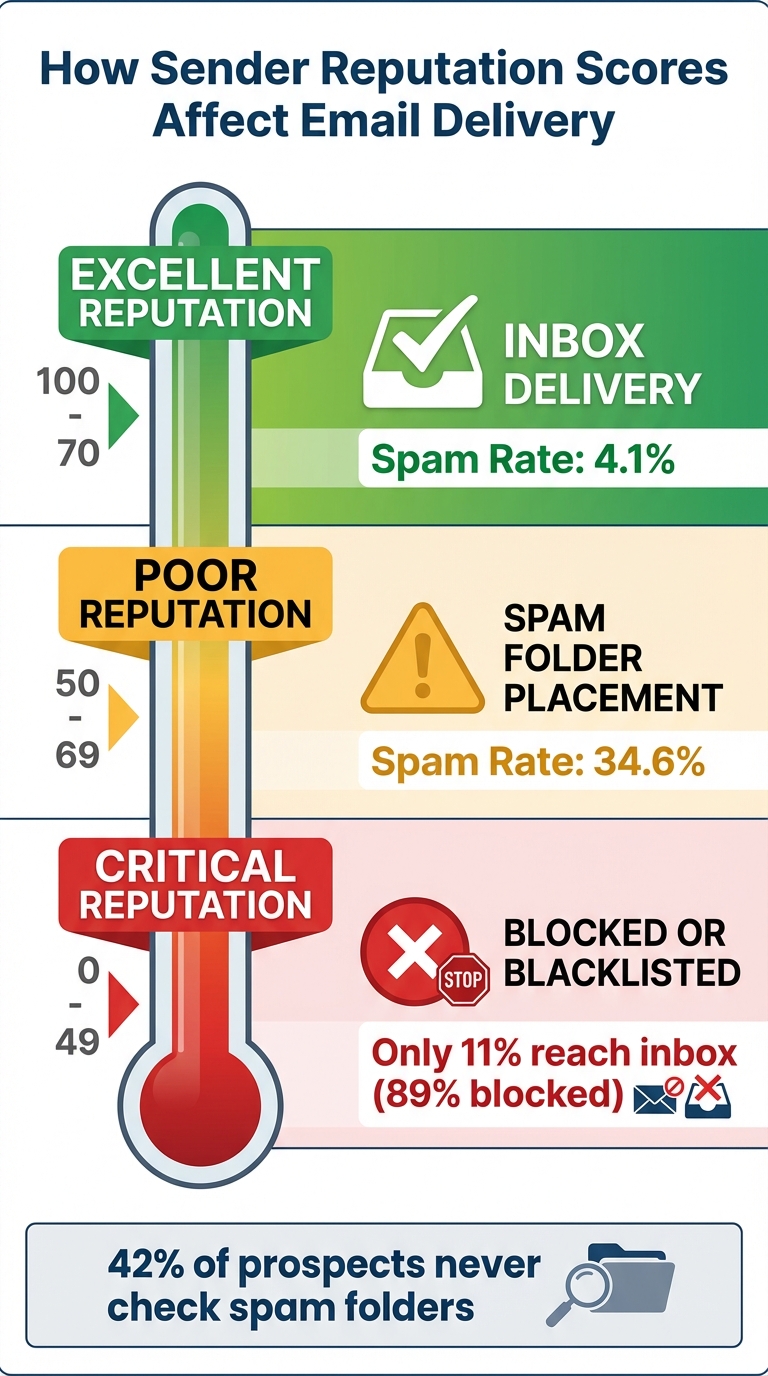
Email Sender Reputation Score Ranges and Deliverability Outcomes
After exploring the advantages of a strong sender reputation, it’s crucial to understand how its decline can derail your cold email campaigns. When your reputation falters, the impact is swift and often severe, bringing your outreach efforts to a grinding halt.
A damaged sender reputation triggers aggressive spam filters from email providers. As a result, your emails may land in spam folders - or worse - get blocked entirely, never reaching your recipient's inbox. And let’s face it, most people don’t bother checking their spam folders, which means you lose access to a large chunk of your audience.
Email providers use a combination of measures to protect users from low-reputation senders. Some outright reject your emails before they’re even analyzed, while others slow down delivery, which can cripple time-sensitive campaigns.
The statistics paint a grim picture. High-reputation IPs experience a spam rate of just 4.1%, while low-reputation IPs face a staggering 34.6%. If your domain gets blacklisted, up to 89% of your emails may never make it to an inbox. Email marketing expert Andrian Valeanu highlights the challenge:
"Entering a blacklist is easy; recovery is challenging. To make matters worse, no one will notify you about that."
Worse still, repeated spam filtering reduces engagement rates, which further damages your reputation. Beyond these delivery issues, the financial fallout can be substantial.
The financial hit from poor deliverability isn’t small change - it’s a multi-billion-dollar problem for businesses annually. For example, if your sales team sends 2,000 emails a month and deliverability drops from 85% to 60%, around 500 fewer prospects will see your message. That could translate to approximately $37,500 in lost monthly pipeline revenue.
Consider this real-world example: A cybersecurity company’s sales development team saw their Gmail delivery rates plummet from 85% to 23% in just one week - all because of 15 spam complaints out of 500 emails. It took six weeks to recover from the damage.
Recovery timelines vary depending on the extent of the damage. Minor issues might be resolved in 1–2 weeks, but severe cases can take 3–6 months of cautious, low-volume sending to rebuild trust. If your spam complaint rate exceeds 0.3%, many email marketing platforms will suspend your account immediately. On top of that, violations of the CAN-SPAM Act can result in fines of up to $53,088 per email.
| Issue Severity | Recovery Timeline | Required Actions |
|---|---|---|
| Minor Issues | 1–2 weeks | Reduce sending volume, clean email lists |
| Moderate Problems | 4–6 weeks | Focus on engagement and follow best practices |
| Severe Damage | 3–6 months | Gradual warmup and cautious sending |
| Blacklisting | 2–4 weeks | Fulfill specific requirements for removal |
In some cases, starting over with a new domain might be more practical than trying to repair the damage. Protecting your sender reputation from the beginning is far easier - and far less costly - than attempting to recover it later. Recovery is a long, expensive journey that’s never guaranteed to succeed.
To ensure your emails consistently land in the inbox and avoid spam filters, it's essential to build and maintain a solid sender reputation. By following best practices and monitoring key metrics, you can establish trust with email providers and sustain it over time.
Email authentication is the backbone of sender reputation. It confirms to email providers like Gmail and Yahoo that you're a legitimate sender. Without proper authentication - such as SPF, DKIM, and DMARC - your emails might never reach their intended recipients.
"DKIM is one of your best tools for authentication - especially in forwarding scenarios where SPF can't be trusted."
p=none) to collect reports and verify your setup. Once everything is aligned, tighten your policy to p=quarantine or p=reject for stronger protection.
| Protocol | Purpose | DNS Record Type | Key Component |
|---|---|---|---|
| SPF | Authorizes specific IPs/servers to send mail | TXT | v=spf1, include:, -all |
| DKIM | Ensures email integrity with cryptographic signatures | TXT or CNAME | _domainkey subdomain, public key |
| DMARC | Sets failure policies and enables reporting | TXT | _dmarc subdomain, policy (none/quarantine/reject) |
Once authentication is configured, you can focus on building a strong sending history.
Sending high volumes of email from a new address can raise red flags with spam filters. To avoid this, gradually increase your sending volume over time. This process, known as "warming up", helps establish trust with email providers.
Warmforge simplifies this process by using AI to simulate natural email activity and gradually increase your sending volume. With one free warm-up slot for Google or Microsoft mailboxes, Warmforge ensures your email account is ready to perform whenever needed.
Monitoring your email deliverability is crucial for maintaining a strong sender reputation. Regular checks help you spot and fix issues before they escalate.
"A higher domain reputation means emails from your sending domain (SPF and DKIM) are less likely to get filtered to a recipient's spam folder or inbox."
Tools like Warmforge provide ongoing monitoring of DNS and MX records, blacklist appearances, and deliverability rates. They also offer monthly placement tests to show exactly where your emails are landing. This proactive approach ensures your emails stay out of spam folders.
Additionally, keep your email lists clean by removing invalid addresses and spam traps with verification tools. Set disengagement triggers to remove unresponsive contacts after several attempts, and review bounce messages for SMTP error codes that might indicate problems. Finally, make sure your sending IP has a valid PTR (reverse DNS) record - many servers won't accept emails without it.
| Metric | Healthy Range | Needs Attention | Critical |
|---|---|---|---|
| Bounce Rate | < 1.0% | 1% - 2% | > 2% |
| Spam Complaint Rate | < 0.01% | 0.01% - 0.05% | > 0.05% |
| Unsubscribe Rate | < 0.3% | 0.3% - 1% | > 1% |
| Deliverability Rate | 96% - 99% | 90% - 95% | < 90% |
Keeping tabs on your sender reputation means using tools that provide real-time insights into how email providers perceive your domain. With the right platform, you can spot issues early, automate fixes, and get a clear view of where your emails are landing.
Warmforge is an all-in-one tool that combines automated warm-up, deliverability monitoring, and placement testing. Its AI-driven system mimics natural email behavior, creating trusted engagement signals with providers like Google and Microsoft. New users get one free warm-up slot and one free placement test per month - enough to explore its capabilities before scaling up.
The platform continuously checks your DNS and MX records, scans blacklists, and monitors deliverability rates across major providers. Unlike manual methods - such as sending emails to friends or colleagues - Warmforge uses real business inbox interactions. This matters because email providers can easily spot fake "seed accounts" and ignore their engagement signals.
| Feature | Manual Methods | Automated Solutions |
|---|---|---|
| Warm-Up Process | Sending emails to friends over weeks | AI-driven engagement with real inboxes |
| Monitoring Frequency | Periodic manual checks | Continuous, real-time monitoring |
| Blacklist Scanning | Manual lookups across multiple sites | Automated scanning with instant alerts |
| Placement Testing | No visibility into inbox placement | Monthly tests showing exact folder placement |
Warmforge also integrates seamlessly with other Forge Stack tools like Salesforge and Primeforge, though each requires a separate subscription. By automating reputation management with Warmforge, you can focus on tracking detailed sender scores and performance metrics - critical for maintaining email deliverability.
Warmforge's monitoring features lay the groundwork, but tracking sender metrics takes your reputation management to the next level. A poor reputation can wreak havoc on your deliverability, so understanding and maintaining your scores is essential.
Sender scores range from 0 to 100, with anything above 70 signaling a strong reputation, while scores below 50 often land your emails in spam. Tools like Google Postmaster Tools offer Gmail-specific insights, helping you monitor both IP reputation (linked to your server) and domain reputation (tied to your domain). Gmail, in particular, now emphasizes domain reputation more heavily.
To stay ahead of potential issues, check these metrics weekly:
Platforms like Allegrow have helped companies such as Algolia, Apollo.io, and Workvivo boost email open rates from 30% to 50% through effective reputation management. As Ruari Baker, CEO of Allegrow, explains:
"Reaching the primary inbox is undoubtedly becoming more challenging due to the popularity of using automated emails to generate leads."
Why does this matter? Only 58% of users check their spam folders daily, compared to 95% who check their primary inbox. This makes reputation management a must for cold email success. To protect your main domain, use subdomains for cold outreach, and set disengagement triggers to remove contacts who haven’t opened your last 6–10 emails.
Your sender reputation works much like a credit score - it changes with every email you send. Gabriel Martínez, Founder of Reachflow, highlights this perfectly:
"Even when your domains are performing well, you should never stop warming up the mailboxes... It's basically an insurance policy for your inbox placement".
Neglecting ongoing monitoring can lead to costly mistakes. Even one poorly executed campaign can hurt your deliverability, which directly impacts revenue.
For instance, boosting inbox placement from 60% to 85% could generate an additional $37,500 in monthly pipeline for a team sending 2,000 emails. In fact, senders who focused on reputation-driven strategies between Q1 and Q3 of 2025 saw their inbox placement improve from 68.8% to 72.9%, while spam rates dropped by 6.9%. These results were achieved through consistent authentication, gradual increases in email volume, and real-time reputation tracking.
To minimize these risks, tools like Warmforge simplify the process. This platform automates key tasks like mailbox warm-up, DNS and MX monitoring, blacklist scanning, and monthly placement tests. It even offers one free warm-up slot and placement test each month, so you can test its effectiveness before committing. Warmforge’s AI takes it a step further by mimicking human interactions - opening emails, marking them as important, and moving them out of spam folders - to build trust with email providers like Gmail and Outlook.
With stricter spam rules from Gmail and Yahoo in 2024–2025, maintaining proper authentication and running regular deliverability checks are no longer optional - they’re essential. Keeping bounce rates below 2%, limiting spam complaints to under 0.1%, and consistently running warm-up processes in the background can protect your domain and ensure your outreach efforts reach their intended audience. Without these measures, your emails - and your revenue - could disappear into the void.
Improving your sender reputation is a crucial step for ensuring your emails actually reach your audience's inbox. Start by authenticating your domain with SPF, DKIM, and DMARC protocols. These tools essentially act as proof to providers like Gmail and Outlook that your emails are legitimate and not spam.
Another important step is to keep your email list clean. Regularly remove invalid addresses, hard bounces, and any contacts who consistently mark your emails as spam. This helps you maintain low bounce and complaint rates, which are critical for your reputation.
When starting out or using a new domain or IP, it's essential to warm it up gradually. Begin by sending emails in small volumes, then slowly increase over time to replicate natural sending behavior. Tools like Warmforge can make this process easier with features like automated warm-ups, deliverability monitoring, and health checks.
Finally, focus on engagement. High open and click rates signal to email providers that your content is relevant and wanted. To achieve this, send personalized, targeted emails and avoid sudden jumps in email volume. With these strategies in place, you'll be well on your way to building a solid sender reputation and landing your emails in the primary inbox.
A weak sender reputation can seriously derail your cold email efforts. When email providers flag your messages as spam or reject them outright, your emails might never make it to your recipients' inboxes. The result? Lower open rates, fewer clicks, and minimal responses.
To boost your sender reputation and improve deliverability, focus on a few key strategies: gradually warming up your email account, keeping your contact list clean, and crafting personalized, relevant messages. Tools like Warmforge can simplify this process by automating email warm-ups and tracking deliverability, helping your emails land where they belong - right in the primary inbox.
SPF, DKIM, and DMARC are key email authentication protocols that ensure your messages come from an approved domain and stay intact during delivery. These tools help email providers identify your emails as genuine, lowering the chances of them being marked as spam or phishing attempts.
Setting up these protocols not only safeguards your domain from potential abuse but also boosts your sender reputation. A solid reputation increases the chances of your emails reaching your recipients' main inboxes - an essential factor for effective email communication.