Warmbox Reviews: Does It Really Improve Email Deliverability?

If you’re thinking about using Warmbox to fix your cold email deliverability, you’ve probably noticed something: there aren’t many clear, detailed reviews out there.
There are also not many user reviews available for Warmbox on major review platforms like G2, Capterra, and Trustpilot, which means there is limited social proof and user feedback for the tool.
So instead of leaving you guessing, we looked at Warmbox closely, compared it with other deliverability tools, and put everything into one simple, honest breakdown.
This review shows you exactly what Warmbox does, how it works, what it handles well, where it falls short, and when a tool like Warmforge might fit better.
If you just want a clean, straightforward look at Warmbox before deciding whether to use it, this will give you the clarity you’re looking for.
Key Takeaways of Warmbox Review
- Warmbox is a cold email warm-up tool that helps improve sender reputation and move emails from spam to inbox.
- It’s simple to use, fully automated, and supports all major inbox providers like Gmail, Outlook, and SMTP.
- However, it offers limited visibility into domain health and doesn’t provide advanced tracking or infrastructure control.
- Pricing starts at $15/month for one inbox, making it suitable for individuals or small setups.
- is a better choice if you need deeper monitoring, infrastructure checks, and more control while scaling.
Get started with 1 free warm-up slot and a free placement test on Warmforge, see your real inbox results before you scale.
What Is Warmbox?
Warmbox is a cold email warm-up tool that builds your inbox reputation before you start sending outreach.
As one of the leading email warmup tools and email warm up services, Warmbox plays a key role in improving deliverability and helping your cold emails reach inboxes instead of spam.

It connects with your email account, including popular email services such as Gmail, Outlook, Yahoo, Zoho, or any other inbox, and automatically sends, opens, and replies to emails on your behalf. These daily interactions make your domain look active and trusted to email providers.
How Does Warmbox Work?
Warmbox works in a simple, predictable way. The setup process is straightforward and user-friendly, allowing you to quickly connect your inbox and start using the service with minimal technical knowledge. Here’s a quick breakdown of what happens once you connect your inbox.
Each day, Warmbox sends and receives emails from your account, simulating natural email activity. The warm up process follows a customizable warm up schedule, allowing you to control the sending speed, frequency, and content to gradually improve deliverability and optimize results based on your specific goals.
In step 2 or 3, the interactions are designed to mimic those of real users, which helps enhance your sender reputation and increase the chances of your emails landing in the inbox rather than the spam folder.
Step 1: You connect your inbox
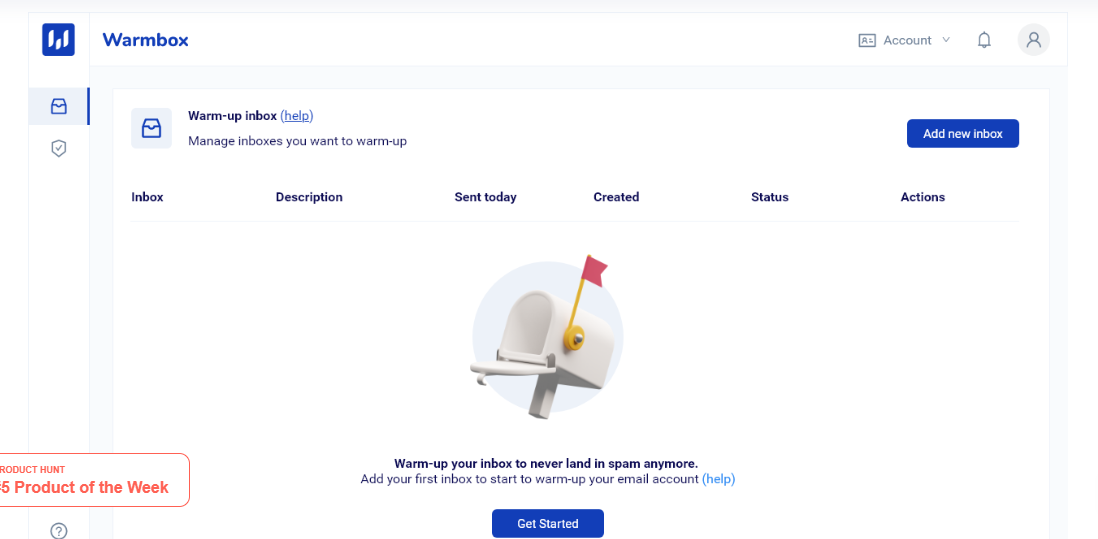
First, you connect your email account, Gmail, Outlook, Yahoo, or any other inbox. It only takes a few clicks and no technical setup.
Step 2: Warmbox starts sending real emails for you
Once connected, Warmbox automatically sends warm up emails from your inbox every day. These warm up emails go to other real inboxes inside Warmbox’s private network.
Warmbox does not rely on fake accounts, but uses genuine inboxes for all interactions.
Step 3: Those inboxes interact with your emails

The emails you send are opened, replied to, marked as important, and even pulled out of spam, all done automatically. These actions look natural to email providers and make your inbox seem active and trusted.
Warmbox's network includes both new and existing email accounts to simulate realistic engagement and improve sender reputation.
Step 4: Your reputation improves over time
As this happens daily, your domain reputation slowly gets stronger. That means fewer of your cold emails land in spam and more reach real inboxes.
These ongoing interactions help establish your domain as a legitimate sender in the eyes of email providers.
Step 5: You can track everything in your dashboard
Warmbox provides an analytics dashboard that shows you reports and analytics of your inbox reputation. Users can access detailed reports to monitor deliverability metrics and campaign effectiveness. You can see how your email deliverability improves week by week.
Key Features of Warmbox for Email Deliverability
Warmbox is an email deliverability tool that packs a few useful tools to make inbox warming simple and hands-free.
It includes a built-in warm up feature and customizable warm up options, allowing users to tailor the warm-up process for optimal results. Warmbox also supports managing multiple email accounts and multiple accounts for teams or agencies, making it ideal for those handling several inboxes.
Here’s a quick overview of its main features and what they do.
1. Automated email interactions
Warmbox automatically sends, opens, replies to, and marks emails as important every day. These actions make your inbox look active and real.
2. Spam removal and reply handling
It even removes your emails from the spam folder and replies to a few messages to build trust with email providers, helping to prevent your emails from landing in spam by avoiding spam filters.
3. Private network of inboxes
Warmbox uses a private network of over 35,000 inboxes from different email providers to interact with your emails and grow your reputation. This network may include free Gmail accounts to simulate diverse, real-world interactions.
4. Flexible warm-up modes
You can customize your warm up schedule by choosing between growth, flat, or random modes, depending on how fast you want to build a reputation.
Controlling your email volume during the warm-up process is important for optimizing deliverability and ensuring your emails avoid spam filters.
5. Real-time reports and monitoring
The dashboard shows detailed analytics, including spam score and reputation tracking, as well as inbox placement rates and an email deliverability score, so you can see your progress.
6. Works with all major inboxes
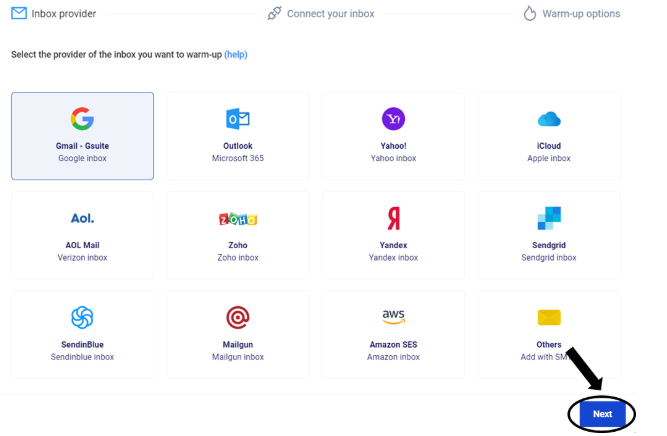
It supports Gmail, Outlook, Yahoo, Zoho, iCloud, Sendgrid, Sendinblue, Mailgun, Amazon SES, and any SMTP inbox. Warmbox also helps ensure that only authorized IP addresses are used for sending, supporting proper SPF record configuration to improve email deliverability.
7. Extra tools for agencies and teams
Warmbox lets you add multiple inboxes, invite team members, and manage warm-up for clients from one place. Some plans also offer the ability to manage unlimited inboxes, making it ideal for larger teams or agencies that need to scale their email outreach.
8. Live DNS and blacklist checker
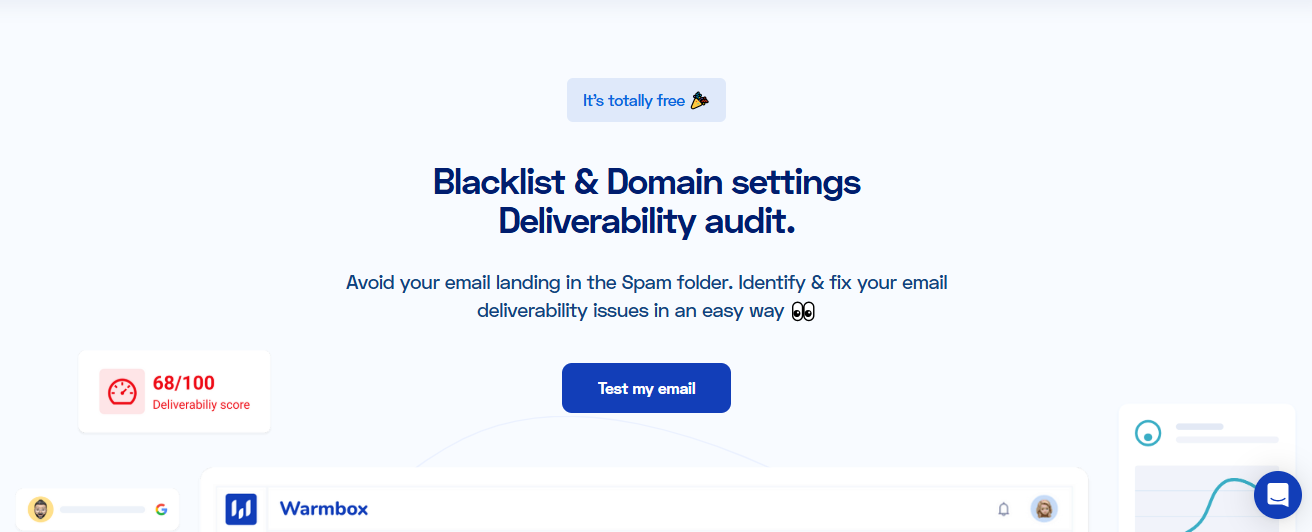
Warmbox includes a DNS settings checker that allows you to verify your DNS settings and domain settings, including SPF, DKIM, and DMARC records. You can also check your DNS setup and see if your domain is blacklisted before sending real campaigns.
How Much Does Warmbox Cost?
Warmbox offers several pricing plans to suit different needs, including both paid plans and options for those looking to test the service first.
If you want to try before committing, Warmbox provides a free trial, allowing users to evaluate the platform risk-free. Their pricing plans are structured to accommodate individuals, startups, and larger teams.
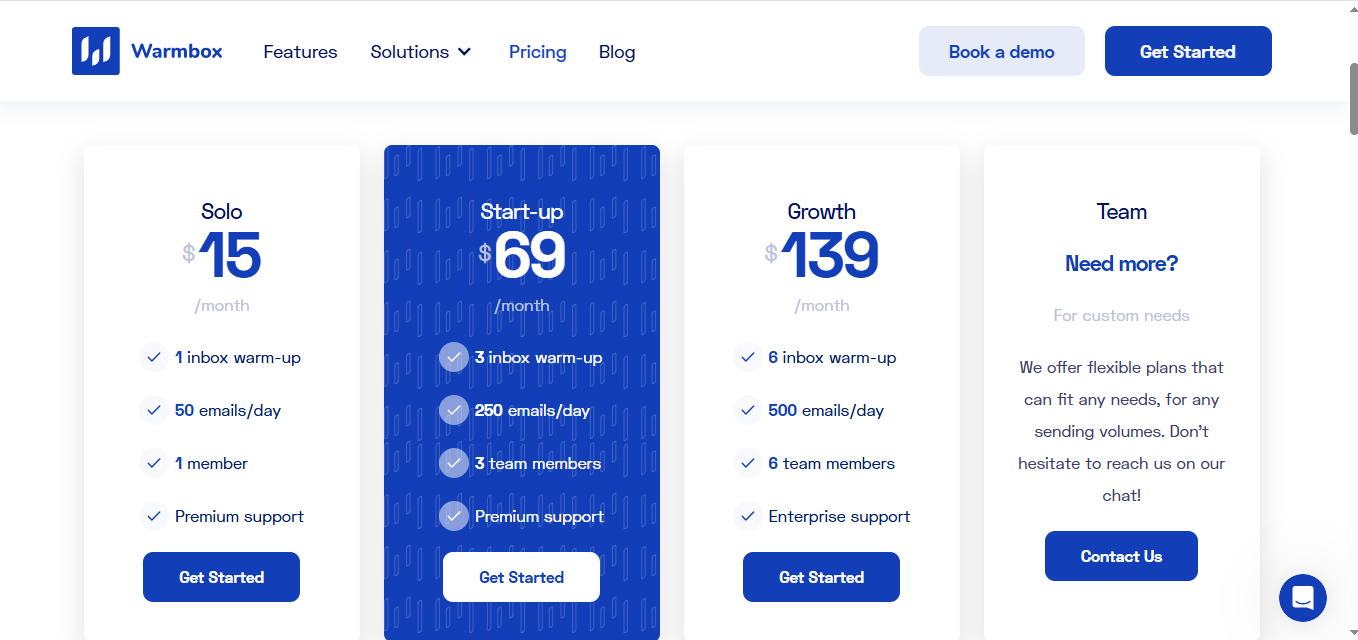
- Solo plan – $15/month
The solo plan is the cheapest plan and serves as an affordable entry point. It includes 1 inbox warm-up, 50 emails per day, and access for 1 member with premium support. - Startup plan – $69/month
The startup plan offers 3 inbox warm-ups, 250 emails per day, 3 team members, and premium support. - Growth – $139/month
You can warm up 6 inboxes, send 500 emails per day, add 6 team members, and get enterprise support. - Team – Custom plan
If you need more inboxes or higher sending limits, you can contact the Warmbox team for a flexible setup.
Every plan comes with all features, automated interactions, spam removal, auto-replies, blacklist, and DNS check, and access to their private inbox network.
What are the Pros and Cons of Warmbox?
Every tool has strengths and weaknesses. Here’s what Warmbox does well and where it falls short compared to other warm-up tools.
Pros of Warmbox
1. Helps your emails land in the inbox faster
You can start seeing better inbox placement after just a few days of warming, especially if your emails were previously hitting spam.
2. Rebuilds your sender reputation safely
Warmbox creates daily, human-like interactions with your emails so providers start trusting your domain again.
3. Saves time with full automation
After setup, it handles everything automatically, sending, opening, replying, and removing emails from spam without your involvement.
4. Works well for new domains
It’s a reliable option to warm up new domains before you start real campaigns, helping you avoid instant spam filtering.
5. Keeps performance consistent
Because it runs on a large private inbox network, the results stay stable across Gmail, Outlook, and other providers.
6. Affordable way to maintain deliverability
The Solo and Start-up plans make it cost-effective for individuals or small teams who just need a basic, ongoing warm-up.
Cons of Warmbox
1. Limited control over how warm-up runs
You can start warming easily, but you can't adjust deeper settings like how fast inboxes scale, when replies happen, or how many daily interactions occur. Tools like Warmforge give that extra flexibility.
2. No visibility into what’s actually hurting deliverability
Warmbox shows results improving, but not why. You don’t get insights into domain health, DNS issues, or which factors still affect inbox placement.
3. Hard to scale for bigger teams
If you manage 10 or more inboxes, the cost rises quickly, and handling everything manually across accounts can get messy.
4. No advanced reporting or reputation tracking
You can see open rates and general warm-up progress, but not deeper metrics like spam triggers, sender reputation score, or domain-level performance.
5. Doesn’t solve infrastructure-level problems
Warmbox focuses purely on warm-up. It doesn’t handle DNS, IP setup, or blacklist removal, which limits results if your problem is technical, not behavioral.
6. No built-in optimization or AI control
Unlike tools like Warmforge, which adjust warm-up patterns based on inbox health, Warmbox follows a static routine with no smart optimization.
Warmforge- The Best Warmbox Alternative for Scaling and Full Deliverability Control
Warmforge is an email warm-up and deliverability tool made for people who want more control when scaling cold email.

Warmbox helps you warm inboxes, but Warmforge helps you see what’s really happening, where your emails land, how healthy your domains are, and what’s hurting your deliverability.
Here’s what Warmforge does better:
- You see where your emails land: Warmforge shows if your emails go to primary, promotions, or spam with real placement tests.
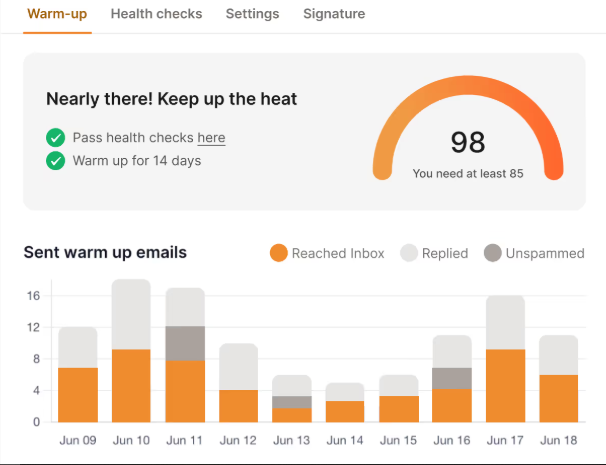
- You get a free test to start: It gives one free warm-up slot and a free deliverability test so you can check results before paying.
- It checks your infrastructure automatically: Warmforge scans your DNS, SPF, DKIM, and MX records to make sure your email setup and infrastructure are correctly configured.
- It keeps watching your inbox health: You can track domain reputation, blacklist status, and overall deliverability in real time.
- It offers Google Postmaster integration: Connect with Google Postmaster Tools for advanced deliverability insights and improved email reputation management.
- You can create your own templates: Users have the flexibility to create their own templates for outreach, allowing for greater customization and personalization.
- It warms smarter: The AI writes different, natural-looking emails every time, instead of repeating the same ones like standard tools.
- It’s built for scaling: Whether you handle a few inboxes or many, it keeps performance stable and easy to manage.
- It works with the Forge Stack: You can connect it with tools like Mailforge, Primeforge, and Leadsforge to manage everything in one place.
Warmbox helps you start, but Warmforge helps you scale safely and keep full control of your deliverability.
Final Verdict: Warmbox Reviews
Yes, Warmbox does what it promises. It helps you warm up inboxes, build a healthy sender reputation, and keep your cold emails out of spam. For small teams or solo users, it’s a simple and reliable way to get started. The main strengths of Warmbox are its ease of use and effectiveness for basic email warm-up. However, its weaknesses include limited advanced features and lack of in-depth deliverability tracking.
But if you want to go beyond basic warm-up, to actually see where your emails land, track domain health, and scale confidently, then Warmforge is the stronger choice. It gives you visibility, infrastructure checks, and continuous monitoring, all in one place.
So, if your goal is just to start warming, Warmbox works well.
If your goal is to grow, scale, and stay in control of deliverability long term, Warmforge is the better option.
Try a free warm-up slot and inbox placement test on Warmforge, see your emails reach the inbox, not spam.