Summarize this article
Table of contents
Get insights delivered straight into your inbox every week!

7 Best Warmbox Alternatives for Better Deliverability (2026 Tested)

I tested several warm-up tools while comparing them against Warmbox to see which ones make more sense for deliverability in 2026.

If you’re here, you’re probably doing the same, looking for better control, clearer reporting, flexible warm-up options, multi-inbox handling, and a setup that fits how you actually send cold emails.

To make it simple for you, I’ve listed the 7 best Warmbox alternatives and shared what I saw while testing them. 

And explained everything in a clear way, so you can choose which suits your use case best without confusion.

TL;DR: 7 Best Warmbox Alternatives

  • Warmforge combines warm-up, placement tests, and health checks in one system.

  • Mailivery offers unlimited mailboxes with shared daily warm-up volume.

  • Warmup Inbox uses per-inbox pricing with clear daily limits.

  • lemwarm adds technical setup checks and deliverability monitoring.

  • Mailwarm focuses on a daily warm-up with live inbox vs spam tracking.

  • MailReach pairs warm-up with built-in spam testing.

  • Instantly includes unlimited warm-up inside a larger outreach platform.
Try Warmforge with 1 Free Warming Slot and 1 Free Placement Test and check your deliverability before sending your next campaign.

Why Consider Warmbox Alternatives

Here are a few areas where Warmbox may feel restrictive, especially as your setup grows:

  • You don’t get much control over how the warm-up scales or how interactions are managed.

  • It doesn’t clearly show why deliverability issues are happening behind the scenes.

  • Costs can rise quickly when you start scaling across multiple inboxes.

  • Reporting stays basic and does not include sender-level or domain-level reputation tracking.

If these limitations affect your workflow, exploring alternatives becomes a practical next step.

7 Best Warmbox Alternatives Quick Comparison Table: 

Tool Automated Warm-up Spam / Inbox Monitoring Inbox Health Monitoring Supports ESPs Warm-up Limits Pricing
Warmforge AI one-click warm-up Placement tests DNS, MX & blacklist checks Google Workspace & MS365 Allows unlimited mailbox setup and warmup $9 per slot/month (annual). Placement tests: $32.5/month
Mailivery AI peer-to-peer interactions Spam & reputation analytics 70+ blacklist monitoring Unlimited mailboxes 100 / 600 / 2000 emails per day based on plans $29 / $79 / $199 per month
Warmup Inbox Automated send & reply Spam & category monitoring Gmail, Outlook, Zoho, SendGrid 75 / 250 / 1000 per day per inbox $15 / $49 / $79 per inbox/month
lemwarm Automated warm-up Deliverability reports & alerts Technical setup check Works with configured email domains 40 emails per inbox per day $29 / $49 per email/month
Mailwarm Daily automated warm-up Live inbox vs spam tracking Gmail, Outlook, Yahoo, AWS, SMTP 50 / 200 / 500 per day $69 / $159 / $479 per month
MailReach Fully automated warm-up Spam tester & inbox placement Domain & inbox health checks Any SMTP provider Up to 100 per day per mailbox $25 (1–5), $19.5 (6–20), $18 (21–50), $16 (51–100+) per mailbox
Instantly Unlimited automated warm-up Deliverability dashboard Health checks included Any SMTP provider Unlimited warm-up $37.6 / $77.6 / $286.3 per month

Now let's know about each in detail.

1. Warmforge

Warmforge is a tool that helps you warm up your email inbox and manage your overall deliverability in one place.

It mimics real human behavior inside your mailbox using AI-written emails

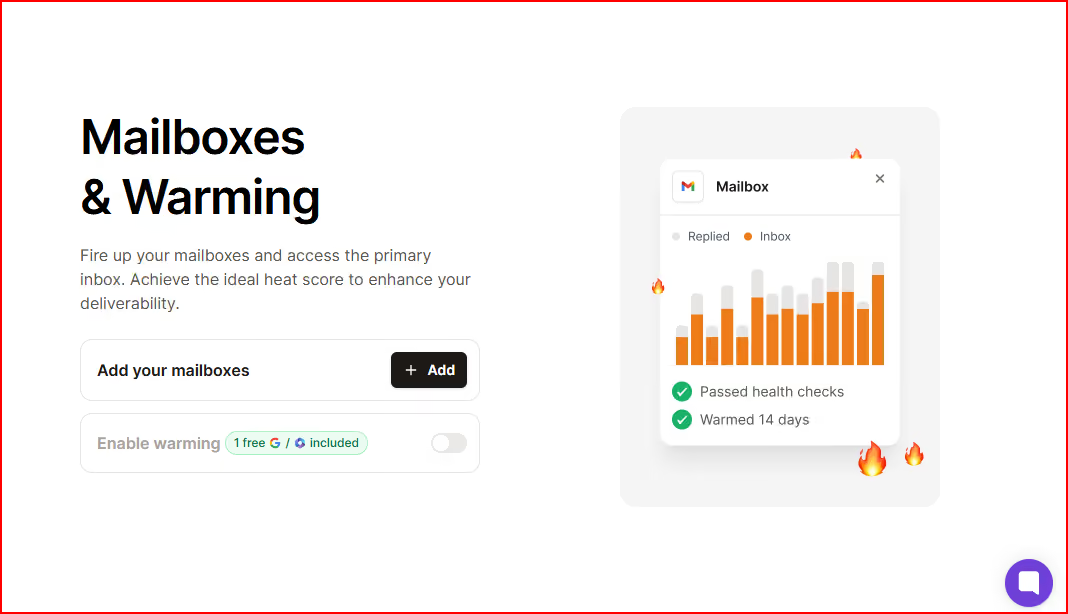
And you can turn it on with a single click and start warming up.

Warmforge’s one-click setup
This image shows the Warmforge’s one-click setup

Inside the same dashboard, you can monitor mailbox health, check DNS and MX records, and see blacklist status.

 You can run placement tests before sending across different ESPs like Google and Outlook.

It also helps you monitor and maximize your mailbox Heat Score™ while keeping warm-up running continuously.

Warmforge works with Google Workspace and Microsoft 365 mailboxes, and if you use Salesforge, unlimited warm-up slots are included there.

 Use Salesforge for multichannel outreach and get unlimited warm-up with Warmforge. 

Key Features 

  • One-click AI email warm-up that runs automatically

  • Premium warm-up pool by default (no separate tiers)

  • Pool made up only of aged Google Workspace and Microsoft 365 accounts

  • Placement tests to check inbox placement across ESPs

  • Health checks, including DNS, MX records, and blacklist status

  • 1 free placement test per month included with warm-up

  • API access available

  • Integrated with Salesforge (unlimited warm-up slots included there)

  • Helps monitor and maximize your mailbox Heat Score™

Pricing

Warmforge pricing works per mailbox.

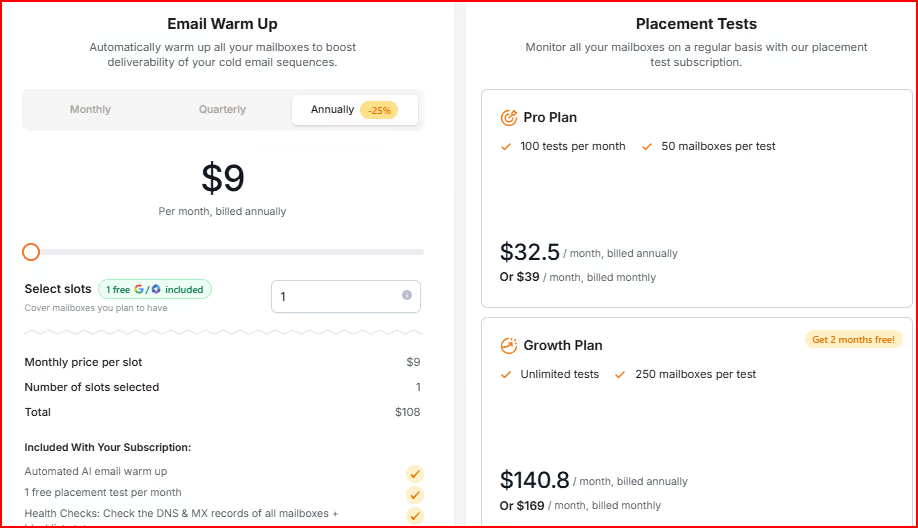
Warmforge pricing
This image shows the Warmforge pricing

Email Warm-Up – $9 per slot/month (billed annually)

  • You pay per mailbox slot. Each slot includes automated AI warm-up, DNS and MX checks, blacklist monitoring, and 1 free placement test every month.
  • If you need to warm more inboxes, you just add more slots.

Placement Tests – Pro Plan

  • $32.5/month billed annually (or $39 monthly).

  • You get 100 placement tests per month, with up to 50 mailboxes tested in each run.

Placement Tests – Growth Plan

  • $140.8/month billed annually (or $169 monthly).

  • You get unlimited placement tests, with up to 250 mailboxes per test.

Pros

  • Let's you warm mailboxes and monitor their health in one place instead of using separate tools.

  • Placement tests help you spot deliverability issues early.

  • A premium warm-up pool is included by default for every mailbox.

  • Heat Score™ tracking helps you monitor overall mailbox strength over time.

Cons

  • Works only with Google Workspace and Microsoft 365 mailboxes.

2. Mailivery

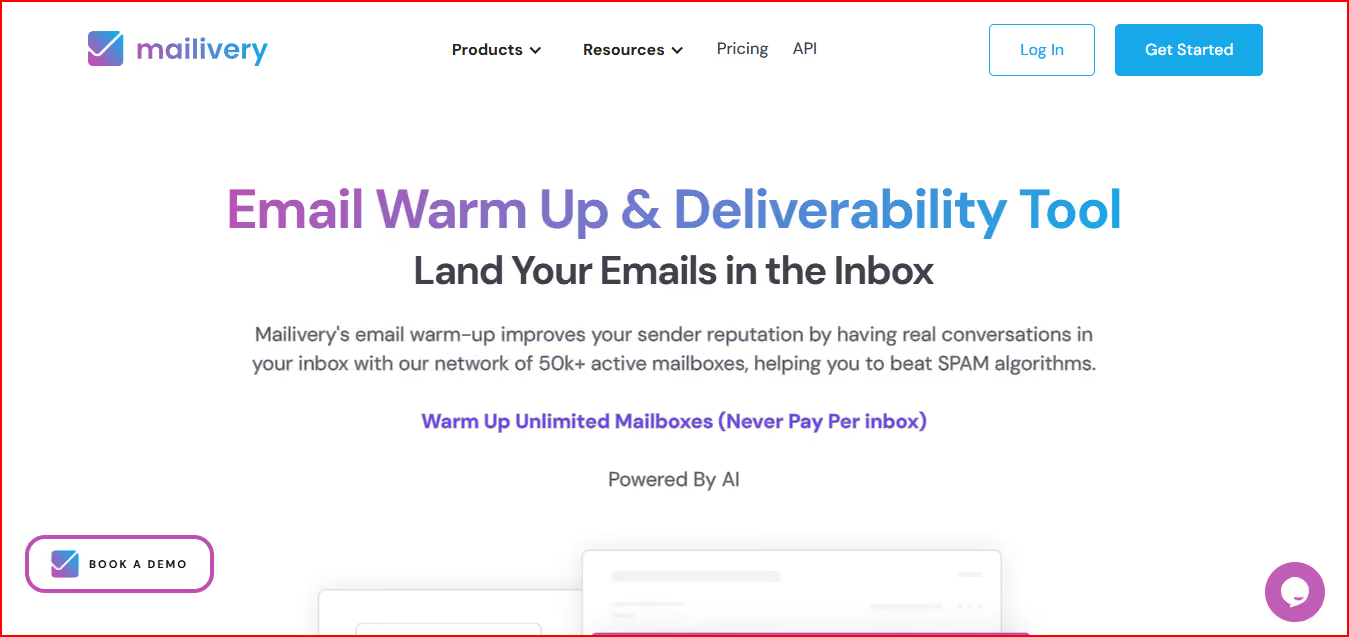
Mailivery is an email warm-up and deliverability tool built to help your emails land in the Primary Inbox instead of Spam or Promotions.

Mailvery- Email warmup and deliverability tool
This image shows the Mailvery- Email warmup and deliverability tool

It improves your sender reputation by creating real AI-powered conversations inside your inbox using a peer-to-peer network of active mailboxes.

The system automatically sends, replies, reads, and moves emails behind the scenes so your outreach looks natural to email providers.

You also get spam analytics, blacklist monitoring, email verification, team management, and API access inside one dashboard.

Key Features

  • Mailivery uses AI-powered interactions with real peer-to-peer email accounts.
  • It automatically moves emails from Spam to Inbox and generates positive replies.
  • You get spam and reputation analytics to see how many emails are landing in Spam in real time.
  • It includes blacklist monitoring across 70+ blacklists with recommendations.
  • You can customize warm-up volume and timing to control daily limits.
  • Unlimited mailboxes are included in every plan.
  • It supports team roles, shared dashboards, API access, and scalable usage.

Pricing

Mailvery offers three main pricing plans.

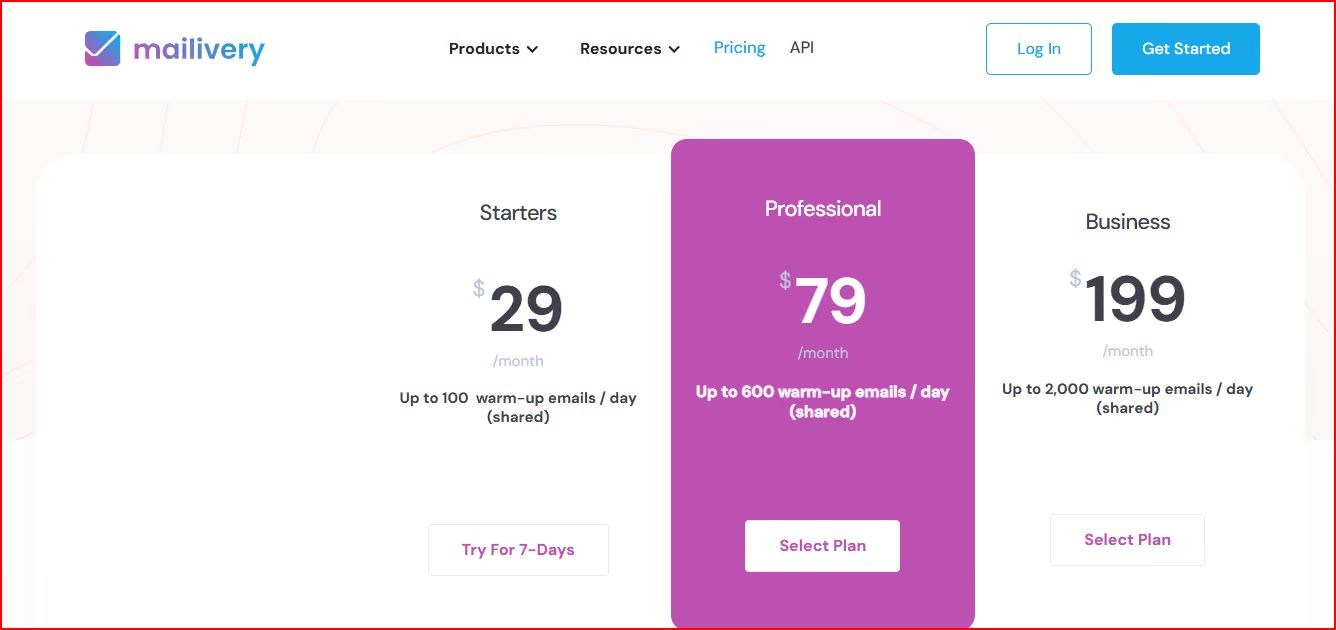
Mailvery pricing
This image shows the Mailvery pricing

Starter – $29/month

  • You get up to 100 warm-up emails per day (shared), unlimited mailboxes, 2 blacklist monitors, and 100 email verification credits.
  • This plan supports 2 team users and allows up to a 30% response rate.

Professional – $79/month

  • You get up to 600 warm-up emails per day (shared), unlimited mailboxes, 10 blacklist monitors, and 500 verification credits.
  • This plan supports 4 team users and allows up to a 55% response rate.

Business – $199/month

  • You get up to 2,000 warm-up emails per day (shared), unlimited mailboxes, 50 blacklist monitors, and 2,000 verification credits.
  • This plan supports 10 team users and allows up to a 55% response rate.

Pros

  • Helps improve sender reputation through real peer-to-peer interactions.

  • Gives real-time visibility into spam rate so you can react quickly.

  • Blacklist monitoring alerts you if your domain or IP gets flagged.

  • Unlimited mailboxes make it easier to manage multiple inboxes under one plan.

  • Custom volume and timing controls help you keep warm-up activity within safe limits.

Cons

  • Daily warm-up limits are shared across all connected mailboxes.

  • Response rate limits depend on the selected plan.

  • Higher volume needs require upgrading to more expensive plans.

3. Warmup Inbox

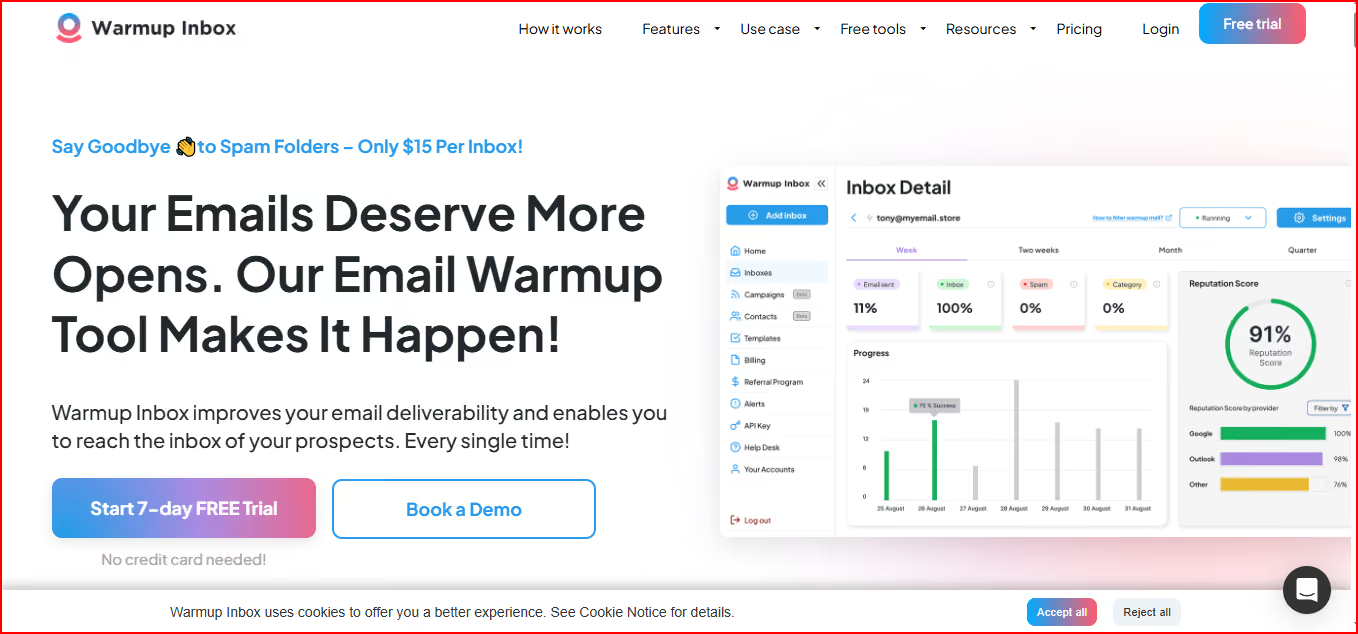
Warmup Inbox is an email warm-up tool that helps you improve deliverability by building your sender reputation gradually.

Warmup Inbox:- email warmup tool
This image shows the Warmup Inbox:- email warmup tool

It works by sending and replying to real emails through a large network of real inboxes, so your activity looks natural to email providers.

Once you connect your inbox, the system automatically increases warm-up activity over time to help your emails avoid Spam and Promotions folders.

It supports providers like Gmail, Outlook, Zoho, SendGrid, and more.

Key Features

  • It connects your inbox to a large network of real inboxes for ongoing interactions.
  • It automatically sends and replies to emails to strengthen your sender reputation.
  • You can monitor spam placement and category placement through the dashboard.
  • You get email reputation checks and alerts if something goes wrong.
  • Plans include human-like AI generated content for warm-up messages.
  • Pro and higher plans allow custom templates, language warm-up, ESP-specific warm-up, and scheduled warm-up.
  • API access and outreach sequences are also included.

Pricing

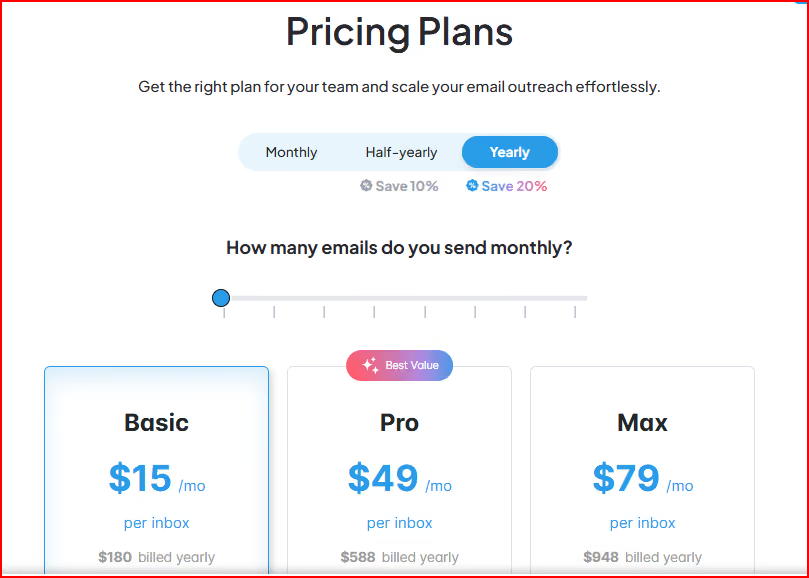
Warmup Inbox offers three Pricing plans.

Warmup Inbox pricing
This image shows the Warmup Inbox pricing

Basic – $15 per inbox/month

  • You get 75 warm-up messages per day and replies up to 25%.
  • This plan includes spam monitoring, dashboards, AI content, API access, and support.

Pro – $49 per inbox/month

  • You get 250 warm-up messages per day and replies up to 45%.
  • It includes custom templates, language warm-up, ESP-specific warm-up, and priority support.

Max – $79 per inbox/month

  • You get 1,000 warm-up messages per day and replies up to 50%.
  • It includes premium support, technical setup check, unlimited API access, and early feature access.

Pros

  • Helps improve sender reputation through gradual and natural activity.

  • A large network of real inboxes supports ongoing warm-up interactions.

  • Spam and category monitoring help you track inbox placement.

  • Flexible plans allow higher daily warm-up volume when needed.

  • Easy setup and dashboard reporting make it simple to manage.

Cons

  • Daily warm-up volume is limited based on the selected plan.

  • Reply rate during warm-up is limited depending on the plan.

  • Advanced customization features are only available in higher-tier plans.
  • Higher warm-up limits require upgrading to more expensive plans.

4. lemwarm

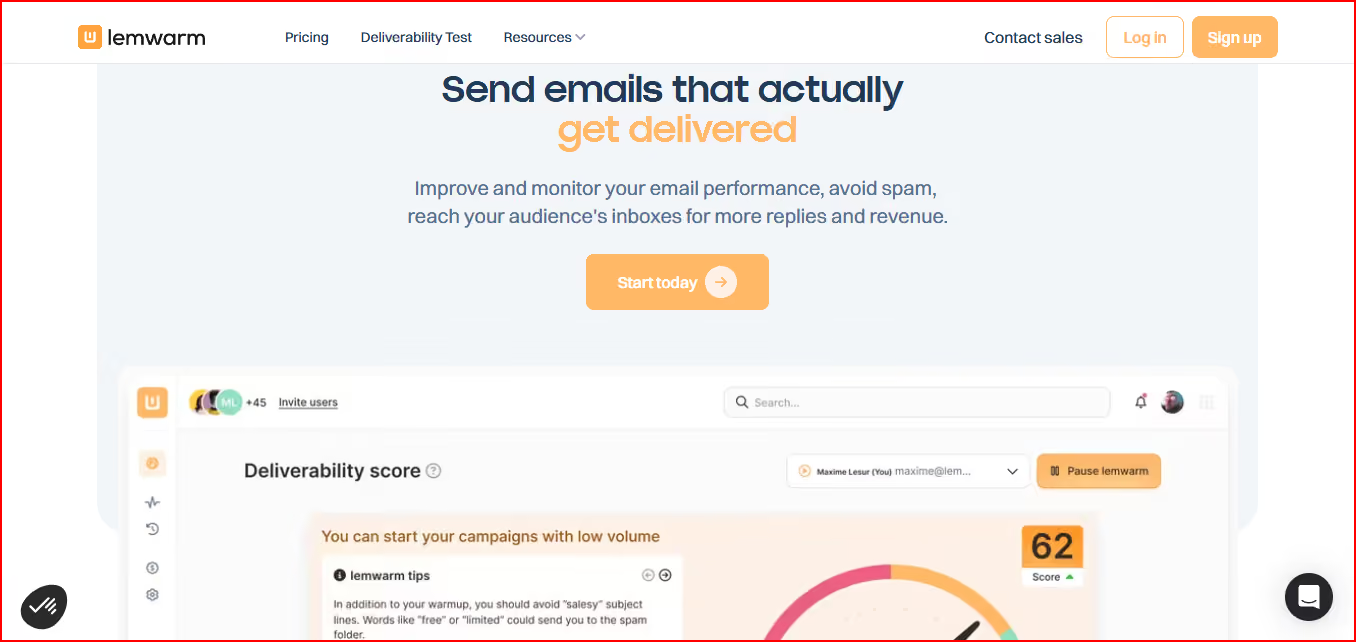
lemwarm is a warm-up and deliverability booster tool designed to help your emails reach the inbox instead of spam.

Lemwarm- Email warmup and deliverability tool
This image shows the Lemwarm- Email warmup and deliverability tool

It helps you set up your email correctly, warm it up with automated and human-like emails.

It also lets you monitor your performance over time.

The warm-up runs through a large network of healthy domains across 150+ countries to gradually improve your domain reputation.

Beyond warm-up, it also monitors your technical setup, sending habits, content risks, and overall deliverability performance.

Key Features

  • Lemwarm automatically warms up your email before you start outreach.
  • It checks your technical setup, including SPF, DKIM, DMARC, MX records, and custom tracking domains.
  • You get deliverability reports and daily insights on performance.
  • It sends personalized warm-up emails and generates natural replies.
  • It monitors sending volume and warns you if your content may trigger spam filters.
  • The Smart plan allows warming up your real templates and gives custom alerts and tips.

Pricing

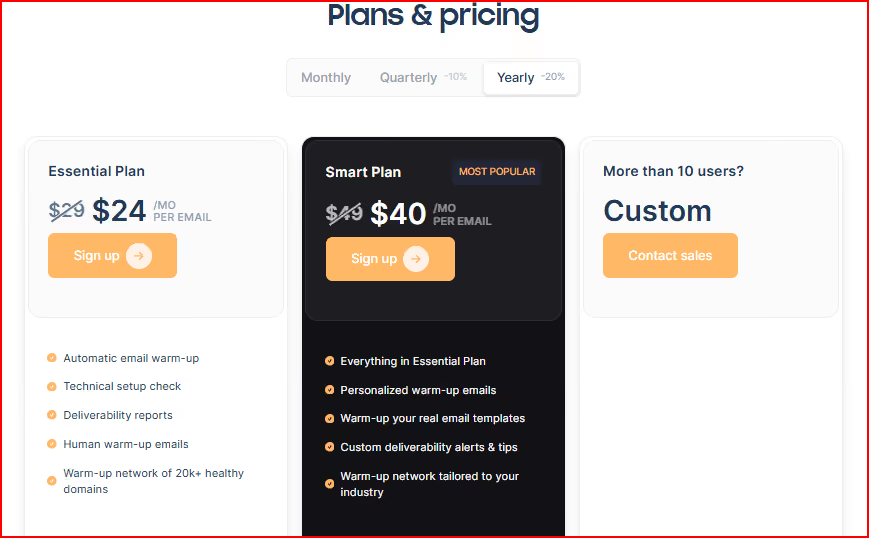
Lemwarm offers two plans.

Lemwarm pricing
This image shows the Lemwarm pricing

Essential Plan – $24/month per email

  • You get automatic warm-up, technical setup check, deliverability reports, and access to a large warm-up network.
  • This plan includes human warm-up emails and core monitoring features.

Smart Plan – $40/month per email

  • You get everything in Essential plus personalized warm-up emails and the ability to warm up your real templates.
  • It also includes custom alerts, tips, and a warm-up network tailored to your industry.

Pros

  • Helps improve domain reputation through a large and diverse warm-up network.

  • Includes technical setup checks to prevent configuration issues.

  • Provides daily insights and alerts to monitor deliverability closely.

  • Allows warming up real email templates in higher plans.

Cons

  • Pricing is charged per email account, which can increase cost as you scale.

  • Advanced features like personalized warm-up and industry-tailored network require the Smart plan.

  • The initial warm-up phase takes around 3–4 weeks before the full effect.

  • Stopping warm-up after the initial phase can reduce your deliverability score.

  • Ongoing use is required to maintain stable sending patterns.

5. Mailwarm

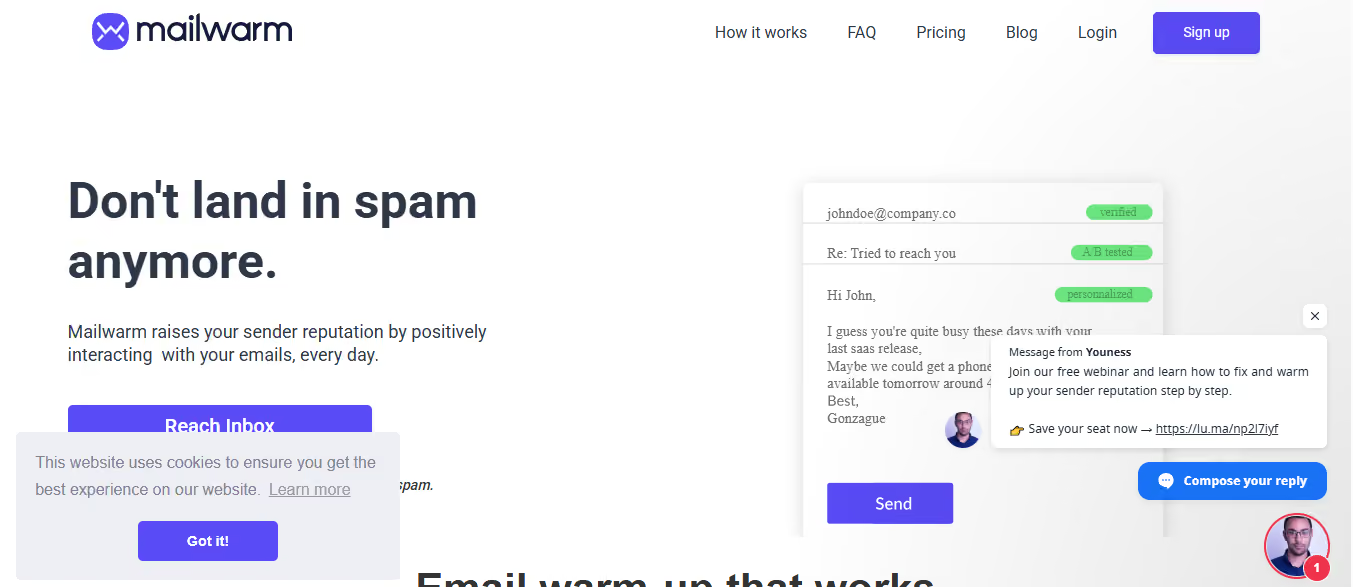
Mailwarm is an email warm-up tool that helps your emails stop landing in Spam and start reaching the Primary inbox.

Mailwarm- email warmup tool
This image shows the Mailwarm- email warmup tool

It does this by sending daily warm-up emails from your mailbox to a large network of Mailwarm accounts and generating real engagement like opens, replies, and important marks.

The system runs automatically based on your schedule, so your inbox shows natural and steady activity.

You can also see live inbox vs spam placement tracking, so you know exactly where your emails are landing.

Mailwarm supports Gmail, Outlook, Yahoo, Zoho, AWS, SendGrid, Mailgun, and other SMTP platforms.

Key Features

  • It sends automated warm-up emails every day to build sender reputation.
  • It creates natural actions like opens, replies, and marking emails as important.
  • You get live inbox vs spam tracking that runs 24/7.
  • The dashboard lets you monitor daily activity and adjust intensity or pause anytime.
  • Higher plans include deliverability expert consulting and a free deliverability audit.

Pricing

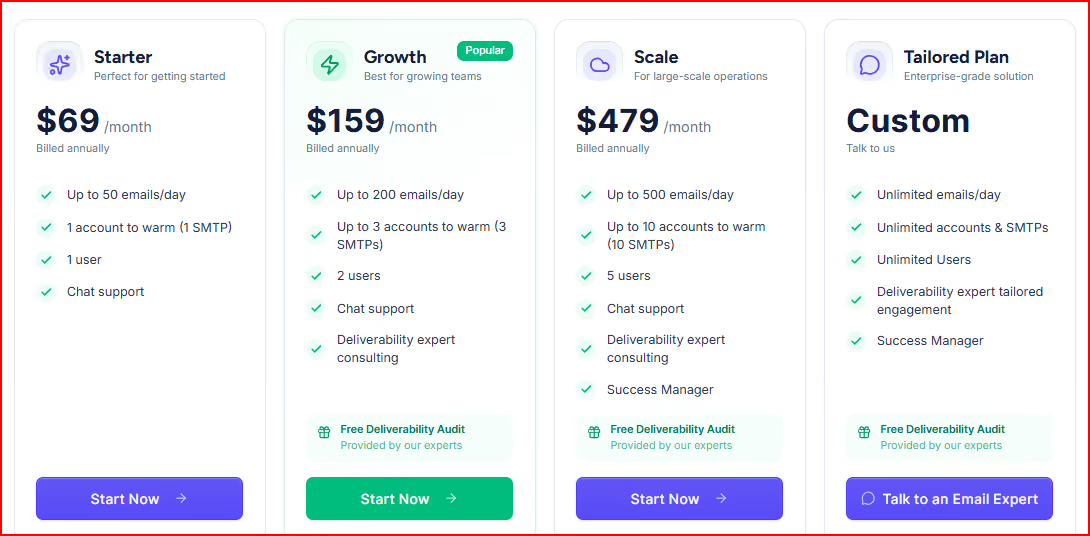
Mailwarm offers 4 pricing plans.

Mailwarm pricing
This image shows the Mailwarm pricing

Starter – $69/month (billed annually)

  • You can warm up to 50 emails per day with 1 account and 1 user included.
  • This plan includes chat support.

Growth – $159/month (billed annually)

  • You can warm up to 200 emails per day and up to 3 accounts.
  • It includes chat support, deliverability expert consulting, and a free audit.

Scale – $479/month (billed annually)

  • You can warm up to 500 emails per day and up to 10 accounts.
  • It includes consulting, a success manager, and a free deliverability audit.

Tailored Plan – Custom

  • You get unlimited emails, unlimited accounts, and unlimited users.
  • It includes expert engagement and a dedicated success manager.

6. MailReach

MailReach is an email warm-up and spam testing tool focused fully on deliverability.

Mailreach - email warmup tool
This image shows the Mailreach - email warmup tool

It helps you repair, raise, and maintain your sender reputation through automated positive interactions with a network of high-reputation accounts.

Along with a warm-up, it includes a spam checker so you can test inbox placement manually or automatically at your chosen frequency.

It works with any email provider that supports SMTP, including Gmail, Outlook, Zoho, Mailgun, SendGrid, Amazon SES, and more.

Key Features

  • It automatically warms up your email, domain, and associated IP.
  • It uses a smart AI warming algorithm to create meaningful and human-like interactions.
  • You get spam testing to check inbox placement and spam score.
  • The dashboard tracks reputation, blacklist status, SPF, DKIM, DMARC, and overall inbox health.
  • It includes MailReach Co-Pilot, an AI deliverability assistant.

Pricing

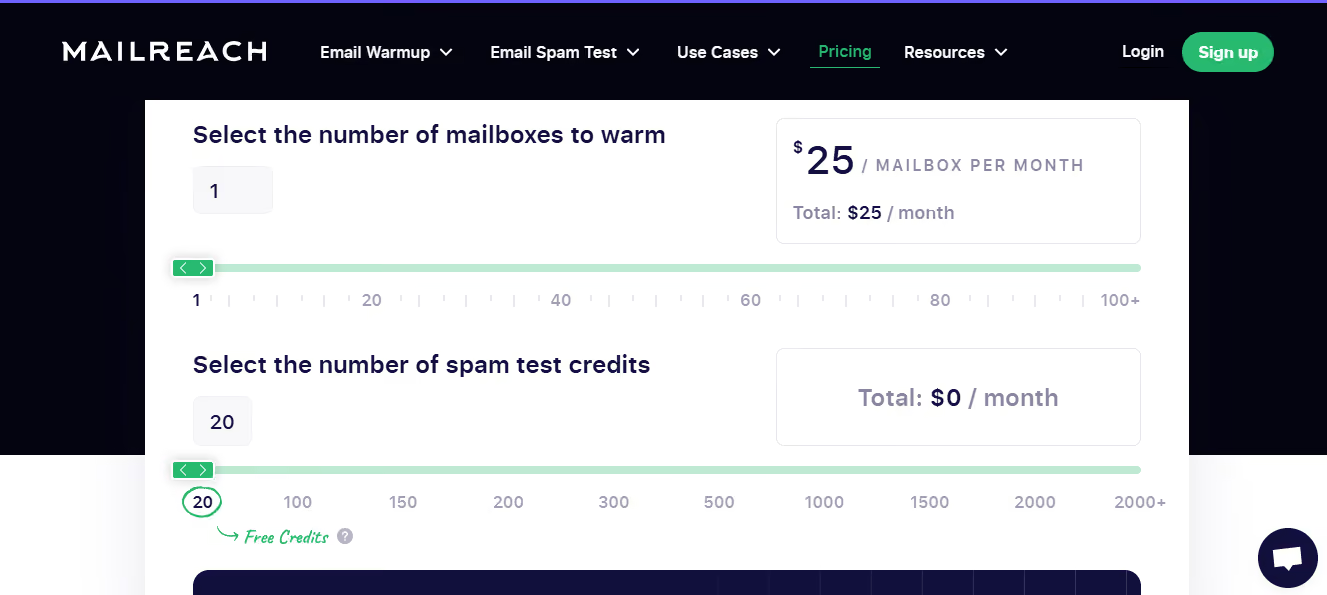
MailReach pricing depends on how many mailboxes you warm, and the cost per mailbox decreases as you scale.

Mailreach pricing
This image shows the Mailreach pricing
  • 1–5 mailboxes: $25 per mailbox/month

  • 6–20 mailboxes: $19.5 per mailbox/month

  • 21–50 mailboxes: $18 per mailbox/month

  • 51–100+ mailboxes: $16 per mailbox/month

Each mailbox includes fully automated warm-up, 20 spam test credits, AI warming algorithm, and MailReach Co-Pilot.

You also get domain and inbox health checks (SPF, DKIM, DMARC, blacklist), a reputation tracking dashboard, multiple ESP warm-up support, and up to 100 emails per day per mailbox.

Pros

  • Focuses fully on deliverability instead of being an add-on feature.

  • Warms email, domain, and IP together to maintain overall sender reputation.

  • Spam testing helps identify inbox placement issues early.

  • Health checks track SPF, DKIM, DMARC, blacklist, and inbox status.

  • Works with any SMTP-supported email provider.

Cons

  • Up to 100 emails per day limit per mailbox in the standard plan.

  • Spam test credits are limited unless upgraded.

7. Instantly 

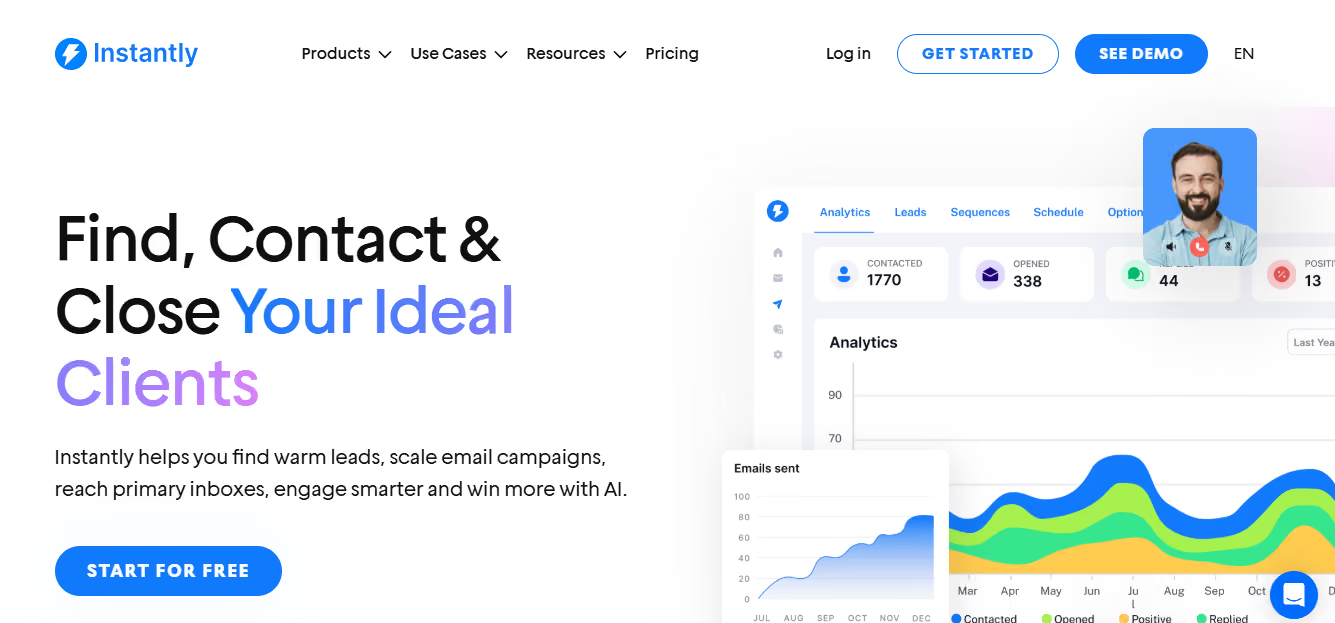
Instantly is a sales engagement and email outreach platform that also includes a built-in Deliverability Network.

Instantly - email deliverability platform
This image shows the Instantly - email deliverability platform

Inside the platform, you get unlimited email warm-up, which runs automatically to improve your sending reputation.

It uses a large network of real email accounts to create positive interactions and strengthen deliverability.

After connecting your email accounts, you can activate warm-up with one click and monitor inbox vs spam placement from the dashboard.

Key Warm-Up Features

  • Unlimited email warm-up included in all plans.

  • 1-click activation after connecting your accounts.

  • Slow Ramp to gradually increase warm-up activity.

  • Deliverability dashboard showing inbox vs spam placement.

  • Advanced controls for open rate, response rate, and spam protection.

  • Read emulation to mimic human-like engagement.

Pricing

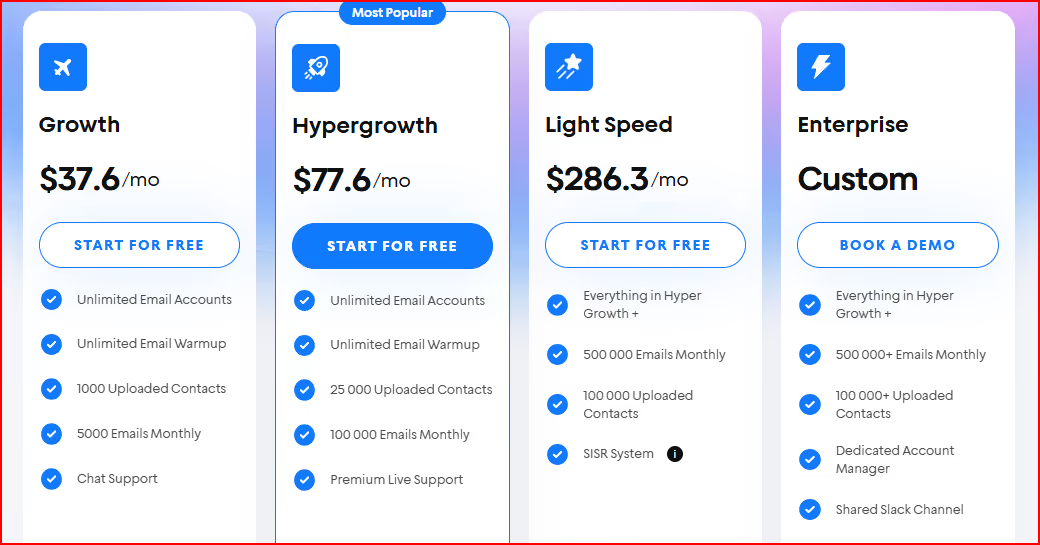
Instantly offers 4 outreach plans.

Instantly pricing
This image shows the Instantly pricing

Growth – $37.6/month

Includes unlimited email accounts and unlimited warm-up.

Allows up to 5,000 emails monthly.

Hypergrowth – $77.6/month

Includes unlimited accounts and unlimited warm-up.

Allows up to 100,000 emails monthly.

Light Speed – $286.3/month

Includes everything in Hypergrowth plus 500,000 emails monthly.

Enterprise – Custom

Includes private deliverability network and dedicated account support.

Designed for large-scale sending needs.

Pros

  • Unlimited email warm-up across all plans.

  • One-click activation makes setup simple.

  • Deliverability dashboard gives clear inbox vs spam visibility.

  • Advanced settings allow control over warm-up behavior.

Cons

  • Higher email sending limits require upgrading to more expensive plans.

  • Advanced features like a private deliverability network are available only in Enterprise.

  • Pricing increases significantly for large-scale sending needs.

Warm-up tools help improve inbox placement. 

But if you're facing challenges related to domain setup, DNS records, or infrastructure, you can use tools like Mailforge and Infraforge.

They offer ready-to-use infrastructure with automated setup and monitoring, which is safe to scale.

Conclusion

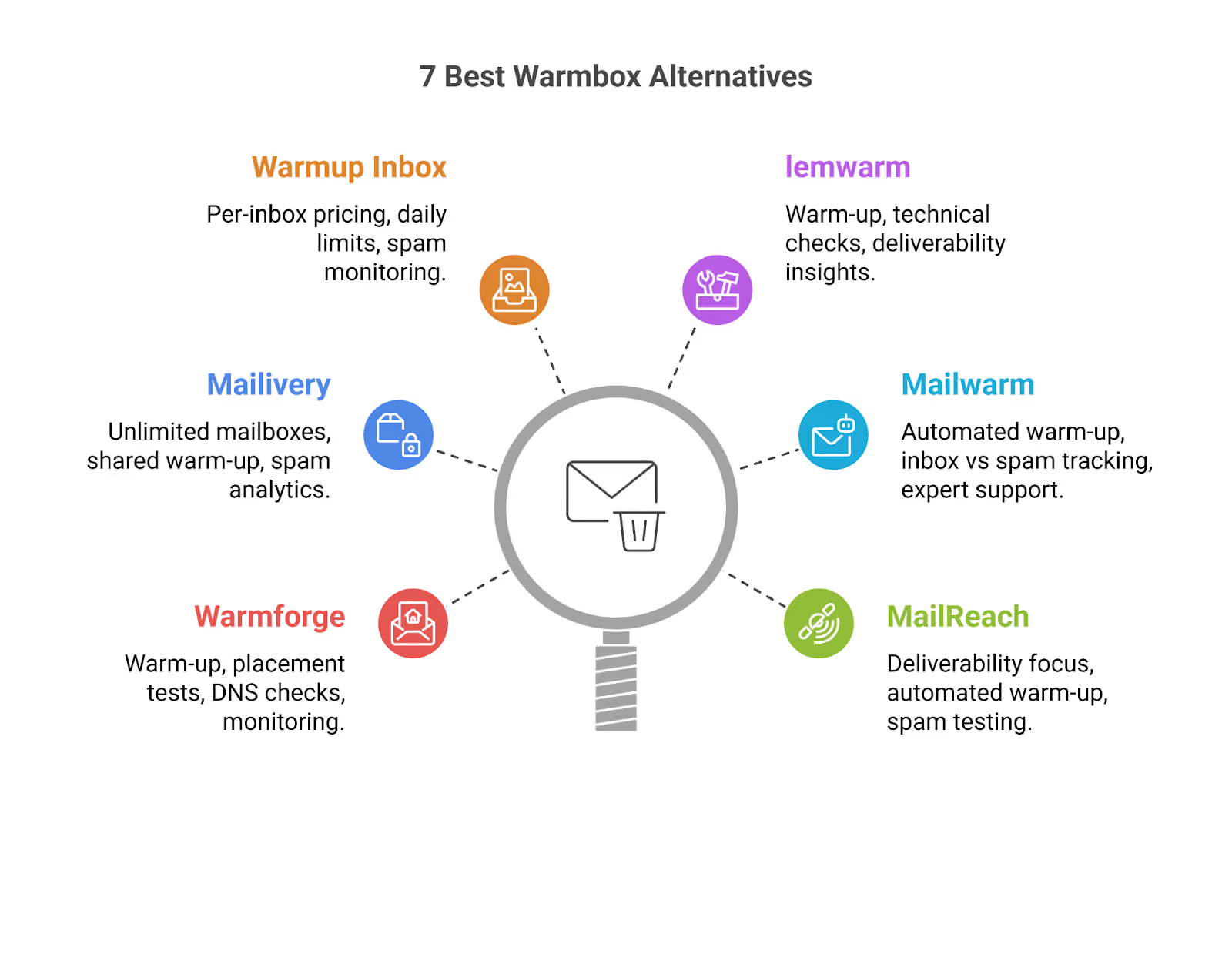
If you’re looking for the best Warmbox alternative in 2026, the right choice really depends on how you send emails and how much you plan to scale.

7 best Warmbox Alternatives
This image shows the 7 best Warmbox Alternatives
  • Warmforge is a good choice if you want warm-up combined with placement tests, DNS and blacklist checks, and Heat Score™ tracking in one place.

  • Mailivery works well if you want unlimited mailboxes under one plan with shared daily warm-up volume and spam analytics.

  • Warmup Inbox fits if you prefer per-inbox pricing with clear daily limits and spam monitoring.

  • lemwarm is suitable if you want warm-up along with technical setup checks and ongoing deliverability insights.

  • Mailwarm focuses on daily automated warm-up with live inbox vs spam tracking and expert support in higher plans.

  • MailReach keeps the focus on deliverability with automated warm-up, spam testing, and inbox health checks.

  • Instantly makes sense if you want unlimited warm-up built inside a larger outreach platform with a large deliverability network.

If you want everything around warm-up, monitoring, and placement checks in one structured system, Warmforge brings all of that together in a single setup

That makes it one of the most complete options to look at first when choosing a Warmbox alternative.

Start with Warmforge at just $9 per inbox and scale your deliverability with warm-up, placement tests, and monitoring all in one place.