
Personalized Outbound Strategy
Get The Right Outbound Strategy In Minutes
Enter your email to get a custom plan & stack recommendation for your business
It's being carefully crafted by AI
Please check your mailbox in 5 minutes

Like most email spam checker tools, Unspam asks you to send your email to a test address. A minute later, it shows everything a receiving server can see about the message, including authentication, blacklists, links, copy, and the fingerprint your inbox leaves behind.
That’s a fair trade, and the free plan lets you run five tests each month. Paid plans are also affordable. The real question is whether the report tells you what matters.
A missing unsubscribe header costs 10 points, while passing SPF, DKIM, and DMARC adds nothing. Link tracking can pass even when six of your seven links redirect through a tracking domain. The score is useful, but only if you understand what it hides.
I reviewed every screen in the order a cold email sender would use it, calculated the actual cost per test, and compared the placement network with the providers most B2B prospects use.
Unspam tells you when something is wrong. If you need help fixing it, I’ll also compare it with Warmforge, which warms mailboxes, continuously checks health, and tests placement against business inboxes.
Unspam combines several checks that usually sit across separate tools. You send one email and receive a spam score, authentication report, blacklist results, link analysis, and design preview.
The itemized score is the most useful part. Instead of a vague warning, Unspam shows exactly where you lost points. If the email lacks a List-Unsubscribe header, you lose 10 points. If an image has no alt text, the accessibility section identifies it.
The weakness is how the score weighs each signal. SPF, DKIM, and DMARC can all pass without adding points, while a missing header removes 10. That may make a technically sound email look worse than expected.
The score also treats each message as a snapshot. A mailbox can pass today and develop a reputation problem next week. Unspam won’t notice unless you send another test.
Placement testing provides more direct evidence, but the receiving accounts matter. Many seeds use Gmail, Outlook.com, Yahoo, and other consumer services. Cold email teams usually care more about Google Workspace and Microsoft 365 business inboxes.
Unspam is strongest as a final check before launching. It isn’t a system for improving a damaged mailbox or monitoring it continuously.
Ten people have reviewed Unspam on G2, but G2 counts only six. The other four are marked as business partners of the seller or a competitor, so their ratings don’t affect the score.
All ten reviews appeared within 13 days, between August 21 and September 2, 2026, with five posted on one day. Every rating is 4.5 or 5 stars.
That doesn’t make the reviews useless. But I’d give the six counted reviews more weight and use the other four for detail rather than a verdict.
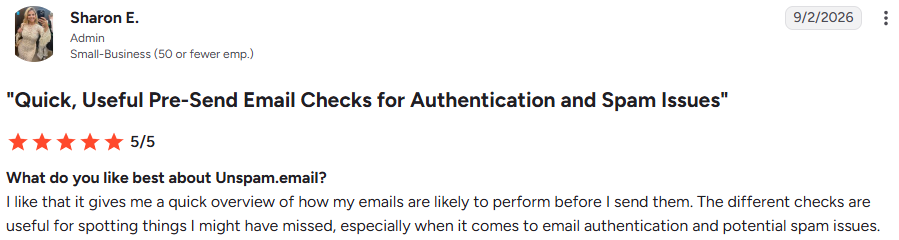
This is the most consistent praise, and it matches what Unspam does best. Sharon E., (G2, Sep 2, 2026, 5/5), likes that the checks catch "things I might have missed, especially when it comes to email authentication."
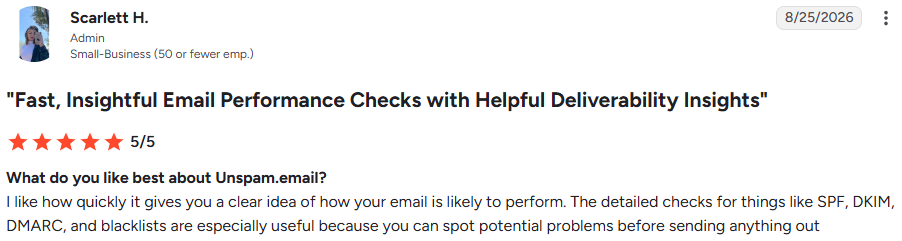
Scarlett H., (G2, Aug 25, 2026, 5/5), points to the SPF, DKIM, DMARC, and blacklist checks specifically, because they let her spot problems before sending anything.
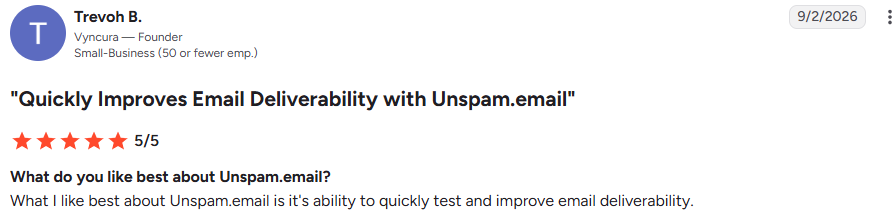
Trevoh B., (G2, Sep 2, 2026, 5/5), says he likes how quickly it tests deliverability. That matches the process: one email to a test address, then one result.
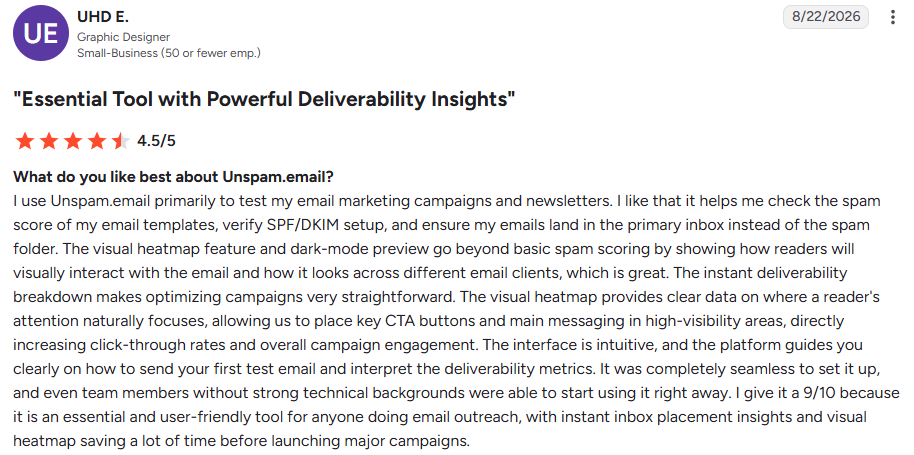
UHD E., a graphic designer (G2, Aug 22, 2026, 4.5/5), gives the most detailed review. He tests newsletters and uses the heatmap to place buttons and key messages, plus the dark-mode preview to check rendering across clients.
That’s a real use case, but notice who benefits. If you send plain-text cold emails, the features he values most won’t help much.
Three people say the reports feel heavy at first. Sharon E. calls the results “a little detailed when you first use the tool.”

Scarlett H. says the amount of information “can feel like a lot at first” if deliverability is new to you. Michael J., an excluded reviewer, says the same about the interface.

Trevoh B. sees it differently and calls the reporting “a bit basic.” My view is that the report lists many checks but doesn’t explore any one of them deeply.


UHD E. says the free credits “run out quickly if I’m managing multiple campaigns,” and wants more flexible pricing for small teams and freelancers.
He also wants white-label PDF reports and team collaboration, so agencies can share audits with clients. If you manage deliverability for clients, that gap affects you directly.

Ethan C., an excluded reviewer, wants more guidance on advanced domain authentication.

Lanie C., also excluded, wants more email client tests and clearer suggestions.
I reviewed Unspam in the same order you’d use it before launching a cold email campaign. I started with the spam test, checked authentication and links, then moved to previews and placement.
Enter a domain, IP, or email address, and Unspam checks it against 14 blacklists. The example returns 13 of 14 clean, with one Barracuda listing.
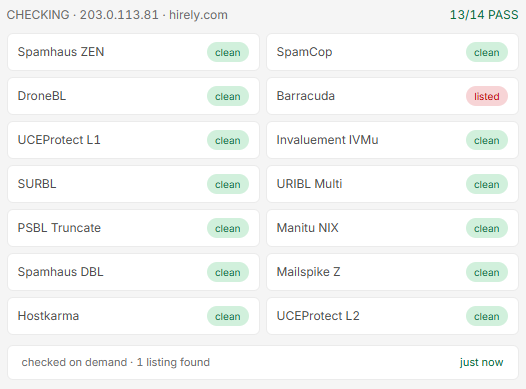
That’s useful to know before sending a single email. But the result ends there. It won’t explain why you were listed or how to request removal, so you’ll need to handle delisting on the blacklist’s site.
Send your email to the test address, and you get a score out of 100. The example scores 90, rated excellent, and lists four checks: SPF, DKIM, and DMARC aligned for +3, all 12 links healthy for +1, an HTML-to-text ratio of 1.8 for +1, and a missing List-Unsubscribe-Post header for −10.
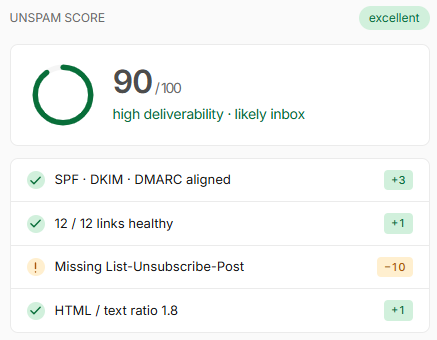
Read the penalties before fixing anything. Some matter for every email. Others, like the unsubscribe header, mainly apply to bulk marketing mail. If you send plain-text cold emails individually, you can decide whether those points matter.
One rule matters more than the score: if SPF, DKIM, or DMARC fails, the report marks you high risk regardless of the number. Always fix authentication first.
This is the test I’d trust most. Your email goes to seed inboxes at different providers, and four seconds later, you see where each copy landed.
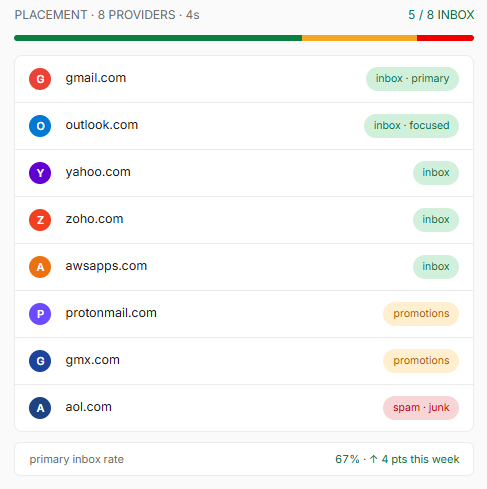
In the example, 5 of 8 copies reached the inbox. Gmail placed it in Primary, Outlook in Focused, ProtonMail and GMX in Promotions, and AOL in spam, giving it a 67% primary inbox rate.
Each test costs $0.50 on the paid plan, regardless of how many seed inboxes it reaches. That makes it cheap insurance before a large send. Just remember that the seeds are mostly personal addresses with no history with you. A prospect who has replied before gets treated differently from a new seed inbox.
Connect a sending mailbox through SMTP, schedule a test, and Unspam runs it on your chosen days. It graphs every run, showing placement by provider and the change since the previous test.
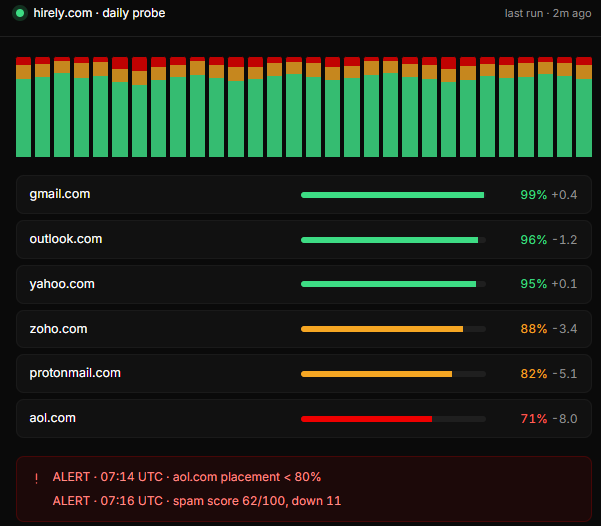
In the example, Gmail sits at 99% and Outlook at 96%, while AOL has dropped 8 points to 71%.
During warmup, that provider-level view tells you what one number can’t: you can keep ramping at Gmail while slowing down where placement is slipping.
Confirm two things before relying on it. First, scheduled tests appear as a Custom plan feature on the pricing page, while the FAQ suggests any account can use them, so check the free plan.
Second, every monitored mailbox needs separate tests. One daily placement test across 10 mailboxes costs about $150 monthly at $0.50 each, before discounts.
When a number changes, Unspam emails you. The example alerts trigger when AOL placement drops below 80% and when the spam score falls from 11 points to 62.
That alert helps because a filter change can reduce replies before you notice. But Unspam can’t pause your campaign, switch mailboxes, or reduce sending. You’ll make those changes in your sending tool, while the usual fixes for poor placement, rest, and warm-up happen elsewhere.
If you have a developer, the API can send alerts wherever your team already works. It can also run a spam check whenever a template changes and block the release if the score drops.
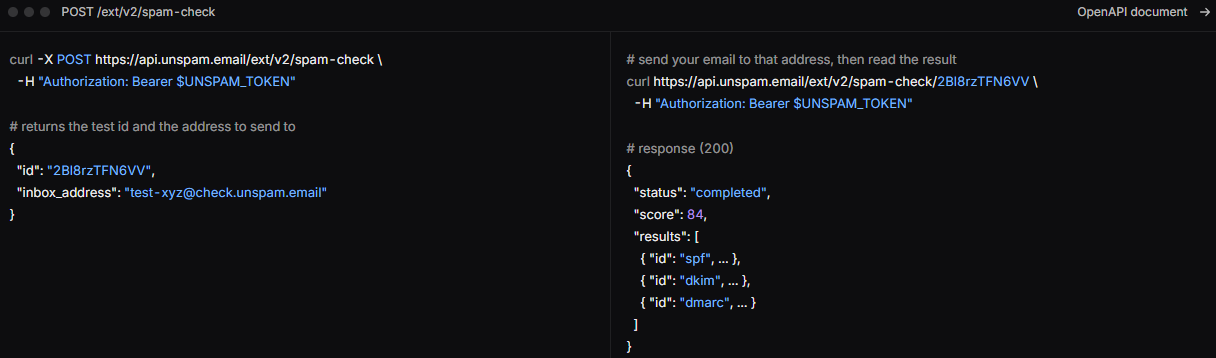
Each integration gets a separate token, so you can revoke one without affecting the others.
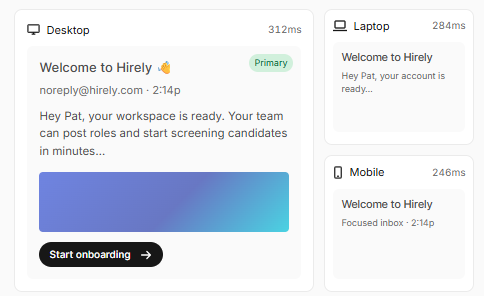
The preview tool shows your email across 50+ real clients and devices in light and dark modes. The heatmap predicts where readers will look.
[SCREENSHOT PLACEHOLDER: Unspam email preview across devices]
This image shows email previews on desktop, laptop, and mobile in Unspam
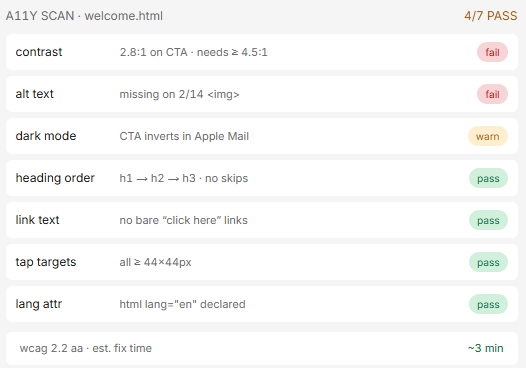
The accessibility scan checks your HTML against WCAG rules. The example flags a button with a 2.8:1 contrast ratio when 4.5:1 is required, missing alt text on 2 of 14 images, and a button that inverts in Apple Mail’s dark mode.
That’s all valuable for a newsletter. For a three-line cold email without images, there’s nothing to render, and previews are the most expensive test at $0.75 each. Use your credits for placement instead.
Unspam doesn’t offer fixed plan tiers. You either use the free allowance or build your own monthly package and pay for each test.
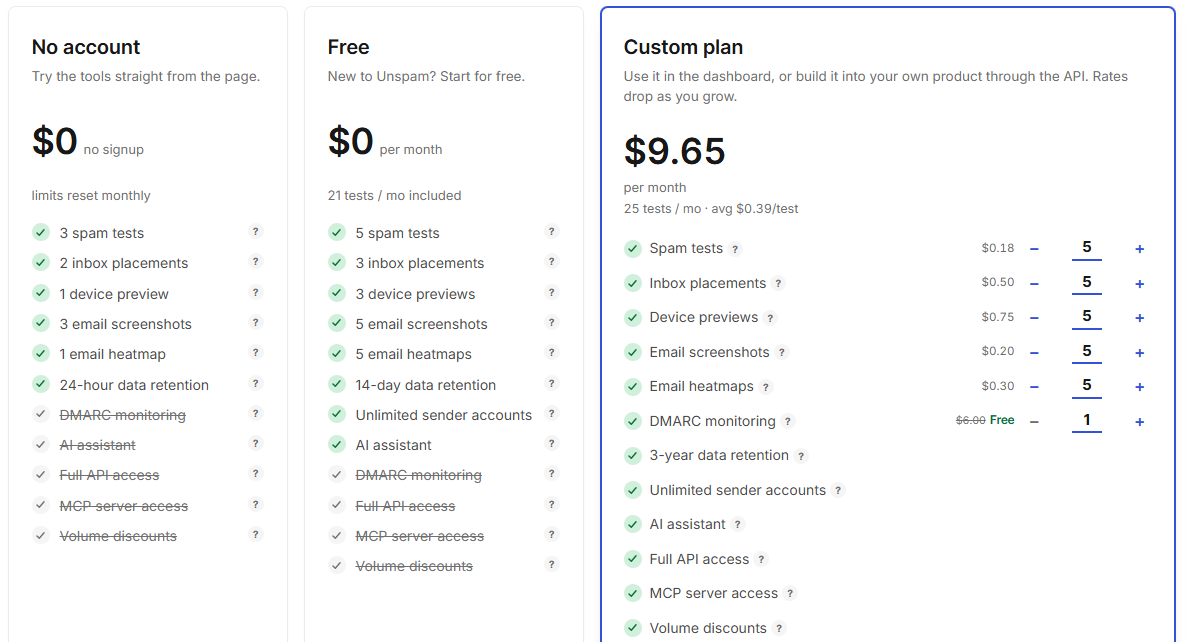
On Custom, each test has its own price:
For one campaign a month, you may never pay. You’ll reach the limit when one of these applies:
The cost mostly depends on how often you run placement tests because each one costs more than two spam tests combined.
If you send cold email from five mailboxes, one weekly placement test per mailbox adds up to about 22 monthly tests, or $11. Add four spam tests for under a dollar, and you’re near $12 monthly, or closer to $10 when billed yearly.
Run daily checks on those same five mailboxes, and you’ll use about 150 placement tests, costing $75 monthly. That’s the real decision on this page: how often you need to check.
If you send a designed newsletter four times monthly, each send with a spam test, two previews, a heatmap, and a placement test costs about $2.48. Four sends cost roughly $10 monthly, with previews taking the largest share.
Volume discounts reduce these rates as you buy more, but I couldn’t find where they start.
I’d use Unspam when you need to find what’s wrong with an email quickly and cheaply before anyone receives it.
If your sender reputation is already damaged, Unspam will confirm it but won’t repair it.
Unspam tells you when your emails are slipping. Warmforge works on why they’re slipping by building the sender reputation that determines where they land.
If you send cold email, that’s usually what you need most.
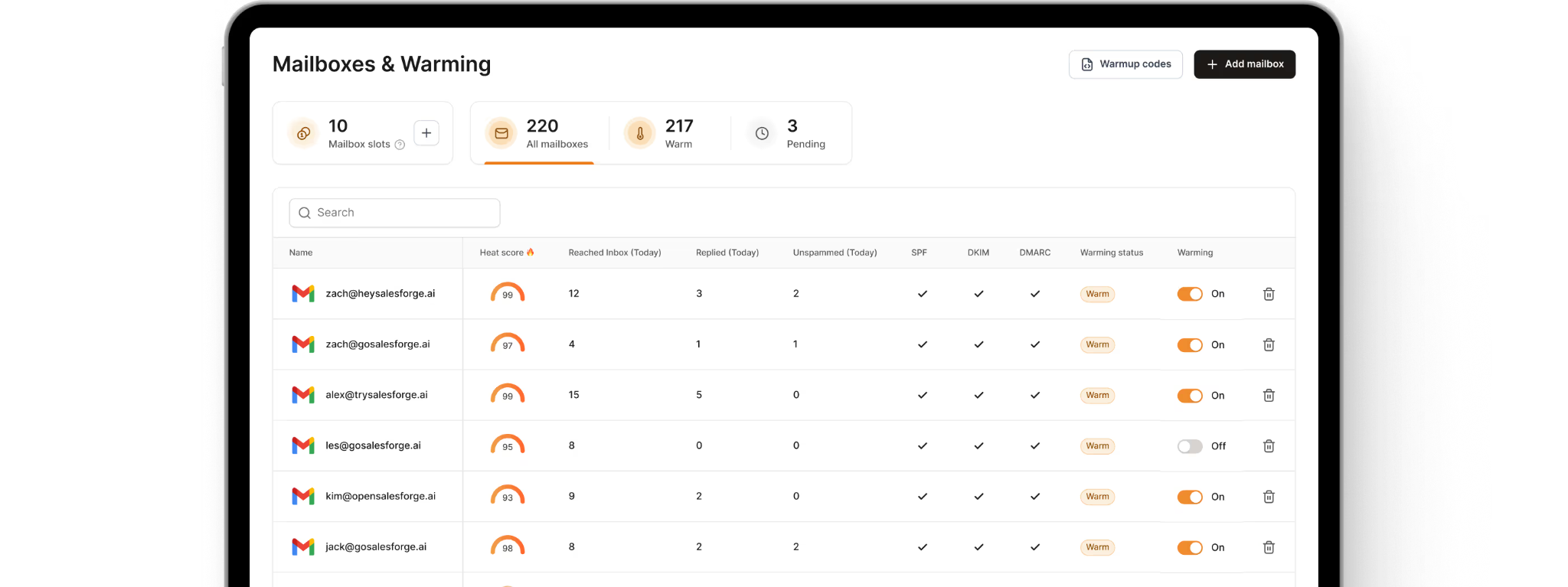
When Unspam reports falling Outlook placement, you must work out the next step. Warmforge handles the most common fix: your mailboxes exchange AI-written conversations with real business inboxes daily, showing Gmail and Outlook that a real person uses the account.
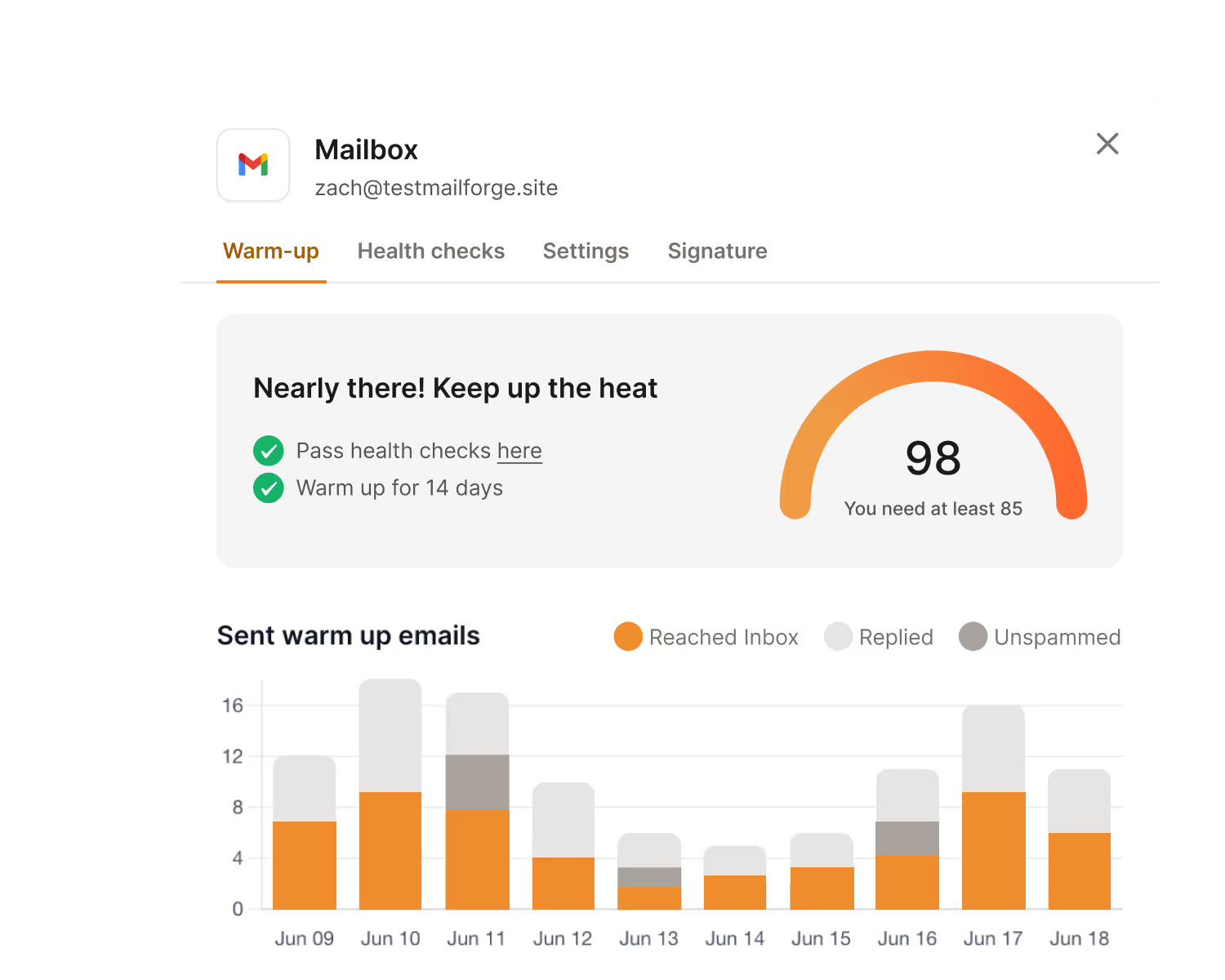
Each mailbox gets a heat score, so you don’t have to guess when it’s ready. The example reaches 98 after 14 days, while the recommended sending score is 85.
If a warmup email lands in spam, Warmforge moves it back to the inbox. That signals to the provider that the email belongs there, something a testing tool can’t do.
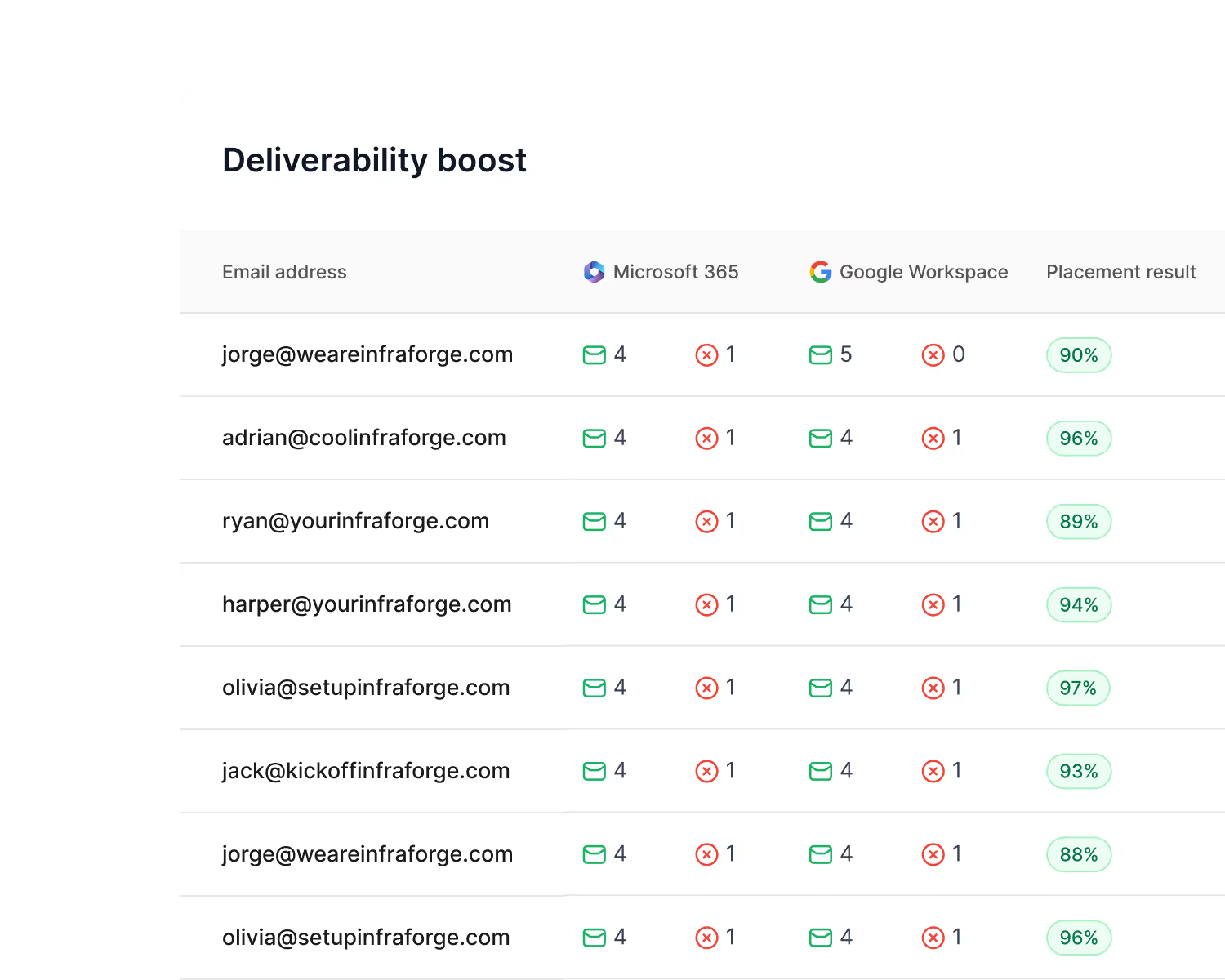
The deliverability view separates each mailbox by Microsoft 365 and Google Workspace, letting you compare one mailbox at 88% with another at 97% and focus on the weaker one.
Unspam’s seed inboxes are mostly personal addresses. Warmforge sends placement tests from your real mailbox to business inboxes on Microsoft 365 and Google Workspace, then shows how many reached the inbox, landed in spam, or never arrived.
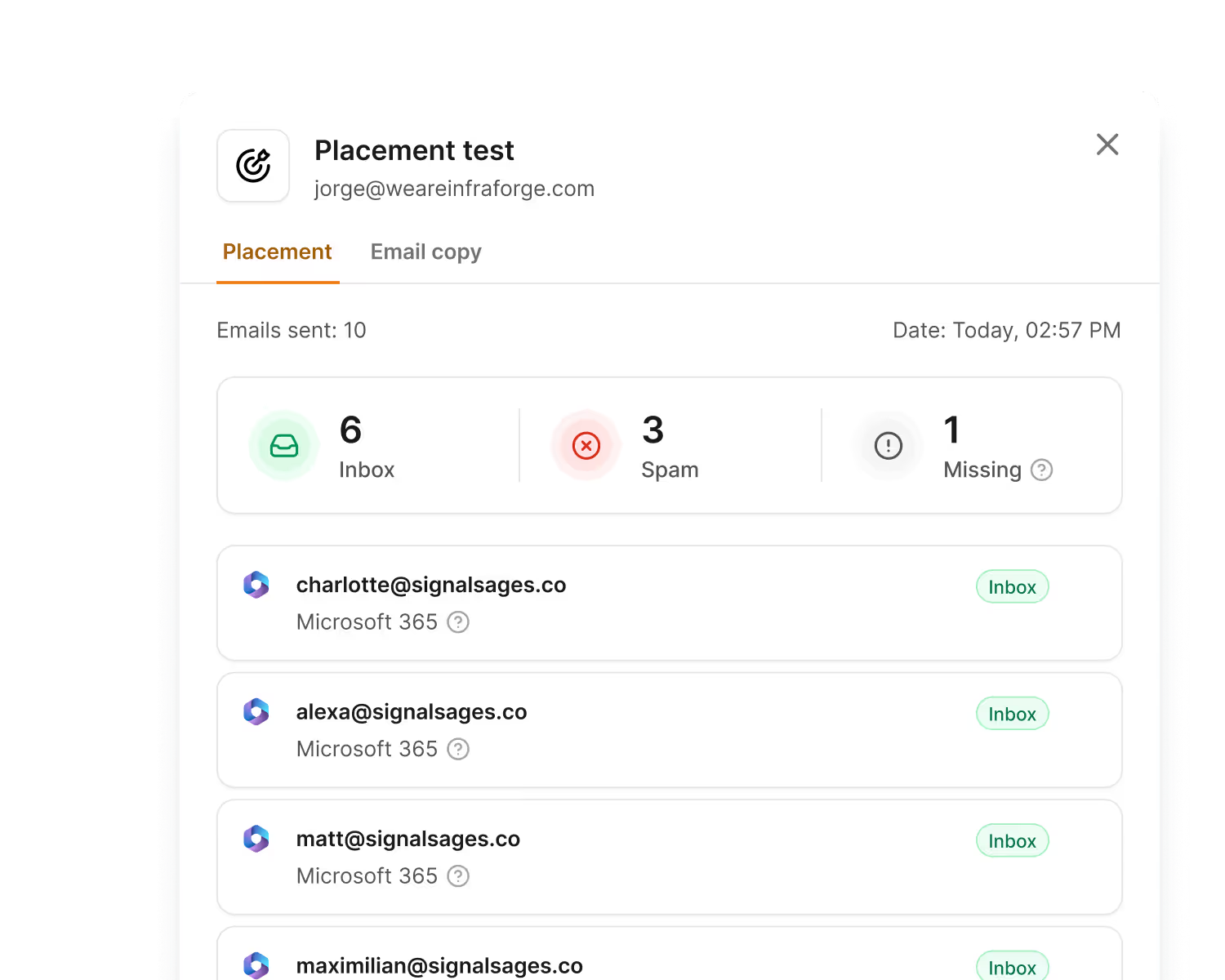
Results include a grade: 95 to 100% is best, while below 70% means you should pause and clean your list. Each grade includes next steps, turning a poor result into a clear plan.
With Unspam, frequent placement testing increases your bill one test at a time. Warmforge’s Pro plan includes 100 monthly tests for $39, and one test can cover up to 50 mailboxes. Daily checks across your setup fit within that limit.
If you need more, the Growth plan includes unlimited tests across up to 250 mailboxes for $169 monthly.
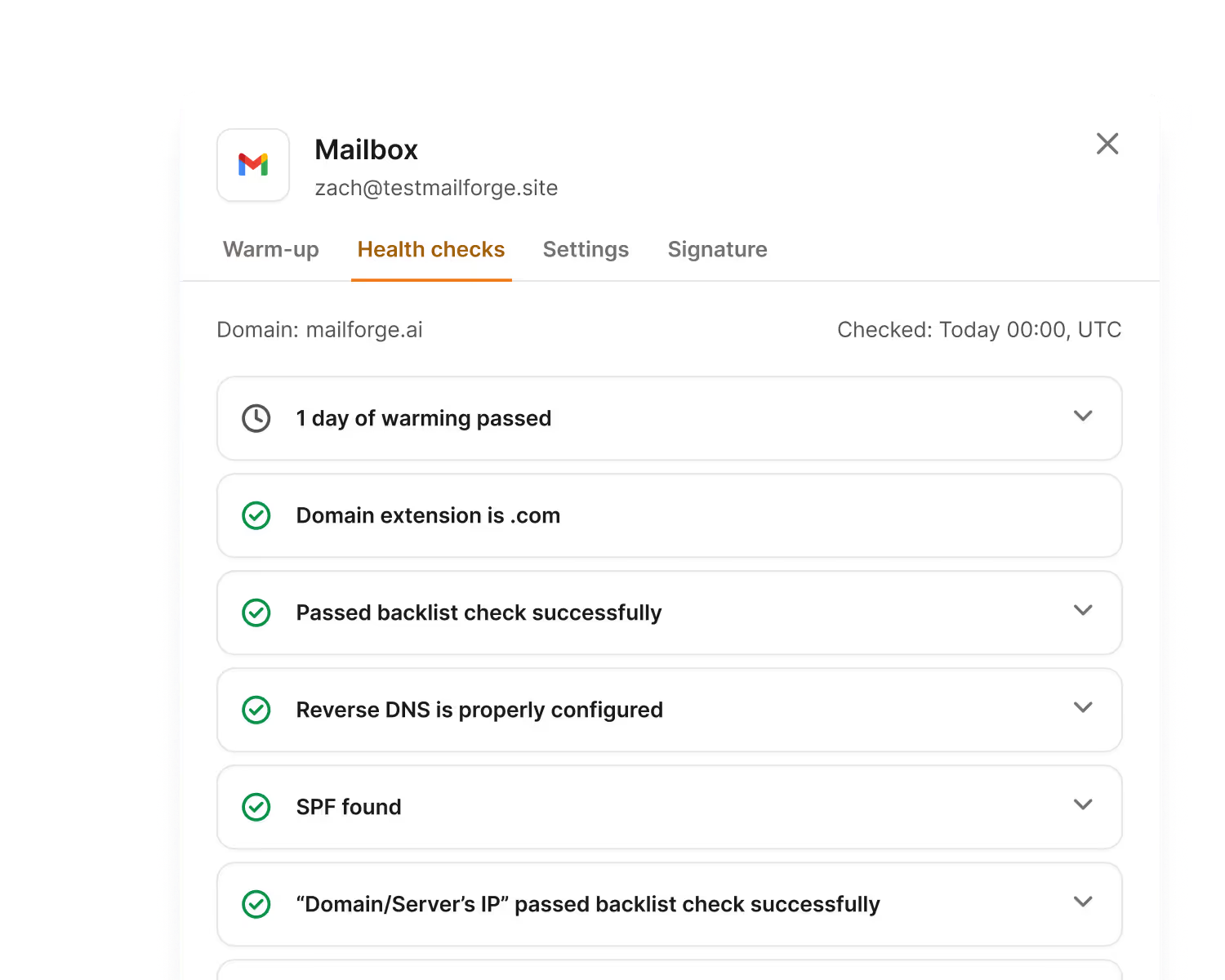
Every connected mailbox receives ongoing health checks for SPF, reverse DNS, MX records, and blacklists covering both the domain and sending IP. If something breaks, you’ll know before it affects a campaign.
There’s no premium tier to unlock. Every mailbox uses one pool of aged accounts, mostly real Google Workspace and Microsoft 365 inboxes, with conversations in several languages. That matters because a warmup network filled with throwaway accounts can damage the reputation it should improve.
Salesforge includes unlimited Warmforge mailbox slots at no extra cost and supports every mailbox type, not only Google and Outlook. Your warmup, health checks, and sending stay in one place.
Enter your email to get a custom plan & stack recommendation for your business
Please check your mailbox in 5 minutes

I’d keep Unspam, but I’d stay on the free plan.
Five spam tests and three placement tests monthly are enough to check a new domain before launch, find a broken DMARC record, or confirm you’re not blacklisted. As a pre-send check, it costs nothing and takes a minute.
Paying works in a few cases: you send designed newsletters and need previews and heatmaps, your developers want spam checks in the deployment pipeline, or you’re an agency reselling tests under your brand.
For cold email, I’d spend the money elsewhere. Scheduled testing across every mailbox gets expensive with Unspam, and the results still only tell you something went wrong. Warmforge uses that budget to warm mailboxes, rescue warmup emails from spam, and test placement in the business inboxes your prospects use.
Connect your first mailbox to Warmforge and run the free placement test. If you already use Salesforge, enable warmup for every mailbox at no extra cost.