
I have watched a cold email campaign look perfect on paper and still fail. Verified list, clean copy, tight targeting. The dashboard said every email was delivered. Almost half of them were sitting in spam.
The only reason I found out was a seed list.
A seed list is the difference between thinking your emails reach the inbox and knowing it. If you send cold emails at any scale, it is one of the few tools that shows you the truth before your real prospects ever see a message.
This guide covers what an email seed list is, how it works, how to build one, where it falls short, and how I test placement now without maintaining a pile of test inboxes myself.
An email seed list is a set of monitored test inboxes spread across major providers like Gmail, Outlook, and Yahoo. You send your campaign to those addresses, then check where each copy landed: inbox, spam, or missing. It gives you a placement read before you commit your real list.
Seed lists are useful but imperfect, since test inboxes do not behave like real subscribers. I pair a seed-based inbox placement test with mailbox warmup and health monitoring in Warmforge, so I catch problems early instead of after a campaign has already burned a domain.
An email seed list is a collection of test email addresses used to measure where your messages land across different inbox providers.
Each address on the list is a real, monitored inbox. Some sit on Gmail, some on Outlook, some on Yahoo, iCloud, or regional providers. When you send a campaign to the list, you can open each inbox or read an automated report and see exactly where the message ended up.
A seed list does not measure whether your contacts are valid. It measures placement. That is a different question, and it is one your sending dashboard cannot answer.
Your sending tool confirms one thing: the receiving server accepted the email. It has no idea whether the message then went to the primary inbox, the promotions tab, or the spam folder. A seed list fills that blind spot, which is the same blind spot that quietly wrecks email deliverability for senders who trust their delivery report a little too much.
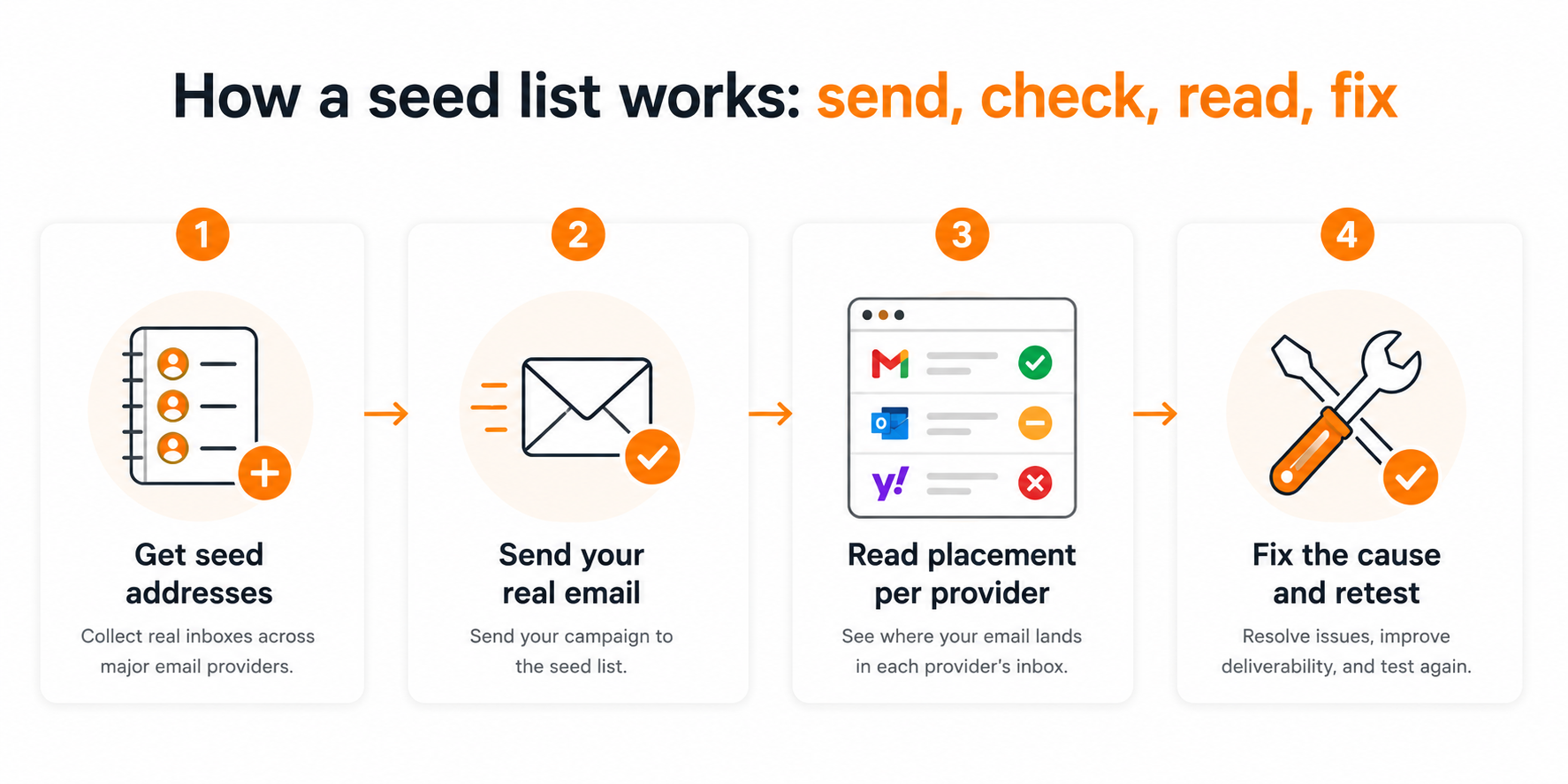
The mechanics are simple. You send, you check, and you read the placement result per provider.
Here is the flow I follow whenever I run a seed test on a new domain or a new campaign. It takes a few minutes and saves me from committing a real list to a mailbox that is not landing.
Pull the monitored test addresses, either from your own maintained set or from a deliverability tool that supplies them. Each address maps to a specific provider so you can read placement provider by provider.
Send from the actual domain, the actual sending tool, and the exact copy you plan to run. A seed test is only honest if it mirrors the real send. A test copy or a clean staging domain will give you a flattering result that does not hold up.
Check where each copy landed: primary inbox, spam, or not delivered. The pattern across providers tells you more than any single inbox. Landing in Gmail but not Outlook points to a different fix than landing nowhere at all.
Low placement is rarely one problem. It is usually a mix of authentication gaps, a mailbox that was not warmed, a copy that trips filters, or volume that ramped too fast. Fix the likely cause, then run the seed test again to confirm the change worked. If you are not sure how to read the signals, my walkthrough on how to check email deliverability breaks down each metric.
Seed lists matter because cold email lives or dies on placement, and placement is the one metric your dashboard hides.
A 99 percent delivery rate means nothing if 40 percent of those delivered emails land in spam. Delivered only means a server accepted the message. Seen means it reached a human. Those are not the same thing, and only a placement check tells them apart.
For cold outreach, the stakes are higher than for opt-in marketing. Cold recipients have no history with you, so inbox providers judge you almost entirely on reputation and behavior. One bad send from an unwarmed mailbox can drag down your sender reputation for weeks. A seed test catches that before it spreads to your whole list.
I treat a seed test as a smoke detector. It will not put out the fire, but it tells me there is one while I can still do something about it.
A good seed test reports more than a single inbox-or-spam verdict. It surfaces the signals behind the placement.
When I read a seed test, these are the things I look at before deciding a campaign is safe to launch.
Placement is the headline. The rest is the diagnosis. Together, they tell you what to fix instead of leaving you to change things at random.
Not every seed list is built the same way, and the type you use changes how much work you carry and how much you can trust the result.
There are three common approaches. Most serious senders end up using a managed option, but it helps to know the trade-offs of each.
You create your own inboxes across providers and send to them yourself. It is cheap and fully in your control. The downside is upkeep: fresh, empty inboxes with no history behave differently from real mailboxes, and keeping them active is a recurring chore.
A deliverability tool maintains a large, diverse pool of monitored addresses and reports placement in a dashboard. It costs more than doing it yourself, but the coverage is wider, and the addresses are kept in a realistic state. This is the option I lean on.
A focused set of addresses on one or two providers is useful when you are troubleshooting a specific inbox. If Outlook is filtering you but Gmail is fine, an Outlook-heavy seed set helps you isolate the cause faster.
If you want to run a DIY seed list, the process is straightforward, but the maintenance is where most people quietly give up.
Here is how I would build one from scratch, along with the parts that need ongoing attention.
Start with the inboxes your buyers actually use. For B2B, that usually means Google Workspace and Microsoft 365, plus Outlook, Yahoo, and any regional providers common in your market. A seed list full of providers your prospects never use tells you nothing useful.
Set up the accounts and give them some history before you rely on them. A brand new inbox with zero activity is treated as unknown, which skews your read. Let them send and receive normal mail for a while so they look like real mailboxes.
Send your real campaign to the full set and record where each copy landed. Track it provider by provider so you can spot a single inbox dragging down the average. A simple sheet works when you are starting out.
Seed inboxes go stale. Providers change filtering rules, and idle inboxes lose their realistic profile. Rotate in fresh addresses and retire dead ones regularly, the same way you would keep a real list clean. My guide to email list hygiene applies here, too.
A seed list is a strong early warning tool, but it is a sample, not the full truth. Knowing where it falls short keeps you from over-trusting the number.
These are the limits I keep in mind every time I read a seed result.
The takeaway is not to skip seed testing. It is to read a seed test as one input, placed beside real open and reply data, rather than as a final grade.
A few habits separate a seed test that actually protects your campaigns from one that gives you false confidence.
These are the practices I stick to across every domain I send from.
I stopped maintaining my own seed inboxes a while ago. The upkeep was not worth it once I had a tool doing the placement read and the reputation work together.
I use Warmforge for this. It runs the seed-based placement testing for me and pairs it with the warmup and monitoring that actually move placement, so I am not testing in one tool and fixing in another.
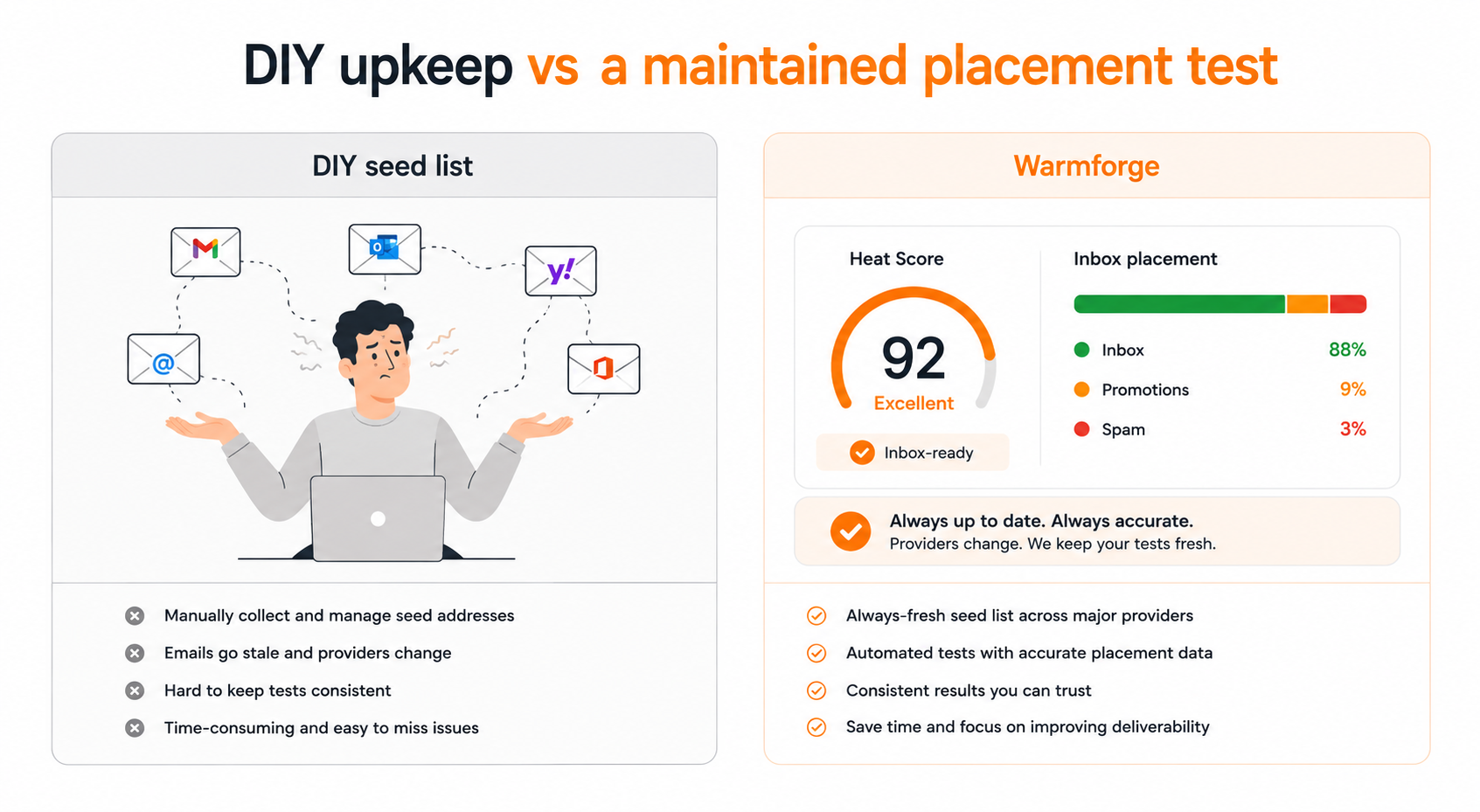
Warmforge runs Inbox Placement Tests across Google and Outlook and shows where my emails land: inbox, promotions, or spam. I do not build or age the seed inboxes myself, since the pool is maintained for me. That removes the exact chore that makes DIY seed lists fall apart.
Every mailbox carries a Heat Score™ that tracks reputation strength over time. One-click AI email warmup runs continuously in the background, with warmup emails written to mimic real human conversation. Once a mailbox crosses a Heat Score™ of 85, I know it is safe to scale sending. The warmup pool is made up of aged Google Workspace and Microsoft 365 mailboxes, and the activity is multilingual so it looks natural to providers worldwide.
Warmforge also runs Health Checks on DNS, MX records, and blacklist status, with alerts when something looks risky. That is often the real reason placement drops, and it is the part that a raw seed list never explains. If I want the full picture, I read the placement result next to the email warm-up process and the health data together.
One more practical point. Warmforge is included free with every Salesforge plan, with unlimited warmup slots, so the placement testing and warmup are not a separate line item on top of the sending tool. Standalone, it starts with a free warming slot and a free placement test.
Here is how the two approaches compare when you weigh effort against what you actually learn.
Start free
A seed test is one checkpoint in a longer chain. It tells you about placement, but placement depends on the list, the infrastructure, and the warmup behind it.
Here is how the pieces connect, so the seed test is reading a system that was set up to pass in the first place.
It starts with the real list. A seed test is only meaningful if your actual contacts are clean, so I build lists in Leadsforge, which pulls from a 500M+ contact database and runs waterfall enrichment to verify each contact before I reveal it. Fewer bad addresses means fewer bounces, which protects the reputation that the seed test is measuring.
The mailboxes come from the infrastructure products, and the right choice depends on your setup. Mailforge gives you shared IP infrastructure for fast, cost-effective scaling. Infraforge gives you dedicated IPs with pre-warmed mailboxes when you need full control. Primeforge gives you real Google Workspace and Microsoft 365 mailboxes with ESP matching, so you send from the same provider your prospect uses. All three run under one login, so you can move between them without migrating.
Then the sending and deliverability layer ties it together. Warmforge warms and monitors the mailboxes, and Salesforge runs the outreach, with Warmforge warmup included free. The seed-based placement test sits at the end of that chain, confirming the whole setup lands before a real prospect ever sees a message.
An email seed list is one of the most honest tools in cold email. It shows you placement, which is the metric that decides whether your outreach works, and which your dashboard will never report on its own.
It is not a complete answer. Seed inboxes are a sample, not your real audience, so a seed test belongs next to real engagement data, not above it. And a seed test measures placement without changing it. The change comes from warmup, authentication, list hygiene, and sending discipline.
My recommendation is simple. Use a maintained seed pool instead of building your own, read the result alongside warmup and health data, and fix the cause before you retest. That is the workflow I run in Warmforge, and it is the reason I stopped finding out about spam problems after a campaign instead of before.
1. What is an email seed list?
An email seed list is a set of monitored test inboxes spread across major providers like Gmail, Outlook, and Yahoo. You send your campaign to those addresses, then check where each copy landed: inbox, spam, or missing. It shows you inbox placement, which your sending dashboard cannot report on its own.
2. What is the difference between a seed list and an inbox placement rate?
A seed list is the set of test inboxes you send to. Inbox placement rate is the metric you read from the result: the percentage of seed inboxes where the message reached the primary inbox rather than spam or missing. The seed list is the tool, the placement rate is the score.
3. How many addresses should an email seed list have?
There is no fixed number. What matters is provider coverage. A useful seed list includes the providers your prospects actually use, usually Google Workspace, Microsoft 365, Outlook, Yahoo, and a few regional inboxes. A spread of 20 to 40 monitored addresses across those providers gives a reliable read for most cold email programs.
4. Are seed list results accurate for cold email?
Seed lists are directional, not exact. Seed inboxes have no engagement history with your brand, so real subscribers can see a different placement. Treat a seed test as an early warning system and read it alongside real open and reply data, not as the final word on deliverability.
5. Do seed lists improve email deliverability?
Not by themselves. A seed test measures placement; it does not change it. Its value is finding authentication, content, or reputation problems early enough that you can fix them before the whole list is exposed. The fixing happens through warmup, authentication, list hygiene, and sending discipline.
6. What is the best way to test inbox placement in 2026?
Use a maintained seed pool through a deliverability tool instead of building and aging your own inboxes. Warmforge runs inbox placement tests across Google and Outlook, tracks a Heat Score for each mailbox, and runs health checks on DNS, MX, and blacklist status, so you catch problems before a campaign goes out. It also warms mailboxes continuously and is included free with every Salesforge plan.
