Table of contents
Get insights delivered straight into your inbox every week!

Suomispam Reputation Check: What It Is & Why It Matters for Your Domain

Sometimes your emails suddenly stop landing in inboxes, and nothing looks obviously wrong.

That’s when many senders first discover the Suomispam reputation system.

Suomispam doesn’t block your emails; it exposes them!

It quietly shows the world how trustworthy (or suspicious) your domain looks.

Once that happens, inboxes stop trusting you. Your emails land in spam, and your reputation starts to fall fast.

That’s why it’s important to spot and fix issues early.

In this guide, you’ll learn what Suomispam reputation is, how it works, and how to detect and fix listings before they damage your domain reputation.

Key Takeaways

  • Suomispam exposes how trustworthy your domain looks and can quietly affect email delivery.

  • It works by tracking spam activity and listing IPs or networks through a DNS-based system.

  • Being listed can make inbox providers treat your emails as spam even if you’re not doing anything wrong.

  • Listings usually happen because of bulk sending, affiliate spam, ignored issues, or bad networks.

  • You can check your Suomispam listing through DNS lookup or the EBL hash method.

  • Delisting requires fixing the spam issue, cleaning your network, and sending a clear request.

  • Suomispam is legal and transparent, with public policies and documented cases.

  • Warmforge helps you avoid listings by improving your sender reputation and keeping your inbox activity safe.
Protect your domain reputation before issues appear - use Warmforge with 1 free warming slot and 1 free placement test to stay off Suomispam’s blacklist.

What Is Suomispam?

Suomispam is a DNS-based blacklist service, also known as a DNSBL.

It tracks spam activity by monitoring IPs, networks, operators, and the spammers themselves. 

Instead of blocking emails, Suomispam simply publishes what it finds.

Think of it like a public “review list” that shows how trustworthy or risky different networks are.

Email providers or hosting services can check this data to decide how to treat messages coming from those networks.

Some might reject them, while others use them as one factor to spot possible spam.

Since Suomispam monitors how trustworthy your domain looks, keeping a strong sender reputation is key.

Use Warmforge to warm up your inbox safely, create real engagement, and build trust before you send, so your domain never shows up on Suomispam’s list.

How Does Suomispam Work?

Suomispam works like a public report card for email senders.

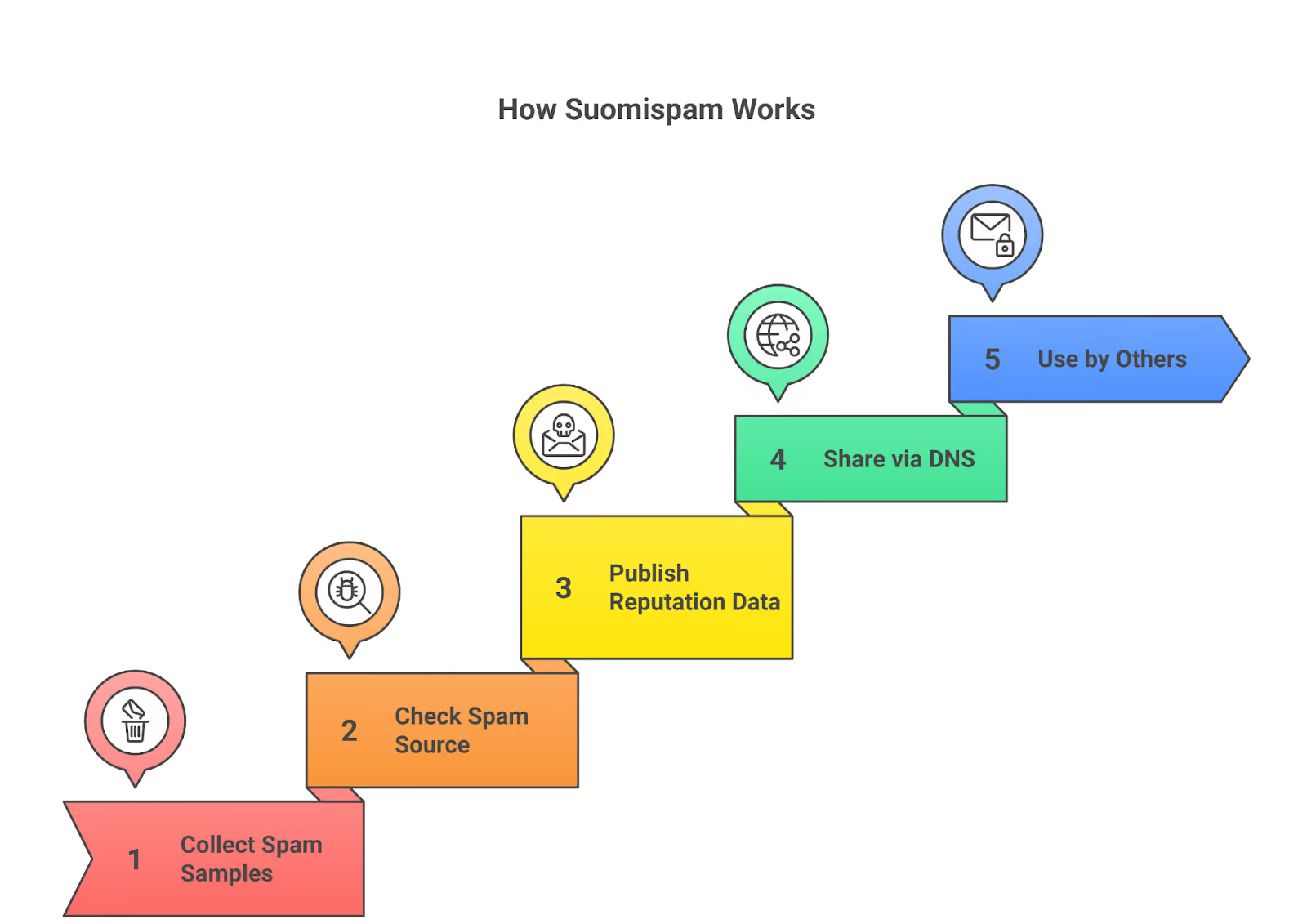
Working of Suomispam Reputation
This image shows the Working of Suomispam Reputation

Here’s how it works, step by step:

Step 1: Collect real spam samples

Suomispam keeps an eye on spam activity happening online. It collects real examples of unwanted or phishing emails sent from different servers.

Step 2: Checks where the spam came from

After collecting those spam samples, Suomispam checks where they came from, which IP address, network, or hosting provider was used to send them.

Step 3: Publishes the reputation data

When Suomispam confirms that a source is connected to spam, it adds that IP or network to its public list.

Step 4: It shares the list using DNS

This list is shared through something called a DNS-based blacklist (DNSBL).

It works like a phonebook for email servers. When an email is sent, the receiving server can “ask” Suomispam if that sender is listed for spam.

Step 5: Others use that information

Other email services and spam filters can look up this data when they receive a message.

They don’t block emails directly because of Suomispam; instead, they use it as one of the signals to judge if a message might be spam.

So, Suomispam’s role is to observe, record, and share.

It doesn’t stop emails itself; it simply gives others the information they need to decide who to trust.

Suomispam Email Blacklist (EBL)

Along with the main DNS list, Suomispam also runs a system called the Email Blacklist (EBL).

This one is made for spotting spam sent from big services like Gmail or Outlook.

Instead of listing full domains or IPs, Suomispam turns spammer accounts into hash codes (a scrambled version of the email address).

This lets others detect spam coming from those accounts, without blocking the entire service or exposing personal data.

Might be helpful for you: How Blacklisted IPs Impact Email Deliverability

Why Suomispam Reputation Matters for Your Domain

Your domain’s reputation decides whether your emails reach inboxes or land in spam.

If your IP or domain is blacklisted on Suomispam, it means spam has been linked to your network, and that can quickly harm your email deliverability.

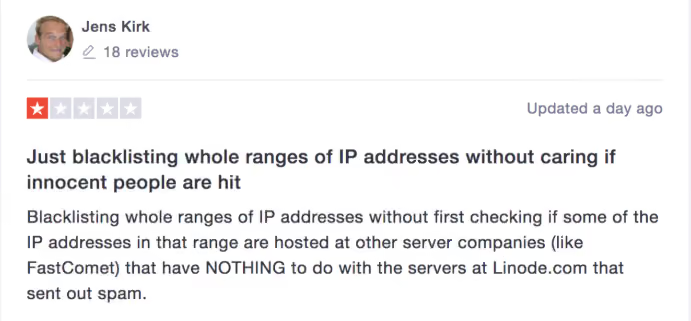
Suomispam blocking IPs
This image shows the Suomispam blocking IPs

What happens when you’re listed:

  • Email providers start losing trust in your domain.

  • Your messages may go to spam or get delayed.

  • Some systems lower your sender score automatically.

  • Even real business emails may stop reaching people.

Real examples:

  • Sendgrid: Got listed because spammers used its system. It caused problems for normal users too.

  • OVH: Had over a thousand listings, and many customers saw poor email delivery.

D-Fence: A spam filtering company that got listed for sending its own marketing spam. It lost trust among users.

Common Reasons for Getting Listed on Suomispam

Suomispam adds your domain or network to its list when it finds that emails are being sent in a spam-like way.

If that ever happens to you, it’s usually because of a few common reasons.

1. Sending too many marketing or affiliate emails

  • This happens when you send a lot of promotional or affiliate emails to people who never signed up or asked for them.
  • Even if you think it’s normal marketing, Suomispam sees it as spam when those emails go to random or collected addresses.

2. Not stopping the spam after it’s found

  • If spam keeps going out from your server or network and you don’t fix it, Suomispam keeps you listed.
  • Old listings don’t just disappear; they stay there until the spam is completely stopped.

3. Using a network already known for spam

  • Sometimes, even if your emails are clean, you can still get listed because you share the same hosting provider or IP range with spammers.
  • When too much spam comes from one network, Suomispam may list the whole group of addresses to warn others.

4. Working with partners who send spam

  • Some companies hire outside marketers or affiliates to promote their services by email.
  • If those partners end up sending spam, Suomispam lists the company that hired them too.
  • This is exactly what happened with Effortia Oy; it was removed once but later listed again after its partners continued sending spam.
  • Suomispam clearly says that paying others to send spam is treated the same as sending it yourself.

5. Trying to buy or force a delisting

  • Suomispam has also received legal threats and even bribe offers to remove listings.

    It doesn’t accept either.
  • A listing is removed only when the spam activity has clearly ended, not because of pressure or payment.

How to Check Your Suomispam Reputation

You can check if your domain, IP, or email is listed on Suomispam in two quick ways.

Method 1: For Domains or IP Addresses

Steps:

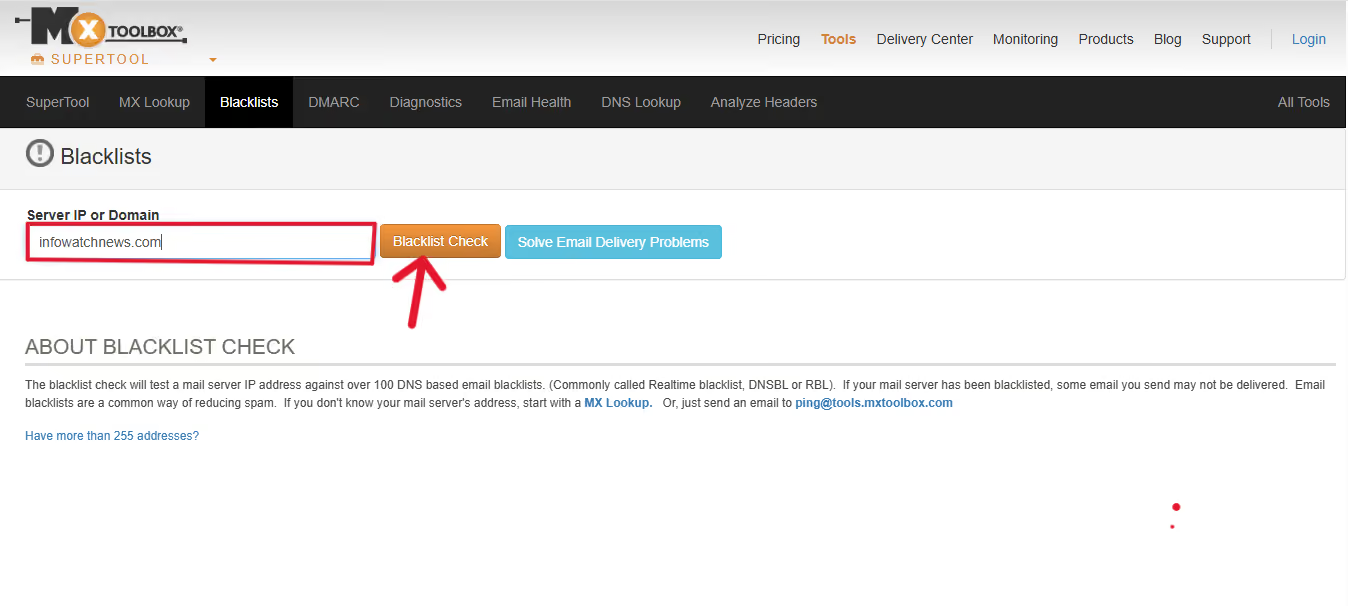
  1. Go to a DNS blacklist lookup site such as mxtoolbox.com/blacklists.
Suomispam domian lookup
This image shows the Suomispam domian lookup
  1. Type your domain name or IP address in the search box.

  2. Click Check Blacklists.

  3. Look through the results and find suomispam.net.

    • If it shows “Listed”, your domain or IP is blacklisted on Suomispam.

    • If it shows “Not Listed”, you’re clear.

Method 2: For Individual Email Addresses (EBL Check)

This method is for checking Gmail, Outlook, or other email accounts inside Suomispam’s Email Blacklist (EBL).

Steps:

  1. Write your full email address in lowercase (for example: noemail@example.com).

  2. Go to any online SHA1 generator tool.

  3. Paste your email and copy the SHA1 hash it gives you.

  4. Add .ebl.suomispam.net at the end of that hash.

Example:

1ffff7d2d2b7f100df95b70e659c88e5b38ec4e6.ebl.suomispam.net

  1. Open any DNS lookup tool, like Salesforge's free SPF and DKIM checker tools.

  2. Paste that full address and run the lookup.

    • If you get an IP result, your email is listed.

    • If it says “Not Found”, your email is not listed.

How to Get Delisted from Suomispam

Getting removed from Suomispam isn’t automatic; you have to fix the spam problem first.

That’s their main rule: no spam, no listing.

Here’s exactly what you need to do:

1. Stop the spam completely

  • Find out where it’s coming from, maybe a hacked account, an open relay, or a spammy affiliate.

  • Fix it, close it, or remove that sender.

  • Make sure no new spam goes out from your domain or network.

2. Clean up your network

  • If you’re a hosting provider, remove abusive users or spammers from your servers.

  • Suomispam only delists once the spam source is gone and your network looks clean.

3. Ask for delisting properly

Once the spam is fully stopped and your system is clean, here’s how to ask Suomispam for removal:

1. Write a short, polite email to Suomispam.

 Explain that you’d like your domain or IP to be reviewed for delisting.

2. Include these details:

  • The IP or domain you want removed.

  • What caused the spam (for example, “a hacked WordPress site” or “a customer sending bulk mail”).

  • What actions did you take to stop it (like disabling accounts, removing scripts, or cleaning malware)?

  • What steps you’ve added to prevent it from happening again.

3. Keep it factual and polite.

  • Don’t blame Suomispam, just explain clearly what’s been fixed.

  • If you’re a hosting provider or admin, mention it, Suomispam prioritizes operator requests.

4. Wait for their reply.

  • They’ll manually review your case.

  • If they see the spam is gone, they’ll remove your domain or IP.

  • If the spam continues, the listing will stay.

4. Rebuild your email trust with Warmforge

 After Suomispam removes your listing, your domain reputation may still be weak.

That’s when Warmforge helps you recover faster.

Warmforge automatically:

  • Warms your domain and inboxes safely after delisting.

  • Restores inbox trust by sending gradual, human-like warm-up emails.

  • Prevents future blacklists with real-time deliverability tracking.

Using Warmforge right after delisting helps you regain inbox placement and keeps your domain reputation strong, so you don’t end up on Suomispam again.

Helpful Reads: How AI Detects and Removes Email Blacklist Issues

How Warmforge Helps You Avoid Suomispam Listings

Suomispam usually lists domains that look suspicious, like those sending too many cold emails, skipping engagement, or using new inboxes with no history.

Here’s how Warmforge helps fix each of these problems:

The problem that leads to Suomispam listing How Warmforge helps you avoid it
New domain with no sending history Warmforge sends and receives real messages between trusted inboxes to build a clean reputation before outreach starts.
Sending too many cold emails too fast Warmforge controls your daily sending speed automatically, increasing it gradually so your activity looks natural.
Low engagement or no replies Warmforge creates genuine two-way interactions, showing email providers that your messages are wanted.
Spam-like sending patterns Continuous warm-up keeps your inbox active and trusted, reducing spam-score signals that trigger Suomispam listings.
Reputation drop or spam placement Warmforge monitors your domain health and alerts you early if deliverability issues appear.

Warmforge keeps your inbox warm, reputation strong, and sending patterns healthy, so you don’t end up on Suomispam’s blacklist.

You can use it anytime to monitor and protect your domain reputation automatically.

Related reads: What Are Email Blacklists and How to Avoid Them

Conclusion

Suomispam is a public reputation tracker that shows how trustworthy your domain looks to others.

If it lists you, it’s not blocking your emails, but others might. That’s how messages quietly start missing inboxes.

Keeping a clean reputation isn’t hard once you know what causes listings.

Stop spammy sends early, fix issues fast, and always warm up new domains before using them.

Warmforge helps you do exactly that; it builds trust with real email activity, monitors your deliverability, and alerts you before problems grow.

Before you send another campaign, take a moment to warm up and check your reputation.

It’s a small step that can save your domain from ever showing up on Suomispam’s blacklist.

Try Warmforge free, get 1 warming slot and 1 placement test to check your email reputation and stay off Suomispam’s blacklist.