
Every outbound platform claims it's the one that will fix your outreach. Salesforge is no exception.
It offers unlimited mailboxes, unlimited LinkedIn senders, an AI SDR called Agent Frank, a unified inbox with Primebox™, and built-in email warmup through Warmforge. Instead of stitching together four or five different tools, Salesforge says you can run your entire outbound operation from one platform.
Sounds compelling, right?
That's exactly why I wanted to see if the claim actually holds up.
So I spent the 14-day free trial putting it through its paces. I connected five mailboxes, tested Primeforge, Mailforge, and Infraforge, built two multichannel sequences using email and LinkedIn, and explored every major feature the platform offers.
Here's what I found. What Salesforge gets right, where it falls short, and whether it's actually a better value than paying for a stack of separate outbound tools.
Let's dive in.
Here is the fast version if you are short on time.
The short version: Salesforge is one of the strongest picks for outbound teams in 2026, and the 14-day trial is enough to test it properly. The rough edges are real but manageable.
I spun up a fresh trial workspace and treated it like a real outbound setup, not a demo click-through.
Here is what that looked like day by day. On day one, I connected 5 mailboxes spread across three different infrastructure products.
That is the honest setup. Now let me show you what I actually found.
Salesforge is a sales execution platform built for teams running outbound at scale.
You get email outreach, LinkedIn outreach, AI-powered personalization, a unified inbox, and deliverability infrastructure in one workspace.
The bigger idea is that Salesforge sits on top of the Forge Stack. That is a connected set of products covering every layer of outbound. Leadsforge handles lead sourcing. Mailforge, Primeforge, and Infraforge cover infrastructure at different price points and control levels. Warmforge runs deliverability. Agent Frank is the AI SDR layer.
You do not have to use all of them. But if you do, they share a login and pass data between them without much friction.
Salesforge is not one app. It is one login into six specialized products, and you only see this when you click the workspace switcher at the bottom of the sidebar. That was my biggest surprise on day one.
Each product handles a different layer of the outbound stack:
This matters because most outreach tools are just a sequencer. Salesforge covers the full stack, from buying the domain to warming the mailbox to sending the email to managing the reply.
The upside is real. I connected 5 mailboxes across three different infrastructure products in one afternoon.
That would have taken me a week if I was doing it manually across Namecheap, Google Admin, and a separate warmup tool.
If deliverability is the piece you care about most, this guide to what email deliverability actually is covers the fundamentals of what the Forge Stack is monitoring under the hood.
Alright. Now the features.
I am covering seven feature areas here. These are the ones that matter most based on how the platform is actually used day to day.
The sequence builder is a visual flowchart canvas, not a linear list of steps.
You get six starting points when you create a sequence: custom, 3-step email, LinkedIn-only, multichannel combined, prioritize email, or prioritize LinkedIn.
Pick one and you drop into a drag-to-explore canvas where you build the sequence step by step. Zoom, pan, expand nodes. It reminded me of what n8n or Zapier looks like when you build a workflow.
Step types are organized into three tabs.
Email steps handle sending and bounce logic, with conditions like Has email, Email bounced, or Is email validated. LinkedIn steps cover connection requests, direct messages, InMail, profile views, follows, and even liking their latest post. Universal steps handle reply conditions across channels.
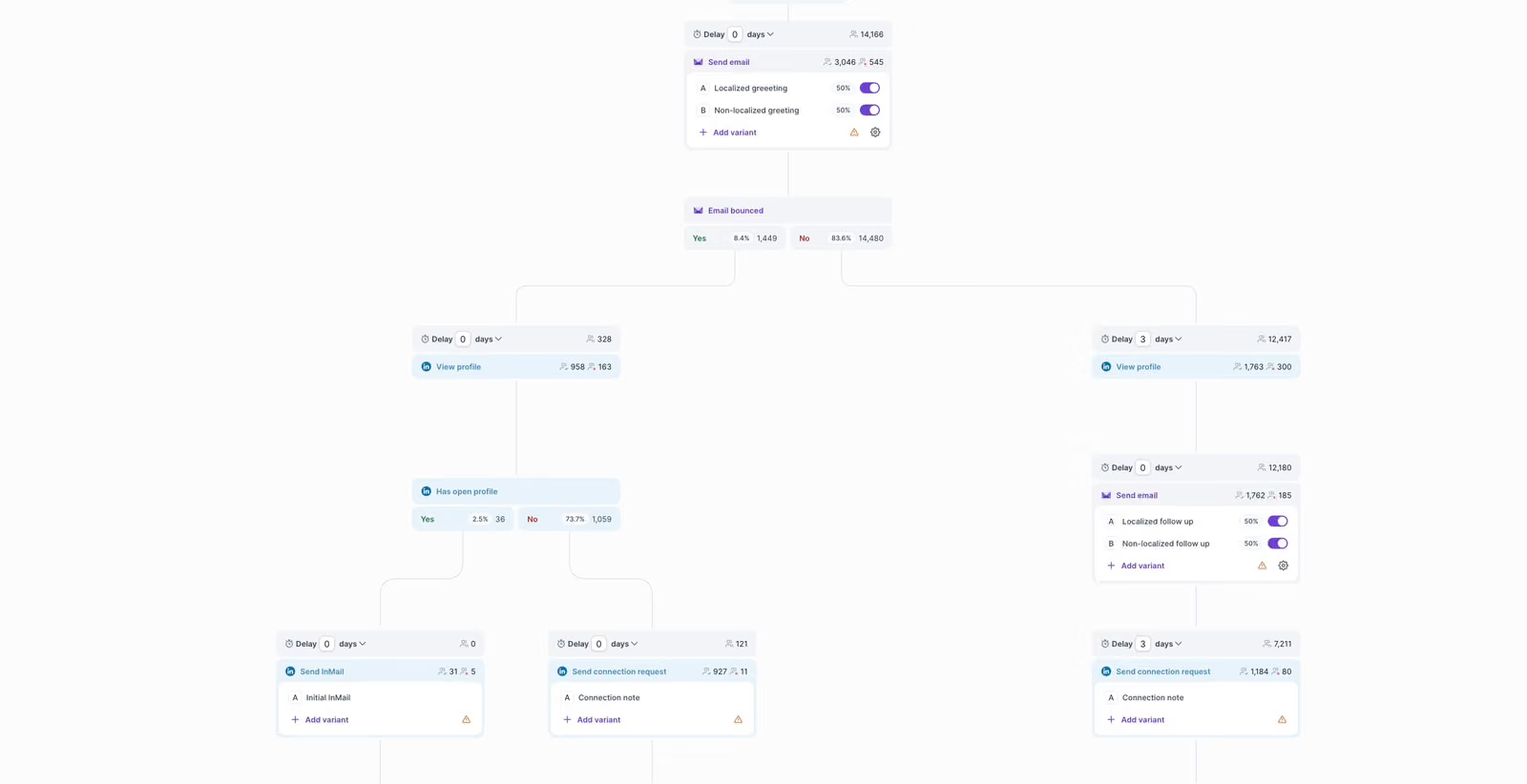
What impressed me most was the scheduling depth. Most cold email tools give you a timezone dropdown and call it a day. Salesforge gives you timezone selection, custom workday and hour sending windows, a "Sending priority" toggle that lets you prioritize new contacts or follow-ups first, and a full "Multithreading" section that lets you cap contacts per company, control sequential-sending inside an account, and stop sending once anyone at that company replies.
That last one is genuinely useful for account-based outreach. If you are hitting five contacts at the same company and one of them replies, Salesforge stops sending to the other four. That is the kind of logic that Reply.io and Outreach get right, and most cheaper competitors miss entirely.
The deliverability toggles are worth calling out too.
Track open rate and track link clicks are both explicitly labeled "Not recommended" inside the product. That is honest product design. Most tools push open tracking because it looks good on a dashboard, even though tracking pixels hurt inbox placement. Bounce Shield is on by default, Plain Text mode is one click, and ESP Matching (available on Growth) automatically routes emails from Gmail senders to Gmail recipients.
Chloe T., a Growth Marketing Specialist, shared her experience on G2 in June 2026 and gave the platform a full 5 stars.
She talked about how the LinkedIn automation let her run outreach at scale without the manual work she had before, and how having email and LinkedIn in the same flow removed a whole layer of context-switching from her day. What stood out in her write-up was the ability to scale outreach with minimal manual effort, which is exactly the promise Salesforge makes on its homepage.
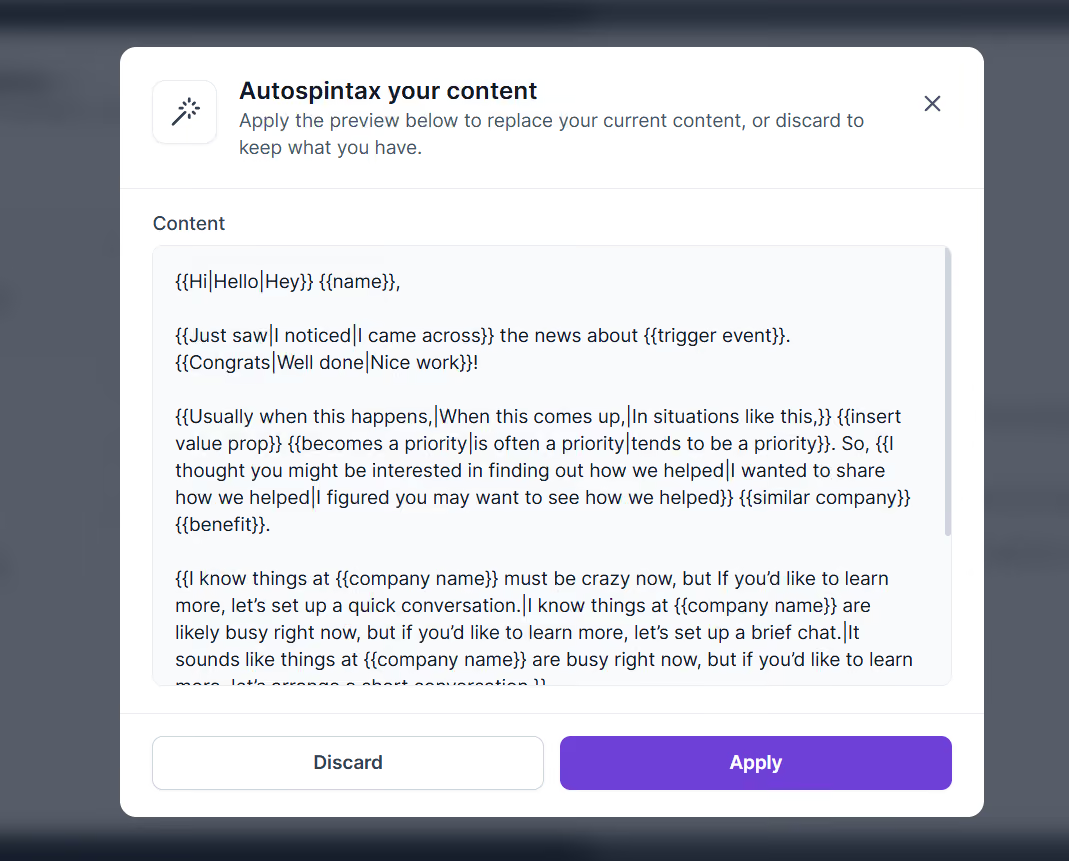
One rough edge worth knowing. Standard spintax syntax with single braces ({option1|option2}) throws a broken error message. Salesforge uses double-brace syntax ({{option1|option2}}) instead.
You only discover this by using the Autospintax button, which generates spintax variants for you. If you are coming from Instantly or Lemlist, that will trip you up on day one. Not a dealbreaker, but I wish the error message actually told you the correct syntax instead of throwing raw HTML at you.
The AI email writer is more structured than most, and that is a deliberate design choice.
You cannot just type "write me a cold email about X." Instead, you have to set up a Reply Goal (click-out, send meeting link, receive meeting link, start a conversation, or request a referral), a Product Profile (company URL with an auto-fill button, product name, industry, pain points, solution, proof), and optionally upload a Knowledge Base file with playbooks, pricing sheets, or FAQs.
That is more setup than a prompt box. But the output is noticeably better because the AI actually knows what your product does, who you sell to, and what the goal of the email is.
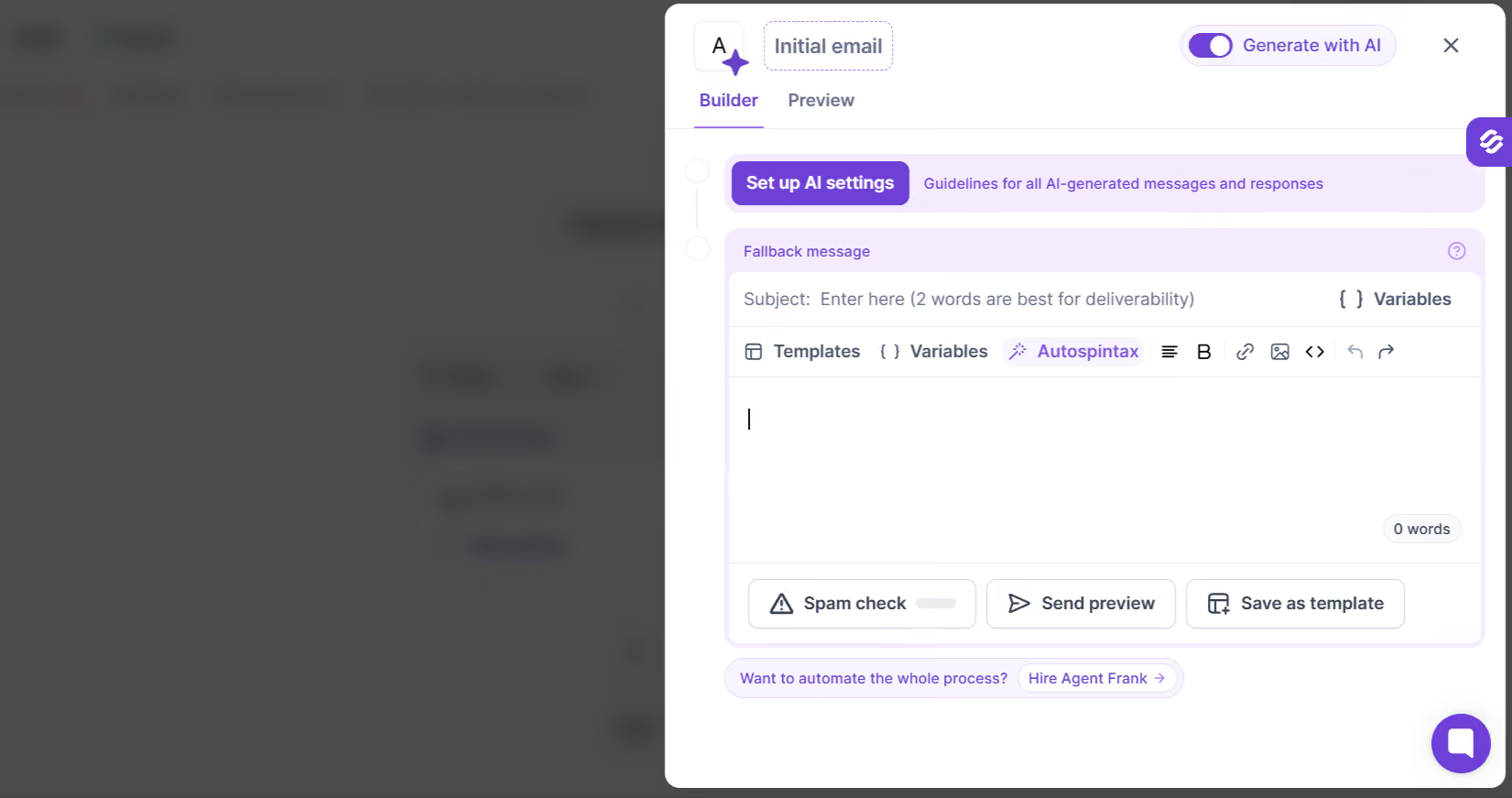
I tested this with a Product Profile filled in for a fictional B2B SaaS. The auto-fill button scraped the company URL and pre-populated most of the fields for me. I only had to tweak the pain points and proof. The emails it generated were noticeably tighter than what I get from a generic ChatGPT prompt because the AI had real context to work with.
The merge tag library is solid. First name, company, sender full name, weekday variables, lead ID, localized greetings. Nothing groundbreaking, but the localized greeting tag is a nice touch if you are running outreach across 20+ languages.
Autospintax is the standout for me. You write your email, click one button, and it generates spintax variants automatically. Instead of manually writing 5 versions of every line, the AI does it for you and drops them into the double-brace syntax the platform expects.
Jessica K., an Outreach Specialist, shared her experience on G2 in June 2026 with a 5-star review. She wrote about how the AI personalization combined with automation genuinely sped up her outbound workflow. Her write-up mentioned that the deliverability features stacked on top of the AI writer made the whole outbound motion faster to run, which matches what I saw in my testing.
For a broader look at how AI tools are shaping cold email in 2026 (and why simple prompt-based AI writers underperform structured ones like Salesforge's), this breakdown of AI tools for cold email campaigns covers the landscape.
Agent Frank is Salesforge's AI SDR, and he sits in his own nav item called "AI Agent HQ."
He is positioned as a teammate you hire, not a tool you subscribe to. That framing shows up throughout the product. The button is "Hire Agent Frank" rather than "Subscribe" or "Activate." The pricing page treats him as a headcount replacement rather than a feature add-on. There is a dedicated account manager included when you hire him.
Agent Frank's job is to handle the full outbound workflow autonomously. He finds prospects based on your ICP, writes personalized outreach in 20+ languages, sends sequences, follows up, manages replies, and books meetings. You choose whether he runs on Auto-Pilot (fully autonomous, no human approval) or Co-Pilot (drafts emails and replies for you to approve before they go out).
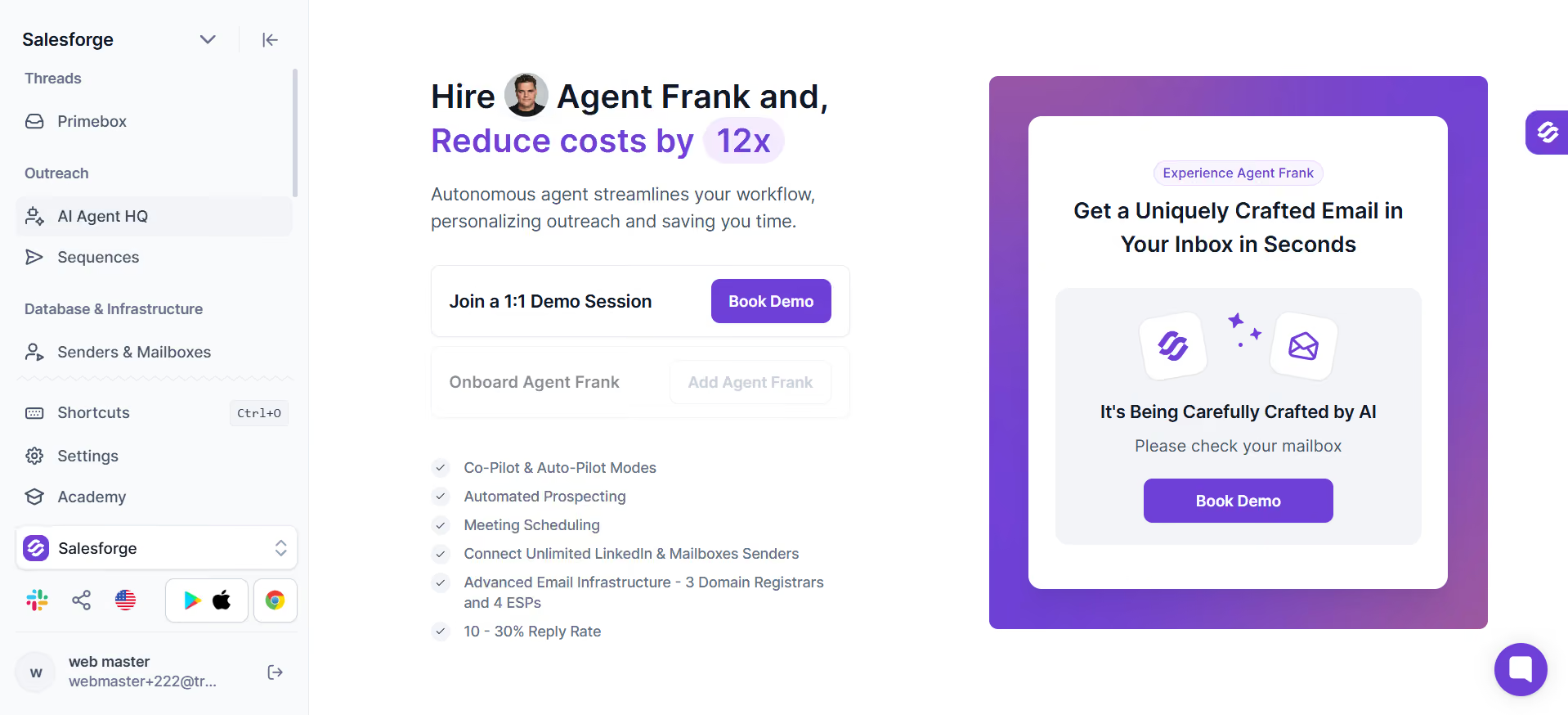
The onboarding is a 7-step process that I want to walk through, because the marketing copy skips over it:
Here is my honest flag. The "Add Agent Frank" button in my trial workspace was disabled. The only path forward was "Book Demo."
So I could not test Agent Frank end to end. What I could test were the in-sequence AI reply modes (Reply as human, Co-Pilot, Auto-Pilot), which are fully functional inside every sequence at no extra cost. Those give you a taste of AI-managed conversations without hiring Agent Frank.
The 3-tier reply autonomy is the smart part. You get to dip a toe into AI-run conversations with Co-Pilot mode (AI drafts, you approve) before ever handing over the wheel with Auto-Pilot. That is a low-risk on-ramp to AI SDR workflows.
Zeynep A., a Product Marketing Manager, shared her experience on G2 in May 2026 with a 5-star review. She valued the combined email and LinkedIn multichannel outreach and specifically called out the Agent Frank AI layer for the efficiency it added. Her write-up described a workflow where the multichannel motion and the AI layer worked together, which is the way Salesforge is designed to be used at its best.
Primebox™ is the unified inbox that catches every reply from every mailbox and every LinkedIn account in one place.
Logging into Salesforge drops you directly into Primebox™, not into a metrics dashboard. That threw me off at first because I was expecting a stats overview like Lemlist or Instantly. The design choice makes sense once you settle in: replies are the thing you actually need to see first thing in the morning, not vanity metrics.
The sidebar splits threads into two groups. The AI Agent group handles threads that Co-Pilot or Auto-Pilot are managing, with subcategories for "Action required" (something needs your attention) and "AI conversations" (the AI is handling it end to end). The Labels group has manual labels: Closed, Wrong contact, and any custom labels you create.
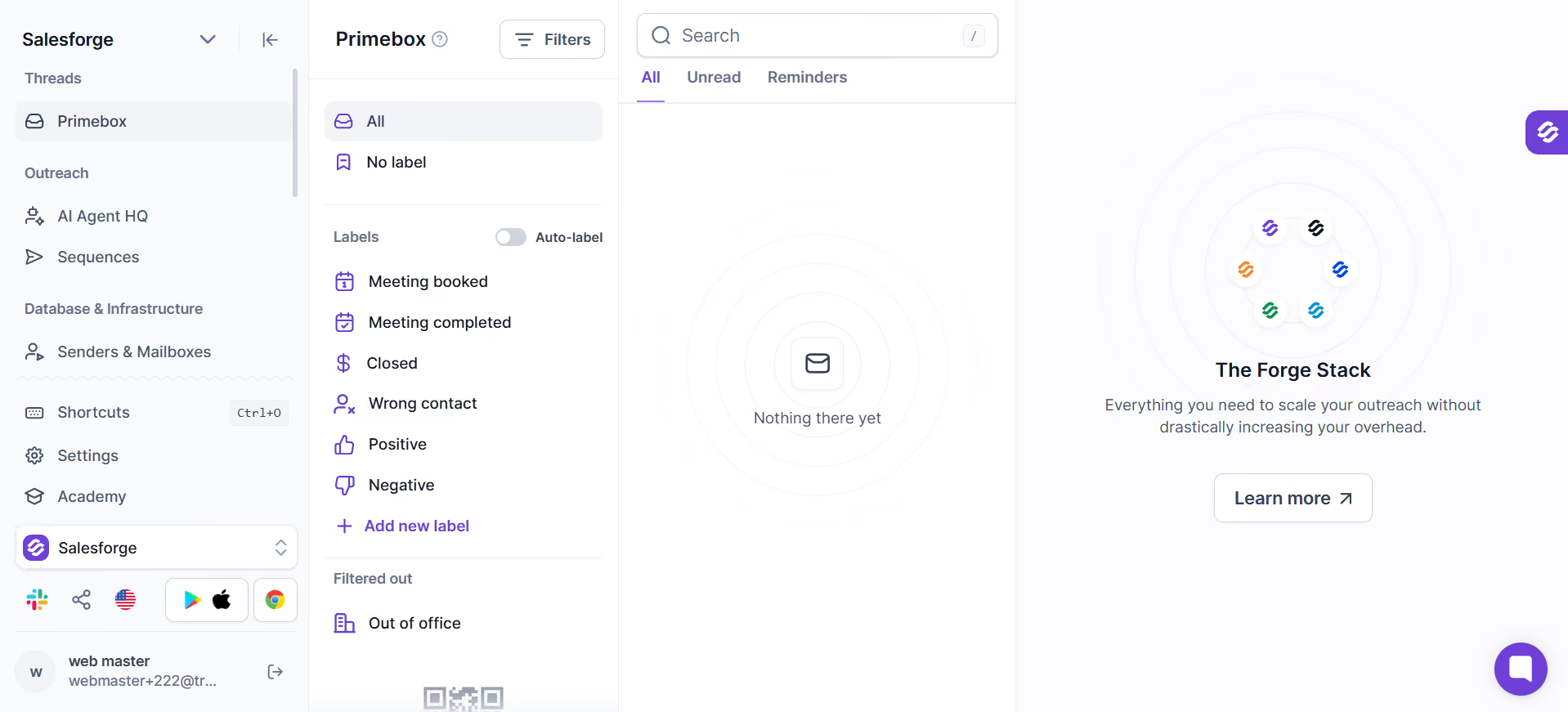
Sentiment Analysis is available on Pro. Primebox™ AI (which drafts responses using your company Knowledge Base and the conversation history) is available on Growth. Both add a layer of context on top of the manual label system.
The mobile app is a nice touch. Salesforge ships a native iOS and Android app just for Primebox™. Between meetings, you can pull out your phone, scan positive replies, and shoot back a quick response without opening a laptop. I have not seen this from Instantly, Lemlist, or Smartlead as a standalone reply-management app.
Emmanuel J., a Business Developer, shared his experience on G2 in June 2026 with a 5-star review. He called out the strong deliverability features (specifically the mailbox warmup) and having all LinkedIn and email replies centralized in one inbox. In his write-up, the time savings came from not having to jump between platforms to answer replies, which matches what most Primebox users mention.
This is where Salesforge pulls ahead of most competitors.
The "Senders & Mailboxes" hub is split into two concepts. Senders are profiles that link one LinkedIn account plus multiple mailboxes into a single outreach identity, so you can rotate sends across mailboxes while keeping the sender persona consistent. Mailboxes are the actual connected inboxes underneath.
You get three paths to connect a mailbox.
Forge mailboxes gives you three options: Primeforge for Google Workspace and Microsoft 365, Infraforge for dedicated IP SMTP, or Mailforge for distributed shared IP SMTP. Standard OAuth handles Google and Outlook connections directly. Manual IMAP/SMTP handles anything else, with bulk CSV upload if you have a stack of mailboxes to add at once.
I tested all three Forge infrastructure paths in the trial. Primeforge felt like a mailbox provisioning wizard. Five steps: create domains, set up forwarding, add contact details, provision mailboxes, checkout.
Even suggested a starting setup ("Five .com domains with two mailboxes each is a cost-effective, reliable setup"). Mailforge was faster to set up because you are not buying domains, just spinning up shared-IP SMTP mailboxes. Infraforge took a bit more configuration because dedicated IPs need slightly more DNS work, but the wizard walked me through it.
Warmforge ran the warmup layer for every mailbox I connected. Heat scores are the metric to watch.
The dashboard shows you where each mailbox is on the reputation scale (target: 85+), a Replied/Inbox activity chart tracking how warmup emails are landing, and "Warmed X days" badges so you know how long each mailbox has been in the warmup pool. My mailboxes hit the healthy range within the trial window without me having to babysit anything.
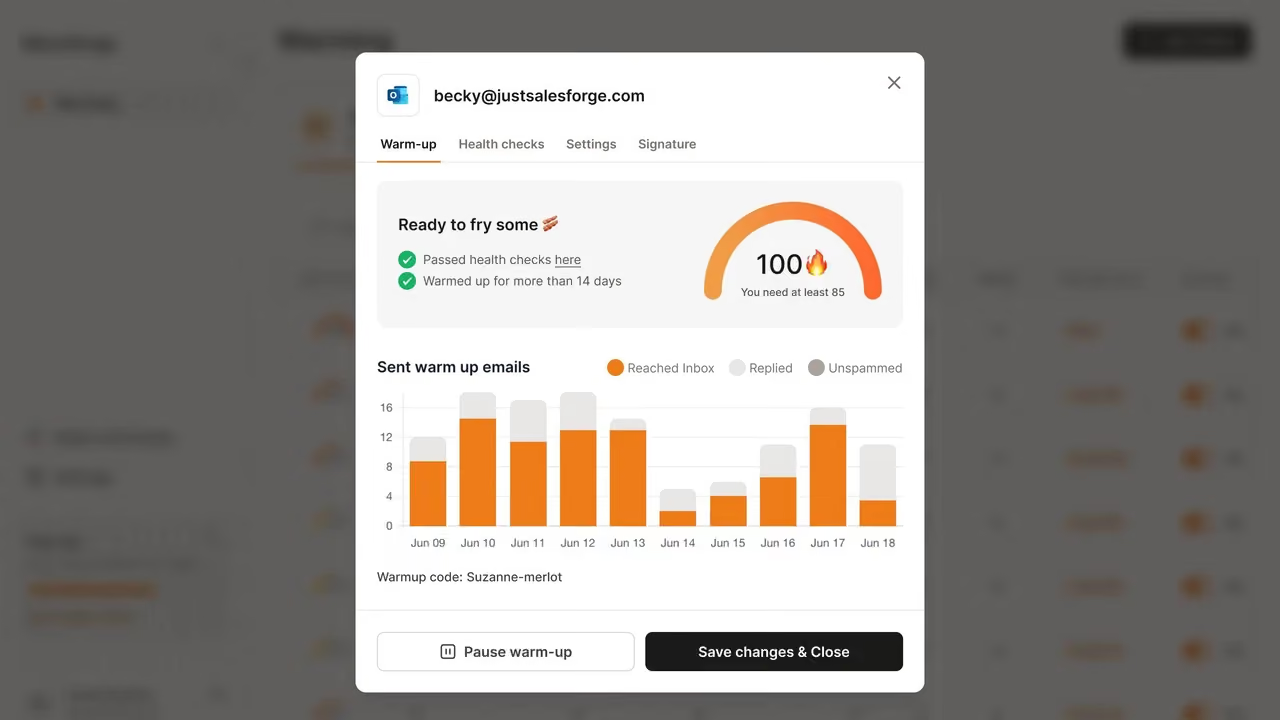
Bounce Shield runs by default across every plan. Pre-send email verification catches invalid addresses before they burn your sender reputation on a bounce. Smart Mailbox Rotation is also included on Pro (most competitors gate rotation behind higher tiers). ESP Matching, which routes emails from Gmail senders to Gmail recipients to maximize inbox placement, is a Growth-only feature.
For the DNS side of what Warmforge is monitoring, this cold email deliverability guide covers the domain setup, TLD choice, and DNS record configuration you need on top of the warmup. And if you want to see how .
There is no standalone global "Contacts" page in the main sidebar. Contacts are managed per-sequence.
Inside each sequence, you get a Contacts tab with import options: Existing contacts (already uploaded to the workspace), Leadsforge (advertised as 500M+ contacts), Google Sheet URL, or CSV upload. The contact table shows Full Name, Sequence status, Email, ESP, and Validation Status columns.
The ESP and Validation Status columns baked into the contact list are a nice touch. Deliverability-relevant data lives right where you need it. You can see at a glance whether a contact is on Gmail or Outlook (useful for ESP-matching strategies) and whether the email has been validated as deliverable.
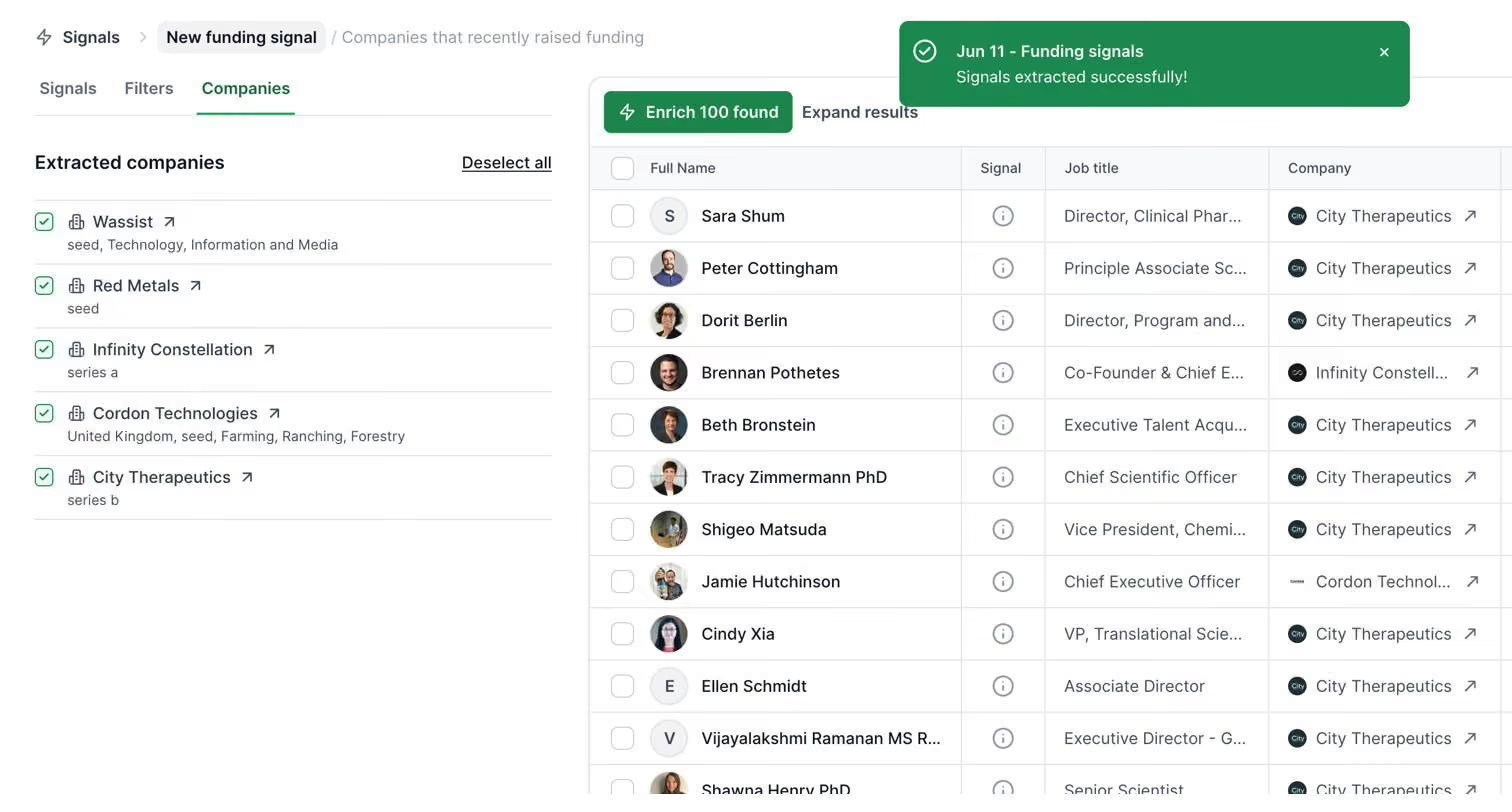
The structural gap is the missing global contact object. Apollo and Reply.io let you build cross-sequence segments and manage contacts as a first-class platform-wide object. Salesforge treats contacts as a per-sequence concept, which is fine for straightforward outbound but limiting if you want to run advanced segmentation.
Enrichment is not native to Salesforge itself. Instead, you route enrichment through third-party integrations (Clay, Bitscale, Persana AI, Databar AI) rather than a native enrichment button. If enrichment is a core part of your workflow, factor in the cost of Clay or Bitscale on top of Salesforge.
The integrations layer is deep and covers most of the tools an outbound team is already using.
One-click CRM connectors include HubSpot, Salesforce, Pipedrive, HighLevel, Breakcold, Attio, and Folk. The Salesforce and HubSpot integrations use OAuth 2.0 with built-in field mapping. Reply data pushes back into your CRM automatically. Positive replies flag as opportunities, and meetings booked sync directly.
Data and enrichment integrations cover Clay, Bitscale (with a discount code baked into the app), RB2B, Databar AI, and Persana AI. Video personalization connects through Sendspark and Weezly. Automation includes Zapier (API key already provisioned by default), Make, Slack, and custom Webhooks. Native API access is available on Growth.
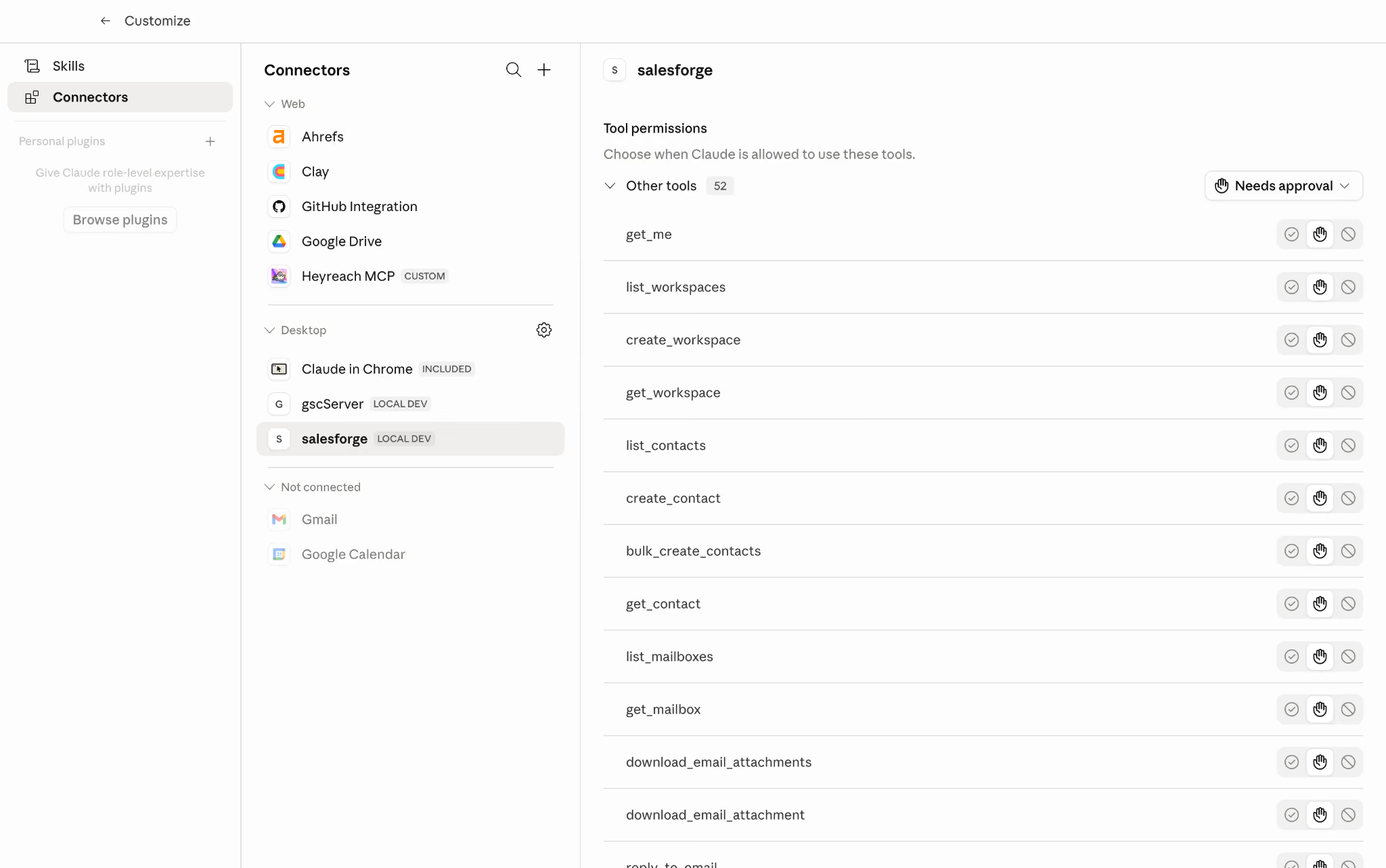
The forward-looking piece is Salesforge MCP (Model Context Protocol) support. MCP is an open standard originally developed by Anthropic that lets external AI agents connect to Salesforge data and trigger actions through a chat interface.
Ask Claude or ChatGPT to "add 20 contacts to my Q1 sequence and launch it," and the MCP integration handles the rest. Instantly, Lemlist, Smartlead, and Apollo do not advertise this yet as of my testing, which makes MCP support a genuine 2026 differentiator.
Om N., a Senior Frontend Developer, shared his experience on G2 in July 2026 with a 5-star review. He praised the clean interface, the solid third-party integrations, and the AI-driven prospecting that scales well. His only critique was that some advanced features took a bit of time to learn, which lines up with what most reviewers mention about the learning curve. Coming from a developer background, his read on the integration layer specifically is worth the click.
Salesforge has three price points. Two self-serve plans and one demo-gated AI SDR.
Salesforge keeps its pricing simple with three plans, but there are a few details worth paying attention to.
The Pro plan includes:
One thing I noticed is that almost every usage limit comes with the option to buy more. So if you outgrow the 5,000 monthly email limit or the included AI credits, you can simply purchase additional capacity instead of moving to a higher plan.
The Growth plan builds on Pro and adds:
If you're running outreach across a larger team, this is where Salesforge starts to stand out. The unlimited users model can be significantly cheaper than tools that charge for every additional seat.
Agent Frank is sold separately and starts at $499 per month when billed quarterly.
It includes:
You'll need to book a demo before you can activate Agent Frank.
One thing that isn't immediately obvious is that Salesforge uses a shared credit system on both the Pro and Growth plans.
Personalization Credits power features like:
All of these features draw from the same pool of credits.
That matters because your monthly cost isn't always limited to the subscription price. If you rely heavily on AI-generated emails or run Agent Frank in Auto-Pilot or Co-Pilot mode, you'll burn through credits much faster than you might expect.
The Pro plan includes 300 Personalization Credits per month, while the Growth plan includes 1,000 Credits. Once those are exhausted, you'll need to purchase additional credits, adding a variable cost on top of your monthly subscription.
Here is the piece I did not see anyone else calculate cleanly.
If you build a comparable stack with separate tools, this is roughly what it costs monthly:
Growth at $96 a month replaces roughly $200 to $280 of separate tools. Add in that the pricing does not scale per seat, and the delta gets bigger as your team grows. A 5-person outbound team on Salesforge Growth pays $96 a month total. On Lemlist Expert, that same team pays $69 per user, or $345 a month.
Nobody else writes this section cleanly. Here is my read.
For most buyers reading this, Growth is the answer.
Here is the quick reference.
Yes, for the right buyer.
Salesforge is the best all-in-one outbound stack without per-seat pricing that I have tested this year. Unlimited mailboxes, unlimited LinkedIn senders, Warmforge included, and infrastructure buying inside the same login. That combination is not something Instantly or Smartlead or Lemlist matches at $96 a month.
The rough edges (spintax syntax, Agent Frank demo gate, Leadsforge login split) are real but manageable. The upside (one platform replacing four tools, deep deliverability tooling, MCP support for AI-native teams) is bigger.
If you are running outbound at any real volume, start the trial and connect real mailboxes.
Start your free 14-day Salesforge trial →
For teams running B2B outbound at any real volume, yes. Salesforge bundles email, LinkedIn, warmup, unified inbox, and infrastructure into one platform at a flat price. For solo founders sending a handful of emails a week, the platform is more than needed.
Pro starts at $40 per month billed annually ($48 monthly). Growth is $80 per month billed annually ($96 monthly). Agent Frank starts at $499 per month and requires a demo to activate.
Salesforge does not have a permanent free plan. You get a 14-day free trial with no credit card required, which is enough to connect real mailboxes and run a small campaign end to end.
Pro gives you 1,000 active contacts, 5,000 emails per month, and 1 LinkedIn sender. Growth gives you 10,000 active contacts, 50,000 emails per month, unlimited LinkedIn senders, unlimited users, A/B testing, API access, ESP Matching, and Primebox™ AI. The unlimited LinkedIn senders and unlimited users lines are the two features that pay for the upgrade.
Agent Frank is a separate paid add-on starting at $499 per month. He is not self-serve either, so you book a demo call to activate him. The in-sequence AI reply modes (Reply as human, Co-Pilot, Auto-Pilot) are included on all plans and give you a taste of AI-managed replies without hiring Agent Frank.
Warmforge runs the warmup and deliverability layer. You get automated warmup, heat scores, health checks, and inbox placement tests included on every plan. Bounce Shield runs by default, Smart Mailbox Rotation is included on Pro, and ESP Matching is available on Growth. That is a deeper deliverability stack than most competitors offer natively.
Yes. You can connect Gmail or Outlook via OAuth, or connect any mailbox via IMAP/SMTP with a bulk CSV upload. You can also buy domains and provision mailboxes inside Primeforge, Mailforge, or Infraforge if you want the setup handled for you.
Yes. Unlimited mailboxes, unlimited LinkedIn senders, and unlimited users on Growth mean you can add clients without your bill scaling per seat. The white-label option lets you resell under your own brand, and unlimited workspaces keep client campaigns properly separated.
Yes. Both are one-click native integrations using OAuth 2.0 with built-in field mapping. Salesforge also connects with Pipedrive, Attio, Folk, HighLevel, and Breakcold. Reply data pushes back into your CRM so records stay current without manual data entry.
MCP (Model Context Protocol) is an open standard from Anthropic that lets external AI assistants like Claude or ChatGPT connect directly to your Salesforge data and trigger actions through a chat interface. You can ask an AI to add contacts to a sequence, launch a campaign, or check reply data. As of 2026, Salesforge is one of the few outreach platforms supporting this natively.
The Salesforge free trial runs 14 days with no credit card required. During the trial, you get 50 contacts, 100 emails, 50 email validation credits, 50 personalization credits, and 100 social action credits for LinkedIn. Unlimited mailboxes and warmup are also available during the trial.
