
Cold email AI is everywhere now. Every outreach tool has an AI writer, an AI reply agent or an AI SDR on its pricing page, and most of them demo beautifully.
I've run cold email programs on several of these tools, and the failure I keep running into isn't bad copy. The AI writes a decent email, and the email never reaches the inbox.
So this guide looks at cold email AI through the lens that decides whether any of it works: deliverability. I cover the 8 tools I'd shortlist in 2026, what their AI actually does, where each one falls short, and the workflow I use so AI-written emails land in primary instead of spam.
Cold email AI covers four separate jobs, and only one of them is writing.
When people say "cold email AI," they usually mean the writing assistant. In a real outbound stack, AI is doing four jobs at once, and each one breaks in a different way.
AI pulls context about each prospect (company news, job changes, funding, tech stack) and turns it into variables. If that data is stale, the personalization is wrong, and a wrong first line hurts more than a generic one.
This is the part every tool demos: subject lines, first lines, full sequences and translations. It's genuinely useful for speed. It's also where the "every email sounds the same" problem starts.
AI picks send times, rotates mailboxes, sorts replies and, in some tools, drafts or sends responses on its own. This is where an AI SDR sits.
Warmup, reputation scoring, inbox placement testing and authentication checks. It's the least exciting job on the list, and it's the one that decides whether the other three matter at all.
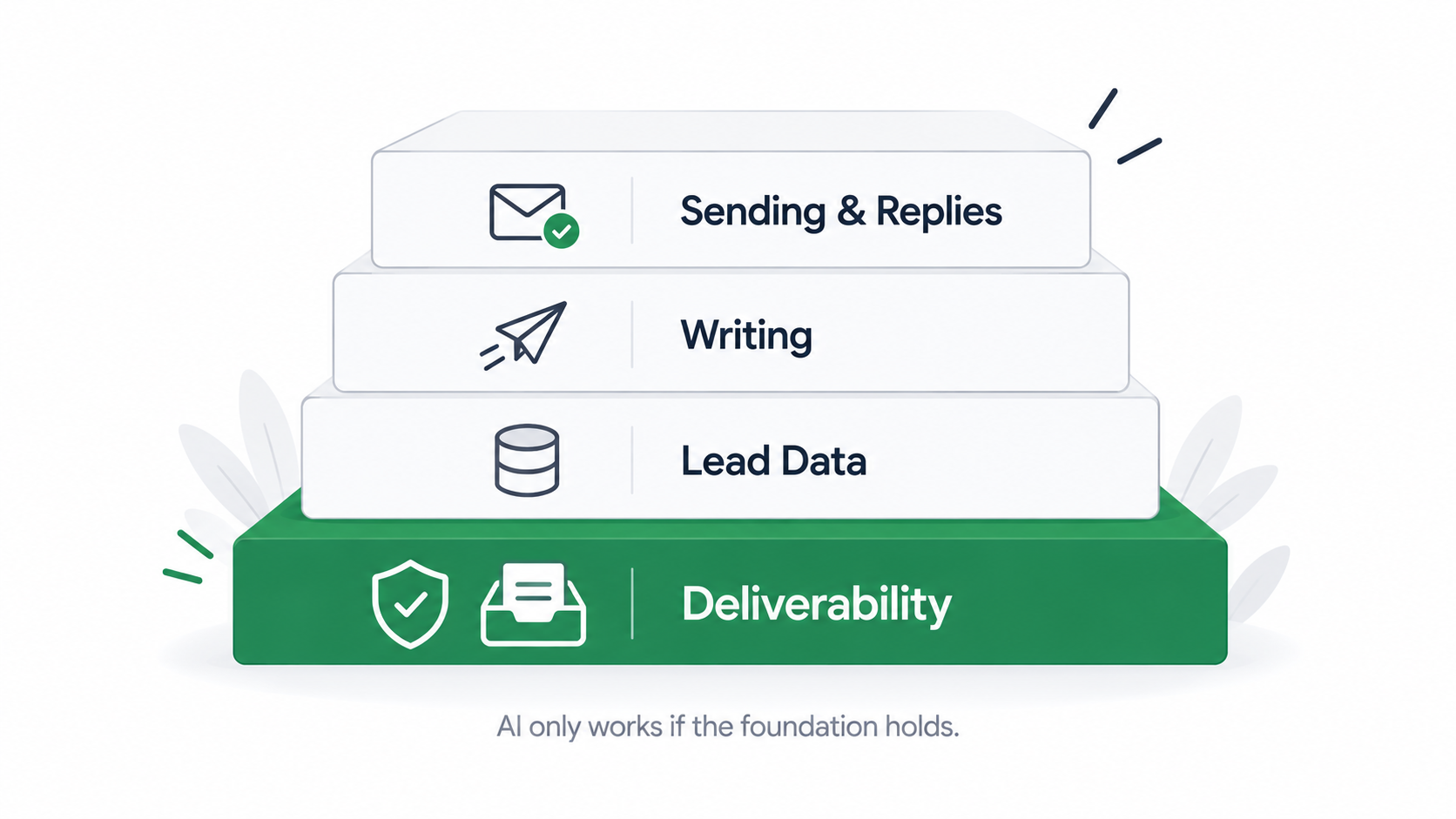
The inbox providers changed the rules, and AI made it easier to break those rules at scale.
AI didn't make cold email harder to write. It made it far easier to send a lot of it, and volume is exactly what the big inbox providers are now policing.
In February 2024, Google and Yahoo started enforcing new rules for bulk senders: SPF and DKIM authentication, a published DMARC record, one-click unsubscribe for marketing mail, and a spam complaint rate kept below 0.3% in Postmaster Tools. Google treats anyone sending close to 5,000 messages a day to personal Gmail accounts as a bulk sender, and that status doesn't reset when you slow down. The details are in Google's email sender guidelines.
Microsoft followed on May 5, 2025. Domains sending over 5,000 emails a day to Outlook.com, Hotmail and Live addresses now need passing SPF and DKIM, plus a DMARC record aligned with at least one of them, or the mail gets routed to Junk. Microsoft's announcement for high-volume senders lays out the timeline.
Most cold email teams aren't sending 5,000 emails a day from one domain. In my experience, though, the providers apply the same signals to smaller senders, just with less public detail. I'd treat these as the baseline for everyone. If you want the full picture, read this guide on keeping your spam complaint rate below 0.3% and run through an email authentication checklist before you connect any AI tool to a mailbox.
Spam filters judge patterns across millions of messages, not just your one email. When thousands of senders use similar models with similar prompts, the output clusters: the same "I noticed your company recently" opener, the same three-paragraph shape, the same soft CTA.
I've seen campaigns on clean infrastructure underperform simply because the copy read like every other AI email that week. AI writers also lean on a few phrases that overlap with common spam trigger words, so I scan every generated template before it goes live.
An AI writer working from a dirty list writes confident, personalized emails to addresses that bounce. Practitioners on r/coldemail keep describing the same arc: double-digit bounce rates on unverified lists, then reply rates climbing once every address is verified before sending.
Bounces hit sender reputation directly, so good email list hygiene is cheaper than any AI upgrade. Verify first, then personalize.
I scored each tool on whether its AI output actually lands, not on how good the demo looks.
I've used Warmforge, Salesforge and Leadsforge day to day and have run or audited campaigns on the other tools. Where a point comes from vendor documentation rather than hands-on use, I say so. These are the six things I checked:
Three Forge tools cover deliverability, writing and data; five competitors cover the rest of the market.
Warmforge isn't a writing tool, and I put it first on purpose. Every other tool on this list produces email. Warmforge decides whether that email has enough reputation behind it to reach the primary inbox.
It's a premium email warmup and deliverability tool. You connect a mailbox, click once, and AI-written warmup emails start building reputation inside a premium pool of aged Google Workspace, Microsoft 365 and SMTP mailboxes. The warmup traffic runs in multiple languages, so it doesn't look like an English-only pattern to inbox providers.
Key features:
What I like: The placement test is the feature I'd miss most. AI makes it easy to launch ten variants in an afternoon, and a placement test tells me which ones are landing in promotions before I burn a week of sends on them. If you're new to warmup, this walkthrough of the email warm-up process covers the two-week ramp.
Where it falls short: It doesn't write or send cold emails, so you pair it with a sending tool. On Salesforge that pairing is already done.
Pricing: $9 per mailbox slot per month on annual billing, with 1 free slot on signup. Each slot includes AI warmup, DNS, MX and blacklist checks, and 1 free placement test a month. Placement Test Pro is $32.50 per month on annual billing. Unlimited and free with any Salesforge plan.
Best for: Anyone sending AI-written cold email who wants proof it's landing, and teams currently paying for warmup per slot on top of their sending tool.
Salesforge is where I'd do the actual writing and sending. It's a multichannel outreach platform that runs cold email and LinkedIn as coordinated channels inside one sequence and one inbox, with Warmforge built in.
Key features:
If you'd rather not run campaigns yourself, Agent Frank is Salesforge's AI SDR. He prospects from the Leadsforge database, enriches contacts, writes email and LinkedIn messages, handles replies through Primebox™ and books meetings on your calendar 24/7. I think of him as a teammate who covers prospecting so the sales team can focus on closing.
What I like: The conditional sequences. Most AI tools generate good copy for one channel. Salesforge lets the same AI variables drive both channels and branch on what the prospect actually did.
Where it falls short: A/B testing, ESP matching, API access, multi-language sequences and unlimited LinkedIn senders sit on the Growth plan. Solo users on Pro give up some of those controls.
Pricing: Pro is $48 per month (1,000 contacts, 5,000 emails, 1 user). Growth is $96 per month (10,000 contacts, 50,000 emails, unlimited users). Agent Frank starts at $499 per month, billed quarterly, for up to 1,000 active contacts. 14-day free trial, no credit card required.
Best for: Teams that want AI writing, multichannel sending, reply management and warmup under one login.
AI personalization is only as good as the data behind it. Leadsforge is the AI lead finder I use to build lists before anything gets written.
Key features:
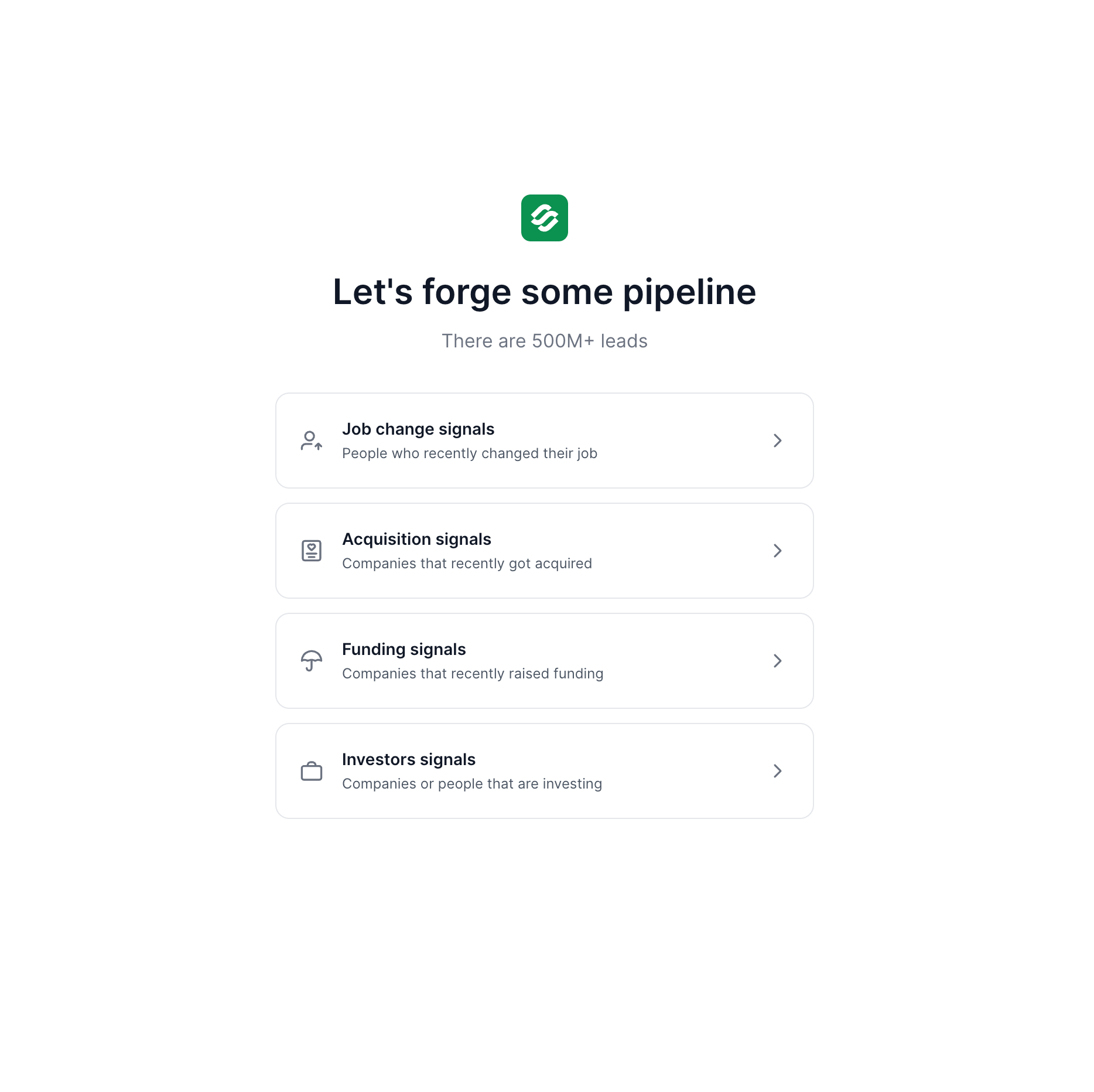
Signals is the part I find most useful for AI writing. A fresh funding round or a new VP gives the AI a real reason to send the email, and the evidence behind each match means the first line references something true instead of something the model guessed. For company-based signals, Leadsforge finds the matching companies first, then surfaces the relevant employees from its lead database.
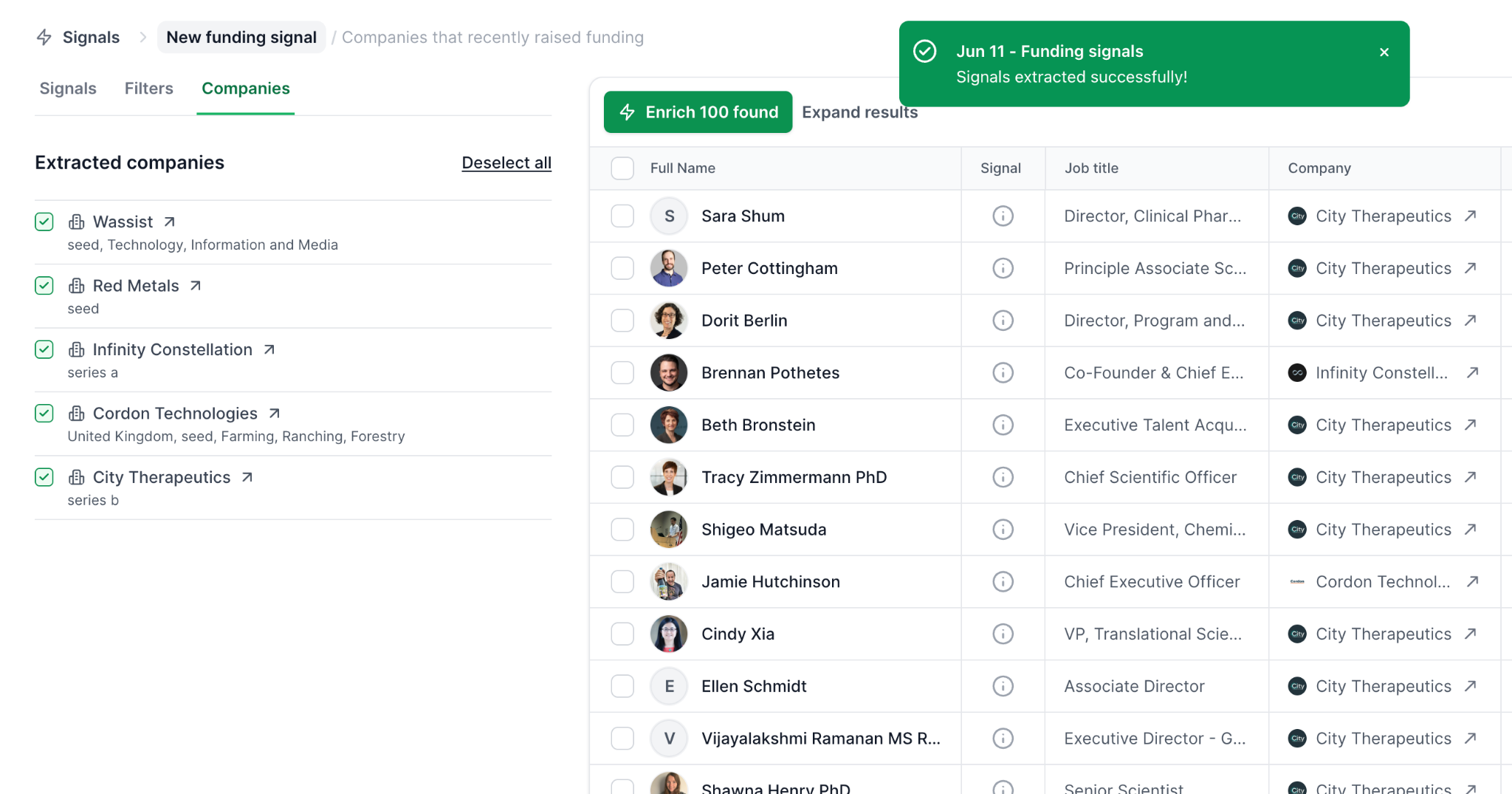
Where it falls short: It's a data tool, not a sender, so you'll pair it with Salesforge or another sending platform. Credits are charged at extraction based on how many companies or contacts you select, so large pulls need a bit of planning.
Pricing: Credit-based plans, with 100 free credits on signup.
Best for: Teams whose AI personalization keeps falling flat because the inputs are generic.
Instantly is popular for a reason. Its outreach plans include unlimited email accounts and unlimited warmup on its own network, so a team can add mailboxes without the bill climbing per seat. It also offers AI help for writing sequences and handling replies, and a separate lead database product.
What I like: Flat pricing that rewards volume, a fast setup, and a large user community sharing playbooks.
Where it falls short: Sequences are email-first, with no native LinkedIn steps in the same flow. Leads, CRM features and some AI capabilities are separate products or add-ons, so the real monthly cost grows as you add them. There's no first-party mailbox infrastructure, so you still buy domains and mailboxes elsewhere.
Pricing: Outreach plans start at $37 per month (Growth, monthly billing), with lower annual rates.
Best for: Email-only teams sending at high volume who already have infrastructure sorted.
Smartlead is built around scale and client management. Every plan includes unlimited mailboxes and warmup, automatic mailbox rotation and agency features such as client workspaces and white-label options. Its AI features focus on categorizing replies and automating parts of the workflow.
What I like: Agencies can spin up client environments quickly, and the per-mailbox economics are friendly.
Where it falls short: The AI writing side is lighter than tools built around personalization, and the interface takes time to learn. Lead data and some advanced features cost extra, and replies from LinkedIn don't share an inbox with email the way they do in Salesforge's Primebox™.
Pricing: Plans start at $39 per month (Basic).
Best for: Lead gen agencies managing many clients and hundreds of mailboxes.
Lemlist is known for creative personalization: custom images, videos and landing pages, plus email, LinkedIn and call steps in one sequence. It includes its own warmup (lemwarm), a built-in lead database and AI that can generate sequences from a short brief.
What I like: The personalization ceiling is high, and multichannel is native rather than bolted on.
Where it falls short: Pricing is per user, so costs scale with headcount. There's no first-party domain or mailbox infrastructure, and heavy visual personalization isn't the right fit for text-only, deliverability-first campaigns.
Pricing: Email Pro is around $63 per user per month and Multichannel Expert around $87 per user per month on monthly billing.
Best for: Small teams running lower-volume, highly personalized campaigns.
Reply.io is a sales engagement platform with email, LinkedIn and call steps, plus Jason AI, its AI SDR that can build sequences, handle replies and book meetings.
What I like: It suits teams that want a traditional sales engagement platform and an AI SDR from the same vendor.
Where it falls short: Pricing is per user, and the AI SDR is priced separately from the core seats. Warmup and mailbox infrastructure aren't part of the core product the way Warmforge and the Forge infrastructure options are for Salesforge users.
Pricing: Core plans start at about $49 per user per month; AI SDR pricing is separate.
Best for: Sales teams already used to sales engagement platforms who want to test an AI SDR.
Apollo combines a large B2B database with sequencing and an AI writing assistant, and it has a free plan that makes it an easy starting point.
What I like: Data and sequencing in one place, and a low barrier to trying it.
Where it falls short: Deliverability tooling is lighter than dedicated warmup and placement tools, and there's no first-party sending infrastructure. Users regularly report that data accuracy varies by region and segment, so I'd verify before sending.
Pricing: Free plan available; paid plans are per seat.
Best for: Early-stage teams that need data and basic sequencing before investing in a deliverability stack.
Here's how the eight tools compare on the features that decide inbox placement.
Prices change often, so confirm each vendor's current plans before you buy. The pattern that matters is structural: most tools give you one or two layers, and you assemble the rest.
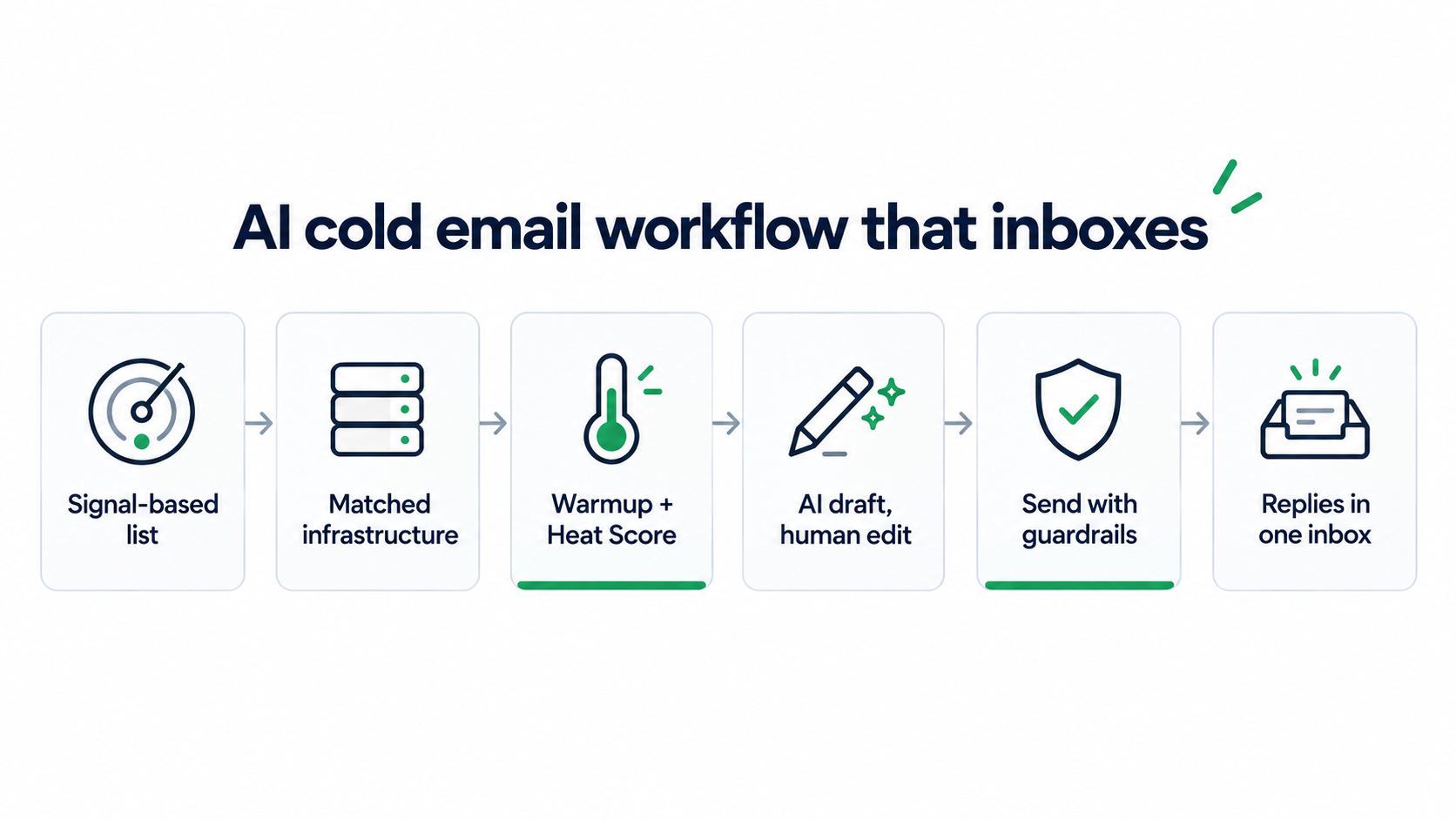
This is the order I run things in, from list to booked meeting, so the AI never writes for a mailbox that isn't ready.
I start in Leadsforge with a Signals pull: people who changed jobs in the last 30 days, or companies that raised a round in the last quarter. Then I add waterfall enrichment so every contact has a verified email before the AI sees it. Timing does more for reply rates than clever wording.
The Forge Stack gives you three infrastructure options under one login, and you can move between them as volume and budget change:
The teams I see doing best run at least two ESPs, for example Primeforge paired with Mailforge or Infraforge, so there's always a matching mailbox for each prospect's inbox provider.
New mailboxes go into Warmforge for about two weeks before any cold sends. I wait for a healthy Heat Score™, run a placement test, and only then ramp volume. Your inbox placement rate tells you more than open rates ever will, and staying inside sensible email sending limits per mailbox keeps the reputation you just built.
I let AI write first drafts and first lines from the signal data, then I edit for three things: one specific reason for reaching out, one clear ask, and no sentence that could have been sent to anyone. I keep emails short and text-only, because plain text tends to inbox better than HTML for cold outreach.
If you want the deliverability side of this in more depth, this piece on how personalization affects cold email deliverability is worth reading, and so is this guide on how to write a cold email that gets replies.
In Salesforge, I keep sender rotation, Bounce Shield, email validation and ESP matching switched on for every campaign. None of these are glamorous, and all of them protect the domains the AI is sending from.
Replies from email and LinkedIn land in Primebox™. I start new campaigns in Co-Pilot mode so I can review AI-drafted responses, then switch to Auto-Pilot once I trust how it handles the common reply types.
The same stack runs three ways: your own team operates it, Agent Frank operates it end to end, or a certified Forge Expert agency runs it for you. I haven't seen another vendor offer that choice on one platform.
AI multiplies whatever you give it, including your mistakes.
"Loved your recent post about growth" is worse than no first line when the prospect never wrote a post about growth. Prospects recognize AI flattery fast. I only let AI reference facts that come from verified data, like a Signals match with evidence.
The ease of generating 500 variants tempts people to send them all on day one. A new domain sending at full volume is the fastest path to the spam folder, whatever the copy says.
If your whole team uses one prompt, your emails cluster together and so do your complaint rates. I rotate angles, not just words, and I rewrite openers that sound like a template.
A wrong AI reply to an interested prospect costs a real deal. Run reply handling in Co-Pilot mode until you've reviewed enough responses to trust it.
AI doesn't change your obligations. Use a real sender identity, a working opt-out and honest subject lines. This breakdown of whether cold emailing is illegal covers CAN-SPAM, GDPR and similar rules.
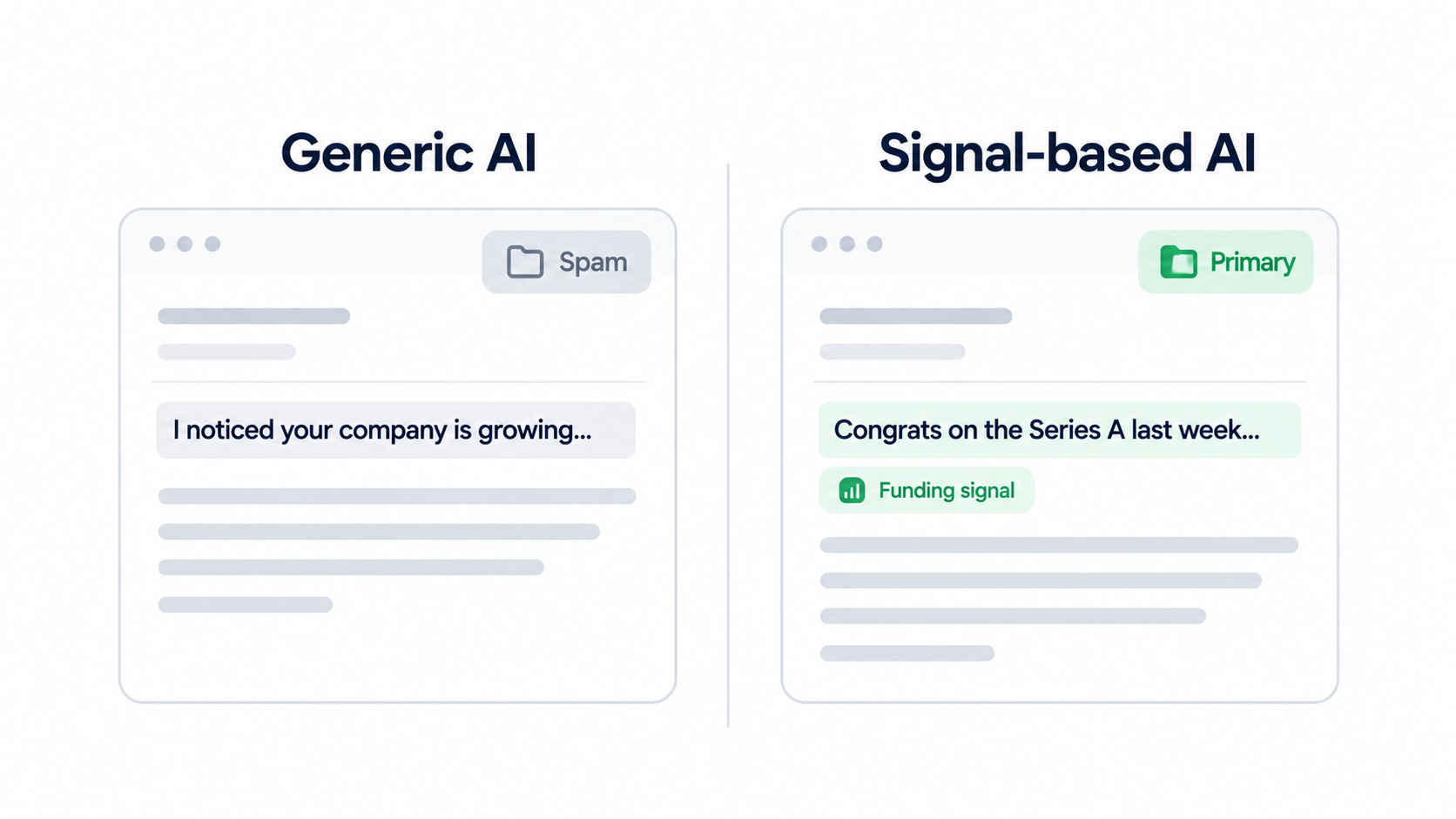
Pick the AI that writes well, but don't skip the layer that decides whether anyone reads it.
If I were building a cold email AI stack from scratch in 2026, I'd use Warmforge for deliverability, Salesforge to write and send (Warmforge comes included), and Leadsforge with Signals to give the AI something real to say. That covers the four jobs from the start of this guide without a single CSV export.
The bigger reason I keep coming back to the Forge Stack is that it's the only setup I know of that puts infrastructure (Primeforge, Mailforge, Infraforge), deliverability (Warmforge), lead finding (Leadsforge), multichannel outreach (Salesforge) and an autonomous AI SDR (Agent Frank) under one roof. Each product has its own subscription, but they share one login; every product exposes an MCP server, and the workflow can be run by your team, by Agent Frank or by a Forge Expert agency.
The others still have clear fits. Instantly suits flat-price, email-only volume. Smartlead suits agencies juggling many clients. Lemlist suits small teams doing creative multichannel personalization. Reply.io suits buyers who want a sales engagement platform with an AI SDR attached. Apollo is a sensible free starting point for data.
Whatever you choose, test placement before you scale. If you only take one thing from this guide, check whether your AI emails are landing in the inbox before your next campaign. For a deeper dive, the complete guide to cold email deliverability is the next read.
Cold email AI is software that uses AI to research prospects, write and personalize cold emails, send sequences and handle replies. The most useful setups also include deliverability tools such as warmup and inbox placement testing, because AI-written emails only work if they reach the inbox.
Yes, if the infrastructure and habits behind them are sound. Authenticate your domains with SPF, DKIM and DMARC, warm new mailboxes for about two weeks, keep spam complaints well under 0.3%, send text-only emails, and edit AI drafts so they don't share the same generic openers.
Yes. Sending tools write and deliver email, but warmup builds the reputation that gets it accepted. Warmforge handles warmup, Heat Score™ tracking and placement tests, and it's included free with unlimited slots on every Salesforge plan.
It is, but the bar is higher. Teams that target with buying signals, verify every address and protect deliverability still book meetings from cold email. Generic AI blasts sent at high volume from new domains tend to land in spam or get ignored.
In most countries, B2B cold email is legal when you follow the rules: an honest sender identity, accurate subject lines, a working opt-out, and, in places like the EU, a legitimate interest basis. Requirements vary by country, so check the rules where your prospects are.
Salesforge works well for agencies because it offers unlimited mailboxes, users and workspaces, includes Warmforge warmup, and puts every client's email and LinkedIn replies into Primebox™. Smartlead is another common agency choice for mailbox-heavy setups.
It depends on volume and how many layers you buy separately. A Salesforge Pro plan starts at $48 per month with unlimited warmup included, and infrastructure is priced per mailbox on top of that. Tools with per-seat pricing get more expensive as your team grows.
