Mailtrap is useful for dev and staging email testing.
It helps teams capture test emails, validate SMTP workflows, and avoid sending emails to real inboxes during development.
But as workflows grow, some users start facing issues like limited email volume, inbox size restrictions, DNS setup problems in some cases, and scaling limitations.
This image shows the Mailtrap user complaining about its limitations.
Some teams need higher sending volume and better scalability.Some want to track whether emails land in the inbox, spam, or promotions tab.
Others need email previews, spam diagnostics, mailbox monitoring, or ongoing deliverability visibility.
Because of that, many teams start looking for alternatives with better deliverability visibility and inbox placement testing.
Some tools also offer stronger spam analysis, email previews, mailbox health monitoring, and QA automation features.
In this guide, I’ll cover the best Mailtrap alternatives for email testing and deliverability, along with their features, pricing, pros and cons, and best use cases.
Not every Mailtrap alternative solves the same problem.
If your issue is inbox placement, spam folders, or domain reputation, Warmforge, GlockApps, or SendForensics are more relevant.
If you use Mailtrap mainly for SMTP sandbox testing, tools like MailHog make more sense.
If you use it for email previews and QA, Litmus or Email on Acid may fit better
If you need production email sending infrastructure, SendGrid is closer to what you need.
This matters because choosing the wrong type of alternative can create more problems than it solves.
10 Best Mailtrap Alternatives Based on Use Case
Mailtrap is not one single use case. Some teams use it for sandbox testing, some for email QA, some for deliverability checks, and some for SMTP workflows.
So the best alternative depends on which part of Mailtrap you want to replace.
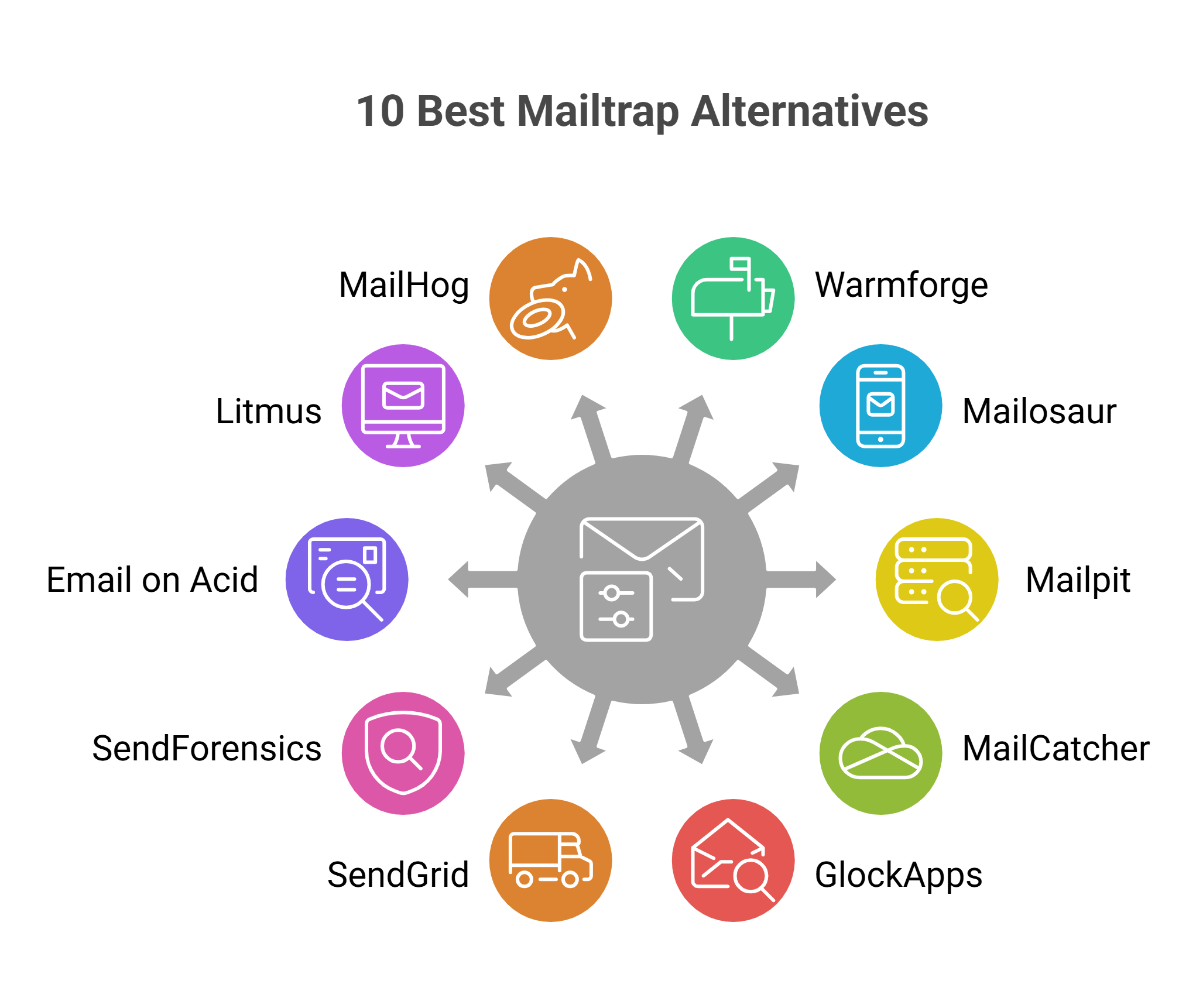
Here are the top alternatives to Mailtrap:
This image shows the Best Mailtrap alternatives for email testing and delivery
Warmforge is the best Mailtrap alternative if your main problem is not sandbox testing, but inbox placement, mailbox health, and ongoing deliverability monitoring.
Mailosaur is stronger for end-to-end email, SMS, OTP, and MFA workflow testing.
Mailpit is a good self-hosted option for local SMTP testing and developer automation workflows.
MailCatcher works well for simple cloud-based development email testing.
GlockApps is better for deep spam diagnostics and blacklist analysis.
SendGrid fits businesses that need a large-scale email delivery infrastructure.
SendForensics focuses more on DMARC analytics and domain reputation tracking.
Email on Acid is better for pre-send QA testing, accessibility checks, and inbox compatibility testing.
Litmus is stronger for advanced email previews, rendering checks, and collaborative review workflows.
MailHog is best for developer SMTP sandbox testing and debugging workflows.
Why Users Look for Mailtrap Alternatives
Mailtrap covers many important email testing and SMTP needs. But not every team uses email workflows in the same way.
Some users need better visibility into where emails land after sending. Others want more advanced spam testing, mailbox monitoring, or email preview features.
A few users also mention limitations related to:
email sending limits
inbox size restrictions
This image shows the Mailtrap user talking about its limitation - Inbox size
DNS setup for some use cases
This image shows the Maitrap user talking about his issue about setting DNS
scaling workflows as email volume grows
Because of that, many developers, QA teams, and product teams start exploring alternatives that better match their testing and deliverability workflow.
How I Selected These Mailtrap Alternatives
I selected these Mailtrap alternatives based on:
Inbox placement testing capabilities
Spam testing and deliverability analysis
Email preview and rendering support
SMTP sandbox and staging workflows
Mailbox, IP, and domain reputation monitoring
DMARC, SPF, and DKIM monitoring features
QA testing and collaboration workflows
Email delivery and scalability
Pricing flexibility and scaling options
This helped create a list that covers different email testing and deliverability needs instead of repeating tools that solve the exact same problem.
10 Mailtrap Alternatives Comparison Table
Tool
Placement Testing
Deliverability Monitoring
Spam Analysis
Mailbox Health Tracking
Email Preview Testing
SMTP Sandbox Testing
Best For
Warmforge
Inbox, spam, and promotions tab tracking across ESPs
Ongoing inbox placement monitoring
AI warm up + blacklist monitoring
Heat Score system
Placement testing before scaling outreach
No
Long-term inbox placement and mailbox monitoring
Mailosaur
Workflow and authentication flow validation
Limited
Basic email validation
No
Real-device previews and dark mode testing
Moderate
End-to-end email and SMS workflow testing
Mailpit
Basic local email testing
Limited
SpamAssassin spam testing
No
HTML compatibility checks and screenshots
Self-hosted SMTP sandbox
Local developer email testing
MailCatcher
Basic development email testing
Limited
Basic email inspection
No
HTML previews and dark mode support
Hosted SMTP sandbox
Lightweight cloud email testing
MailHog
Basic spam scoring
Limited
Spam score analysis
No
HTML previews
Real-time SMTP sandbox
Developer email testing and debugging
GlockApps
Seed-list inbox placement testing
IP and domain reputation tracking
Spam filter diagnostics
Reputation monitoring
Limited
No
Spam troubleshooting and blacklist analysis
SendGrid
Delivery performance insights
Email infrastructure analytics
Spam filter checks
Authentication monitoring
Basic
Limited
Large-scale email delivery
SendForensics
Inbox placement analytics
Reputation dashboards and alerts
Spam-trigger analysis
DMARC monitoring
Moderate
No
Domain reputation and DMARC tracking
Email on Acid
Inbox compatibility checks
Pre-send inbox readiness
Content spam analysis
Limited
100+ client previews
No
Email QA and accessibility testing
Litmus
Inbox rendering validation
Deliverability insights
Basic spam testing
Limited
100+ client previews
No
Collaborative email QA workflows
Now let’s understand each in detail.
1. Warmforge
Warmforge is not a like-for-like Mailtrap replacement for developer sandbox testing.
But if your bigger problem is inbox placement, spam folders, mailbox health, and deliverability visibility, it is one of the strongest options in this list.
It is an email deliverability and email warm-up tool built to help teams improve inbox placement and monitor mailbox health.
This image shows the Warmforge Inbox placement and deliverability tool
Warmforge goes further by including pre placement tests that help you check where emails land after sending, while also monitoring deliverability and inbox placement over time.
Instead of only running a warm-up in the background, Warmforge also helps teams monitor deliverability performance and mailbox reputation over time.
Continuously warm up mailboxes using AI-generated emails
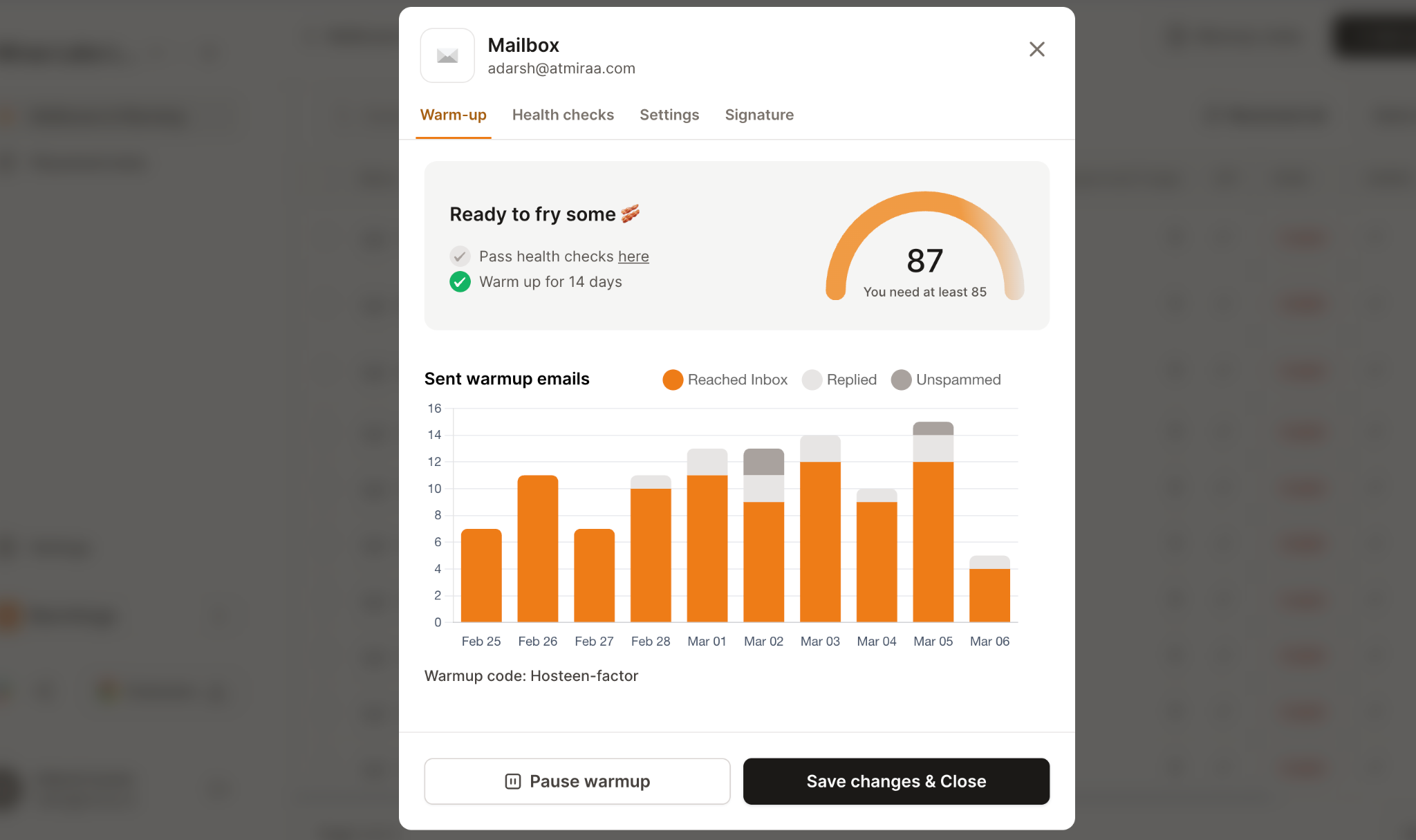
Another useful feature is the Heat Score system for mailbox health monitoring.
This image shows the Email warmup report in Warmforge
This gives you a clear reputation indicator for each mailbox, so you know how healthy your inbox is before increasing sending volume.
Warmforge also supports Google Workspace and Microsoft 365 mailboxes and recommends keeping warm-up active continuously to maintain stable deliverability.
Pricing
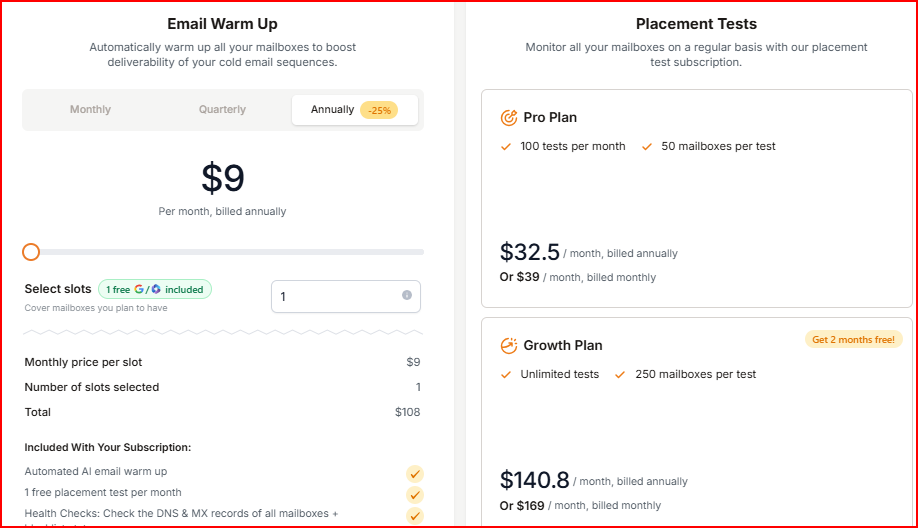
Warmforge pricing starts at $9/month per mailbox slot when billed annually. This includes:
This image shows the Warmforge pricing
Automated AI email warm-up
1 free placement test per month
DNS and MX health checks
Blacklist monitoring
Placement Testing plans are separate:
Pro Plan: $39/month billed monthly
Growth Plan: $169/month billed monthly
Instead of large bundled plans, you simply pay per mailbox slot, so you only pay for what you actually use.
This makes it affordable and easy to scale.
Pros
Gives much better visibility into where emails actually land after sending
Helps identify deliverability issues before inbox placement drops badly
“Their dashboard shows you the health percentage and even provides you with tips on what are healthy stats for your mailboxes.”- Valdis Sprogis, Trustpilot
Heat Score makes it easier to know when mailboxes are ready for outreach
Not mainly built for simple fake SMTP or lightweight staging-only testing
Best For
Checking whether emails land in inboxes or spam folders
Monitoring long-term email deliverability
Managing multiple mailboxes
Scaling outreach across Google Workspace and Microsoft 365
Using email warm-up and placement testing together
If you want to check inbox placement before sending and also monitor deliverability after emails go out, Warmforge is one of the strongest options in this list.
Personalized Outbound Strategy
Get The Right Outbound Strategy In Minutes
Enter your email to get a custom plan & stack recommendation for your
business
It's being carefully crafted by AI
Please check your mailbox in 5 minutes
2. Mailosaur
Mailosaur fits better when email testing is part of a larger customer workflow.
Instead of only checking whether an email was sent, it helps teams test complete flows like sign-ups, OTP verification, password resets, MFA authentication, and transactional messaging.
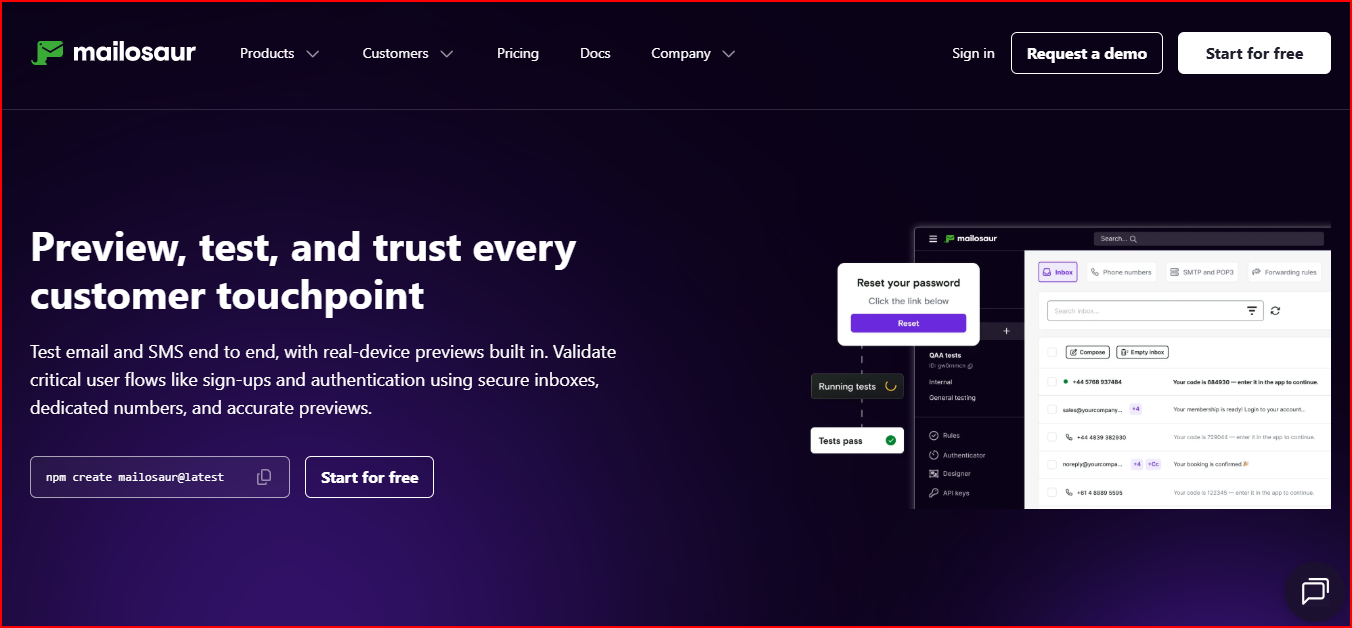
It is an email and SMS testing platform built to help teams test customer communication workflows, email previews, authentication flows, and automated QA processes.
This image shows the Mailosaur - Email and SMS testing platform
Another area where Mailosaur stands out is real-device email previews.
Unlike tools that rely on emulated screenshots, Mailosaur generates previews using real devices to help identify rendering issues more accurately before launch.
It lets you:
Test email and SMS workflows together
Preview emails across clients, devices, and dark mode
Automate testing with Cypress, Selenium, Playwright, and other frameworks
Validate OTP, MFA, and password reset flows
Inspect email content, links, headers, and layouts
Create secure test inboxes and phone numbers
Integrate testing into CI/CD workflows
Pricing
Mailosaur offers a 14-day free trial.
The platform mainly uses custom pricing based on testing workflows, preview usage, and automation needs.
The pricing makes more sense for businesses running automated QA testing and customer workflow validation instead of simple SMTP sandbox testing.
Pros
Strong end-to-end email and SMS workflow testing
Real-device previews help catch rendering issues more accurately
Works well for OTP, MFA, and password reset testing
Easy integration with popular testing frameworks
Useful for automated QA and CI/CD workflows
Cons
More focused on workflow automation than deliverability monitoring
Pricing is not publicly available
May feel too advanced for simple SMTP-only testing needs
Best For
End-to-end email and SMS testing
OTP, MFA, and password reset validation
Automated QA workflows
Real-device email preview testing
CI/CD testing automation
If your workflow includes authentication flows, transactional emails, and automated QA testing, Mailosaur is one of the strongest options in this list.
3. Mailpit
Mailpit makes more sense for developers that want a lightweight local email testing setup without dealing with extra dependencies or heavy infrastructure.
It is a small SMTP testing tool built for developers to capture, inspect, test, and automate emails through a local testing environment and API.
This image shows the Mailpit - lightweight SMTP testing tool
Compared to Mailtrap, Mailpit focuses more on self-hosted local testing, developer control, and fast integration workflows.
It runs as a single binary with no additional dependencies and includes a web interface for viewing emails, spam testing, HTML compatibility checks, and automated testing workflows.
It lets you:
Capture emails through a local SMTP server
Test HTML and CSS compatibility across email clients
Run SpamAssassin spam testing
Check links and linked images automatically
Generate email screenshots
Search and filter emails with advanced filtering
Automate testing through a REST API
Download emails through a POP3 server
Trigger SMTP failure scenarios for resilience testing
Relay or forward emails through external SMTP servers
Another useful part is the built-in chaos testing support.
Mailpit can intentionally trigger SMTP errors to help developers test how applications behave during email delivery failures.
Pricing
Mailpit is free and open-source.
It runs as a standalone binary or Docker image without additional paid infrastructure requirements.
The setup is much more useful for developers that want local SMTP testing and automation without paying for cloud-based testing workflows.
Pros
Lightweight setup with no extra dependencies
Strong local SMTP testing and automation support
Includes spam testing and HTML compatibility checks
REST API makes automated testing easier
Useful for resilience and failure testing workflows
Cons
Focused more on local developer testing than inbox placement monitoring
Does not focus on production deliverability analytics
Requires self-hosted setup and management
Best For
Local SMTP testing
Self-hosted email testing workflows
Automated integration testing
HTML compatibility and spam testing
Application resilience and failure testing
If you want a lightweight self-hosted alternative for local email testing and automation, Mailpit is one of the strongest options in this list.
4. MailCatcher
MailCatcher works better for teams that want a simple cloud-based email testing setup without sending test emails to real inboxes.
It is an email testing platform built to capture emails from development environments, preview email rendering, inspect email data, and organize testing workflows safely in one place.
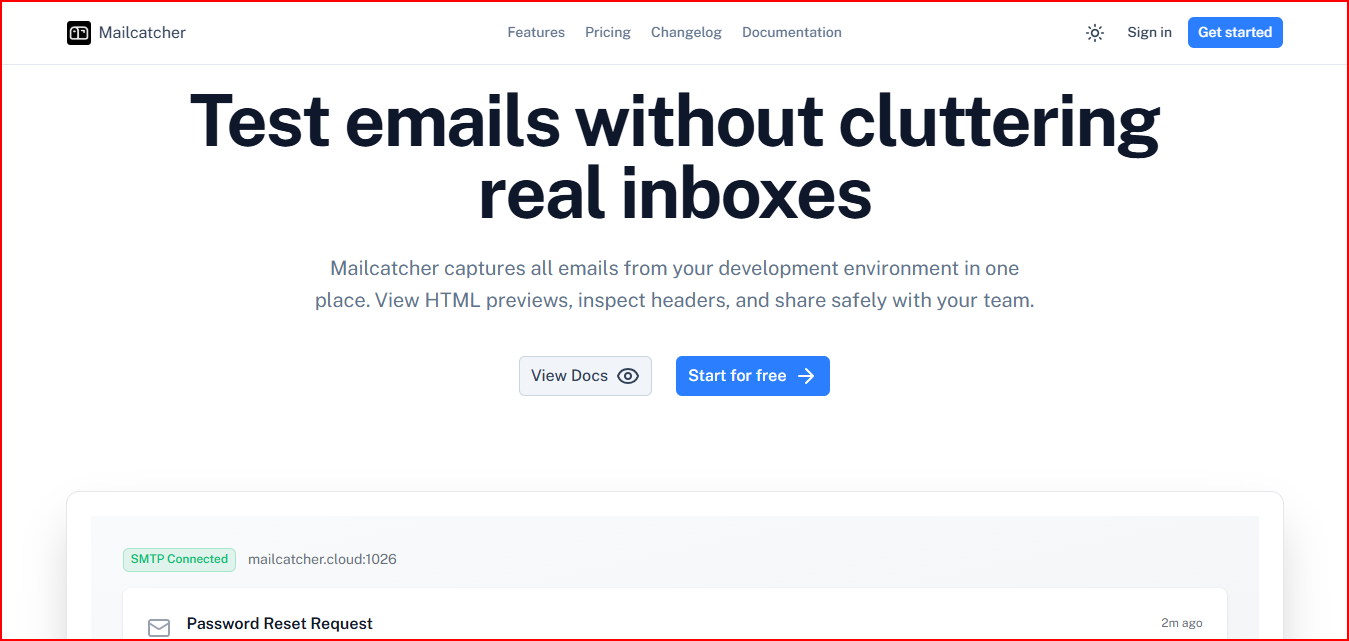
This image shows the MailCatcher - cloud-based email testing tool
Compared to Mailtrap, MailCatcher focuses more on simple setup, project organization, and collaborative email testing workflows.
It helps developers and QA teams preview emails, inspect raw email data, and manage testing environments without needing complex infrastructure or local setup.
It lets you:
Capture emails from development environments
Preview HTML and text email versions
Test responsive layouts and dark mode rendering
Inspect raw source, headers, and attachments
Organize emails by projects
Share test emails with teams safely
Manage user permissions and access controls
Another useful part is the quick setup workflow.
MailCatcher can be connected through SMTP settings in minutes without requiring Docker containers or complex configuration.
Pricing
MailCatcher has a free plan with:
Unlimited projects and users
10 emails per project
10 MB email storage
HTML and text previews
Paid plans start at:
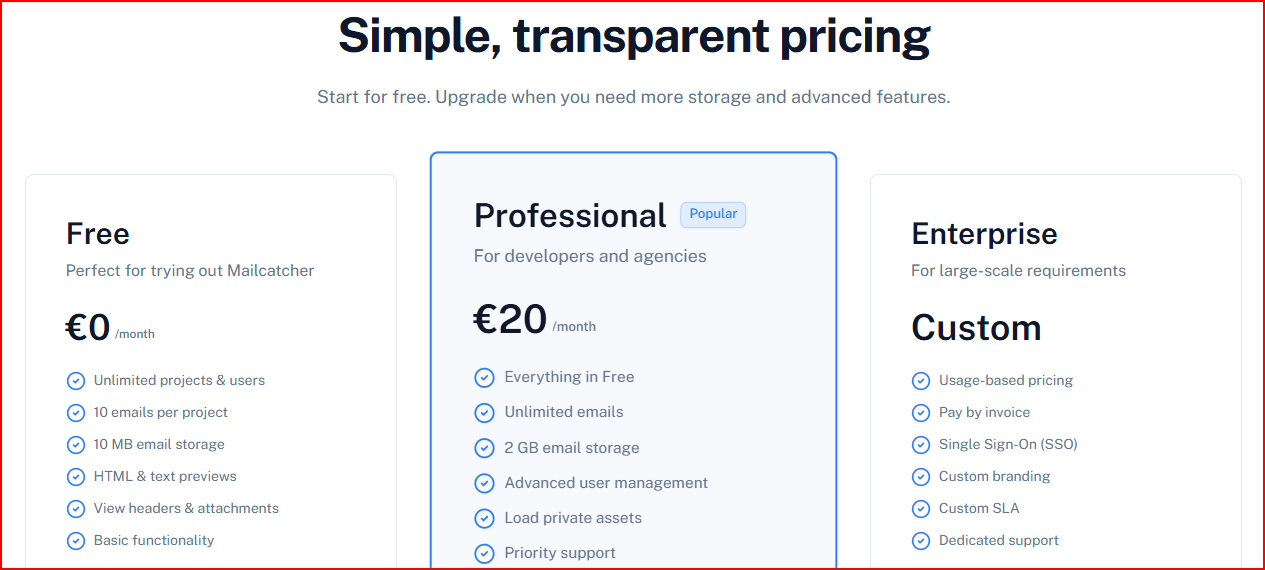
This image shows the Mailcatcher pricing
Professional Plan - €20/month with unlimited emails, 2 GB storage, advanced user management, and priority support
Enterprise Plan - custom pricing with SSO, custom branding, dedicated support, and custom SLA
The pricing works well for teams that want a simple hosted email testing environment without managing their own infrastructure.
Pros
Simple setup with cloud-hosted email testing
Good HTML preview and email inspection tools
Easy project organization for multiple apps
Useful collaboration and permission management features
No complex infrastructure setup required
Cons
More focused on development email testing than deliverability monitoring
Limited advanced spam and inbox placement analysis
Free plan storage and email limits are small
Best For
Development email testing
HTML preview and rendering checks
Shared email QA workflows
Project-based email organization
Lightweight cloud-hosted SMTP testing
If you want a simpler hosted alternative for testing development emails without cluttering real inboxes, MailCatcher is a strong option in this list.
5. GlockApps
GlockApps is useful when you already know your email can be sent, but you need to understand why it lands in spam, promotions, or the inbox.
It is an email deliverability testing and spam testing platform built to help businesses monitor inbox placement, sender reputation, and email authentication issues.
This image shows the Glock Apps - deliverability diagnostics and spam testing platform
Alt text:- Glock Apps - deliverability diagnostics and spam testing platform
It also includes spam testing across major inbox providers and spam filters like Barracuda and SpamAssassin.
It also provides detailed reports for inbox placement, sender reputation, DKIM alignment, blacklist status, and IP reputation monitoring.
Instead of only checking whether an email works, GlockApps focuses more on identifying the exact issues affecting deliverability and helping improve inbox placement over time.
It lets you:
Run spam tests across different providers
Monitor the domain and IP reputation
Track blacklist records
Monitor DKIM alignment
Analyze email content, links, and HTML compatibility
Set up automatic tests and alerts for deliverability issues
Pricing
GlockApps has a free plan available.
GlockApps has a free plan with limited spam testing credits.
This image shows the Glock Apps pricing
Paid plans start at:
Essential Plan - $59/month with 360 spam test credits and 1 sending account
Growth Plan - $99/month with 1080 spam test credits and 10 sending accounts
Enterprise Plan - $129/month with 1800 spam test credits and 20 sending accounts
The pricing makes more sense for users who regularly run inbox placement tests and need ongoing deliverability diagnostics, not just occasional email testing.
Pros
Gives much deeper spam testing and deliverability diagnostics
This image shows the Glock apps detailed insights helps deliverability
Helps identify why emails are landing in spam folders
Detailed reports make troubleshooting easier
Includes domain, IP, DKIM, and blacklist monitoring together
Automatic alerts help catch deliverability issues early
Cons
More focused on deliverability diagnostics than simple email sandbox testing
Higher plans may be needed for larger testing volumes
Best For
Finding why emails land in spam folders
Monitoring sender reputation and blacklist status
Inbox placement testing across multiple ISPs
Checking domain, IP, and DKIM health
Ongoing deliverability diagnostics and monitoring
If you want deeper visibility into why emails fail deliverability checks or land in spam, GlockApps is one of the strongest options in this list.
6. SendGrid
SendGrid fits a different stage of the email workflow. Mailtrap helps you test emails before they go live, while SendGrid helps you send and monitor production emails at scale.
It is an email API and email delivery platform built to help businesses send transactional and marketing emails at scale through SMTP relay and REST APIs.
This image shows the Sendgrid - Email API and email delivery platform
It also includes deliverability monitoring, email testing, validation, and infrastructure management features.
It lets you:
Send emails through SMTP relay and APIs
Monitor deliverability insights across mailbox providers
Validate email addresses in real time
Test emails for spam filters and rendering issues
The platform uses scalable pricing based on email sending volume and infrastructure needs. Additional pricing details are available through SendGrid’s pricing plans and sales team.
The pricing setup makes more sense for businesses sending high email volumes and needing reliable email infrastructure, not just sandbox testing.
Pros
Strong email delivery infrastructure for large-scale sending
Combines sending, testing, validation, and deliverability monitoring in one platform
This image shows the Sendgrid user complementing its deep email metrics
Helps improve inbox placement with authentication and reputation management
More focused on production email delivery than lightweight testing workflows
Can feel infrastructure-heavy for simple sandbox testing needs
Advanced deliverability and infrastructure features may require larger plans
Best For
Sending transactional and marketing emails at scale
Managing email authentication and deliverability
Monitoring inbox placement and delivery performance
SMTP relay and API-based email delivery
Large production email infrastructure workflows
If your focus is reliable email delivery and deliverability monitoring at scale, SendGrid is one of the strongest alternatives in this list.
7. SendForensics
SendForensics makes more sense when deliverability is no longer a one-time check.
It is built for teams that want to monitor domain reputation, DMARC issues, inbox placement, and sender performance continuously.
It is an email deliverability platform built to help businesses improve inbox placement, monitor DMARC compliance, and analyze email reputation across campaigns and domains.
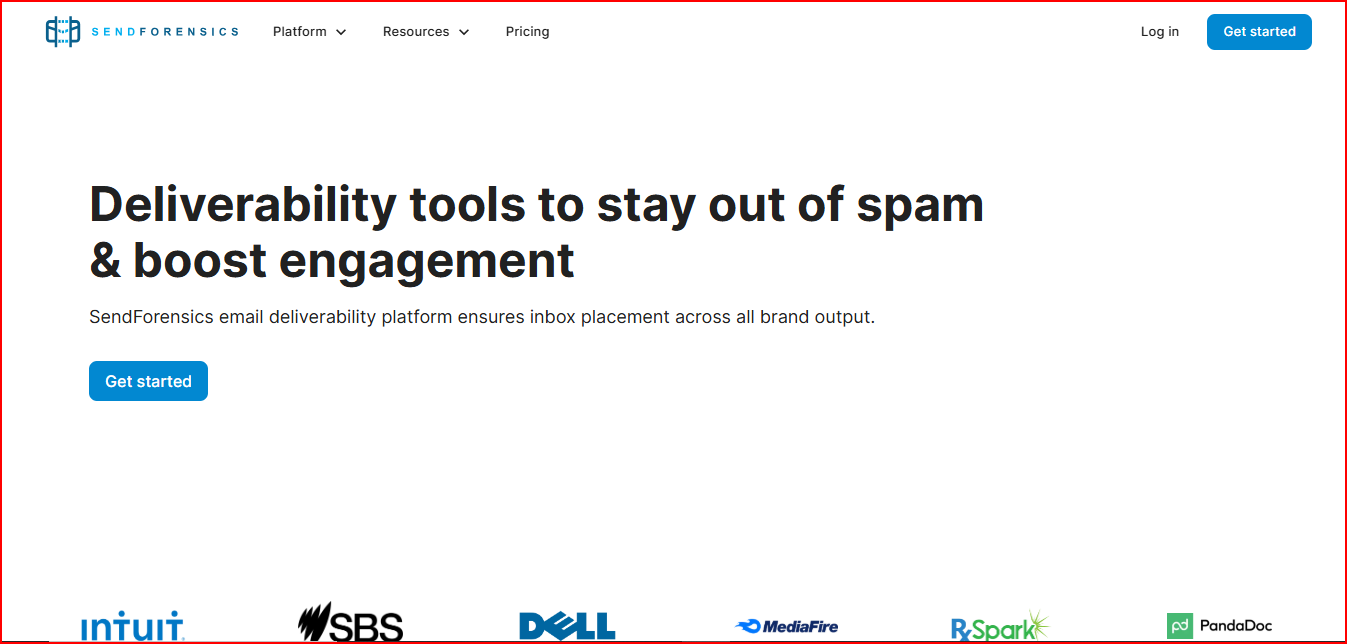
This image shows the SendForensics - Email deliverability platform
It lets you:
Run inbox placement tests across major providers
Monitor DMARC compliance and failures
Analyze spam-triggering words and code snippets
Preview emails across different clients and devices
Monitor blacklist activity and complaint rates
Track sender reputation and deliverability KPIs
Receive Slack, webhook, and email alerts for deliverability issues
Another useful part is the domain protection workflow.
SendForensics helps monitor inactive or non-sending domains and automatically detects unmonitored subdomains that may create security or spoofing risks.
Pricing
SendForensics pricing starts at:
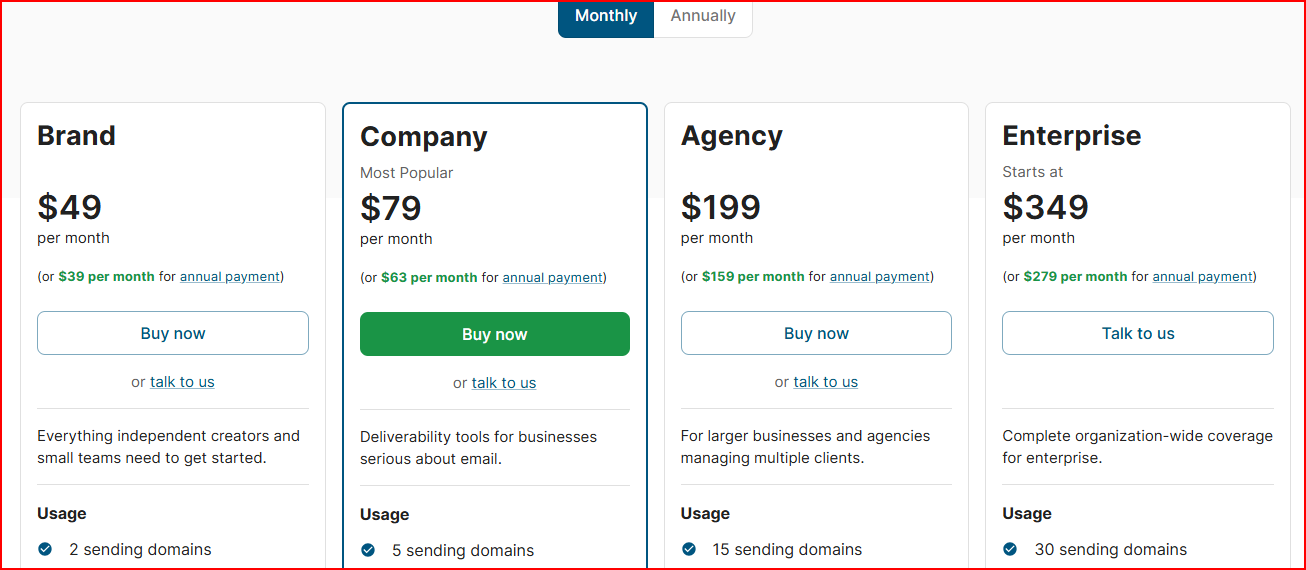
This image shows the SendForensics pricing
Brand Plan- $49/month with 2 sending domains and unlimited spam tests, client previews, and inbox placement tests
Company Plan - $79/month with 5 sending domains and 1 million DMARC reports/month
Agency Plan - $199/month with 15 sending domains, advanced reporting, and data segmentation
Enterprise Plan - starts at $349/month with 30 sending domains and enterprise SSO support
All plans include unlimited spam tests, unlimited client previews, unlimited inbox placement tests, DMARC analytics, and integrations.
The pricing feels more valuable for businesses managing multiple sending domains and ongoing deliverability monitoring instead of basic SMTP testing.
Pros
Strong inbox placement and deliverability analytics
Helps monitor DMARC failures and domain reputation issues
Unlimited spam tests and inbox placement testing across plans
Useful for managing multiple sending domains
Alerts help catch reputation and blacklist problems early
Cons
More focused on deliverability analytics than lightweight developer testing
Advanced reporting features are mainly available in higher plans
Better suited for ongoing monitoring than simple staging workflows
Best For
Monitoring inbox placement across multiple domains
Managing deliverability alerts and blacklist monitoring
Long-term deliverability and reputation monitoring
If you need stronger inbox placement analytics and domain reputation monitoring beyond basic email testing, SendForensics is one of the strongest options in this list.
8. Email on Acid
Email on Acid is less about SMTP sandbox testing and more about checking whether your email will look, load, and behave correctly before you send it.
It is an email QA and email testing platform focused on email previews, accessibility testing, spam analysis, and inbox readiness before launch. It is now part of Mailgun Inspect.
This image shows the Email on Acid is an email QA and email testing platform
It lets you:
Preview emails across 100+ clients and devices
Run accessibility checks based on WCAG guidelines
Analyze HTML code issues
Validate links and images
Run spam content analysis across major ISPs
Test inbox compatibility across different providers
Access QA testing through API integrations
Another useful part is the isolated spam content analysis.
Email on Acid checks email content quality separately from sender reputation, which helps identify content-related spam issues before launch.
Pricing
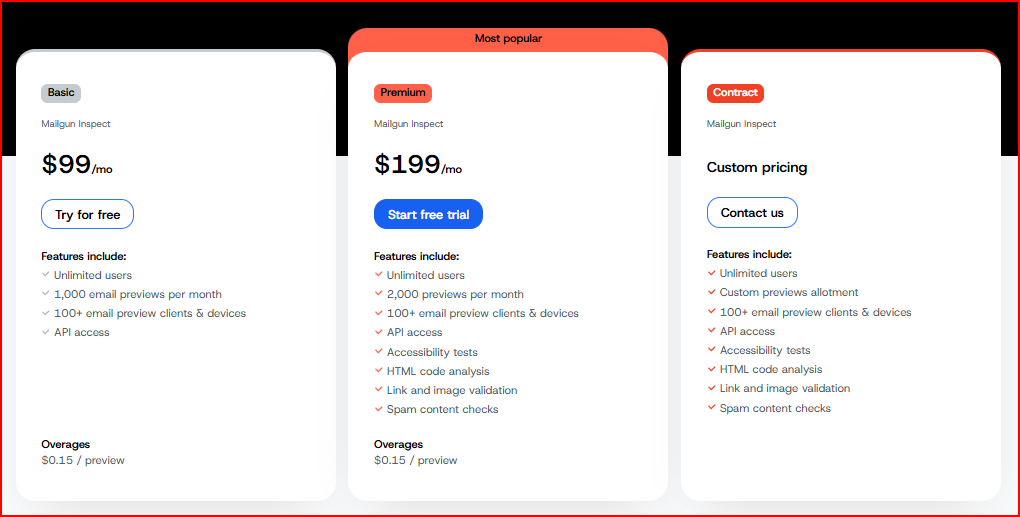
Email on Acid pricing starts at:
This image shows the Email on Acid pricing
Basic Plan - $99/month with 1,000 previews/month and API access
Premium Plan - $199/month with 2,000 previews/month, accessibility testing, HTML analysis, and spam content checks
Contract Plan - custom pricing with custom preview limits
All plans include unlimited users but previews are limited by monthly preview counts,
The pricing makes more sense for businesses running frequent email QA testing and inbox compatibility checks before large email sends.
Pros
Strong email preview testing across devices and inboxes
This image shows the Email on acid user satisfaction about its preview
Helps catch rendering, accessibility, and HTML issues before launch
Link and image validation reduce broken email elements
Cons
Focused more on pre-send QA testing than post-send deliverability monitoring
Higher pricing compared to lightweight SMTP testing tools
Preview-based pricing may become expensive for high testing volumes
Best For
Email rendering and inbox compatibility testing
Accessibility and HTML validation
Spam content analysis before launch
Large pre-send QA workflows
Testing links, images, and email layouts across devices
If your focus is detailed pre-send email QA and inbox readiness testing, Email on Acid is one of the strongest alternatives in this list.
9. Litmus
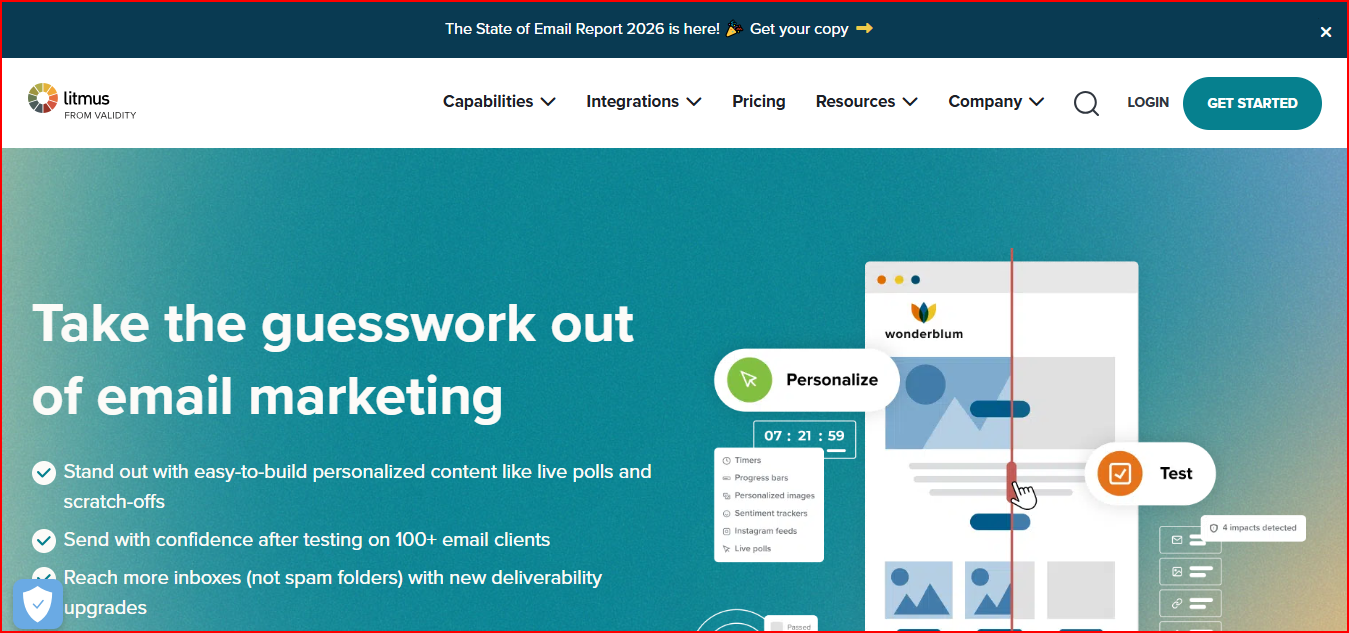
Litmus is a stronger fit for marketing and lifecycle teams that need email previews, QA checks, approvals, and collaboration before launching campaigns.
Litmus is an all-in-one email marketing and email testing platform built to help businesses design, test, personalize, review, and monitor emails before launch.
This image shows the Litmus - All-in-one email marketing and email testing platform
It lets you:
Preview emails across 100+ email clients and devices
Run automated QA checks and testing
Test email personalization elements
Monitor inbox placement and deliverability insights
Track SPF, DKIM, and DMARC results
Collaborate through shared reviews and approval workflows
Analyze engagement and email performance
Another useful part is the built-in collaboration workflow. Litmus combines email building, testing, reviews, approvals, and analytics in one place, which helps reduce email errors and review delays before launch.
Pricing
Litmus does not publicly list its pricing. It mainly offers an Enterprise-focused plan with unlimited seats and usage.
The platform includes email previews, QA testing, collaboration workflows, personalization, analytics, and deliverability insights.
Additional inbox placement and reputation monitoring features are available as upgrades.
Litmus pricing is more suited for businesses running large-scale email campaigns and advanced email testing workflows instead of lightweight SMTP sandbox testing.
Pros
One of the strongest tools for email rendering and preview testing
This image shows the Litmus powerful email preview tool
Helps catch email design and compatibility issues before launch
Combines testing, reviews, approvals, and analytics in one workflow
Supports advanced personalization testing and dynamic email content
Cons
More focused on marketing email workflows than simple developer SMTP testing
Enterprise-focused setup may feel too large for basic testing needs
Best For
Testing email rendering across different devices and inboxes
Large-scale email QA and approval workflows
Monitoring inbox placement and deliverability
Testing personalized and dynamic email content
Managing collaborative email review workflows
If your focus is email rendering accuracy, collaborative QA workflows, and inbox readiness before launch, Litmus is one of the strongest alternatives in this list.
10. MailHog
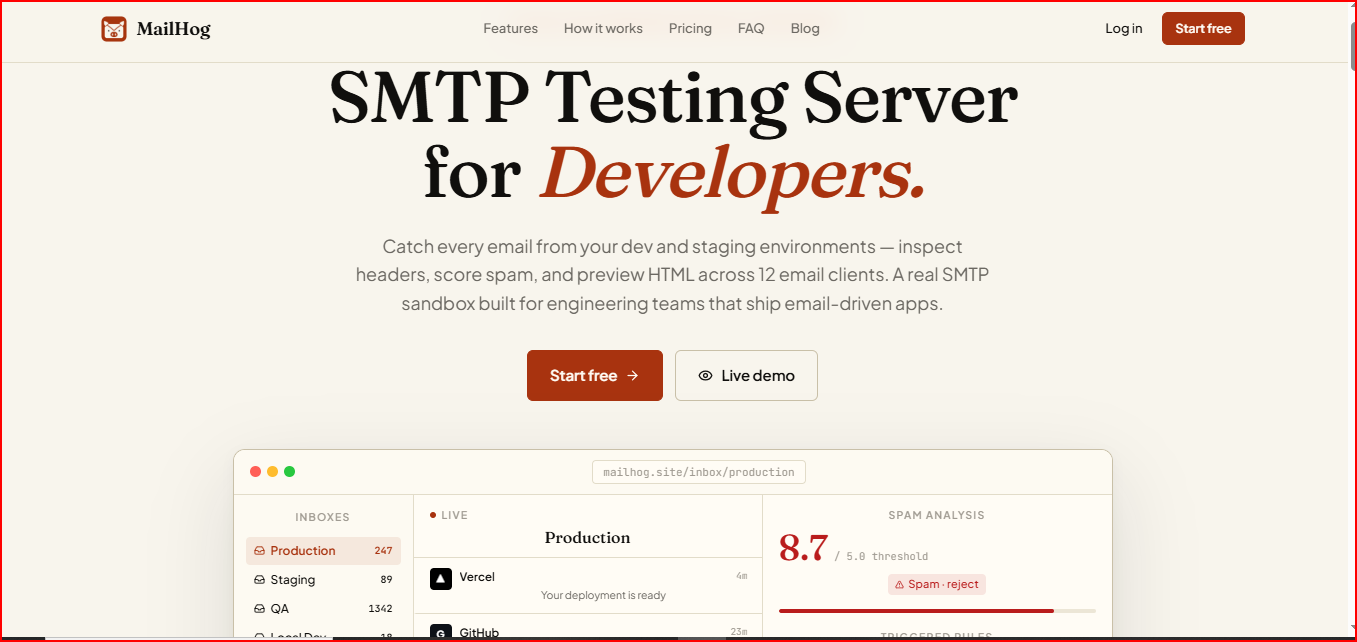
MailHog is the closest option in this list for developers who mainly want a lightweight SMTP sandbox to capture, inspect, and debug emails locally.
This image shows the MailHog - developer-focused email testing tool
It lets you:
Inspect SPF, DKIM, DMARC, and message headers
Analyze spam scores with detailed rule breakdowns
Preview HTML rendering across 12 email clients
Create separate inboxes for staging, QA, and production testing
Automate email testing through API endpoints
Another useful part is the real-time inbox updates.
Emails appear instantly in the dashboard without refresh or polling, which makes debugging much faster during development workflows.
Pricing
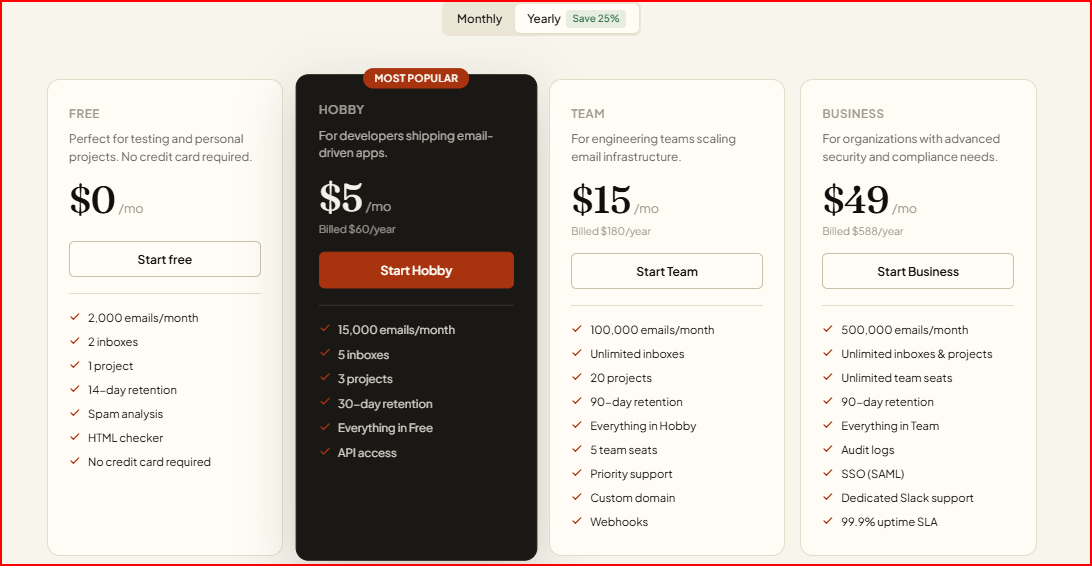
MailHog has a free plan with 2,000 emails/month, 2 inboxes, spam analysis, and an HTML checker.
This image shows the MailHog pricing
Paid plans start at:
Hobby Plan - $5/month with 15,000 emails/month, 5 inboxes, and API access
Team Plan - $15/month with 100,000 emails/month, unlimited inboxes, and webhooks
Business Plan - $49/month with 500,000 emails/month, unlimited projects, SSO, and audit logs
The pricing is much more affordable for teams that mainly need SMTP sandbox testing, spam analysis, and email debugging workflows.
Pros
Makes SMTP testing and email debugging very fast
Real-time inbox updates help speed up testing workflows
Spam scoring and HTML previews are included even in lower plans
Easy to separate dev, staging, and QA email environments
Works with almost every SMTP-capable framework
Cons
Focused more on development and sandbox testing than ongoing deliverability monitoring
Not mainly built for inbox placement monitoring after sending
Advanced business features are locked behind higher plans
Best For
SMTP sandbox testing
Debugging emails in dev and staging environments
Testing email rendering across different email clients
Spam score testing before launch
Automating email testing workflows with APIs
If your main goal is fast SMTP testing and email debugging during development, MailHog is one of the strongest alternatives in this list.
Personalized Outbound Strategy
Get The Right Outbound Strategy In Minutes
Enter your email to get a custom plan & stack recommendation for your
business
It's being carefully crafted by AI
Please check your mailbox in 5 minutes
Which Mailtrap Alternative Should You Choose?
The right alternative depends on what you need beyond Mailtrap.
Choose Warmforge for inbox placement testing, mailbox health monitoring, AI warm-up, and ongoing deliverability visibility in one workflow.
Choose Mailosaur for end-to-end email and SMS workflow testing with OTP and MFA validation.
Choose Mailpit for lightweight self-hosted SMTP testing and developer automation.
Choose MailCatcher for simple hosted email testing and HTML previews.
Choose GlockApps for deep spam diagnostics and blacklist monitoring.
Choose SendGrid for large-scale email delivery infrastructure and SMTP/API sending.
Choose SendForensics for DMARC analytics and domain reputation monitoring.
Choose Email on Acid for pre-send QA, accessibility, and HTML testing.
Choose Litmus for advanced email previews and collaborative QA workflows.
Choose MailHog for lightweight SMTP sandbox testing and debugging.
Overall, Warmforge feels like the most balanced option if you want both inbox placement visibility and ongoing deliverability monitoring together.
If Mailtrap helped you test emails before sending, Warmforge helps you answer the next question: where do those emails actually land?
Use Warmforge to run placement tests, monitor mailbox health, and catch deliverability issues before they hurt your outreach.