
Personalized Outbound Strategy
Get The Right Outbound Strategy In Minutes
Enter your email to get a custom plan & stack recommendation for your business
It's being carefully crafted by AI
Please check your mailbox in 5 minutes

Inboxy’s price is $3 per month for a Google Workspace mailbox, less than half what Google charges for a seat. If you manage 50 or 100 sending mailboxes, that gap is hard to ignore. It also raises two questions: what’s the catch, and are cheap mailboxes enough to keep campaigns out of spam?
The catch is small but real. Warmup costs another $3 per inbox, so a mailbox you can actually send from costs $6 monthly. That’s still cheaper than buying Workspace directly from Google.
The second question is harder. Inboxy writes your DNS records and sends mailboxes to Instantly or Smartlead without you touching a setting. But it only offers Google reseller mailboxes. Once your mailboxes go live, the only number you see is a warmup score from its own network, which says nothing about how prospects’ inboxes treat your emails.
I went through the order screen, mailbox dashboard, warmup reports, and API. I checked the billing rules, including what happens to mailboxes after 30 days without payment. I also read all five G2 reviews, none of which are newer than April 2024.
If you need Microsoft mailboxes or want to see where your emails actually land, I’ll also compare Primeforge and Warmforge and show where Inboxy remains cheaper.
Inboxy sells the two things you need before sending your first cold email: Google Workspace mailboxes and warmup. You bring your domains, Inboxy handles the DNS, and your mailboxes appear in Instantly, Smartlead, or whichever tool you use.
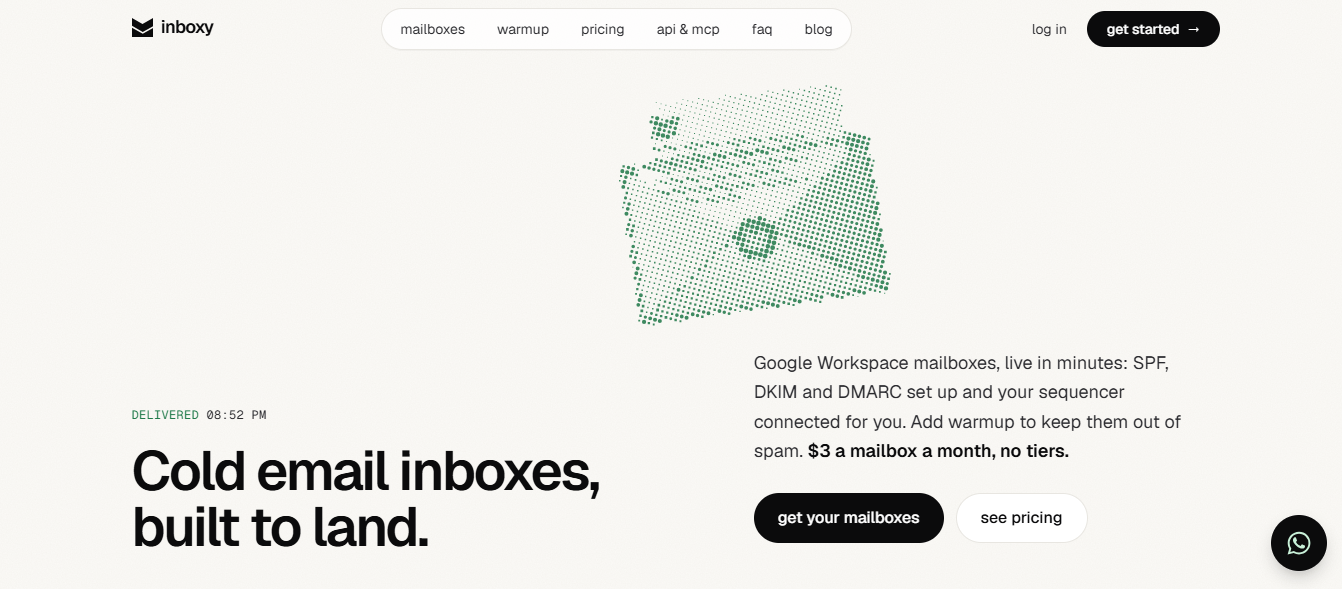
The price is the first thing you’ll notice, and it holds up. A mailbox costs $3 monthly, dropping to $2.40 with yearly billing, compared with $7 or more when buying Workspace seats directly from Google. The rate stays the same whether you run 10 mailboxes or 1,000.
As an agency, I’d value how little clicking it requires. Connect your registrar once, select the domains you want, and Inboxy sets the nameservers, MX, SPF, DKIM, and DMARC.
If you manage hundreds of client domains, you can place the entire order through code or ask Claude to do it, with a dry run showing the exact price before any charge.
Warmup runs through real browser sessions, making the activity resemble someone reading email: opening, replying, starring, marking important, and moving messages out of spam.
What you don’t get is the $3 price once warmup is active. Warmup is a separate subscription at the same rate, so a warmed mailbox costs $6 monthly. For 30 mailboxes, that’s $180, not $90.
You also don’t get Microsoft 365 mailboxes. If many prospects read email in Outlook, you’ll want some sending to come from Microsoft too, and Inboxy can’t provide that half.
You also can’t check whether this is actually working. The dashboard only shows a warmup score based on interactions within Inboxy’s network. There’s no placement test against real business inboxes, blacklist monitoring, or a view of which prospect servers are bouncing your emails.
Then there’s the question of mailbox control. If a payment remains unpaid for 30 days, Inboxy deletes the mailboxes and their Google Workspace. Your domains remain connected, but the material doesn’t explain whether you receive Workspace admin access or can take the mailboxes elsewhere.
Primeforge and Warmforge split the same job. Primeforge provides Google Workspace and Microsoft 365 mailboxes, while Warmforge handles warmup and testing.
Inboxy gets you sending cheaply and quickly from Google. What it lacks is everything that shows where those emails land after sending.
Inboxy's last G2 review dates back to April 2024. Nobody reviewed it there during 2025 or 2026. These reviewers used Inboxy before the $3 flat-rate mailboxes, registrar import, API, and MCP server promoted on its current homepage.
What they do describe is warmup and the team behind it. Ratings range from 0.5 to 5 stars, and the lowest review deserves as much attention as the highest.
Don C., a copywriter and marketer at a small business (G2, Apr 11, 2024, 5/5), runs outbound for his company and agency clients. He uses Inboxy to bring client email accounts in-house and prepare them before campaigns begin.

He keeps generic mailboxes warmed and idle, so when a new client needs to start quickly, he doesn’t have to wait weeks for reputation to build.

Steve J., a marketing and advertising CEO (G2, Nov 15, 2023, 5/5), used Inboxy to restore a domain’s reputation after deliverability dropped. He also used it to warm new mailboxes before launch.
Joshua David H. (G2, Nov 14, 2023, 4.5/5) says he reconnects inboxes less often than with similar tools. That matters because a disconnected mailbox stops warming without you knowing.
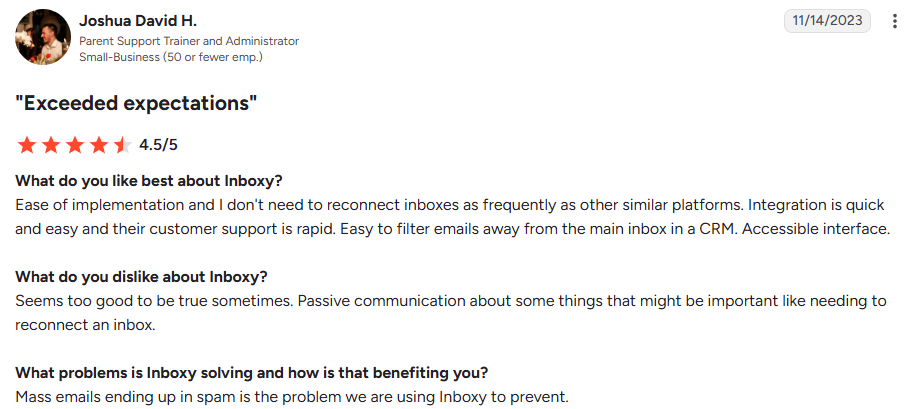
He could also filter warmup emails away from his CRM’s main inbox. If your team handles replies there, this prevents warmup messages from burying real prospect replies.
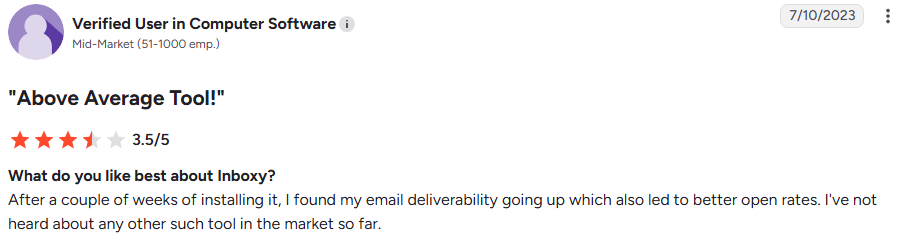
Another user (G2, Jul 10, 2023, 3.5/5) saw deliverability and open rates improve within a few weeks. They also booked more meetings than in previous months.
G2 invited and incentivized this reviewer, so consider that when weighing the feedback.

Joshua David H. says Inboxy communicated passively about important issues, such as an inbox needing reconnection. Today’s dashboard shows each mailbox’s warmup score. The available material doesn’t mention disconnection alerts, so you may still need to check manually.

The mid-market reviewer’s team found Inboxy too expensive. Today, a mailbox costs $3 monthly, and warmup costs another $3, bringing a warmed mailbox to $6.
That’s less than Google charges for a Workspace seat alone, but double the homepage price.
The same reviewer was still trying to lower bounce rates. Warmup doesn’t solve that because bounces come from bad addresses in your list. Inboxy doesn’t verify contacts, so you need another tool to clean them.
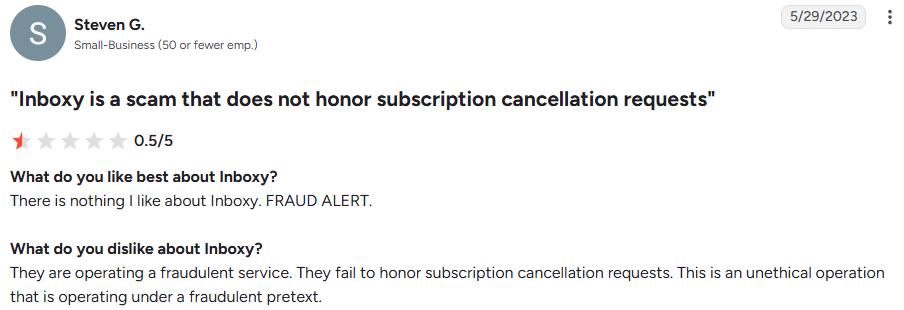
Steven G., from a small business (G2, May 29, 2023, 0.5/5), says Inboxy didn’t honor his cancellation request, refused a refund, and failed to improve his deliverability.
[SCREENSHOT PLACEHOLDER: Steven G., G2, May 29, 2023, with vendor response]
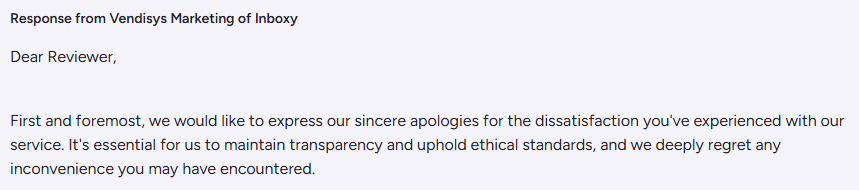
The reply came from “Vendisys Marketing of Inboxy.” It apologized and asked him to contact support, but the page doesn’t show the outcome.
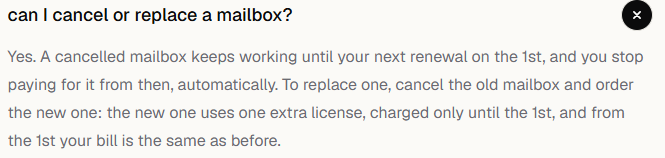
Inboxy’s FAQ now clearly explains cancellation: cancel before renewal to stop the next charge. It still doesn’t publish a refund policy.
Inboxy has no free trial, so you only see the full product after buying licenses. I reviewed its screens and API in the order you’d use them: launching mailboxes, monitoring warmup, and then automating the process.
Connect your registrar once from Porkbun, Namecheap, Cloudflare, Spaceship, Dynadot, or Name.com, then select your domains. Inboxy points their nameservers to itself and configures MX, SPF, DKIM, and DMARC.
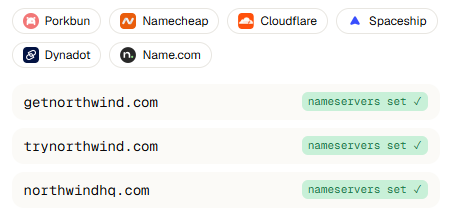
If your domains use another registrar, you’ll need to move them or set the nameservers manually. I’d also check one thing before connecting a domain with existing email. Inboxy takes over its nameservers, but the material doesn’t explain what happens to current DNS records or mailboxes.
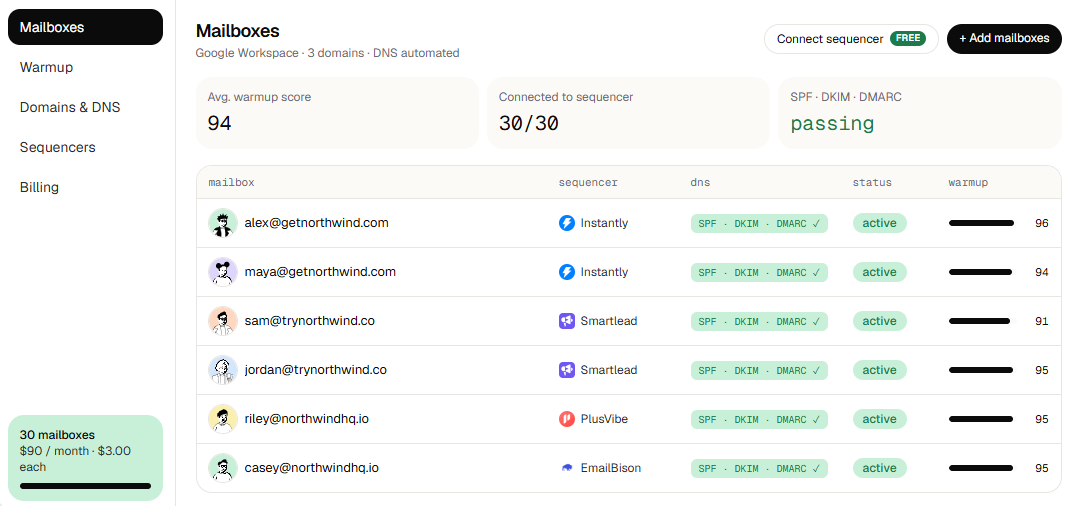
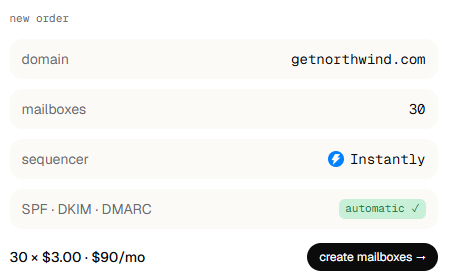
An order has four fields: the domain, number of mailboxes, sequencer receiving them, and DNS, which is marked automatic. You see the total before confirming, so 30 mailboxes appear as $90 monthly.
The screen doesn’t explain the billing model. You’re buying licenses, and you're charged for each one whether it holds a mailbox or not. Your first payment covers only the days until the month’s 1st. Buy 30 licenses on the 15th and you pay about $45 that day, then $90 on the 1st.
The DNS view shows three records: an SPF record for Google, a DKIM key, and a DMARC record set to p=none with a reporting address. With p=none, receiving servers report on your mail rather than rejecting it.
The mailbox dashboard lists each address with its sequencer, DNS status, active status, and warmup score. At the top, you see the average warmup score, connected mailbox count, and authentication status.
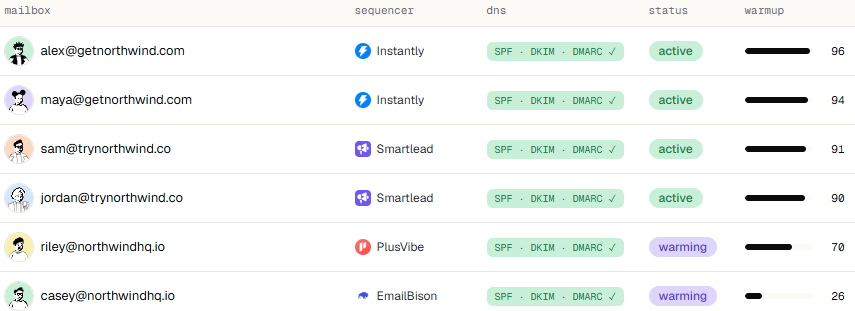
Agencies will care most about the sequencer column. In the example, one account sends mailboxes to Instantly, Smartlead, PlusVibe, and EmailBison, allowing clients on different tools to stay under one invoice.
Each mailbox has a daily activity feed. In the example, an email opens at 09:41 and receives a reply at 09:43. Another leaves spam at 09:52, one gets marked important at 10:04, and another gets starred at 10:11.
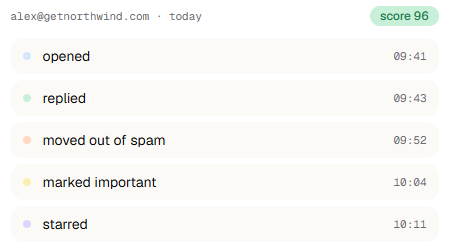
Inboxy says its network uses real browser sessions instead of API calls. You can’t verify that from outside, but it determines whether Google sees the activity as human.
The warmup chart covers 21 days. In the example, the score rises 78 points to 96 after 412 emails sent, 398 opened, 176 replied to, and 23 rescued from spam.
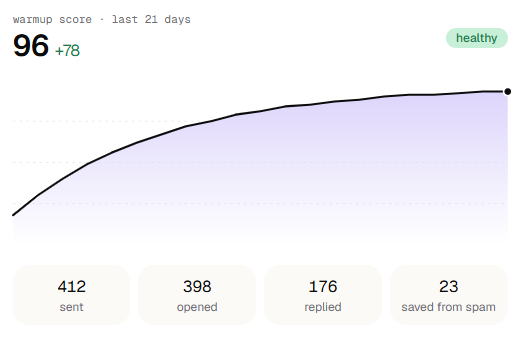
I’d look beyond the score to the final number. Twenty-three of 412 emails entered spam, roughly 1 in 18, even within Inboxy’s network. Those messages were rescued, but prospects won’t rescue yours. The opens and replies also come from the network, so they show warmup activity, not campaign placement.
The material also doesn’t explain how Inboxy calculates the score.
Running Inboxy through code or Claude
Through the REST API, send an order with ?dry_run=true to receive the exact price without being charged.
The example quotes two mailboxes at 300 cents each and shows three free licenses, meaning no new purchase is required.
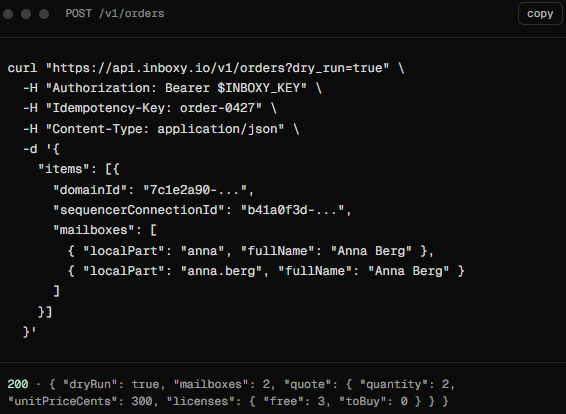
An Idempotency-Key header ensures a repeated request returns the first response instead of ordering twice. Each key allows 300 requests per minute.
The MCP server gives Claude, ChatGPT, or Cursor 42 tools covering domains, mailboxes, sequencers, billing, and team workspaces. You can type “connect this domain, order 10 mailboxes and push them to Instantly,” and it handles the order.
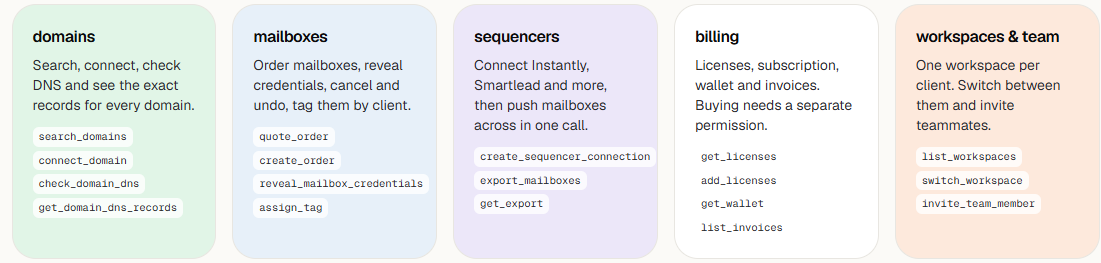
Anything involving spending or deletion asks for confirmation first, while buying licenses requires separate permission. Workspace keys grant access to only one client, which helps when giving a contractor access.
Inboxy’s pricing page shows one figure, $3 per mailbox monthly, and it’s accurate. It simply covers the mailbox alone.
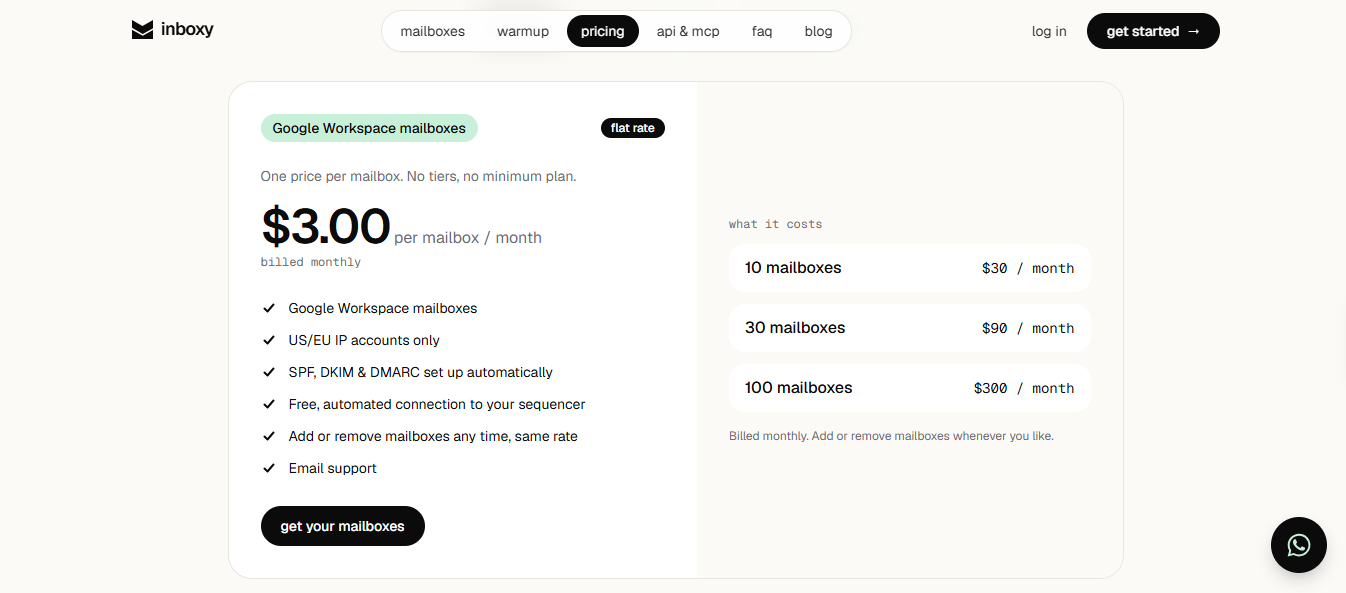
There are no tiers, so the price stays the same whether you run 10 mailboxes or 1,000. Domains aren’t included because you bring your own and pay your registrar separately.
Most cold email teams warm every mailbox they buy, so plan around the $6 figure.
Compared with Google’s price of $7 or more per Workspace seat, a warmed Inboxy mailbox remains cheaper than a bare seat bought directly. That’s a fair advantage.
Your total cold email spending doesn’t end there. You’ll still pay separately for domains, a sending tool, contact verification, and a placement testing tool if you want to know where emails land.
You don’t pay per mailbox. You pay per license, and you're charged for every license whether it holds a mailbox or not. If you buy 50 licenses but run only 35 mailboxes, you still pay for 50.
Everything renews on the 1st. Your first charge only covers the days until then, as do licenses added mid-month. After that, they renew together at the same rate.
The replacement process works well for cold email. If a mailbox burns out, cancel it, order another, and pay for the extra license only until the 1st. Your bill then returns to its previous amount. The canceled mailbox continues working until renewal.
Inboxy fits teams that already have a preferred sending tool and simply want affordable Google mailboxes delivered to it, warmed and ready.
Inboxy gets you sending but offers little insight into whether emails land or what happens if you leave.
Inboxy’s weak points are in the mailboxes, not in what's in them. You only get Google, can’t see where emails land, and have limited control over the Workspace behind each address.
Primeforge and Warmforge divide this work. Primeforge provides Google Workspace or Microsoft 365 mailboxes, while Warmforge handles warmup and testing. You can move mailboxes between them in a few clicks.
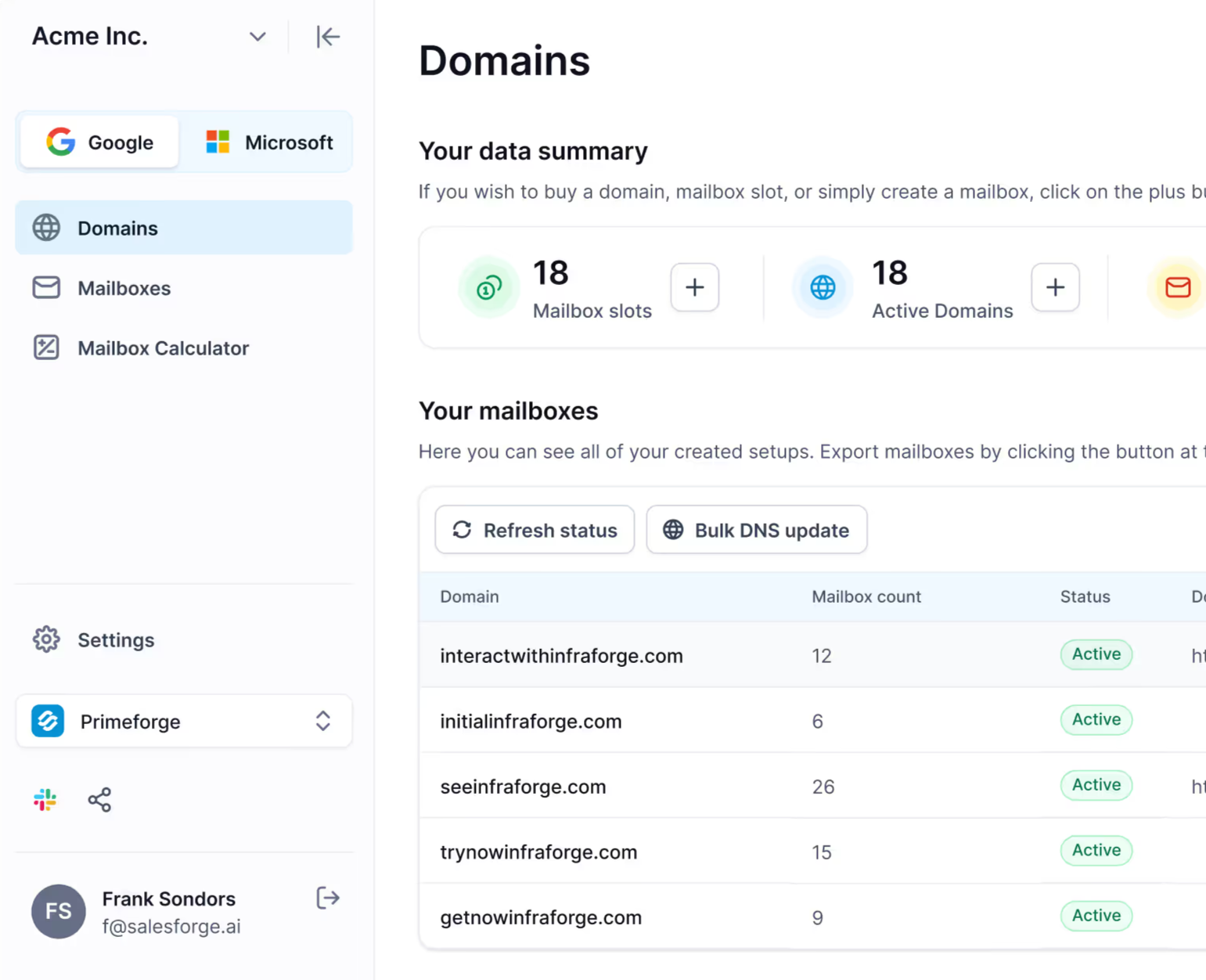
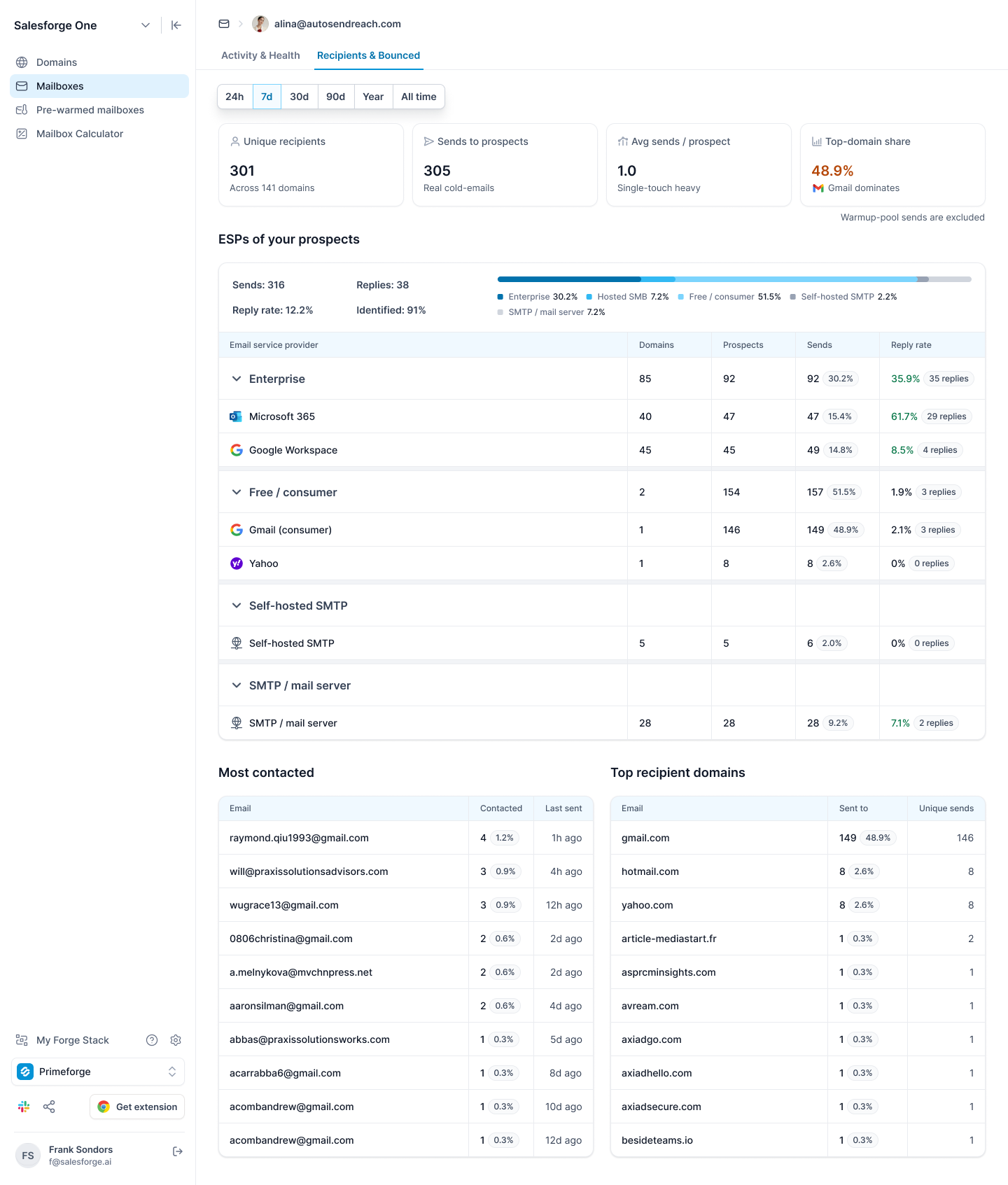
Primeforge sells both. Sending through the same provider your prospect uses may improve your chances of reaching their inbox, while Inboxy covers only Google.
Primeforge’s analytics group recipients by provider and show each group’s reply rate. If Microsoft 365 prospects reply far less than Google users, that signals you should add Microsoft mailboxes.
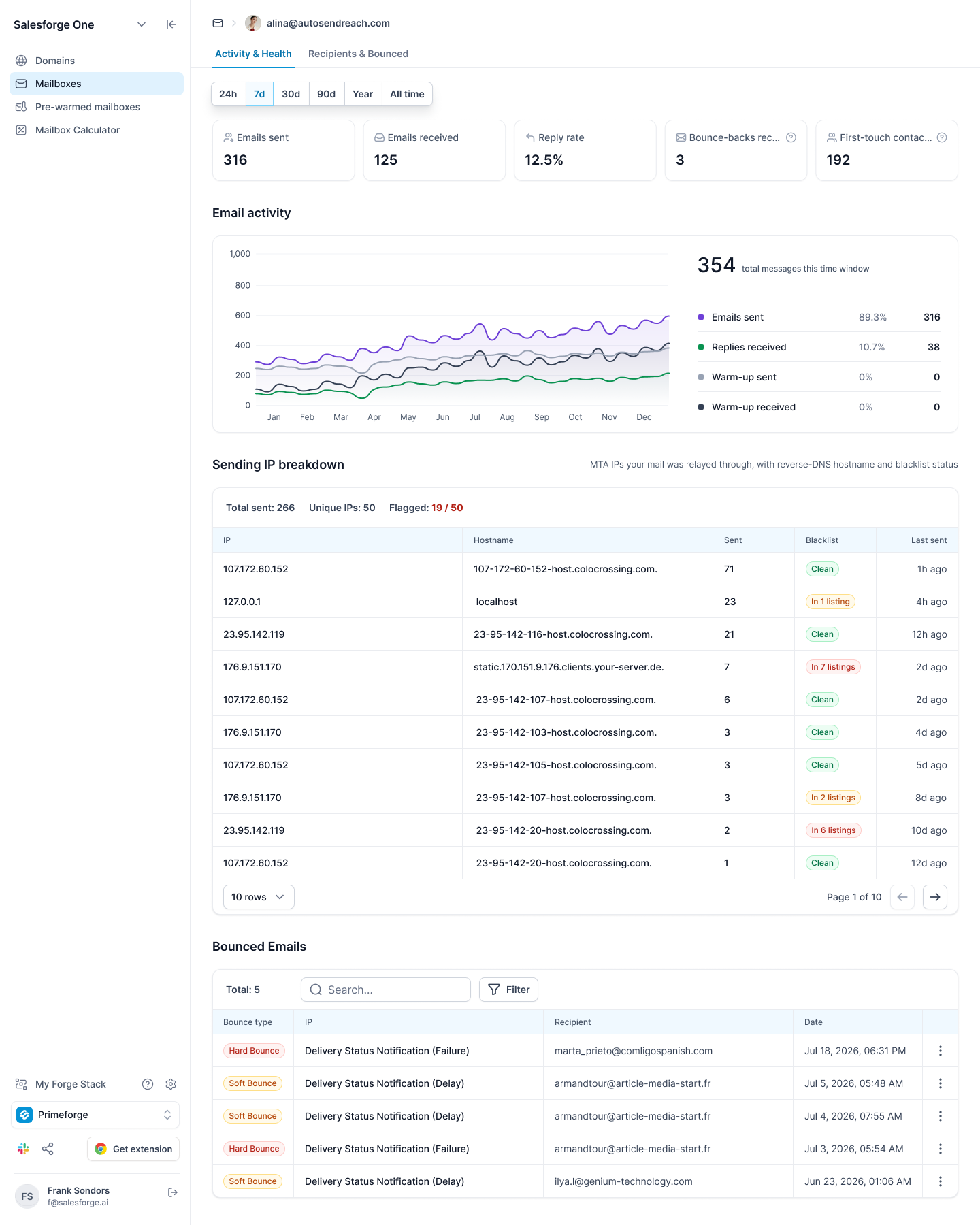
Inboxy provides a warmup score. Primeforge shows each mailbox’s sends, replies, bounces, and first-touch contacts, along with every IP used and its blacklist status.
Open any bounce to see whether it was hard or soft, what caused it, and the receiving server’s response. When a mailbox struggles, you can separate a bad list from a blacklisted IP instead of guessing.
Export your Primeforge mailboxes to Warmforge and test them against Google Workspace and Microsoft 365 inboxes. You’ll see how many messages reached the inbox, entered spam, or never arrived, which Inboxy’s warmup score can’t show.
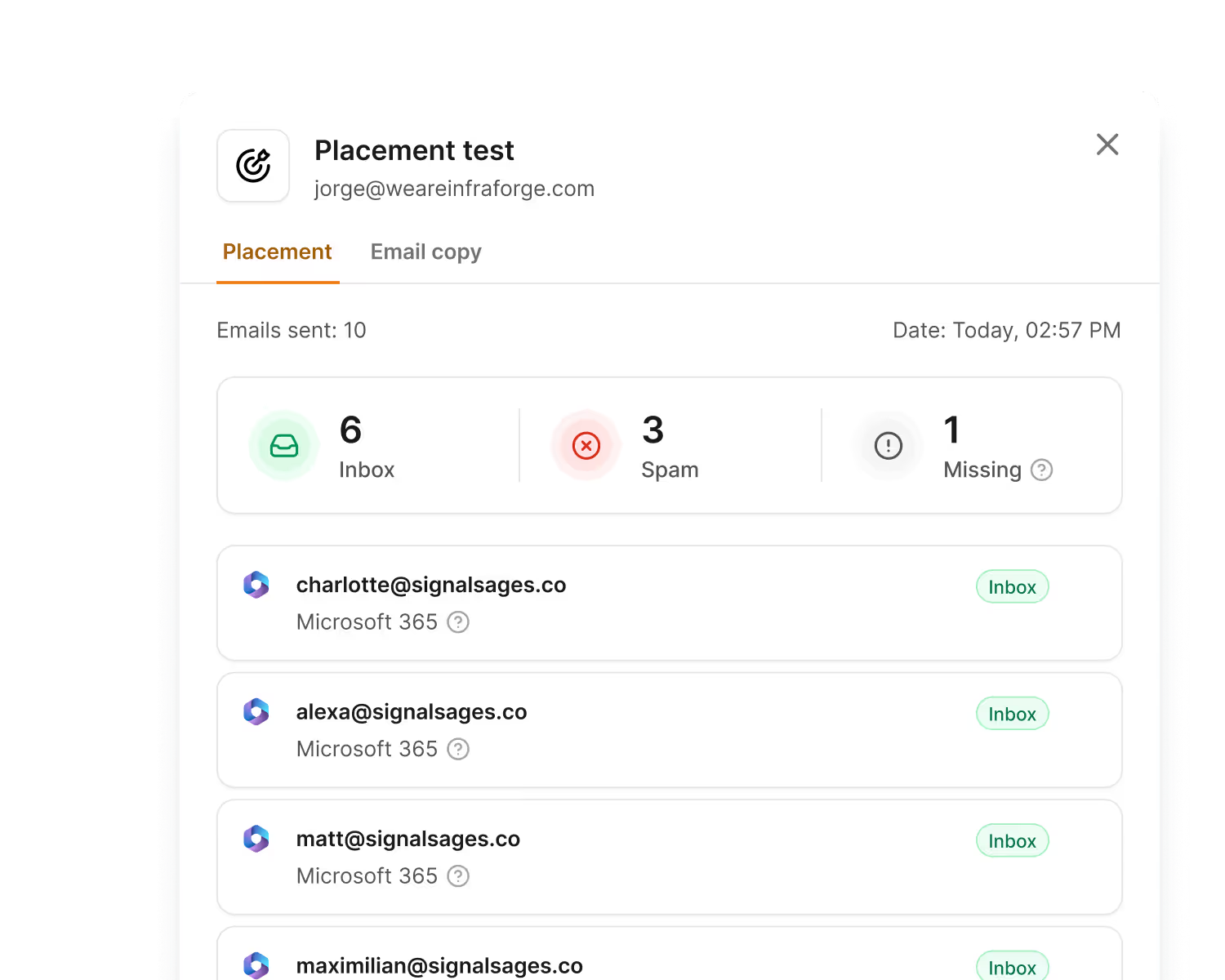
Every plan includes one monthly test, while the Pro plan includes 100 for $39.
Every Inboxy mailbox starts from zero, so you must wait through warmup before launching. Primeforge also sells pre-warmed mailboxes for $9 monthly each, plus $18 yearly for each .com domain.
The minimum is four domains with three mailboxes each, costing $108 monthly. Ask support how long each domain has warmed before buying, and continue warming afterward.
Every Google domain receives its own Workspace and Super Admin account. You can change settings through Google Admin or send using the Gmail API from your systems.
Primeforge also clearly states what Inboxy leaves uncertain. Connecting a domain you already own removes its current DNS records and mailboxes. If you cancel, the domains remain yours, but the mailboxes stop.
Warmforge lets you set each mailbox’s daily minimum, maximum, ramp-up speed, and reply rate. It moves warmup emails out of spam and checks DNS, MX, and blacklists for every mailbox. Warmup is free when sending through Salesforge.
Enter your email to get a custom plan & stack recommendation for your business
Please check your mailbox in 5 minutes

Inboxy is worth considering as an affordable source of Google mailboxes, not as the tool that keeps you out of spam.
If you send through Instantly or Smartlead to mostly Gmail users, a $6 warmed mailbox with DNS handled for you is hard to beat. Begin with a few licenses on monthly billing, then switch to yearly only after they perform well for several weeks.
What it lacks are Microsoft mailboxes, pre-warmed domains, and testing against real business inboxes. If you need those, set up mailboxes through Primeforge, export them to Warmforge, and run a placement test before your next campaign.
Warmup costs nothing extra when sending through Salesforge.