

Personalized Outbound Strategy
Get The Right Outbound Strategy In Minutes
Enter your email to get a custom plan & stack recommendation for your business
It's being carefully crafted by AI
Please check your mailbox in 5 minutes
Lately, I keep seeing the same problem again and again.
People are sending emails to clean, opt-in lists. The emails look simple and natural. Nothing feels spammy. Everything seems fine from the outside.
But when they check results, something feels off, opens are low and replies are even lower.
So they test the email themselves. And it’s sitting in the Gmail Promotions tab.
That’s where it gets confusing. Because at this point, it doesn’t feel like a copy issue or a targeting issue.

Then the same questions come up:
People try small fixes, change a few things, even switch tools. But nothing really improves.
That’s exactly why this guide exists.
In this blog, I’ll walk you through everything step by step and show you what actually works in 2026 to stay out of Promotions and reach the inbox.
Do this consistently, and your emails will build trust + engagement, improving your chances of landing in the Primary inbox.
If managing all this daily feels hard, you can use tools like Warmforge to keep your sending stable and improve inbox placement.
Most people don’t notice this at first. Their emails look fine, but the way they are sent sends the wrong signals to Gmail.
Here are the common patterns I keep seeing:
The biggest issue here is email engagement.

If people are not replying or interacting, Gmail assumes your emails are not important. Even if your copy is good, low engagement makes your emails look like bulk messages.
When all these patterns combine, Gmail sees one thing clearly.
Your emails don’t look like normal conversations. They look like campaigns. And that’s why they end up in the Promotions tab. To fix this, you need to understand how Gmail actually reads these signals.
Gmail is not checking your email like a human. It is checking the signals around your email and deciding one simple thing: does this look like a normal conversation or a campaign?
To make that decision, it looks at three clear signals:
Now combine these together, and the decision becomes very predictable.
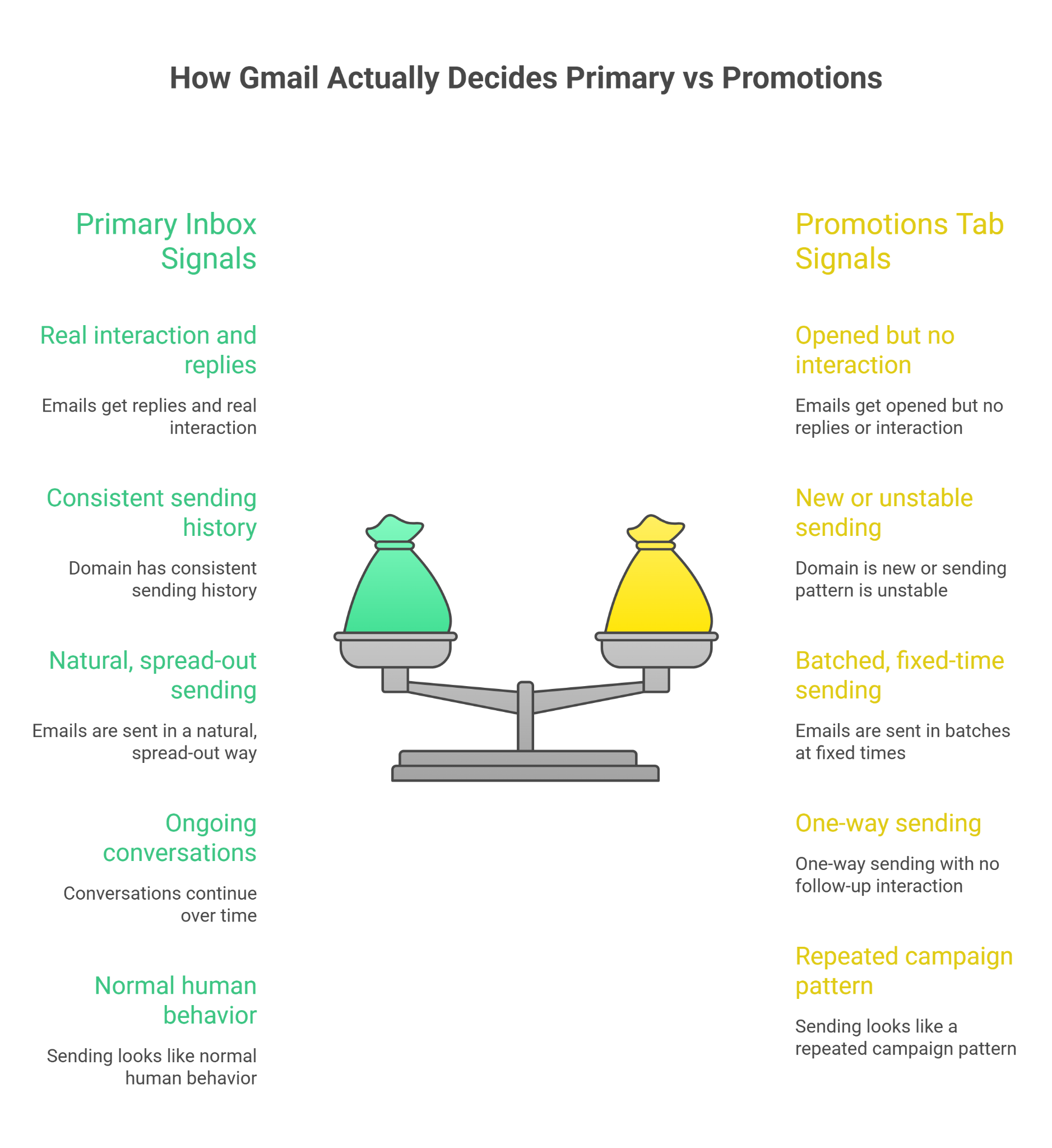
Primary tab signals:
Promotions tab signals:
So Gmail is not reacting to one thing, like links or formatting. It is looking at your overall pattern.
So, fixing formatting alone won’t help; you need to fix these signals.
Now that you know what Gmail looks at, the fix is not random tweaks. It’s about controlling how you send emails every day and keeping those signals stable over time.
Here’s exactly what to do:
Don’t start campaigns on a cold setup. Gmail needs sending history + trust signals first.
Replies = strongest signal for Primary inbox placement.

Gmail tracks your daily pattern, not just volume.
Batch sending = automation signal → pushes you to Promotions.
One inbox handling everything = high risk signal.
Your email should look like one-to-one communication, not a campaign.
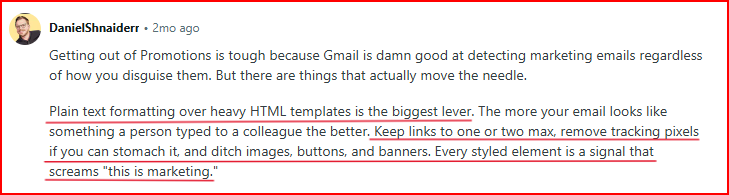
When you execute this properly, your emails start building trust and getting replies, which improves inbox placement over time.
But the real challenge is doing all of this consistently without breaking the pattern, especially when you scale.
Following these once is easy, but keeping them consistent every day gets difficult as you scale.
In such cases, you can try tools like Warmforge. It helps manage these signals without manual effort.
Warmforge is an email warm-up and deliverability tool that helps you build sender reputation and improve inbox placement.
It works by automating warm-up, engagement, and sending behavior so your emails look natural to Gmail.
This is how Warmforge can help do all of them correctly every single day.
Instead of manually increasing volume and tracking limits, Warmforge runs warm-up on autopilot. It sends emails gradually and builds sender trust over time without you managing it daily.
Warmforge creates natural email activity like opens, replies, and interactions, which Gmail uses to judge your emails. This helps your inbox look active and trusted.
Instead of fixed patterns, it sends emails in a way that looks human. This avoids batch-like behavior signals that usually push emails into Promotions.
Warmforge runs an always-on warm-up, so your inbox doesn’t lose reputation when you pause or change campaigns. This keeps your sending pattern stable.
It also helps you track mailbox health, deliverability, and placement, so you can spot issues early instead of guessing what went wrong.
Warmforge gives each inbox a Heat Score™, which shows how ready it is for sending.
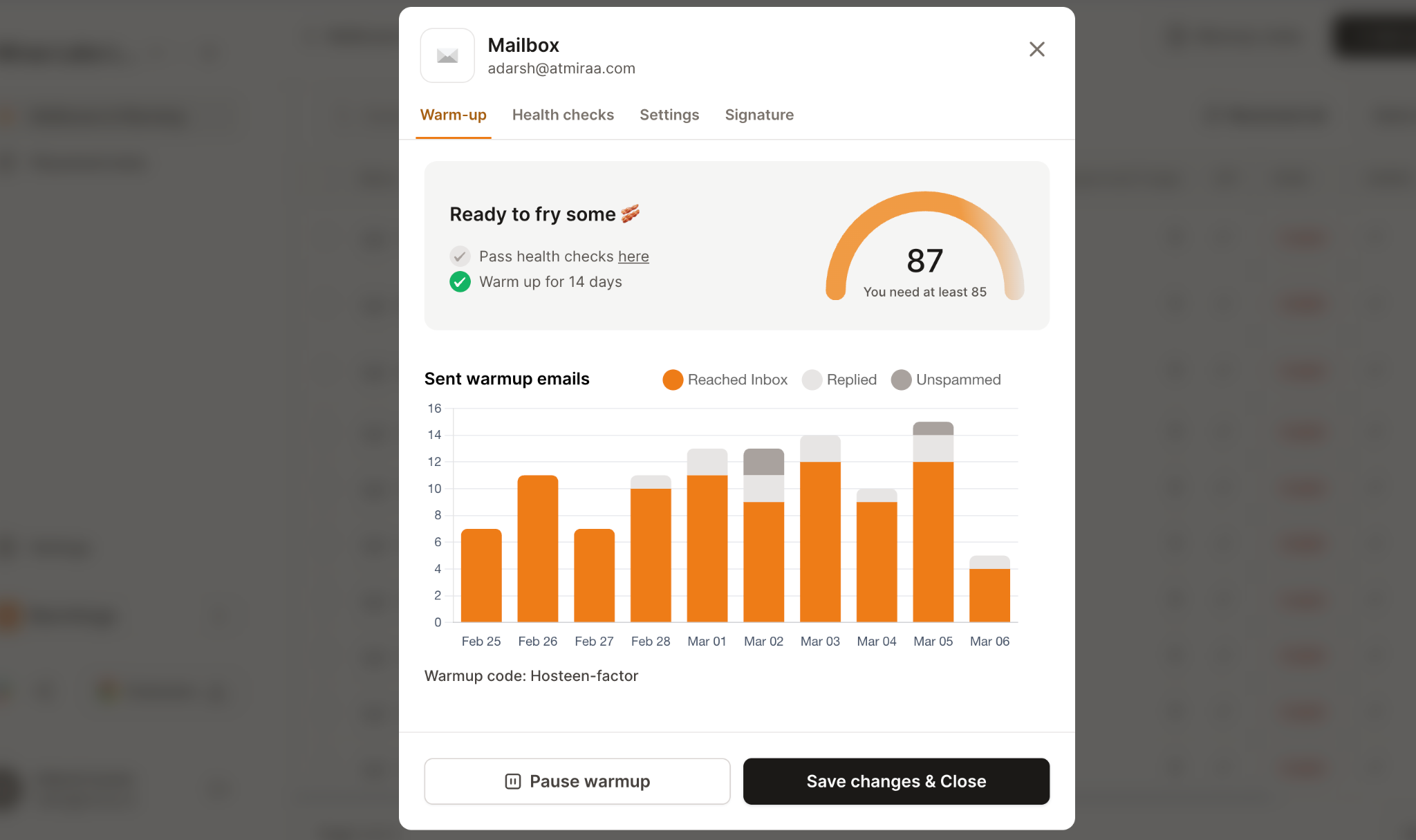
This helps you avoid guessing and only send when your inbox is actually ready.
Warmforge runs on a curated pool of real, aged mailboxes, which makes the activity look natural and improves trust signals faster.
When you look at it simply, all the things you were trying to manage manually,
warm-up, replies, sending patterns, and consistency, are handled in one place.
You still control your campaigns.
But the signals Gmail cares about stay stable, which is what actually improves your chances of landing in the Primary inbox.
Enter your email to get a custom plan & stack recommendation for your business
Please check your mailbox in 5 minutes

At this point, one thing should be clear.
Landing in the Gmail Primary inbox is not about small tricks like removing links or changing words. It comes down to how your emails behave over time.
If your setup builds trust, consistency, and engagement, your emails move closer to Primary.
If those signals are weak or break often, you end up in Promotions.
The steps are not complicated.
But the real challenge is doing all of this consistently without breaking the pattern, especially when you start scaling.
That’s why instead of guessing or fixing things again and again, it makes more sense to rely on a system that keeps these signals stable.
You can keep managing it manually.
Or you can use tools like Warmforge to handle the backend while you focus on writing better emails and closing deals.
In the end, Gmail is simple.
It rewards emails that look like normal communication.
Focus on that, and your inbox placement will follow.
Start Warmforge with 1 free warming slot + 1 free placement test and see where your emails actually land.