I keep hearing the same question from SDRs and GTM professionals running cold email campaigns:
“Which email warmup tool should I use?”
I get why they ask. There are dozens of email warmup tools out there, and most promise better deliverability, healthier mailboxes, and better inbox placement.
So, I decided to test them myself.
I tested 20+ email warmup tools and spoke with agency owners, SDRs, and GTM professionals. I also went through Reddit threads, cold email communities, and questions from my LinkedIn DMs.
I compared how each tool warms up mailboxes, what features it offers, how easy it is to use, and where it falls short. I looked at factors such as email deliverability, sender reputation, inbox placement, automation, and support for scaling multiple inboxes.
I shortlisted 11 email warmup tools for different scenarios, from full setup and automation to fixing deliverability issues, working with a tight budget, and scaling cold email campaigns.
Best for Reply Simulation & Reputation Repair: InboxAlly
Best AI-Powered Reply Customization: Mailivery
Best Warmup with Spam Diagnostics: Folderly
Best Integrated Warmup in Outreach Tool: Mailstand
Best Simple SMTP Warmup: Mailwarm
Best for Bulk Inbox Warmup: Warmup Inbox
Best Custom Warmup Schedules: Warmbox
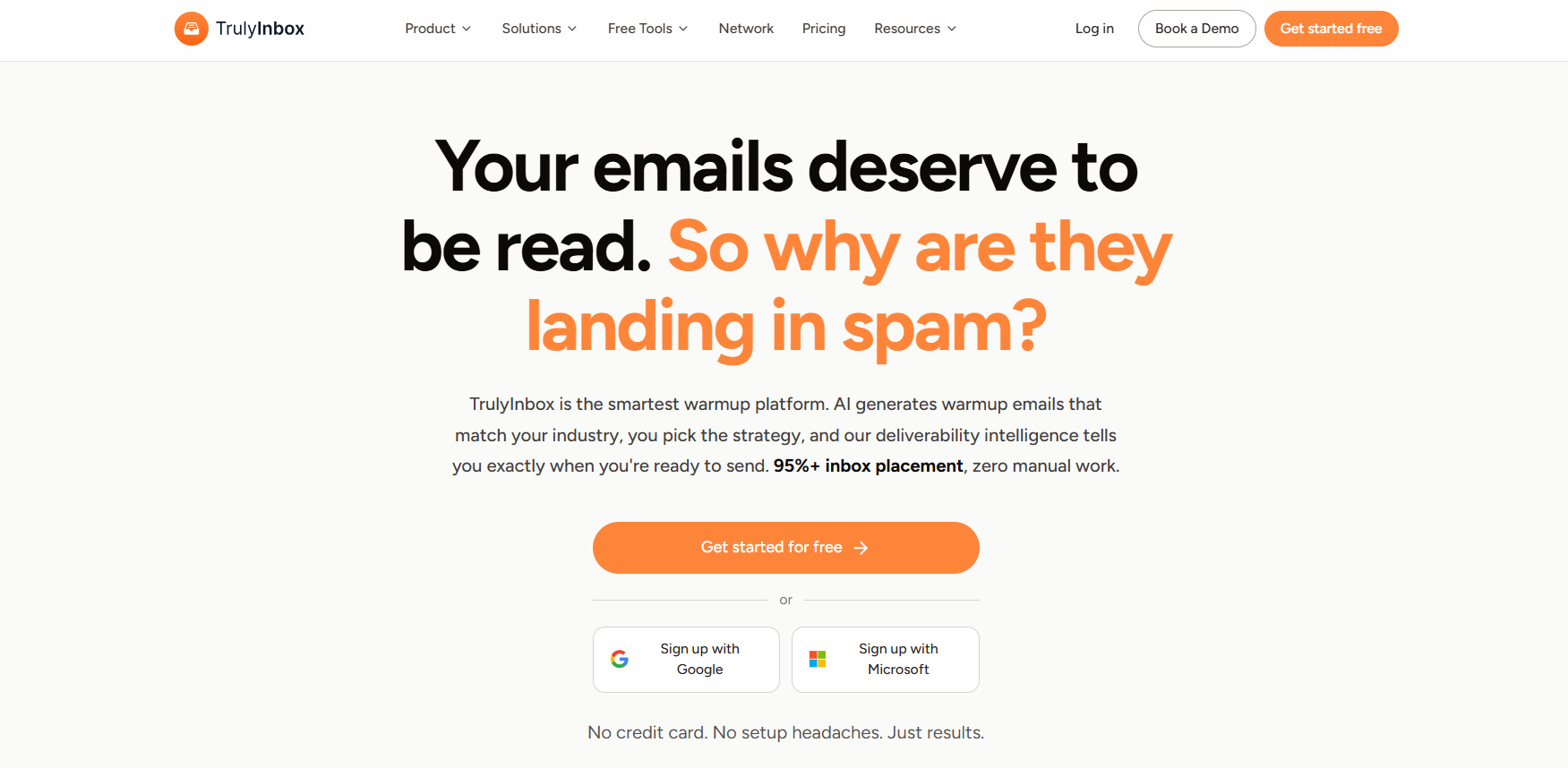
Best Scalable AI Warmup for Agencies: TrulyInbox
These selections stand out from other providers in the market due to their advanced features, automation, and proven deliverability improvements.
How We Tested and Ranked the Best Email Warm-Up Tools
To make this list actually useful, we reviewed 100+ real user reviews and scored each email warmup tool based on five things that matter the most.
We also evaluated the warm up process each tool uses, focusing on how systematically and effectively it prepares email accounts for campaigns.
Does it actually improve inbox placement on Gmail and Outlook?
Does it support SPF, DKIM, blacklist checks, and other infrastructure setup?
Does it automate everything (like replies, ramp-up, pauses), and does it offer an automated warm up process as a key feature?
Is it beginner-friendly and scalable for 1 to 50+ inboxes?
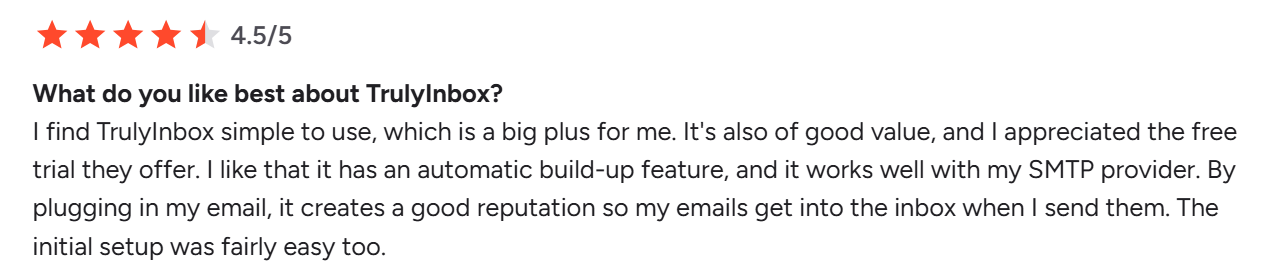
Do real users say it works well (on G2, Reddit, cold email groups)?
We Reviewed 20+ Email Warm-Up Tools (Here Are the Best 11)
These are the email warmup tools that do more than just warm up your inbox, they belong to a broader category of email warm ups designed to enhance deliverability and sender reputation.
They offer full domain setup, better inbox placement, and automation that saves you hours. Each tool implements a structured warmup process, including gradual sending volume increases, monitoring inbox placement, and optimizing sending strategies to improve deliverability.
They’re ideal if you’re running cold outreach at scale, managing multiple inboxes, or just want everything handled without the usual tech hassle.
Warmforge is a leading email deliverability platform that helps teams improve their chances of reaching the inbox.
It warms up your mailboxes, monitors your sender reputation, and lets you test inbox placement before and during cold outreach so you can catch issues early.
Instead of treating warmup as a one-time setup, Warmforge keeps it running continuously in the background while also giving you visibility through Health Checks, Placement Tests, and Heat Score™ tracking.
It works with Google Workspace, Microsoft 365, and compatible IMAP/SMTP mailboxes, using multilingual warmup activity to better reflect real-world sending patterns.
Warmforge is included in all Salesforge plans with unlimited warmup slots, and is also available as a standalone tool for teams that only need email deliverability and warmup together.
This image shows the Warmforge Homepage
Key Features
One-click AI email warmup: Connect a mailbox and start automated warmup using AI-generated emails designed to create natural email activity.
Premium warmup pool: Warm mailboxes in Warmforge’s premium pool of aged accounts, with traffic dominated by Google Workspace and Microsoft 365 mailboxes.
Multilingual warmup activity: Warmup traffic runs across multiple languages rather than relying exclusively on English-language activity.
Heat Score™ tracking: Monitor each mailbox’s Heat Score™ to track its deliverability reputation over time.
Inbox Placement Tests: Test mailbox deliverability across different email providers and see how many test emails are delivered to each provider.
Health Checks: Check DNS records, MX records, and blacklist status to identify potential deliverability and infrastructure issues.
Always-on warmup: Keep mailbox warmup running continuously without manually switching warmup on and off.
Mailbox compatibility: Use Warmforge with Google Workspace, Microsoft 365, and compatible IMAP/SMTP mailboxes.
Pros
Bundles premium warmup, placement testing, and health checks in one platform
Single premium warmup pool for all users, with no tiered “pay for quality” pools
Multilingual warmup activity across the warmup pool
Heat Score™ tracking for monitoring mailbox reputation
API, MCP, and CLI access; SOC 2 compliant
Simple one-click mailbox warmup.
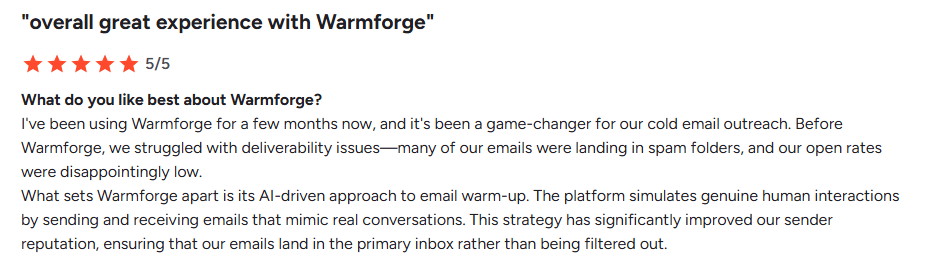
This image shows the Warmforge user review on G2.com
No free warmup trial (a warmup slot is required to get started)
Who It’s Best For
Warmforge's target audience includes cold email agencies, consultants sending at scale, startups with multiple domains or inboxes, and teams that want zero manual setup.
If you want premium email warmup with deliverability monitoring and placement testing, Warmforge brings warmup, Health Checks, and inbox placement tools together in one platform.
Here’s How UniteSync Reached 11,700 Creators with Just $2.86 CAC
UniteSync used Salesforge, Mailforge, and Warmforge to hit an 85.26% reply rate and onboard new customers daily — without burning budget or hitting spam folders.
Folderly is a premium email warmup platform. You use it when your mailboxes need warming and your emails keep landing in spam.
The warmup works from your own content, so each mailbox builds sender reputation against realistic traffic rather than filler text. Folderly is one of the heavier deliverability tools for email warmup and reputation repair.
Two things earned Folderly a spot on my list.
The first is custom warm-up strategies. Each mailbox gets its own warmup plan instead of one fixed schedule.
The second is warmup diagnostics. Folderly tells you what's keeping a mailbox out of the inbox while the warmup runs.
Folderly is for teams that want warmup plus reputation repair and hands-on support.
This image shows the Folderly home page
Key Features
AI warm-up with reply simulation to mimic real conversations
Inbox placement dashboard for Gmail, Outlook, and more
ESP-specific tracking across different email providers
Content-based spam testing including HTML and image checks
Centralized client management for agencies with multiple domains
Safety net monitoring that protects sender reputation by detecting spam threats, preventing risky emails, and cleaning your email list to enhance deliverability
Pros
Easy to set up, even for non-technical users
Clear inbox placement reports
Improves inbox placement and open rates
Strategic support and deliverability guidance
Simple UI with actionable insights
This image shows the Folderly user review on G2.com
Businesses with aged domains needing cleanup (since domain age can influence deliverability and warmup duration)
Anyone looking to repair email performance, not just warm up
Want a closer look at Folderly? Read our detailed Folderly review to explore its features, pricing, and performance.
Folderly Pricing
Folderly isn’t cheap. Here’s the pricing:
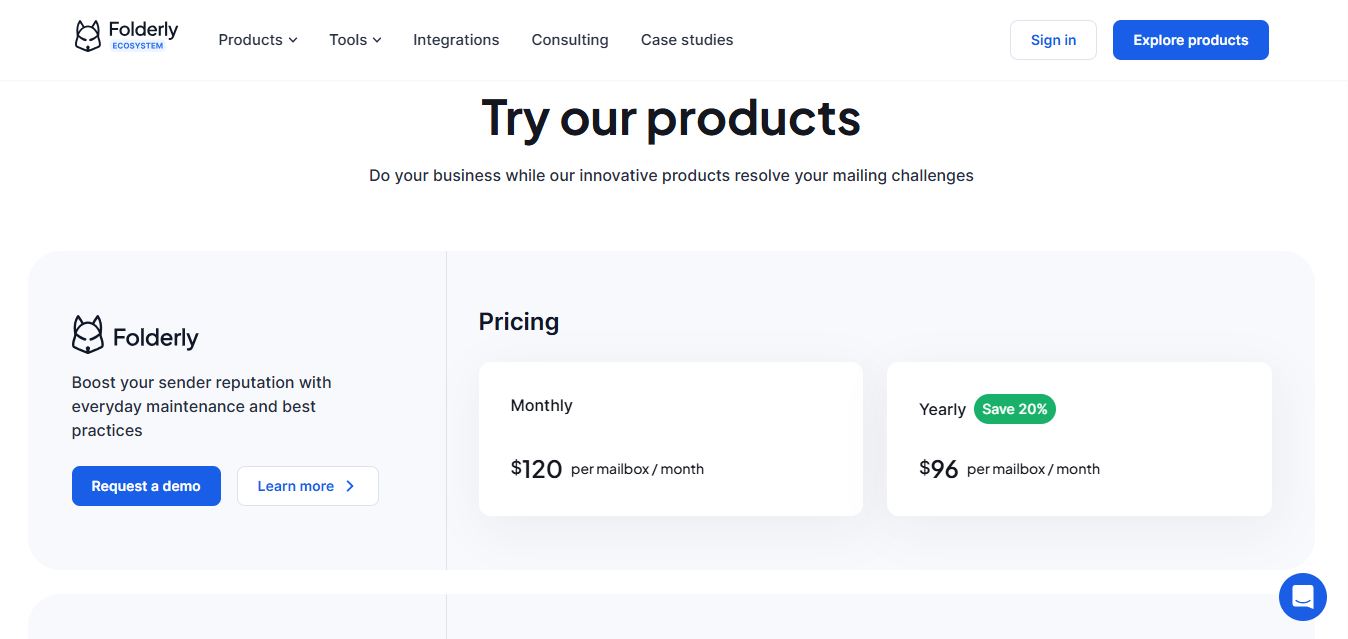
This image shows the Folderly pricing
Monthly Pricing (Per Mailbox)
1–9 mailboxes: $120/month
10–24 mailboxes: $90/month
25–99 mailboxes: $70/month
100+ mailboxes: Custom quote
Annual plans offer up to 20% savings, making it more cost-effective for teams.
Our Verdict
Folderly isn’t just for warming up; it’s for fixing deeper deliverability problems.
If your emails keep landing in spam, Folderly helps you identify and resolve the issues to restore your sender reputation and inbox placement.
Looking for other options? Explore our guide to the best Folderly alternatives and compare other email warmup tools.
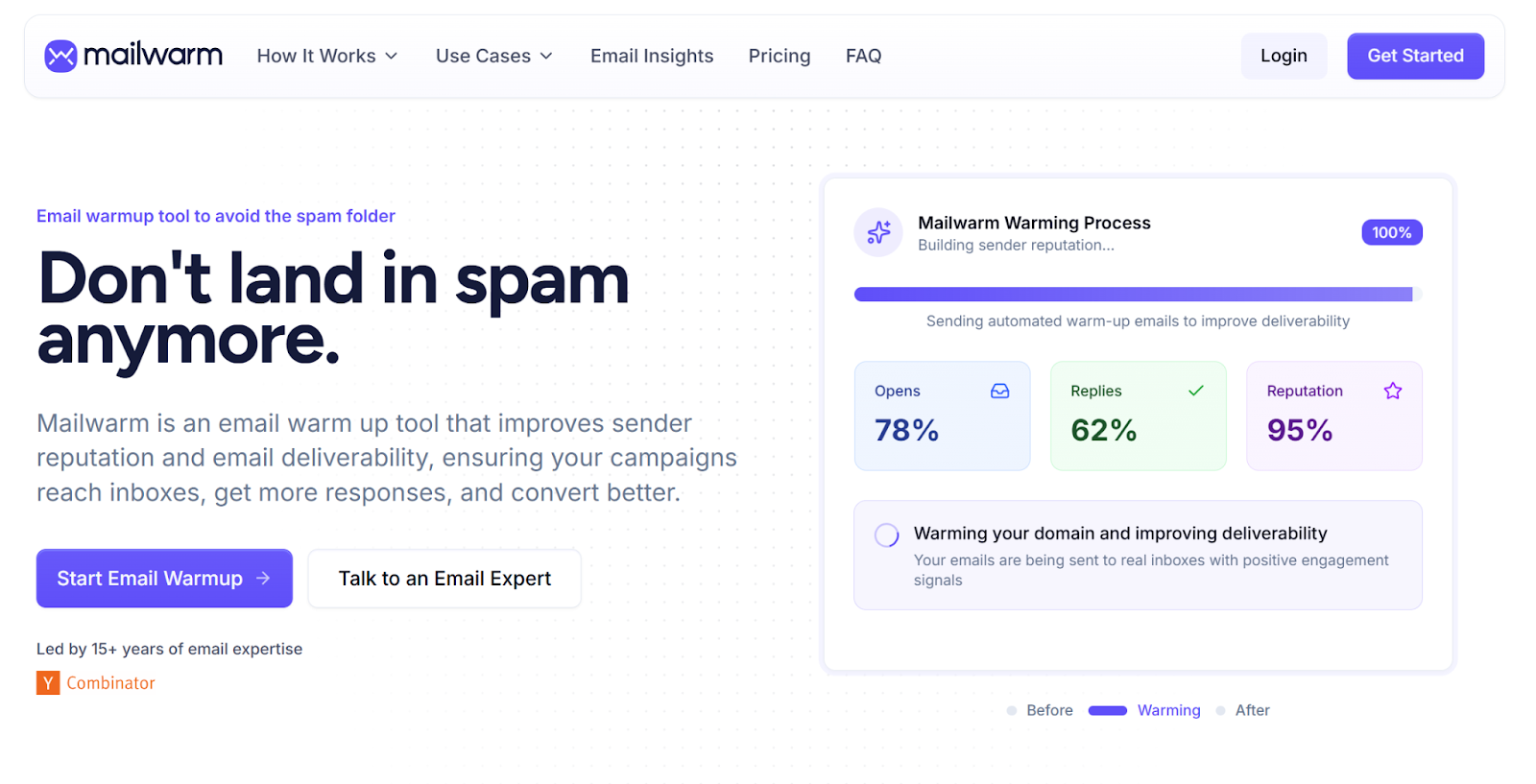
3. Mailwarm
Mailwarm is a premium email warm-up and deliverability platform built for teams that care about inbox placement, sender reputation, and scaling safely across multiple providers.
Unlike basic warm-up tools, Mailwarm combines automated warm-up with deliverability monitoring, inbox placement insights, and spam score tracking. It uses a network of 50,000+ real inboxes across Gmail, Outlook, Yahoo, Microsoft 365, and SMTP to generate authentic engagement signals that help mailbox providers trust your emails.
If you’re looking for more than just simple SMTP warm-up, Mailwarm gives you the visibility and infrastructure needed to warm up inboxes properly before scaling cold outreach.
Want a closer look at Mailwarm? Read our detailed Mailwarm review to explore its features, pricing, and performance.
Mailwarm Key Features
Fully automated email warm-up across Gmail, Outlook, Yahoo, Microsoft 365, and SMTP
Network of 50,000+ real inboxes generating authentic engagement
Inbox placement and spam score monitoring by provider
Multi-account and domain-level management
Works with your own email content for realistic warm-up
Bounce prevention and email verification
One-click integrations including Outlook / Office 365
Advanced deliverability dashboard with actionable insights
Pros
Strong deliverability focus, not just warm-up automation
Large real inbox network across major providers
Helpful visibility into inbox placement and spam score
Works well for teams managing multiple inboxes or domains
Easy setup despite advanced capabilities
Cons
Not a cold outreach sending platform
Pricing is higher than entry-level warm-up tools
Who It’s Best For
Teams that want to maximize inbox placement before scaling outreach
Agencies and SDR teams warming multiple inboxes or domains
Users who want deeper deliverability insights, not just basic warm-up
Founders and marketers who need provider-level visibility across Gmail, Outlook, and SMTP
Mailwarm Pricing
Mailwarm offers transparent pricing based on inbox volume and team size.
Starter: $69/month per inbox
Growth: $159/month for multiple inboxes
Scale: $479/month for larger teams
Custom plans available for agencies and high-volume senders
Verdict
Mailwarm is one of the strongest options if your main goal is to land in the inbox consistently, not just run a simple warm-up sequence.
It’s especially valuable for teams that want strong sender reputation, provider-level deliverability insights, and a platform that can scale beyond a few inboxes.
Looking for other options? Explore our guide to the best Mailwarm alternatives and compare other email warmup tools.
4. InboxAlly
InboxAlly is an email warmup and inbox placement tool built for reputation repair. You use it when your cold emails are already sending and engagement is the weak point.
The warmup runs against your live campaigns. InboxAlly's seed inboxes receive the real cold emails you send, then engage with them.
InboxAlly built its name on two features.
The first is what InboxAlly calls pre-trained seed inboxes. These accounts open, click, and reply to your cold emails to simulate real human behavior.
The second is spam recovery. When a message lands in spam, the seed inboxes move it to the primary inbox and mark it as wanted.
InboxAlly is for senders who want more than basic warmup and are targeting better engagement signals with Gmail, Outlook, and Yahoo. It won't touch your SPF or DKIM, so sort your domain setup first.
This image shows the Inbox Ally home page
Want to learn more about InboxAlly? Read our detailed InboxAlly review to explore its features, pricing, and performance.
Key Features
Real Engagement: Simulates opens, replies, and clicks on your actual cold emails.
Human-Like Interactions: Mimics genuine email engagement by replicating natural, human behavior in email exchanges to improve sender reputation and deliverability.
Spam Recovery: Pulls emails out of spam to restore domain reputation.
Custom Actions: Set unique behaviors like marking as important or replying.
ESP Targeting: Improves inboxing across Gmail, Outlook, Yahoo, etc.
Placement Reports: Tracks where your emails land in real inboxes.
No DNS Setup Needed: Runs without changes to SPF, DKIM, or adding trackers.
Pros
Actually improves inbox placement using smart reply simulation and behavioral patterns
Gives you full control over warm-up pacing, which helps prevent spam flags
Ideal for teams managing multiple inboxes in one place
Especially effective when paired with high-volume outreach setups
Cons
Expensive compared to tools that offer warm-up plus outreach
No help with domain setup or authentication issues (like SPF/DKIM)
Not beginner-friendly – setup and optimization require more effort
No direct email sending or cold email campaign support
Lacks live chat or fast-response support for urgent deliverability issues
Who It's Best For
Cold emailers focused on Gmail deliverability, especially those looking to warm up their Gmail accounts
Teams that want more realistic engagement during warmup
Users who already have SPF and DKIM set up
Agencies warming client inboxes with full control
Inbox Ally Pricing:
Here’s how the plans break down:
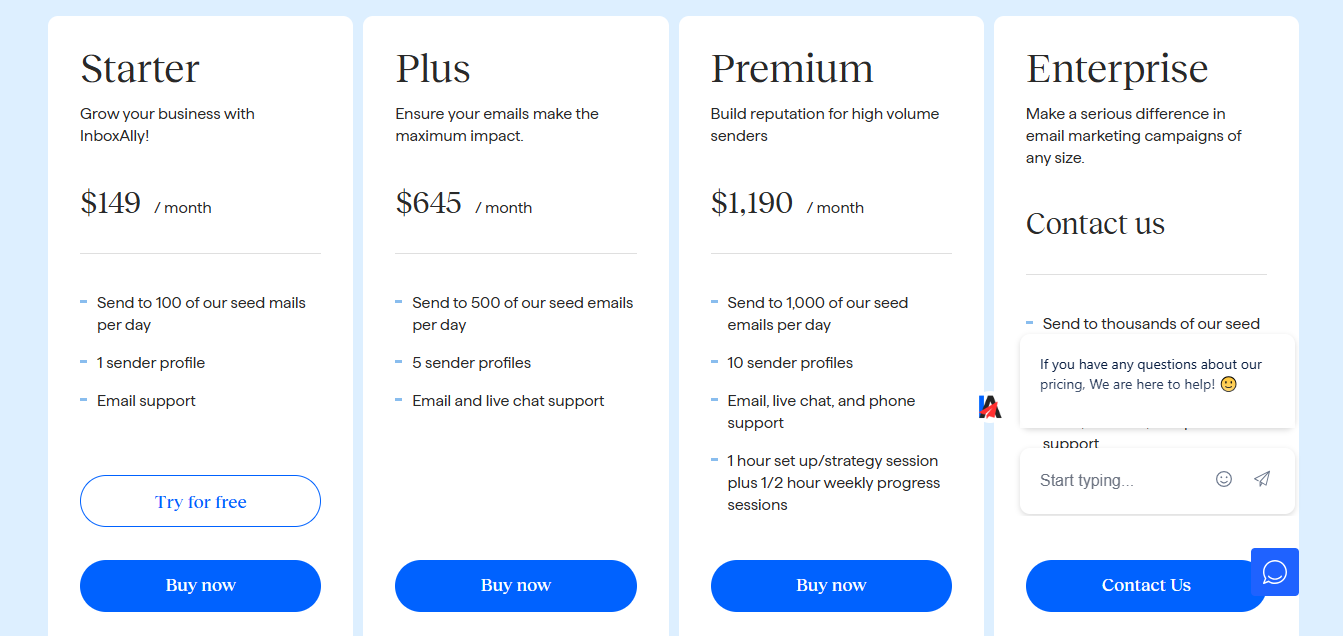
This image shows the Inbox Ally pricing
Starter – $149/month for 1 sender, 100 seed inboxes/day
Plus – $645/month for 5 senders, 500 seed inboxes/day
It’s not cheap, but if you’re targeting Gmail or need high inbox placement fast, it’s a strong option.
5. Mailreach
Mailreach is a precision-focused email warm-up tool. You use it when you need to see what warmup is doing, inbox by inbox.
The warmup runs automatically on a network of real inboxes. Mailreach measures warm-up speeds for Gmail, Outlook, and Yahoo, then gives you a performance breakdown for each inbox.
Two features put Mailreach on this list.
The first is granular warm-up control. You set warmup pacing per email provider rather than one speed across every mailbox.
The second is real-time placement tracking with visual sender reputation scoring. You get a live score per domain as the warmup builds.
That makes Mailreach a strong choice for agencies warming 100+ inboxes that need visibility, control, and reliable trust signals in one platform. It won't configure DNS, so bring a domain you've already set up.
This image shows the Mailreach home page
Want to know more about Mailreach? Read our detailed Mailreach review to explore its features, pricing, and performance.
Key Features
Inbox placement tracking – Shows where your emails land
Custom ESP warm-up control – Lets you adjust warm-up pacing per provider
Visual reputation scores – Displays real-time sender health with easy-to-read trends.
Real-time deliverability alerts – Notifies you of DNS issues, blacklists, or inboxing
Receive alerts for reputation drops – Get timely notifications when your reputation score decreases or deliverability issues arise, so you can act quickly.
Scales across teams – Supports 100+ inboxes with user roles and shared analytics.
Pros
Easy to set up, even for beginners
Visual dashboard with live domain scores
Boosts deliverability and inbox placement
Fully automated warm-up system
No outreach features, so fewer risks
This image shows the Mailreach user review on g2.com
Teams that want clear spam insights and warm-up tracking
Cold emailers who prefer a clean dashboard overall technical setup help
Mailreach Pricing
Mailreach offers tiered pricing based on how many inboxes you warm up.
The more you add, the less you pay per inbox, making it scalable for solo senders, teams, and agencies.
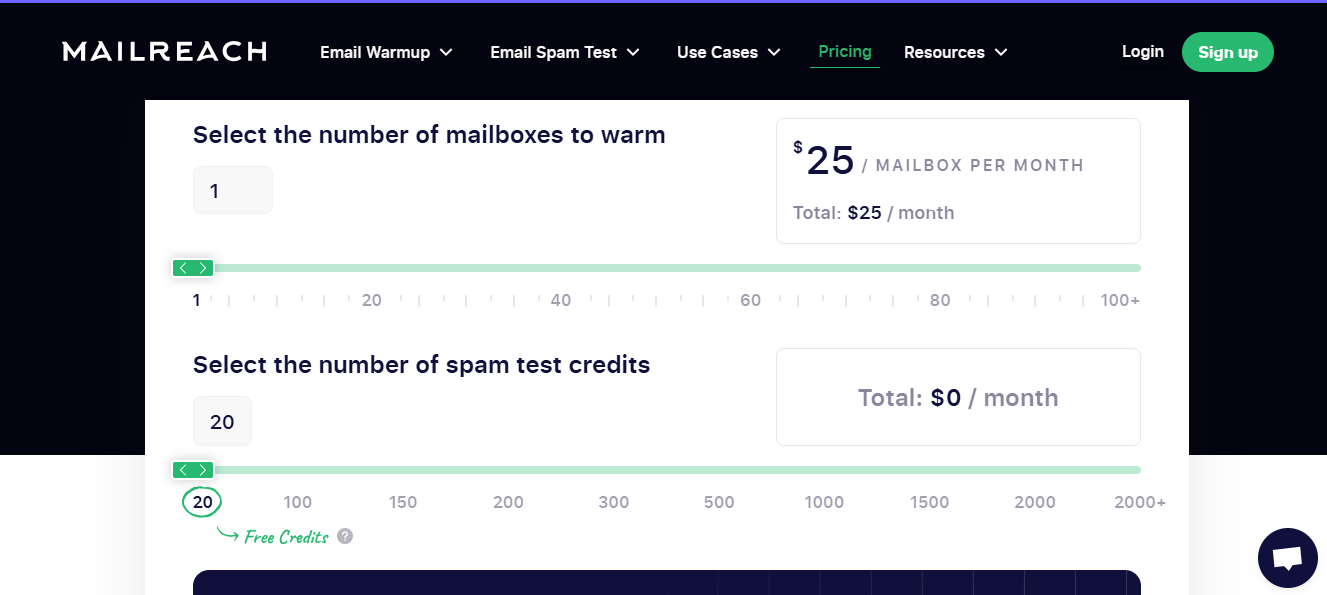
This image shows the Mailreach pricing
Pricing (Monthly)
1–5 inboxes: $25/inbox - best for individuals or small teams
6–20 inboxes: $19.50/inbox - suited for consultants and growing teams
21–50 inboxes: $18/inbox - optimized for larger teams
50+ inboxes: $16/inbox - built for agencies and high-volume senders
All plans include full warm-up automation, spam testing, and inbox tracking.
Our Verdict
Mailreach is a solid pick if your domain is already set up and you want to monitor inbox placement closely.
It won’t configure SPF or DKIM for you, but it gives you the clarity to know if your warmup is working.
Looking for other options? Check out our guide to the best Mailreach alternatives and compare other email warmup tools.
6. Lemwarm
Lemwarm is Lemlist's built-in warm-up engine. You use it when your outreach already runs in Lemlist and you want warmup handled in the same place.
The warmup targets your sending inboxes directly. Lemwarm warms the same accounts you use for outreach rather than isolated test accounts, so the reputation you build is the reputation you send on.
Lemwarm stands out for two features.
The first is campaign sync. Lemwarm automatically pauses warm-up when a campaign is running, so warmup mail never competes with live sends.
The second is email template warm-up. You can test and customize your own templates during the warm-up process, using real copy instead of filler text.
Lemwarm is for Lemlist users who want warmup handled in one place. Outside Lemlist it isn't an option, and warmup pacing control is thin compared to standalone tools.
This image shows the Lemwarm home page
Want a closer look at Lemwarm? Read our detailed Lemwarm review to see its features, pricing, and overall performance.
Key Features
Auto Reply Simulation: Sends smart replies to mimic real conversations.
Inbox & Blacklist Monitoring: Tracks spam placement and blacklist status.
Smart Sync with Campaigns: Pauses warmup when campaigns are active.
One-Click Setup: Instantly enabled from your Lemlist account.
Gradual Volume Control: Safely increases email volume over time.
Pros
Easy to use if you're already inside the Lemlist platform
Fully automated warm-up with reply simulation
Tracks blacklist status and inbox placement
Smooth experience for solo users and small teams
Works well when paired with Lemlist campaigns
Cons
Only works with Lemlist, not a standalone tool
Limited control over pacing and warm-up strategy
Advanced controls require higher-tier plans
No support for SMTP or external email platforms
Doesn’t handle DNS setup like SPF or DKIM
Not designed to scale across multiple domains or inboxes
Who It’s Best For
Lemlist users who want a warm-up built in
Founders or solo marketers running light cold campaigns, especially those managing cold outreach campaigns
Teams that want a simple, automatic warm-up without extra tools
Lemwarm Pricing
Lemwarm offers two straightforward plans based on how personalized you want your warmup to be.
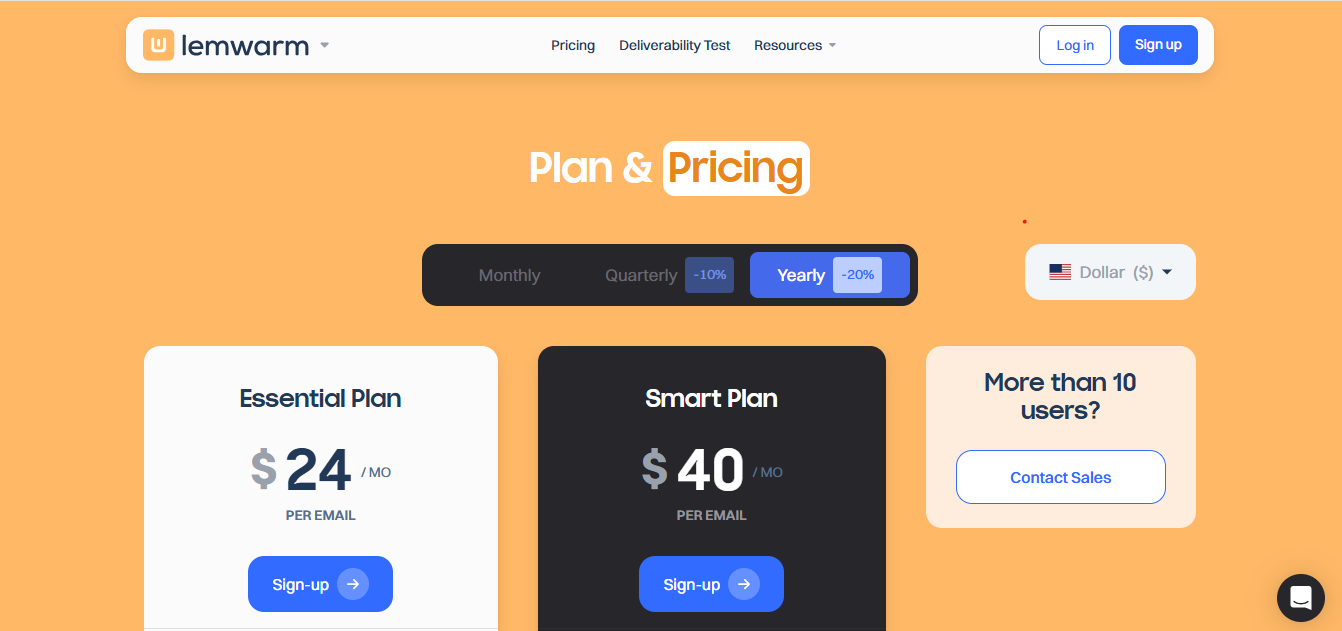
You can pay monthly, quarterly (save 10%), or yearly (save 20%).
This image shows the lemwarm pricing
Essential Plan – Starts at $24/month (yearly): Basic warm-up, reports, and 20K inbox network.
Smart Plan – Starts at $40/month (yearly): Adds personalized warm-up emails and real-template warm-up.
Custom Plan – For 10+ inboxes, pricing on request.
Verdict
Lemwarm is great if you’re already using Lemlist.
It keeps warmup simple and automatic, but if you need deeper deliverability control or DNS help, you’ll need to pair it with another tool.
If Lemwarm doesn’t fit your requirements, check out our guide to the best Lemwarm alternatives and compare other email warmup tools.
7. Mailivery
Mailivery is built to simulate human replies using AI personas, not just send warm-up emails.
Each inbox in Mailivery gets a unique identity with custom sender behavior (language style, timezone, industry) to trigger authentic engagement signals.
The smart cluster feature on the Pro account further personalizes email content by tailoring it to specific industries and target audiences, enhancing the warmup process and delivery success.
It also runs blacklist checks, inbox placement tests, and lets you fully customize reply rates, timing, and templates, something most warm-up tools don’t offer.
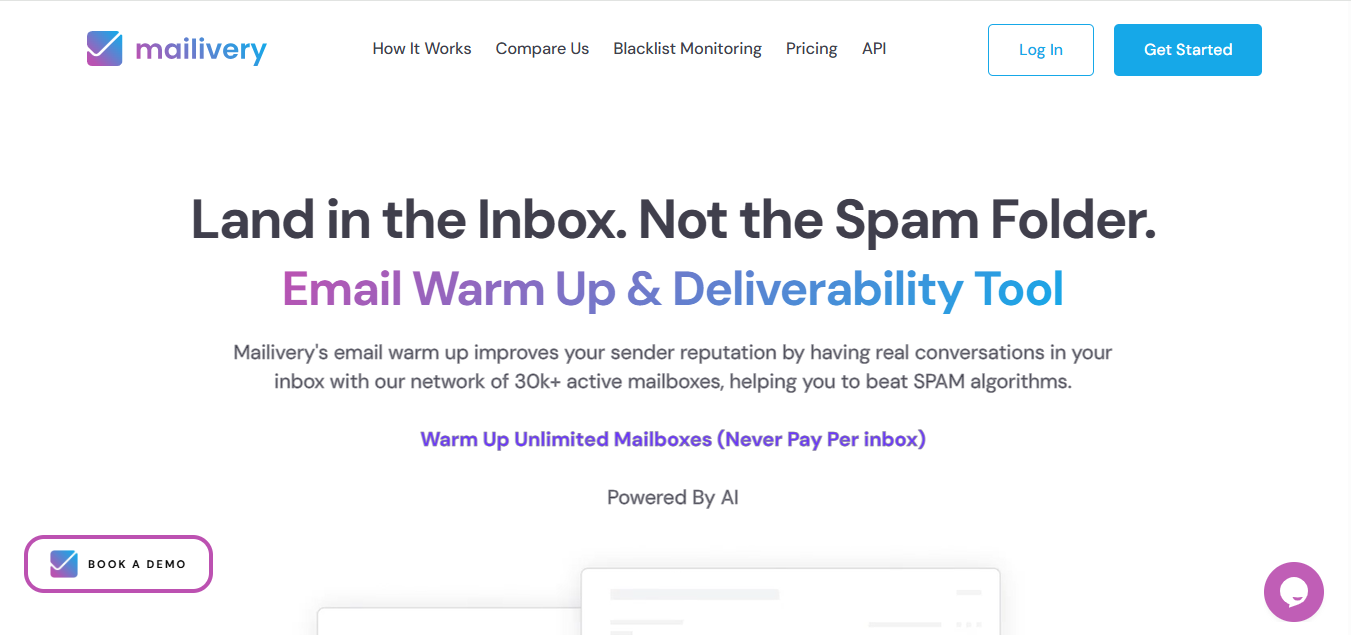
This image shows the Mailivery home page
Want a closer look at Mailivery? Read our detailed Mailivery review to explore its features, pricing, and performance.
Key Features
AI Reply Simulation: Uses AI personas for natural replies.
Custom Identities: Realistic sender profiles per inbox.
Blacklist Alerts: Monitors domain/IP blacklists.
Inbox Placement: Tracks inbox vs. spam rates.
Volume Control: Adjustable send and reply pacing.
Template Warmup: Uses real cold email content.
Outreach Integration: Works with Lemlist, Instantly, etc.
Pros
AI-generated replies look human and natural
Clean dashboard with easy tracking
Works well with Gmail and Outlook
Easy to use for solo users and teams
Cons
No DNS setup or domain management
Limited advanced reporting tools
Customization options can be limited
No built-in blacklist removal services
Occasional delays reported in reply simulations
Support response times can vary
Who It’s Best For
Cold emailers who want smarter replies during warmup and to build a positive reputation with email providers
Teams already managing DNS and domain setup
Founders who want a simple, AI-enhanced warmup tool
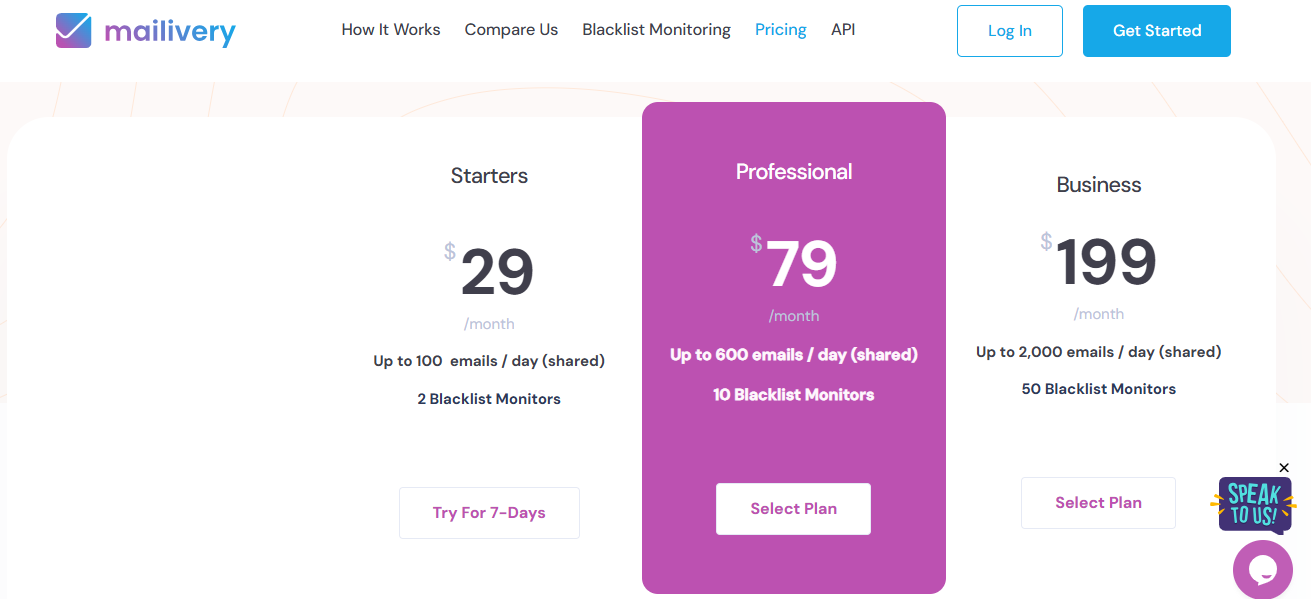
Mailivery Pricing
Mailivery offers flexible plans depending on how many warmup emails you want to send each day.
Mailivery works well if you want your warmup to look and feel more real.
It’s not for DNS or infra setup, but if you're focused on engagement and inbox placement, it's a smart middle-tier option.
Looking for other options? Explore our guide to the best Mailivery alternatives and compare other email warmup tools.
8. Mailstand
Mailstand is a cold outreach platform that includes built-in email warmup alongside campaign tools.
It also supports comprehensive email outreach strategies, helping users engage potential clients through effective email campaigns.
If you’re looking to manage both outreach and warmup in one place, it offers a convenient all-in-one setup.
It doesn’t offer deep DNS configuration or spam diagnostics, but it’s useful for teams who want to run campaigns and warm inboxes from the same dashboard.
This image shows the Mailstand homepage
Key Features
Multi-Inbox Warmup: Supports warming up to 10+ inboxes simultaneously.
Spam Trigger Detection: Analyzes emails to identify potential spam risks.
Inbox Placement Monitoring: Tracks where emails land in Gmail, Outlook, and others.
No Complex Setup: Easy activation without technical knowledge needed.
Pros
Warmup built directly into the outreach platform
Automates replies and volume ramp-up
Simple management of multiple inboxes
Easy to use for small teams and solo senders
Cons
Only useful if you use Mailstand for outreach
No DNS, blacklist, or spam testing features
Limited customization options for warmup pacing
Lacks detailed deliverability analytics
Who It’s Best For
Cold emailers already using Mailstand
Small teams that want campaign + warmup in one place
Users who don’t need advanced DNS or spam monitoring
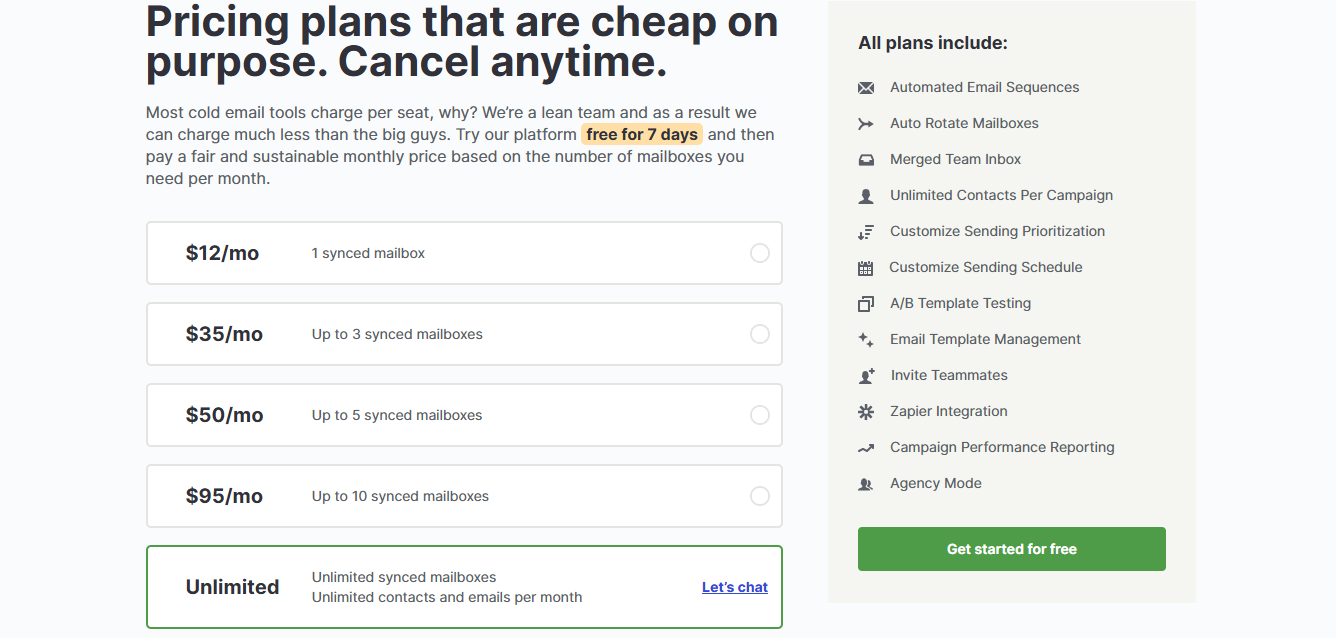
Mailstand Pricing
Mailstand keeps pricing lean and transparent, focusing on the number of mailboxes you sync.
You can try it free for 7 days, and cancel anytime.
This image shows the Mailstand Pricing
$12/month for 1 mailbox, unlimited contacts/emails
$35/month for up to 3 mailboxes, ideal for small teams
$50/month for up to 5 mailboxes, good for consultants
$95/month for up to 10 mailboxes, for growing teams
Unlimited plan available with custom pricing for high-volume senders
Our Verdict
Mailstand is a good choice if you want to keep warm-up and outreach under one roof.
It’s not built for deep diagnostics, but for basic warm-up inside your campaign tool; it works well.
9. Warmup Inbox
Warmup Inbox offers per-inbox customizable warm-up speeds and volumes and supports bulk warm-up for hundreds of accounts simultaneously, all through an intuitive dashboard with detailed spam and inbox placement testing.
Warmup Inbox also provides insights into inbox placement rates for each account, helping users track how often emails land in the primary inbox, promotions, or spam folders.
This combination makes it a go-to for agencies and large teams needing precise, scalable reputation management without manual overhead.
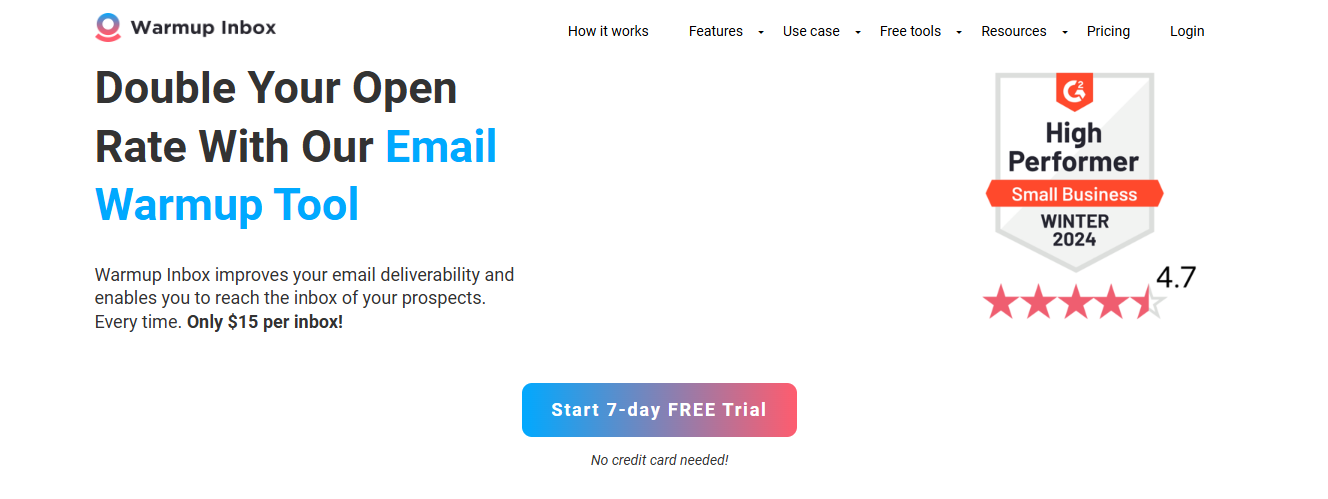
This image shows the Warmup Inbox home page
Want a closer look at Warmup Inbox? Read our detailed Warmup Inbox review to explore its features, pricing, and performance.
Key Feature
Large Verified Network: Uses 30,000+ real inboxes for genuine engagement.
Custom Warmup Control: Adjust sending speed and volume per inbox.
Bulk Warmup Support: Warm hundreds of inboxes simultaneously.
Inbox Placement Testing: Tracks if emails land in inbox or spam.
Spam Trigger Analysis: Detects risky content in emails.
Intuitive Dashboard: Easy monitoring and management for teams.
Pros
Quick setup, inbox ready in minutes
Simple dashboard with health scores
Boosts deliverability reliably
Scales to 1,000+ inboxes
Affordable compared to premium tools
This image shows the Warmup inbox user review on G2.com
Small teams that just need basic warmup without complexity
People who already have SPF and DKIM set up elsewhere, and want to use Warmup Inbox to help establish a solid sender reputation
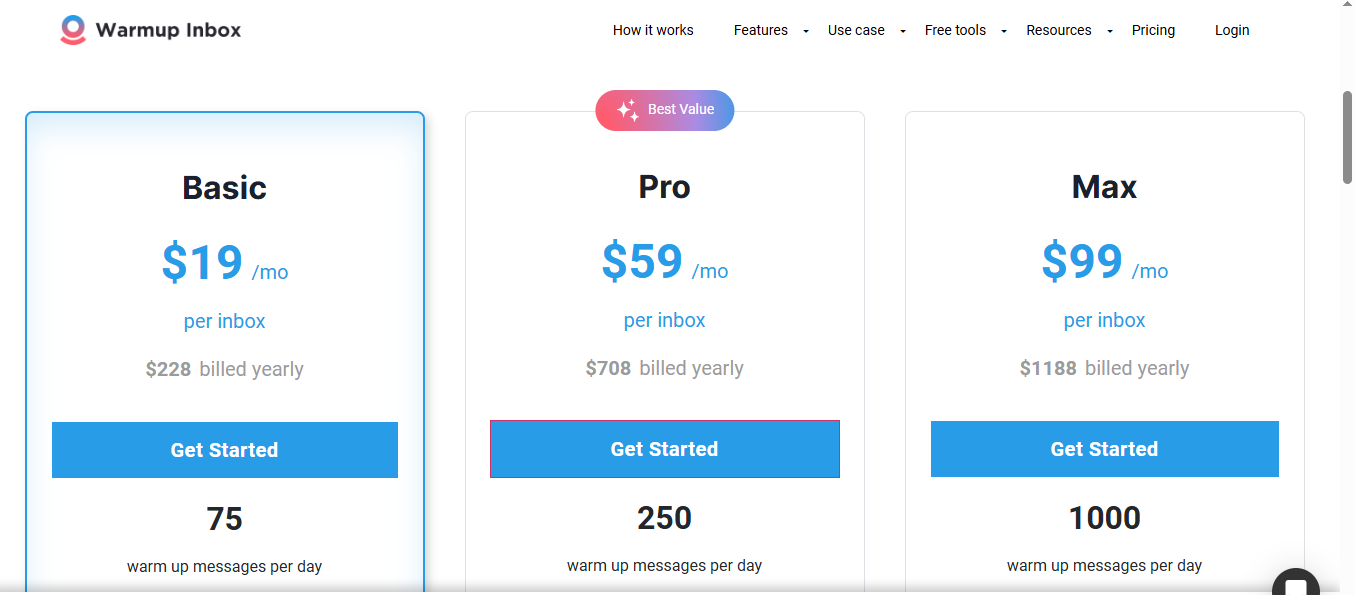
Warmup Inbox Pricing
Warmup Inbox offers three plans based on how many warmup emails you need.
This image shows the Warmup Inbox Pricing
Basic: $19/month or $228/year
Pro: $59/month or $708/year
Max: $99/month or $1,188/year
Verdict
Warmup Inbox is great if you just want to warm up your domain safely and affordably, without any technical steps. It won’t help with setup or spam issues, but for basic warmup, it gets the job done.
Warmbox is a visual and customizable email warmup tool that helps you land in the inbox instead of spam. Warmbox is designed to achieve maximum deliverability for your campaigns.
It uses AI-generated replies, real inbox interactions, and smart scheduling to build a natural sender reputation.
It’s a good fit for users who want more control and visibility over how their warmup behaves, including reply rates, warmup topics, and daily limits.
This image shows the Warmbox home page
Want a closer look at Warmbox? Read our detailed Warmbox review to explore its features, pricing, and performance.
Key Features
Multi-Inbox Warmup: Supports warming multiple inboxes at once
Spam Trigger Detection: Identifies risky content in your emails
Inbox Placement Tracking: Monitors where emails land (Inbox, Spam)
Automated Scheduling: Sends warm-up emails on a smart, gradual schedule
Simple Setup: No technical skills required for activation
Affordable Pricing: Designed for small teams and solo senders
Pros
Built into the outreach platform for seamless use
Automates replies and volume ramp-up
Easy inbox management for multiple accounts
User-friendly for small teams and individuals
Cons
Only useful if you use Warmbox for outreach
No DNS, blacklist, or spam testing tools
Limited warm-up pacing customization
Lacks detailed deliverability analytics
Who It’s Best For
Cold emailers who want custom warmup behavior
Users looking for real-time dashboards and reply control, and want to avoid emails landing in promotion folders for better inbox placement
Teams that already have SPF and DKIM configured
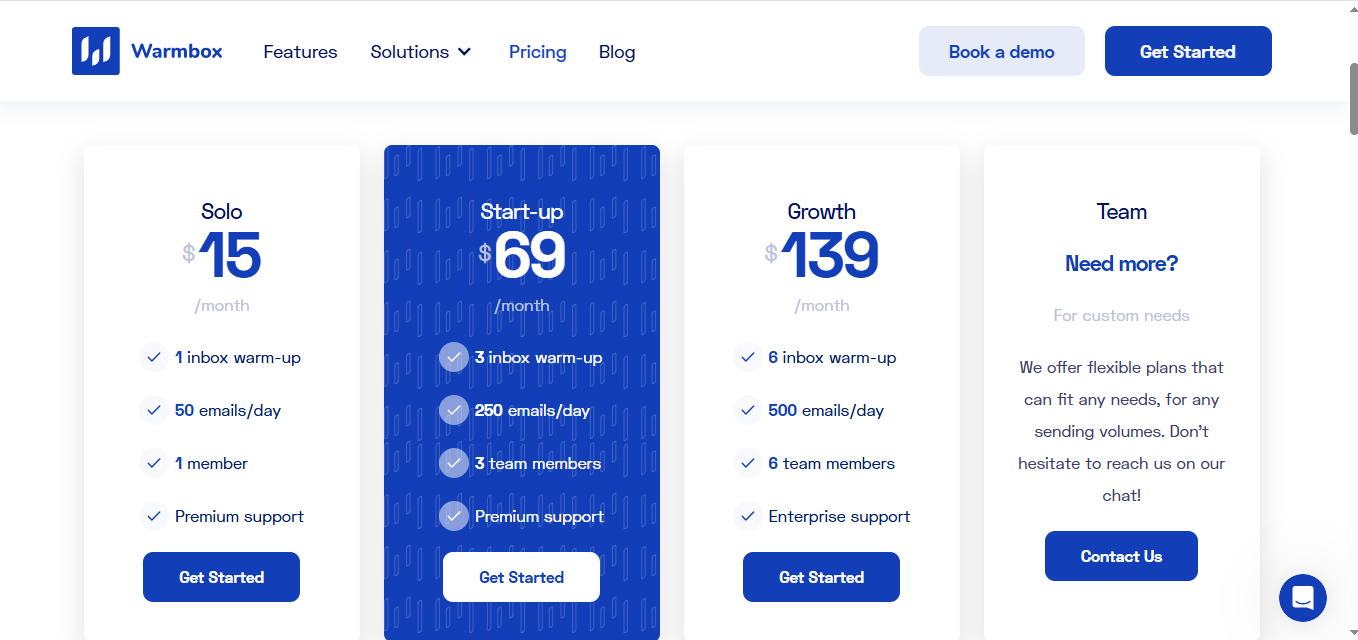
Warmbox Pricing
Warmbox offers three plans based on how many warm-up emails you want to send daily. All plans are per inbox, with discounts for half-yearly and yearly billing.
This image shows the Warmbox Pricing
Solo: $15/month for 1 inbox, 50 emails/day, premium support
Startup: $69/month for 3 inboxes, 250 emails/day, premium support
Growth: $139/month for 6 inboxes, 500 emails/day, enterprise support
Team: Custom pricing for larger teams with tailored features
Looking for other options? Explore our guide to the best Warmbox alternatives and compare other email warmup tools.
11. TrulyInbox
TrulyInbox is an AI-powered email warmup platform that builds, maintains, and repairs sender reputation through a network of 40,000+ real accounts.
What sets it apart is how the warmup algorithm works.
It prioritizes actual interactions, conversations, and engagement quality over raw volume.
Here's what that looks like in practice:
Industry-matched emails: Instead of generic filler, TrulyInbox generates warmup emails that match your industry, niche, and language.
Randomized sending: The algorithm sends warmup emails at random intervals, mimicking how real people actually send.
Engagement that ESPs trust: Opens, replies, and conversations build the kind of pattern that Google and Microsoft recognize as legitimate.
The result? Your email accounts earn real reputation, not inflated numbers that collapse when you start outreach.
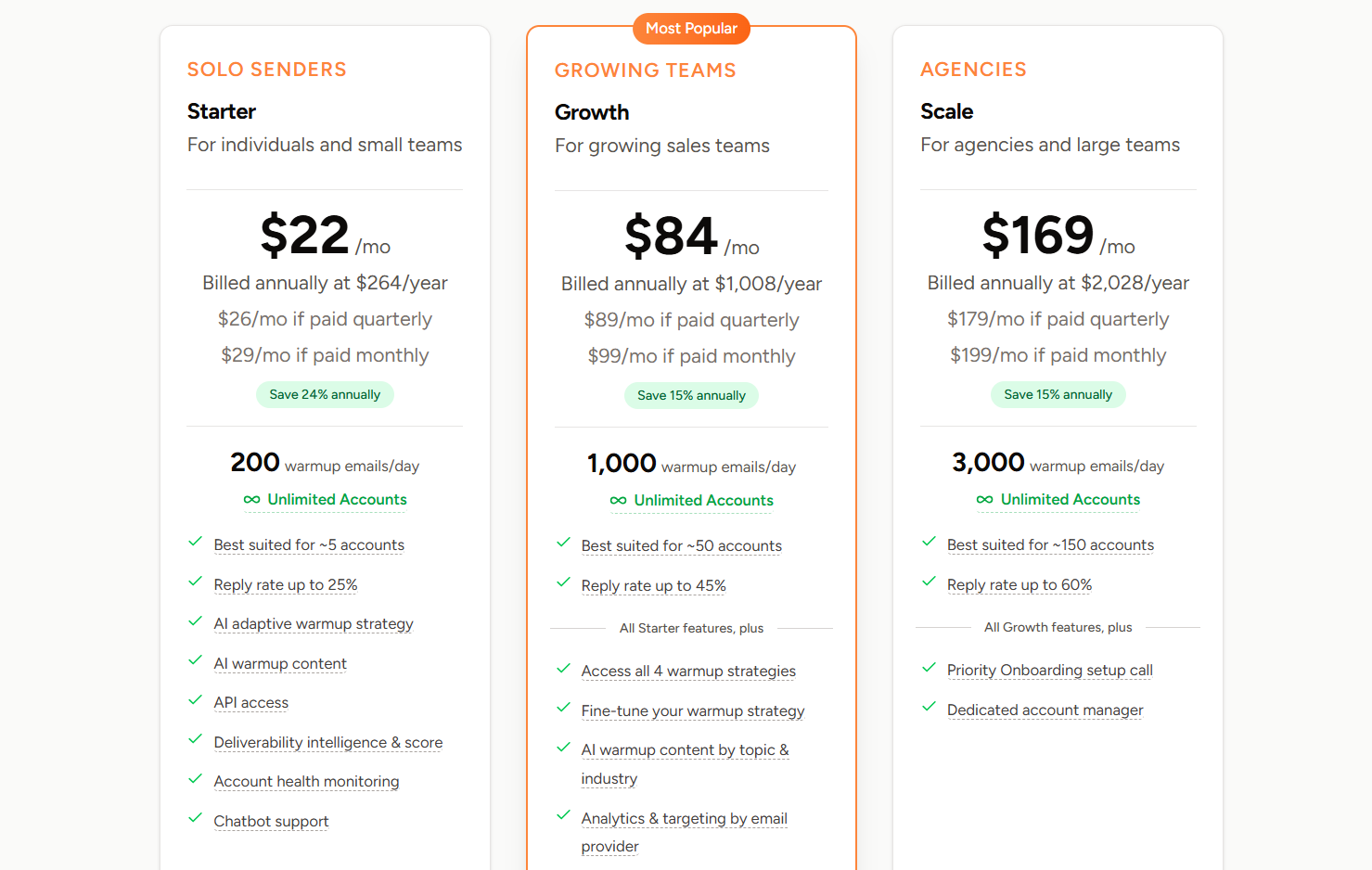
Finally is the pricing!
You pay based on warm up email volume, not per account. So, you can add and warm up multiple inboxes without costs multiplting.
Want a closer look at TrulyInbox? Read our detailed TrulyInbox review to explore its features, pricing, and performance.
Key Features
Four warmup strategies to match your exact email warm-up needs: AI Adaptive, Progressive, Randomized, and Flat.
Easily prioritize warmup toward a specific ESP like Google, Microsoft, or others.
AI generates warmup emails that match your industry, niche, and language across 50+ industries, 30+ topics, and 12 languages.
Set custom reply rates (up to 65%) and sending schedules to match your outreach window.
Know when your accounts are ready for outreach based on the deliverability score and outreach readiness signals.
TrulyInbox Network API lets agencies and enterprises plug warmup directly into their product or workflow.
Automatic SPF, DKIM, DMARC, and blacklist checks help you spot problems before they tank deliverability.
Pros
Volume-based pricing becomes a real cost saver as you add more accounts.
Quick setup with a low learning curve
Forever free plan plus a 7-day trial (no card) and a 14-day money-back guarantee make it low-risk to test
Highly customizable warm-up options to help build sender reputation of your email accounts faster
Key Decision Table: Which Email Warmup Tool Should Be Used?
This table simplifies decision-making by matching each tool to specific cold email needs, from budget warmup to advanced infrastructure.
Use Case
Recommended Tool(s)
Why This Matters
If you want full infrastructure + warmup
Warmforge
Takes care of DNS, IP warmup, and inbox tracking with no manual setup.
If you want basic warmup on a budget
Warmup Inbox, Mailwarm
Covers essentials like gradual sending and reply rate control at a low cost.
If you want something that works with Lemlist
Lemwarm
Built inside Lemlist.
If you want to fix spam or deliverability
Folderly
Specializes in repairing bad sender reputation and boosting inbox rates.
If you want to manage 20+ inboxes easily
Mailreach, Warmforge
Designed for bulk warmup, automation, and dashboard control.
If you want smart AI replies and engagement
Mailivery, InboxAlly
Mimics natural conversations to boost domain trust and improve inbox placement.
If you want full control over warmup pacing
TrulyInbox, Warmup Inbox
Lets you adjust send volumes, reply rates, and ramp-up rules.
If you want detailed spam diagnostics
Mailreach, InboxAlly
Provides clear reports on inbox placement, blacklist checks, and domain health.
If you want hands-off automation
Warmforge
Handles warmup behind the scenes while you focus on outreach.
If you want to warm inboxes from any tool
Warmbox, TrulyInbox
Works standalone without needing integrations, ideal for multiple setups.
Tip: When choosing a tool, make sure it is email warmup legal and complies with regulations like GDPR, CAN-SPAM, and CASL to ensure your warmup process is both effective and lawful.
Final Thoughts: Which Email Warmup Tool Is Worth It?
Email warm-up isn't just a task; it's the foundation for every successful cold outreach campaign. The right tool can save you hours, protect your sender reputation, and keep your emails landing where they belong.
Remember, warm-up tools vary in approach, from simple automation to full infrastructure support.
Choosing wisely means aligning with your sending volume, technical comfort, and long-term goals.
If you want something that works out of the box, with no technical setup, full automation, and real results, is the one tool that checks every box.
👉 Try Warmforge today, and get 1 free warmup slot for Google and Microsoft inboxes.
FAQs About Email Warmup Tools
1. How long should I warm up a new inbox?
Most inboxes need 2–3 weeks of daily warm-up before you start cold outreach. Tools like Warmforge automate the process by gradually increasing email volume and replies to build sender reputation.
2. Do email warmup tools really work?
Yes, when you use them correctly. A good warmup tool gradually increases sending activity, monitors inbox placement, and helps maintain your sender reputation. Proper SPF, DKIM, and DMARC setup also matters.
3. Can I warm multiple inboxes at once?
Yes. Tools such as Warmforge, Mailreach, and Mailivery let you warm multiple inboxes at the same time, making it easier to scale outreach campaigns.
4. What’s the difference between warmup and infrastructure setup?
Warm-up gradually increases sending activity to build a sender reputation. Infrastructure setup covers SPF, DKIM, DMARC, IP warming, domain configuration, and other technical settings that support deliverability.
5. What’s the safest warmup tool for Gmail and Outlook?
Warmforge is a strong option for Gmail and Outlook because it combines mailbox warm-up with deliverability monitoring and technical checks.
6. What is the best email warmup tool?
It depends on what you need. Warmup Inbox and Mailreach offer simple warm-up features, while Warmforge adds automation, placement testing, and deliverability monitoring.
7. How do you warm up a new email address?
Start with a small number of emails each day and increase the volume gradually. Monitor bounce rates, spam placement, and engagement as you scale. A warmup tool can automate this process and manage the sending activity for you.
8. Can I use a warmup tool for free?
Yes. Some warmup tools offer free trials or limited free plans. These options let you test the platform before paying for a larger mailbox setup.
9. What is Warmup Inbox?
Warmup Inbox is an email warm-up tool that automates sending and receiving activity to help improve sender reputation and email deliverability.
10. What’s the difference between GMass, Mailshake, and warm-up platforms?
GMass and Mailshake focus on sending outreach campaigns. Warm-up platforms focus on building sender reputation and improving email deliverability before and during outreach.
11. How do I filter warmup emails from real replies?
Create inbox filters or labels to separate automated warmup emails from genuine replies. This keeps your inbox organized and makes it easier to identify real prospects.