Outbound teams today know that email warmup isn't an add-on. It's a necessity.
Most teams have already picked a warmup tool, read a guide, and started the process.
What they don't realize is where things quietly go wrong.
The infrastructure they set up before warmup, the signals they miss during warmup, and the way they transition to live campaigns afterward are often where things quietly go wrong. These are the gaps that silently kill deliverability, often before the first cold email even goes out.
I've seen these mistakes repeat across teams of all sizes.
They slow down how quickly new accounts build sender reputation, make it harder to recover damaged domains, and prevent warmup efforts from translating into actual inbox placement once real campaigns begin.
In this post, I'll walk through the mistakes I see most often, the warning signs that tell you something is off, and what you can do to fix each one.
Let’s get into it!
Here's what I've noticed after managing warmup across hundreds of mailboxes.
The teams that land in spam aren't the ones who skipped warmup. They're the ones who followed a guide, picked a tool, and assumed the job was done.
Warm-up isn't just a step. It's the result of decisions made before, during, and after the warmup window.
Pick the wrong infrastructure? Warmup starts on a weak foundation. Ignore your heat score while ramping? You'll overshoot without realizing it. Cut warmup the day your first campaign goes live? Deliverability collapses by week three.
The mistakes below are the ones I see most often. Each one includes a diagnostic signal so you can spot it in your own setup.

This mistake looks invisible on a dashboard. It only shows up when you start sending real emails.
Not all warmup networks are the same. Some tools run warm-up through pools of custom SMTP servers or unverified inboxes.
The warmup emails are sent and received. The dashboard shows activity. Everything looks fine.
But email providers are smarter than that.
Gmail and Outlook detect when warmup happens within isolated, low-reputation networks. The engagement signals from those interactions carry less weight. In some cases, they carry no weight at all.
So what's the actual difference?
How to spot it: Your warmup tool shows strong engagement metrics, but inbox placement tests tell a different story. Emails land in spam or promotions despite weeks of warmup. The dashboard says you're healthy. Real-world placement says otherwise.
What to do: Check what kind of accounts your warmup tool uses. If it's running on custom SMTP or unverified inboxes, the warmup data is unreliable.
Warmforge runs warmup exclusively through aged Google Workspace and Microsoft 365 accounts. That's why the engagement signals translate into real inbox placement. You can test this with a free warming slot and a free placement test to see the difference yourself.
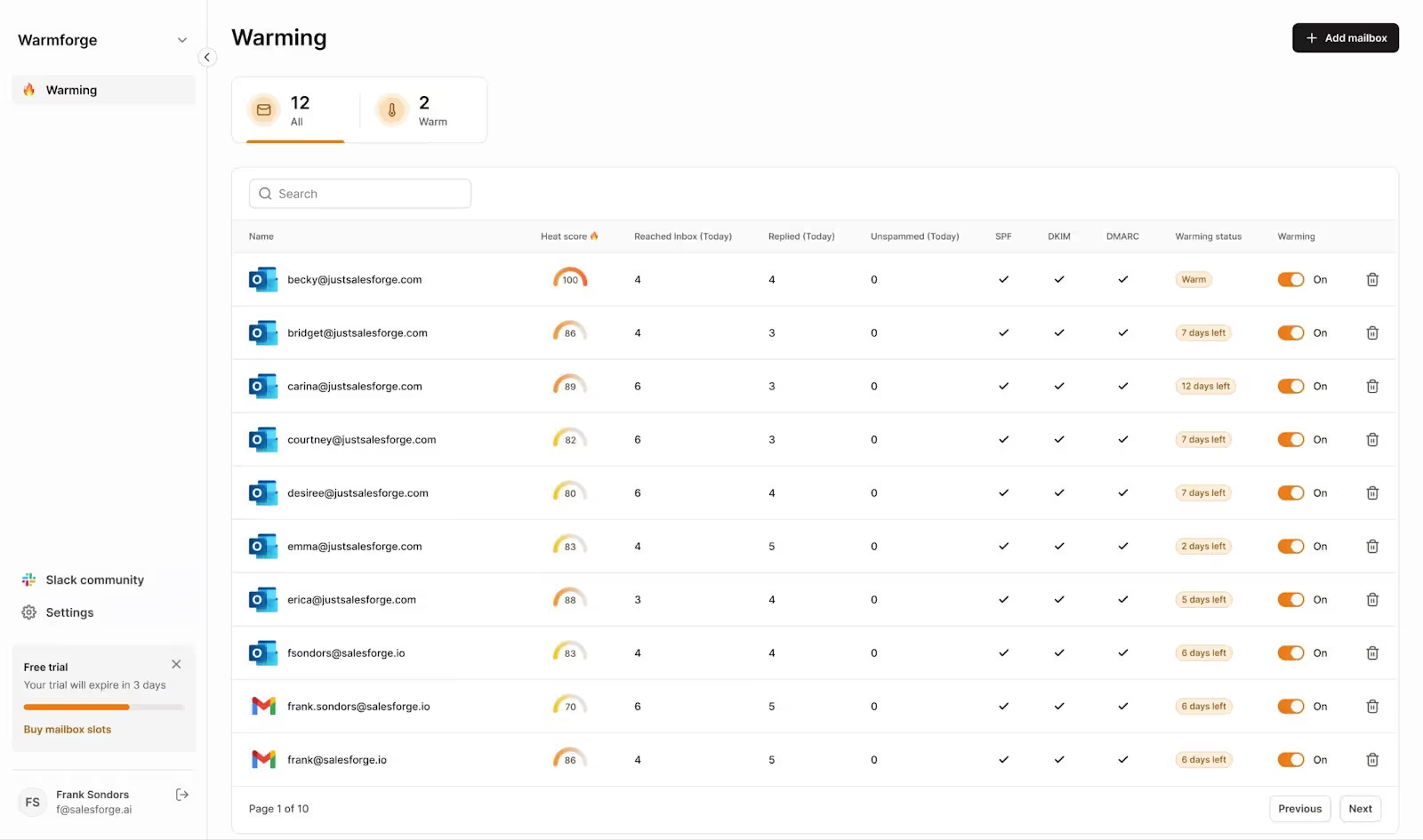
This mistake happens before the warmup even begins. And it's the one most teams never think about.
Your warmup outcomes are shaped by the infrastructure underneath. The mailbox type, the IP setup, the domain quality. If any of these are off, warmup is fighting uphill from day one.
Here's what I mean:
If you're sending high volume across multiple clients, shared IPs tie your reputation to other senders. One bad actor drags everyone down. Dedicated IPs give you full control, but they need consistent volume to work.
Dedicated IPs need consistent sending to build a reputation. If you're only sending a few hundred emails a day, shared IPs are usually the better call.
Some providers use EDU tricks or workaround accounts for cheap Google or Microsoft mailboxes. These work until the provider updates their policies. Then your entire infrastructure breaks overnight.
I see this constantly. A team sets up 30 mailboxes, and every single one is Google Workspace.
If Google changes a policy or tightens spam filters, all 30 accounts get hit at once. You need a mix of Google Workspace, Microsoft 365, and custom mailboxes. Spreading across ESPs protects you from provider-specific crackdowns.
How to spot it: Your warmup metrics look healthy, but inbox placement drops once real campaigns start. Or mailboxes get suspended without warning. Or deliverability tanks across all accounts at the same time.
What to do: Match your infrastructure to your sending volume.
For cost-effective scaling,
Ideally, your infrastructure should include a mix of all three.
That way, no single provider controls your entire sending reputation.
I'm not going to walk through SPF, DKIM, and DMARC setup here.
There's already a detailed guide on setting up SPF, DKIM, and DMARC for cold outreach.
But here's the thing. I still see teams start warm-up without properly configuring authentication.
Sometimes they skip it entirely. Sometimes they configure it but make errors that silently break the chain. Either way, the result is the same.
Warmup without authentication is pointless. Email providers check authentication before they look at engagement signals. If SPF, DKIM, or DMARC fails, your warmup emails get treated as untrusted. You're building a reputation on a broken foundation.
How to spot it:
What to do: Verify authentication before you start warmup. Not after.
Run a health check on every domain and mailbox to confirm SPF, DKIM, and DMARC are passing. If you're setting up mailboxes through Mailforge, Infraforge, or Primeforge, DNS authentication is configured automatically. But it's still worth running a verification check.
Warmforge's deliverability center runs automated authentication checks. That way, you catch misconfigurations before they cost you weeks of wasted warmup.
Most warmup guides give you a fixed schedule. Send 10 emails on day one, 20 on day three, 50 by week two.
That's a starting point. It's not a rule.
The mistake is following the calendar blindly without checking whether your mailbox is ready for the next step. Two mailboxes started on the same day can be in very different places by day ten. One might be ready to ramp. The other might need another week at the same volume.
How to spot it:
What to do: Let your engagement data drive the ramp, not the calendar.
If your heat score is climbing and inbox placement is strong, push forward. If it stalls, hold the volume steady until the signals improve.
I covered this in more detail in the domain warmup and gradual scaling guide, including specific metrics to watch at each stage.
This one sounds obvious. But I still see it happen, especially on teams under pressure to hit pipeline targets.
The logic usually goes: "We're already sending warmup emails, so why not add a few cold emails to the mix?"
Here's why that kills the process.
Warmup works because every interaction generates positive engagement. Opens, replies, emails pulled out of spam. These signals teach providers that your mailbox is trustworthy.
Cold outreach does the opposite. Some recipients ignore your email. Some mark it as spam. Some bounce. When you mix the two, negative signals from cold emails cancel out the positive signals from warm-up.
Your mailbox ends up stuck in a grey zone. Providers can't decide whether to trust you.
How to spot it:
What to do: Keep warmup and cold outreach completely separate until the warmup window closes.
For most setups, that means at least 14 days of pure warmup before any live sending begins. That's also Warmforge's recommended warmup duration for new mailboxes.
Once the warmup is done and your heat score is at 85 or above, you can start campaigns. But don't turn warmup off. Keep it running alongside your outreach. More on that in mistake #7.
Some warmup tools send the same handful of templates back and forth across their network. Subject lines repeat. Body copy repeats. The structure is identical every time.
Email providers notice patterns like this.
When the same content circulates within a closed network, it starts to look like automated spam. This is especially true with Gmail. Google's spam filters detect repetitive, machine-generated content patterns. If your warmup emails all look the same, the engagement they generate carries less trust.
How to spot it:
What to do: Use a warmup tool that generates unique, varied content for every interaction. The emails should read like real business conversations, not recycled templates.
Warmforge uses AI to generate unique warmup emails in 20+ languages. Each one mimics a genuine professional exchange, which is exactly what spam filters are trained to look for. You can see the difference in your placement test results within the first two weeks.
This is one of the most common mistakes I see. And one of the most damaging.
Teams spend two or three weeks warming up their mailboxes. Heat scores look good. Inbox placement tests pass. So they flip the switch, turn off warmup, and start sending cold outreach.
By week three of live sending, deliverability starts to slip.
Here's why.
Warmup doesn't just build sender reputation. It maintains it. When you stop warmup, you remove all the positive engagement signals providers used to trust your mailbox. Now the only signals coming in are from cold outreach.
Some recipients open. Some don't. Some mark you as spam. Without warmup running in the background, nothing offsets the negative signals. Your reputation starts to erode. Slowly at first, then fast.
How to spot it:
What to do: Never turn warmup off. Keep it running continuously alongside your live campaigns.
Warmup should run for the entire life of the mailbox, not just the first two weeks. Warmforge is designed to run this way. Set it once, and it keeps generating positive engagement signals while your campaigns do the rest.
I covered the post-campaign reputation side of this in the email warmup process guide.
Most teams track open rates during warmup. Some track bounce rates. Very few run actual inbox placement tests. That's a problem.
Open rates tell you whether warmup emails are being engaged with. They don't tell you where those emails are landing.
An email can be "opened" from the spam folder. It can be "opened" from the promotions tab. The open rate still counts, but the placement is wrong.
Inbox placement tests are different. They tell you exactly where your warmup emails are arriving. Primary inbox, promotions, spam. Broken down by provider.
Without this data, you're flying blind. Your dashboard might say warmup is going well. But your emails might be sitting in spam on Gmail while landing in the inbox on Outlook.
How to spot it:
What to do: Run placement tests during warmup, not just after.
Warmforge gives you one free placement test per month per account. Use it during the warmup window. This gives you a real picture of where your emails are landing. If placement is off, you can adjust before the warmup window closes.
If you wait until campaigns are live, you've already lost time. I wrote more about this in the inbox placement checklist.
Warming up five mailboxes is straightforward. Warming up fifty or two hundred is a different game entirely.
The mistake I see is teams applying the same single-mailbox warmup process across dozens of accounts. No staggering. No rotation. No variation in sending patterns.
When you warm up a large batch of mailboxes at the same time, from the same domains, with the same patterns, email providers notice. It looks coordinated. And coordinated sending from new accounts is exactly what spam operations do.
How to spot it:
What to do: Stagger your warmup. Don't start all mailboxes on the same day.
Spread them across a week or two. Vary the ramp speed slightly between accounts. If you're running multiple mailboxes per domain, limit how many warm at once.
Warmforge's warmup codes also help here. They let teams coordinate warmup management across accounts without losing track of which mailboxes are at which stage.
If you're operating across multiple infrastructure types, the cold email deliverability guide covers how to distribute traffic across providers. It's especially relevant when you're managing mailboxes across Mailforge, Infraforge, and Primeforge simultaneously.
A new domain has no reputation. A damaged domain has a negative one. These are very different starting points.
The mistake is applying a standard warmup process to a domain that's already been flagged. Teams assume that if they just "re-warm" the domain, the slate gets wiped clean.
It doesn't work that way. Email providers remember.
If a domain has a history of spam complaints, high bounce rates, or blacklist entries, a fresh warmup cycle won't erase that. Providers watch that domain more closely than a brand-new one. A standard warmup ramp on a damaged domain can make things worse.
How to spot it:
What to do: Don't treat this like a normal warmup.
First, check whether the domain is on any blacklists. The blacklist removal guide covers how to find and fix that.
Second, drop your volume to near zero. Not the 10 to 20 emails per day you'd start with on a new domain. Closer to two or three highly engaged contacts.
Third, rebuild slowly. Much slower than a new domain. A damaged domain recovery can take two to three months, not two to three weeks.
In some cases, it's faster and cheaper to retire the domain entirely. Setting up fresh infrastructure through Mailforge or Infraforge is usually quicker than months of slow reputation rebuilding. If the domain has been blacklisted multiple times, recovery may not be worth the effort.
Every mistake in this post comes down to the same gap.
Teams treat warm-up as an isolated step instead of a connected process.
The fix is straightforward. Get your infrastructure right before warmup starts. Let your heat score and placement data drive the ramp, not a fixed calendar. And never turn warmup off once campaigns go live.
That sequence sounds simple.
But the details inside each step are where most teams slip up. Go back through the mistakes above and check your current setup against the diagnostic signals. If even one applies, fix it before your next campaign.
You can start with one free warming slot and one free placement test on Warmforge to see where your mailboxes stand right now.
For a new domain with clean infrastructure, two to four weeks is the standard range. But don't go by time alone.
Watch your heat score and inbox placement data. If your heat score is at 85 or above and placement tests show emails hitting the primary inbox, you're ready. For damaged domains, expect two to three months minimum.
Not during the initial warmup window. Mixing cold outreach with warmup emails dilutes the positive engagement signals that warmup builds.
Once the warmup window is done and your metrics look healthy, start campaigns. But keep warmup running in the background. Don't turn it off.
85 or above. That's the threshold where most mailboxes are healthy enough for consistent inbox placement.
If you're sitting at 70 to 80, hold off and let the warmup run for another week. Starting campaigns with a borderline heat score usually leads to a deliverability dip within the first few weeks.
Yes. Always.
Warmup isn't a one-time setup step. It's an ongoing process that maintains your sender reputation while live campaigns generate a mix of positive and negative signals. Stopping warmup after campaigns begin is one of the most common mistakes I see.
Don't rely on open rates alone. Run inbox placement tests.
A working warmup shows three things: a rising heat score, a low bounce rate under 2%, and placement tests that confirm emails are hitting the primary inbox across Gmail and Outlook. If any of those three are off, something in your setup needs attention.
Yes.
Shared IPs come with an existing reputation from other senders on the same IP. Your warmup benefits from that shared history, but you're also affected by what other senders do. Mailforge uses shared IPs, which is why warmup tends to be faster there.
Dedicated IPs start with no reputation at all. Warm-up takes longer and needs more consistent volume. Infraforge provides dedicated IPs, and that extra control is worth it for high-volume senders.
If you're not sure which setup fits your use case, this breakdown of how blacklisted IPs affect deliverability covers the tradeoffs in detail.