
Every few weeks, someone asks me the same question: Should I move to a dedicated IP?
Usually, they ask right after a bad week. Open rates dipped, replies dried up, and a dedicated IP feels like the fix.
Most of the time, it isn't.
The dedicated IP vs shared IP decision gets treated like a tier upgrade, as if paying more buys better deliverability. It does not work that way. A dedicated IP is not a better IP. It is an empty one.
What you get is a blank reputation and full responsibility for building it. If you can carry that, a dedicated IP is a real advantage. If you cannot, a clean shared pool will beat it every time.
Below, I walk through how I actually make this call: the volume math, the warmup cost people forget to price in, and the signals that tell you when you have outgrown a shared pool.
A shared IP is one sending IP used by many senders at once. Your traffic sits in a pool alongside everyone else's.
That sounds risky until you consider what comes with it: a reputation that already exists. The pool has a history with Google and Microsoft. It has been sending for months or years.
You inherit that history. You do not build it.
This is why a shared pool is usually faster for stable sending. There is no cold start.
The trade-off is worth stating plainly. Your outcomes are partly tied to the behavior of senders you cannot see. If a provider runs a permissive pool and lets bad actors in, that reaches you.
Pool hygiene is the whole ballgame. A well-managed pool vets senders, watches complaint rates, and rotates IPs. A badly managed one is a shared liability.
A dedicated IP is a sending IP that only you use. Every signal it generates traces back to you.
That is the appeal. Nobody else can damage it.
It is also the catch. Nobody else can carry it either.
A new dedicated IP has no history. Mailbox providers have never seen it, and to them unrecognized is not neutral. It is suspicious. Unknown IPs get filtered harder than established ones.
So the reputation you now fully control is a reputation you now fully have to build, from nothing, before it does anything for you.
Here is how the two setups compare on the factors that actually change your decision.
Here is what gets lost in this debate.
In cold email, you are almost never sending from one IP through one mailbox. You are running many mailboxes across many domains, deliberately, to spread volume.
That changes the math. Mailbox providers score you at several levels at once: IP, domain, and mailbox.
For most cold email setups, domain and mailbox reputation carry more weight than the IP. Your domains are new. Your mailboxes are new. That is where the scrutiny lands.
Which means the IP question is smaller than the internet makes it sound. I have watched teams move to dedicated IPs, expecting a jump and getting nothing, because their real problem was list quality or a domain with no warmup history.
Switching IPs does not fix a targeting problem. It just gives you a cleaner view of the same one.
Your sender reputation is built across all three layers at once. Fix the layer that is actually broken.
Volume is the first filter, and for most people, it is the only one they need.
A dedicated IP needs consistent traffic to hold a reputation. Reputation is a memory, and memory fades. Send too little and the IP never establishes a pattern that mailbox providers recognize.
These are the rough thresholds I work with:
The word doing the work is consistently. Seasonal or bursty sending is the worst case for a dedicated IP. Gaps let the reputation decay, and every restart is a partial rewarm.
If your volume swings hard month to month, a shared pool absorbs that. A dedicated IP punishes it.
This is the line item people leave out of the comparison, and it is the expensive one.
A new dedicated IP needs a warm-up ramp before it carries production volume. Realistically, that is 4 to 6 weeks of gradual, patient sending.
During that window, you are paying for infrastructure that is not producing a pipeline yet.
Shared pools mostly skip this at the IP layer because the pool is already warm. You still warm your mailboxes and domains, but you are not starting the IP from zero.
I want to be precise about something, because it gets misread constantly. Warmup is not optional on either setup. New domains and new mailboxes need email warmup regardless of which IP they sit behind.
The difference is what you are warming. On shared, you warm mailboxes. On dedicated, you warm mailboxes and an IP.
Skipping the IP ramp is the fastest way to destroy new dedicated infrastructure. You get one first impression with an unknown IP.
Isolation is the honest argument for dedicated IPs, and it is a real one.
People mark you as spam when the message has no business arriving. So I would rather fix the list than fix the IP. Leadsforge now lets you source contacts from Signals instead of static ICP filters, building lists around real events: people who recently changed jobs, companies that just raised funding, companies that were acquired, and active investors.
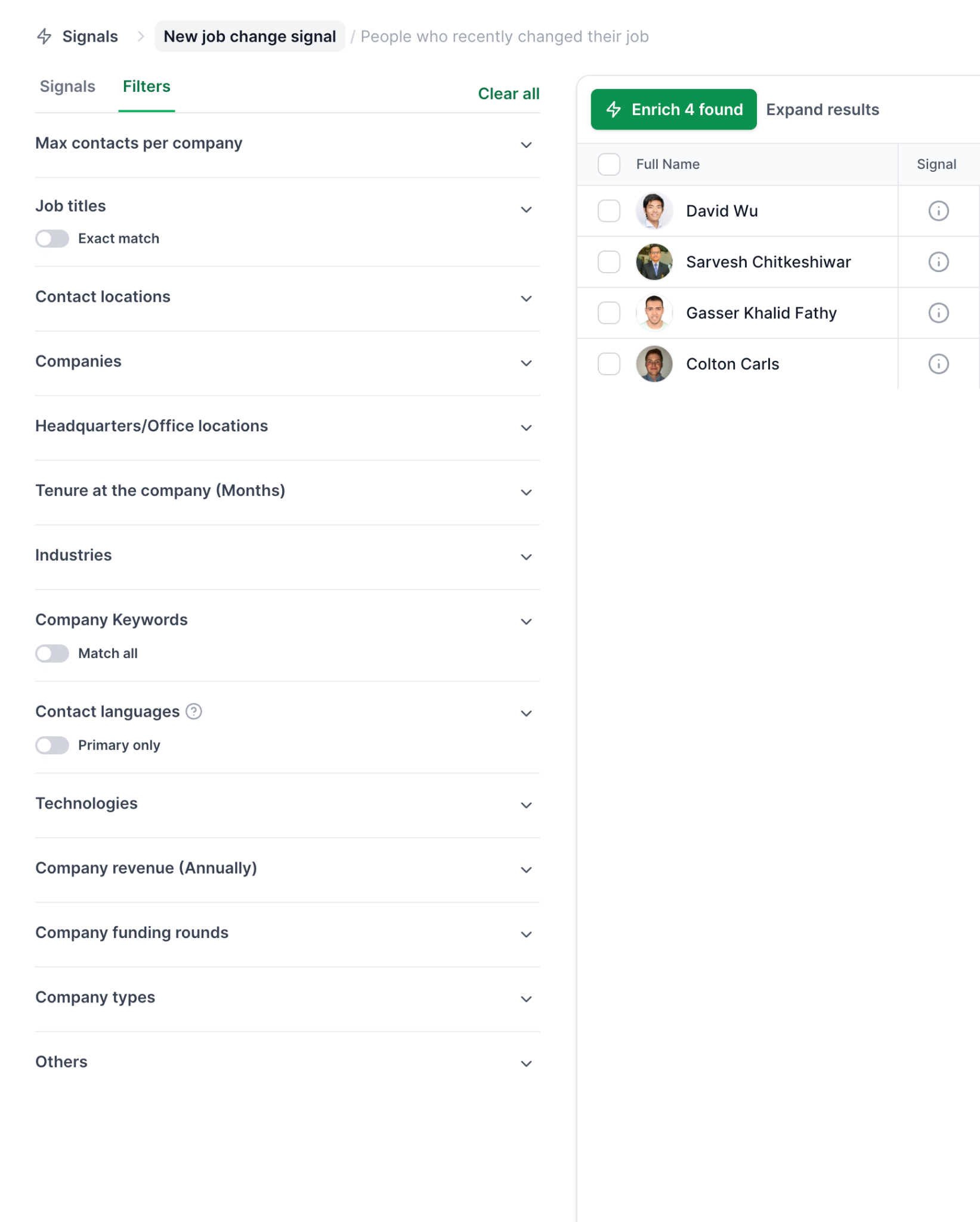
This image shows the Signals sourcing options in Leadsforge
The reason that matters here is timing. Someone who changed roles three weeks ago has a reason to hear from you. A name pulled from a static filter often does not.
Better timing lowers complaint rates. Lower complaint rates protect the IP, shared or dedicated. That is the order in which the work should happen.
Either way, you want blacklist monitoring running. Isolation tells you a problem is yours. It does not tell you that you have one.
The per-mailbox price difference between shared and dedicated infrastructure is modest. That is not where the cost lives.
The real cost of a dedicated IP is time and attention:
If you have that person, the cost is fine. If you do not, you are buying a liability with a monthly fee attached.
I would rather see a small team put that budget into better data and stay on a clean shared pool.
For current per-mailbox rates on each model, the Mailforge vs Infraforge breakdown puts both side by side, with a calculator you can run against your own contact volume.
This is the question I ask before any of the others, and it settles most conversations quickly.
Who, by name, is going to watch your IP reputation?
A dedicated IP is not a purchase. It is an assignment. It needs someone checking placement, watching complaint rates, catching blacklist entries early, and pulling volume back when the signals soften.
If the honest answer is that nobody would, then a shared pool is the better choice. Not the cheaper compromise. The better choice.
Providers running shared pools do that monitoring work as part of the product. You are paying them to carry it for you.
Choose shared if most of these describe your setup:
That describes the majority of cold email senders. There is nothing second-tier about it.
For that setup, Mailforge runs a shared IP infrastructure built specifically for cold outreach, with domains, mailboxes, and DNS records configured automatically, so you can start without the technical build.
Choose dedicated if most of these describe your setup:
That last one matters more than the volume threshold. A dedicated IP rewards discipline and punishes everything else.
If that is your setup, Infraforge provides dedicated IP infrastructure with bulk DNS control, sender rotation, and prewarmed options so the ramp starts sooner.
Worth noting, because it is a third path people forget exists.
Google and Microsoft mailboxes send through their own shared infrastructure. You do not pick the IP at all.
What you get instead is the deliverability weight of the provider itself. For plenty of senders, a real Google Workspace or Microsoft 365 mailbox outperforms both options above, because mailbox providers already trust the source.
Primeforge provides real Google Workspace and Microsoft 365 mailboxes configured for cold outreach, with automated DNS and US IP addresses handled at setup.
The IP question does not apply here. The reputation question still does.
Here is the thing that decides your deliverability, and it is not the IP.
Both setups fail the same way. Someone picks an infrastructure, connects it, starts sending at volume, and finds out three weeks later that the mailboxes were never ready.
The IP is the container. Reputation is what you put in it.
That means two habits, on shared and dedicated alike.
Warm before you send. New mailboxes and domains need a warmup period before they carry campaign volume, and I treat two weeks as the floor. Warmforge runs warmup across Google and Microsoft mailboxes and gives each one a Heat Score, so you can see when a mailbox is ready instead of assuming it is. Above 85 is the mark I use before launching anything.
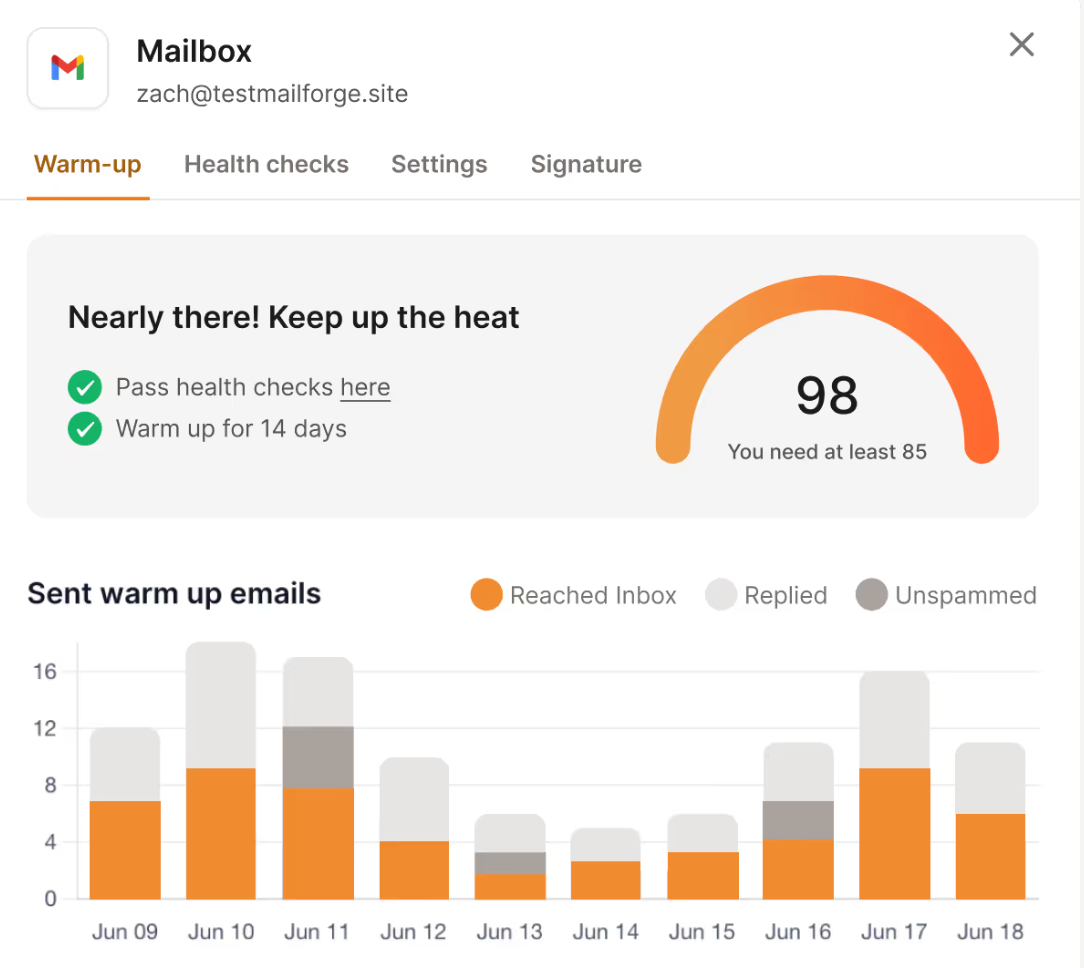
This image shows the Heat Score and warmup report in Warmforge
Watch after you send. Reputation is not a setup task. It drifts. Placement tests tell you where your emails are landing right now, per provider, rather than letting you infer it from open rates that Apple and Gmail have already made unreliable.
That second habit is where most teams lose. They warm up once, launch, and stop looking.
The sending layer sits on top of whichever infrastructure you choose. Salesforge connects to shared, dedicated, and Google or Microsoft mailboxes alike, so the IP decision does not lock you into a sending tool.
Monitoring is also what makes the IP decision reversible. If you are watching placement properly, you will see the moment a shared pool stops serving you, and you will have the data to justify the move.
Warm up your mailboxes and run a free placement test with Warmforge to see where your emails are actually landing.
If you do make the move, do not cut over.
Run both for a period. Keep the shared pool sending while the dedicated IP warms behind it.
Ramp the dedicated IP gradually, starting with your most engaged segments. Early positive signal is what teaches mailbox providers to trust a new IP.
Watch placement daily during the ramp, not weekly.
Shift volume across only when inbox placement on the dedicated IP matches or beats what you were getting on shared. Not before.
The failure I see most often is a hard cutover on day one. New IP, full volume, no ramp. That IP is finished inside a week, and rebuilding it is harder than warming it would have been.
The dedicated IP vs shared IP decision is simpler than the debate around it suggests.
Shared IPs suit most senders. You get an established reputation, faster time to sending, and someone else managing pool hygiene on your behalf.
Dedicated IPs suit high-volume senders with the discipline and the staffing to run them. You get control, isolation, and clean diagnostics, and you accept the warmup cost and the monitoring load that come with them.
But the IP is not what decides whether your emails land.
I have seen clean setups fail on dedicated IPs and modest setups do well on shared ones. The difference was never the IP. It was whether the mailboxes were warmed properly, and whether anyone was watching placement afterwards.
Pick the IP that matches your volume and your operational reality. Then go do the part that actually moves the number.
The questions I get asked most often on this topic.
Not by default. A dedicated IP gives you control and isolation, but it starts with no reputation and needs consistent high volume to hold one. For senders below roughly 50K emails a month, a well-managed shared pool usually performs better, because it comes with an established reputation already in place.
As a working rule, 150K or more emails a month are sent consistently. Between 50K and 150K it depends on how steady your sending is. Below 50K, a dedicated IP struggles to generate enough signal to maintain a reputation, and inconsistent volume lets it decay.
Yes. The pool is warm, but your domains and mailboxes are not. Every new mailbox needs a warmup period before it carries campaign volume, on shared and dedicated infrastructure alike. What changes is that on a dedicated IP you are warming the IP as well as the mailboxes.
Plan for 4 to 6 weeks of gradual ramping before full production sending. Mailbox warmup itself runs shorter, around two weeks, but a new IP needs longer because it has no history at all with mailbox providers.
It can. An unwarmed dedicated IP performs worse than a clean shared pool, because unknown IPs get filtered more aggressively than established ones. If your list quality or complaint rates are poor, isolation means there is nothing to dilute the damage.
They can affect it, which is why pool hygiene matters more than the shared label itself. A provider that vets senders, watches complaint rates, and rotates IPs keeps the pool healthy. A permissive one exposes you. Ask how a pool is managed before you judge the model.
The signal is data, not a feeling. If your placement is degrading while your own list quality, copy, and sending patterns are all clean, the pool may be the constraint. Placement testing across providers is how you tell the difference between your problem and the pool's.
