Most email deliverability audit guides are written for newsletter senders and marketing teams. They talk about opt-in forms, subscriber engagement, and ESP reputation scores.
That is not what cold emailers deal with.
If you send cold emails, your deliverability challenges are fundamentally different. You are reaching out to people who did not sign up. You are using multiple domains, multiple inboxes, and scaling volume across dozens of sending accounts. The rules that apply to a Mailchimp campaign do not apply here.
I have audited deliverability across hundreds of cold email accounts over the past few years. Some were my own. Many were client accounts where reply rates suddenly dropped or emails started hitting spam for no obvious reason. Every time, the fix came from running a structured audit and catching the specific issue.
This is the exact 8-step process I follow. It is built specifically for cold email and outbound, not marketing, not transactional. If you want a broader primer before jumping in, I wrote a separate guide on how to check email deliverability that covers the fundamentals.
An email deliverability audit is a systematic check of every factor that affects where your emails land. Inbox, promotions tab, or spam.
For cold email, that means checking things most marketing-focused guides skip entirely.
You are not dealing with a single sending domain connected to an ESP. You are managing multiple secondary domains, multiple email accounts per domain, warm-up schedules, sending volume caps, and plain-text sequences. Each one introduces a deliverability variable.
A cold email deliverability audit checks all of them. It tells you what is broken, what is about to break, and what is actually working.
The goal is simple. Find the problem before it kills your campaign.
Not every drop in open rates means something is wrong with deliverability. Sometimes the copy is off. Sometimes the list is bad. But there are specific moments when a deliverability audit is the right move.
If your reply rates were steady at 4-5% and fell to under 2%, something shifted. When copy, list, and targeting stayed the same, the emails are likely not reaching inboxes.
New infrastructure needs verification. SPF, DKIM, and DMARC misconfigurations are the most common cold email setup mistakes. You will not catch them unless you check.
Going from 50 emails a day to 200 across multiple accounts introduces new risks. If the ramp is too aggressive or sender rotation is not configured, inbox providers flag you fast.
Migrating to a new platform can change how your emails are sent at the SMTP level. What worked in the old tool may not carry over.
Inbox providers update their filtering algorithms constantly. What was landing in primary three months ago might be getting filtered now. A quarterly audit catches drift before it becomes a problem.
This is the order I follow every time. It starts with the most immediate signal: are emails even reaching inboxes? Then it works backward through every layer that could be causing issues.
Before checking anything else, I want to know where emails are actually landing right now.
This means sending a test email to a seed list that includes addresses across Gmail, Outlook, Yahoo, Zoho, and other providers.
The seed list simulates real recipient inboxes. Once the email is sent, the tool reports back where it landed for each provider.
If your emails are hitting primary on Gmail but going to spam on Outlook, that tells you something specific. If they are going to spam across the board, the issue is likely domain-level.
I run placement tests through Warmforge. It shows inbox placement rates broken down by provider, so I can see exactly where things are falling apart.
The placement test runs across real inboxes and gives a clear percentage for inbox, spam, and promotions per provider.
Other tools that do inbox placement testing include GlockApps and Mail Tester.
The key is to run the test before you start digging into DNS records and blacklists. Inbox placement tells you whether there is a problem. Everything after this tells you why.
This is where most cold email deliverability issues start. It is also the easiest to fix.
Three protocols matter here: SPF, DKIM, and DMARC.
For cold email, the most common mistakes I see are:
How to check: Run your domain through MXToolbox's SuperTool. It flags missing or broken records in seconds. Warmforge also runs automated SPF, DKIM, and DMARC checks inside its deliverability center. That is useful if you are monitoring multiple domains at once.
Since February 2024, Google and Yahoo both require proper SPF, DKIM, and DMARC for bulk senders. If these are not set up, your emails will not reach Gmail or Yahoo inboxes.
Authentication confirms you are who you say you are. Reputation determines whether inbox providers trust you.
Domain reputation matters more than IP reputation for cold email. Most outreach tools use shared sending infrastructure, which means your IP reputation is partly out of your control. Your domain reputation, however, is entirely yours.
Here is how I check it.
The most common reasons for poor domain reputation in cold email:
If your domain reputation is damaged, the fix is not quick. You need to reduce volume, clean your lists, and rebuild trust over 2-4 weeks. There is no shortcut.
This is the step most cold emailers skip during an audit. It is also the one that catches issues before they escalate.
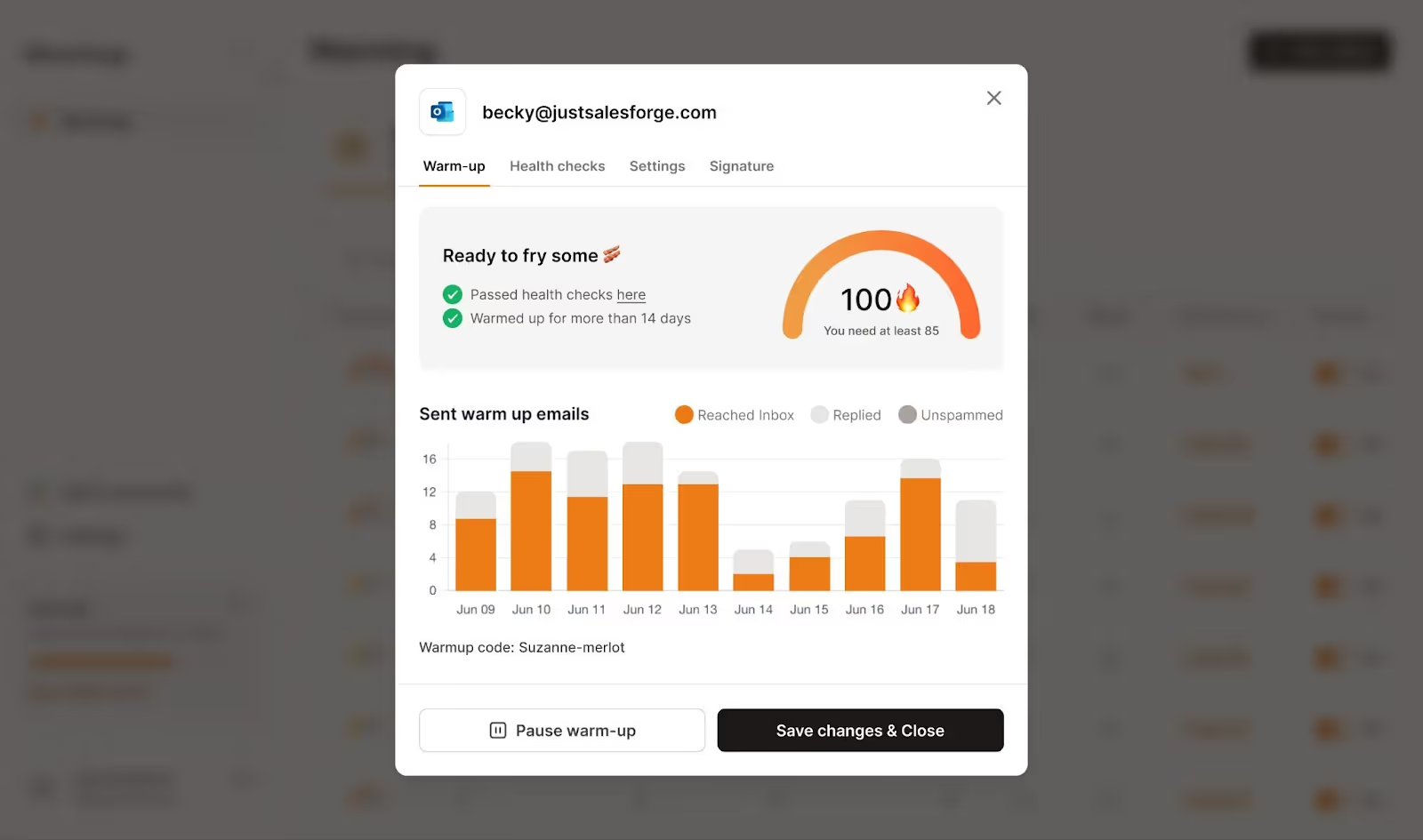
Warm-up is not a one-time setup task. It is an ongoing process. If warm-up stops on an account, or if the engagement ratios drop, inbox providers notice the shift in sending behavior. I wrote a full breakdown on how to warm up email accounts that covers ramp schedules and best practices. But during an audit, here is what I check specifically:
I have seen situations where warm-up was paused during a tool migration and never turned back on. The accounts continued sending cold emails without any warm-up engagement to balance things out. Within two weeks, inbox placement dropped below 60%.
A healthy warm-up should show open rates above 40% and reply rates above 20% on warm-up emails. If these numbers are lower, the warm-up network is not generating enough positive signals.
If you are sending 50 cold emails per day from an account but only 5 warm-up emails, the ratio is off. The warm-up needs to create enough positive engagement to offset cold sending activity.
This sounds counterintuitive, but it happens. If the warm-up tool's network is low quality, even warm-up emails start going to spam. The same thing happens if your domain reputation has already dropped. At that point, the warm-up is doing more harm than good.
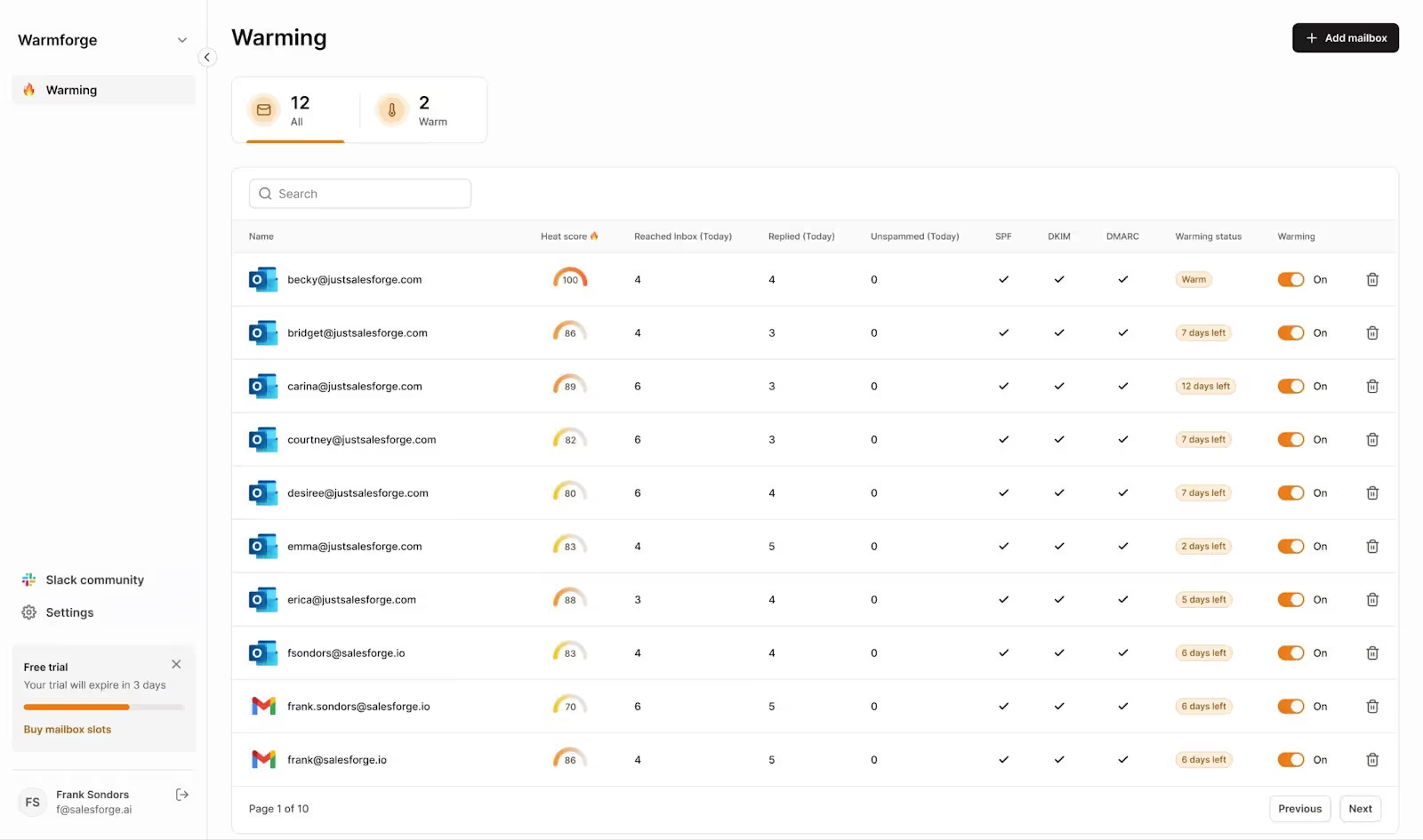
I use Warmforge for warm-up because the Heat Score gives me a real-time snapshot of each mailbox's health. If a mailbox drops below 85, I know something has shifted before it affects live campaigns.
The deliverability center shows warm-up metrics, placement rates, and domain health in one dashboard. That makes the audit process significantly faster when managing dozens of accounts.
If you are still on the fence about whether warm-up is worth running in 2026, I tested that question separately. Here is what I found: does email warm up work.
Inbox providers look at how you send, not just what you send.
Sudden spikes in volume are one of the fastest ways to get flagged. If an email account jumps from 20 emails a day to 100, that looks suspicious. Gmail and Outlook treat sudden spikes like compromised-account behavior. Even if the content is clean.
Here is what a healthy cold email sending pattern looks like:
During an audit, I check the sending logs for each account. I look for volume spikes, irregular timing, and accounts that exceeded safe sending limits.
If you are using sender rotation, verify it is working correctly. Sender rotation distributes volume across multiple email accounts automatically. But if it is misconfigured, you might have one account handling 80% of the volume while others sit idle. That defeats the purpose.
Most outreach tools, including Salesforge, offer sender rotation that distributes volume across unlimited mailboxes. During the audit, I check that the rotation is active and distributing evenly.
Bounce rates are one of the clearest signals inbox providers use to evaluate your sending behavior. High bounces tell Gmail, Outlook, and Yahoo that you are sending to bad lists. That means you are either buying data, scraping carelessly, or not verifying before sending.
The thresholds to watch:
During the audit, I pull bounce data from the last 30 days. If hard bounces are above 2%, I stop campaigns on the affected accounts immediately. Then I clean the remaining list through a verification tool and only resume once it passes.
For cold email, verification before sending is not optional. Every list should run through an email verifier before it enters a sequence. Most outreach platforms offer a built-in verifier, or you can use a standalone tool like ZeroBounce or NeverBounce.
The goal is zero hard bounces. That is not always realistic, but anything under 1% means your list hygiene is solid.
Your email copy can trigger spam filters independently of everything else. Even if your authentication, reputation, and warm-up are perfect, poorly structured content can still land you in spam. I covered specific words to watch in a separate post on spam trigger words and safe alternatives.
Here is what I check during the audit:
For a more comprehensive breakdown of what triggers modern spam filters, check out this guide on how to avoid email going to spam.
[INLINE CTA 3] Heading: Check Your Deliverability Before You Send Subtitle: Warmforge runs SPF, DKIM, DMARC checks and monitors your Heat Score so you catch problems early. Button: [Start Free Trial] → warmforge.ai/signup?utm_source=emaildeliverabilityauditcta3&utm_medium=blog&utm_campaign=optinmonstercta
This is the last step because blacklisting is usually a symptom, not a root cause. If you are on a blacklist, something else went wrong first. High bounces, spam complaints, a compromised account, or sending to spam traps.
But you still need to check. Even a temporary blacklisting can tank deliverability for days.
Here is how to check:
MXToolbox Blacklist Check scans your domain and IP against 100+ major blacklists in one search. If anything comes back flagged, it tells you which list and provides a link to the removal process.
Spamhaus is the most impactful blacklist. If you are listed on Spamhaus, most major inbox providers will reject or spam your emails. Their removal process requires you to submit a delisting request and demonstrate that the underlying issue has been resolved.
Barracuda and SURBL are also worth checking, especially if you are seeing delivery issues with corporate email servers.
If you find yourself blacklisted:
Here is a quick-reference checklist you can use every time you run an audit. I go through this on a quarterly basis for all active accounts, and immediately when something looks off. For a complementary reference, I put together a detailed inbox placement checklist that pairs well with this audit process.
You do not need ten different tools to run a proper audit. Here is what I actually use.
Warmforge is where I spend the most time during an audit. It covers warm-up monitoring, inbox placement testing, Heat Score tracking, and automated SPF, DKIM, and DMARC checks in one dashboard.
The Heat Score is particularly useful because it gives me a single number per mailbox. If I see a mailbox sitting below 85, I dig into why before it affects campaigns.
For teams managing 20+ inboxes, having all of this in one view saves hours compared to checking each account individually. There is also a free warming slot and a free placement test, which makes it easy to trial before committing. For a broader comparison of tools in this space, I wrote a roundup of email deliverability tools worth considering.
A note on infrastructure: If your audit surfaces issues with the mailboxes or domains themselves (not just how they are configured), it might be worth looking at your infrastructure layer.
I have seen plenty of cases where the warm-up and authentication are fine but the mailboxes are the weak link. Mailforge handles shared-IP infrastructure at scale, Infraforge provides dedicated IPs for high-volume senders, and Primeforge offers real Google Workspace and Microsoft 365 mailboxes built for cold outreach. The right infrastructure choice depends on your volume and control needs.
Running the audit is the diagnostic step. The real value comes from fixing what you find.
Here is the priority order I follow when an audit surfaces multiple issues:
SPF, DKIM, and DMARC issues are the most fundamental. If these are broken, nothing else matters because inbox providers will not trust your emails regardless of content or reputation. This is also the fastest fix, usually resolved within an hour.
If you are on a blacklist, deliverability is actively suppressed. Submit delisting requests and resolve the root cause before moving on.
This takes time. Reduce sending volume, clean your lists, and let warm-up run for 2-4 weeks to generate positive signals. Warmforge recommends a minimum 14-day warm-up period for new or recovering mailboxes. Do not rush this. A damaged reputation needs patience, not more volume.
These are important but less urgent than infrastructure and reputation. Once your foundation is solid, optimizing content and volume caps will give incremental improvement.
For active cold email accounts, I recommend a quarterly full audit. Add a monthly quick check covering inbox placement, bounce rates, and warm-up health. If you are scaling aggressively or managing client accounts at an agency, monthly full audits are worth the time.
An email deliverability audit is not something you do once when things break. It is a recurring process that keeps your cold email infrastructure healthy. Inbox providers update their filters, your volume changes, and your domains age.
The 8-step process I outlined here covers every layer: inbox placement, authentication, reputation, warm-up, sending patterns, list quality, content, and blacklists. Run through it systematically, fix issues in priority order, and re-check regularly.
Most deliverability problems in cold email are fixable. The ones that become permanent are the ones that went undiagnosed for too long. For a complete overview of deliverability fundamentals, check out this cold email deliverability guide.
For active cold email accounts, run a full audit quarterly and a quick check (inbox placement, bounce rates, warm-up status) monthly. If you notice a sudden drop in reply rates or open rates, run an immediate audit to catch the issue early.
Anything above 90% is solid. Above 95% is excellent. If your inbox placement is below 80%, there is an active deliverability issue that needs attention. Below 60% means your emails are predominantly landing in spam and campaigns should be paused until the root cause is fixed.
It depends on the severity. Minor content issues or sending pattern adjustments can be fixed while campaigns are running. But if your domain reputation is damaged, you are on a blacklist, or hard bounces exceed 5%, pausing is the right move. Continuing to send from a damaged domain only makes the problem worse.
Authentication fixes take effect within 24-48 hours. Blacklist removal typically takes 1-3 days after submitting a delisting request. Reputation recovery is the slowest, usually 2-4 weeks of reduced volume and consistent warm-up activity. There is no way to speed up reputation recovery. It is a trust-rebuilding process with inbox providers.
Email delivery measures whether the receiving server accepted your email. A 98% delivery rate means 98% of your emails were not rejected outright. Email deliverability measures where those accepted emails actually land, whether that is the primary inbox, promotions tab, or spam folder. You can have a 98% delivery rate and still have 40% of your emails in spam. That is why inbox placement testing matters more than delivery rate for cold email.
A Heat Score is a real-time metric in Warmforge that reflects the overall health of a mailbox. It combines engagement rates, placement test results, bounce data, and spam signals into a single number. A score of 85 or above means the mailbox is healthy and ready to send. Anything below that signals a problem worth investigating during your audit.

