Do you want to know if TrulyInbox is really the right email warm-up tool for you?
Many people search for TrulyInbox reviews in 2025 because they are ready to try it, but still have a few unanswered questions, such as:
Does TrulyInbox really let you connect unlimited email accounts?
Does the customer support actually respond when you need help?
Does it send the daily warm-up emails it promises, or fewer than expected?
Does it really help keep emails out of spam and improve deliverability?
These are the doubts most people have before signing up. To give you clear answers, I went through 100+ TrulyInbox reviews on G2, Trustpilot, Reddit, and Slack groups. Active discussions in the email marketing community, including forums and social media, also play a key role in shaping perceptions of TrulyInbox.
In this article, you will see the real feedback from users-the pros and cons, pricing details, and whether TrulyInbox works for your kind of outreach.
This way, you can decide with confidence if it is worth using or not.
What Is TrulyInbox? How Does it Work?
TrulyInbox is an automated email warm-up platform that helps you improve deliverability by building a stronger sender reputation.
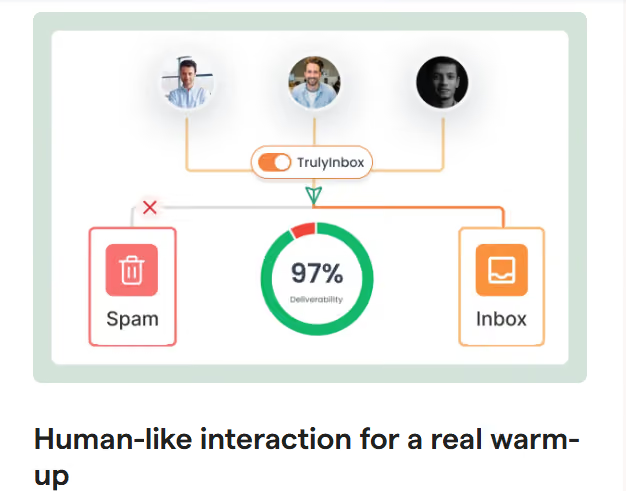
This image shows the TrulyInbox home page
It does this by creating realistic, human-like interactions between your accounts-emails that are sent one at a time, at different intervals.
This activity signals to providers like Gmail or Outlook that your emails are safe, which eventually leads to better deliverability. Email service providers use advanced spam and filtering mechanisms to detect fake or unnatural warm-up activities, so having realistic interactions is essential for successful email outreach.
Here’s how it works:
Once you connect an account and enable warm-up, it joins a pool of other users' mailboxes.
Your mailbox automatically sends and receives emails within this network.
Each email is processed by the TrulyInbox algorithm, which opens it, replies to it, and even marks it as important or starred.
These activities simulate human-like engagement, which signals to providers like Gmail, Outlook, or Zoho that your emails are trustworthy.
To avoid clutter in your inbox, you can create a folder or filter where these warm-up emails get stored.
The process uses randomized time intervals for actions like opening, starring, and replying, so it appears completely natural to email providers.
Over time, this activity builds your domain reputation, allowing you to safely increase sending limits and land more emails in the inbox instead of spam.
You can connect unlimited email accounts and manage them all in one place.
TrulyInbox supports almost every major provider, including Gmail, Workspace, Outlook, Microsoft 365, Zoho, Yahoo, AOL, iCloud, GMX, Amazon SES, Mailgun, Brevo, SendPulse, Elastic Email, Mailchimp, Mailjet, and GetResponse
See How VidLab7 Scaled Outreach Safely
With the Forge Stack, VidLab7 hit 67.55% open rates and 3.82% positive replies—without spam issues.
It helps you spot issues early before campaigns suffer.
Central Account Management
Control all your connected accounts from one place.
Can be integrated with cold email tools for a smooth workflow.
While TrulyInbox covers the essential features for email warm-up, it does not offer some advanced features found in other tools, such as industry-specific warm-up networks, customizable templates, or a built-in spam checker.
Competitors like Lemwarm provide more advanced features such as industry-specific warm-up networks, template customization, personalized warm-up emails, and technical setup checks, positioning them as more comprehensive solutions for improving email deliverability. These advanced features can provide more control and improved deliverability for users with specific needs.
With these features, TrulyInbox helps strengthen email deliverability, protect your domain reputation, and make outreach more consistent.
TrulyInbox Pros & Cons
Pros:
Setting up TrulyInbox is quick - just connect your email, turn on warm-up, and it starts working automatically.
Works with almost all major providers like Gmail, Outlook, Zoho, and Microsoft 365, giving users flexibility.
Shows a basic deliverability score so you can keep an eye on inbox performance.
Lets you manage multiple mailboxes from one place, which is handy for small teams.
Allows you to slowly increase daily email volume to keep your domain safe.
Cons:
The number of warm-up emails sent often doesn’t match what’s promised.
Reporting is limited - you can’t see long-term data or detailed trends.
Doesn’t offer advanced control over DNS, IPs, or domain reputation.
Mailboxes sometimes disconnect, especially with Gmail or Outlook.
TrulyInbox does the basics well, but if you need consistent results and more control, tools like Warmforge are a better fit.
How Much Does Trulyinbox Cost?
TrulyInbox offers five different plans, including a free option. Each plan comes with different limits on daily warm-up emails and reply rates.
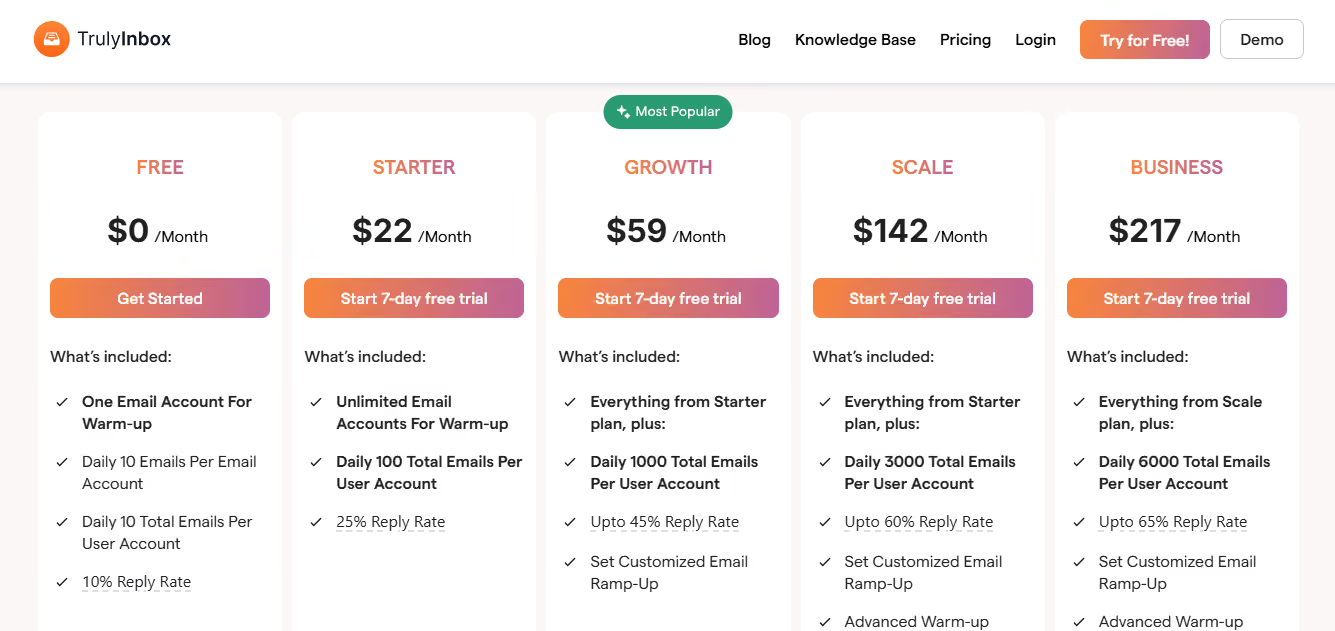
This image shows the TrulyInbox pricing
Here’s the breakdown:
Plans & Pricing
All paid plans include a 7-day free trial.
Plans & Pricing Table
Plans & Pricing
All paid plans include a 7-day free trial.
Plan
Price / Month
Key Features
Free
$0
1 email account for warm-up
10 emails per day
10% reply rate
Starter
$22
Unlimited email accounts
100 daily emails per user
25% reply rate
Growth
$59
1,000 daily emails per user
Up to 45% reply rate
Custom email ramp-up
Scale
$142
3,000 daily emails per user
Up to 60% reply rate
Advanced warm-up settings
Business
$217
6,000 daily emails per user
Up to 65% reply rate
Advanced settings + priority support
Each plan is available as a monthly subscription, and higher-tier subscriptions like the Growth Plan, Scale Plan, and Business Plan offer more features and higher limits to support advanced or large-scale email outreach needs.
TrulyInbox pricing is budget-friendly at the lower tiers, but higher plans are designed for agencies or large teams that need thousands of warm-up emails per day.
What Do Users Say About Trulyinbox in Their Reviews?
Many users have heard of TrulyInbox as a well-known email warm-up tool. However, reviews online for TrulyInbox are limited and sometimes questioned for their credibility.
In their reviews, users say TrulyInbox is affordable and easy to set up, but many also point out issues with support, promised warm-up volumes, and reporting. Additionally, the same picture of a person praising TrulyInbox appears on multiple websites, which raises questions about the authenticity of some testimonials.
Let’s see each of them clearly.
What Users Liked About TrulyInbox
When looking at TrulyInbox reviews, a few positives come up repeatedly. Here’s what stands out:
Improves inbox placement
Many users found it helpful for fixing deliverability issues and pulling emails out of spam.
Warm-up is easy to set up
Accounts can be connected quickly, and email warm-up starts with just a few steps, even for non-technical users.
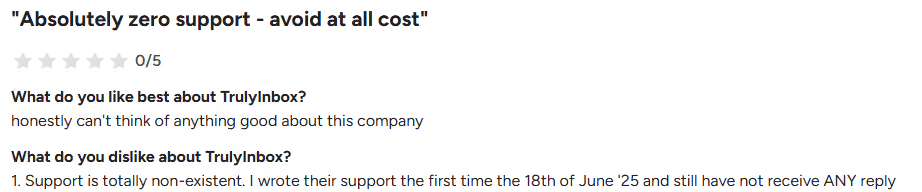
This image shows the Trulyinbox user complaining about poor support
Warm-up results often don’t match the promised numbers
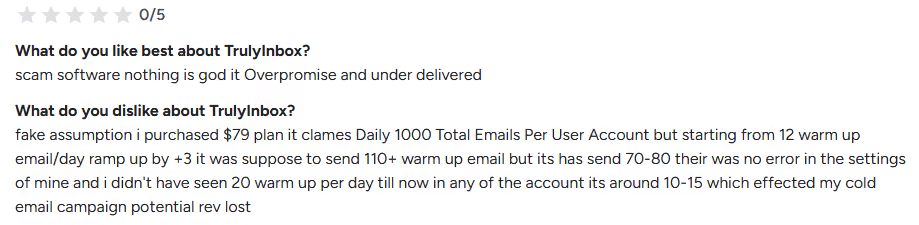
Some users said the tool promised higher daily warm-up numbers, but in reality, it sent fewer emails than advertised. Additionally, several users reported that their emails still ended up in the spam folder even after using TrulyInbox, raising concerns about its deliverability effectiveness.
This image shows the Trulyinbox user frustration about fake promises and poor delivery
Lacks detailed warm-up analytics
The dashboard only shows recent data and does not provide a full history of warm-up activity, which makes tracking harder.
“Their system does not adhere to the 'daily increase' of warm-up as per config at all”- Steven Vd, Trustpilot
Integration glitches
A few users faced issues with Gmail and other providers where inbox connections were lost or needed frequent resets.
This image shows the Trulyinbox user feedback about its glitches while integrating with gmail
Not a full email solution
Some reviewers expected more features and felt that TrulyInbox works only as a warm-up tool, not as a complete email platform.
This image shows the Trulyinbox user complaining that it is not a full email service
In short, the main downsides of TrulyInbox are around support, reliability of warm-up numbers, and limited reporting.
How Much Time Does Trulyinbox Take to Properly Warm Up a Mailbox?
The time it takes to warm up a mailbox with TrulyInbox depends on how new your domain or account is.
On average, most users need 8 to 12 weeks of warm-up before they can safely send campaigns.
Brand new domains or mailboxes usually need a longer period, around 3 to 4 months, to build trust and reach higher sending volumes.
Domains with some history or reputation can be ready faster, often within 4 to 8 weeks, unless the reputation is very poor, in which case more time may be needed.
In short, you should plan for at least a couple of months of warm-up, and extend it if you’re starting from scratch or recovering from deliverability issues.
Warmforge is an email warm-up tool that gives accurate volumes, real-time deliverability tracking, and stronger support, making it a more reliable choice for cold email outreach than TrulyInbox.
Warmforge also provides API access for integrating warm-up features into external workflows, a capability not offered by TrulyInbox.
Why Warmforge Stands Out
Warmforge delivers the exact number of daily warm-up emails you set, ensuring consistent and predictable results every day.
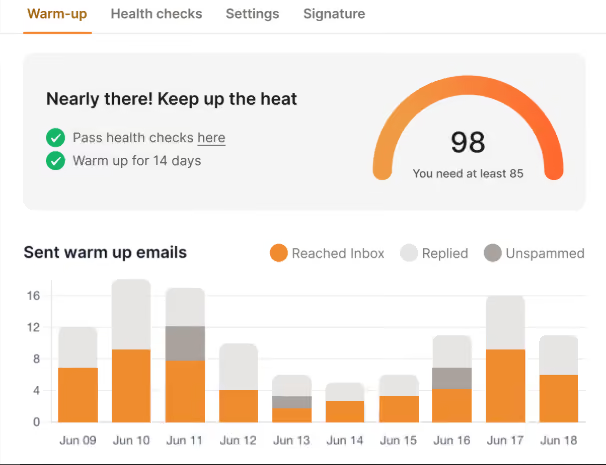
This image shows the Warmforge analytics on Inbox placement
The platform maintains stable connections across multiple domains and mailboxes, making it reliable for teams and agencies.
Warmforge’s responsive support team helps resolve setup or deliverability issues quickly, keeping your campaigns on track.
It gives full infrastructure control, allowing you to manage DNS, IPs, and sending patterns safely as you scale your outreach.
Together, these features make Warmforge a reliable choice for accurate, safe, and scalable email warm-up.
TrulyInbox Vs. Warmforge: How Do They Compare?
Feature Comparison: TrulyInbox vs Warmforge
Feature Comparison: TrulyInbox vs Warmforge
Feature
TrulyInbox
Warmforge
Warm-up volume accuracy
Daily warm-up counts often vary from what’s promised, making results inconsistent.
Sends the exact number of warm-up emails set by the user, ensuring consistent delivery.
Human-like warm-up behavior
Uses random opens, replies, and stars to look natural, but lacks precision.
Simulates realistic activity through controlled timing and advanced logic for more reliable warm-up.
Deliverability tracking
Shows a simple deliverability score with short-term data.
Offers real-time insights into inbox placement and sender reputation, helping you react instantly.
Multi-domain reliability
Allows multiple mailboxes but can disconnect randomly.
Keeps all connected mailboxes stable, even across multiple domains.
Customer support
Known for slow or no responses when users need help.
Provides responsive, dedicated support to keep warm-up running smoothly.
Infrastructure control
No access to DNS, IP, or sending pattern management.
Gives full control over DNS, IPs, and sending pace for safer scaling.
Free testing
No free placement test offered.
Includes one free warming slot and one free placement test.
Pricing
Free plan for one account (10 emails/day). Paid plans: Starter $22/month, Growth $59/month, Scale $142/month, Business $217/month.
Starts at $10 per mailbox per month with flexible scaling. Includes free test credits to try before upgrading.
Warmforge offers more accurate warm-up results, real-time tracking, and stronger control-making it a smarter choice for teams that rely on consistent inbox placement.
Is TrulyInbox Worth It in 2025?
TrulyInbox offers low-cost access and a straightforward setup, which appeals to teams starting out with email warm-up.
At the same time, many users mention issues such as under-delivery of warm-up emails, limited reporting features, and slow or unhelpful support.
Teams that need consistent volumes, clearer deliverability tracking, and dependable assistance can go for Warmforge.
Warmforge provides accurate warm-up activity, real-time monitoring, and stable support to keep outreach running smoothly.