
Email tracking tools help you monitor when emails are opened, which links are clicked, and how recipients engage with your content. These insights can improve response times, boost sales, and enhance marketing ROI. To choose the right tool, focus on these 10 must-have features:
Quick Tip: Tools like Salesflare, HubSpot, and GMass offer features like CRM syncing, unlimited tracking, and advanced analytics to streamline your email campaigns. Choose a tool that aligns with your email platform and team needs for the best results.
Getting real-time alerts when someone opens or clicks on your email is a game-changer. It allows you to reach out while their interest is still fresh. These notifications don’t just tell you someone opened your email - they also provide details like which links were clicked, how many times the email was reopened, the type of device used, and even the recipient’s approximate location. Plus, features like Open Spike and Email Revival alerts signal when someone is showing heightened interest, giving you the chance to act quickly.
"Discovering in real time when a recipient opens your email is vital for potential follow-ups and finding out which campaigns are effective." - Ajay Goel, Founder, GMass
That said, tracking isn’t always perfect. Privacy settings and disabled image loading can impact accuracy, with rates typically ranging between 85–95%. However, link clicks tend to be more reliable as an engagement metric.
To keep your data clean, you can automatically filter out self-opens and team-opens, preventing inflated numbers. For an extra edge, enable desktop notifications to stay on top of real-time activity and focus your outreach on recipients who show strong engagement, like those triggering open spikes.
The most effective email tracking tools integrate directly into your inbox, embedding their features within Gmail or Outlook instead of functioning as standalone apps. These native integrations allow you to access key insights - like open times, click counts, and engagement data - right from the compose window. No need to switch between applications, which makes managing your workflow much smoother. Plus, many of these tools sync seamlessly with CRMs, offering cross-device tracking without extra hassle.
For example, some tools automatically update CRM records or create tasks based on email activity. This kind of email tracking and automation has helped sales teams reduce their average response times from 4.2 hours to just 47 minutes - a major improvement in efficiency.
However, compatibility is key. Tools like Streak, Mixmax, and GMass work exclusively with Gmail, while others, such as Salesflare, HubSpot, and Mailbutler, support both Gmail and Outlook. If your team uses a mix of email platforms, you’ll want to ensure the tool you choose works across both. Also, keep in mind that many browser-based extensions only function on desktop, which could limit your ability to track emails on mobile devices.
Another important feature to look for is self-open filtering, which prevents the system from logging your own activity as recipient engagement. Additionally, if you’re using Google Workspace, make sure tracking permissions are enabled at the workspace level, as some native features might require administrative activation.
Here’s a quick comparison of native integration features offered by popular email tracking tools:
| Tool | Gmail Support | Outlook Support | Starting Price | Key Native Benefit |
|---|---|---|---|---|
| Salesflare | Yes | Yes | $29/month | Integrated notifications with lead timelines |
| HubSpot | Yes | Yes | $15/month | Automatic syncing with CRM records |
| GMass | Yes | No | $25/month | Fully integrated into the Gmail interface |
| Mailbutler | Yes | Yes | ~$5/month | In-box tracking and task management |
| Mailsuite | Yes | Yes | $9.99/month | WhatsApp-style checkmarks in the inbox |
Tracking attachments and links helps you identify which content truly grabs your recipients' attention, making it easier to separate active prospects from passive ones. If someone spends time digging into your pricing PDF or clicks on a case study link, that’s a clear signal they’re interested. This kind of data lays the groundwork for deeper insights into engagement.
Advanced tools like Yesware go a step further by offering page-by-page analytics for attachments. You’ll see exactly which slides or pages captured a prospect’s attention the longest. This isn’t just about knowing if they engaged - it’s about understanding how much they cared about specific parts of your content.
When it comes to links, simplicity is key. Emails with just one call to action generate 371% more clicks than those with multiple CTAs. A focused message ensures you know exactly what prompted the click, rather than guessing which of several links did the trick.
Timing is everything for follow-ups. Real-time alerts let you act while interest is still fresh. Following up within an hour can increase conversion chances by 7x compared to waiting 24 hours. Tools like Mailsuite notify you instantly when someone interacts with a link or opens a PDF, giving you a critical window to respond.
To keep your data clean, make sure your tracking tool filters out internal clicks. Tools like Salesflare handle this by excluding activity from you and your team, while also using personalized tracking subdomains to avoid spam filters and ensure smooth deliverability.
Unlimited tracking tools are invaluable for gaining continuous insights, especially when managing high-volume email campaigns. Without them, monthly caps can leave you in the dark - no data on email opens, lead activity, or the best times to follow up. This lack of visibility makes it difficult to maintain consistent email sending patterns that protect your reputation.
Take free versions of popular platforms as an example. HubSpot limits users to 200 tracking notifications per month, which averages out to about 6–7 notifications daily. Yesware’s free plan is even more restrictive, allowing just 10 tracked emails per month, while RightInbox caps it at 5. These free plans often serve as a preview, nudging users toward paid options for full access.
Even when a tool claims "unlimited tracking", it’s worth checking the fine print. For instance, HubSpot might technically track all emails, but it limits the number of real-time notifications you’ll receive. This means you could miss key data on subsequent opens or clicks.
Some platforms, however, do offer more generous options. Mailsuite (formerly Mailtrack) provides unlimited tracking on its free plan, though upgrading for $4.99/month removes promotional signatures. GMass offers unlimited emails, contacts, and campaigns for $25/month, while Yesware’s Pro plan includes unlimited tracking for opens, links, and attachments at $15/month.
It’s crucial to dig deeper into what "unlimited" truly covers. Some tools only track the first email open, ignoring any additional engagement - a major drawback when you’re trying to gauge a prospect’s interest. Others, like SalesHandy, provide free unlimited tracking for Gmail users but exclude Outlook users from this benefit. Before avoiding spam filters in high-volume campaigns, thoroughly test the tracking capabilities of your chosen tool to avoid any surprises.
If you want accurate engagement data, filtering out your own and your team's opens is a must. Without this, your analytics can quickly become unreliable, making it hard to tell which prospects are genuinely interested.
Some basic platforms, like Snovio, Streak, and MailTracker, only filter activity on their Chrome extensions. This means opens from other devices or browsers still get logged, skewing your results. On the other hand, advanced tools such as Salesflare and HubSpot take filtering to the next level. These tools track team activity across all devices and networks where your team is logged in. While HubSpot requires some manual setup, Salesflare automates the process entirely, saving you time and effort.
For pricing, Salesflare starts at $29 per month, HubSpot's paid plans begin at $15 per seat per month, and Mailbutler is around $5 per user per month. It’s also worth noting that even Gmail’s image pre-loading feature can cause false opens. This makes advanced filtering essential to separate automated system activity from real engagement by your recipients , which is a key factor in understanding cold email open rates.
Before choosing a tool, check if it filters activity at the browser level or across the network. To make informed follow-up decisions, you need email deliverability metrics that reflect actual prospect behavior - not your own testing or internal team activity. Getting this filtering right is crucial if you plan to incorporate more advanced tracking features into your outreach strategy later on.
Turn raw tracking data into meaningful insights with dashboards that highlight key metrics like open rates, click-through rates (CTR), reply rates, and link engagement. These tools take the guesswork out of email performance, helping you pinpoint what’s working and what needs improvement.
Some advanced platforms go even further, tracking team response times, workload distribution, and peak activity hours. For instance, EmailAnalytics ($15 per month per user) provides a clear view of team-wide activity patterns, while Email Meter allows you to set custom KPIs that align with your workflow. If you're running campaigns, tools like Campaign Monitor offer detailed insights, breaking down engagement by geography, acquisition source, and even sales performance with advanced segmentation options. These metrics don’t just inform your strategy - they directly impact your results.
"Not tracking properly means missing opportunities to optimize your campaigns and increase revenue. If you're not paying attention to your email performance, you're letting your competition steal your customers." - Alex Dimond
For deeper insights, consider tools that go beyond basic email metrics. Features like geographical data, device tracking, and scroll depth on linked content can provide a fuller picture of user behavior. Platforms such as Salesflare (starting at $29 per month) and HubSpot (paid plans from $15 per seat per month) offer these advanced capabilities. Some tools even analyze when recipients are most active, helping you optimize send times - for example, research shows that Tuesday at 10:00 AM often sees the highest engagement. This level of detail ensures your follow-ups are timely and effective.
Analytics also play a critical role in A/B testing. For example, subject lines with 6–10 words tend to boost open rates by 21%, while emails with a single call-to-action (CTA) generate 371% more clicks compared to those with multiple CTAs. A good dashboard should help you spot these trends easily, as well as manage inactive contacts to protect your sender reputation and maintain clean data. By leveraging these insights, you can fine-tune your campaigns and maximize their impact.
Missing follow-ups can mean missing out on deals. SC&H Group experienced this firsthand when a tracking notification revealed that a prospect revisited a proposal and clicked a link three months after their initial contact. A well-timed follow-up sealed the deal, bringing in over $100,000. Statistics back this up: responding within an hour increases engagement by 7x, while replying in just five minutes boosts connection chances by an astonishing 100x.
To ensure no lead slips through the cracks, automated follow-up tools can make all the difference. For instance, GMass ($35/month) and Vocus.io automate follow-up sequences until a reply is received. Meanwhile, tools like Right Inbox ($7.95/month) and Mailbutler ($9.95/month) send reminders if no response is received within 2–3 days.
Timing is everything when it comes to scheduling emails. Aim to send them during peak engagement hours - typically 9–11 AM or 2–4 PM - while considering how timing impacts email open rates across different time zones for maximum impact. These scheduling techniques can be further enhanced with behavior-triggered follow-ups. This approach works best when combined with personalized content to maintain high engagement.
Advanced tools like Salesflare ($29/month) and HubSpot Sales Hub ($15/seat/month) take it a step further by enabling follow-ups based on recipient behavior. For example, Bryan Tucker, Regional Manager at Influitive, used email tracking to monitor 50 emails sent to financial services VPs. Within 48 hours, he identified three accounts that had opened his emails over 10 times, signaling internal forwarding. By prioritizing follow-up calls to these accounts, he secured two meetings with Senior VPs at leading firms.
"Email tracking has completely flipped the world of prospecting upside down for me." - Bryan Tucker, Regional Manager, Influitive
Integrating reminders and scheduling tools can boost response times by an average of 42.5%, while sales conversions see a 35% uptick when leveraging these data-driven strategies. Configure "if-no-reply" reminders to avoid pestering engaged recipients, and use tracking insights to remove unresponsive leads from your pipeline.
Template and sequence support takes follow-up automation to the next level, making outreach more efficient and effective. Crafting unique emails for every prospect simply isn’t realistic when scaling up. That’s where templates and sequences come in - they allow you to create polished, consistent messages that can be automatically personalized, saving you valuable time without sacrificing quality.
Tools like GMass and HubSpot Sales Hub are designed to automate follow-up sequences based on how recipients interact with your emails. For instance, if a prospect clicks a link but stops short of completing registration, the system can send a tailored follow-up two days later to re-engage them. Analytics features in platforms like Yesware (priced at $15–$35/month) and SalesLoft let teams share template libraries and monitor which emails drive the most engagement and responses. This data-driven approach helps you fine-tune your outreach strategy. For example, GMass boasts an impressive 4.8/5 rating on Capterra, based on over 810 reviews, while HubSpot Sales Hub holds a 4.4/5 rating on G2 from more than 7,800 reviews.
Another handy feature is the ability to automatically pause sequences when a recipient replies, avoiding awkward or redundant follow-ups. Many of these tools integrate seamlessly with Gmail or Outlook through browser extensions, so you can insert templates or enroll contacts in sequences directly from your inbox. Plus, platforms like GMass and Instantly offer A/B testing to experiment with subject lines and calls-to-action, giving you real-time insights to optimize performance. These capabilities ensure your outreach is not only efficient but also personalized and timely.
Stealth mode is a feature that conceals tracking indicators, allowing you to monitor engagement without alerting recipients. Tracking pixels, for example, can capture details like when an email is opened, the type of device used, and even the recipient's approximate location. However, some free tools include promotional signatures - like "Sent with Mailsuite" - at the bottom of emails, which can tip off recipients that tracking is active.
To maintain a professional image and build trust, removing such branding is a smart move. For instance, Mailsuite offers branding removal starting at $9.99/month. On the other hand, tools like Snov.io and MailTracker by Hunter provide unbranded tracking for free. Advanced platforms such as Salesflare take it a step further by using custom tracking subdomains, which mimic native URLs. This reduces the likelihood of detection by savvy recipients and can even enhance email deliverability. These stealth features can seamlessly integrate into your tracking strategy, improving both data accuracy and your professional presentation.
"The email tracker should not share your or your customer's data with third parties and should offer the highest security with encryption." - Juan Carlos Mora, Mailsuite
While stealth mode offers discretion, it’s not foolproof. Email clients like Apple Mail (iOS 15+) now block tracking pixels by default, prioritizing user privacy. Additionally, Gmail and Apple Mail use proxy servers to load images, effectively masking recipients' real IP addresses. Some recipients may also use browser extensions like PixelBlock or Ugly Email to block tracking pixels altogether.
From a legal standpoint, email tracking is permissible as long as it adheres to regulations like GDPR, CAN-SPAM, and CCPA. To remain transparent, consider disclosing your tracking practices in your privacy policy or email signature - especially when dealing with recipients in regions with strict data protection laws. Keep in mind that violations of the CAN-SPAM Act in the United States can result in fines of up to $43,792 per email. This highlights the importance of using tracking responsibly and in compliance with legal requirements.
AI-powered sentiment analysis takes email engagement tracking to the next level by interpreting recipient emotions. This technology doesn’t just track metrics - it evaluates the tone of incoming replies, categorizing them as positive, negative, or neutral. Often, it assigns a numerical score to help prioritize follow-ups. For instance, EmailAnalytics uses a 1–10 scale to identify which prospects are most engaged and which might need extra attention.
"AI-powered sentiment analysis determines next sequence steps." - Smartlead
The impact of AI in this area is impressive: companies leveraging these tools report a 45% increase in response rates, 32% more closed deals, a 73% boost in productivity, and a 60% reduction in manual tasks. Tools like Microsoft Copilot for Outlook even offer pre-send coaching, analyzing your email drafts for tone, clarity, and sentiment to ensure your message resonates as intended. Pricing for Microsoft Copilot starts at $360 per seat annually.
AI also enables automated sequence branching based on sentiment. For example, if a prospect responds positively, the system can automatically schedule a meeting. On the other hand, a negative response might trigger an escalation to a senior team member for personalized follow-up. Real-time alerts can flag responses that indicate frustration, giving you a chance to address concerns before losing a deal. Tools like Smartlead (priced between $39 and $94 per month) and Mixmax (ranging from $15 to $30 per month) integrate these AI-driven features seamlessly with Gmail and Outlook.
Teams that incorporate email analytics and sentiment tracking have been shown to reduce their average response time by 42.5%. However, it’s essential to use these tools responsibly. Since AI often analyzes email content, ensure your platform complies with GDPR and SOC2 standards to safeguard sensitive data and boost outreach success. This thoughtful integration of AI enhances your email tracking strategy while maintaining ethical practices.
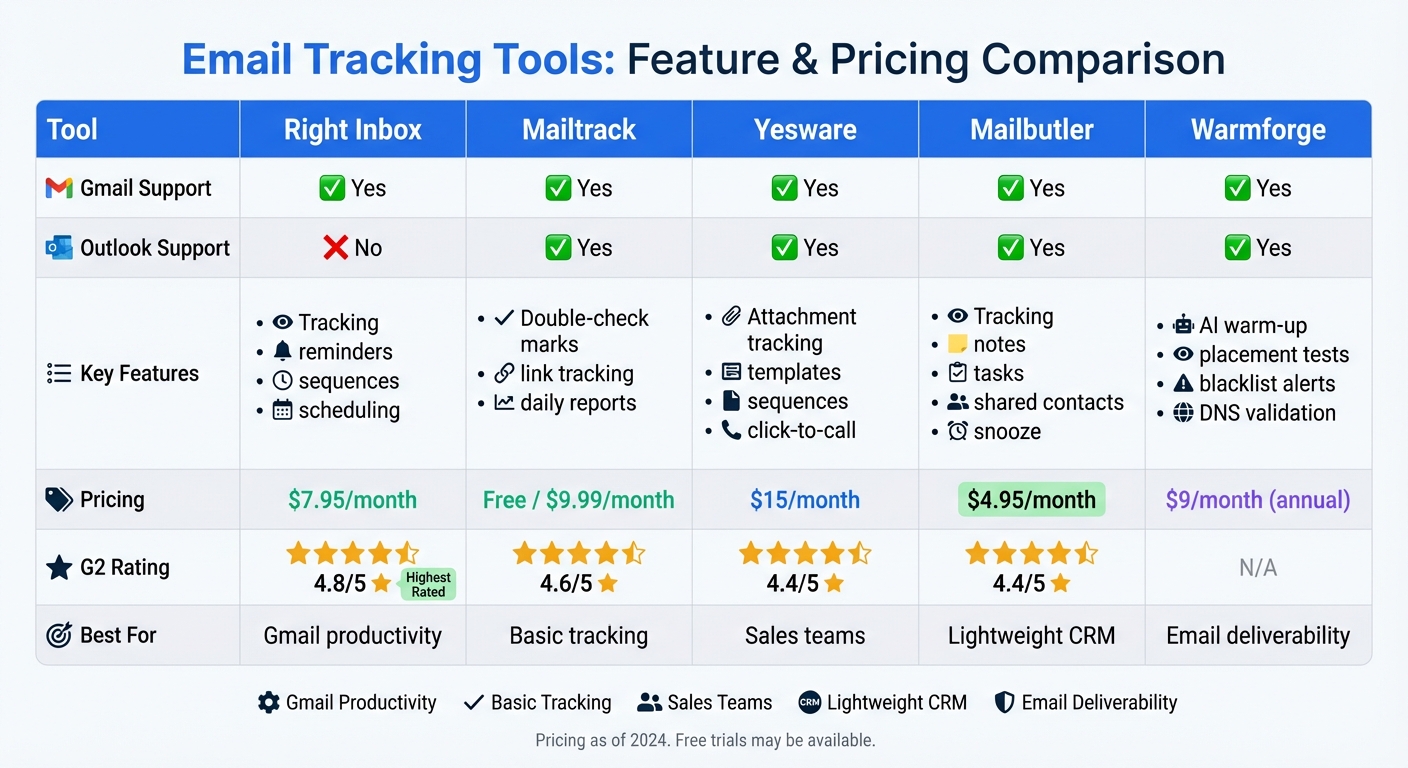
Email Tracking Tools Feature Comparison Chart
Here's a side-by-side look at five popular email tracking tools, comparing their compatibility, features, pricing, and user ratings. Each tool has its own niche: Right Inbox is a Gmail-specific Chrome extension, while Mailtrack, Yesware, and Mailbutler work with both Gmail and Outlook across desktop and mobile. Warmforge, on the other hand, focuses less on individual email tracking and more on improving email deliverability, inbox placement, and warm-up processes.
When it comes to pricing, Mailbutler is the most budget-friendly at $4.95/month, while Yesware plans range from $15 to $65/month. Warmforge offers a unique perk: one free warm-up slot per user (for Google or Microsoft mailboxes) and one free placement test monthly, with paid plans starting at $9/month if billed annually.
In terms of user ratings, Right Inbox leads with an impressive 4.8/5 on G2, followed by Mailtrack at 4.6/5. Both Yesware and Mailbutler hold solid ratings of 4.4/5. These scores reflect their standout features: Right Inbox enhances Gmail productivity, Yesware excels in attachment tracking for sales teams, and Mailbutler acts as a lightweight CRM within your inbox.
| Tool | Gmail | Outlook | Key Features | Pricing (Starting) | G2 Rating |
|---|---|---|---|---|---|
| Right Inbox | Yes | No | Tracking, reminders, sequences, scheduling | $7.95/month | 4.8/5 |
| Mailtrack | Yes | Yes | Double-check marks, link tracking, daily reports | Free / $9.99/month | 4.6/5 |
| Yesware | Yes | Yes | Attachment tracking, templates, sequences, click-to-call | $15/month | 4.4/5 |
| Mailbutler | Yes | Yes | Tracking, notes, tasks, shared contacts, snooze, Apple Mail support | $4.95/month | 4.4/5 |
| Warmforge | Yes | Yes | AI warm-up, placement tests, blacklist alerts, DNS validation, health checks | $9/month (annual) | N/A |
Each tool has strengths tailored to different needs. For example, Right Inbox is perfect for Gmail users seeking productivity boosts, while Yesware is ideal for sales teams needing advanced tracking features. Warmforge, with its focus on email deliverability, is a standout choice for maintaining sender reputation and ensuring messages land in the primary inbox.
Deliverability is a crucial factor in email tracking. Premium tools often use personalized subdomains to safeguard deliverability. Warmforge goes a step further with AI-driven warm-up processes and continuous monitoring, helping to maintain a strong sender reputation and ensuring emails avoid spam filters.
The features we've explored can help you pick an email tracking tool that boosts efficiency and delivers results where it matters most. The key factors? Real-time tracking, native email integrations, and actionable analytics. And the numbers speak for themselves - teams using email tracking report a 42.5% improvement in response times and a 35% increase in sales conversions.
Platform compatibility is another critical consideration. While many tools work seamlessly with Gmail, if your team uses multiple email clients, make sure your chosen tool supports them all.
Deliverability should be a top priority, too. High-quality tools protect your sender reputation by using personalized tracking subdomains. For instance, platforms like Warmforge leverage AI-driven warm-up and ongoing monitoring to ensure your emails land where they’re supposed to. As marketing expert Alex Dimond points out:
"Not tracking properly means missing opportunities to optimize your campaigns and increase revenue. If you're not paying attention to your email performance, you're letting your competition steal your customers".
Your budget and sending volume also play a role in your decision. If you're a solo founder, freemium tools like Mailtrack (starting at $9.99/month) might be a good fit. For sales teams, CRM-integrated options like Salesflare ($29/month) could be more suitable. Meanwhile, Warmforge offers a free warm-up slot and placement test each month, with paid plans starting at $9/month when billed annually, making it a smart choice for teams prioritizing deliverability.
Lastly, an effective email tracking tool should filter out self-opens and team activity to maintain accurate data. It should also track link clicks and attachment downloads, giving you a complete picture of engagement. Take the time to review your chosen tool's features before rolling it out to ensure accurate tracking and reliable deliverability.
Email tracking tools give you a clear picture of how recipients interact with your messages. They let you see metrics like opens, clicks, and even what devices people are using. This information can help you fine-tune your approach - for example, by testing different subject lines or calls-to-action (A/B testing), segmenting your audience based on engagement levels, or timing follow-ups for when they're most likely to be effective. The result? Higher conversion rates and less wasted effort on outreach.
Some advanced tools take it further by offering features like deliverability monitoring and inbox placement testing, ensuring your emails land in the primary inbox instead of getting buried in spam. Platforms such as Warmforge even provide automated email warm-up and regular health checks to maintain your sender reputation. By combining these engagement insights with tools that safeguard deliverability, you can build a smarter, data-driven email marketing strategy that drives consistent results.
AI takes email tracking to the next level by turning raw data into practical strategies that can supercharge your outreach. By examining metrics like open rates, click-through behaviors, and recipient interactions, it pinpoints the ideal times to send emails, suggests attention-grabbing subject lines, and flags potential spam risks. The result? Less time spent on manual tasks and better response rates.
On top of that, AI boosts campaign performance with real-time analytics that dig deeper than traditional reports. It connects deliverability stats with engagement patterns, uncovers issues that might hurt your sender reputation, and recommends steps like email warm-ups or placement tests to improve inbox placement. This keeps your outreach effective and adaptable to shifting recipient preferences, ensuring stronger results while safeguarding your domain reputation.
Self-open and team filtering play a key role in keeping email tracking data accurate. Self-open filtering ensures that the system doesn’t count opens caused by the sender previewing or testing their own emails. On the other hand, team filtering removes opens triggered by colleagues sharing the same mailbox or CRM. This way, only interactions from external recipients are tracked.
By cutting out false engagement data, these filters ensure analytics stay reliable. This helps teams zero in on genuinely interested leads, make smarter follow-up choices, and steer clear of misleading metrics that could hurt sender reputation. Warmforge offers both self-open and team filtering as customizable options, giving users more control over their tracking data - something many other platforms don’t provide.
