
Timing can make or break your email campaign. The right send time ensures your message lands at the top of inboxes when recipients are most likely to engage. Key takeaways:
Tools like Warmforge can help ensure your emails avoid spam folders, making your timing tests more accurate. The bottom line? Analyze your audience’s habits, test send times, and adjust quarterly to stay ahead.
Best Email Send Times: B2B vs B2C Comparison Guide
Timing plays a crucial role in determining how visible your email is in a recipient's inbox. For instance, an email sent at 7:00 AM will likely sit at the top when someone checks their inbox at 9:00 AM. On the other hand, an email sent at 2:00 AM might get buried under a flood of newer messages by the time they log in. This positioning can significantly influence whether your email gets opened or overlooked. Let’s dive into the key factors that shape this dynamic.
The more crowded the inbox, the harder it is for your email to stand out. Mid-morning emails, for example, often compete with newsletters, work-related messages, and notifications. If your email isn’t opened right away, it risks being quickly pushed down the list.
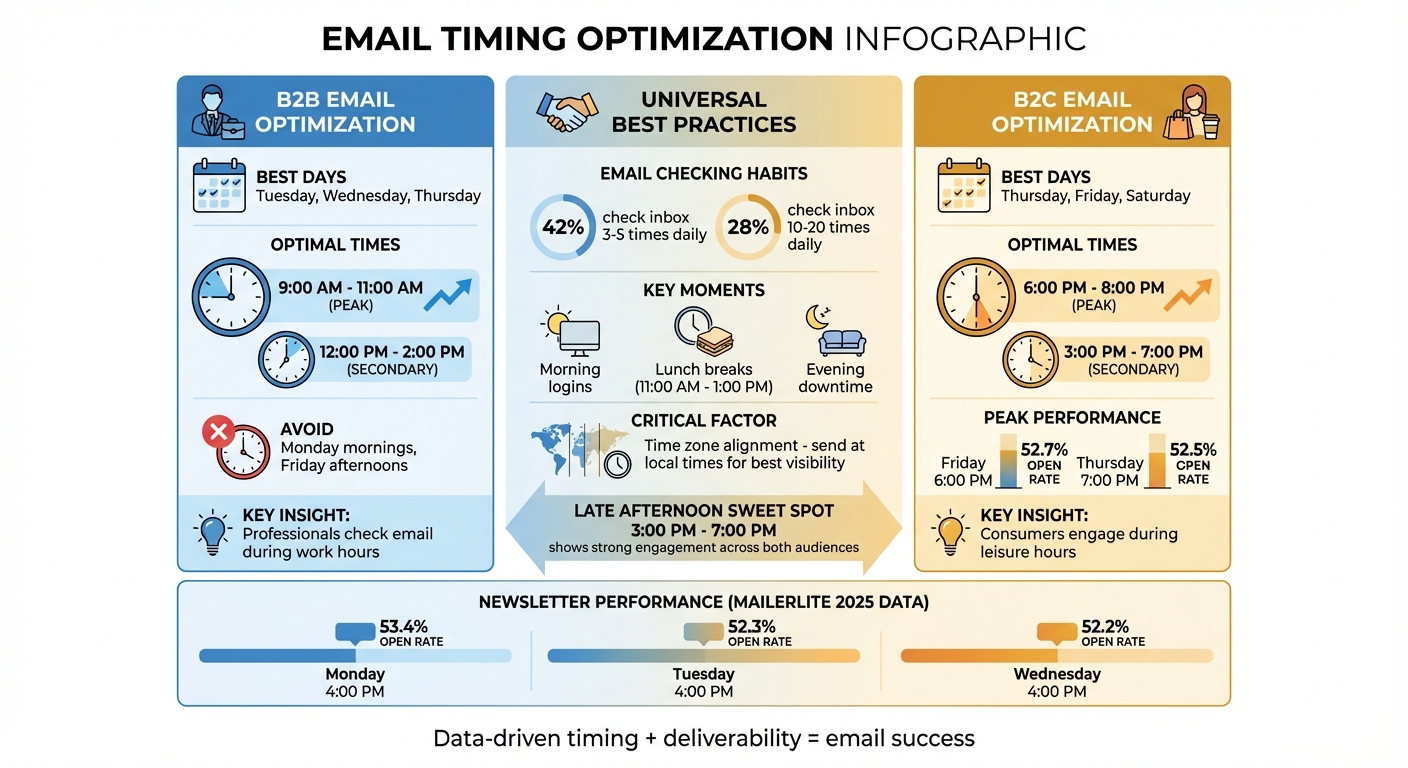
To improve visibility, aim to send emails just before peak activity times. Emails that land between 7:00–9:00 AM or around lunch breaks are more likely to stay near the top of the inbox. According to MailerLite’s 2025 report, the late afternoon window from 3:00–7:00 PM also sees strong engagement as people wind down their day.
Interestingly, email-checking habits are fairly predictable: 42% of people check their inbox 3–5 times daily, while 28% check 10–20 times. Key moments include morning logins, lunch breaks, and evening downtime. Understanding these patterns can help you choose the best times to send.
Timing gets trickier when dealing with audiences across multiple time zones. For example, sending an email at 10:00 AM Eastern Time means West Coast recipients will receive it at 7:00 AM - likely before their workday begins. Meanwhile, international subscribers might get the email in the middle of the night, meaning it could be buried by morning.
The solution? Align your send times with local time zones. This ensures your email arrives during natural activity windows, increasing the chances it will be noticed. For U.S. audiences, segment your email list by region and stagger the sends so that East Coast and West Coast recipients both get emails at optimal local times.
Many email service providers offer tools that can automatically adjust delivery times based on recipients’ time zones. Features like send-time optimization can even predict the best hour for each contact, taking the guesswork out of the process.
The timing sweet spot can vary significantly between B2B and B2C campaigns.
For B2B audiences, engagement tends to peak during business hours on weekdays. Data consistently shows that Tuesday through Thursday between 9:00 AM and 2:00 PM local time delivers the best results. Within that window, 9:00–11:00 AM is particularly effective, as professionals are typically settled into their workday by then. Mondays are often too busy with catch-up tasks, while Fridays tend to see lower engagement as people prepare for the weekend.
In contrast, B2C audiences are more active during evenings and weekends, when they’re using personal devices. Retailers, for example, can benefit from sending emails during leisure hours. Late afternoon or evening sends, such as a Thursday evening promotion, are particularly effective for reaching people planning their weekends. A B2B SaaS company might find success with a Tuesday morning email promoting a webinar, while a retail brand could see better results from a Saturday morning campaign advertising a weekend sale.
Even with perfect timing, deliverability issues can derail your efforts. Tools like Warmforge can help by warming up inboxes, monitoring deliverability, and ensuring your emails land in the primary inbox. This makes any performance testing across time zones or audience segments more accurate and meaningful.
To discover the best times to send emails for your audience, you’ll need to dig into your own data. Industry benchmarks can give you a starting point, but they’re just guidelines - not hard-and-fast rules. Your subscribers’ habits are unique, so think of this as a science experiment: gather data, test your theories, and refine as you go. The methods below will help you pinpoint the ideal send times by building on the factors discussed earlier.
Start by pulling 3–6 months of email performance data, or up to a year if you send a large number of emails. This ensures you capture seasonal trends like holidays or industry-specific events. Key metrics to export include: send date and time (with time zone), open rate, click rate, click-to-open rate, unsubscribe rate, and spam complaint rate. Group the data by campaign type - newsletters, promotions, cold outreach, and product updates - since each type performs differently.
Next, use a pivot table or chart to organize the data into time blocks (e.g., 6–8 a.m., 8–10 a.m., etc.). Calculate the average open and click rates for each block and highlight the top-performing 3–5 time slots for both metrics. For many audiences, mid-morning (9–11 a.m.) and lunchtime (12–1 p.m.) on weekdays tend to perform well. However, some groups show strong engagement in the late afternoon or early evening (3–7 p.m.). If you spot time blocks with high open rates but low click rates, flag them for further testing.
Email timing isn’t universal, so segment your audience to send messages at the best local times for each group. At the very least, divide your list by time zone or inferred location to ensure emails arrive during optimal hours. For U.S. audiences, this means scheduling separately for Eastern, Central, Mountain, and Pacific time zones.
Beyond geography, consider job roles and behavior patterns. Knowledge workers and executives often check emails during weekday mornings or around lunchtime, while frontline or shift workers may check theirs before or after shifts, or even on weekends. Analyze recent engagement data to identify when each contact is most active. For example, tag subscribers as "Morning opener (6–11 a.m.)", "Midday opener (11 a.m.–3 p.m.)", or "Evening/weekend opener (3–10 p.m. or Sat/Sun)" based on their activity patterns. This allows you to send the same email at different times to different groups. Refresh these segments every quarter to account for changes in behavior.
Once you’ve segmented your audience, it’s time to test different send times. Use A/B testing to validate your findings. Start with a baseline from your data and segments, then test 1–2 variables at a time, such as Tuesday at 10 a.m. versus Thursday at 4 p.m. local time. Divide a large, comparable audience segment into at least two equal groups, ensuring each group has a few hundred recipients for reliable results. Send the same email content to both groups at the different times, then wait 24–48 hours to compare metrics like open rate, click rate, and unsubscribe/spam rates.
Run these tests across 3–5 campaigns to confirm consistent results. Once you’ve identified a high-performing time slot, you can fine-tune further with A/B/C tests. For example, compare neighboring times (e.g., 9 a.m. vs. 10 a.m. vs. 11 a.m.) on the same day to zero in on the best hour. These top-performing windows can become your default send times for that segment, but don’t forget to re-test quarterly or after significant changes like holidays, as habits can shift.
It’s important to note that timing tests will only yield accurate results if your emails are actually reaching inboxes. Poor deliverability or sender reputation can skew results because fewer emails are seen. Tools like Warmforge can help by providing deliverability monitoring, inbox placement tests, and email warm-up services. For example, Warmforge allows you to run placement tests on a representative Google or Microsoft mailbox before large timing experiments, ensuring your messages are consistently hitting inboxes. By combining these insights with Warmforge’s tools, you can fine-tune your email campaigns for maximum impact.
When it comes to email campaigns, timing can make or break your engagement rates. Different types of emails - like cold outreach, newsletters, and promotions - serve unique purposes and target varying audiences. That means each requires a tailored timing strategy. Here's a breakdown of practical approaches for each campaign type, grounded in audience behavior and real-world data.
For B2B cold outreach, aim to send emails between Tuesday and Thursday, preferably between 9:00 a.m. and 2:00 p.m. in the recipient's local time zone. Avoid sending emails on Monday mornings or Friday afternoons, as these times tend to see lower engagement. A good place to start is testing sends between 9:30–11:00 a.m. and 1:00–2:00 p.m., then using your analytics to fine-tune the schedule.
If you're running multi-step sequences, space out your follow-ups strategically. For example:
Keeping this spacing prevents email fatigue and ensures your messages don’t get buried in crowded inboxes. Always adjust the timing based on how recipients engage with earlier emails.
To improve deliverability and ensure your emails land in the inbox, consider tools like Warmforge. It helps warm up mailboxes, monitor deliverability, and test placement. Combining Warmforge with systematic timing tests allows you to pinpoint whether better timing or improved filtering drives your success.
Next, let’s look at how to time regular communications like newsletters.
Newsletters perform best when sent during late morning or lunchtime (11:00 a.m.–1:00 p.m.) or in the late afternoon (around 4:00 p.m.). Data from MailerLite shows that Monday at 4:00 p.m. achieves an average open rate of 53.4%, with Tuesday and Wednesday at the same time also performing well (52.3% and 52.2%, respectively). This indicates that many people catch up on content as they settle into their week or wind down their day.
For professional audiences, start with Tuesday through Thursday late morning or lunchtime slots. If you’re targeting a post-work crowd, test late afternoon sends between 3:00–6:00 p.m.. On the other hand, for consumer or hobby-focused audiences, evenings between 6:00–8:00 p.m. often yield better results, as people are more likely to browse during their downtime. Use your email reports to compare open rates by hour, then adjust your timing to match the highest-performing window.
Promotional emails tend to perform best during leisure hours (3:00–7:00 p.m.), with engagement often peaking around 6:00 p.m.. If your promotion is tied to the weekend - such as events, travel deals, or retail sales - sending emails on Thursday or Friday evenings (5:00–7:00 p.m.) can help build anticipation and give recipients time to plan. MailerLite’s 2025 analysis found that Friday at 6:00 p.m. has an average open rate of 52.7%, while Thursday at 7:00 p.m. also performs well at 52.5%.
For campaigns with multi-day offers, consider a staggered approach:
For U.S. audiences, sending the final email around 6:00 p.m. on the last day often captures attention when people are free to act. Research shows this timing aligns with higher click and purchase activity. To avoid overwhelming your audience, limit your sends to two or three emails per campaign. Reserve urgency-driven language, like "last chance", for genuinely time-sensitive offers to maintain trust.
Finally, segment your audience by time zone to ensure emails arrive at optimal local times. This is especially critical for promotions with countdowns or same-day expirations, as precise timing can make your message more effective and actionable.
Getting email timing just right requires the right tools and a structured approach. These days, most email service providers (ESPs) come equipped with features that automate much of the process, while deliverability tools ensure your perfectly timed emails actually make it to your audience's inboxes.
Once you've analyzed the best times to send emails, take advantage of your ESP's scheduling tools to automate the process. Platforms like Mailchimp and HubSpot can deliver emails based on your recipients' local time zones. Many also include send-time optimization (STO) features that use machine learning to predict the best time to send emails to each individual based on their previous engagement patterns. Instead of sending emails to everyone at a fixed time, STO staggers delivery throughout the day, aligning with user behavior. For non-urgent campaigns, enabling STO can improve open and click rates without requiring constant manual adjustments. Just keep in mind that it may take several campaigns for the system to learn your audience's habits.
You can also pull performance reports from your ESP to identify trends in open rates by day and time. For instance, if your data shows that emails sent to a B2B audience between 9:00 a.m. and 11:00 a.m. on weekdays perform best, try sticking to that window while testing slight variations, like 9:30 a.m. versus 10:30 a.m. Since user behavior can shift due to seasonal changes or work patterns, reassess your timing strategy every few months.

Even the best timing won’t matter if your emails land in spam. That’s where Warmforge comes in. It helps ensure emails reach the primary inbox by warming up mailboxes, monitoring deliverability, and running placement tests. Its AI-driven process mimics human actions to build trust with email providers and safeguard your sender reputation.
Before experimenting with new send times, connect your mailbox (like Google Workspace or Microsoft 365) to Warmforge and activate its free warm-up feature. Start with a baseline placement test to check if your emails are landing in inboxes across major providers like Gmail or Outlook. Warmforge recommends warming up new mailboxes for at least two weeks before beginning outreach and continuing this process to maintain strong deliverability. While testing send times, use Warmforge’s health checks to monitor for issues like sudden volume spikes or unusual engagement patterns that could trigger spam filters. Monthly placement tests can confirm whether improved performance is due to better timing or simply better inbox placement.
Warmforge is part of The Forge Stack, which also includes tools like Salesforge for outreach and Leadsforge for lead generation. Together, these tools streamline warm-up, deliverability tracking, and send-time testing, making it easier to refine your email timing strategy across all outbound efforts.
Turn the insights from your timing experiments and deliverability checks into a cohesive strategy by creating a timing playbook. This shared, living document should be updated regularly as you gather more data.
Start by defining your audience profiles, such as U.S.-based B2B buyers or retail shoppers, and identifying default send windows based on past campaign performance. For example, B2B emails might perform best between Tuesday and Thursday mornings, while B2C emails could see better engagement on Thursday evenings or Saturday mornings.
Next, outline segmentation rules that consider factors like time zones, industries, lifecycle stages, and engagement levels. Record the best-performing send times for each segment, along with key metrics like open rates, click-through rates, and conversions. Include a testing calendar that specifies when to run A/B tests, the minimum sample sizes needed, and the metrics you’ll use to decide whether to adopt or discard changes.
Don’t forget to incorporate deliverability checks into your playbook. Before launching a new timing test, confirm that your mailbox warm-up is complete, placement tests show positive results, and spam complaints are within acceptable limits. Plan to update your playbook quarterly to reflect new data, seasonal trends, or shifts in user behavior. A well-maintained playbook ensures consistency, encourages continuous improvement, and prevents one-off experiments from derailing your overall strategy.
Even the perfect message can miss its mark if it arrives at the wrong time. To make sure your emails land when your subscribers are most likely to engage, rely on your data, audience segments, and the right tools. Timing plays a critical role in how visible and relevant your emails are. When messages hit inboxes while subscribers are actively checking, open rates, clicks, and revenue often see a boost. Since many U.S. subscribers check their inboxes multiple times a day, your send time can determine whether your email appears at the top or gets lost in the shuffle.
Each campaign calls for its own timing strategy - there’s no universal formula that works for everyone. For instance, research suggests that late-afternoon sends (between 3:00 and 7:00 p.m.) often perform well. However, your ideal timing depends on your audience's habits and your industry. A B2B SaaS company targeting decision-makers might see the best results from emails sent between 9:00 and 11:00 a.m. on weekdays, while a retail brand could find success with Thursday evening sends aimed at consumers planning weekend shopping.
To fine-tune your timing, start by analyzing your past performance by send time - look at the days and hours when your U.S. subscribers are most likely to open and click. Segment your audience by type and time zone - for example, B2B versus B2C or East Coast versus Pacific Time - so each group receives emails that align with their local schedules and behaviors. For major campaigns like newsletters or promotions, run A/B tests on send times and document what works best. Revisit your findings quarterly to adjust for shifts in subscriber behavior, seasonal trends, or changes in inbox competition.
Of course, even perfectly timed emails won’t succeed if they end up in spam folders. Tools like Warmforge can help ensure your emails land in the primary inbox. Warmforge uses AI to simulate human email interactions, protect your sender reputation, and improve deliverability. They even offer perks like a free warm-up slot and a monthly placement test, so your timing efforts don’t go to waste because of delivery issues.
To determine the ideal time to send your emails, begin by examining your audience's engagement habits. Dive into your email platform's data to see when recipients usually open and interact with your messages. Testing different send times using A/B testing can reveal trends and help fine-tune your timing.
You can also leverage tools like Warmforge’s placement tests. These tools highlight when your emails are more likely to land in primary inboxes, which can significantly boost your open rates. Use these insights to adjust your strategy and get the most out of your email campaigns.
Aligning email delivery with your recipients' time zones can make a big difference in how well your emails perform. When emails land in inboxes at times people are most likely to check - like during work hours or early in the evening - they're far more likely to be opened and read.
Scheduling emails to match time zones helps you avoid sending messages at inconvenient hours, like late at night or early in the morning, when they’re likely to get lost in a flood of other emails. This small tweak can go a long way in making your email campaigns more effective.
Warmforge improves email deliverability by automatically preparing mailboxes for consistent performance. This process helps establish trust with email service providers (ESPs) and lowers the chances of your emails being marked as spam. By using AI to mimic natural, human-like email interactions, it ensures your messages reach primary inboxes while safeguarding your sender reputation.
In addition to warming up mailboxes, the platform keeps a close eye on mailbox health, checks DNS configurations, monitors blacklist statuses, and flags emails that end up in spam. With regular warm-up routines and placement tests, Warmforge helps keep your outreach efforts dependable and effective.
