
Personalized Outbound Strategy
Get The Right Outbound Strategy In Minutes
Enter your email to get a custom plan & stack recommendation for your business
It's being carefully crafted by AI
Please check your mailbox in 5 minutes

AI email agents sound simple until you try to build one into a real outbound system. Sure, the agent might write a strong email, but it still needs a place to send it from. It has to connect to mailboxes, handle replies, manage follow-ups, and plug into your CRM, enrichment tools, and other GTM systems.
And if you are running cold outreach at scale, you also have to think about domains, sending infrastructure, and deliverability.
That is where things start to get more complicated. Some tools give AI agents programmable inboxes. Others focus on intent signals and automated outreach. Some help you build full GTM workflows. And tools like Mailforge handle the infrastructure side through API, MCP, and CLI access.
So the right choice really depends on what you are building. In this guide, I looked at five of the best AI email agents for developers and GTM engineers to find out which ones fit best for email infrastructure, programmable inboxes, signal-based outreach, enterprise sales, and agentic GTM workflows.
Let’s begin.
I looked at these tools through the lens of a developer and GTM engineer. Instead of focusing on AI email writing, I paid closer attention to how well each tool would actually fit into a real GTM workflow. These are the main factors I considered:
* Mailforge pricing depends on billing and mailbox quantity; your article’s 25-mailbox example works out to $3/mailbox monthly or $2.40/mailbox on annual billing.
** 6sense MCP is currently beta and read-only; it is a broader 6sense data interface, not specifically the AI Email execution API
Best for: Developers and GTM engineers who need programmable cold email infrastructure for AI agents and automated outbound workflows.
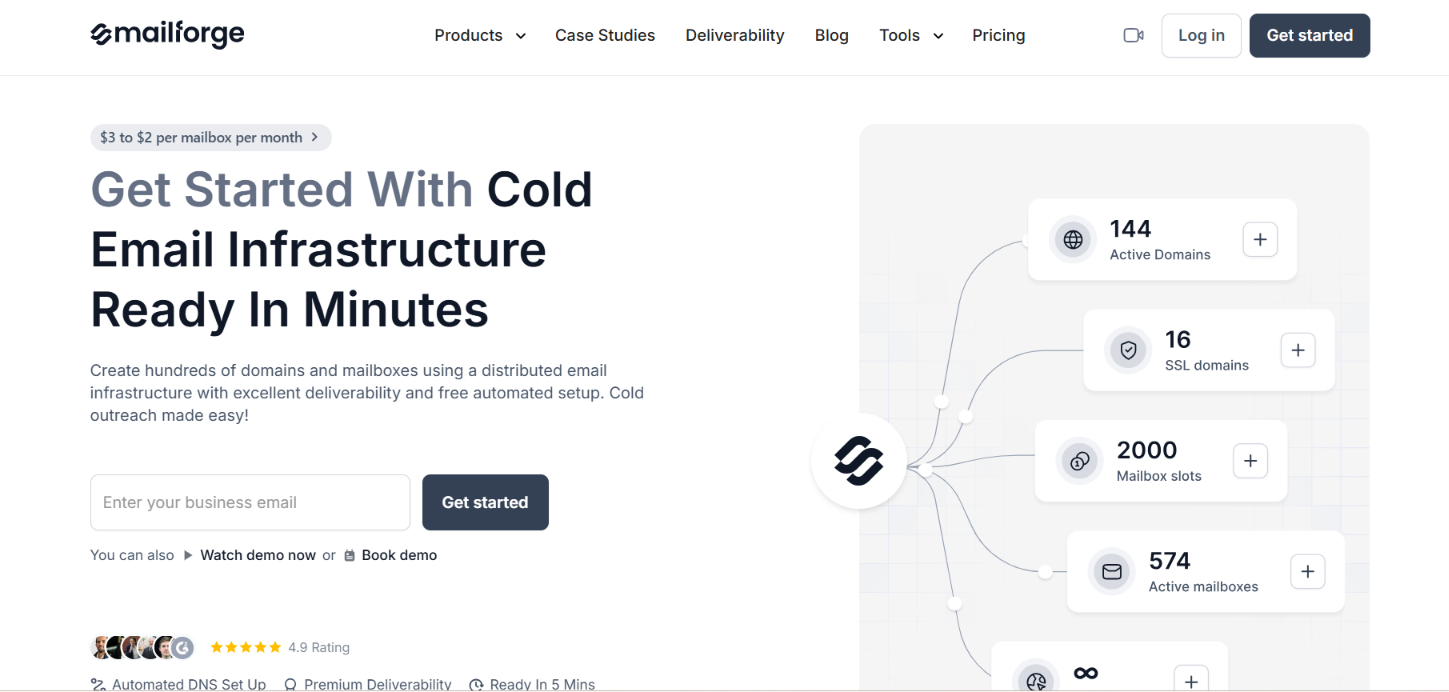
Mailforge is a bit different from most AI email agents on this list. It doesn’t write emails, choose who to contact, or run your sequences for you. Instead, it gives you the email infrastructure you need to send those campaigns properly.
With Mailforge, you can buy domains, create mailboxes, automate DNS setup, and manage cold email infrastructure at scale. It runs on distributed shared IP infrastructure built specifically for cold outreach, and it works with Salesforge as well as other sending platforms.
What makes Mailforge especially useful for developers and GTM engineers is its API, MCP, and CLI access. Instead of manually setting up infrastructure every time an agent, client, or campaign needs new mailboxes, you can build those steps directly into your own workflow.
For example, your system could check domain availability, buy the domains, create mailboxes, wait for them to become active, set up forwarding, and then hand the ready-to-use infrastructure to the next part of your outbound stack. Mailforge’s API supports all of these infrastructure tasks.
The main reason I included Mailforge is because of what happens behind the AI email agent. Imagine you’re building an AI agent that finds prospects, researches them, writes personalized emails, and decides when outreach should begin.
Once all of those decisions are made, the agent still needs properly configured sending infrastructure to actually send the emails. With Mailforge, your workflow can handle infrastructure tasks like:
For example, a GTM engineer building an outbound system for multiple clients could automate infrastructure provisioning whenever a new client is added. The workflow could check available domains, purchase them, create the required mailboxes, wait until they’re active, and then pass those mailboxes to the sending layer.
That removes a manual infrastructure step from what is otherwise an automated AI outbound workflow.
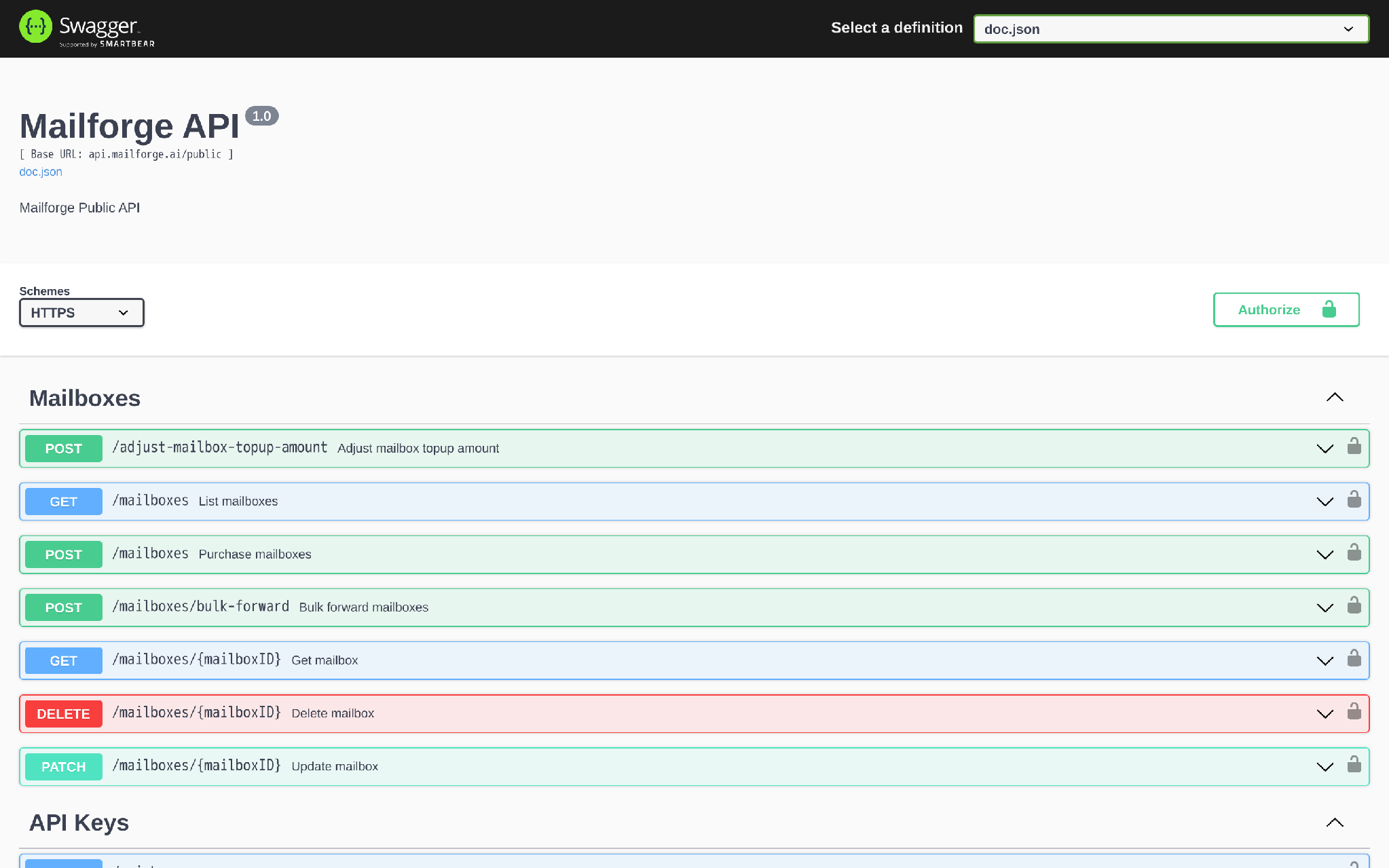
Mailforge gives technical teams three ways to work with email infrastructure:
Each Forge product also has its own API key. So if your agent only needs access to Mailforge, you can use the Mailforge key instead of giving it access to every Forge product. This is what makes Mailforge different from simply offering an API.
MCP makes it especially relevant for agentic workflows, while the REST API gives developers a more predictable way to build the same infrastructure actions into their backend.
That said, Mailforge stops at the infrastructure layer. It doesn’t create sequences, score replies, run LinkedIn steps, or execute campaigns by itself. For that part of the workflow, you connect its mailboxes to Salesforge or another sending platform.
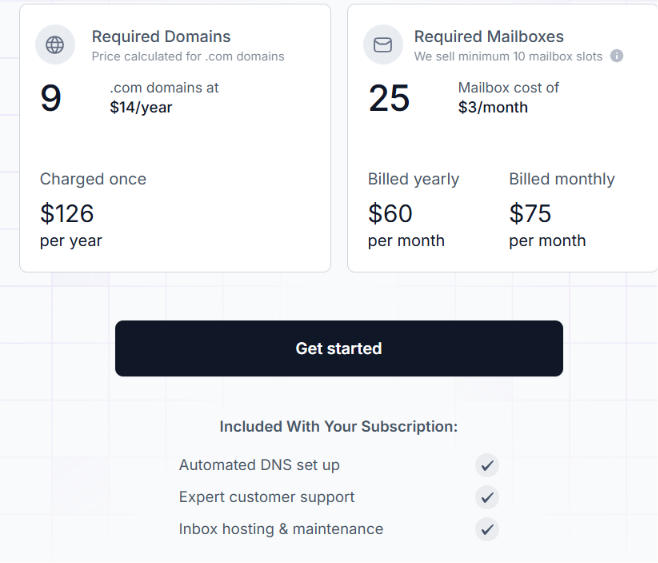
Mailforge’s pricing is based on mailbox slots, with a minimum purchase of 10 slots. For example, its pricing calculator shows 25 mailbox slots at $60 per month when billed annually, or $75 per month when billed monthly. That comes out to $2.40 or $3 per mailbox per month, depending on the billing option.
.com domains are listed at $14 per year. The subscription includes automated DNS setup, inbox hosting and maintenance, and customer support. SSL and Domain Masking are available as add-ons.
There isn’t a free trial for actual domains and mailboxes because Mailforge has to provision real infrastructure. However, you can still explore the platform before buying. For developers building AI email agents at scale, this means costs mainly grow with the sending infrastructure you provision, rather than with another AI seat for every workflow.
Best for: Developers building AI agents that need their own email address to communicate and act through email.
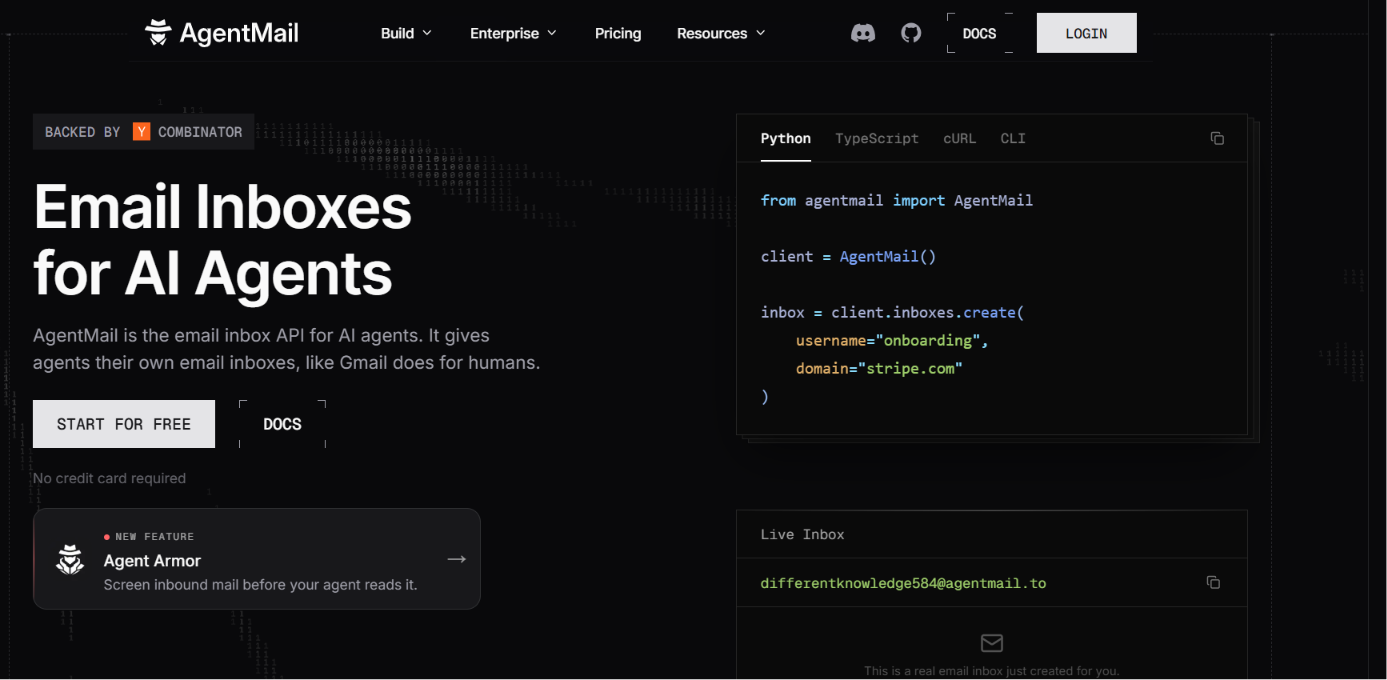
AgentMail gives AI agents their own persistent email inboxes. Instead of connecting an agent to a human-managed Gmail or Outlook account, developers can create a separate inbox for the agent with a single API call.
If email is part of an agent's job, the agent needs more than an AI email writer. It needs an email identity it can use on its own. This makes AgentMail useful for several types of agents. A scheduling agent can manage meeting requests through email. A browser agent can receive OTP codes while signing up for services.
A document-processing agent can receive invoices or other attachments. Customer service agents can use their own inboxes to handle incoming requests.
AgentMail provides the email layer for these workflows. You still build the reasoning and logic that decides what the agent should do next.
Once you create an inbox, your agent can use it to handle two-way email conversations. It can receive messages, read them, keep track of the thread context, and reply from the same inbox. It can also manage attachments, search through existing messages, and use a custom domain if needed.
AgentMail also supports multi-tenancy, which is helpful when your app has multiple agents or customers. Instead of using one shared inbox for everything, each agent can have its own email identity. For example, if you’re building an AI scheduling assistant, you could give it a dedicated inbox.
When someone emails about a meeting, the agent can read the request, run it through your scheduling logic, and respond from the same address.
This makes email a real part of the agent’s workflow, not just a place where AI-generated replies get sent.
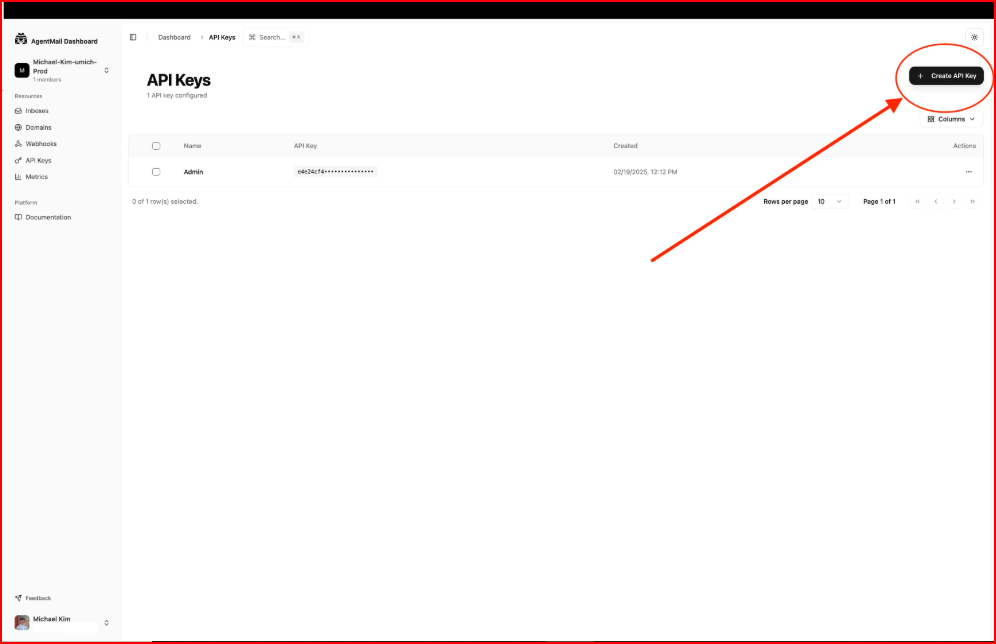
AgentMail is API-first and provides several ways to connect those inboxes to your agent stack.
AgentMail also supports semantic search and data extraction, which can help agents find information across messages or turn email content into structured data.
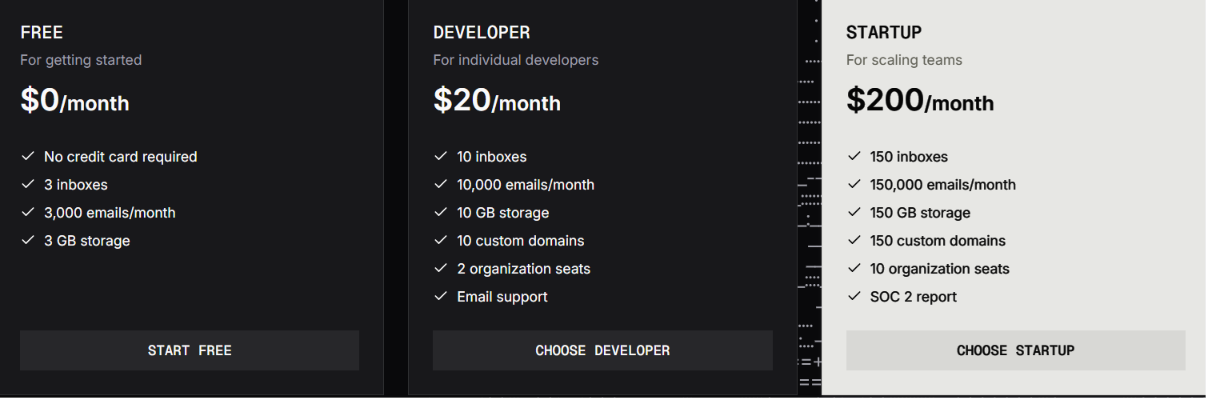
AgentMail has a Free plan at $0 per month with 3 inboxes, 3,000 emails per month, and 3 GB of storage. The Developer plan costs $20 per month and includes 10 inboxes, 10,000 emails per month, 10 GB of storage, 10 custom domains, and two organization seats.
The Startup plan costs $200 per month and includes 150 inboxes, 150,000 emails per month, 150 GB of storage, 150 custom domains, and 10 organization seats. Enterprise pricing is custom and adds features such as unlimited inboxes, dedicated IPs, EU-region cloud hosting, BYO cloud deployment, and SSO.
Best for GTM teams that want to identify buyers showing intent and automatically engage them through email and other channels.
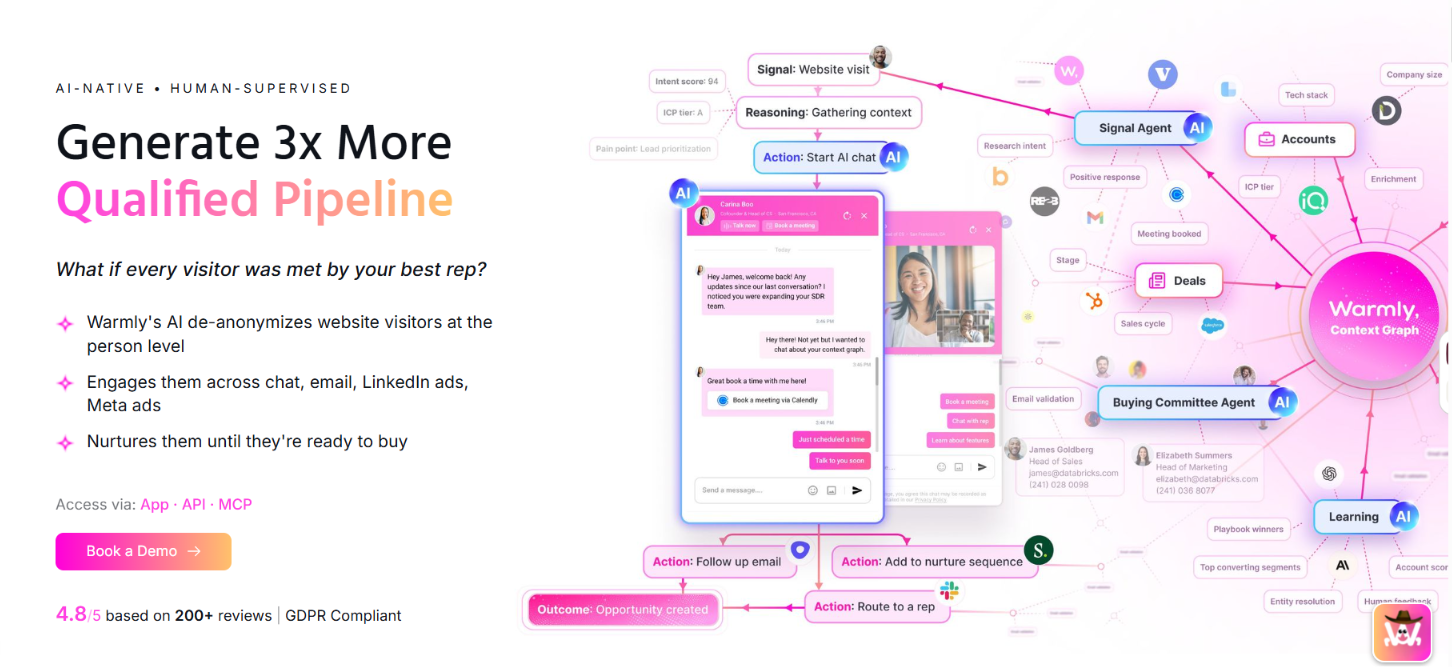
Warmly is a good fit when the biggest problem is not writing the email. It is knowing who you should email and when. It tracks signals such as website visits, product activity, CRM data, job changes, hiring activity, research intent, and competitor research.
Warmly uses that activity to identify accounts showing interest and decide which ones deserve attention.
This gives email outreach more context. Instead of putting every prospect into the same cold sequence, your team can engage an account because someone visited your website, showed research intent, returned to a key page, or triggered another relevant signal.
Warmly then connects those signals with its AI agents. Its TAM Agent focuses on accounts in your target market, while its Inbound Agent works with people already coming to your website.
Warmly offers app, API, and MCP access, giving GTM engineers another way to bring Warmly's visitor and account data into their workflows. The Context Graph is important here. It keeps account activity in one place and connects it with people, companies, deals, buying committees, and enrichment data.
Warmly can then use that context for things such as ICP tiers, intent scores, account summaries, and next-best actions. This means you do not have to build every intent rule yourself.
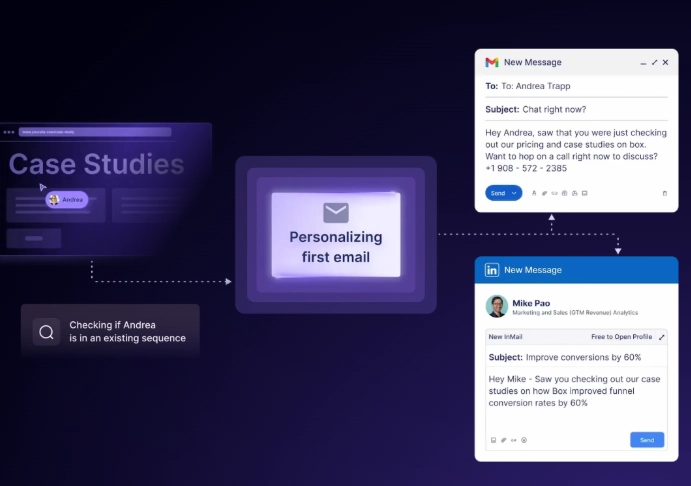
Warmly can provide the signal and context layer, while your CRM and other GTM tools remain connected to the workflow.
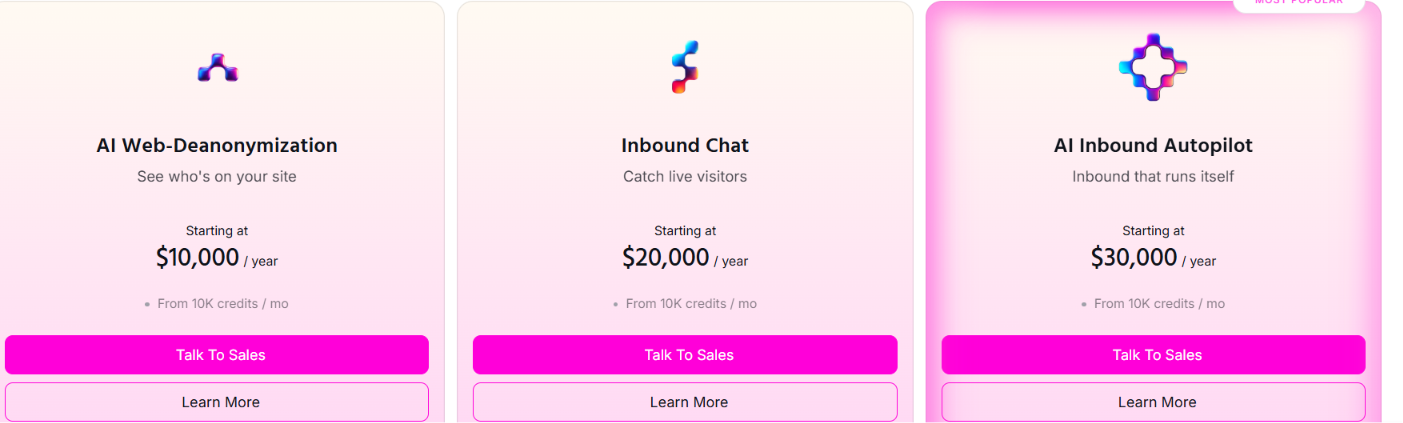
Warmly's AI Web-Deanonymization starts at $10,000 per year. It includes person and company website visitor identification, ICP filtering, real-time alerts, lead routing, CRM sync, and retargeting through email, LinkedIn, and ads.
Inbound Chat starts at $20,000 per year and adds AI chat, automated email follow-up, Warm Calling, and related inbound engagement features.
AI Inbound Autopilot starts at $30,000 per year. It adds AI qualification and decision-making, unlimited AI Studio Agents, AI-written chat follow-up, and automated email generation and follow-up.
The GTM Signals Package costs an additional $10,000 per year and adds signals such as research intent, hiring activity, funding events, and competitive intelligence.
Best for B2B marketing teams that want AI to run email outreach using buyer intent, CRM data, and account information.
6sense AI Email Agents are built to do more than write email copy. They can create multi-email sequences, personalize each message, send follow-ups, read replies, respond to prospects, and bring in a sales rep when a buyer shows interest.
The main value is the data behind the emails. 6sense can use buyer intent, company and people data, CRM history, product information, and your brand voice to make each message more relevant. You can use the agents for outbound prospecting, inbound qualification, event follow-up, and re-engaging cold prospects.
You start with a prompt, and 6sense can build the email sequence for you. From there, the agent uses 6sense data to personalize the message for each buyer. Your team can also upload brand and product documents, choose which signals to use, and preview the emails before they go live. Once the campaign starts, the agent can:
That makes 6sense useful for teams that want AI to handle more of the email conversation, not just the first message.
6sense uses its Signalverse data to help decide who should get outreach and what the message should say. For example, if an account is showing stronger buying intent, the email agent can use that context to make the outreach more relevant. 6sense says Signalverse processes 1 trillion signals every day.
The agent can also use company data, people data, CRM history, and product knowledge. This is useful for account-based teams that already use 6sense to prioritize which accounts matter most. 6sense also supports dedicated AI Email Agent inboxes.
6sense does not publish AI Email Agent pricing in the material provided. You need to contact 6sense for a quote based on your setup and requirements.
Best for GTM teams that want to find prospects, research them, track buying signals, and use that data to create personalized email outreach.
Persana AI combines prospecting, enrichment, AI research, buyer signals, and email outreach in one workflow. It pulls data from 100+ sources, so you can build an ICP-based lead list, find contact information, research prospects, and then use that context to personalize your emails.
For example, you could find companies matching your ICP, identify the right contacts, detect a funding round or job change, research what is happening at the company, and use that information when writing the outreach.
Persana also has its own email sequencer and native sending. If you already have an outreach stack, you can connect it with other tools instead.
Persana focuses heavily on gathering useful information before generating the email. Its AI Research Agents can research company websites and news, find personalization angles, track competitor information, and score prospects.
Persana also tracks 75+ signals, including job changes, hiring, funding, website visits, keyword intent, technology changes, and social activity. You can use this data to:
Persana specifically says its AI can create personalized emails or first lines using information such as a prospect's social activity, company news, and website content.
Once you have the prospect and personalization data, Persana's AI Sequencer lets you turn it into an email sequence. The sequencer supports follow-up logic, intent data, and behavior-based rules. Persana also offers native email sending and built-in warmup, so you do not necessarily need a separate sending platform.
If you already have an outbound stack, Persana can connect with other tools instead. Its supplied data lists integrations with tools such as Salesforce, HubSpot, Instantly, and Smartlead.
This makes Persana a better fit when you want prospect data and research to shape the email, rather than using AI only to rewrite a generic cold email.
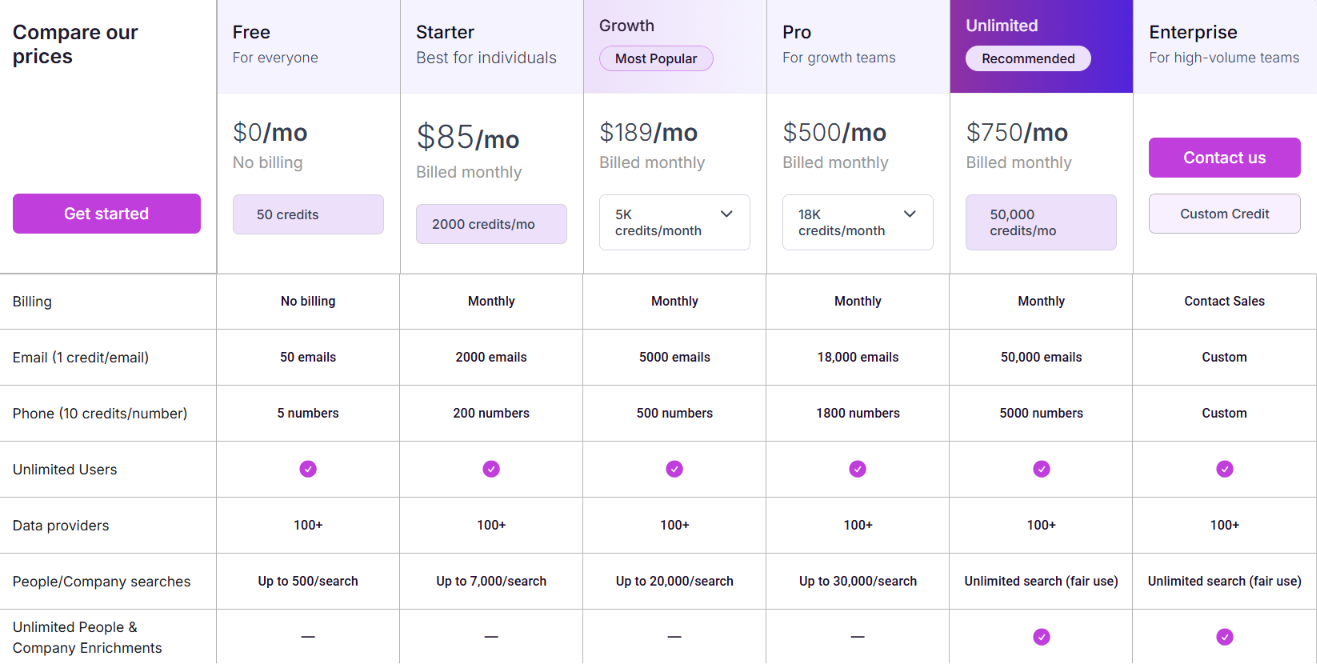
Persana offers a Free plan with 50 credits. With monthly billing, Starter costs $85 per month for 2,000 credits, Growth costs $189 per month for 5,000 credits, Pro costs $500 per month for 18,000 credits, and Unlimited costs $750 per month for 50,000 credits. Enterprise pricing is custom.
Persana also offers a 20% discount with annual billing, bringing the effective monthly prices down to $68 for Starter, $151 for Growth, $400 for Pro, and $600 for Unlimited. Email data costs 1 credit per email, while phone data costs 10 credits per number. Your actual cost therefore depends on how much prospecting, enrichment, and data your workflow uses.
One thing to keep in mind for 2026 is that Persana has announced that it is joining forces with Rox, so its product and packaging may continue to change.
The best AI email agent depends on which part of the email workflow you want to automate. Some tools provide infrastructure, while others handle inboxes, buyer intent, or personalized outreach.
For developers and GTM engineers, Mailforge and AgentMail solve the most technical use cases. Mailforge handles the infrastructure behind outbound sending, while AgentMail gives the agent an inbox it can directly operate.
Enter your email to get a custom plan & stack recommendation for your business
Please check your mailbox in 5 minutes

AI email agents are moving beyond simple email writing. They can research prospects, react to buying signals, manage conversations, and automate larger parts of the email workflow.
As these workflows become more automated, developers also need to think about what happens behind the agent. Domains, mailboxes, DNS setup, and sending infrastructure still need to be managed before outreach can run.
For teams building this type of outbound system, Mailforge can handle that infrastructure layer through its API, MCP, and CLI. This lets you keep the agent logic in your own workflow while automating more of the setup behind it.
If you are building an AI outbound workflow and want to spend less time setting up its email infrastructure manually, you can try Mailforge.