
If you are watching your Yahoo open rates crash from 22% to 4% overnight, you are not alone.
Yahoo’s email deliverability has taken a serious hit for senders through 2026, and most of them cannot figure out why it is happening.
In this guide, I will be walking you through how to optimize your Yahoo email deliverability (step by step).
Let’s get into it!
Yahoo email deliverability in 2026 comes down to seven fixes.
Each one is broken down in detail further down, but here is the order you should follow.
Why Yahoo email deliverability got harder in 2026
Yahoo has always been strict on senders, but 2026 pushed the bar higher than most people realized.
Here is what actually changed.
For years, you could rotate IPs to escape a bad sending history. That trick stopped working in April 2025. Yahoo now weighs your sending domain reputation almost entirely over the IP address you send from. And that means your From domain carries every past complaint, bounce, and filtering event with it, no matter which IP or ESP you switch to.
The practical impact is huge. If your domain hit a complaint spike six months ago and you have not actively rebuilt reputation since, Yahoo still remembers. Moving to a new IP will not save you.
Gmail takes three to seven days to react to a complaint spike. Yahoo does it in 24 to 48 hours. So if you send Monday and see a spike Tuesday morning, your Wednesday campaign is already at risk before you know what went wrong.
That timing gap matters more than most senders realize. You have less room to catch a problem before it becomes a crash, which is why weekly monitoring is not enough for high-volume Yahoo senders in 2026. You need daily visibility.
Yahoo launched the Insights dashboard inside Sender Hub in October 2025. Before that, Sender Hub only handled domain verification and complaint feedback loop registration, so there was no real visibility into your reputation.
The Insights dashboard changed that entirely. You now get daily-updated domain reputation, complaint rate trends, and up to 180 days of historical data for every DKIM-authenticated domain you send from. This is the closest thing Yahoo has ever given senders to Google Postmaster Tools, and if you have not opened Sender Hub this year, you are missing the most useful free monitoring tool Yahoo offers.
Every major provider added AI models to their filtering stack this year, and Yahoo is no exception. Yahoo now weighs content patterns across senders, not just your individual behavior. If you are using the same cold email templates or subject line patterns as thousands of other senders, Yahoo groups you together and filters the whole pattern as a batch.
That said, you can still land in the inbox with clean templates. The trap is reusing generic templates from a Google search, which are the same ones every other sender is using.
Yahoo's mail backend also powers AOL, Verizon.net, AT&T.net, and SBCGlobal.net. Together, these domains represent 10 to 15 percent of US consumer email volume, and much more in older demographics.
Here is what most senders miss. When you audit your list and see 2 percent @yahoo.com addresses, your real Yahoo exposure is often five times higher. Every fix in this guide applies to all of these addresses, not just the ones ending in @yahoo.com.
Now for the actual fixes. Each of these H3s is a step you should work through in order, because the earlier fixes make the later ones stick.
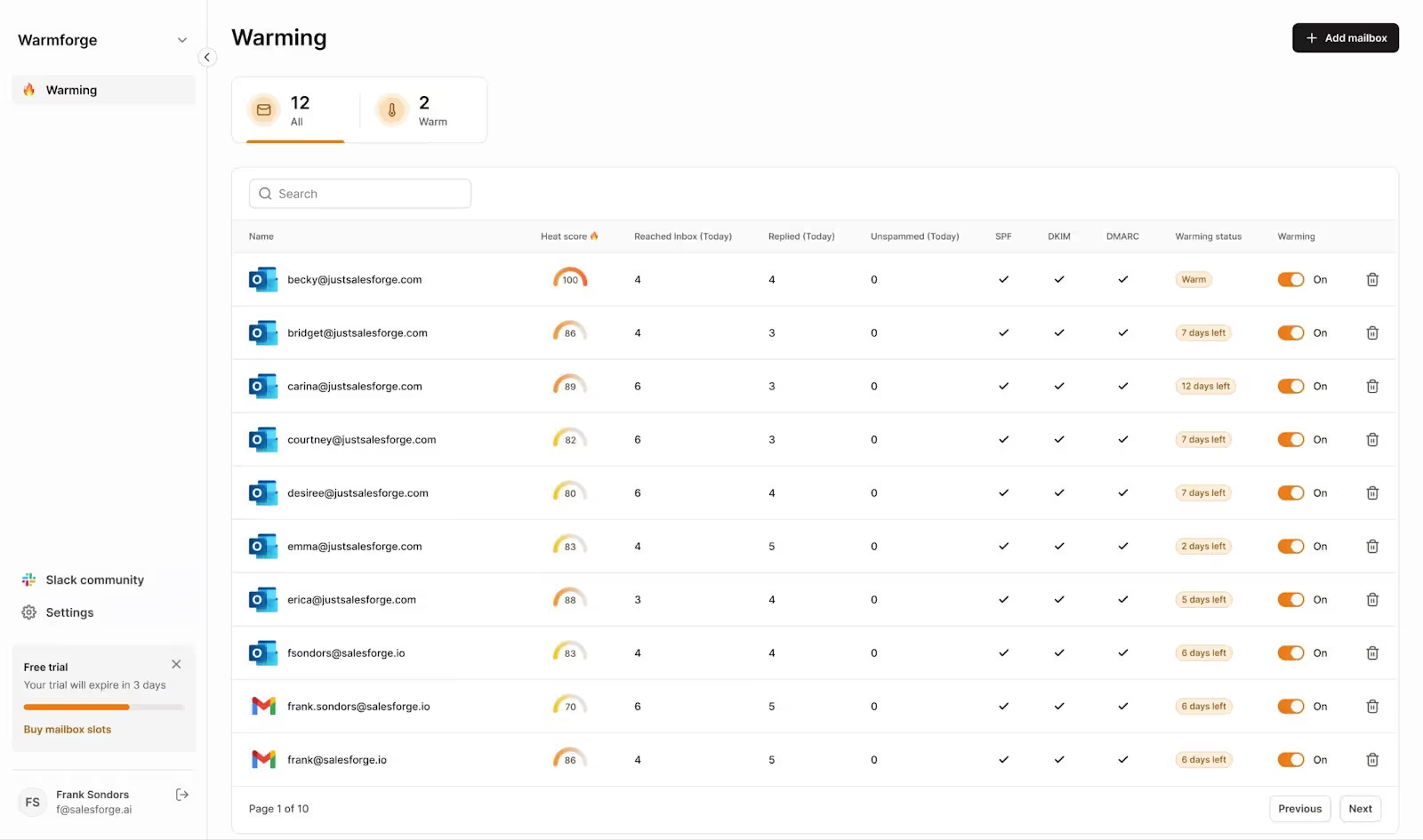
You need a warmup tool that tracks reputation by provider. If your warmup dashboard only shows one aggregate score, you cannot tell whether Yahoo trusts you or not. Track heat score by provider and watch the Yahoo number specifically. Do not launch a campaign until your Yahoo heat score sits above 85.
💡Pro tip: I always start warmup at least three weeks before a launch, not two. The extra week gives you buffer if Yahoo warms slower than expected, which in my experience happens about a third of the time.
Warmforge is built for exactly this. You get Yahoo-heavy warmup pools, heat score tracked by provider, and a Yahoo dip flagged before your campaign catches it. And if your current warmup tool does not break down reputation by provider, you are flying blind on Yahoo.
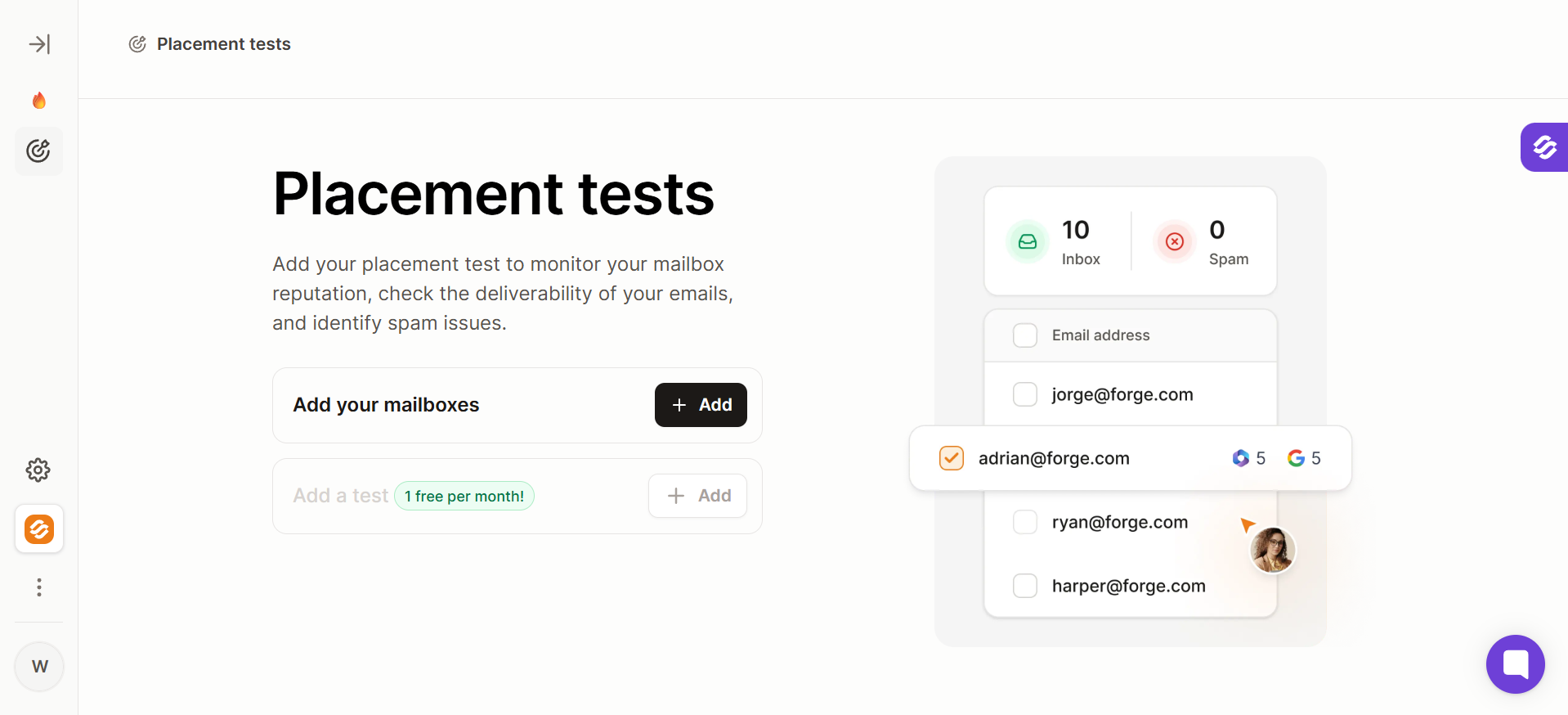
The next thing you can do to fix Yahoo email deliverability is run inbox placement tests. Yahoo's biggest deliverability trap is that it hides problems well. Emails that are getting filtered to spam still show as delivered in your ESP or outbound tool.
Emails routed to the Promotions tab count as inbox in some reporting systems but never get opened. So if you rely on your ESP dashboard to tell you where your emails land at Yahoo, you are already behind.
Inbox placement tests solve this.
A placement test sends your exact email from your exact sending domain to a controlled seed list that covers Yahoo, Gmail, Outlook, and other providers. It then reports back exactly where your email landed at each provider — inbox, Promotions, spam, or missing.
The value at Yahoo specifically is that Gmail can look completely fine while Yahoo is broken. I have seen setups with 85% Gmail inbox placement and 30% Yahoo placement in the same test, from the same sending domain. And without a placement test, you would not know that until your open rates drop weeks later. This is the fastest way to catch a Yahoo email deliverability problem before it becomes a full-blown crash.
Run a placement test in three situations.
💡Pro tip: I run placement tests weekly on active campaigns, not just at launch. A campaign that lands in the Yahoo inbox on Monday can end up in spam by Friday if something shifts mid-week, and weekly checks catch that before the campaign burns out.
Warmforge includes inbox placement testing as part of its deliverability center. And if you want to see how your current sending stands at Yahoo, that is the fastest way to get a baseline.
Once your warmup and placement testing are in place, authentication is next. It is the first check Yahoo runs when your email arrives, and if any of the three protocols fail, you fail before your content is even scanned.
You can have SPF and DKIM technically passing, but neither one might align with your From domain. When that happens, Yahoo treats your mail as unauthenticated even though the checks passed. And that is the fastest way to hit the spam folder without knowing why.
Start your DMARC policy at p=none so you can collect reports without affecting delivery. Once you have confirmed alignment across every sending source, move to p=quarantine, and eventually p=reject.
💡Pro tip: I run every new domain through MXToolbox before I send a single warmup email. If the checker flags anything at all, I fix it before the domain touches a live campaign. Fifteen minutes of testing now saves you six weeks of recovery later.
For a full walkthrough on getting DKIM alignment right the first time, read our guide on email authentication for cold outreach.
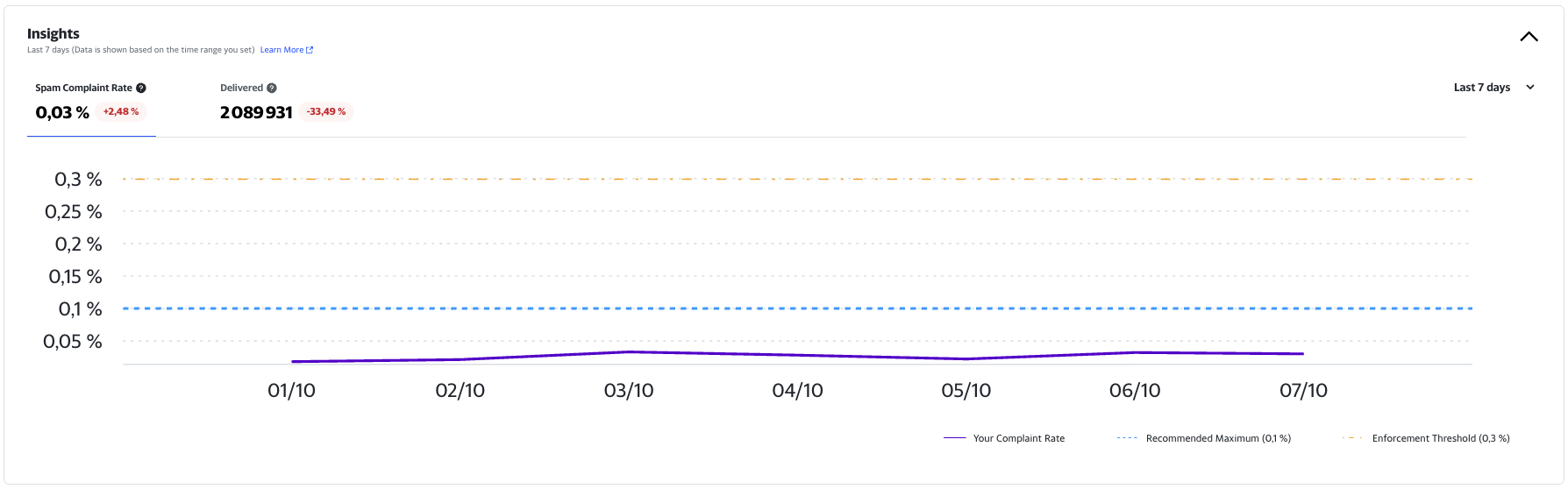
Complaint rate is the fastest way to tank your Yahoo email deliverability, and Yahoo enforces it more aggressively than any other provider. The official threshold is 0.3%, but the working target should always be under 0.1%.
Here is why the math matters. Yahoo calculates complaint rate against inbox-delivered mail, not against total volume sent.
So if you sent 10,000 emails and only 3,000 landed in the inbox, a single complaint pushes your rate to 0.033%. Ten complaints on that same batch would put you at 0.33% and past Yahoo's ceiling. Your effective threshold is much tighter than the number suggests.
Yahoo also acts on complaint spikes within 24 to 48 hours, and that timing changes how you have to respond. If you spot a spike on Monday, you have until Tuesday morning at the latest to pause and investigate. Miss that window and your Wednesday send is already going to spam.
Three habits drop your complaint rate reliably.
💡Pro tip: I run a weekly complaint audit and cross-reference the complainer domains against my last three campaigns.
Nine times out of ten, a complaint spike traces back to one specific segment or subject line. Fixing that one thing is easier than reworking the whole list.
For more on protecting your sender reputation long term, read our guide on sender reputation for cold email.
That said, if you are running your own SMTP infrastructure or a self-hosted setup, this is where you need to double-check. Send a test email to a Yahoo address, look for the native unsubscribe option in the header, and click it. If nothing happens or you get redirected to a login page, your implementation is broken.
💡Pro tip: I keep a spreadsheet of every domain we send from and audit the unsubscribe flow once a quarter. Yahoo has punished me for a silent header failure once, and I never let that happen twice.
Yahoo Sender Hub is the free monitoring dashboard every serious sender should have running, and most do not.
Before October 2025, Sender Hub was fairly basic — it handled domain verification and complaint feedback loop registration, but it did not show you your reputation directly. That changed with the Insights dashboard launch.
Insights now shows daily-updated domain reputation for every DKIM-authenticated domain you send from.
You also get complaint rate trends, placement patterns, and up to 180 days of historical data. It is the closest thing Yahoo will ever give you to Google Postmaster Tools, and it is genuinely useful for tracking your Yahoo email deliverability over time.
Here is how to set it up.
💡Pro tip: I check Sender Hub every Monday morning as part of my weekly deliverability review. Any dip that appeared over the weekend gets investigated before Monday's campaign goes out. Catching a problem on Monday costs you 20 minutes, but catching it on Thursday costs you a week of paused sending.
For more on how to read reputation metrics across providers, read our guide on deliverability monitoring.
Yahoo punishes senders who hit dead addresses faster than any other provider. Every hard bounce signals to Yahoo that you do not know your list, and repeated bounces from the same domain lead to throttling, deferrals, and eventually rejections. In 2026, this is even more important than it used to be.
Here is why. Yahoo started rolling out a 15GB storage cap in some regions in early 2026, starting with the UK. Users who exceed the cap get their oldest emails deleted, and dormant Yahoo accounts get deactivated faster.
So if your list has any age on it, you are almost certainly emailing addresses that no longer exist. Yahoo treats those bounces as a signal that your list quality is low.
Three habits fix this.
This is basic hygiene, but I have audited too many setups where suppression only applies inside one tool. When senders switch platforms, it gets missed.
💡Pro tip: I clean my active Yahoo segments once a month, not once a quarter. Yahoo's tighter deactivation cycle means quarterly cleaning is already too slow in 2026, especially if your list is over a year old.
For a full breakdown of list hygiene practices for outbound programs, read our guide on email list hygiene.
If your Yahoo numbers are already broken, the seven fixes above still apply. But you need a specific recovery order to pull the domain back.
And if you skip a step or rush the ramp, you tank the domain a second time.
Here is the exact sequence I follow when a domain lands at Yahoo in a bad spot.
Stop sending to any @yahoo.com, @aol.com, @verizon.net, @att.net, and @sbcglobal.net addresses in your active campaigns. Continuing to send during a reputation crash makes recovery slower and sometimes impossible, because Yahoo needs to see a break in the pattern before it will re-evaluate your domain.
Use the pause window to audit what went wrong. Pull your last 30 days of Yahoo sends, look at complaint rate trends, and check for authentication drift. Identify which specific campaign or segment triggered the drop, because recovery without a diagnosis is guessing.
Once you know what broke, fix your authentication end to end. Confirm your SPF record includes every current sending IP. Verify DKIM is signing every outbound email and aligns with your From domain. And check that DMARC is published with alignment enforcement.
If any of these are misconfigured, fix them before Step 3. Restarting sends on broken authentication is a fast way to burn a second domain.
When you resume, send only to Yahoo addresses that clicked one of your emails in the past 7 days. These are your most engaged contacts, and their engagement gives Yahoo the positive signals it needs to start rebuilding your reputation. Do not send to openers only — Yahoo does not weight opens the way it used to, because AI-based inbox summaries can register opens without a human ever seeing the email.
Keep the volume small. Cap your first day of recovery sends at 25 percent of your normal Yahoo volume, and send lower if you were on high volume before the crash.
Once you've restarted with your most engaged Yahoo recipients, resist the urge to ramp volume too quickly. Yahoo rewards consistent sending patterns, and sudden spikes—even to engaged users can trigger throttling or renewed spam filtering.
Instead, use a structured email warm-up process to gradually rebuild your sender reputation. A platform like Warmforge can help automate this by increasing Yahoo volume in controlled increments while maintaining natural engagement patterns and monitoring deliverability signals throughout the recovery.
As you warm up your domain:
Email warm-up isn't a replacement for proper authentication or list hygiene—it works because you've already completed the previous steps. Think of it as reinforcing the positive reputation signals Yahoo is looking for while avoiding the sudden sending changes that often trigger another reputation drop.
Most recoverable Yahoo domains require one to two weeks of consistent warm-up before they're ready for larger campaign volumes.
Sometimes recovery is not possible. Yahoo has been fingerprinting domains that mix streams or push commercial content patterns aggressively, and once your From domain is fingerprinted, no amount of engagement or authentication cleanup will pull it back. So after running through Steps 1 through 5 cleanly, if you still see 100% soft bounces or spam placement at Yahoo, the domain is probably fingerprinted.
The move here is to spin up a fresh subdomain of your primary sending domain. Warm it up from scratch and shift your Yahoo traffic to it. Do not use a completely unrelated domain, because Yahoo uses parent domain reputation as a signal for subdomains. A subdomain of your existing domain inherits the good parts of your reputation, and it starts with a clean slate on the specific pattern that got fingerprinted.
💡Pro tip: When I recover a fingerprinted domain to a new subdomain, I always review content patterns and stream separation first. That happens before the first warmup email goes out. And if the original domain was fingerprinted because it mixed transactional and cold outreach, the new subdomain gets one clear purpose and nothing else.
Every fix in this guide matters, but two of them do more work than the rest. Warmup builds the domain reputation Yahoo scores you on, and inbox placement testing tells you whether your fixes actually worked. Everything else is table stakes that keeps you compliant, but these two are what move the numbers.
Warmforge runs both. You get Yahoo-heavy warmup pools, heat score tracked by provider, and free inbox placement tests you can run before every campaign. Start with the free warming slot and free placement test, and see where your Yahoo reputation actually stands today.
If your Yahoo open rate dropped without any campaign change, Yahoo is likely filtering more of your email to spam or Promotions. This is not a one-off. Yahoo has been enforcing stricter sender rules since April 2025, and 2026 added AI-based content filtering on top. Common causes include DKIM alignment failing, complaint rate spiking above 0.1%, new mailboxes added without warmup, or your content pattern matching something Yahoo is filtering more broadly in 2026.
A 421 TSS04 error is Yahoo's soft-bounce code for throttling. It means Yahoo is temporarily deferring your email rather than rejecting it outright. The fix depends on the trigger — if it started after a volume spike, reduce your send volume and space your batches. If it started after a complaint rate rise, pause and audit your recent sends. And if it appeared alongside authentication changes, fix your SPF, DKIM, and DMARC alignment before you send another batch.
Yahoo's stated threshold is 0.3%, but 0.1% is the working target. Above 0.1%, Yahoo starts filtering more of your email to spam. Above 0.3%, Yahoo throttles or blocks you. And because Yahoo calculates complaint rate against inbox-delivered mail rather than total sent volume, your effective threshold is tighter than the number suggests. Aim for under 0.1% and treat 0.1% itself as a warning line.
Technically, Yahoo's bulk sender rules kick in at 5,000 emails per day to Yahoo addresses. In practice, Yahoo enforces the same core requirements on smaller senders too. SPF, DKIM, DMARC, one-click unsubscribe, and low complaint rates are baseline expectations regardless of volume in 2026. And if you fall below the 5,000 threshold, you get more room for error, but you are not exempt from the rules.
Yes. Yahoo's mail backend also powers AOL, Verizon.net, AT&T.net, and SBCGlobal.net. Every fix in this guide applies to those domains, not just @yahoo.com. Combined, these domains represent 10 to 15 percent of US consumer email volume, and much more in older demographics. So if your list has a decent US consumer base, your real Yahoo exposure is often five times higher than the @yahoo.com share suggests.
For a domain that took a bad hit but is still recoverable, expect two to three weeks of careful ramping. That includes the 24 to 48 hour pause, authentication cleanup, and cohort-by-cohort ramp starting with 7-day clickers. And if your domain has been fingerprinted, recovery is not possible and you need to move Yahoo traffic to a fresh subdomain, which is closer to four to six weeks including warmup.
Yahoo Sender Hub Insights is a dashboard Yahoo launched in October 2025 as part of Sender Hub. It shows daily-updated domain reputation, complaint rate trends, and up to 180 days of historical data for every DKIM-authenticated domain you send from. It is completely free — register at postmaster.yahooinc.com, verify your domain, and the dashboard populates over a few days once Yahoo starts tracking your reputation.
