Email throttling controls how many emails are sent or received over a specific time. Instead of blasting 20,000 emails in one go, you might limit it to 1,000 per hour. This practice helps maintain sender reputation, avoid spam filters, and improve email deliverability.
Key points:
Throttling is essential for scaling email campaigns while ensuring messages land in inboxes, not spam folders.
Email throttling operates by controlling the number of messages sent or received within a set time period - this could be per minute, hour, or day. For example, you might configure your email service provider (ESP) to send no more than 1,000 emails per hour to Gmail addresses. If you're working with a new domain, you might start with just 50 emails per day, gradually increasing the volume as your sender reputation improves.
On the receiving end, internet service providers (ISPs) like Gmail, Outlook, and Yahoo enforce their own limits. They only accept a certain number of emails from your IP or domain within a specific timeframe. If you exceed their limit, they’ll return temporary errors, essentially asking you to slow down and resend later. This means even if your ESP sends emails at a steady pace, some messages might still be temporarily rejected by ISPs until they’re retried. These limits form the foundation of how ISPs handle incoming emails, as explained further in the section on deferrals and soft bounces.
When ISPs detect that emails are arriving too quickly, they respond with 4xx SMTP codes - temporary failures known as deferrals or soft bounces. For instance, you might see messages like "User is receiving mail at too great a rate right now, please try again later" or "You have reached your daily sending quota."
A soft bounce indicates a temporary issue, such as hitting a rate limit, a full inbox, or another short-term problem. These emails may still be delivered after retries. On the other hand, hard bounces, signaled by 5xx codes, indicate permanent issues - like invalid or blocked email addresses. These addresses should typically be removed from your mailing list to maintain deliverability. If you experience repeated deferrals from the same ISP over time, it could signal that you’re consistently exceeding their throttling limits or that your sender reputation needs improvement.
ISPs use various methods to manage the flow of incoming emails. For instance, connection limits restrict the number of simultaneous SMTP connections allowed from a single IP address. Once you hit that cap, any additional connections will be rejected. Similarly, message-per-connection limits control how many recipients can be served over a single connection.
There are also per-domain volume caps, which limit the number of emails an ISP will accept from your IP to a specific domain (e.g., all emails sent to @gmail.com). If you exceed this cap, the ISP will issue deferrals. Many ESPs address these restrictions by offering campaign-level throttling features, allowing you to stagger your email sends over several hours instead of sending all at once. This gradual approach helps ensure smoother delivery, especially to ISPs with stricter rules.
Now that we’ve covered how throttling works, let’s dive into how it directly boosts email deliverability.
Throttling your email sends helps establish legitimacy with Internet Service Providers (ISPs). Sending too many emails too quickly - like jumping from 50 to 5,000 emails a day - can set off alarms, leading to deferrals or rejections. This is especially true for new IPs and domains, which often face strict limits. Many mailbox providers initially accept only a few hundred emails per hour from unfamiliar senders, gradually increasing this as your reputation improves. By controlling your sending pace, you reduce the risk of being flagged and improve your chances of landing in inboxes.
Throttling also mimics natural email-sending patterns. Instead of blasting thousands of emails at once, it breaks your sends into smaller, varied batches throughout the day - just like how a person might send emails. Starting with 50–100 emails daily feels more organic and avoids triggering ISP alerts. Tools like Warmforge make this even easier by using AI to replicate human-like email behavior. This builds trust with email providers and increases the chances of your messages landing in primary inboxes. Warmforge even offers a free warm-up slot, so you can try it out before scaling up your campaigns.
Staggered email delivery doesn’t just help with deliverability - it also keeps recipients and ISPs from being overwhelmed. This approach ensures that more messages are delivered on time, increasing the chances of opens, clicks, and replies. Plus, it helps your team manage responses more effectively, so they’re not swamped all at once. Considering that 45.6% of global email traffic is flagged as spam, throttling is a smart way to protect your sender reputation and maintain strong engagement metrics.
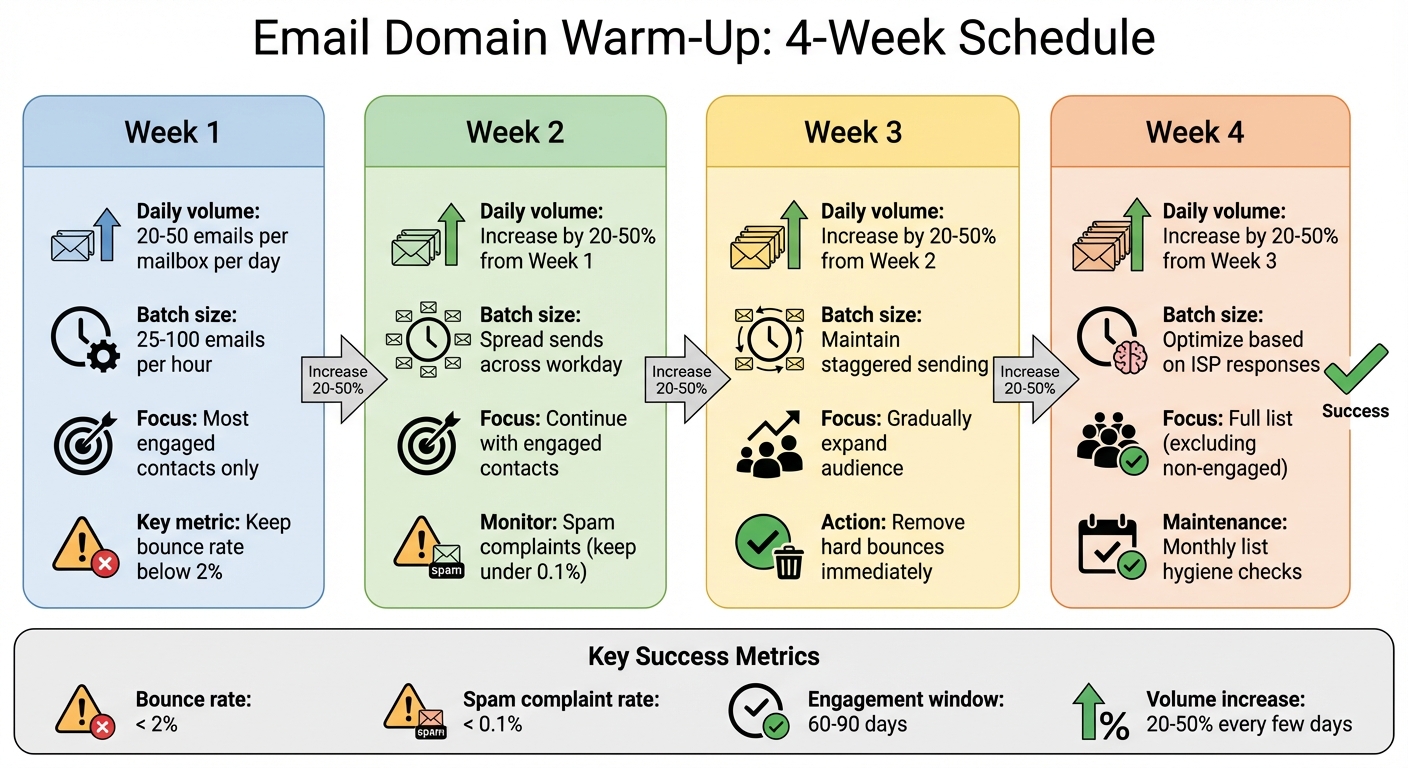
Email Throttling Best Practices: 4-Week Domain Warm-Up Schedule
Now that we’ve covered the benefits, let’s dive into the right way to implement email throttling.
Launching a new domain or IP address? Take it slow. Start by sending 20–50 emails per mailbox per day during the first week. Gradually increase your volume by 20–50% every few days, but only if your bounce rates and spam complaints stay low. Abrupt spikes in volume can cause issues, so stick to a steady pace. Break your sends into smaller batches - 25–100 emails per hour spread across the workday. This mimics natural human behavior and helps you stay within the unspoken hourly limits set by ISPs for new senders.
Plan to warm up new domains over 2–4 weeks, focusing on your most engaged contacts first. Keeping this process ongoing can ensure consistent deliverability. Once you’ve optimized your sending volume, keep your email lists clean to maintain good results.
A clean, verified email list is the backbone of a successful warm-up. After each campaign, immediately remove hard bounces, unsubscribes, and spam complaints. For new subscribers, use a double opt-in process to confirm their email addresses are valid and engaged. To maintain healthy engagement rates, suppress contacts who haven’t opened or clicked your emails in the last 60–90 days.
For added precision, run your lists through an email verification service regularly. This helps weed out invalid addresses, role-based emails (like info@ or sales@), and disposable accounts. High-volume senders should review engagement monthly, while lower-volume programs can check quarterly. Aim to keep your bounce rate below 2% and your spam complaint rate under 0.1% to stay in ISPs' good graces.
Tools like Warmforge can simplify the warm-up process. They simulate realistic interactions, such as opens and replies, to boost your sender reputation both before and during outreach. These tools also monitor deliverability, test inbox placement, and provide health checks to alert you if ISPs start throttling or filtering your emails.
Run placement tests regularly to confirm your emails are landing in inboxes. If you notice more deferrals, reduce your hourly send limits and scale up more cautiously. Warmforge even offers free perks, like a warm-up slot for Google or Microsoft mailboxes and a monthly placement test, so you can fine-tune your throttling approach without spending upfront.
Keep a close eye on metrics like bounce rate, spam complaints, open rate, reply rate, and click-through rate. A sudden uptick in soft bounces with "rate limit exceeded" messages is a red flag that adjustments are needed. Monitoring these signals can help you stay ahead of potential issues and maintain strong deliverability.
Even with the best practices in place, email throttling issues can still arise. To keep your emails landing in inboxes, you need targeted strategies to address common challenges.
Different email providers, like Gmail and Outlook, have their own rules for managing incoming messages. Gmail, for instance, is highly sensitive to sudden increases in email volume and spam complaints, while Microsoft 365 enforces stricter limits on connections and messages per minute. If you notice soft bounces due to rate limits, that’s usually a sign you’ve hit a provider’s threshold.
To work around this, segment your email lists by ISP and apply tailored hourly caps. For example, send emails to Gmail users separately from Outlook users, adjusting based on deferral patterns. For providers reporting connection errors, reduce the number of simultaneous SMTP connections. When sending to Gmail, prioritize highly engaged contacts - early opens and clicks can signal legitimacy and help ease throttling over time.
Keep a close eye on bounce codes in your email service provider (ESP) logs. If one domain shows a spike in deferrals, reduce your sending volume for that domain and gradually increase it - around 20–30% daily - as performance improves.
Now, let’s look at how sudden increases in email volume can further complicate delivery.
Big campaigns, like product launches, can lead to sudden spikes in email volume, which ISPs often view as suspicious. They compare your current sending patterns to historical data, and any sharp increase might result in mass deferrals or delayed deliveries.
To avoid this, start warming up your sending volume 1–3 weeks before the campaign. Break large campaigns into smaller, staggered waves to create a more natural increase in volume. Begin with your most engaged subscribers in the first wave - this reassures ISPs that your emails are legitimate.
If throttling happens mid-campaign, immediately cut your hourly send rate in half. Pause sends to impacted ISPs and focus on high-engagement segments until deferrals decrease.
When manual adjustments aren’t enough, specialized tools can help fine-tune your approach.

Warmforge is a tool designed to tackle throttling by automating the warm-up process and monitoring deliverability. It uses AI to simulate human email interactions - like opens, replies, and threaded conversations - which helps build trust with ISPs. This gradual reputation-building reduces the likelihood of hitting strict throttling limits as your email volume grows.
With inbox placement tests, you can see exactly where your emails are landing - whether it’s Gmail, Outlook, or another provider. If you notice more soft bounces or slipping inbox placements, you can tweak your send rates and refine your segmentation before rolling out a full campaign. Real-time health checks flag any issues, such as rising bounce rates or drops in engagement, so you can act quickly by slowing down or cleaning your list.
For teams just starting out or experimenting with new domains, Warmforge offers one free warm-up slot for a Google or Microsoft mailbox and a free placement test each month. This allows you to validate your throttling strategy and confirm that your emails are reaching inboxes - all without any upfront costs. It’s a great way to build confidence as you scale your email efforts.
Email throttling is all about managing how many emails you send within a set time frame - whether you're pacing your outreach or adapting to ISP restrictions. By controlling send rates, optimizing SMTP connections, and strategically handling soft bounces, you safeguard your sender reputation and boost the chances of landing in your recipients' inboxes. This deliberate approach signals to providers like Gmail, Outlook, and Yahoo that you're a reliable sender.
To throttle effectively, focus on three key practices: gradually warming up new domains, maintaining clean email lists, and driving strong engagement. Together, these steps build trust with email providers and enhance deliverability. Throttling helps regulate your sending pace, warm-ups establish credibility for new senders, list hygiene eliminates problematic addresses, and engagement metrics show that your emails are welcomed. These elements are crucial for teams sending high volumes, whether it's for B2B outreach, e-commerce promotions, or large-scale newsletters.
Pay extra attention to throttling when working with new or inactive domains, onboarding fresh sales reps, or preparing for big campaigns like Black Friday or product launches. For situations like these, adjusting your sending pace and segmenting your audience can prevent deliverability issues. Throttling ensures more emails make it to inboxes instead of being flagged or filtered, protecting your results over the long term.
Tools like Warmforge can make this process easier. They automate domain warm-ups, mimic natural sending patterns, and offer real-time placement tests and health checks. With features like a free warm-up slot for Google or Microsoft mailboxes and a free monthly placement test, you can validate your strategy and confirm that your emails are hitting primary inboxes - all without any upfront costs.
To put these strategies into action, start by auditing your send volumes, addressing spikes, and creating a ramp-up plan for new mailboxes. Use your email service provider's throttling features, run placement tests, and monitor your results before scaling up. The key to smart throttling? It’s not about slowing down - it’s about sending with precision.
Email throttling is a method used to regulate the pace at which emails are sent, ensuring that email service providers (ESPs) aren’t overwhelmed. By spacing out the delivery of emails, this technique helps prevent spam filters from flagging your messages as suspicious, which is crucial for maintaining a strong sender reputation.
This practice plays a key role in improving email deliverability. It increases the chances of your emails landing in recipients' inboxes rather than being diverted to spam folders. Pairing throttling with tools like automated email warm-up and deliverability monitoring - such as those provided by Warmforge - can make your email outreach efforts far more effective and reliable.
Email throttling comes with its fair share of challenges. These include keeping a steady sending rhythm to dodge spam filters, managing your sender reputation across different email service providers (ESPs), and steering clear of blacklists. If your sending patterns are inconsistent, it can raise red flags and hurt your chances of landing in the inbox.
To tackle these issues, keeping an eye on deliverability metrics and sticking to best practices is key. Tools like Warmforge can make this easier by simulating natural email behavior, safeguarding your sender reputation, and boosting your overall deliverability.
Warmforge takes the hassle out of email throttling by automating the warm-up process. It gradually increases your email sending volumes, helping you build trust with email service providers. This way, your emails are seen as legitimate and are less likely to get flagged as spam.
Beyond that, Warmforge keeps a close eye on your mailbox health, checks email deliverability, and runs placement tests to catch potential issues early. By ensuring consistent sending patterns, it boosts the chances of your emails landing in recipients' main inboxes, safeguarding your sender reputation and improving the success of your outreach efforts.