Spam filters scrutinize every word and pattern in your email subject lines to decide if your message reaches the inbox or gets flagged as junk. Avoiding spam trigger words and poor formatting is crucial to improving your email deliverability and maintaining your sender reputation. Here’s a quick guide to help you:
By focusing on clarity, avoiding overused phrases, and testing your emails, you can improve your chances of landing in the inbox and engaging your audience effectively.
Spam filters are designed to spot patterns that spammers commonly use, and subject lines are a key focus. While certain words and phrases won't automatically send your email to the spam folder, they can increase your spam score - especially when combined with ALL CAPS, excessive punctuation, or a poor sender reputation. Knowing which phrases raise red flags can help you create subject lines that land in the inbox instead of being flagged as junk.
Terms like "free", "bonus", "lowest price", and "incredible deal" are often associated with spam, as noted in HubSpot's research. MailSoar categorizes "promotions and special offers" as a high-risk theme that spam filters scrutinize closely.
For example, writing "FREE BONUS INSIDE" triggers filters because it matches patterns linked to spam. Instead, opt for clear, value-driven language that highlights what you're offering without unnecessary hype. For instance, replace "Free bonus inside" with "New toolkit included with your trial" or "Complimentary setup session with your account". These alternatives help maintain your email's deliverability while still conveying value.
Urgency phrases are another red flag for spam filters, especially when paired with discounts. Phrases like "sale ends soon", "limited time offer", and "act now" mimic language often used in scams. Mailmeteor's 2025 guide identifies "limited-time offer" and "urgent response needed" as major triggers that filters flag immediately. Similarly, Mequoda found that a subject line like "SALE ends soon – up to 50% off" had a dismal 1.9% open rate and was often sent to junk folders due to its combination of "sale" and urgency language.
Instead, use gentler urgency with specific timelines. For example, write "Registration closes Friday" rather than "ACT NOW – LIMITED TIME ONLY!" or "Last day to join this cohort" instead of "LAST CHANCE – OFFER EXPIRES!". This approach conveys urgency without setting off spam filters.
Language that makes sweeping promises can also attract spam filters. Words like "guaranteed", "risk-free", and "money-back guarantee" often raise red flags. Constant Contact’s deliverability guidelines specifically call out "guarantee" and "winner" as common triggers. HubSpot also warns against terms like "no obligation", "full refund", and "no hidden costs", as they can erode trust with filters. ActiveCampaign and Moosend confirm that such phrases often lead to emails being flagged as spam because they suggest potential deception.
Instead of making absolute claims, focus on specific and transparent policy details. For example, replace "Risk-free – 100% money-back guarantee!" with "30-day return policy". Similarly, swap "No strings attached, no obligation!" for "Cancel anytime". By describing your terms clearly and realistically, you can avoid triggering spam filters while building trust with your audience.
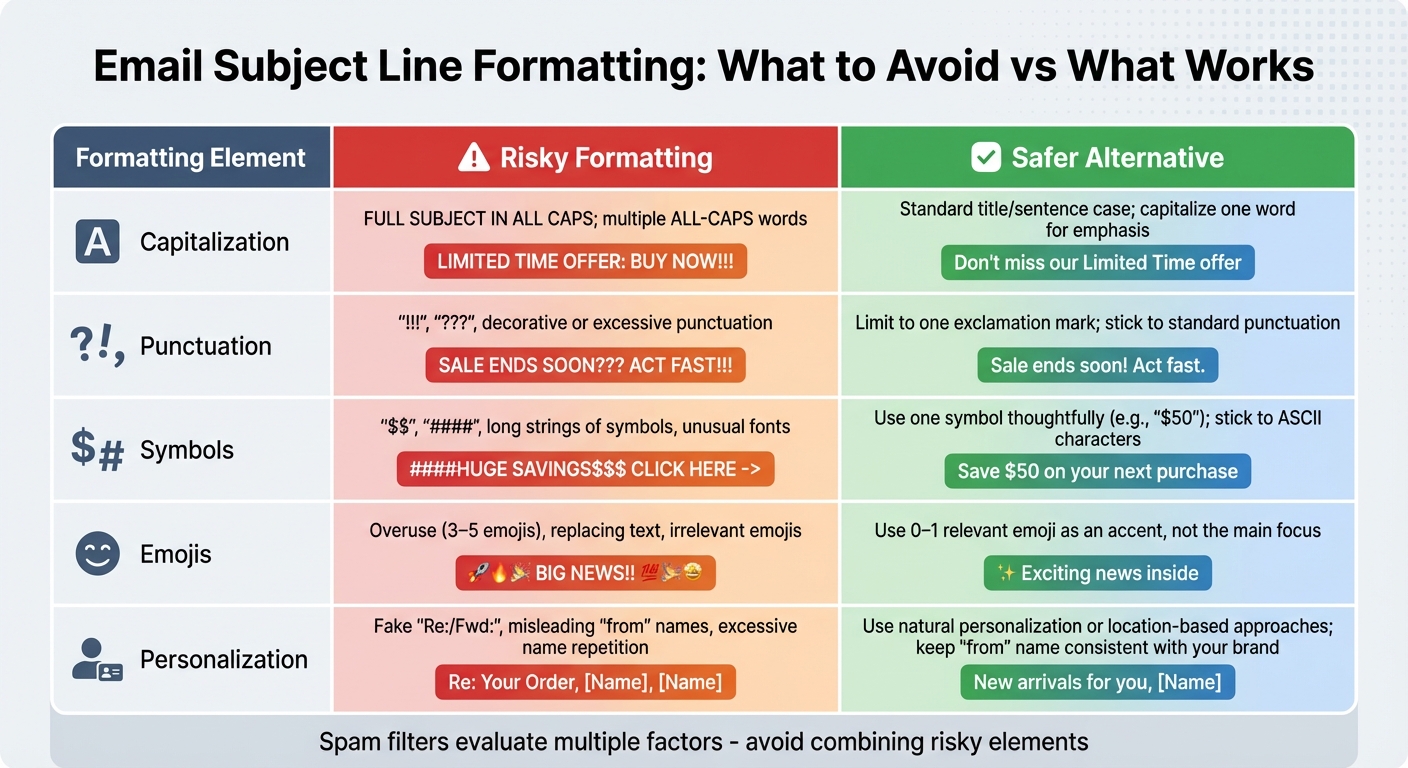
Email Subject Line Spam Triggers: Risky vs Safe Formatting Guide
The way you format your subject line can be just as important as the words you use. Spam filters are programmed to detect formatting tricks often associated with spam, so even if your content is legitimate, poor formatting could send your email straight to the junk folder. VerticalResponse sums it up well: "Don't write subject lines ALL IN CAPS" and "Nix the punctuation!!!". Below are some common formatting pitfalls and how to avoid them.
Using ALL CAPS is a surefire way to get flagged by spam filters. Subject lines like "BUY NOW!!! FREE OFFER!!!!" combine full capitalization with multiple exclamation marks, which raises your spam score. Mailmeteor highlights that overusing capitalization and punctuation are major red flags. Instead, stick to standard title case or sentence case. For example, swap "HUGE SALE TODAY!!!" for something more subtle like "Today's sale highlights" or "Discover our latest offers". If you need to emphasize something, limit yourself to capitalizing one word and using a single exclamation mark.
While symbols and emojis can make your subject line stand out, going overboard can backfire. Spam filters are quick to flag subject lines overloaded with dollar signs ($), special characters (####), or emojis like "🔥💰SALE🔥". The trick is to use them sparingly - one emoji per subject line is usually enough, and it should be placed thoughtfully, such as at the beginning or end. For instance, try "Ready for summer? ☀️ New arrivals". Avoid combining emojis with aggressive words or excessive capitalization, and stick to standard characters. Unusual fonts or Unicode symbols can also trigger spam detection. Mailmeteor advises keeping subject lines under 50 characters and minimizing symbols for better clarity and to avoid being flagged.
Another common issue is personalization that feels manipulative or unnatural. Repeating a recipient's name excessively - like "John, John, check this out John!" - or using misleading "from" names such as "John's Bank Alert" can come across as deceptive and trigger spam filters. Similarly, adding "Re:" or "Fwd:" to a subject line when the email isn’t part of a real thread can hurt your credibility. MailChimp data shows that personalization doesn’t always guarantee higher open rates and can even feel off-putting if done poorly. Instead, keep personalization natural. For example, write "A quick update for [Name]" or use location-based personalization like "Bay Area deals for [Name]", which MailChimp found to be more effective. Always ensure your "from" name aligns with your brand and that your subject line clearly reflects the content of your email without resorting to gimmicks.
| Formatting Element | Risky Formatting | Safer Alternative |
|---|---|---|
| Capitalization | FULL SUBJECT IN ALL CAPS; multiple ALL-CAPS words | Standard title/sentence case; capitalize one word for emphasis |
| Punctuation | "!!!", "???", decorative or excessive punctuation | Limit to one exclamation mark; stick to standard punctuation |
| Symbols | "$$$", "####", long strings of symbols, unusual fonts | Use one symbol thoughtfully (e.g., "$50"); stick to ASCII characters |
| Emojis | Overuse (3–5 emojis), replacing text, irrelevant emojis | Use 0–1 relevant emoji as an accent, not the main focus |
| Personalization | Fake "Re:/Fwd:", misleading "from" names, excessive name repetition | Use natural personalization or location-based approaches; keep "from" name consistent with your brand |
Even the most polished subject line won't perform well if your technical setup is flawed or your sender reputation has taken a hit. A thorough review process can help you avoid common pitfalls that might trigger spam filters.
Before hitting "send", go through this checklist:
A great subject line won't matter if your technical foundation isn't solid. Start by ensuring your domain's SPF, DKIM, and DMARC records are correctly configured. These authentication protocols establish your legitimacy with email providers and reinforce your efforts to avoid spam filters.
Keep an eye on key metrics like bounce rates, spam complaints, and unsubscribe rates. If you notice a spike, investigate whether it correlates with specific campaigns or subject-line choices. If you're using a new domain or IP, warm it up gradually. Begin by sending emails to a small group of engaged recipients, then slowly increase the volume over two weeks or more.
Inactive subscribers can also hurt your deliverability. Segment them out and run re-engagement campaigns to either win them back or remove them from your list. Additionally, check your domain against major blocklists every month and review DMARC aggregate reports to catch authentication issues or spoofing attempts.
Once you've addressed technical and review safeguards, test how well your email actually performs in terms of delivery. Inbox placement tools can send your email to seed lists on platforms like Gmail, Outlook, and Yahoo, then report where it lands - Primary, Promotions, Updates, or Spam.
Consider using tools like Warmforge to automate placement tests. These tests can help you identify adjustments that might move your email out of the spam folder and into the inbox. Warmforge also offers features like DNS, MX, and blacklist monitoring, along with ongoing warm-up services. Every Warmforge account includes one free placement test per month and one free warm-up slot for a Google or Microsoft mailbox, making it easier to verify your email's readiness without extra costs.
Your subject line is your first - and sometimes only - opportunity to make it into your recipient's inbox. Dodging spam filters isn’t about memorizing a list of forbidden words - it’s about creating a solid foundation with straightforward language, clean formatting, and consistent testing. Spam filters evaluate hundreds of factors; while a single risky word might not ruin your chances, repeated missteps definitely will.
Start with the essentials: swap out exaggerated claims for clear specifics, keep your formatting natural, and ensure your subject line aligns with the content of your email. From there, focus on testing and monitoring. Try A/B testing different subject line variations, send emails to seed lists across platforms like Gmail, Outlook, and Yahoo, and track metrics like open rates, clicks, and spam complaints to catch issues early. Pair these creative efforts with strong technical practices to maximize your deliverability.
Technical measures are just as important as creative strategies. Make sure your domain is authenticated with SPF, DKIM, and DMARC, warm up new sending infrastructure gradually, and maintain clean email lists by removing inactive subscribers and hard bounces. Tools like Warmforge can simplify this process by automating key tasks. For example, Warmforge offers one free warm-up slot for a Google or Microsoft mailbox and a free placement test each month, making it easier to validate your subject lines without additional costs.
Think of every subject line as a long-term investment in your sender reputation, not just a quick fix. Positive engagement signals to email providers that your messages are worth delivering. Keep track of what works, phase out what doesn’t, and adjust your approach as spam filters evolve. With the right habits and tools, you’ll consistently land in the inbox and maintain a strong sender reputation over time.
To keep your emails out of spam filters, stick to natural and personalized language. Avoid using overly promotional words like "free," "buy now," or "urgent." Instead, opt for phrases that feel more relatable, such as "special offer," "find out more," or "let’s connect." Your subject lines should clearly highlight the value of your email while maintaining a conversational tone.
Tools like Warmforge can also be a game-changer. They help your email content reflect human-like behavior, which boosts deliverability and safeguards your sender reputation. By steering clear of spammy language and focusing on genuine communication, you increase the chances of your emails landing in the primary inbox.
To keep your emails out of spam folders, it's a good idea to test your subject lines across various email service providers (ESPs). By doing this, you can assess how well your emails are delivered. Tools like Warmforge make this process easier by offering automated placement tests and monitoring. These tools can flag words or phrases in your subject lines that might trigger spam filters, increasing the chances that your emails land in the primary inbox where they belong.
To improve how well your emails reach their intended recipients, prioritize a few important technical steps. Start by setting up SPF, DKIM, and DMARC records. These tools authenticate your emails and safeguard your domain from potential misuse. It's also a good idea to regularly check your DNS and MX records and confirm that your domain isn't flagged on email blacklists.
On top of that, consistently warming up your mailbox can help establish a solid sender reputation. Tools like Warmforge can take care of this for you by simulating human-like email activity, increasing the chances of your emails landing in the primary inbox rather than being sidelined.