Managing multiple DKIM selectors can feel overwhelming, but it doesn't have to be. Here's the gist:
DKIM selectors are critical for email authentication, helping verify your emails and ensuring they reach inboxes securely. Each selector points to a public key in your DNS, allowing you to manage and rotate keys for different email streams (like marketing or transactional emails). However, poor management - like outdated selectors, generic naming, or inconsistent configurations - can lead to security risks, email failures, and deliverability issues.
sendgrid-mkt-2025q1).By staying organized and proactive, you can secure your email systems and avoid common pitfalls. Keep reading for detailed strategies and examples.
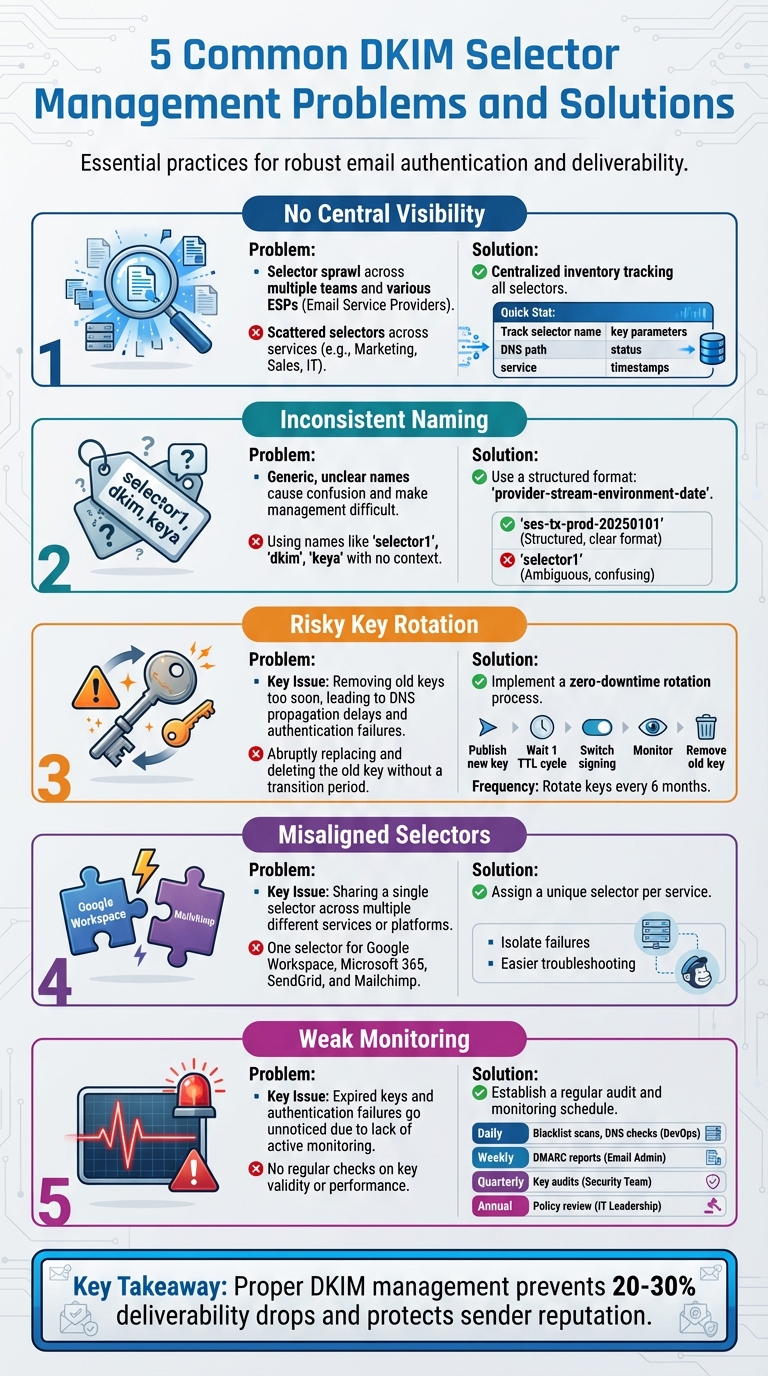
5 Common DKIM Selector Management Problems and Solutions
When different teams or email service providers (ESPs) create DKIM selectors independently without a shared system to track them, it often leads to confusion and inefficiency. Imagine selectors like marketing, corporate, or transactional scattered across various DNS records. Over time, legacy selectors might stick around after tools are retired or keys are rotated, adding to the chaos.
This lack of organization creates headaches. For instance, when a support team sees a selector like s=dkim1 in an email header, they may struggle to figure out whether it’s tied to the CRM, an outdated marketing platform, or a retired transactional service. Security audits can uncover dozens of DKIM TXT records, many with weak 1024-bit keys or generic names like "default" or "k1", making it unclear which ones are still in use. Worse yet, during DNS cleanups, a critical selector might accidentally get deleted, causing DKIM or DMARC failures and disrupting legitimate email delivery.
Without a clear inventory of which selectors are active, which services they belong to, and which domains they cover, troubleshooting becomes a time sink. Teams can spend hours piecing together information from DNS records, email headers, and vendor documentation. To avoid this, organizations need a centralized way to track and manage selectors.
A centralized inventory is the key to keeping DKIM selectors organized. This system should track every selector across all domains and include details like the selector name, DNS path, associated service, key parameters (e.g., 2048-bit RSA), status, and timestamps for creation or rotation. Consistent formatting and links to change tickets should also be part of the process.
For smaller organizations with just a few domains and ESPs, starting with a shared internal wiki or knowledge base can work as a simple, human-readable solution. However, this approach lacks automation and can quickly become outdated. A spreadsheet with dedicated columns for each data point might be a better interim solution, although it still requires manual updates and has its limitations.
Mid-size and enterprise-level organizations, especially those managing multiple brands, regions, or high email volumes, benefit from specialized DKIM and DMARC management platforms like DMARCIAN. These tools analyze DMARC aggregate reports to identify active selectors, flag those with high failure rates, and verify that DNS records are correctly configured. They reduce the need for manual troubleshooting by automating checks and providing real-time insights into selector usage.
While not a DKIM-specific tool, Warmforge can complement a centralized DKIM strategy. Its placement tests and health checks act as an early warning system. If certain mail streams tied to specific selectors start landing in spam more frequently, Warmforge can alert teams to potential configuration issues. By maintaining sender reputation through automated warm-up and health monitoring, Warmforge adds another layer of protection to your DKIM setup.
To ensure long-term success, organizations should establish governance processes. Any new ESP onboarding or mail stream launch should follow a checklist: create or assign a selector, document it in the central inventory, and get approval from email or security teams before making DNS changes. Change management policies should route all DKIM-related updates through a central team or ticketing system to enforce standards like 2048-bit keys and unique selectors for each service. For companies subject to regulatory audits (e.g., SOX or ISO), logging selector-related events can simplify compliance reviews.
A well-maintained DKIM inventory is essential for both security and email deliverability. Below is a comparison of different management approaches to help organizations choose the right solution.
| Approach | Visibility | Error Risk | Cost | Best For |
|---|---|---|---|---|
| Manual / Ad-hoc Tracking | Limited; relies on admins manually checking DNS | High; prone to typos, forgotten selectors, and incomplete rotations | No direct tooling cost but higher labor and incident-response costs | Small setups with minimal email services |
| Spreadsheets / Shared Docs | Moderate; centralized list but can become outdated quickly | Medium to high; manual tracking is still error-prone | Low; mainly staff time for audits and updates | Growing teams before scaling to more robust tools |
| Specialized DKIM/DMARC Platforms | High; dashboards provide real-time insights into selector usage | Low; automated checks minimize misconfigurations | Subscription-based; cost depends on vendor and email volume | Mid-size to enterprise organizations with multiple domains and services |
For U.S.-based organizations managing high email volumes or multiple cloud services, investing in specialized platforms often pays off. The operational efficiency and reduced risk far outweigh the costs of dealing with fragmented and poorly managed DKIM selectors. The next sections will explore other challenges, such as naming inconsistencies and key rotation, in more detail.
Using generic names like selector1, dkim, or keya for DKIM selectors can lead to a host of operational headaches. These vague labels don’t provide any clues about their purpose, such as which service, department, or mail stream they belong to. This lack of context can make audits a time-consuming process, as administrators have to dig deeper to figure out what each selector does. Worse, it increases the risk of critical mistakes, like rotating the wrong key or ignoring an important selector entirely. Such errors could result in legitimate emails being flagged as spam - or even rejected outright.
In environments with multiple services, the problem compounds. For example, a selector named mail could be tied to Google Workspace, SendGrid, or an internal SMTP server. This ambiguity makes troubleshooting slower and raises the likelihood of misconfigurations. Imagine a scenario where a marketing team accidentally updates a selector meant for transactional emails. Customer receipts or password resets might fail authentication, while promotional emails continue to go through - an avoidable mess that better naming conventions could prevent.
To address these issues, it’s crucial to adopt a consistent and descriptive naming strategy.
Clear and consistent naming conventions are the key to avoiding the pitfalls outlined above. The idea is simple: use names that are descriptive and unique, incorporating details about the service, environment, and even rotation schedules when applicable. For organizations that rotate keys regularly, including dates in the selector name can be particularly helpful. Service-specific naming patterns work well for most setups. For example:
gws-prod: Instantly identifies Google Workspace production mail.sendgrid-mkt: Clearly points to a marketing email stream managed by SendGrid.These kinds of labels make it easier for teams to pinpoint issues quickly without disrupting other mail flows.
For even more clarity, selectors can include additional details like the type of mail stream and rotation time frames. For instance, a name like 2025q1-tx-prod indicates that the selector is used for transactional mail in production during the first quarter of 2025. Best practices also recommend prepending department names (e.g., fin-payroll or hr-annc) and including rotation dates. This approach supports automated audits and allows independent key rotations for each service and mail stream, minimizing cross-system disruptions.
A standardized naming format could look like this: provider-stream-environment-date. For example:
ses-tx-prod-20250101: This identifies AWS SES for transactional mail in production, with a key activated on January 1, 2025.Documenting and enforcing a naming standard like this ensures selectors are managed systematically.
Let’s compare some poor naming practices with improved alternatives to highlight the benefits of a clear strategy:
| Poor Selector Name | Issues | Improved Selector Name | Benefits |
|---|---|---|---|
| selector1 | No service or purpose info | sendgrid-mkt-2025q1 | Clearly identifies provider, mail type, and rotation period |
| dkim | Too generic; prone to confusion during rotations | gws-prod-fin | Specifies service (Google Workspace), environment (production), and department (finance) |
| key1 | Arbitrary label with no context | ses-tx-20250101-2048 | Details provider (SES), mail type, activation date, and key length |
| Ambiguous; could refer to any service | fin-payroll-2024q3 | Links selector to a specific function (finance/payroll) and time frame |
Adopting these naming practices not only speeds up audits but also makes key rotations much smoother. For example, if a DMARC report flags authentication failures for a selector like sendgrid-mkt-2025q1, teams can immediately identify the associated system and investigate. Similarly, date-based naming makes it obvious which selectors are active and which are due for retirement. This level of clarity reduces errors and ensures email deliverability stays intact during transitions.
Rotating DKIM keys is an important security measure, but it’s easy to make mistakes that can disrupt email deliverability. One common error is removing the old key too soon. If you delete the old selector from DNS or disable it on your mail server while some systems are still signing messages with it, those emails will fail DKIM authentication. This can lead to DMARC failures, especially if your policy is set to p=quarantine or p=reject, causing legitimate emails to end up in spam folders - or worse, being blocked entirely.
DNS propagation delays are another frequent issue. Even if you publish the new public key in DNS and immediately switch your mail server to use the new selector, DNS changes can take hours to propagate. During this delay, some receivers may not yet recognize the new selector and will treat your emails as DKIM=fail. While most DNS records have a time-to-live (TTL) of about one hour (3,600 seconds), some global caches may hold onto older records for longer.
Lastly, selector mismatches can trip you up. Reusing a selector across different services might cause some emails to fail while others work as expected. This inconsistency makes troubleshooting difficult and time-consuming. Worse, you might accidentally retire a selector that a low-volume service still relies on, creating unexpected failures.
To avoid these pitfalls, follow a zero-downtime approach for DKIM key rotation. Start by generating a new 2048-bit RSA key pair and creating a fresh selector. Use a descriptive name for the selector, such as ses-tx-20250601, which includes the activation date for easy tracking. Publish the new public key as a DNS TXT record under this selector, and wait at least one full TTL cycle before making any changes to your sending systems. This ensures that DNS resolvers worldwide have had enough time to cache the new record.
Once the TTL period has passed, update your mail transfer agents (MTAs) or email service provider (ESP) settings to sign outgoing messages with the new selector. However, do not deactivate the old selector in DNS just yet. Send test emails to major providers like Gmail, Outlook, and Yahoo, and then inspect the DKIM-Signature headers to confirm the new selector is being used and passing validation. Use DKIM lookup tools to verify that the DNS record is correctly formatted and accessible from various locations.
Monitor DMARC aggregate reports for a full sending cycle to ensure the new selector is functioning properly and passing authentication across all recipients. Only after confirming that no legitimate traffic relies on the old selector should you remove it from DNS. As a general guideline, MxToolbox recommends rotating DKIM keys every six months, and M3AAWG advises tracking selector activity over time to prevent premature deactivation.
Careful monitoring throughout the rotation process is key to success.
Given the risks of DNS delays and other potential issues, continuous monitoring is essential after a key rotation. Warmforge's placement tests allow you to send emails signed with your new selector to test inboxes across major providers like Google and Outlook. These tests help you determine whether your emails land in the inbox, promotions tab, or spam folder, while also confirming that DKIM and DMARC validation are passing. This real-time feedback lets you catch problems early, before they impact your broader email campaigns.
Warmforge also offers health checks and deliverability monitoring to track your DNS records, including DKIM selectors. The platform alerts you to sudden drops in DKIM pass rates or increases in spam-folder placement immediately after a rotation. Additionally, Warmforge’s automated email warm-up and deliverability tools can help stabilize your sender reputation with the new key and selector. Every Warmforge plan includes one free placement test per month, making it easier to validate critical rotations without extra costs. This proactive approach helps you identify and resolve configuration issues before they affect your customers’ inboxes.
Using a single DKIM selector for multiple services - like Google Workspace and SendGrid - can lead to DMARC misalignment issues. DMARC compliance hinges on the signing domain in your DKIM signature matching the domain in the "From" header. When different services share the same selector but use different keys or configurations, some emails may fail authentication while others pass. This inconsistency can confuse receiving mail servers, potentially causing legitimate emails to land in spam folders or even be rejected entirely.
To avoid this, it's crucial to assign unique selectors to each service. This practice ensures consistent DMARC alignment and enhances security. For example, if a key for one service is compromised, you can rotate its selector without affecting other services. Logical naming conventions - such as "2025_gws" for Google Workspace or "sendgrid1" for SendGrid - make audits and key rotations more straightforward. By isolating selectors, you can also fine-tune configurations for each platform without overlap.
Setting up unique selectors for each service is a cornerstone of effective DKIM management. Each platform has its own requirements, so understanding these distinctions is key. Below is a closer look at how selectors are configured for some widely used platforms:
Google Workspace
In Google Workspace, you generate a DKIM key pair in the Admin console, choose a unique selector (e.g., "google2025"), and publish the public key as a TXT record in DNS at selector._domainkey.domain.com. After DNS propagation (usually about an hour), you activate DKIM signing. Unlike some platforms, Google uses TXT records directly, bypassing the need for CNAME delegation.
Microsoft 365
Microsoft 365 takes a different approach by using CNAME records. Through the Microsoft 365 Defender portal, you enable DKIM for your domain and create two CNAME records per selector. For example, selector1._domainkey might point to selector1._domainkey.domain.onmicrosoft.com, and selector2._domainkey would follow a similar pattern. This setup allows Microsoft to handle automatic key rotation, reducing the need for manual DNS updates. Once configured, tools like MX Toolbox can verify the alignment.
SendGrid and Mailchimp
For ESPs like SendGrid and Mailchimp, the process varies slightly. SendGrid lets you generate keys through its dashboard, assign a unique selector (e.g., "sendgrid1"), and publish either a TXT or CNAME record at selector._domainkey.domain.com. CNAME records are preferred for automatic key rotation. Mailchimp, on the other hand, typically uses TXT records with custom selectors like "mailchimp1." Regardless of the platform, it's critical to use separate keys for each mail stream and document selectors in a central inventory for easier management.
Here’s a quick comparison of how different platforms handle selectors:
| Platform | Record Type | Selector Example | Management Style | Key Rotation |
|---|---|---|---|---|
| Google Workspace | TXT | google2025 | Manual key generation & publish | Manual (every 6 months) |
| Microsoft 365 | CNAME (2 records) | selector1/selector2 | Provider-hosted keys | Automatic via CNAME |
| SendGrid | CNAME/TXT | sendgrid1 | Auto-generated via dashboard | Provider-assisted |
| Mailchimp | TXT | mailchimp1 | Manual TXT publish | Manual rotation |
This table highlights the differences in selector management across platforms. CNAME records, as used by Microsoft 365 and SendGrid, simplify key rotation and reduce manual intervention. In contrast, TXT records, used by Google Workspace and Mailchimp, give administrators more direct control. Regardless of the method, assigning unique selectors to each service is essential for isolating mail streams and maintaining DMARC compliance.
Once you've tackled configuration and rotation hurdles, the next step is maintaining the health of your DKIM setup through consistent monitoring. Simply setting up DKIM selectors isn’t enough - neglecting ongoing checks can lead to significant problems. Expired keys, DNS propagation failures, or misalignments often slip under the radar until emails start hitting spam folders or getting outright rejected. This can cause a 20-30% drop in deliverability for high-volume campaigns, along with damage to your sender reputation that can take weeks to rebuild.
Regular audits are essential and should focus on four key areas: DNS availability (ensuring TXT or CNAME records resolve correctly), key strength (confirming the use of 2048-bit keys instead of weaker alternatives), alignment (making sure the signing domain matches the From header for DMARC compliance), and blacklist status (checking that selectors aren’t flagged on spam lists). These audits help you catch and fix issues before they escalate. For instance, a marketing team once overlooked an expired selector after a key rotation, leading to 40% of their emails failing DMARC checks and landing in spam. A quick audit identified the problem, and their deliverability was back on track within 48 hours. Regular audits are the final piece of the DKIM puzzle, ensuring long-term reliability.
A good monitoring routine blends automation with scheduled manual reviews. Start with DMARC aggregate reports, which provide insights into which selectors are active, where failures are happening, and whether alignment is intact. Reviewing these reports weekly can help you spot anomalies, like unexpected selectors or sudden spikes in failures.
You can also use DNS testing tools like MxToolbox or DKIM Inspector to verify that records are resolving correctly. These checks should be run quarterly or after a key rotation or system update. Tools like Warmforge’s health checks and monthly placement tests offer automated alerts and practical deliverability insights, helping you catch potential DKIM issues before they snowball into bigger problems. Combining automated monitoring with placement testing ensures you’re covering both technical and real-world performance. Finally, assign clear responsibilities to keep these checks consistent.
A structured monitoring schedule ensures no aspect of selector health is overlooked. Assigning specific responsibilities to different teams helps maintain consistency. For example, daily blacklist scans and basic DNS checks can be handled by DevOps or SRE teams, who are equipped to address infrastructure issues quickly. Email administrators should review DMARC reports weekly to identify trends or anomalies. Security teams can conduct quarterly audits to check key lengths, alignment, and rotation schedules, while IT leadership reviews the overall key rotation policy annually.
| Frequency | Checks | Responsibility |
|---|---|---|
| Daily | Blacklist scans, basic DNS resolution | DevOps/SRE team |
| Weekly | DMARC report review for failure trends | Email admin |
| Quarterly | Comprehensive audits (key length, alignment, rotation) | Security team |
| Annual | Policy review for key rotation | IT leadership |
This structured routine keeps your selectors in good shape. Automation plays a crucial role here, reducing human error by up to 70%, according to experts from M3AAWG and Valimail. Tools like Warmforge make it easier to stay proactive, so you can focus on maintaining deliverability rather than scrambling to fix problems after they occur.
Managing multiple DKIM selectors effectively boils down to a few essential practices. Start by centralizing your efforts - keep a well-maintained inventory that tracks all domains, selectors, keys, providers, and rotation schedules. This approach minimizes the chances of misconfiguration and makes audits much easier. For better control, assign unique selectors to each mail stream or service (e.g., marketing emails, transactional messages, or different ESPs). This allows you to rotate keys independently and troubleshoot issues without disrupting your entire domain. Additionally, use clear naming conventions that reflect the department, function, or activation date (e.g., "mkt-app-20250101-2048"). This makes troubleshooting faster and ensures clear ownership.
Consistency is key when it comes to rotations and audits. Rotate your 2048-bit keys every six months to maintain security. Pair this with quarterly audits using DMARC data and DKIM lookup tools to catch issues early. Make sure any key rotation is communicated across all relevant teams to avoid missteps. These proactive measures help you shift from a reactive approach to a structured process that safeguards both your sender reputation and inbox placement rates.

Automation can take these strategies to the next level. Tools like Warmforge can monitor DNS records, perform health checks, and run placement tests to ensure your authentication updates don’t disrupt inbox placement. Its automated alerts flag issues tied to specific selectors, letting you address problems before they impact your campaigns.
Warmforge also offers a free warm-up slot for Google or Microsoft mailboxes and monthly placement tests, giving you a cost-effective way to evaluate how selector adjustments affect deliverability. By linking DKIM health to inbox placement data, you gain insights into whether a specific selector or mail stream is damaging your reputation - something that raw DMARC reports alone might not reveal. For teams juggling multiple selectors, this automation reduces manual work and ensures you can stay ahead of potential issues.
Using distinct DKIM selectors for your email streams offers several important advantages. For starters, it boosts security by keeping each stream separate - this way, if one stream is compromised, the rest remain unaffected. It also helps with email deliverability, as you can tailor authentication settings for each stream, lowering the risk of emails being marked as spam. Additionally, it streamlines management and troubleshooting, allowing you to quickly pinpoint and address issues in individual email flows with ease.
To handle and monitor multiple DKIM selectors efficiently, centralizing your DNS management is a smart first step. This approach makes updates simpler and minimizes the chance of errors. It's also a good idea to routinely review your DNS records and check your email authentication status to confirm everything is set up properly. Tools like Warmforge can make this process easier by automating health checks and running placement tests to ensure your emails are reaching their destination.
Keeping a clear, detailed record of your selectors and scheduling regular audits can help you spot and resolve potential problems early. AI-driven monitoring adds another layer of reliability, allowing you to maintain consistent configurations and respond quickly to any issues, ensuring your email systems remain secure and dependable.
When rotating DKIM keys, challenges like misconfigured records, propagation delays, or inconsistent updates can arise. To avoid these hiccups, make sure your DNS records are updated correctly and confirm that the new DKIM keys are set up properly.
Plan key rotations during times when email activity is lower to reduce the risk of disruptions. Before fully rolling out the new keys, use testing tools to validate their functionality, and keep a close eye on email deliverability afterward. Keeping multiple selectors in place can add flexibility and make the transition smoother.