
Personalized Outbound Strategy
Get The Right Outbound Strategy In Minutes
Enter your email to get a custom plan & stack recommendation for your business
It's being carefully crafted by AI
Please check your mailbox in 5 minutes

Mailwarm can warm your inbox automatically, but some users still struggle to see exactly how much their deliverability is improving.
Recent G2 reviewers point to limited reporting as a drawback. One user wanted more detail on performance trends, while another said the analytics could do a better job of showing improvements over time.
That becomes important when you are paying at least $69 per month for one mailbox. If you are using Mailwarm to improve sender reputation, you need enough data to understand whether that work is actually helping your emails reach the inbox.
So, does Mailwarm give you enough value despite its reporting limits?
In this Mailwarm review, I’ll break down how it works, what users are saying, pricing, its main features, and whether it is worth considering in 2026.
Mailwarm combines automated email warm-up with inbox placement tracking, blacklist checks, and email authentication checks. It supports Gmail, Outlook, Microsoft 365, Yahoo, and SMTP-based mailboxes.
Warmforge offers similar warm-up and monitoring but focuses on Google Workspace and Microsoft 365. It also includes DNS and MX health checks, blacklist monitoring, and placement tests.
Mailwarm is a better fit if you need Yahoo or SMTP support, or if you want deliverability expert help included.
Warmforge makes more sense if you mostly use Google Workspace or Microsoft 365 and want warm-up, health checks, blacklist monitoring, and placement testing at a lower cost per mailbox.
If you’re managing several outreach mailboxes, that price difference can add up fast.
Mailwarm reviews are strong on G2, but Trustpilot gives a more mixed picture. Users mainly like its easy setup, automated warm-up, and deliverability improvements, while reporting, price, and customization come up as concerns.
Mailwarm has a 3.1/5 TrustScore from 2 Trustpilot reviews. The reviews are split, with one 5-star review and one 1-star review.
The positive reviewer said they had used Mailwarm since 2023 and saw better email deliverability. They also liked the easy setup and support.
The 1-star review from July 2026 reported a very different experience. The reviewer said they could not access their account after signing up and did not receive a response after contacting Mailwarm several times about access and cancellation.
With only two reviews, however, the Trustpilot score is based on too little feedback to represent the experience of most Mailwarm customers.
Mailwarm has a 5/5 rating from 15 G2 review. Ease of use is one of the clearest positives. Several 2026 reviewers said Mailwarm was quick to set up, ran automatically in the background, and required little ongoing work.
Users also report improvements in deliverability. One reviewer said Mailwarm helped get more emails into inboxes instead of spam, while a long-term user said their deliverability improved when Mailwarm was active.

The most repeated complaint is reporting. Users want deeper analytics, clearer performance trends, and more detailed mailbox data.

One reviewer also said Mailwarm was expensive enough that they only used it for their main mailboxes. Overall, G2 users are very positive about Mailwarm's ease of use, automation, and deliverability results. The main limits are reporting depth, customization, and cost.
Trustpilot includes a serious support complaint, but with only two reviews, there is not enough feedback there to judge Mailwarm's overall customer experience.
Mailwarm is mostly hands-off once your mailbox is connected. You choose your warm-up settings, start the process, and Mailwarm creates email activity in the background.
Here is how it works:
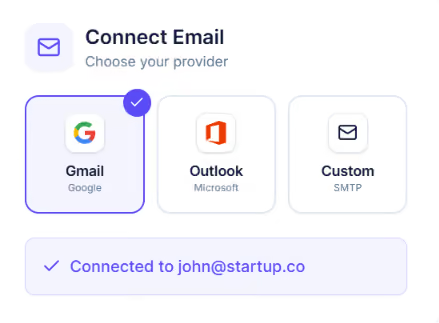
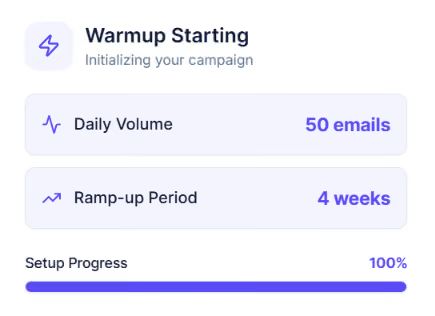
You should not expect an immediate fix. Mailwarm says early improvements can appear within days or weeks, while stronger and more stable inbox placement usually takes 2 to 4 weeks of continuous warm-up.
The main benefit is that you do not have to create this activity manually. Once it is running, you can monitor the results from the dashboard and adjust the intensity or pause warm-up when needed.
Mailwarm goes beyond sending automated warm-up emails. It also gives you tools to check where your emails are landing, find technical setup problems, and monitor deliverability across different providers.
Here are the main features you get:
The useful part is that Mailwarm combines warm-up and deliverability monitoring instead of only generating email activity. You can see where emails are landing and check technical issues such as authentication or blacklisting from the same platform.
Mailwarm helps improve deliverability by slowly building email activity and creating positive signals such as opens, replies, important marks, and moving emails out of spam. It also shows whether your emails are landing in the inbox or spam folder.
Mailwarm says most users may start seeing improvements within a few days or weeks. More stable inbox placement usually takes around 2 to 4 weeks of continuous warm-up.
User reviews also show positive results. One long-term G2 user said their deliverability improved when Mailwarm was running and dropped when they stopped using it. Another reviewer said they noticed better deliverability and reply results after using Mailwarm.
Still, Mailwarm cannot fix every deliverability problem on its own. Your results also depend on things like domain reputation, email authentication, sending volume, bounce rates, and how you run your campaigns.
So yes, Mailwarm can help improve deliverability, but the results are usually gradual and depend on the overall health of your email setup.
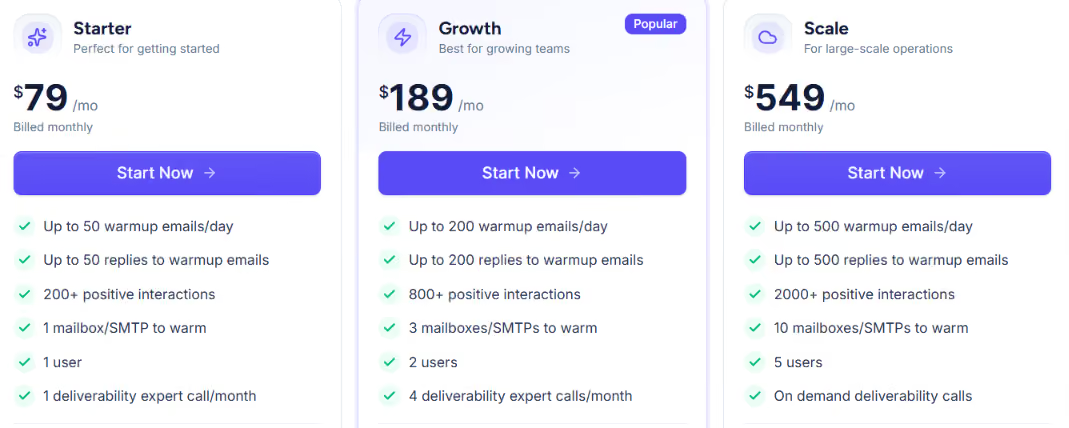
Mailwarm has three standard plans plus a custom plan for larger teams. You can pay monthly or choose annual billing for a lower monthly price.
All three standard plans include B2B and B2C warm-up, spam score monitoring, provider-level warm-up, custom email content for warm-up, authentication fix tools, and no required IMAP access.
If you pay yearly, Mailwarm currently shows a 13% discount. That brings the advertised monthly equivalent down to about $69 for Starter, $159 for Growth, and $479 for Scale.
The main thing to consider is the number of mailboxes. Starter only covers one mailbox, while Growth covers three and Scale covers ten. So, the cost can become significant if you need to warm a large number of cold email inboxes.
Mailwarm does not currently offer a traditional free trial.
Mailwarm is a good fit for teams that rely on email and want warm-up to happen automatically in the background. The company positions it for founders, sales teams, marketers, and agencies.
Overall, Mailwarm fits teams that want automated warm-up plus deliverability monitoring and expert help. Its pricing becomes harder to justify if you need to warm many outreach mailboxes.
If Mailwarm feels expensive for the number of mailboxes you need to warm, Warmforge is a more affordable alternative, especially for teams using Google Workspace and Microsoft 365.
Warmforge starts at $10 per mailbox per month when billed quarterly.
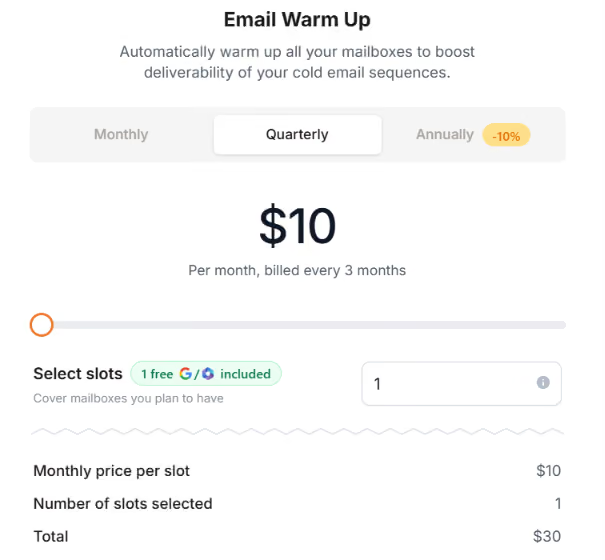
Mailwarm's Starter plan costs $79 per month for one mailbox when paid monthly, or $69 per month with annual billing.
The lower price does not mean you only get basic warm-up. Warmforge includes:
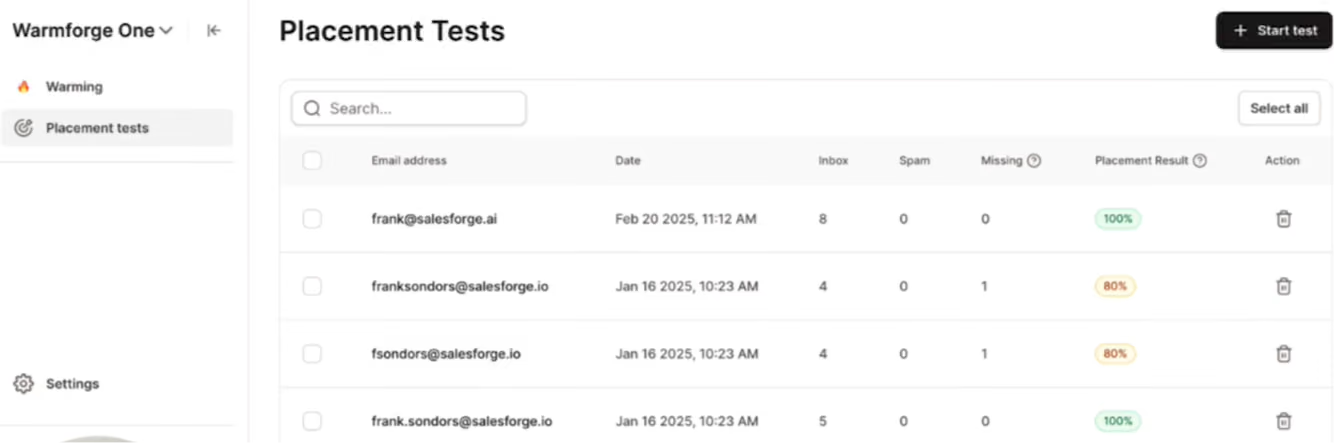
Warmforge includes one free placement test each month with a warm-up subscription. If you need more frequent testing, the Pro placement plan costs $39 per month for 100 tests, while the Growth plan costs $169 per month for unlimited tests.
The biggest limitation is provider support. Warmforge is mainly built for Google Workspace and Microsoft 365 mailboxes, while Mailwarm supports a broader range of providers, including Yahoo and SMTP-based services.
So, Mailwarm is the better choice if you need wider provider support or want deliverability expert calls included in your plan. But if you mainly use Google Workspace or Microsoft 365 and want to warm multiple outreach mailboxes, Warmforge offers warm-up, health monitoring, and placement testing at a much lower starting cost per mailbox.
Enter your email to get a custom plan & stack recommendation for your business
Please check your mailbox in 5 minutes

Mailwarm is worth considering, but its value depends heavily on how many mailboxes you need to manage. For one or a few important inboxes, the higher price may be easier to justify. You get a hands-off warm-up process, visibility into inbox placement, and access to deliverability experts.
The positive G2 feedback also suggests that users are generally happy with how easy it is to set up and run.
The value becomes less clear when you start adding more outbound mailboxes. At that point, paying for a limited number of mailbox slots can quickly increase your deliverability costs.
That is where Warmforge becomes a stronger choice for Google Workspace and Microsoft 365 users. Instead of paying for a larger bundled plan, you can add the mailbox slots you actually need while still getting warm-up, health checks, blacklist monitoring, and placement testing.
If that better matches how you run cold outreach, start with Warmforge and keep your mailboxes warm as you scale.