Google's actual guidance is to keep your spam rate below 0.10% and never let it hit 0.30%. Those are two different numbers doing two different jobs. The first is where you should operate. The second is where you stop being eligible for help when things go wrong.
So when someone tells me their spam complaint rate is at 0.28% and they're "still under the limit," what they're really saying is they've been running at three times the recommended level for weeks and nobody flagged it.
Here's what makes this metric harder than every other deliverability number you track. Bounces tell you immediately. Opens tell you within hours. Spam complaints show up days later, aggregated, with no name attached. You find out people hated your campaign long after the campaign finished sending.
This is a diagnostic guide, not a checklist. I'll cover what the number actually measures, what a realistic target looks like for cold outbound, why most cold email teams can't see the metric at all, and the specific fixes that bring it back under control.
What it is: Percentage of your delivered emails that recipients manually marked as spam. Formula: (complaints ÷ delivered) × 100.
Gmail's two numbers: Stay below 0.10%. Never reach 0.30%. Cross 0.3% and you lose access to Gmail's mitigation support until you hold under it for seven straight days.
How small 0.1% actually is: One complaint per 1,000 delivered emails. On a 200-email-a-day operation, three complaints in a week puts you over.
The three fixes that move it most: Tighter list relevance, a genuinely working opt-out, and fewer follow-ups.
The catch for cold email teams: You probably can't see this number at all. Google Postmaster Tools needs several hundred Gmail recipients per domain per day before it shows data. Multi-domain, low-volume cold outbound almost never hits that.
Find Out Where Your Emails Are Landing
Check Gmail, Outlook, Yahoo, and Zoho placement before poor inboxing turns into more spam complaints.
Spam complaint rate is the percentage of your delivered emails that a human recipient manually reported as spam.
The word "delivered" is doing a lot of work in that sentence. Bounced emails aren't in the denominator. Emails a filter routed to the spam folder aren't in the numerator either.
Only messages that reached a real inbox and then had a real person click "Report spam" count.
How to Calculate Spam Complaint Rate (Formula and Example)
Run it on real numbers. You sent 8,400 emails. 400 bounced. 8,000 were delivered. Twelve people reported you.
(12 ÷ 8,000) × 100 = 0.15%
That looks tiny. It's also 50% above the recommended threshold, and it came from twelve people out of eight thousand.
That ratio is the thing most people underestimate. You don't need a disaster campaign to breach 0.1%. You need a dozen annoyed strangers.
Why Spam Complaint Rate Is Measured Daily
Gmail computes spam rate daily. It doesn't smooth your good weeks against your bad Tuesday.
This matters more than it sounds. A team running clean at 0.04% for a month can send one badly targeted campaign on a Wednesday, spike to 0.6% for that single day, and take a reputation hit that lingers for weeks.
Your monthly average can look perfect while your daily chart has a spike in it. The spike is what Gmail responds to.
What Spam Complaint Rate Is Not (3 Common Confusions)
Three metrics get confused with spam complaint rate constantly, and each one leads to a different fix:
It isn't your unsubscribe rate. An unsubscribe is a person choosing to leave politely. A complaint is a person choosing to report you. Unsubscribes cost you nothing in reputation terms. A healthy unsubscribe rate usually means your complaint rate is low, because people had an easier option than the spam button.
It isn't your bounce rate. Bounces are delivery failures. They damage reputation through a different mechanism, and they're caused by bad data rather than bad targeting. They correlate with complaints because both come from stale lists, but they're separate metrics with separate fixes.
It isn't "my emails are going to spam." A filter decision is not a complaint. If your emails land in the spam folder automatically, that's a placement problem driven by authentication, content, or domain reputation. If people are actively reporting emails that reached their inbox, that's a relevance problem.
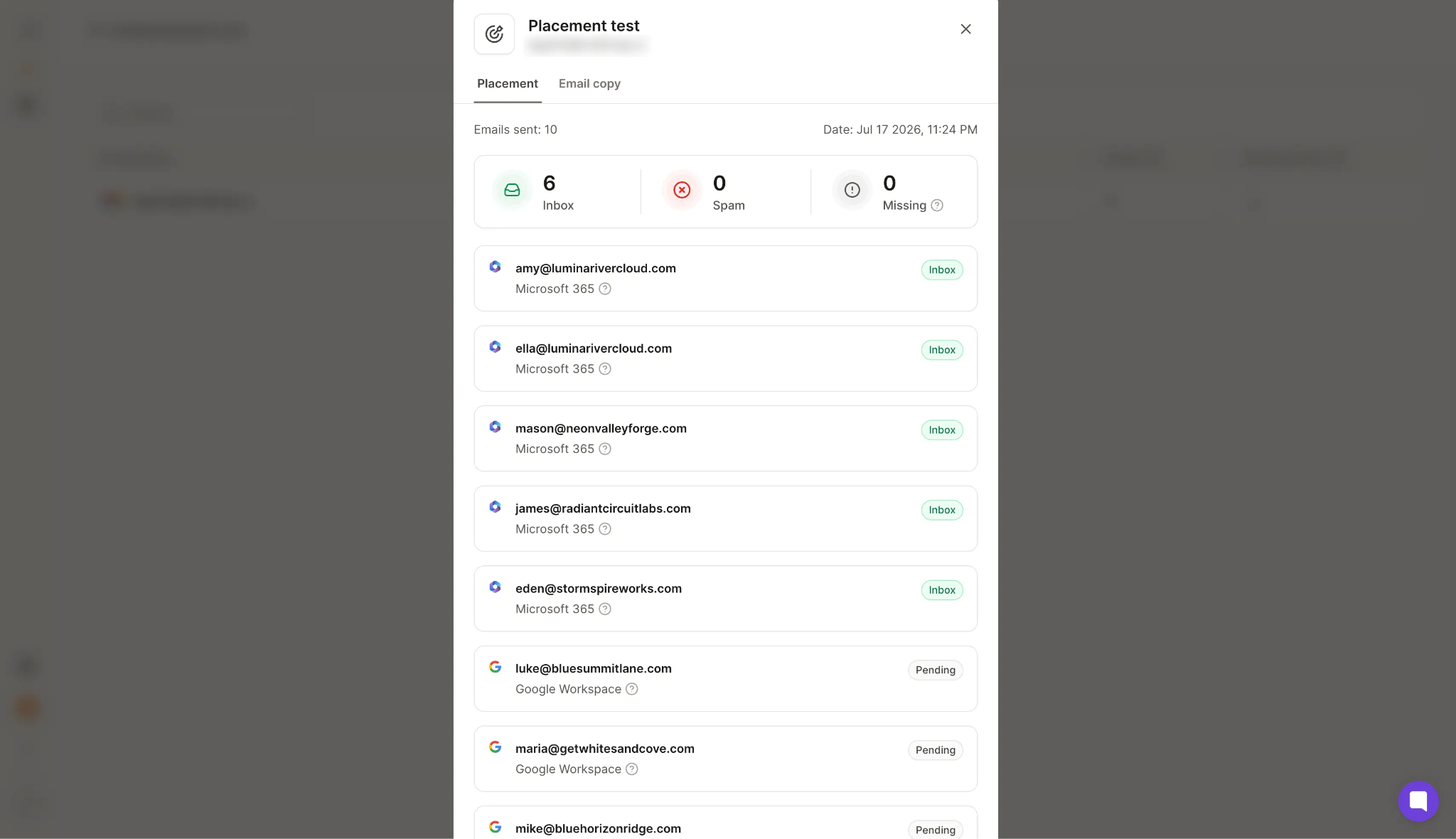
Warmforge's inbox placement test tells you which of the two is happening: it sends to seed inboxes across Gmail, Outlook, Yahoo, and Zoho and shows you where each provider is routing your message.
If placement drops on Gmail but Postmaster's spam rate stays empty, you're looking at reputation slipping before complaints have caught up. The emails going to spam breakdown covers the placement side in depth.
What Is a Good Spam Complaint Rate for Cold Email?
Google publishes both a target and a ceiling, and the difference between them is where most teams get confused:
Below 0.10% is the operating target. This is where you should live.
0.30% is the point of no return. Bulk senders above 0.3% become ineligible for Gmail's mitigation support. You get that eligibility back only after holding below 0.3% for seven consecutive days.
Google is also explicit that the impact is graduated. Rates above 0.1% already hurt inbox placement for bulk senders. You don't get a free pass between 0.1% and 0.3%. You get progressively worse delivery.
Reaching 0.3% doesn't mean a switch flips. It means you've been accumulating damage for a while and just crossed the line where Google stops helping you fix it.
Spam Complaint Thresholds for Yahoo, Microsoft, and Amazon SES
Gmail gets the most attention because Postmaster Tools makes the data visible. The other providers have thresholds too, they're just quieter about them.
Provider
Threshold
Where to Monitor
Gmail
Below 0.10% target, 0.30% ceiling
Google Postmaster Tools, updated daily
Yahoo
Below 0.30%
Complaint Feedback Loop (CFL)
Microsoft / Outlook
Below 0.30%
SNDS and JMRP
Amazon SES
0.10% triggers review, 0.50% risks pause
SES reputation dashboard
If you're sending B2B outbound, your list skews heavily toward Google Workspace and Microsoft 365. Yahoo barely matters. Microsoft matters a lot, and almost nobody sets up SNDS because it's less convenient than Postmaster Tools.
Realistic Spam Complaint Rate Benchmarks for Cold Outbound
Published benchmarks mostly come from marketing email, where recipients opted in. Cold outbound doesn't have that cushion, so the tolerance is tighter, not looser.
One cold email deliverability dataset I've referenced put financial services at a 0.02% spam complaint rate, the lowest across all industries in the study, alongside the highest inbox placement at 91%. The deliverability benchmarks piece breaks the numbers down by sector.
The pattern behind it is worth sitting with. Compliance-heavy industries perform best on complaints. Not because their copy is better, but because regulation forces clean lists, documented consent, and disciplined data governance.
Which tells you something useful. Complaint rate is downstream of list quality far more than it's downstream of writing.
Why 0.1% Is Harder to Hit Than It Sounds
One complaint per 1,000 delivered emails.
Put that against a typical cold outbound setup. Twenty mailboxes sending 40 emails a day is 800 emails daily, roughly 4,000 a week. Your budget at 0.1% is four complaints per week across the entire operation.
Four people. Out of four thousand.
That's the actual constraint. And it's why "we only got a few complaints" is never a reassuring sentence.
Why Cold Email Teams Can't See Their Spam Complaint Rate
Here's the part nobody writes about, and it invalidates most of the advice on this topic.
Google Postmaster Tools Needs Minimum Daily Volume
Google Postmaster Tools only populates spam rate data when a domain sends enough volume for statistical significance. In practice that means several hundred Gmail recipients per day, per domain, consistently.
Below that threshold you don't get a low number. You get an empty chart.
Why Cold Email Setups Fall Below the Reporting Threshold
Now look at how a competent cold outbound operation is built:
Multiple sending domains
Fifteen to forty mailboxes
Twenty to fifty emails per mailbox per day, deliberately capped
That structure exists specifically to avoid concentrating volume on any single domain, because concentrated volume is how domains get burned.
So the exact architecture that protects your deliverability is the architecture that makes your spam rate invisible to you. Distribute 800 daily emails across eight domains and no single one of them will ever cross Postmaster's reporting threshold.
This is not an edge case. This is the default configuration for almost every outbound team running at scale.
Why an Empty Postmaster Dashboard Is Misleading
An empty Postmaster dashboard reads like a green light. No red bars, no warnings, nothing alarming.
It means "no data," not "no problem."
I've watched teams operate on that assumption for months. They keep sending, complaints accumulate quietly across eight domains, and the first visible symptom is a reply rate that drops by half with no obvious cause. By then the damage is spread across the whole sending infrastructure and there's no single campaign to point at.
Deliverability Metrics to Track Instead of Spam Complaint Rate
When the primary metric is unavailable, you monitor proxies. Five that actually work:
Seed inbox placement: Send to a controlled set of real mailboxes across Gmail, Outlook, Yahoo, and Zoho, and measure where each provider routed your message. This is the closest thing to a direct read on reputation that a low-volume sender can get. Warmforge's inbox placement test runs this end-to-end: your email hits real seed mailboxes on each major provider, and you get back the percentage that landed in the primary inbox versus promotions versus spam, per provider. If Gmail placement drops from 92% to 71% between one test and the next, that gap is your complaint rate rising even when Postmaster is still empty.
Opt-out rate per sequence: This moves before complaint rate does. People willing to unsubscribe today are the same population who'd report you next week if the opt-out were harder to find. A rising opt-out rate on a specific sequence is your earliest warning.
Negative reply ratio: Track "please stop emailing me" replies as a percentage of total replies. Sudden increases mean a targeting problem, not a copy problem.
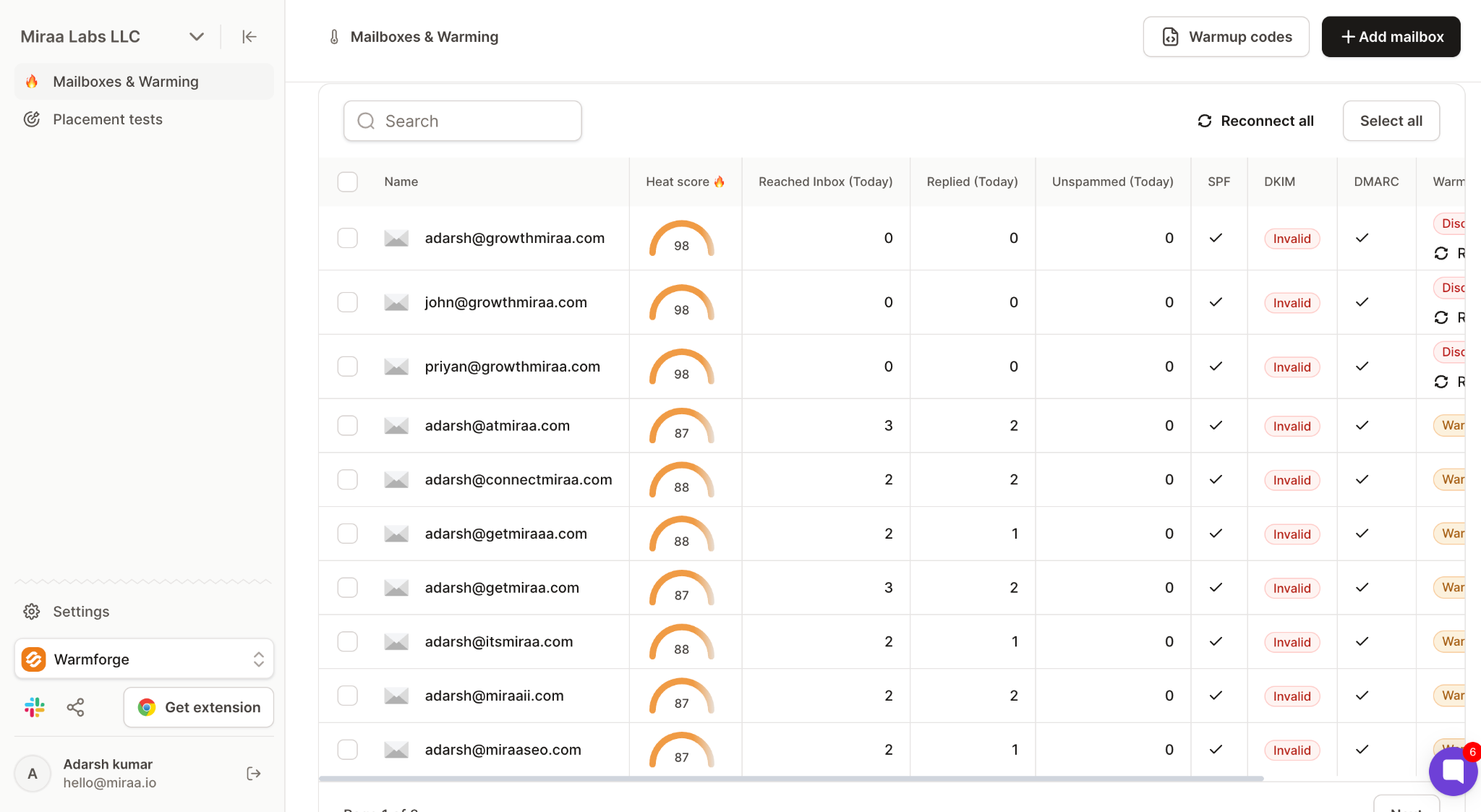
Per-mailbox open decay: If one mailbox's open rate drops while others hold steady, that mailbox has a reputation problem. Isolate it before it spreads. Warmforge's heat score surfaces this at the mailbox level: it's a 0-100 real-time reputation score, refreshed daily, that reflects how the warmup network is treating your mailbox right now. Anything under 85 means the mailbox is losing reputation and should not be sending live campaigns. Because it's per-mailbox, you catch the specific inbox that's slipping before the whole domain gets pulled down with it.
Bounce rate by list source: The dataset I referenced put the blended cold email bounce rate at 2.2%. Anything meaningfully above that on a specific list source tells you that source is producing stale contacts, which is the same root cause that produces complaints.
Track the Signals Before Complaints Spike
Monitor inbox placement, mailbox health, authentication, and reputation from one place, even when your Postmaster data is blank.
Before the fixes, the diagnosis. In my experience these four causes account for nearly everything, ranked by how often they're the real culprit.
1. Bad Contact Data and Poor List Targeting
Relevance failure is cause number one by a wide margin.
Nobody reports an email they were plausibly the right recipient for, even a badly written one. They ignore it. The spam button comes out when the email makes no sense arriving in that inbox at all.
Teams respond to a complaint spike by rewriting subject lines. The subject line is almost never the problem. The list is.
2. Missing or Buried Unsubscribe Options
When there's no opt-out, or the opt-out is a link buried under a signature that leads to a preference centre, the spam button becomes the opt-out.
It's faster. It works immediately. And from the recipient's perspective it's the same action with a better guarantee.
3. Sending Too Many Follow-Ups Too Fast
Step nine of a nine-step sequence generates more complaints than steps one through four combined.
The first email is a stranger being mildly annoying. The seventh is a stranger who clearly isn't listening. That shift in perception is where reporting happens.
4. Sender Identity That Looks Suspicious
No real name. No company. No physical address. A subject line starting with Re: for a conversation that never happened.
Complaints spike sharply on identity doubt, because a recipient who suspects phishing reports rather than deletes. The avoid spam filters breakdown covers related patterns.
How to Reduce Your Spam Complaint Rate (6 Fixes)
Six fixes. Work them in this order, because fixing copy before fixing the list is how teams waste a month.
Fix 1: Clean and Segment Your Email List
This is where the majority of your complaint rate lives:
Tighten the segment before you tighten the copy. A narrow, specific segment complains less than a broad one, every time. If you can't articulate why this exact person should care in one sentence, they're going to wonder why they got the email.
Verify every address before sending. Bounces and complaints share the same root cause, which is stale data. A contact who changed jobs eighteen months ago either bounces or reaches someone in a role that has nothing to do with your pitch.
Cut role-based addresses. info@, support@, sales@, admin@, contact@. These inboxes are monitored by people whose job includes filtering unsolicited email, and they report at dramatically higher rates than named inboxes. Strip them from cold sequences entirely.
Drop catch-all domains, or isolate them. Catch-all servers accept everything, so verification can't confirm the mailbox exists. Either exclude them or route them to a separate low-volume domain so the fallout stays contained.
Deduplicate across every sequence. The same person receiving three campaigns from three reps at your company is a complaint waiting to happen. This is the single most common self-inflicted cause I see at companies with more than five SDRs.
Suppress existing relationships. Current customers, open opportunities, active pipeline, and anyone who already said no. Getting cold-pitched by a vendor you already pay is one of the fastest routes to a spam report.
Refresh anything older than 90 days. Contact data decays constantly, and it decays fastest in high-turnover industries. Real estate had the worst bounce rate at 2.3% in the dataset I referenced, for exactly this reason.
Leadsforge handles the sourcing side with waterfall enrichment across multiple providers, so you're not stuck with a single database's hit rate. That waterfall matters here specifically because complaints and bounces come from the same root cause: stale contacts. A single-source list is one bad refresh cycle away from a complaint spike.
Fix 2: Give Recipients an Easy Way to Unsubscribe
Every complaint is someone who wanted to leave and picked the loudest available exit. Give them a quieter one:
Include an opt-out in every email, including follow-ups. Not just the first touch. The person who wants out on email four shouldn't have to scroll back to email one.
Text-based opt-out usually beats a link. A line like "reply STOP and I'll close the loop" costs you nothing, reads as human, and doesn't add a clickable URL that filters have to evaluate. It also converts better, because replying is a lower-friction action than clicking through to a page.
If you use a link, make it single-click. One click, done, confirmed. Not a preference centre. Not a login. Not a "are you sure?" page. Any friction you add converts unsubscribes into complaints at close to a one-to-one rate.
Honour opt-outs globally and instantly. Across every sequence, every mailbox, every client account. Someone who opts out of one campaign and receives another one from you next week will report that second email, and they'll be right to.
Suppress at the domain level when it's warranted. When a senior person says "nobody at this company is interested," that's a company-wide no. Treat it as one.
Fix 3: Limit Your Follow-Up Cadence
Three to four steps, not nine. The returns past step four are small and the complaint cost is not.
Minimum three business days between touches. More for senior titles. A VP who gets daily follow-ups from a stranger will report you by day three.
Auto-stop on any reply, including negative ones. This should be obvious and it's still one of the most common failures I see. Someone replies "not interested," the sequence continues because the reply wasn't categorised, and touch four arrives. That's a guaranteed complaint.
Respect business hours in the recipient's timezone. A 3am email reads as automated, and automated reads as spam.
No weekend follow-ups. Nothing in cold outbound is urgent enough to justify Saturday.
Never restart a closed-lost prospect without a real reason. A new product line is a reason. A new quarter is not.
The sending platform you run all this through should handle reply-stopping, timezone scheduling, and variable send intervals natively. Salesforge covers all three, plus multichannel sequencing across email and LinkedIn if you need it.
Fix 4: Write Emails That Look Like a Human Wrote Them
One ask, and make it small. Email one asking for a 30-minute call is asking a stranger for their afternoon. Ask a question instead.
Plain text. No images, no buttons, no HTML signature with a logo and social icons. Formatted marketing emails signal bulk, and bulk from an unknown sender signals spam.
One link maximum. Zero in the first email if you can manage it.
Honest subject lines. No fake Re:, no fake Fwd:. This is the single fastest way to convert a mildly uninterested recipient into someone who reports you, because they feel tricked.
Lead with why you picked them, in line one. Visible in the preview pane, before they open. The recipient's first question is "why me," and if the answer isn't immediately apparent, the spam button is a reasonable response.
Real name, real company, real physical address in the signature. Anonymity reads as phishing.
Vary the copy. Two thousand identical emails landing in the same provider within an hour create a pattern that inbox filters recognize as bulk.
Fix 5: Set Up Proper Email Infrastructure and Authentication
Infrastructure doesn't reduce complaints. It reduces how much each complaint costs you:
SPF, DKIM, and DMARC on every sending domain. An authenticated sender with a few complaints is treated very differently from an unauthenticated one with the same number. Warmforge runs daily SPF, DKIM, and DMARC checks on every mailbox you connect and flags failures the same day they happen. This matters because auth breaks silently: a DNS record gets edited during a domain migration, or a provider updates its policy, and your DKIM signature stops validating without any obvious warning. Without a daily check, you find out weeks later when placement collapses. With one, you catch it before Gmail starts routing you to spam.
Custom tracking domain, or no open tracking at all. Shared tracking domains inherit other senders' reputations. If you don't need open data, and for most outbound teams it's a vanity metric, turn it off.
Warm up every new mailbox before it sends anything real. 14 days minimum. This is what Warmforge is built for: your mailbox joins a real inbox network of Google and Microsoft mailboxes and starts exchanging conversation-style emails at a slowly ramping volume. The warmup emails get opened, replied to, marked important, and moved out of spam by the network. All of that is signal to Gmail and Microsoft that your mailbox behaves like a legitimate human sender. Heat score climbs from zero to 85+ over the 14 days, and only then is the mailbox ready for live campaigns. Skip this step and Gmail treats your first cold send like it came from throwaway infrastructure, because that's exactly what it looks like.
Ramp volume gradually. Ten a day in week one. Not fifty. New domains sending at full volume immediately look exactly like throwaway spam infrastructure, because that's what throwaway spam infrastructure does.
Rotate sending and cap per mailbox. Sender rotation distributes volume automatically so no single account carries the load.
Separate domains by offer or segment. If you're running three very different campaigns, isolate them. A high-complaint campaign should be able to fail without taking your other two down with it.
Run a placement test before launch. Warmforge's inbox placement test tells you where a new sequence will actually land before anyone receives it. That's a full launch worth of complaint risk you can avoid for the cost of one test.
If you're building infrastructure from scratch, Mailforge handles shared-IP domains and mailboxes in about 5 minutes, Infraforge does the same on dedicated IPs for higher-volume senders, and Primeforge provides real Google Workspace and Microsoft 365 mailboxes with US IPs pre-configured. Whichever you pick, run it through Warmforge for 14 days before sending anything live.
Fix 6: Monitor Deliverability Metrics Weekly
Set up Google Postmaster Tools properly. Add the Feedback-ID header so you get campaign-level attribution rather than one aggregate number. Without it, even when you do have data, you can't tell which campaign caused a spike.
Register for the other feedback loops. Yahoo CFL, Microsoft SNDS and JMRP. Microsoft matters for B2B and almost nobody bothers.
Run a placement test before every new sequence and after any domain or DNS change. The email deliverability test walkthrough covers the methodology. [WARMFORGE INTERLINK]
Review opt-out rate per sequence weekly. It's your leading indicator.
Pause the campaign, not the domain. When something spikes, isolate the source before you shut down your whole operation. The full metric set worth tracking is in the email deliverability metrics guide. [WARMFORGE INTERLINK]
The reason weekly monitoring works is compounding. Every metric on this list moves days or weeks before complaint rate does, so a weekly review catches the early signal while there's still time to react. Warmforge's Deliverability Center pulls heat score, inbox placement, auth status, blacklist scans, and warmup progress into a single view across every connected mailbox.
That's the difference between spotting a slip in week one versus finding out at the end of the month when reply rate has already halved.
Spam Complaints Already Too High?
Find the affected mailboxes, identify the problem segment, and rebuild your sending reputation before you resume campaigns.
How to Recover If Your Spam Complaint Rate Is Above 0.3%
Different situation, different playbook. Prevention advice doesn't help once you're over the line.
Step 1: Stop Sending From the Affected Domain
Not reduce. Stop.
Every additional email while you're above 0.3% adds to a rate that's already blocking your recovery clock from starting.
Step 2: Identify the Problem Segment
Your overall rate is a blend, and blends hide culprits. Break it down by:
List source
Job title
Seniority
Industry
Sequence
In almost every case I've looked at, one segment is producing the majority of complaints while everything else runs fine. Find that segment before you rebuild anything.
Step 3: Purge and Rebuild Your Email List
Remove the offending segment permanently, not temporarily
Re-verify everything that's left
Cut the cadence on whatever you restart with
If the segment came from a specific list source, stop using that source
Step 4: Re-Warm Mailboxes for 14 Days
Run a full 14-day warmup on the affected mailboxes before resuming any live sending
Then restart at roughly 20% of your previous volume
Build back over a month
Going straight back to full volume after a pause looks worse than never having paused, because Gmail flags the volume swing as a re-activation of dormant spam infrastructure.
Warmforge runs the re-warmup exactly like a fresh warmup: your mailbox rejoins the inbox network, sends and receives real conversation-style emails, and heat score is rebuilt back toward 85+ over the 14 days. Only when heat score confirms healthy reputation do you restart live campaigns, and even then at reduced volume so Gmail sees a natural ramp rather than a sudden spike.
Step 5: Expect a 4-6 Week Recovery Lag
You need seven consecutive days below 0.3% before mitigation eligibility returns. That's the floor, not the finish line.
Reputation recovers slower than it degrades. Google says this explicitly, and it matches what I've seen. Plan for four to six weeks before performance returns to where it was, and plan your pipeline accordingly.
If your emails are still landing badly after that, the issue has moved beyond complaints.
Below 0.10% is the operating target for Gmail, and 0.30% is the ceiling you should never reach. For cold outbound specifically, aim lower than the marketing email benchmarks you'll find published, because cold email has no opt-in to fall back on.
How do you calculate spam complaint rate?
Divide the number of spam complaints by the number of delivered emails, then multiply by 100. Bounced emails are excluded from the denominator. Only messages that reached an inbox and were then manually reported count.
What happens if my spam complaint rate goes above 0.3%?
Bulk senders above 0.3% become ineligible for Gmail's mitigation support. You regain eligibility only after keeping the rate below 0.3% for seven consecutive days. Delivery impact is graduated, so damage accumulates before you cross the line.
Why is my spam rate blank in Google Postmaster Tools?
Postmaster Tools only shows spam rate when a domain sends enough daily volume to a Gmail audience for the data to be statistically meaningful. Multi-domain cold outbound setups usually stay under that threshold, so the chart stays empty. Blank means no data, not a clean record. Warmforge's inbox placement test is the workaround for low-volume senders.
Do unsubscribes count as spam complaints?
No. An unsubscribe is a normal opt-out and carries no reputation penalty. A complaint is a manual spam report and does. A healthy unsubscribe rate often indicates a low complaint rate, because recipients had an easier exit than the spam button.
How long does it take to recover from a high spam complaint rate?
The formal requirement is seven consecutive days below 0.3%. Actual performance recovery usually takes four to six weeks, because reputation improves more slowly than it declines. Re-warming affected mailboxes and resuming at reduced volume shortens the timeline.
Does adding an unsubscribe link increase or decrease complaints?
It decreases them. When people can't find a way out, they use the spam button instead. Some teams remove the opt-out fearing it will cost them prospects, and it reliably makes complaint rates worse.
Is spam complaint rate different for cold email versus marketing email?
The thresholds providers publish are identical, but the tolerance you should give yourself is not. Marketing recipients opted in, so a complaint signals a content problem. In cold outbound, a complaint usually signals a targeting problem, and it should be treated as more serious.