
Spam complaints can ruin your email outreach. If too many recipients mark your emails as spam, your sender reputation will take a hit , damaging your sender reputation, making it harder for your messages to reach inboxes. Worse, if your complaint rate exceeds 0.1%, your campaigns could face serious issues, and rates over 0.3% may trigger warnings or blocks from email providers like Gmail and Yahoo.
Here’s the solution: follow these five steps to protect your reputation and improve deliverability:
Key fact: 90% of spam issues stem from technical misconfigurations, not content. Start by fixing your email setup, and you’ll see better results.
Keep reading for actionable tips to safeguard your campaigns and avoid costly mistakes.
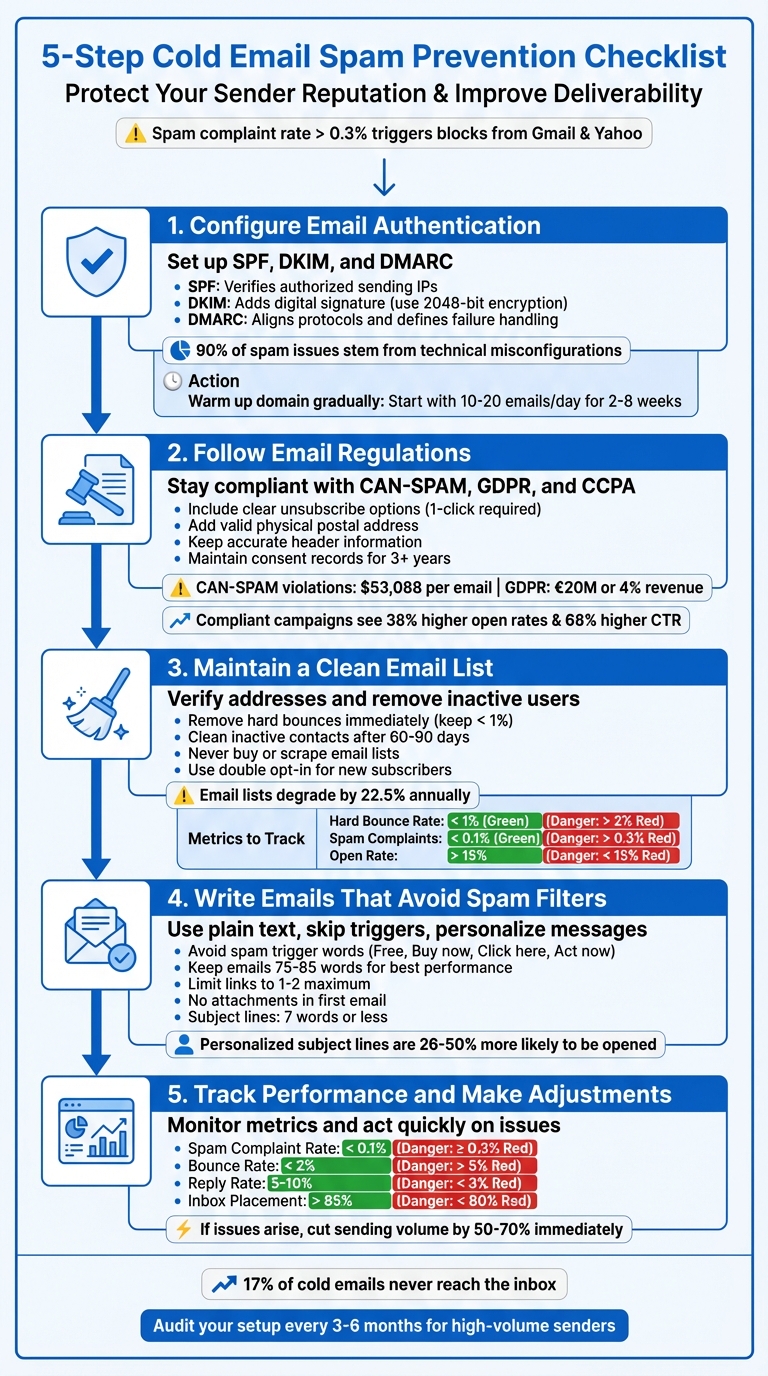
5-Step Cold Email Spam Prevention Checklist
Getting your email authentication right is crucial to avoid spam complaints and ensure your emails actually reach inboxes. Without this setup, mailbox providers might not trust your emails, and they could end up being blocked or sent straight to spam.
SPF, DKIM, and DMARC are the three key protocols you need. SPF confirms which IPs or domains are authorized to send emails on your behalf. DKIM adds a cryptographic signature to verify that the email hasn’t been tampered with. DMARC ties these two together and tells receiving servers how to handle emails that fail authentication. Starting February 2024, Google and Yahoo require all three for bulk senders sending over 5,000 emails daily. Skipping this step? Your emails might not even make it to your recipients.
Begin with your DNS records. Your SPF record should list all servers allowed to send emails for your domain. Keep it simple - SPF is limited to 10 DNS lookups, and exceeding this limit will break authentication. For DKIM, use a 2048-bit encryption key for stronger security instead of the weaker 1024-bit option.
When configuring DMARC, start cautiously with a p=none policy to gather reports without affecting email delivery. Once you’re confident everything is working correctly, move to stricter policies like p=quarantine and eventually p=reject. This gradual approach helps you avoid accidentally blocking legitimate emails.
| Protocol | Purpose | Key Benefit |
|---|---|---|
| SPF | Verifies authorized sending IPs/domains | Stops domain spoofing |
| DKIM | Adds a digital signature to email headers | Ensures message integrity |
| DMARC | Aligns SPF/DKIM with the "From" domain and defines failure handling | Builds trust with providers |
Make sure your "From" address domain aligns with the domains specified in your SPF and DKIM records. This alignment, known as DMARC alignment, is essential. Even one misconfigured record can undo all your efforts.
"DNS is the backbone of your email strategy. A well-configured SPF record keeps spammers out and your reputation intact. But a single typo? It's like handing the keys to your domain to the bad guys".
- Matthew Vernhout, Principal Email Advisor at Email Industries
While email authentication provides a solid foundation, building a strong reputation involves more than just this step.
Authentication alone doesn’t guarantee success. A new domain starts with no reputation, and mailbox providers will judge it based on recipient interactions like opens, clicks, and replies.
Start small. Send 10–20 emails per day for the first few days, then gradually increase your volume - but don’t double your sending overnight. Keep growth below 100% day-over-day. For most campaigns, warm-ups take 2–8 weeks, but high-volume efforts may require up to 12 weeks. Skipping or rushing this process? That’s where 85% of deliverability problems come from.
Manual warm-ups, like asking colleagues to engage with your emails, can be tedious. Automated tools like Warmforge streamline the process by simulating real engagement across a network of business inboxes. Bonus: Warmforge offers one free warm-up slot per user, so you can test it out without spending a dime.
Even after warming up, don’t flood inboxes with thousands of emails. For cold outreach, stick to 50–100 emails per day per mailbox. Space emails out by 3–5 minutes to mimic natural sending patterns. Maintaining a low-volume, ongoing warm-up behind the scenes can help keep your sender reputation strong and steady.
Once your domain is authenticated and warmed up, tracking your sender reputation becomes critical. Tools like Google Postmaster Tools provide insights into your domain reputation, IP reputation, and spam complaint rates. Check these metrics daily to catch issues early. Before launching major campaigns, run inbox placement tests to see whether your emails land in the primary inbox, promotions tab, or spam folder. Warmforge includes one free placement test per month, along with DNS health checks and blacklist status reviews.
Set alerts for bounce rates above 2% or spam complaints exceeding 0.1% - these are red flags that need immediate attention. Over 20% of legitimate emails fail to reach inboxes due to blacklisting of IPs or domains. Tools like MXToolBox or MultiRBL can help you check if you’ve been flagged.
"Sending emails without monitoring the email authentication status is little more than a shot in the dark.".
- DMARCLY experts
Regular monitoring helps you catch problems before they spiral out of control.
"An IP reputation is hard to build, easy to lose, and hard to regain".
- Rob Pellow, Digital Experience Director at Armadillo
Staying on the right side of email regulations isn’t just about avoiding fines - it’s also about maintaining trust and improving performance. Ignoring these rules can cost you big time. For example, a single CAN-SPAM violation could set you back $53,088 per email, while GDPR non-compliance might result in penalties as high as €20 million or 4% of global annual revenue. If your audience includes California residents, CCPA violations could cost $2,500 for unintentional breaches and $7,500 for intentional ones.
Beyond the financial risks, compliance has a direct impact on your campaign success. Permission-based email campaigns typically see 38% higher open rates and 68% higher click-through rates compared to non-compliant ones. Following these rules not only keeps you out of trouble but also strengthens the trust you’ve built with your audience.
Email regulations vary depending on where your recipients are located. In the U.S., the CAN-SPAM Act operates on an opt-out model. This means you can email without prior consent, but recipients must have an easy way to unsubscribe within 10 business days. Meanwhile, the GDPR in the European Union requires explicit opt-in consent before you send any emails. Over in California, the CCPA focuses on transparency, giving residents the right to opt out of having their data sold or shared.
One common misconception is that B2B emails are exempt from these laws. That’s not true. The Federal Trade Commission makes this clear:
"Despite its name, the CAN-SPAM Act doesn't apply just to bulk email. It covers all commercial messages... The law makes no exception for business-to-business email."
Adding to the challenge, starting February 2024, major email providers like Google and Yahoo will block bulk senders whose spam complaint rate hits 0.3% or higher - that’s just three complaints per 1,000 emails. Exceed this threshold, and your emails won’t even make it to inboxes.
| Regulation | Consent Model | Unsubscribe Timeline | Max Penalty |
|---|---|---|---|
| CAN-SPAM (US) | Opt-out (no prior consent) | 10 business days | $53,088 per email |
| GDPR (EU) | Opt-in (explicit consent) | Immediate | €20M or 4% of revenue |
| CCPA (California) | Opt-out (transparency-focused) | Not specified | $2,500–$7,500 per violation |
To stay compliant, your emails need to meet specific legal requirements.
Every commercial email you send must contain certain elements - no exceptions. First, ensure your header information (like the “From,” “To,” and “Reply-To” fields) is accurate and clearly identifies the sender. Second, your subject line must match the content of your email. Misleading subject lines - like using “Invoice attached” for a sales pitch - are outright violations.
Third, include a valid physical postal address in your emails. This can be a street address, a P.O. Box, or a registered private mailbox. Fourth, provide a clear unsubscribe link that’s easy to find and use. Starting February 2024, major email providers will require a one-click unsubscribe option in both the email body and header. Make sure unsubscribing is hassle-free.
If you’re using an agency or third party to handle your email campaigns, remember that you’re still legally responsible for their compliance. Their mistakes could mean fines for you.
Proper documentation is your safety net if regulators come calling. You need to maintain records of how, when, and where each email address was obtained. This means logging the source (like a website form or a business card exchange), the timestamp of consent, and the legal basis for contacting the individual - whether it’s explicit consent or legitimate interest under GDPR.
You should also maintain a suppression list and cross-check it before every campaign to avoid contacting anyone who has opted out. Industry experts recommend keeping unsubscribe records for at least three years to protect yourself during potential FTC investigations.
Here’s a cautionary tale: In 2018, French retailer Optical Center was fined €250,000 by the CNIL (France’s data protection authority) after security flaws exposed customer email addresses and marketing preferences. This highlights the importance of not just keeping records but also securing them.
Using double opt-in is one of the best ways to ensure compliance. This process requires users to confirm their email subscription by clicking a link in a follow-up email. While not mandatory under U.S. law, double opt-in lists achieve 22.7% higher conversion rates than single opt-in lists. It’s an extra step, but it pays off in better engagement and legal protection.
Keeping your email list in top shape is just as crucial as ensuring proper authentication and following regulations. Why? Because the quality of your email list directly affects whether your messages land in inboxes or get flagged as spam. A poorly maintained list - filled with invalid addresses, inactive users, or purchased contacts - can ruin your sender reputation faster than almost anything else. On average, email lists degrade by 22.5% annually, which means that if you don’t regularly clean your list, nearly a quarter of your contacts could harm your deliverability.
The stakes are high. For example, if your hard bounce rate climbs over 10%, Internet Service Providers (ISPs) will often block all emails from your domain. Even smaller issues, like an open rate below 15%, can signal to email providers that your messages might be spam. The good news? Maintaining a clean email list is straightforward if you stick to some essential practices.
Start by validating email addresses at every entry point - whether through web forms, CRM imports, or sales workflows. Real-time validation helps catch common issues like typos, role-based emails (e.g., info@ or sales@), and disposable addresses before they enter your system. These checks should include syntax validation, domain verification (to confirm MX records exist), and mailbox existence checks, all without sending an actual email.
Regular maintenance is key. For stable databases, clean your list annually. If you’re dealing with high turnover, increase the frequency. Use re-engagement campaigns to target inactive contacts, and focus on removing those who haven’t opened or clicked in 60–90 days for outbound campaigns or 90–180 days for newsletters.
Pay close attention to hard bounces (5.x.x errors), as these represent permanent failures like non-existent email addresses. Remove them immediately to avoid triggering domain-wide filtering. Keeping your hard bounce rate under 1% is essential, while soft bounces should ideally stay below 5%. Here’s a quick reference for healthy metrics:
| Metric | Healthy Threshold | Danger Zone |
|---|---|---|
| Hard Bounce Rate | < 1% | > 2% |
| Spam Complaint Rate | < 0.1% | > 0.3% |
| Unsubscribe Rate | < 5% | > 5% |
| Open Rate | > 15% | < 15% |
Using purchased or scraped email lists is a surefire way to destroy your sender reputation. These lists often contain pristine spam traps - email addresses designed to catch scrapers. Sending even one email to such an address can result in immediate blacklisting.
The financial risks are just as severe. Violating compliance rules, like those under CAN-SPAM, can lead to fines of up to $53,088 per email. Beyond penalties, purchased lists perform poorly. Permission-based campaigns typically achieve 38% higher open rates and 68% higher click-through rates compared to non-compliant lists. Plus, most reputable Email Service Providers (ESPs) will suspend accounts with high bounce or complaint rates.
Instead of buying lists, focus on building your own through methods like gated content, webinars, product sign-ups, and events. Use double opt-in to ensure new subscribers confirm their email addresses via a link. This not only filters out bots and typos but also provides proof of consent. For a head start, services like VerifiedEmail offer 200 free email verifications.
Segmenting your email list based on engagement is another powerful way to protect your sender reputation. ISPs look at opens, clicks, and replies to measure how engaged your audience is. Continuing to email disengaged contacts drags down your overall engagement rates, jeopardizing your ability to reach new, high-quality prospects.
Here’s how you can segment effectively:
Automate this process using CRM tools that create "Smart Views" or triggers. For example, you can set up workflows to pause email sequences for contacts who haven’t interacted in 30–60 days. To reduce unsubscribes, offer disengaged users a preference center where they can choose to receive fewer emails instead of opting out entirely.
As Peter Cools, CEO of Rodz, explains:
"The best way to protect deliverability is to only email when there's a reason to. At Rodz, we only contact leads when a signal tells us they're likely to care - and it keeps our reputation clean and conversion high."
Once you've set up authentication, ensured compliance, and maintained a high-quality email list, it's time to focus on your email content. Even perfectly authenticated emails can land in spam if the content raises red flags. In fact, 17% of cold emails never make it to the inbox, often due to spam filter triggers. The good news? Avoiding these pitfalls is easier than you might think.
Certain words and phrases scream "spam" to filters. Think of your email as a message to a colleague, not a sales pitch to a crowd. Ziemek Bućko, Cold Email Evangelist at Hunter.io, advises:
"Make every cold email look like a message you would send to a colleague at work."
So, instead of saying "Click here now!" try something like, "How about a quick chat?" Short and conversational works best - cold emails with 75 to 85 words perform the highest. Also, keep links to a minimum. Emails without links in the initial touchpoint see 20–30% higher reply rates than those with links.
Here’s a cheat sheet of words and phrases to avoid:
| Category | Examples of Spam Triggers |
|---|---|
| Financial / Offers | Free, Buy now, Discount, Winner, Risk-free, Exclusive offer |
| Urgency / Pressure | Act now, Urgent, Limited time, Apply now |
| Promises / Gimmicks | Guarantee, WIN, Congratulations, 100% more |
| Call-to-Action | Click here, See for yourself |
| Formatting Triggers | ALL CAPS, Excessive exclamation marks, Bold text, Custom fonts |
By steering clear of these triggers, you’ll craft emails that feel natural and professional.
Plain-text emails tend to outperform flashy HTML templates because they feel more personal. Heavy HTML, bold colors, and fancy layouts can make your email look like a mass marketing blast, which spam filters love to block. Keep your formatting simple and clean.
Also, think mobile-first. Use short paragraphs (2–3 lines) and plenty of white space for better readability on smartphones. Keep subject lines concise - 7 words or fewer and under 30 characters is ideal for mobile open rates.
| Formatting Element | Best Practice | Why It Matters |
|---|---|---|
| HTML | Minimal or Plain Text | Reduces "marketing blast" appearance |
| Links | 1–2 Maximum | Lowers spam filter scrutiny |
| Images | Use sparingly or avoid | Prevents spam flags from high image-to-text ratios |
| Subject Line | 7 words or less | Boosts mobile open rates |
| Attachments | None in first email | Avoids security risks and filtering |
A simple, clean format not only looks better but also makes it easier for your email to pass spam filters.
Personalization isn’t just a nice touch - it’s essential for engagement and deliverability. Spam filters are trained to spot mass emails, so identical messages are more likely to get flagged. Customizing your emails shows relevance and increases your chances of reaching the inbox.
Start by referencing something specific about the recipient. This could be a recent LinkedIn post, a shared challenge, or news about their company (like funding or a product launch). But don’t overdo it - cramming too many personalized details can feel robotic.
Here’s why personalization works:
Since most prospects spend just 11 seconds reading an email, make sure your personalized content appears early in the message. To stay efficient, follow the 3–5 minute rule: spend no more than 3–5 minutes per prospect finding a compelling angle for high-priority accounts. For larger campaigns, tools like "Spin Syntax" or "Liquid Syntax" can help you vary email content while keeping it unique for each recipient.
As Optif.ai puts it:
"Personalization isn't optional - it's the price of entry."
Once you've nailed down authentication, compliance, list hygiene, and optimized content, the next step is to keep a close eye on your campaign's performance. Why? Because around 17% of cold emails never make it to the inbox, often due to overlooked warning signs. The difference between a thriving campaign and a blacklisted domain lies in how quickly you can spot and resolve issues.
Your email metrics directly reflect your sender reputation. The most critical metric? Spam complaint rate - this shows how often recipients mark your emails as spam. Keep it under 0.1%; let it creep up to 0.3%, and email providers like Gmail and Yahoo may start filtering your messages aggressively.
Another key metric is your bounce rate. Hard bounces (emails sent to invalid addresses) should stay below 2%. If your bounce rate climbs above 5%, it signals poor list hygiene and can damage your sender reputation. Additionally, aim for a reply rate of 5–10%; a rate below 3% could indicate issues with your targeting or messaging. Finally, track your inbox placement rate - the percentage of emails landing in the primary inbox instead of spam or promotions folders. An ideal placement rate is above 85%; anything under 80% calls for immediate action. Remember, email lists naturally decay by 22–28% annually.
| Metric | Target Benchmark | Danger Zone |
|---|---|---|
| Spam Complaint Rate | < 0.1% | ≥ 0.3% |
| Bounce Rate | < 2% | > 5% |
| Reply Rate | 5–10% | < 3% |
| Inbox Placement Rate | > 85% | < 80% |
Even after all your setup efforts, regular monitoring is essential to keep your emails landing where they should - right in the inbox.
If you can't see the problem, you can't fix it. Tools like Google Postmaster Tools, Microsoft SNDS, and MXToolbox provide valuable insights into how email providers view your domain reputation and whether your IP has been blacklisted. For a more proactive approach, platforms like Warmforge offer placement tests and health checks, showing exactly where your emails end up - in the inbox, promotions, or spam folders. Warmforge even provides one free placement test per month and automatically checks your SPF, DKIM, and DMARC records.
Before launching any new template, test it on a seed list. If emails are landing in spam, remember - 90% of the time, it’s due to a technical issue, not the content. Use these tools to identify the problem and adjust your strategy accordingly.
When your metrics signal trouble, speed is your best ally. If you notice a spike in spam complaints or a drop in inbox placement, take immediate action. Start by cutting your daily sending volume by 50–70%. Focus on sending to your most engaged recipients - those who have recently opened or replied - to rebuild positive signals. Perform a technical audit of your SPF, DKIM, and DMARC records, and check for blacklists and learn how to remove your domain using specialized tools. If you’re on a blacklist, stop all sending until you fix the root cause.
To recover, give your domain a 7–14 day break with minimal activity. During this time, remove unengaged contacts (those who haven’t interacted after 3–4 attempts) to prevent further damage. Once your domain is ready, resume sending gradually: start with 10–20 emails per day and increase volume by no more than 100% day-over-day. Set up automated alerts to pause campaigns if key metrics hit danger thresholds - this simple precaution can save your domain from long-term damage.
Achieving success with cold emails hinges on a structured approach that protects your sender reputation and ensures compliance. The five steps outlined in this checklist work together seamlessly: proper authentication builds trust with email providers, staying compliant with regulations keeps you out of legal trouble, clean email lists ensure you're targeting real people, optimized content helps you bypass spam filters, and ongoing monitoring catches potential issues before they escalate.
The stakes are high. With 45% of global email traffic flagged as spam, providers like Gmail and Yahoo are stricter than ever about enforcing best practices. Sticking to these guidelines not only keeps you in their good graces but also leads to far better engagement rates.
But it doesn’t stop at the initial setup. Maintaining these standards is an ongoing effort. Authentication records can fail, and engagement patterns can shift over time. For high-volume senders, audits every 3–6 months are essential, while smaller operations should aim for at least an annual review.
Tools like Warmforge can make this process easier by automating email warm-ups, which prevents spam issues, providing real-time deliverability monitoring, and offering free placement tests each month to show exactly where your emails land. With one free warm-up slot included, you can explore its features without any upfront cost.
To excel in email outreach, stay vigilant and act quickly. By consistently applying these steps, you can safeguard your sender reputation and ensure your outreach efforts remain effective. Remember, your sender reputation is one of your most valuable assets - protect it wisely.
To make sure your cold emails avoid the dreaded spam folder, setting up email authentication protocols is a must. These protocols help confirm that your emails are legitimately sent from your domain, safeguarding your reputation and cutting down on spam complaints.
If you’re looking for extra layers of protection, advanced standards like BIMI, MTA-STS, and TLS-RPT can improve your email deliverability even further. Tools like Warmforge can make the setup process easier, helping you configure and monitor these protocols so your emails land in inboxes where they belong.
To stay on the right side of major email regulations like CAN-SPAM, GDPR, and CCPA, there are a few essential steps you need to take:
Tools like Warmforge can make compliance easier. Its AI-powered features, including email warm-up, deliverability monitoring, and SPF/DKIM/DMARC checks, help safeguard your sender reputation. Plus, Warmforge offers insights into inbox placement, helping you spot and resolve compliance issues before they become major problems.
Keeping your email list in good shape is essential for ensuring your emails actually make it to inboxes and for safeguarding your sender reputation. Email addresses can go bad over time - whether it’s from typos, people changing jobs, or accounts becoming inactive. These outdated contacts can lead to hard bounces or even trigger spam traps. By regularly cleaning your list and removing these problematic addresses, you can lower bounce rates, avoid spam complaints, and make sure your emails are reaching people who are still engaged. Plus, it helps keep your campaigns in line with regulations like CAN-SPAM.
Taking things a step further, segmenting your list lets you send more targeted messages to specific groups, like new leads or subscribers who haven’t engaged in a while. This kind of personalized communication not only boosts engagement but also improves open and reply rates while cutting down on spam complaints. Tools like Warmforge make this process easier by automating list cleaning, keeping track of your deliverability, and fine-tuning your segmentation. They even offer perks like a free warm-up slot so you can see how well the tool works for your needs.
