A cold email is a message you send to someone who does not know you.
There is no prior relationship.
You are reaching out because you believe there is a reason for this person to hear from you.
The goal is not to sell in that first message. It is to start a conversation that could lead to a meeting, a partnership, or a deal.
Cold emailing is one of the most cost-effective ways to generate B2B pipeline in 2026.
It works because it is direct, measurable, and scalable.
One person with the right list and the right message can book more meetings than an entire team relying on inbound alone.
But the rules have changed. Email providers have gotten smarter. Inboxes are more crowded. And generic, copy-paste outreach gets filtered before a human ever sees it.
This guide covers everything about cold email.
Let’s get into it!
A cold email is an unsolicited message sent to a person or business you have no existing connection with. The word "cold" refers to the relationship, not the tone.
Cold emailing is used across sales, recruiting, partnerships, fundraising, and business development.
The common thread is that the recipient has not asked to hear from you. Your job is to make the message relevant enough that they want to reply.
Here is a simple way to think about it. A cold email is not a newsletter. It is not a marketing blast. It is a one-to-one message written for a specific person, about a specific reason, with a specific ask.
Spam is sent in bulk with no targeting, no personalization, and no regard for the recipient. It exists to promote, deceive, or harvest data. Cold email is the opposite. It is targeted, personal, and written to provide value.
The distinction matters legally and practically. Email providers like Gmail and Outlook use behavioral signals to classify messages. If your email behaves like spam (high volume, low engagement, no warmup), it gets treated like spam. If it behaves like a real conversation (low volume, high relevance, genuine replies), it reaches the inbox.
That is why cold email is as much an infrastructure problem as it is a copywriting problem.
These terms are often used interchangeably, but they describe different things.
Cold email outreach is one-to-one. You send a personalized message to a specific person, usually a decision-maker, with the goal of starting a conversation.
Cold email marketing is one-to-many. It refers to campaigns sent to larger segments, often with lighter personalization. Think product launches, event invitations, or content distribution to a cold list.
Both are valid, but they require different approaches to copywriting, deliverability, and measurement.
Cold email is not the only way to reach someone who does not know you. Cold calling and LinkedIn outreach are the two other primary channels for outbound prospecting. Each has trade-offs.
Most B2B teams in 2026 are not choosing one channel. They are combining all three in a multichannel sequence.
Cold email as the scalable foundation. Cold calling for high-priority accounts. LinkedIn for social proof and relationship building.
The important point is that cold email scales in a way that calling and LinkedIn cannot. You can reach 500 qualified prospects this week with email.
Reaching 500 by phone requires a full team. That is why email remains the default first touch for most outbound motions.
Yes. Cold email is legal in most countries, including the US, UK, Canada, and across the EU. But each region has specific rules you need to follow.
CAN-SPAM applies to all commercial email. The rules are relatively straightforward:
Include a valid physical address in your email. Provide a clear way to opt out (unsubscribe link). Honor opt-out requests within 10 business days. Do not use deceptive subject lines or false header information. Identify the message as an advertisement if applicable.
CAN-SPAM does not require prior consent. You can email someone who has never opted in, as long as you follow the rules above.
GDPR is stricter. It requires a lawful basis for processing personal data, which includes sending an email to a business contact.
Most B2B cold emailers rely on the "legitimate interest" basis. This means the email must be relevant to the recipient's professional role, and you must be able to demonstrate that relevance if challenged.
Practical GDPR requirements for cold email: target people based on their professional role, not personal data. Include your identity and contact details.
Provide a way to opt out. Do not buy or scrape lists from non-compliant sources. Keep records of your legitimate interest assessment.
Canada's Anti-Spam Legislation is the strictest of the three. CASL requires express or implied consent before sending commercial email.
Implied consent can come from an existing business relationship or a publicly available email address with a relevant business connection.
The bottom line: cold email is legal when done responsibly.
Most cold emails fail because of the message, not the channel. The email is too long, too generic, or asks for too much too soon.
A cold email that gets replies follows a specific structure. Every element has a job.
Here is what a solid cold email looks like in practice:
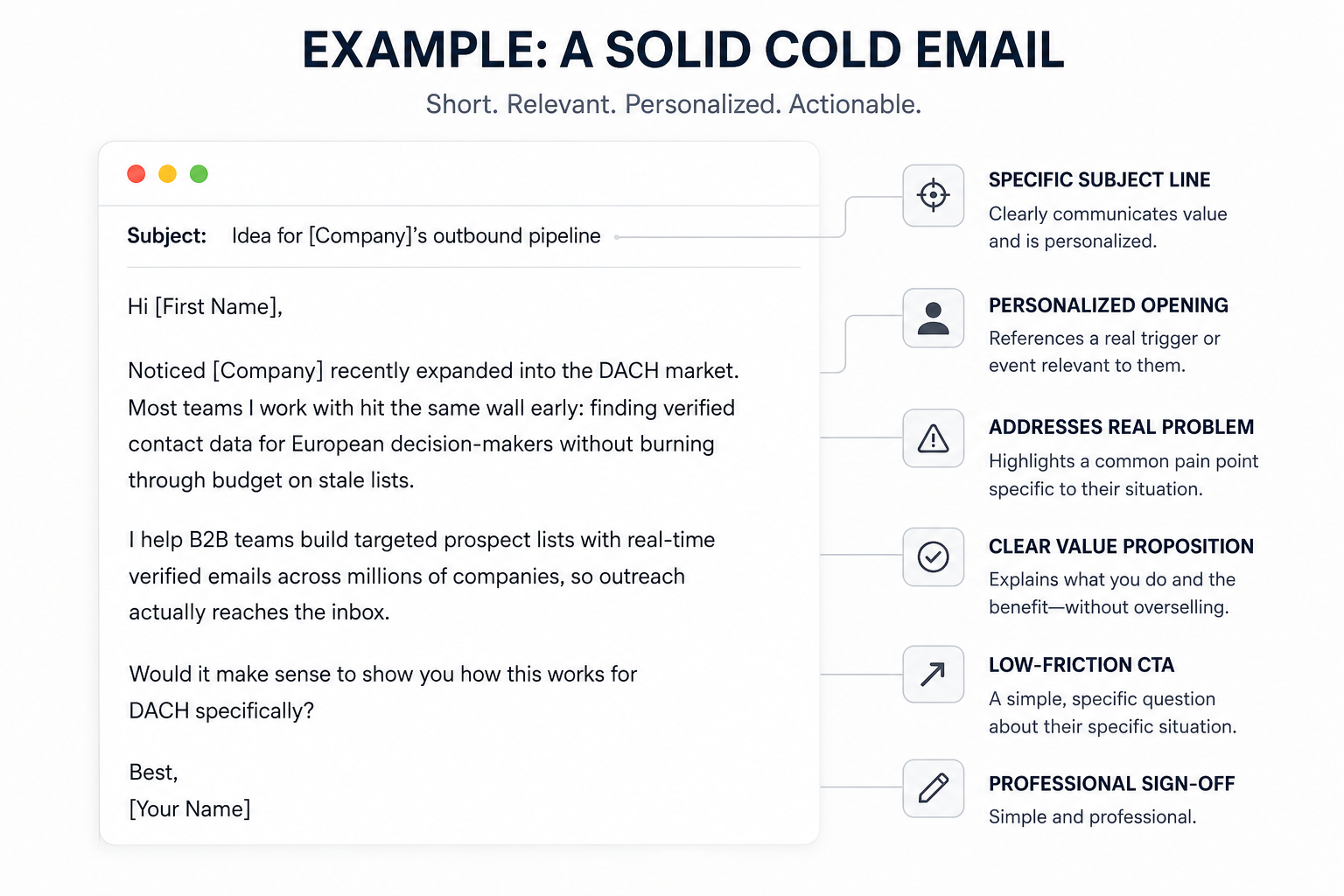
What makes this work:
The subject line is specific and relevant (not generic). The opening line references a real trigger (market expansion). The body addresses a real problem (European data quality) without overselling. The CTA is low-friction and specific to their situation. Total length: 72 words.
The subject line decides whether the email gets opened. Keep it under 7 words. Make it specific to the recipient or their company. Avoid anything that sounds like a marketing campaign.
The first sentence has one job: prove you did your homework. Reference something specific about their company, role, or a recent event. This is what separates a cold email from spam in the recipient's mind.
Do not start with "My name is..." or "I hope this finds you well." Both signal that the message is automated and impersonal.
For frameworks on how to open cold emails that actually connect, check out these personalized cold emails that get replies.
Keep the body between 50 and 75 words. One idea. One value proposition. One reason this matters to them specifically.
The body should answer one question from the reader's perspective: "Why should I care?"
State the problem they likely face. Show that you understand it. Briefly explain how you can help, without turning the email into a product pitch.
I have found that plain text emails consistently outperform HTML-heavy messages in cold outreach. They feel more personal, trigger fewer spam filters, and get more replies.
End with one clear, low-friction ask. Not two. Not three. One.
The best CTAs in cold email are easy to say yes to. "Would a 15-minute call next week make sense?" works because it is specific and low-commitment.
Avoid CTAs that require commitment before the prospect trusts you. "Book a demo," "Start your free trial," and "Reply with your availability for a 45-minute call" all ask for too much too soon.
Keep it clean. Full name, title, company, and one link (usually your website or LinkedIn). Skip the banners, social media icons, and promotional taglines. Cluttered signatures trigger spam filters and distract from the message.
You can write the best cold email ever. It does not matter if the message lands in spam.
Deliverability is the most underestimated part of cold emailing. It is not about what you write. It is about the technical infrastructure behind your sending.
For a full breakdown of what determines inbox placement, I wrote a separate guide on how to check email deliverability.
Email providers like Gmail and Outlook use algorithms to decide where your message lands. They evaluate sender reputation, domain authentication, sending patterns, recipient engagement, and content signals.
If you are sending from a new domain without warmup, your emails will go to spam. If you are sending 500 emails a day from a single inbox, your emails will go to spam. If your bounce rate crosses 2%, your sender reputation takes a hit.
Most deliverability problems are preventable. Here is what to set up before you send your first campaign.
These three records tell email providers that your domain is real and that you are authorized to send from it.
Without all three configured correctly, your emails look suspicious to inbox algorithms. Setting them up takes about 15 minutes, and it is one of the highest-impact things you can do for deliverability. For a technical walkthrough of each protocol, I covered this in detail in the SPF, DKIM, and DMARC setup guide.
If you are using infrastructure from Mailforge or Infraforge, DNS records are configured automatically for every domain. That removes one of the most common setup mistakes I see teams make: forgetting to add a DMARC record or misconfiguring SPF includes.
Even after setup, these records need ongoing monitoring. A broken SPF record or expired DKIM key can quietly tank your deliverability without any visible error. Warmforge runs automated health checks on DNS and MX records for every connected mailbox. You get flagged before a misconfiguration affects your campaigns.
A brand new email account has no sending history. If you start sending 50 cold emails from it on day one, email providers flag the behavior as unnatural.
Email warm-up simulates normal email activity over a period of 2 to 4 weeks. The warm-up tool sends and receives emails from real accounts, marks messages as important, and moves them out of spam. Over 2 to 4 weeks, it gradually builds a positive sender reputation.
Warm-up is not optional. Every new sending account needs it before joining a campaign. No exceptions.
I covered what warm-up actually does and where it falls short in a separate piece: does email warm-up still work in 2026?
This is where I lean on Warmforge.
It uses AI-generated emails to simulate real inbox behavior: sending, opening, replying, and threading conversations that look natural to email providers. You connect a mailbox and start warming with a single click.
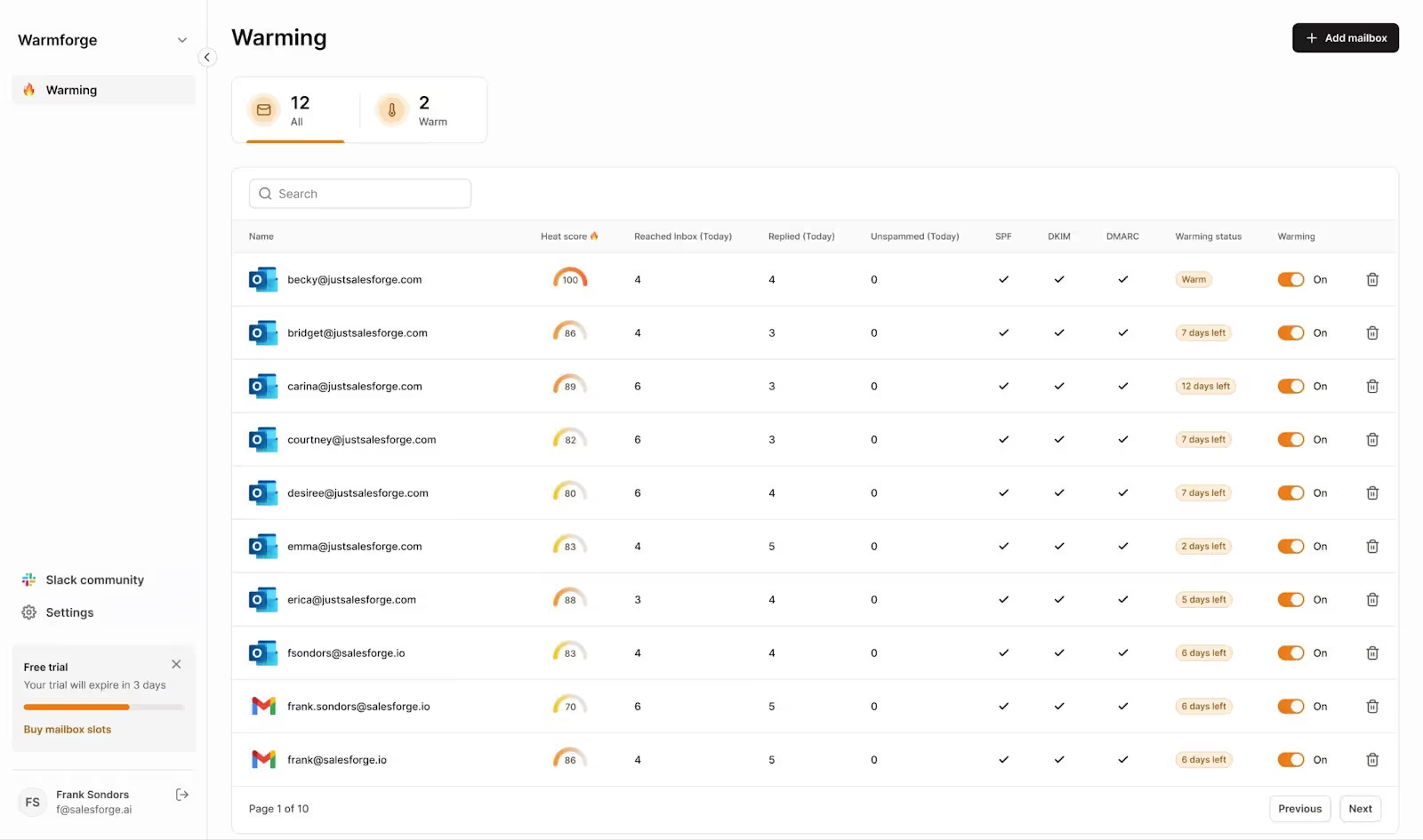
The recommended practice is to keep warm-up running continuously, not just during the ramp-up phase. Stopping warm-up activity creates the same kind of behavioral gap that got your account flagged in the first place.
Beyond basic warm-up, Warmforge also gives you a Heat Score for every mailbox. This is a real-time indicator of mailbox health. I use it to decide when an account is ready to join a live campaign. A Heat Score above 85 means the mailbox has built enough positive engagement history to handle cold outreach volume safely.
Even after warm-up, you should not jump straight to full volume. Start with 10 to 15 emails per account per day and increase by 5 to 10 per day over the next 2 weeks. The goal is to reach a sustainable daily limit (usually 30 to 50 per inbox) without triggering volume-based spam filters.
Sending all your emails from one account is risky. If that account gets flagged, your entire campaign stops.
Sender rotation distributes your sending volume across multiple email accounts automatically. If you have 5 accounts, each one sends a portion of your daily emails. This protects individual accounts from volume spikes and keeps your deliverability healthy as you scale.
When I run campaigns through Salesforge, sender rotation is handled automatically across unlimited mailboxes. That means scaling from 5 to 50 accounts does not increase the per-seat cost. That matters when you are running outbound for multiple ICPs or client accounts.
Open rates alone do not tell you where your emails are landing. An email can be "opened" by spam filters without a human ever seeing it.
Inbox placement testing shows you whether your emails hit Primary, Promotions, or Spam across different providers. This gives you early warning before deliverability problems affect your reply rates.
Warmforge includes placement tests that check inbox performance across Gmail, Outlook, and other major providers. Every mailbox gets one free placement test per month, and I run them regularly to catch issues before they compound. If a mailbox starts dropping into Promotions or Spam, I know about it before my reply rates tell the story. For a deeper look at the tools available for this, I compared the top inbox placement tools in a separate review.
Sending to invalid email addresses increases your bounce rate. A bounce rate above 2% damages your sender reputation and pushes future emails toward spam.
Verify your email list before launching any campaign. Use a data source that verifies contacts at the point of reveal, not one that last checked the record months ago. Real-time verification catches invalid addresses before they ever enter your sequence.
Most replies do not come from the first email. They come from the second, third, or fourth.
The data backs this up consistently. Across millions of cold email campaigns, around 42% of positive replies come after the initial email. Not because the first message was bad, but because people are busy. They saw the email. They meant to reply. They got pulled into something else.
Follow-up is not about being pushy. It is about being persistent with new value each time.
For cold outreach, 3 to 5 follow-ups is the standard range. Anything less leaves replies on the table. Anything more starts to feel aggressive and risks complaints.
Use a widening gap cadence. The first follow-up should go out 2 to 3 days after the initial email. The second, 4 to 5 days later. After that, space each one out by a week, then two weeks.
This pattern matches how people process their inbox. Early follow-ups catch the ones who forgot. Later ones catch the ones whose timing was not right initially.
This is where most teams go wrong. They send "just checking in" or "bumping this to the top of your inbox." These add zero value and signal laziness.
Every follow-up should introduce a different angle:
Each message should feel like a new reason to reply, not a reminder that you already emailed them.
You cannot improve what you do not measure. But most teams track the wrong metrics or misinterpret the ones they do track.
For current benchmarks and how they have shifted year-over-year, I published a breakdown of cold email metrics and trends for 2026.
Here are the cold email metrics that actually matter:
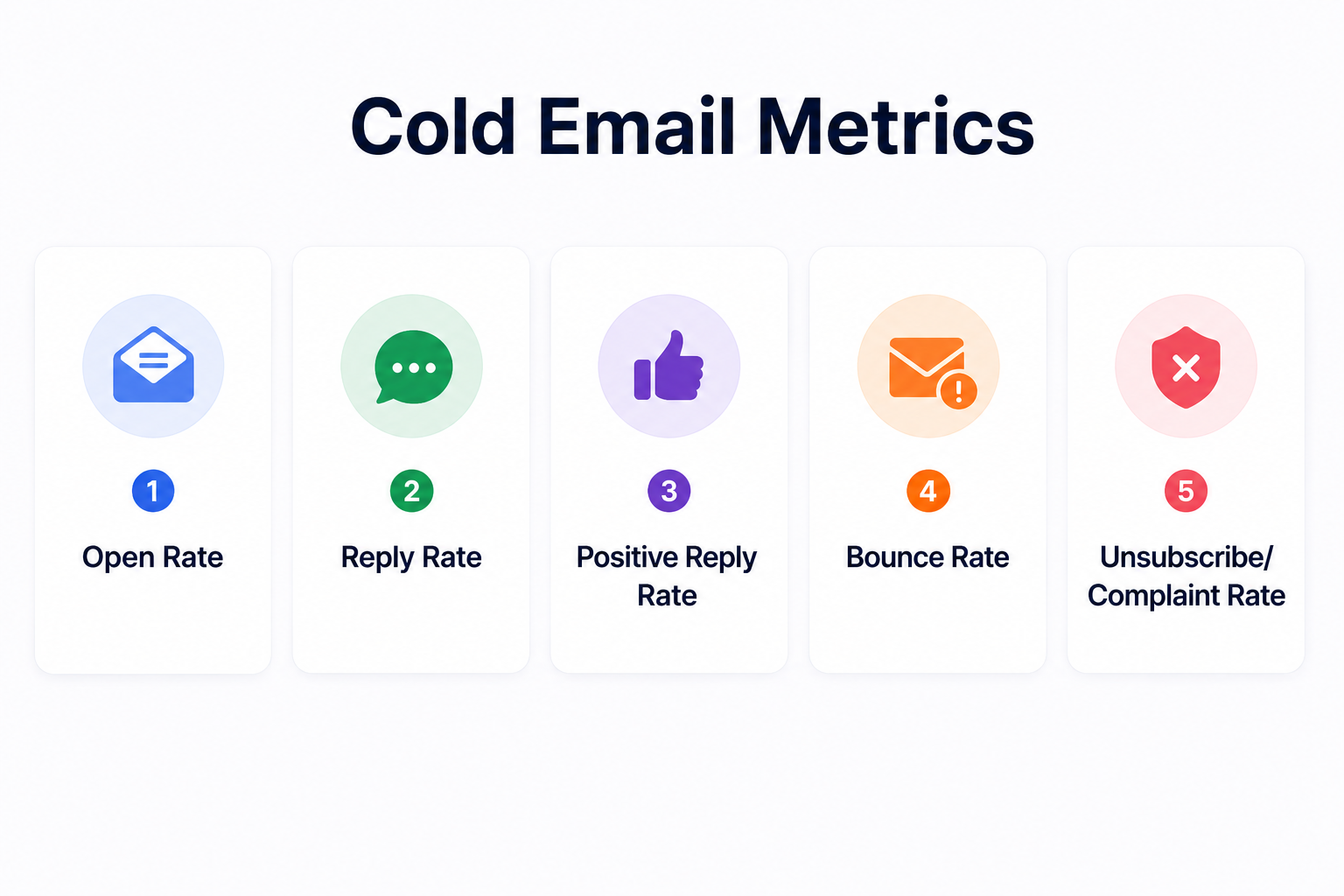
This is the metric that matters most. Opens are vanity. Replies are pipeline.
Cold email is simple in concept but easy to get wrong in execution. These are the mistakes that damage campaigns most often.
This is the most common mistake I see. A team buys a new domain, sets up 5 email accounts, and starts sending 50 emails per account on day one. Within a week, every account is flagged and everything goes to spam.
Every new sending account needs 2 to 4 weeks of warm-up before it joins a campaign. No exceptions. I keep Warmforge running on every mailbox continuously, even after campaigns go live. The moment you stop simulating normal inbox behavior, you create a gap that email providers notice.
If you are sending more than 30 emails a day from one account, you are putting that account at risk. High volume from a single source looks like spam to email providers, regardless of how good your content is.
Distribute your sends across multiple accounts using sender rotation. It protects individual accounts and lets you scale safely.
"Hi {First Name}, I hope this email finds you well. I wanted to reach out because I help companies like yours..."
This pattern is instantly recognizable as a mass email. The recipient has seen it a hundred times. It gets deleted without reading.
Personalization means more than inserting a name. It means referencing something specific about their company, role, industry, or a recent event. One personalized line changes the entire feel of the email.
Sending one email and moving on leaves the majority of potential replies untouched. As I covered earlier, follow-ups account for nearly half of all positive responses in cold email.
Set up a sequence with 3 to 5 follow-ups before your campaign goes live. Do not rely on manual follow-up because it does not happen at scale.
"Would you like to book a demo, or should I send over a case study? Also, feel free to check out our website."
Three asks. The recipient does not know what to do. A confused reader does not reply.
Every email should have one CTA. One. Make it specific and low-friction.
The best email in the world will not work if it lands in the wrong inbox. If you are selling to VP-level decision-makers at mid-market SaaS companies, do not send to junior marketing coordinators at enterprise retailers.
Targeting is the foundation. Spend more time building and filtering your list than writing your email. A mediocre email to the right person outperforms a perfect email to the wrong one.
Sending to unverified lists is a guaranteed way to spike your bounce rate. Even databases that were accurate 6 months ago have decay. People change jobs. Companies merge. Email addresses go inactive.
Use a data source that verifies contacts at the point of reveal, not one that last verified the record months ago. Real-time verification keeps your bounce rate under control and protects your sender reputation.
For a full pre-launch checklist that covers infrastructure, authentication, and sending practices, I put together a complete email deliverability checklist for sales teams.
Sending 20 emails a day is one thing. Sending 500 is a different operation entirely.
Scaling cold email is not about sending more emails from the same setup. It is about building the infrastructure to handle higher volume without sacrificing deliverability, personalization, or reply quality.
The moment you hit the ceiling of what one account can safely send (typically 30 to 50 per day), you need additional accounts. Not additional volume from the same account.
Each new account needs its own warm-up period and should be added gradually. Five accounts sending 30 emails each gives you 150 daily sends with significantly lower risk than one account sending 150.
When I add new mailboxes, I connect them to Warmforge immediately. The AI-driven warm-up starts building sender reputation from day one. The Heat Score tells me exactly when each account is ready for live campaigns. No guessing. No premature launches.
I covered sender rotation in the deliverability section, but at scale it becomes non-negotiable. When you are running campaigns across 10, 20, or 50 sending accounts, manually distributing volume is not realistic.
Automated sender rotation handles this. It distributes emails evenly across your active accounts, so no single inbox bears a disproportionate sending load.
At low volume, a few bounces do not cause much damage. At scale, a 3% bounce rate on 1,000 daily sends means 30 bounced emails per day. That is enough to erode your sender reputation within a week.
This is why data quality matters more as you scale. Every contact in your sequence should be verified before the first email goes out.
At scale, you are not running one campaign. You are running different sequences for different ICPs, different industries, and different value propositions. Each needs its own tracking, its own follow-up cadence, and its own performance analysis.
A unified inbox consolidates replies from all your sending accounts into one view. Without it, you are checking 15 different inboxes manually and losing track of conversations.
The Forge stack approach is what I have found works best at scale. Set up domains and mailboxes through Mailforge or Infraforge (depending on whether you need shared or dedicated IPs). Warm everything through Warmforge. Enrich leads through Leadsforge. Run multichannel sequences through Salesforge. Each product handles its piece, but the whole stack is connected.
A cold email tool is the engine behind your outreach. The right one gives you infrastructure that handles deliverability, personalization, follow-ups, and analytics in one place. The wrong one creates gaps that you fill with duct tape and manual work.
When evaluating cold email tools, focus on these capabilities:
You need the ability to build a sequence that runs automatically. That means an initial email plus 3 to 5 follow-ups. Each step should support different messaging, timing, and conditions (like stopping the sequence when a prospect replies).
Warm-up should not be a separate tool with a separate subscription. The best cold email setups include warm-up natively, so every new account you add gets warmed automatically before it starts sending campaign emails.
This is one reason I rely on Warmforge. It is purpose-built for warm-up and deliverability monitoring. If you send through Salesforge, warm-up slots through Warmforge are included at no extra cost.
Any platform that limits you to one or two sending accounts per campaign will cap your scaling potential. Look for a tool that lets you add multiple accounts and rotate sends across them automatically.
Sending to unverified addresses is the fastest way to damage your reputation. Your workflow should include verification before contacts enter your sequence.
Open rate is the least useful metric in cold email. Your tool should track reply rates, positive replies, bounce rates, and sequence performance at the step level. You need to know exactly where prospects drop off.
When you are running campaigns across 5, 10, or 20 sending accounts, you need one place to see all replies. Categorization of replies (interested, not interested, out of office, bounced) saves time and prevents missed opportunities.
Cold email is not the same channel it was two years ago. The shifts are real, and teams that ignore them are seeing declining results.
Gmail and Outlook have tightened their filtering algorithms significantly. High-volume senders who do not warm up accounts, authenticate domains, and manage sending patterns are getting filtered more aggressively than ever.
The practical impact: technical setup matters more than copywriting in 2026. A perfectly written email from an unwarmed account goes to spam. A decent email from a properly configured account reaches the inbox.
This is exactly why I run Warmforge on every mailbox before it touches a campaign. The warm-up builds the behavioral trust signals that email providers look for.
The placement tests confirm that your emails are actually reaching Primary. And the health checks catch DNS issues before they erode your sender reputation quietly.
AI tools now generate personalized email variants, opening lines, and follow-up sequences automatically. This has lowered the bar for creating cold emails but also flooded inboxes with content that sounds similar.
The teams getting results are using AI for research and variant generation, not as a replacement for thinking. AI can pull context from a prospect's LinkedIn, company news, or recent hires and turn that into a relevant opener. But the strategy behind who to target, what angle to take, and when to reach out still requires human judgment.
The era of blasting 1,000 generic emails per day and hoping for replies is over. Email providers punish this behavior, and prospects ignore it.
The teams booking the most meetings in 2026 are sending fewer emails to better-targeted prospects with higher personalization. A campaign of 200 emails to a well-researched list outperforms a blast of 2,000 to a scraped one.
Cold email alone works. Cold email combined with cold calling and LinkedIn works better.
Most modern outreach sequences now include email as the first touch, followed by a LinkedIn connection request. High-priority accounts then get a phone call. This multichannel approach increases touchpoints without increasing email volume, which protects deliverability while boosting response rates.
A cold email is a message sent to someone you have no prior relationship with. It is typically for business purposes like sales, partnerships, recruiting, or networking. The goal is to start a conversation, not to make a sale in the first message.
No. Cold email is legal in the US (CAN-SPAM), EU (GDPR, under legitimate interest), and most other regions as long as you follow local regulations. This includes providing an opt-out option, using your real identity, and sending relevant, targeted messages.
The industry average for cold email reply rates sits between 5% and 10%. Teams with strong ICP targeting, personalized messaging, and proper follow-up sequences regularly achieve 15% to 25%.
3 to 5 follow-ups is the standard recommendation. Most positive replies come after the first email, so stopping after one message leaves the majority of potential conversations on the table. Space follow-ups out using a widening gap cadence (2 days, then 5 days, then 7 days, then 14 days).
Spam is unsolicited bulk messaging sent without targeting, personalization, or regard for the recipient. Cold email is targeted, personalized, one-to-one outreach sent to a specific person for a specific business reason. The distinction affects both legal classification and how email providers handle the message.
Technically, yes. But Gmail limits sending to 500 emails per day for free accounts and 2,000 for Google Workspace. For cold email at any meaningful scale, you need dedicated sending accounts with proper DNS setup and warm-up. You also need a sending tool that manages sequences and rotation.
50 to 75 words for the initial email. Follow-ups can go up to 100 to 120 words. Shorter emails consistently outperform longer ones because they respect the reader's time and focus on one idea.
Tuesday through Thursday, between 9 AM and 11 AM in the prospect's local time zone. Some teams also see strong performance in the 1 PM to 3 PM window. Avoid Mondays (inbox overload from the weekend) and Fridays (people are checking out for the week).
Yes. Every new email account needs 2 to 4 weeks of warm-up before it starts sending cold outreach. Warm-up builds the sender reputation that email providers use to decide whether your messages reach the inbox or go to spam. I use Warmforge for this. It runs AI-driven warm-up, monitors Heat Scores, and lets me run placement tests to verify inbox delivery before launching campaigns.
Aim for 90% or above. If less than 90% of your emails are reaching Primary inbox across providers, something in your infrastructure needs attention. That could be DNS authentication, sending volume, warmup consistency, or list quality. Run placement tests regularly to catch drops early.

